
gospelo-mediakit




English | 日本語
Handy little tools for video-production work, bundled as an MCP server. Today it offers first/last frame extraction and speed change (e.g. compress a 4-second clip to 1 second). Under the hood it just shells out to ffmpeg — small for now, but it'll keep growing.
It has three entry points, but the actual logic lives in one place
(gospelo_mediakit/core/) — a thin-wrapper design:
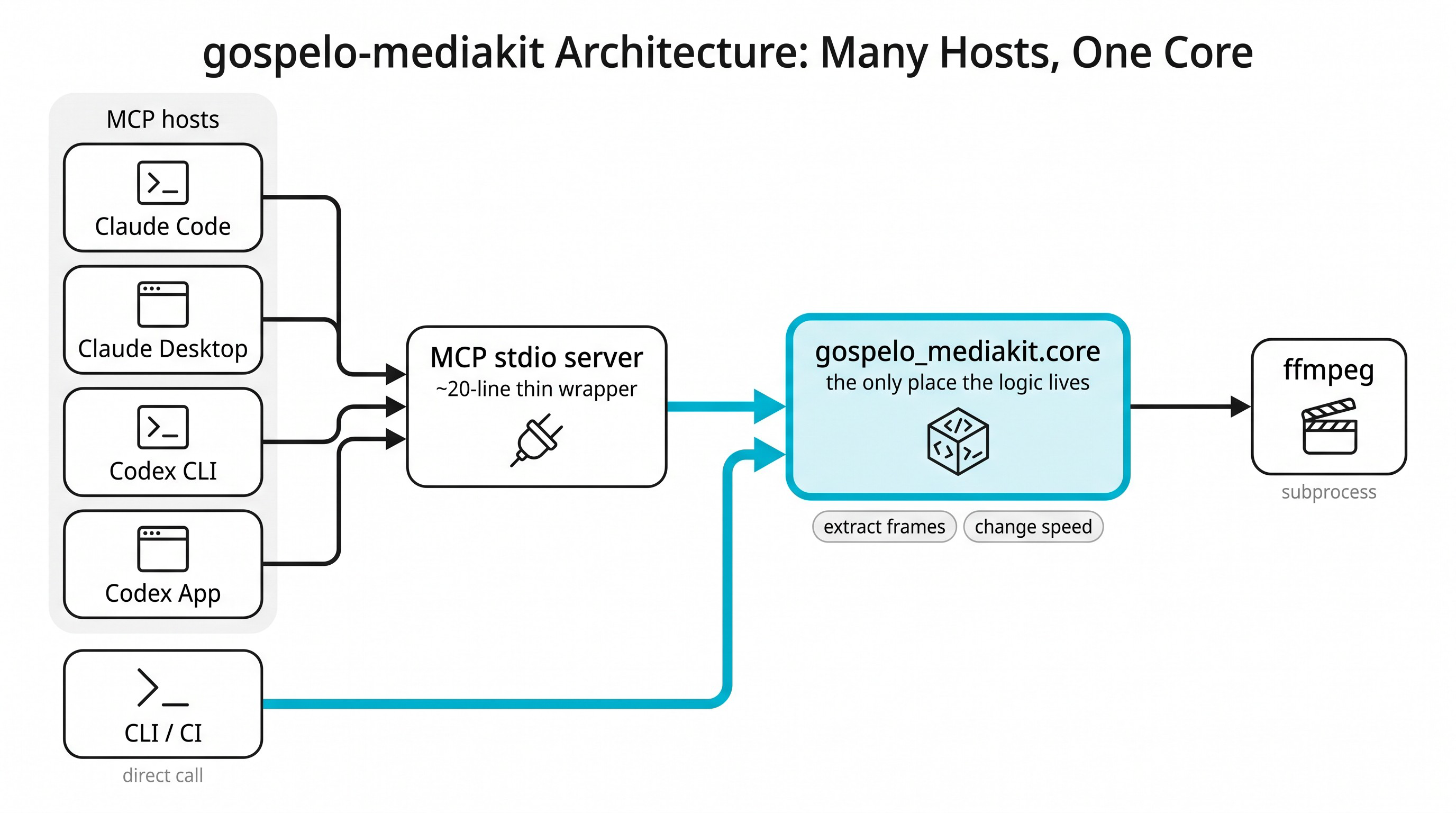
Text version (ASCII)
                ┌─ Claude Code   (.mcp.json, project)            ─┐
                │  Claude Desktop (claude_desktop_config.json)    │
  MCP stdio  ◄──┤  Codex CLI      (~/.codex/config.toml)          │ ←─ every host
   server    ◄──┤  Codex App      (~/.codex/config.toml, same)    │    calls the same
 (thin wrap)    └────────────────────────────────────────────────┘    venv binary
        │
        ▼  import
  gospelo_mediakit.core   ◄── the CLI (gospelo-mediakit / python -m …) calls the same core
   (ffmpeg via subprocess)
Supported hosts (all registered by bash skills/setup.sh):
| Host | Registered in | Scope |
|---|---|---|
| Claude Code | .mcp.json (project) |
this repository |
| Claude Desktop | ~/Library/Application Support/Claude/claude_desktop_config.json |
global |
| Codex CLI | ~/.codex/config.toml |
global |
| Codex App | ~/.codex/config.toml (same file as the CLI) |
global |
Note for GUI apps (Claude Desktop / Codex App): they do not inherit your shell
PATH, so the server locatesffmpeg/ffprobein this order:PATH→ common dirs like/opt/homebrew/bin→ the env varsGOSPELO_MEDIAKIT_FFMPEG/GOSPELO_MEDIAKIT_FFPROBE.setup.shalso injects aPATHinto the Claude Desktop entry. Fully restart the app after changing its config.
- Core
gospelo_mediakit/core/— deterministic Python over ffmpeg (no LLM). - CLI
gospelo-mediakit extract-frames …— a thin wrapper over the core, for CI / shell use. - MCP server
gospelo_mediakit/mcp_server.py— a ~20-line FastMCP wrapper. Both console scripts ship in one distribution (gospelo-mediakit-mcp).
Setup
The package ships as one distribution, gospelo-mediakit-mcp, that provides
both the MCP server and the CLI. Requirements: ffmpeg on the system (and
uv for the zero-install path below). ffprobe is
optional.
Recommended: zero-install via uvx (cross-platform)
Point each host's MCP config at uvx gospelo-mediakit-mcp — uv fetches the
package (and a suitable Python) on demand, so there is no clone, no venv, and no
machine-specific path. The same config works on macOS, Linux and Windows:
// Claude Code .mcp.json / Claude Desktop claude_desktop_config.json
{
  "mcpServers": {
    "gospelo-mediakit": { "command": "uvx", "args": ["gospelo-mediakit-mcp"] }
  }
}
# Codex (CLI + App)
codex mcp add gospelo-mediakit -- uvx gospelo-mediakit-mcp
First launch downloads the package; if a host times out spawning the server, pre-warm it once with
uv tool install gospelo-mediakit-mcp(persistent) or just retry. Add anenvblock to point at ffmpeg — see below.
Local development (macOS / Linux)
To hack on this repo, build an editable .venv and register it everywhere:
bash skills/setup.sh
It runs pip install -e ., registers .venv/bin/gospelo-mediakit-mcp with all
four hosts, and symlinks the Claude skill. Reopen the session/app afterwards
(fully restart the GUI apps). On Windows, use the uvx config above instead
(this script is bash-only).
Pointing at ffmpeg (Windows / GUI apps)
GUI hosts (Claude Desktop, Codex App) don't inherit your shell PATH, so the
most reliable way to locate ffmpeg is the GOSPELO_MEDIAKIT_FFMPEG env var,
set in the MCP server's env block. It accepts the ffmpeg executable or its
bin directory. (GOSPELO_MEDIAKIT_FFPROBE is the same for ffprobe; optional.)
Claude Code / Claude Desktop (.mcp.json / claude_desktop_config.json):
{
  "mcpServers": {
    "gospelo-mediakit": {
      "command": "uvx",
      "args": ["gospelo-mediakit-mcp"],
      "env": {
        // Windows — the ffmpeg.exe path or its bin dir:
        "GOSPELO_MEDIAKIT_FFMPEG": "C:\\ffmpeg\\bin\\ffmpeg.exe"
        // macOS/Linux example: "/opt/homebrew/bin/ffmpeg"
      }
    }
  }
}
Codex (~/.codex/config.toml):
[mcp_servers.gospelo-mediakit.env]
GOSPELO_MEDIAKIT_FFMPEG = "C:\\ffmpeg\\bin"   # file or bin directory
Without the override the server still auto-searches PATH and the usual install
locations (macOS /opt/homebrew/bin etc.; Windows C:\ffmpeg\bin,
%ProgramFiles%\ffmpeg\bin, scoop shims). Install ffmpeg with
winget install ffmpeg (Windows) or brew install ffmpeg (macOS).
Usage
Claude Code / Claude Desktop / Codex (MCP tools)
Extract the first and last frame of clip.mp4          → mediakit_extract_frames
Compress the 4-second clip.mp4 to 1 second (keep pitch) → mediakit_change_speed
CLI (no host needed)
# Frame extraction
gospelo-mediakit extract-frames clip.mp4                 # first+last → clip_first.png / clip_last.png
gospelo-mediakit extract-frames clip.mp4 --which last --overwrite

# Speed change (frame rate maintained; pitch & volume preserved)
gospelo-mediakit change-speed clip.mp4 --target-duration 1   # 4s→1s, output clip_1s.mp4
gospelo-mediakit change-speed clip.mp4 --speed 200           # 2x faster (shorter), clip_2x.mp4
gospelo-mediakit change-speed clip.mp4 --speed 50            # half speed (longer)
gospelo-mediakit change-speed clip.mp4 --target-duration 1 --fps 24

# One-shot, no install, via uvx (the CLI script lives in the same distribution):
uvx --from gospelo-mediakit-mcp gospelo-mediakit change-speed clip.mp4 --target-duration 1
Tools
mediakit_extract_frames — first/last frame extraction
| Arg | Default | Description |
|---|---|---|
video_path |
(required) | Input video |
out_dir |
video's directory | Output directory |
prefix |
video's stem | Output basename prefix |
fmt |
png |
Image format |
which |
both |
first / last / both |
overwrite |
false |
Overwrite existing output |
Why ffmpeg: the last frame is unreliable via OpenCV's
CAP_PROP_POS_FRAMESseek (black/dropped frames depending on the codec). This tool uses ffmpeg-sseof(seek from the end and overwrite until EOF) to grab it reliably.
mediakit_change_speed — speed change (keeps fps, pitch & volume)
| Arg | Default | Description |
|---|---|---|
video_path |
(required) | Input video |
speed |
100 |
Speed percent (100 = original, 200 = 2x faster/shorter, 50 = half/longer) |
target_duration |
none | Target output seconds (overrides speed; hard-trimmed exactly) |
fps |
source fps | Output frame rate (default keeps source; set to also convert) |
out_dir / prefix / overwrite |
— | Same as the extraction tool |
How the frame rate is maintained:
setptsalone crams every frame into the shorter duration and inflates the fps; thefpsfilter restores the source rate by nearest-timestamp drop/duplicate (no pixel blending). Audio usesatempo(a tempo change that preserves pitch and volume; chained beyond 2x).
Output details (for LLM integration)
Both tools return enough information to explain and reproduce what they did:
input_format/output_format(orinfo) — container, codec, resolution, fps, frame count, bit rate, size, audio (codec / sample_rate / channels).processing— the filter chains applied, the frame-resampling method, frame counts, the encoder, the full ffmpeg command, and a one-line summary.
Layout
mediakit/
├── README.md / README_jp.md
├── pyproject.toml                      # one distribution: gospelo-mediakit-mcp
├── gospelo_mediakit/                   # the importable package
│   ├── cli.py                          # CLI subcommand dispatcher
│   ├── mcp_server.py                   # FastMCP thin wrapper + cli mode
│   ├── core/                           # ★ the logic (ffmpeg wrappers)
│   │   ├── frames.py                   #   extract_endframes
│   │   ├── speed.py                    #   change_speed
│   │   ├── ffmpeg.py                   #   run_ffmpeg / probe / has_audio
│   │   └── errors.py
│   └── tools/
│       ├── extract_frames.py           # thin CLI wrapper
│       └── change_speed.py             # thin CLI wrapper
├── skills/
│   ├── setup.sh                        # local-dev: .venv + register all hosts
│   ├── claude/gospelo-mediakit/skill.md
│   └── codex/gospelo-mediakit/SKILL.md
└── tests/
Adding a new tool
- Write the logic in
gospelo_mediakit/core/<feature>.py(ffmpeg via subprocess). - Add a thin
gospelo_mediakit/tools/<feature>.py(argparse → core → JSON). - Add one line to
_SUBCOMMANDSincli.py. - Add a ~20-line
@mcp.tool()ingospelo_mediakit/mcp_server.py(just calls the core).
Publishing (maintainers)
python -m build           # or: uv build  → dist/gospelo_mediakit_mcp-*.whl + .tar.gz
twine upload dist/*       # or: uv publish
After release, end users need nothing but uvx gospelo-mediakit-mcp in their MCP config.
License
MIT — see LICENSE.md.
1 maintainer

Download files
Download the file for your platform. If you're not sure which to choose, learn more about installing packages.
Source Distribution
Built Distribution
Filter files by name, interpreter, ABI, and platform.
If you're not sure about the file name format, learn more about wheel file names.
Copy a direct link to the current filters
File details
Details for the file gospelo_mediakit_mcp-0.1.0.tar.gz.
File metadata
- Download URL: gospelo_mediakit_mcp-0.1.0.tar.gz
- Upload date:
- Size: 23.3 kB
- Tags: Source
- Uploaded using Trusted Publishing? No
- Uploaded via:
twine/6.2.0 CPython/3.14.6
File hashes
| Algorithm | Hash digest | |
|---|---|---|
| SHA256 |
254323a6252362c057ba0425fe10af449bf1dfc6120c9d2350d2b9ab64da0dfc
|
|
| MD5 |
373687d9582a785d07a677166ca76852
|
|
| BLAKE2b-256 |
4d2675ec12d23dd2ac97679697242b92940e11c436b5c57e8cdf7747ff5d43d7
|
File details
Details for the file gospelo_mediakit_mcp-0.1.0-py3-none-any.whl.
File metadata
- Download URL: gospelo_mediakit_mcp-0.1.0-py3-none-any.whl
- Upload date:
- Size: 24.6 kB
- Tags: Python 3
- Uploaded using Trusted Publishing? No
- Uploaded via:
twine/6.2.0 CPython/3.14.6
File hashes
| Algorithm | Hash digest | |
|---|---|---|
| SHA256 |
d583fc951a4e25956151d3dc15b6fe81d4ce78370e9493f0829082a56903857c
|
|
| MD5 |
9a5087c8047e51b832189acb88cca017
|
|
| BLAKE2b-256 |
a6b843493a2405d93569f86c34d82d0ccd24449b34daffefb9826be6cde520c2
|













