
GotenNet: Rethinking Efficient 3D Equivariant Graph Neural Networks

Project description
GotenNet: Rethinking Efficient 3D Equivariant Graph Neural Networks




Overview
This is the official implementation of "GotenNet: Rethinking Efficient 3D Equivariant Graph Neural Networks" published at ICLR 2025.
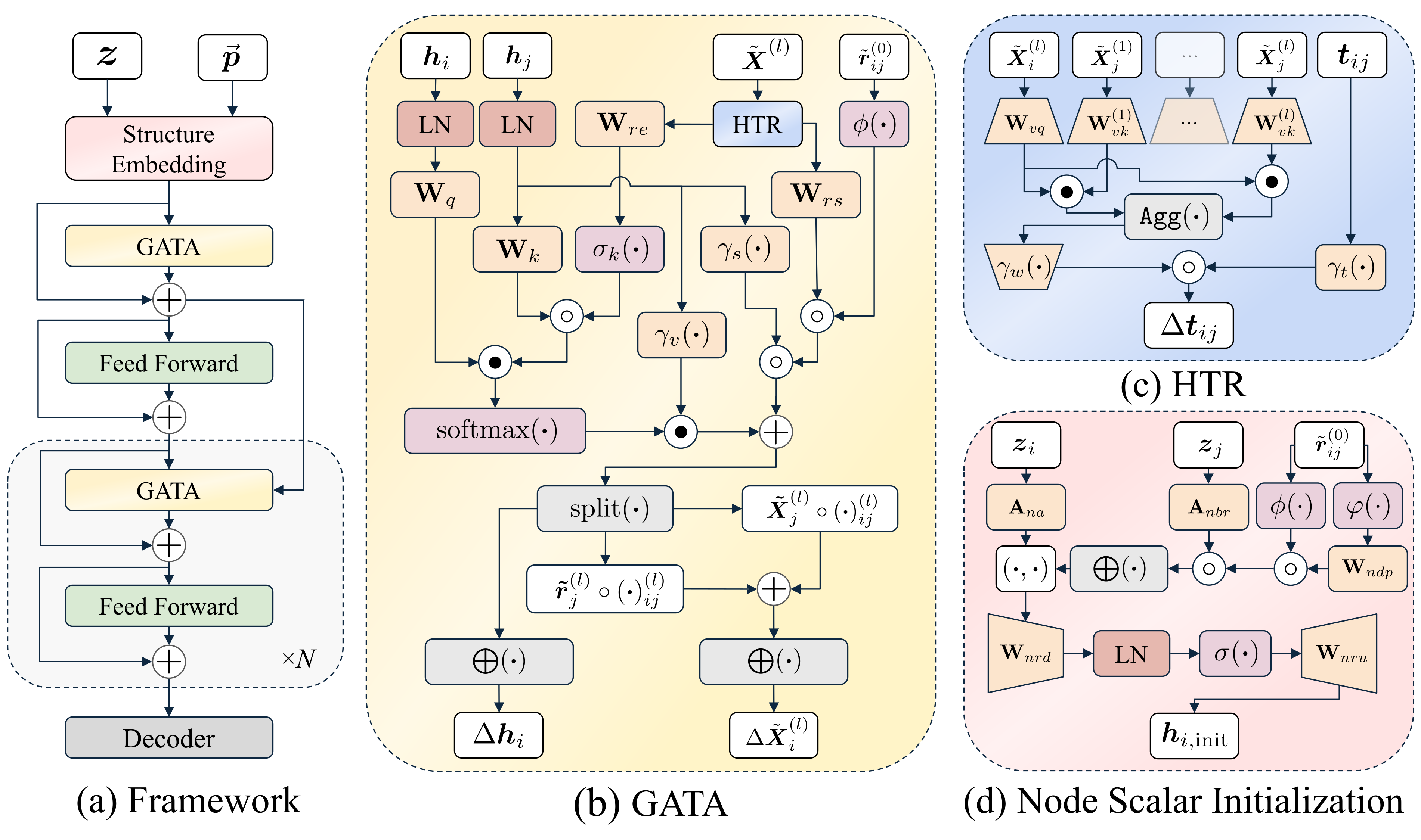
GotenNet introduces a novel framework for modeling 3D molecular structures that achieves state-of-the-art performance while maintaining computational efficiency. Our approach balances expressiveness and efficiency through innovative tensor-based representations and attention mechanisms.
✨ Key Features
- 🔄 Effective Geometric Tensor Representations: Leverages geometric tensors without relying on irreducible representations or Clebsch-Gordan transforms
- 🧩 Unified Structural Embedding: Introduces geometry-aware tensor attention for improved molecular representation
- 📊 Hierarchical Tensor Refinement: Implements a flexible and efficient representation scheme
- 🏆 State-of-the-Art Performance: Achieves superior results on QM9, rMD17, MD22, and Molecule3D datasets
🚀 Installation
📦 From PyPI (Recommended)
You can install it using pip:
-
Core Model Only: Installs only the essential dependencies required to use the
GotenNetmodel.pip install gotennet
-
Full Installation (Core + Training/Utilities): Installs core dependencies plus libraries needed for training, data handling, logging, etc.
pip install gotennet[full]
🔧 From Source
-
Clone the repository:
git clone https://github.com/sarpaykent/gotennet.git
cd gotennet
-
Create and activate a virtual environment (using conda or venv/uv):
# Using conda
conda create -n gotennet python=3.10
conda activate gotennet

# Or using venv/uv
uv venv --python 3.10
source .venv/bin/activate
-
Install the package: Choose the installation type based on your needs:
-
Core Model Only: Installs only the essential dependencies required to use the
GotenNetmodel.pip install .
-
Full Installation (Core + Training/Utilities): Installs core dependencies plus libraries needed for training, data handling, logging, etc.
pip install .[full]
# Or for editable install:
# pip install -e .[full]
(Note:
uvcan be used as a faster alternative topipfor installation, e.g.,uv pip install .[full]) -
🔬 Usage
Using the Model
Once installed, you can import and use the GotenNet model directly in your Python code:
from gotennet import GotenNet

# --- Using the base GotenNet model ---
# Requires manual calculation of edge_index, edge_diff, edge_vec

# Example instantiation
model = GotenNet(
    n_atom_basis=256,
    n_interactions=4,
    # resf of the parameters
)

# Encoded representations can be computed with
h, X = model(atomic_numbers, edge_index, edge_diff, edge_vec)

# --- Using GotenNetWrapper (handles distance calculation) ---
# Expects a PyTorch Geometric Data object or similar dict
# with keys like 'z' (atomic_numbers), 'pos' (positions), 'batch'

# Example instantiation
from gotennet import GotenNetWrapper
wrapped_model = GotenNetWrapper(
    n_atom_basis=256,
    n_interactions=4,
    # rest of the parameters
)

# Encoded representations can be computed with
h, X = wrapped_model(data)
Training a Model
After installation, you can use the train_gotennet command:
train_gotennet
Or you can run the training script directly:
python gotennet/scripts/train.py
Both methods use Hydra for configuration. You can reproduce U0 target prediction on the QM9 dataset with the following command:
train_gotennet experiment=qm9_u0.yaml
Configuration
The project uses Hydra for configuration management. Configuration files are located in the configs/ directory.
Main configuration categories:
datamodule: Dataset configurations (md17, qm9, etc.)model: Model configurationstrainer: Training parameterscallbacks: Callback configurationslogger: Logging configurations
🤝 Contributing
We welcome contributions to GotenNet! Please feel free to submit a Pull Request.
📚 Citation
Please consider citing our work below if this project is helpful:
@inproceedings{aykent2025gotennet,
  author = {Aykent, Sarp and Xia, Tian},
  booktitle = {The Thirteenth International Conference on LearningRepresentations},
  year = {2025},
  title = {{GotenNet: Rethinking Efficient 3D Equivariant Graph Neural Networks}},
  url = {https://openreview.net/forum?id=5wxCQDtbMo},
  howpublished = {https://openreview.net/forum?id=5wxCQDtbMo},
}
📄 License
This project is licensed under the MIT License - see the LICENSE file for details.
Acknowledgements
GotenNet is proudly built on the innovative foundations provided by the projects below.


Download files
Download the file for your platform. If you're not sure which to choose, learn more about installing packages.
Source Distribution
Built Distribution
Filter files by name, interpreter, ABI, and platform.
If you're not sure about the file name format, learn more about wheel file names.
Copy a direct link to the current filters
File details
Details for the file gotennet-1.0.1.tar.gz.
File metadata
- Download URL: gotennet-1.0.1.tar.gz
- Upload date:
- Size: 47.7 kB
- Tags: Source
- Uploaded using Trusted Publishing? No
- Uploaded via: twine/6.1.0 CPython/3.8.5
File hashes
| Algorithm | Hash digest | |
|---|---|---|
| SHA256 |
bb964f298e825d114133c9f5f220eae70d1e0bb574c7a190c8faf790855d96ca
|
|
| MD5 |
766b622d97535335f92bde6003c79282
|
|
| BLAKE2b-256 |
6af4d89c2cd51c728b79d5fd1e127524feafa00b6293e3e73a51152281e95c91
|
File details
Details for the file gotennet-1.0.1-py3-none-any.whl.
File metadata
- Download URL: gotennet-1.0.1-py3-none-any.whl
- Upload date:
- Size: 52.9 kB
- Tags: Python 3
- Uploaded using Trusted Publishing? No
- Uploaded via: twine/6.1.0 CPython/3.8.5
File hashes
| Algorithm | Hash digest | |
|---|---|---|
| SHA256 |
bfaf3b8fd91fe9886fcc7bf3820cdba1c405486077c8445904b03ab6e28c3bab
|
|
| MD5 |
d597bb4a776fe1d743cd7d4c54372f51
|
|
| BLAKE2b-256 |
5dc20fa7320f40c44bce079f13ca6f58110c31a39226187ab835d059bc9d261f
|






