
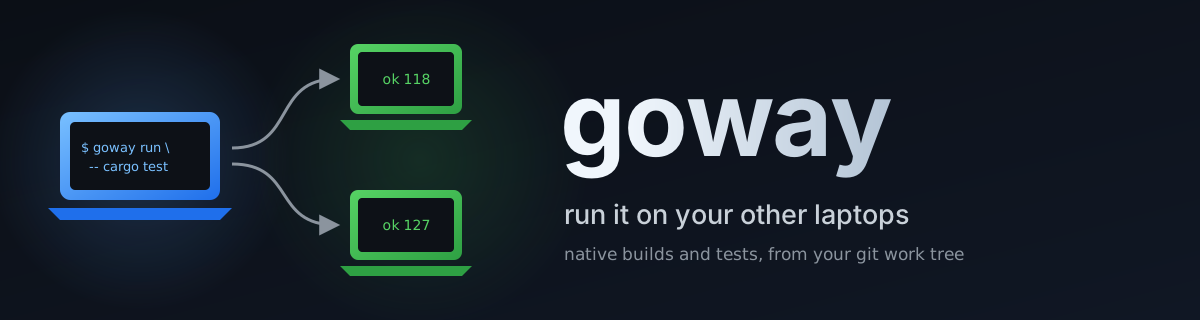
goway
goway lets you type a build or test command on your main laptop and have your other laptops do the work.
- It copies the files git shows for your project, including uncommitted changes, to the least busy helper laptop on your network.
- It runs the command there natively, with a warm build cache, at low priority, so the person using that laptop is not slowed down.
- It streams the output back and exits with the command's own result.
Helpers are found by name, not by fixed address, so laptops on changing Wi-Fi addresses keep working. A test run can also be split across several helpers. goway is built for Rust projects worked on from many git worktrees at once, and it runs any command. Every change goway makes to a machine is journaled, so uninstalling restores it exactly.





Install
goway runs on two kinds of computer: your main laptop, the one you type on, and one or more helper laptops, the ones that do the work. All of them must be on the same network.
Support at a glance. "Tested by the maintainer" means the maintainer ran it on a real machine; "untested by the maintainer (no such machine)" means it is built, or expected to work, but has not been run on real hardware.
Operating systems
| Operating system | As your main laptop | As a helper laptop |
|---|---|---|
| Windows 11 + WSL (Ubuntu) | Works: install inside WSL (Linux and WSL). Tested by the maintainer | Works: one installer (Windows with WSL); Windows 11 22H2 or newer uses mirrored networking, NAT mode uses a port relay goway keeps current. Tested by the maintainer |
| Windows 10 (21H2 or newer) + WSL | Works: install inside WSL. Untested by the maintainer (no such machine) | Works through the port relay goway sets up. Untested by the maintainer on real hardware (the relay was verified on Windows 11 by simulation) |
| Windows without WSL | Works: goway-setup.exe install (Windows). Tested by the maintainer through CI only |
Not yet: a helper needs Linux, so install WSL first; native support is in progress (~SFJ1T6J). Untested by the maintainer |
| Ubuntu, Debian | Works: one command (Linux and WSL). Ubuntu: tested by the maintainer; Debian: untested by the maintainer (no such machine) | Works: a few manual steps (Linux). Ubuntu: tested by the maintainer; Debian: untested by the maintainer (no such machine) |
| Fedora, RHEL | Works: the Linux install script. Untested by the maintainer (no such machine) | Works: the Linux steps. Untested by the maintainer (no such machine) |
| Arch | Works: the Linux install script. Untested by the maintainer (no such machine) | Works: the Linux steps. Untested by the maintainer (no such machine) |
| Alpine | Works: the Linux program is a static musl build. Untested by the maintainer (no such machine) | Not verified: the helper side expects the usual GNU userland. Untested by the maintainer (no such machine) |
| openSUSE | Works: the Linux install script. Untested by the maintainer (no such machine) | Works: the Linux steps. Untested by the maintainer (no such machine) |
| Raspberry Pi OS | Works: the ARM Linux program. Untested by the maintainer (no such machine) | Works: the Linux steps. Untested by the maintainer (no such machine) |
| ChromeOS Linux (Crostini) | Works: the Linux install script inside the Linux container. Untested by the maintainer (no such machine) | Untested by the maintainer (no such machine): the container's network is not directly reachable from the LAN |
| macOS Apple Silicon | Works: release binaries and one command (macOS). CI-built and CI-tested only; untested by the maintainer (no such machine) | Supported, untested by the maintainer (CI only): needs Homebrew GNU tools, see docs/macos.md |
| macOS Intel | Works: release binaries and one command. CI-built only; untested by the maintainer (no such machine) | Supported, untested by the maintainer (CI only): needs Homebrew GNU tools, see docs/macos.md |
| FreeBSD | Not supported: no release binary. Untested by the maintainer (no such machine) | Not supported. Untested by the maintainer (no such machine) |
Downloads. Every version's ready-made files are on the Releases page. These links always fetch the newest release (from v0.1.0):
| Your computer | Download |
|---|---|
| Windows, most PCs (x64) | goway-setup.exe |
| Windows on ARM (for example Snapdragon laptops) | goway-setup-arm64.exe |
| Linux or WSL, most PCs (x86_64) | goway-x86_64-unknown-linux-musl.tar.gz |
| Linux or WSL on ARM (aarch64, Raspberry Pi 4 and newer) | goway-aarch64-unknown-linux-musl.tar.gz |
| Mac with Apple Silicon (M1 and newer) | goway-aarch64-apple-darwin.tar.gz |
| Mac with Intel | goway-x86_64-apple-darwin.tar.gz |
| The installer script (Linux, WSL, macOS) | install.sh |
| Checksums of all of the above | SHA256SUMS |
Not sure which one? On Windows, Settings > System > About shows
"System type" (x64 or ARM64). On Linux or a Mac, uname -m prints
x86_64 or aarch64/arm64. The one-line installers below pick the
right file for you.
How to check that a download is genuine
Each release publishes SHA256SUMS, the fingerprint of every file. The
one-line installer checks it for you; to check a file you downloaded by
hand, put it next to SHA256SUMS and run:
# Linux or WSL
sha256sum --check --ignore-missing SHA256SUMS
# macOS
shasum -a 256 --check --ignore-missing SHA256SUMS
# Windows PowerShell: compare this with the line for the file in SHA256SUMS
(Get-FileHash .\goway-setup.exe -Algorithm SHA256).Hash
Every file also carries a signed record of the GitHub build that made it (a build provenance attestation). With the GitHub CLI:
gh attestation verify goway-setup.exe --repo lognd/goway
A mismatch means the file is not the one the release published: delete it and download again.
On your main laptop, one command installs goway:
# Linux, or WSL on Windows
curl -fsSL https://github.com/lognd/goway/releases/latest/download/install.sh | bash
# Windows without WSL (download goway-setup.exe from the table above first)
.\goway-setup.exe install
# a Windows helper laptop with WSL (one command; it prints what to run next)
.\goway-setup.exe install --host
Other ways to install
From v0.1.0 goway is also on PyPI and crates.io, so uv, pipx, pip (in a virtual environment) and cargo can install it. Each is available from v0.1.0; the details, the PEP 668 explanation of why system pip is refused on Debian and Ubuntu, and where each puts the program are in docs/install-methods.md.
uv tool install goway          # available from v0.1.0 (preferred; install uv first: https://docs.astral.sh/uv/getting-started/installation/)
pipx install goway             # available from v0.1.0
cargo install --locked goway   # available from v0.1.0 (needs a Rust toolchain: https://rustup.rs)
After any of them, the next step is goway add. goway uninstall
recognises the method and removes the program with the matching command
(uv tool uninstall goway, pipx uninstall goway, cargo uninstall goway, or pip uninstall inside its virtual environment).
Each download is checked against the release's published checksums.
The helpers do the building, so they need the toolchain for your
project, such as Rust. goway add installs it for you. The main laptop
needs only goway, git and ssh.
Words you have not seen before are explained in
docs/glossary.md.
Languages and test tools
Every row below except .NET has a sharding adapter (goway run --shard N, see
docs/usage.md). The columns say what has been checked.
| Language / tool | Runs | Sharding | Warm dependencies | Doctor checks | Tested where |
|---|---|---|---|---|---|
| Rust / cargo nextest | yes | --partition count:i/N |
yes: persistent per-repository target dirs and slot trees | toolchain checks in progress (~XP4RZVS) | the maintainer's helpers and CI |
| vitest | yes | --shard=i/N |
yes: node_modules kept in the slot tree |
in progress (~XP4RZVS) | argument rewriting unit-tested; real tool untested by the maintainer |
| jest | yes | --shard=i/N |
yes: node_modules kept |
in progress (~XP4RZVS) | argument rewriting unit-tested; real tool untested by the maintainer |
| Playwright | yes | --shard=i/N |
yes: node_modules kept |
in progress (~XP4RZVS) | argument rewriting unit-tested; real tool untested by the maintainer |
| pytest (+ xdist) | yes | goway's own file split, composes with xdist | yes: .venv kept |
in progress (~XP4RZVS) | real pytest tested locally; xdist not run |
| Java: Maven, Gradle | yes | goway's own class split | yes: target, .gradle and build kept |
in progress (~XP4RZVS) | class split unit-tested; Maven and Gradle not run |
| C/C++ GoogleTest | yes | GTEST_TOTAL_SHARDS and GTEST_SHARD_INDEX |
yes: build/ kept |
in progress (~XP4RZVS) | real FetchContent build sharded across two real helpers |
| C/C++ Catch2 | yes | --shard-count, --shard-index |
yes: build/ kept |
in progress (~XP4RZVS) | fixture binaries only; detection has a known bug being fixed (~KKNQADN) |
| C/C++ CTest | yes | -I i,,N |
yes: build/ kept |
in progress (~XP4RZVS) | real ctest tested locally |
| Go | yes | package split | yes: gitignored paths kept in the slot tree | in progress (~XP4RZVS) | real go test tested locally |
| Ruby / RSpec | yes | goway's own spec-file split | yes: gitignored paths kept in the slot tree | in progress (~XP4RZVS) | file split unit-tested; RSpec not run |
| .NET | yes (any command runs) | runs unchanged on every host with GOWAY_SHARD and GOWAY_SHARD_COUNT; no .NET adapter |
yes: gitignored paths (bin, obj) kept in the slot tree |
in progress (~XP4RZVS) | untested by the maintainer |
Sixty-second tour
goway add <YOUR-COMPUTER-NAME-HERE> ...     # once per helper: the line its installer printed
goway status                                 # are the helpers reachable, how busy are they?
goway run -- cargo nextest run --workspace   # run on the least busy helper
goway run --shard 2 -- cargo nextest run     # split one test run across two helpers
goway doctor --fix                           # check everything, fix what it can
goway uninstall                              # remove goway everywhere, exactly
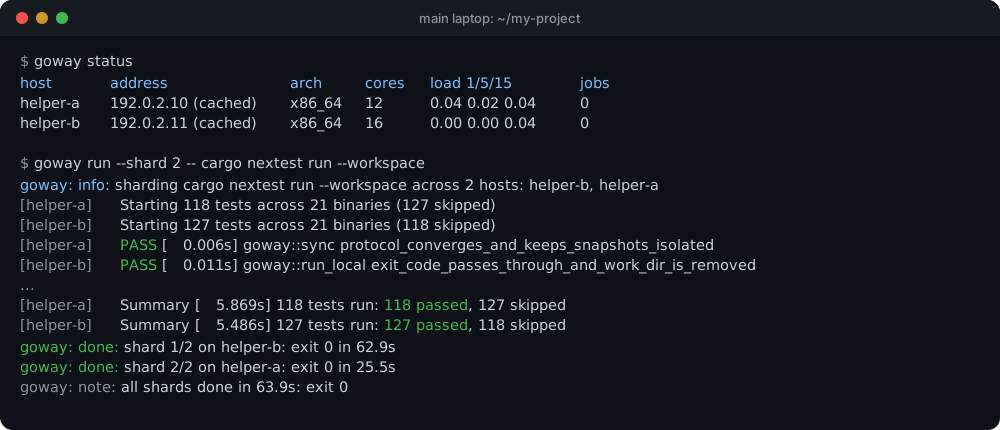
Read top to bottom:
- status: each helper's current address and how goway found it, its processor type and cores, its load, and goway's jobs on it.
- run --shard 2: goway picks the two least busy helpers. It copies
only what changed since the last run and gives each helper half of
the tests (nextest's own
--partition). Each output line is prefixed with the helper it came from. - done / note: every goway line says its kind in words, and goway exits with the first failing shard's code, or 0.
Quick start: your first helper
1. On each helper laptop (once)
-
Download
goway-setup.exefrom the latest release. -
Open the Start menu, type PowerShell, and open it. In the folder where the download went (usually
cd ~\Downloads), type:.\goway-setup.exe install --host -
Windows asks "Do you want to allow this app to make changes?". Choose Yes.
-
At the end, the installer prints one line starting with
goway add. Copy that line or write it down; you need it in step 3.
What this changes on the helper laptop, and why
- Mirrored networking (Windows 11 22H2+) or, on Windows 10 and Windows 11 in NAT mode, the port relay goway-setup installs, so your main laptop can reach the Linux inside this laptop. You do not set either by hand.
- An ssh server inside WSL on port 2222. ssh is the secure way one computer logs into another. Password logins are turned off once a key is set up, so only your main laptop's key gets in.
- Two firewall rules for port 2222, limited to home or work networks and your local network. A cafe's Wi-Fi cannot reach it.
- A "keepalive" task that keeps WSL running after you sign in, so the helper is reachable.
- An entry in Settings > Apps named "goway helper". It removes every one of these changes again.
Every change is recorded together with what was there before, and the uninstall puts back exactly that. Details: docs/install-windows.md.
If the installer says WSL is missing
It stops before changing anything and prints the steps:
- Open PowerShell as administrator (right-click it in the Start menu, "Run as administrator").
- Type
wsl --install -d Ubuntuand restart the laptop. - When Ubuntu opens, choose a Linux user name and password. Remember both: the password is the one goway asks for in step 3.
- Run
.\goway-setup.exe install --hostagain.
If the installer warns about a "Public" network
Windows treats networks it does not know (cafes, airports, and often your own Wi-Fi when you first connect) as Public. goway only opens its port on home or work (Private) networks. On your own network, open Settings > Network & internet > Wi-Fi > your network and choose Private network. The installer also prints the one-line command that does the same.
2. On your main laptop (once)
Linux or WSL: open the terminal and type:
curl -fsSL https://github.com/lognd/goway/releases/latest/download/install.sh | bash
Then close the terminal and open it again.
Windows (without WSL): download goway-setup.exe from the same
release and run .\goway-setup.exe install in PowerShell.
What this changes on your main laptop
- Linux: it copies one program to
~/.local/bin/goway. If that folder is not already on PATH, it adds one marked line to~/.profile. The download is checked against its published checksum first. No administrator rights are used. It keeps a record of what it added, sogoway uninstallcan remove exactly that. - Windows: it copies
goway.exeinto your user's program folder and adds that folder to your PATH. It also adds an entry in Settings > Apps that removes both again.
3. On your main laptop, once per helper
Type the line the helper's installer printed in step 1.4. It looks like
this, with the helper's own values in place of the <...> parts:
goway add <YOUR-COMPUTER-NAME-HERE> --fingerprint <FINGERPRINT-FROM-THE-INSTALLER> --user <YOUR-LINUX-USER-NAME-HERE> --rsudo
goway shows what it is about to do, asks for the helper's Linux
password once (not its Windows password), and finishes with
goway: done: <YOUR-COMPUTER-NAME-HERE> is ready.
What to put in place of each <...> and how to find it
The helper's installer prints all three values at the end. If you no
longer have that output, run .\goway-setup.exe status --host on the
helper to see it again, or find each value by hand:
<YOUR-COMPUTER-NAME-HERE>: the helper laptop's name, which goway uses to find it on the network.- On Windows: Settings > System > About, the line Device name,
for example
DESKTOP-4K2J9. - On a Linux helper: type
hostnamein its terminal. - Upper or lower case does not matter.
- On Windows: Settings > System > About, the line Device name,
for example
<YOUR-LINUX-USER-NAME-HERE>: the user name you chose when Ubuntu (WSL) first started on the helper. In the helper's Ubuntu window, typewhoami. goway asks for this user's password.<FINGERPRINT-FROM-THE-INSTALLER>: the helper's identity, which looks likeSHA256:followed by 43 letters and digits. goway compares it, so it never sends your password to a different machine that answers to the same name. In the helper's Ubuntu window:ssh-keygen -lf /etc/ssh/ssh_host_ed25519_key.pub.
What this changes, and why goway needs no password afterwards
- The helper's identity: goway compares the helper's fingerprint
with the one in the command, so it never talks to an impostor. It
then remembers that identity in
~/.config/goway/known_hosts. - A key: goway uses your existing ssh key. If you have none, it
creates one in
~/.config/goway/. It adds one tagged line for that key to~/.ssh/authorized_keyson the helper. From then on your laptop proves who it is with the key, so no password is needed. - Build tools on the helper: cargo-nextest and sccache are installed for the helper's user. Downloads are checked against fixed checksums.
- With
--rsudo: goway lists the changes that need administrator rights on the helper, with the reason for each (for example the C compiler Rust needs, or turning off password logins). It asks once, then runs them all with onesudo. You type the password into the helper's own sudo; goway never sees it.
goway uninstall reverses all of this. See Uninstall.
4. Try it
goway status                                  # are the helpers reachable?
cd ~/my-project                               # a folder kept in git
goway run -- cargo nextest run --workspace    # runs on the least busy helper
Everything after -- is the command the helper runs.
What happens during a run, and what is sent
- goway asks every helper how busy it is and picks the least busy one.
- It copies the files git shows for your project. It never sends
.git, env files, credential files or private keys. - It runs the command in a private folder on the helper, at low priority so the person using that laptop is not slowed down.
- It shows the output as it arrives and ends with the command's own result.
Builds stay fast because each helper keeps a build cache, which disappears on its own after 7 idle days. Details: docs/usage.md.
Install details for each operating system
Main laptop: Linux or WSL
curl -fsSL https://github.com/lognd/goway/releases/latest/download/install.sh | bash
This works on any Linux on Intel/AMD (x86_64) or ARM (aarch64), and
inside WSL. It needs curl, git and ssh, which most systems have.
If one is missing, goway add ... --lsudo installs it on Ubuntu or
Debian. Remove goway again with goway uninstall.
Main laptop: Windows (without WSL)
-
Install Git for Windows (https://git-scm.com). Windows 10 and 11 already include the ssh client goway uses.
-
Download
goway-setup.exefrom the latest release. On a Windows-on-ARM laptop, takegoway-setup-arm64.exe. -
In PowerShell, in the download folder:
.\goway-setup.exe install -
Open a new PowerShell window and type
goway --help.
Remove it in Settings > Apps > goway, or with
goway-setup.exe uninstall. Details:
docs/install-windows.md.
Main laptop: macOS
The release has goway binaries for Apple Silicon (aarch64-apple-darwin)
and Intel (x86_64-apple-darwin). The same one-line installer as on Linux
picks the right one, verifies it against SHA256SUMS with shasum -a 256,
and installs it to ~/.local/bin:
curl -fsSL https://github.com/lognd/goway/releases/latest/download/install.sh | bash
The installer and goway uninstall use only what macOS ships (bash 3.2 and
the BSD tools). The maintainer has no Mac: the binaries are built, and the
client tests and installer scripts are run, on GitHub's macOS runners only.
Without the release, build from source with Rust (https://rustup.rs):
cargo install --locked --git https://github.com/lognd/goway goway
A Mac cannot be a helper: goway's helper side needs Linux tools
(GNU findutils, flock, setsid).
Helper: Windows with WSL
See step 1 of the quick start. The
helper needs WSL 2 and Ubuntu. Windows 10 (21H2 or newer) and Windows 11
both work. With Windows 11 22H2 or newer, goway-setup uses WSL's mirrored
networking. On Windows 10, or with WSL in NAT mode (networkingMode=nat),
it instead sets up a Windows port relay (netsh interface portproxy) on
the helper's port; a scheduled task re-points the relay whenever WSL's
internal address changes. The firewall rules still limit who can connect,
the goway add line is the same, and goway-setup uninstall --host
removes the relay and the task. --network mirrored|nat|auto overrides
the choice. Windows 10 and NAT mode are untested by the maintainer on real
hardware.
If WSL is missing, the installer stops and tells you how to add it.
Helper: Linux
There is no installer for Linux helpers yet. These steps are for Ubuntu or Debian; other distributions use their own package names.
-
On the helper, install the ssh server and goway's needs:
sudo apt-get install -y openssh-server git tar util-linux findutils -
Make sure your main laptop can reach it on port 22. Many desktop systems allow this by default; with the
ufwfirewall, runsudo ufw allow from <YOUR-LOCAL-NETWORK> to any port 22, for example192.168.1.0/24. -
Find its name with
hostname, and its fingerprint withssh-keygen -lf /etc/ssh/ssh_host_ed25519_key.pub. -
On your main laptop:
goway add <YOUR-COMPUTER-NAME-HERE> --port 22 --fingerprint <FINGERPRINT> --user <YOUR-LINUX-USER-NAME-HERE> --rsudo
goway finds Linux helpers as <name>.local when the helper runs the
avahi-daemon service (Ubuntu desktop does). Otherwise, add
--address <ITS-IP-OR-DNS-NAME>.
Day to day
goway run -- COMMANDruns a command on the least busy helper;--host NAMEpicks one;--shard 2splits a test run across two helpers.goway statusshows how busy each helper is.goway doctorchecks everything and says how to fix what is wrong.- Press Ctrl-C to stop a run; goway stops it on the helper too.
Using a screen reader? Add --plain (or set GOWAY_PLAIN=1), and
tables are printed as labelled lines such as
host: <YOUR-COMPUTER-NAME-HERE>, load: 0.40, jobs: 0. Every goway line starts with its
kind in words (error:, warning:, done:, next: ...), so color is
never needed.
Old copies and caches on the helpers are cleaned up automatically
(goway gc --dry-run shows what would go). More:
docs/usage.md.
Uninstall
On your main laptop:
goway uninstall              # lists everything it will remove, then asks
goway uninstall --rsudo      # also undoes the administrator changes on helpers
Then, on each helper laptop, remove goway helper in Settings > Apps.
What each step removes, and what it leaves
goway uninstall removes the following, helpers first, then this
laptop:
- goway's folder on each helper
- the tools goway installed there
- goway's key line on each helper
- the "no password login" setting, with
--rsudo - goway's settings and keys on this laptop
- the goway program itself, with the command of the tool that
installed it (
cargo uninstall goway,uv tool uninstall goway,pipx uninstall goway,pip uninstallin its virtual environment) or by replaying the install journal; the plan names the exact command, and it runs last, after you confirm
If a helper is switched off, it stops before touching this laptop, so you can run it again later.
It deliberately leaves system packages it installed on helpers, such as the C compiler, because other programs may rely on them. It lists each one with its removal command.
The helper's entry in Settings > Apps undoes everything the helper installer did, exactly as it was before.
How install and uninstall work: the journal
Everything goway's installers and setup commands change is meant to be completely reversible. That is possible because goway keeps a journal: a written record of each change it makes, together with what was there before.
How the journal works
- Before each change, goway writes it down. The journal entry says what will change (a file, a setting, a firewall rule, a line in a file, a folder) and records the state before it: the old contents, the old value, or "this did not exist". The entry is saved to disk before the change is made, so even a crash or a power cut in the middle leaves a record of everything that was touched.
- Things that were already in place are recorded as "no change". If the PATH already held goway's folder, or a setting already had the value goway wants, goway writes that down and does not touch it. Uninstall then leaves it alone too, because it was yours.
- Uninstall replays the journal backwards, newest entry first, and
puts each recorded "before" state back:
- a file goway created is deleted
- a file goway changed gets its old contents back
- a setting gets its old value back, or is removed if it did not exist
- a folder goway created is removed once it is empty
- a rule or task goway created is deleted
- Your later changes are never overwritten. If you edited something after goway installed it, uninstall leaves your version in place and tells you, instead of clobbering it.
- Running uninstall twice is harmless. Entries already undone are skipped, and an interrupted uninstall can simply be run again.
Where each journal lives
| What | Journal |
|---|---|
| Linux / WSL main laptop install | ~/.local/state/goway/install-journal |
| Windows main laptop install | %LOCALAPPDATA%\goway\install-journal.json |
| Helper laptop install (Windows) | %ProgramData%\goway\goway\host-journal.json, writable only by administrators, so no ordinary program can plant entries that an administrator's uninstall would then carry out |
Key setup for a helper (goway add) |
~/.config/goway/ssh-setup-<helper>.json on the main laptop; it records the changes on the helper too |
Tools goway add installed on a helper |
~/.config/goway/installed-<helper>.json on the main laptop |
What "completely reversible" covers, and the two deliberate exceptions
Uninstalling restores every file, setting, PATH entry, registry value,
firewall rule, scheduled task, folder and authorized_keys line that
goway added or changed, exactly as it was before.
The two exceptions are deliberate:
- System packages installed on a helper with
--rsudo, such as the C compiler Rust needs, stay installed, because other software on that helper may come to rely on them.goway uninstalllists each one with the command that removes it. - Your own changes after install are kept, as described above.
goway's build caches on helpers are not journaled; they are goway's own
files in one marked folder, and goway uninstall deletes that whole
folder.
How this is checked
- Property tests generate thousands of random machines and install
plans. For each one they check that uninstall after install gives
back exactly the starting machine, that installing twice changes
nothing more, and that uninstalling twice is harmless
(
crates/goway-journal/tests/properties.rs). - Snapshot tests on real machines install and uninstall the Windows
helper and client components on a test laptop. They require the
before and after snapshots to be identical. The snapshots cover the
registry, PATH, firewall rules, scheduled tasks,
.wslconfigand the ssh server configuration (scripts/windows/roundtrip*.sh). - Linux tests install, uninstall and compare every file, mode and
byte of the home folder (
crates/goway/tests/install_scripts.rs). Thegoway add/goway uninstalltests do the same for the helper side (crates/goway/tests/ssh_setup.rs).
What goway does
| Command | Purpose | Docs |
|---|---|---|
goway add HOST |
register a helper: confirmed identity, key login with one password, its toolchain | docs/ssh-setup.md |
goway run -- CMD |
run a command on the least busy helper; --host, --shard N, --keep, --report |
docs/usage.md |
goway status |
address, cores, load, jobs and disk of every helper (--plain for screen readers) |
docs/usage.md |
goway doctor [HOST] --fix |
check helpers and this laptop; fix what it can, root fixes with --rsudo |
docs/usage.md |
goway gc |
remove stale state on helpers (it also happens on its own) | docs/usage.md |
goway uninstall |
remove everything goway added, here and on every helper | docs/usage.md |
goway host add/list/remove |
manage the pool by hand | docs/hosts.md |
goway-setup.exe install [--host] |
Windows installer, main laptop or helper; journaled, exact uninstall | docs/install-windows.md |
install.sh |
Linux and WSL installer; checksum-verified download | docs/install-linux.md |
More: config, how helpers are found, troubleshooting, glossary, goway versus other build systems, design, releases.
Why not Kubernetes or Docker?
They solve a different problem. Kubernetes and Docker run services and packaged images on machines set aside for them. goway runs one command from the folder you are working in on computers you already own and use, and then it is gone.
| goway | A Kubernetes cluster | Docker (contexts or remote hosts) | |
|---|---|---|---|
| What you hand it | the command you would type, from your work tree as it is right now (uncommitted edits included) | a container image plus manifests | an image, or a build context, per host |
| What runs on the other machines | nothing permanent: ssh and a script sent with each call | a control plane, kubelet, a container runtime | a Docker daemon |
| Getting your code there | automatic, only the changed files | build an image, push it to a registry, pull it | build or copy per host; bind mounts of your local folder do not work remotely |
| Machines | everyday laptops and desktops with changing addresses, used by people | dedicated nodes | each host set up separately |
| Picking a machine | the least busy one that meets --needs, every run |
the scheduler, by resource requests | you pick the context |
| Warm builds | per repository, kept between runs (cargo, ccache, node_modules, .venv, ...) |
only if you add caching volumes yourself | only the daemon's image layers |
| Cleanup | automatic, with a disk budget per machine | your job | docker system prune, global |
| Result | live output and the command's own exit code | logs and a job status | output of the container |
When Kubernetes, Docker or CI is the better choice
- Long-running services (web servers, databases, workers): use Kubernetes or Docker. goway runs commands that finish.
- Reproducible, hermetic environments that must be identical
everywhere: build an image (or use Nix or Bazel). goway runs on each
machine's own toolchain, and
goway doctorshows where they drift. - A team's shared build fleet with access control and quotas: a cluster or a CI system. goway runs as your own user on machines you trust.
- Checks on every push: CI. goway is for the minutes before you
push, and it can feed CI-like evidence (
--report).
They also combine: goway run -- docker build . uses the helper's own
Docker, and a project that tests in containers can still be sent with
goway. The longer comparison, including Bazel, distcc and CI runners, is
in docs/positioning.md.
Something went wrong?
See docs/troubleshooting.md; if goway add
says "Permission denied", start with its section "goway add says
Permission denied" (no password set, password login off, a ban, and
how to add goway's key by hand with goway add NAME --no-password).
Every goway
error ends with a next: line saying what to try, and goway doctor
checks everything at once.
Development
git clone https://github.com/lognd/goway.git && cd goway
cargo nextest run --workspace                                # the test suite (Linux or WSL)
cargo clippy --workspace --all-targets -- -D warnings        # lints, warnings are errors
cargo clippy --target x86_64-pc-windows-gnu --workspace --all-targets -- -D warnings
The suite never touches a real remote machine: a fake ssh runs
goway's remote side locally. The workspace has three crates:
goway: the command-line toolgoway-journal: the reversible change journalgoway-setup: the Windows installer
The work itself is tracked with frob, a work-accounting tool: its
tickets and evidence live in tickets/, and the changelog fragments
live in changelog.d/.
Versioning and compatibility
goway follows Semantic Versioning. Before 1.0, a
minor version may change flags, output layout or the config file; the
config file rejects unknown keys, so a renamed setting is reported
rather than ignored. The minimum supported Rust version is 1.98, pinned
in rust-toolchain.toml and checked in CI. Releases are cut as
described in docs/release.md.
Contributing
Contributions are welcome, from a typo fix to a new feature. Read CONTRIBUTING.md before opening a pull request; it covers the local setup, the gate, the commit format and the AI-assisted contributions policy. Everyone taking part is expected to follow the Code of Conduct.
Security
See SECURITY.md for how to report a vulnerability; please do not open a public issue for one.
License
MIT. See LICENSE.
1 maintainer

Metadata
1 maintainer
Release files for goway 0.1.0
For a detailed explanation of source distributions (sdists) and built distributions (wheels), please see the package formats documentation.
Source distribution (sdist)
| File | Size | Uploaded | |
|---|---|---|---|
| goway-0.1.0.tar.gz | 523.0 kB | Details |
Built distributions (wheels)
| File | Reset | |||
|---|---|---|---|---|
| goway-0.1.0-py3-none-win_arm64.whl | Python 3 | none | Windows ARM64 | Details |
| goway-0.1.0-py3-none-win_amd64.whl | Python 3 | none | Windows x86-64 | Details |
| goway-0.1.0-py3-none-musllinux_1_2_x86_64.whl | Python 3 | none | Linux musl 1.2+ x86-64 | Details |
| goway-0.1.0-py3-none-musllinux_1_2_aarch64.whl | Python 3 | none | Linux musl 1.2+ ARM64 | Details |
| goway-0.1.0-py3-none-manylinux_2_17_x86_64.manylinux2014_x86_64.whl | Python 3 | none | Linux glibc 2.17+ x86-64 | Details |
| goway-0.1.0-py3-none-manylinux_2_17_aarch64.manylinux2014_aarch64.whl | Python 3 | none | Linux glibc 2.17+ ARM64 | Details |
| goway-0.1.0-py3-none-macosx_11_0_arm64.whl | Python 3 | none | macOS 11.0+ ARM64 | Details |
| goway-0.1.0-py3-none-macosx_10_12_x86_64.whl | Python 3 | none | macOS 10.12+ x86-64 | Details |
Total release size: 21.7 MB
Release files / goway-0.1.0.tar.gz
| Download URL | goway-0.1.0.tar.gz |
|---|---|
| Size | 523.0 kB |
| Tags | Source |
|
SHA-256 checksum How to use checksums |
33f977da980d093b39e30473a530d63cabf1358b85ebeab499eb8cfec1d39832
|
|
BLAKE2b-256 checksum How to use checksums |
b767949078462a18ae52e561adbf84db9429e515105ff9b0d771a3a00e849a0f
|
| Upload date | |
|
Uploaded using Trusted Publishing? What is trusted publishing? |
Yes |
| Uploaded via |
twine/7.0.0 CPython/3.13.14
|
Provenance
Provenance describes where a file came from. On PyPI, provenance is shared via attestations, which provide a verifiable record of the build or publishing details. View details, limitations and caveats.


PyPI Publish Attestation
PyPI verified that this artifact, at this checksum, originated from the publisher listed below.
Signed by GitHub Actions, verified by PyPI on Oct 5, 2026.
Transparency logRelease files / goway-0.1.0-py3-none-win_arm64.whl
| Download URL | goway-0.1.0-py3-none-win_arm64.whl |
|---|---|
| Size | 2.6 MB |
| Tags | Python 3 Windows ARM64 |
|
SHA-256 checksum How to use checksums |
d796303ea2023af9e02093ce750c809118b6273ce4dfa2b90f70bdaf5edcde1e
|
|
BLAKE2b-256 checksum How to use checksums |
52d9aa254404f01824a880ae64d29ff96a9ea6483616c102aca6d006b1c956c4
|
| Upload date | |
|
Uploaded using Trusted Publishing? What is trusted publishing? |
Yes |
| Uploaded via |
twine/7.0.0 CPython/3.13.14
|
Provenance
Provenance describes where a file came from. On PyPI, provenance is shared via attestations, which provide a verifiable record of the build or publishing details. View details, limitations and caveats.
PyPI Publish Attestation
PyPI verified that this artifact, at this checksum, originated from the publisher listed below.
Signed by GitHub Actions, verified by PyPI on Oct 5, 2026.
Transparency logRelease files / goway-0.1.0-py3-none-win_amd64.whl
| Download URL | goway-0.1.0-py3-none-win_amd64.whl |
|---|---|
| Size | 2.8 MB |
| Tags | Python 3 Windows x86-64 |
|
SHA-256 checksum How to use checksums |
2ff5c8904dcd32c3cadf76e703a92a02abfe9fe2948393d9b3c51df3fff44138
|
|
BLAKE2b-256 checksum How to use checksums |
8f27010b48a4b759a608b8fad218e19001744db17b8af3c054cf3dfb91c355eb
|
| Upload date | |
|
Uploaded using Trusted Publishing? What is trusted publishing? |
Yes |
| Uploaded via |
twine/7.0.0 CPython/3.13.14
|
Provenance
Provenance describes where a file came from. On PyPI, provenance is shared via attestations, which provide a verifiable record of the build or publishing details. View details, limitations and caveats.
PyPI Publish Attestation
PyPI verified that this artifact, at this checksum, originated from the publisher listed below.
Signed by GitHub Actions, verified by PyPI on Oct 5, 2026.
Transparency logRelease files / goway-0.1.0-py3-none-musllinux_1_2_x86_64.whl
| Download URL | goway-0.1.0-py3-none-musllinux_1_2_x86_64.whl |
|---|---|
| Size | 2.8 MB |
| Tags | Linux musl 1.2+ x86-64 Python 3 |
|
SHA-256 checksum How to use checksums |
5197c9be06782325fccb93737cb5e0b612018549922cdb57c659b0c2b5a0f609
|
|
BLAKE2b-256 checksum How to use checksums |
5d001380497c8f49c2b526ae0112bce58260582be05ecf87eb62ad477e48be35
|
| Upload date | |
|
Uploaded using Trusted Publishing? What is trusted publishing? |
Yes |
| Uploaded via |
twine/7.0.0 CPython/3.13.14
|
Provenance
Provenance describes where a file came from. On PyPI, provenance is shared via attestations, which provide a verifiable record of the build or publishing details. View details, limitations and caveats.
PyPI Publish Attestation
PyPI verified that this artifact, at this checksum, originated from the publisher listed below.
Signed by GitHub Actions, verified by PyPI on Oct 5, 2026.
Transparency logRelease files / goway-0.1.0-py3-none-musllinux_1_2_aarch64.whl
| Download URL | goway-0.1.0-py3-none-musllinux_1_2_aarch64.whl |
|---|---|
| Size | 2.6 MB |
| Tags | Linux musl 1.2+ ARM64 Python 3 |
|
SHA-256 checksum How to use checksums |
10287f90e7d04ed0d4bb7a9c0fbfb90d8681c32c52e5b49752295e4e9d9b1736
|
|
BLAKE2b-256 checksum How to use checksums |
4ecf9abdf6f478d4a25995e1cb8eab94e3d2ab0c4f12c0992f1789a93d82d037
|
| Upload date | |
|
Uploaded using Trusted Publishing? What is trusted publishing? |
Yes |
| Uploaded via |
twine/7.0.0 CPython/3.13.14
|
Provenance
Provenance describes where a file came from. On PyPI, provenance is shared via attestations, which provide a verifiable record of the build or publishing details. View details, limitations and caveats.
PyPI Publish Attestation
PyPI verified that this artifact, at this checksum, originated from the publisher listed below.
Signed by GitHub Actions, verified by PyPI on Oct 5, 2026.
Transparency logRelease files / goway-0.1.0-py3-none-manylinux_2_17_x86_64.manylinux2014_x86_64.whl
| Download URL | goway-0.1.0-py3-none-manylinux_2_17_x86_64.manylinux2014_x86_64.whl |
|---|---|
| Size | 2.7 MB |
| Tags | Linux glibc 2.17+ x86-64 Python 3 |
|
SHA-256 checksum How to use checksums |
e1cdd7bbd22eab17577a77394abafafc6a564a19ed7cea3693ca1ac9326f2711
|
|
BLAKE2b-256 checksum How to use checksums |
beab11bdef6755c34a90bde62b5610358040ff37f8fa7a4e1a7176012794e39f
|
| Upload date | |
|
Uploaded using Trusted Publishing? What is trusted publishing? |
Yes |
| Uploaded via |
twine/7.0.0 CPython/3.13.14
|
Provenance
Provenance describes where a file came from. On PyPI, provenance is shared via attestations, which provide a verifiable record of the build or publishing details. View details, limitations and caveats.
PyPI Publish Attestation
PyPI verified that this artifact, at this checksum, originated from the publisher listed below.
Signed by GitHub Actions, verified by PyPI on Oct 5, 2026.
Transparency logRelease files / goway-0.1.0-py3-none-manylinux_2_17_aarch64.manylinux2014_aarch64.whl
| Download URL | goway-0.1.0-py3-none-manylinux_2_17_aarch64.manylinux2014_aarch64.whl |
|---|---|
| Size | 2.6 MB |
| Tags | Linux glibc 2.17+ ARM64 Python 3 |
|
SHA-256 checksum How to use checksums |
facd3d2181ff24604da13471e91fdc83df814f12884b7c6fed8a9f833791fa65
|
|
BLAKE2b-256 checksum How to use checksums |
e4375080363a11b45ed86547c2e20d3e30b7db4a3ab9d5ea159b7a7611ef293b
|
| Upload date | |
|
Uploaded using Trusted Publishing? What is trusted publishing? |
Yes |
| Uploaded via |
twine/7.0.0 CPython/3.13.14
|
Provenance
Provenance describes where a file came from. On PyPI, provenance is shared via attestations, which provide a verifiable record of the build or publishing details. View details, limitations and caveats.
PyPI Publish Attestation
PyPI verified that this artifact, at this checksum, originated from the publisher listed below.
Signed by GitHub Actions, verified by PyPI on Oct 5, 2026.
Transparency logRelease files / goway-0.1.0-py3-none-macosx_11_0_arm64.whl
| Download URL | goway-0.1.0-py3-none-macosx_11_0_arm64.whl |
|---|---|
| Size | 2.5 MB |
| Tags | Python 3 macOS 11.0+ ARM64 |
|
SHA-256 checksum How to use checksums |
fe3220418b654e5f6a74dafd23696bfa63eae897c50dd603234e185830fa1361
|
|
BLAKE2b-256 checksum How to use checksums |
23199c0f63b21c03a2bd56f1669051ac58b952cdebfd9eb9b5d59a357975c11d
|
| Upload date | |
|
Uploaded using Trusted Publishing? What is trusted publishing? |
Yes |
| Uploaded via |
twine/7.0.0 CPython/3.13.14
|
Provenance
Provenance describes where a file came from. On PyPI, provenance is shared via attestations, which provide a verifiable record of the build or publishing details. View details, limitations and caveats.
PyPI Publish Attestation
PyPI verified that this artifact, at this checksum, originated from the publisher listed below.
Signed by GitHub Actions, verified by PyPI on Oct 5, 2026.
Transparency logRelease files / goway-0.1.0-py3-none-macosx_10_12_x86_64.whl
| Download URL | goway-0.1.0-py3-none-macosx_10_12_x86_64.whl |
|---|---|
| Size | 2.6 MB |
| Tags | Python 3 macOS 10.12+ x86-64 |
|
SHA-256 checksum How to use checksums |
b729ad218e7300e3673ea11ce1397e782b72942844c783f3673732a637209182
|
|
BLAKE2b-256 checksum How to use checksums |
99340a8d608ba14f7a20075db22f245833e12321f3cd0ee47e3e181482d22a18
|
| Upload date | |
|
Uploaded using Trusted Publishing? What is trusted publishing? |
Yes |
| Uploaded via |
twine/7.0.0 CPython/3.13.14
|
Provenance
Provenance describes where a file came from. On PyPI, provenance is shared via attestations, which provide a verifiable record of the build or publishing details. View details, limitations and caveats.
PyPI Publish Attestation
PyPI verified that this artifact, at this checksum, originated from the publisher listed below.
Signed by GitHub Actions, verified by PyPI on Oct 5, 2026.
Transparency log












