
quickly play anime from terminal

Project description
goyabu-cli
😎 Watch animes without leaving the terminal!
🚀 How to use
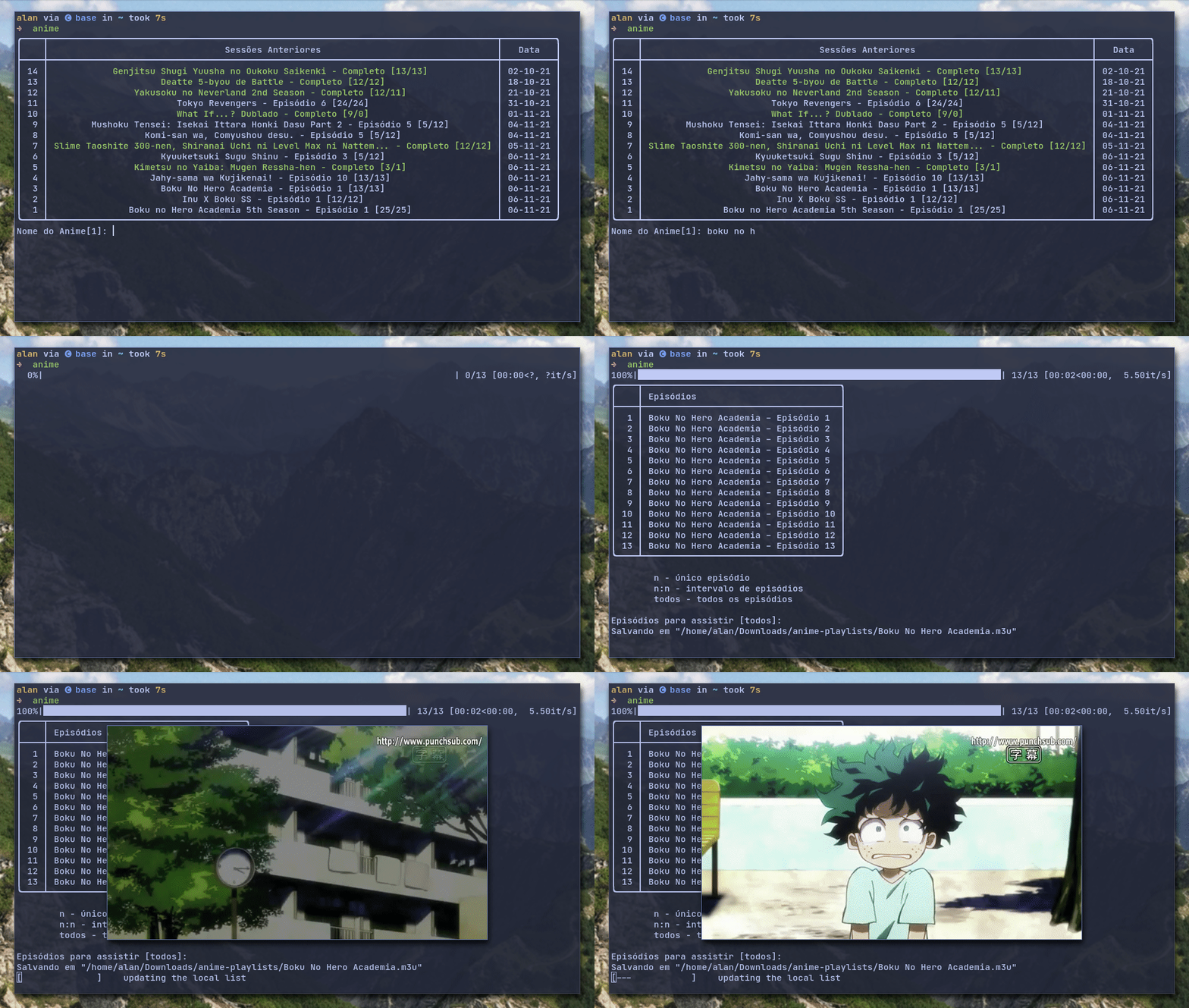
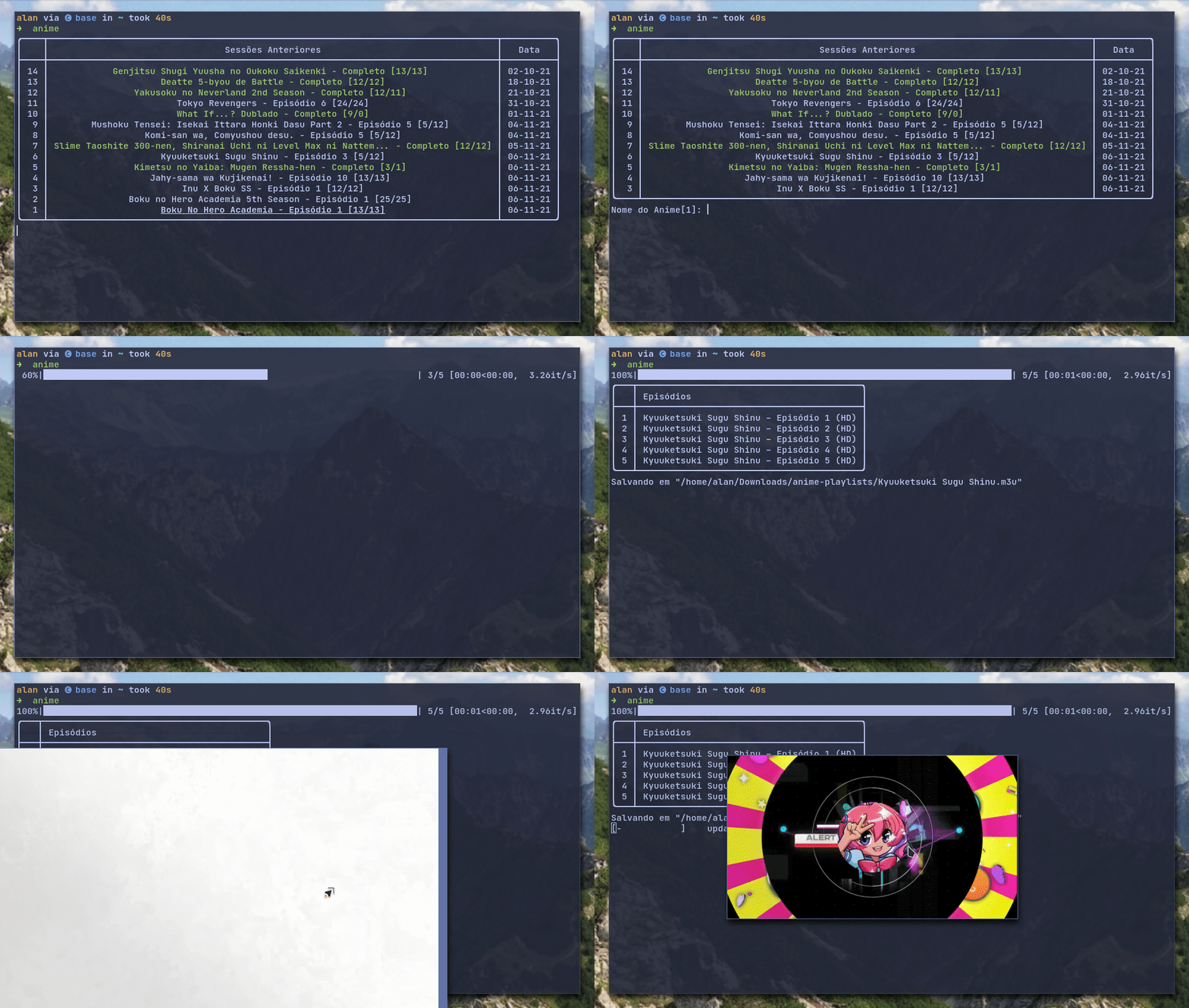
Type anime in the terminal to start the program
then you will be asked to type which anime/series you want to watch. After that, select one of the found anime/series, select the episodes you want to watch using the spacebar (or pressing enter to watch them all) and, finally, enjoy 😊.
📦 Installation
Requirements:
- Python 3
- MPV player (recommended)
Installation can be done using pip:
pip install goyabu-cli
To run the program type anime in the terminal.
# run the bellow command to update the program
pip install --upgrade goyabu-cli
⚙ Manual installation
Install Python 3, MPV and git
Clone this repository
git clone 'https://github.com/AlanJs26/goyabu-cli' && cd goyabu-cli
Install all pythons dependencies
pip install -r requirements.txt
To run the program, type python runner.py in the program folder or add to your system path
Available sources
| Source | Description | Language | Comments |
|---|---|---|---|
| animefire | website used to watch anime | Portuguese | |
| goyabu | website used to watch anime | Portuguese | |
| superanimes | website used to watch anime | Portuguese | |
| gogoanime | website used to watch anime | English | |
| vizer | website used to watch movies,tv shows and animes | Portuguese,English |
Language
I'm Brazilian, so my primary focus is on portuguese sources for anime/series, but I have also translated the program to english and added some english sources.
Compatibility
This app was tested on linux, but probably works in windows too. Some issues that windows users can have are:
- Lists not displaying properly
- MPV integration could not work
- file path issues
If you find some bug, please open and issue here on github.
Tips
Previous sessions
In the start screen you can press the arrow up or Tab to select something you have watched before. Or even type one of the numbers on the left instead of typing the whole name.
All lists are scrollable, you check by looking for a little arrow at the top or bottom of the list.
As 1 will always be the last anime/series watched, you can use this in the command line to jump directly on your previous session.
anime 1 --yes
Here I also used
--yesto accept all prompts
Command arguments
All available arguments are listed below:
--episodesselect which episodes to watch. The syntax isstart:endorepisode.--playerspecify the player do you want to use (default: mpv)--scraperuse specified scraper to fetch the episodes--updatefetch the number of total episodes of the items in history.--serverserves a list of animes as a m3u playlist through the network.--configchange the default config.--anilist_syncsync your local history with anilist--yesaccept all default options. it is useful then you already know the full name of the anime/series--config-dirspecify the folder to save the playlist file
for more information run anime --help
Anilist
to enable anilist sync,to enable synchronization with anilist, you must first run the command anime --config and select the field 'token'. This will open a browser window asking for confirmation.
MPV
I strongly recommend the use of MPV player on top of this cli program, since with MPV is possible to start the stream at the exact point you left on the previous session.
I recommend my MPV config, it comes with a pretty ui, shaders and some plugins. One of them being skiptosilence, that is used to jump anime openings! (I have mapped Tab to activate it)
To-do
- upload project to pypi
- add more sources
Release history Release notifications | RSS feed


Download files
Download the file for your platform. If you're not sure which to choose, learn more about installing packages.
Source Distribution
Built Distribution
Filter files by name, interpreter, ABI, and platform.
If you're not sure about the file name format, learn more about wheel file names.
Copy a direct link to the current filters
File details
Details for the file goyabu-cli-1.0.15.tar.gz.
File metadata
- Download URL: goyabu-cli-1.0.15.tar.gz
- Upload date:
- Size: 30.8 kB
- Tags: Source
- Uploaded using Trusted Publishing? No
- Uploaded via: twine/4.0.2 CPython/3.10.10
File hashes
| Algorithm | Hash digest | |
|---|---|---|
| SHA256 |
09a722d6f62c2c584913bbe862f41569cc61d5eb01c17fc3d9cd470fb9073b53
|
|
| MD5 |
4f66c81feba9056b113c9ced710baaf6
|
|
| BLAKE2b-256 |
a9295690ea49f61ea08028f99f61d9bb6761b7631b9f12ae93b199bc48741262
|
File details
Details for the file goyabu_cli-1.0.15-py3-none-any.whl.
File metadata
- Download URL: goyabu_cli-1.0.15-py3-none-any.whl
- Upload date:
- Size: 38.1 kB
- Tags: Python 3
- Uploaded using Trusted Publishing? No
- Uploaded via: twine/4.0.2 CPython/3.10.10
File hashes
| Algorithm | Hash digest | |
|---|---|---|
| SHA256 |
aaa08c2a9904fb67c07eb867a896f0f6ed5378f4a5f35e76a7dbd8e0f25656be
|
|
| MD5 |
8f68c966697f961abcee7254cb45c68a
|
|
| BLAKE2b-256 |
89f6766e55a528aa6dd56d5b5bc35448120c80575f06975b6ddac7d4867b3582
|






