
GPGWrap
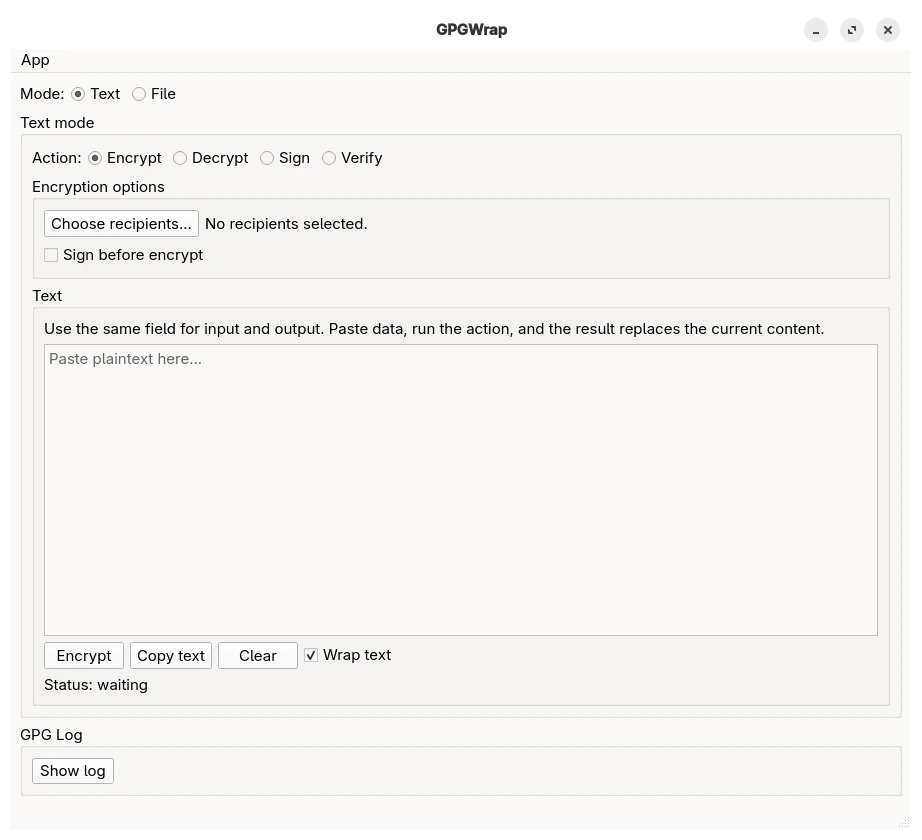
GPGWrap is a lightweight Linux desktop GUI for common OpenPGP tasks using the system gpg binary.
It provides a simple interface for encrypting, decrypting, signing, and verifying text or files, plus basic key management and key generation.
Features
Text mode
- Encrypt text
- Decrypt text
- Sign text
- Verify clear-signed text
- Verify detached signatures
File mode
- Encrypt files
- Decrypt files
- Sign files
- Verify file signatures
Key management
- Import keys from file
- Import armored keys directly from clipboard
- Export public keys
- Copy public key to clipboard
- Delete keys
- Generate new keys
- Sign public keys (local or exportable) after fingerprint verification
- Set ownertrust independently of key signing
Requirements
- Linux desktop environment
- Python 3.10+
gpggpg-agentpinentry
Install with pipx
pipx install gpgwrap
Install directly from GitHub:
pipx install git+https://github.com/h0ek/gpgwrap.git
Run
gpgwrap
Keyboard shortcuts
Ctrl+E— switch to Encrypt and run the action in the current modeCtrl+D— switch to Decrypt and run the action in the current mode
Install desktop launcher and icon
After installation, you can install the desktop entry and icon for the current user:
gpgwrap-install-desktop
After that, GPGWrap should appear in your application menu.
Notes
- GPGWrap uses the system GnuPG installation.
- Your keys remain managed by your local GPG setup.
- The application is intended for desktop Linux use.
- If a message decrypts successfully but the signer public key is missing, GPGWrap will still show the decrypted plaintext and report that signature verification could not be completed.
Upgrade
pipx upgrade gpgwrap
If you installed GPGWrap from GitHub, you may need to force reinstall to get the latest version:
pipx install --force git+https://github.com/h0ek/gpgwrap.git
Uninstall
Remove the application:
pipx uninstall gpgwrap
Remove desktop entry and icon (optional):
rm ~/.local/share/applications/gpgwrap.desktop
rm ~/.local/share/icons/hicolor/256x256/apps/gpgwrap.png
1 maintainer

Release files for gpgwrap 1.2.1
For a detailed explanation of source distributions (sdists) and built distributions (wheels), please see the package formats documentation.
Source distribution (sdist)
| File | Size | Uploaded | |
|---|---|---|---|
| gpgwrap-1.2.1.tar.gz | 71.6 kB | Details |
Built distribution (wheel)
| File | Interpreter | ABI | Platform | Reset |
|---|---|---|---|---|
| gpgwrap-1.2.1-py3-none-any.whl | Python 3 | none | any | Details |
Total release size: 142.5 kB
Release files / gpgwrap-1.2.1.tar.gz
| Download URL | gpgwrap-1.2.1.tar.gz |
|---|---|
| Size | 71.6 kB |
| Tags | Source |
|
SHA-256 checksum How to use checksums |
146f473765df39f4b52a0aacbf4ec7d064f2ae05e5477e89c99117519f2ed023
|
|
BLAKE2b-256 checksum How to use checksums |
351e8d0c21514b1c426b11e00d88827608b2f149ab57854414f50a6a5da1cc25
|
| Upload date | |
|
Uploaded using Trusted Publishing? What is trusted publishing? |
Yes |
| Uploaded via |
twine/6.1.0 CPython/3.13.12
|
Provenance
Provenance describes where a file came from. On PyPI, provenance is shared via attestations, which provide a verifiable record of the build or publishing details. View details, limitations and caveats.


PyPI Publish Attestation
PyPI verified that this artifact, at this checksum, originated from the publisher listed below.
Signed by GitHub Actions, verified by PyPI on Apr 18, 2026.
Transparency logRelease files / gpgwrap-1.2.1-py3-none-any.whl
| Download URL | gpgwrap-1.2.1-py3-none-any.whl |
|---|---|
| Size | 70.9 kB |
| Tags | Python 3 |
|
SHA-256 checksum How to use checksums |
01919a275720e9d97d1d53cac453523e7844822c03d1cefe92c22fd2d832b015
|
|
BLAKE2b-256 checksum How to use checksums |
58cba551b9c06ed3e93f034fbe186729a82123a2fa01861447f8138a871de342
|
| Upload date | |
|
Uploaded using Trusted Publishing? What is trusted publishing? |
Yes |
| Uploaded via |
twine/6.1.0 CPython/3.13.12
|
Provenance
Provenance describes where a file came from. On PyPI, provenance is shared via attestations, which provide a verifiable record of the build or publishing details. View details, limitations and caveats.
PyPI Publish Attestation
PyPI verified that this artifact, at this checksum, originated from the publisher listed below.
Signed by GitHub Actions, verified by PyPI on Apr 18, 2026.
Transparency log













