
Binning plasmid-predicted contigs using short-read graphs


Project description

gplasCC: binning plasmid-predicted contigs
GplasCC is a tool to bin plasmid-predicted contigs based on sequence composition, coverage and assembly graph information. GplasCC is a new version of gplas that allows for plasmid classification of any binary plasmid classifier and extends the possibility of accurately binning predicted plasmid contigs into several discrete plasmid components by also attempting to place unbinned and repeat contigs into plasmid bins.
Table of Contents
- gplasCC: binning plasmid-predicted contigs
- Table of Contents
- Installation
- Usage
- Output files
- Complete usage
- Issues and Bugs
- Contributions
- Citation
Installation
Requirements
An installation of Centrifuge is required if you are using plasmidCC as binary classifier (default). We reccomend using a conda environment with the centrifuge-core package installed.
conda create --name gplasCC -c conda-forge -c bioconda centrifuge-core=1.0.4.1 pip
conda activate gplasCC
If you prefer to use a different binary classifier, you can use gplasCC without installing Centrifuge.
Installation using pip
The prefered way of installing gplasCC is through pip:
pip install gplas
When this has finished, test the installation using
gplas --help
This should should show the help page of gplasCC.
Usage
Using gplasCC with plasmidCC
GplasCC comes built in with plasmidCC as a binary classifier. When using plasmidCC, gplasCC only requires one input file:
- An assembly graph in .gfa format. Such an assembly graph can be obtained by assembling quality trimmed reads using Unicycler (preferred) or with SPAdes genome assembler.
Provide the path to your assembly graph with the -i flag, and select which plasmidCC database to use with the -s flag. Optionally, provide a custom name for your output with the -n flag. See example below:
gplas -i test_ecoli.gfa -s Escherichia_coli -n my_isolate
For an overview of plasmidCC supported species, use the --speciesopts flag:
gplas --speciesopts
Using gplasCC with an external classification tool
If you wish to use a different binary classifier, it is possible to provide your own external plasmid prediction file. We've listed and reviewed several other classifier tools here. Although they are all compatible with gplasCC, extra preprocessing steps are required:
- Use gplasCC to convert the nodes from the assembly graph to FASTA format (most binary classifiers only accept FASTA files as input). To do this, provide your assembly graph (.gfa) and include the --extract flag.
gplas -i test_ecoli.gfa --extract -n my_isolate
The output FASTA file will be located in: gplas_input/my_isolate_contigs.fasta. By default, this file will only contain contigs larger than 1000 bp, however, this can be controlled with the -l flag.
-
Use this FASTA file as an input for the binary classification tool of your choice.
-
Format the output file:
The output from the binary classification tool has to be formatted as a tab separated file containing specific columns and headers (case sensitive). See an example below:
head -n 4 test_ecoli_plasmid_prediction.tab
| Prob_Chromosome | Prob_Plasmid | Prediction | Contig_name | Contig_length |
|---|---|---|---|---|
| 1.0 | 0.0 | Chromosome | S1_LN:i:374865_dp:f:1.0749885035087077 | 374865 |
| 1.0 | 0.0 | Chromosome | S10_LN:i:198295_dp:f:0.8919341045340952 | 198295 |
| 0.0 | 1.0 | Plasmid | S20_LN:i:91233_dp:f:0.5815421095375989 | 91233 |
For proper compatability with gplasCC, please make sure your prediction file is tab-separated, and uses the correct (case sensitive) column names and prediction labels (Plasmid/Chromosome).
Once you've formatted the prediction file as above, move to Predict plasmids.
Predict plasmids
After pre-processing, we are now ready to predict individual plasmids.
Provide the paths to your assembly graph, using the -i flag, and to your binary classification file, with the -P flag. Optionally, provide a custom name for your output with the -n flag. See example below:
gplas -i test_ecoli.gfa -P test_ecoli_plasmid_prediction.tab -n my_isolate
Output files
GplasCC will create a folder called ‘results’ with the following files:
ls results/my_isolate*
## results/my_isolate_bin_0.fasta
## results/my_isolate_bin_1.fasta
## results/my_isolate_bin_2.fasta
## results/my_isolate_bins.tab
## results/my_isolate_chromosome_repeats.tab
## results/my_isolate_plasmidome_network.png
## results/my_isolate_results.tab
results/*.fasta
Fasta files with the contigs belonging to each predicted plasmid bin.
grep '>' results/my_isolate*.fasta
>S20_LN:i:91233_dp:f:0.5815421095375989
>S1_LN:i:374865_dp:f:1.0749885035087077
>S32_LN:i:42460_dp:f:0.6016122804021161
>S44_LN:i:21171_dp:f:0.5924640018897323
>S47_LN:i:17888_dp:f:0.5893320957724726
>S48_LN:i:11703_dp:f:1.1884320594277211
>S50_LN:i:11225_dp:f:0.6758514700227541
>S56_LN:i:6837_dp:f:0.5759570101860518
>S59_LN:i:5519_dp:f:0.5544497698217399
>S67_LN:i:2826_dp:f:0.6746421335091037
>S70_LN:i:2125_dp:f:9.215759397832965
>S76_LN:i:1486_dp:f:1.3509551203209675
>S84_LN:i:1063_dp:f:3.2697611578099566
results/*bins.tab
Tab delimited file containing a short overview showing the contigs that got assigned to each plasmid bin.
| number | Bin |
|---|---|
| 1 | 1 |
| 20 | 0 |
| 32 | 1 |
| 44 | 1 |
| 47 | 1 |
| 48 | 1 |
| 50 | 1 |
| 56 | 1 |
| 59 | 1 |
| 67 | 1 |
| 70 | 1 |
| 76 | 1 |
| 84 | 1 |
results/*results.tab
Tab delimited file containing the classification given by plasmidCC (or other binary classification tool) together with the bin prediction from gplasCC. The file contains the following information: contig number, contig name, probability of being chromosome-derived, probability of being plasmid-derived, class prediction, length, k-mer coverage, assigned bin.
| Prob_Chromosome | Prob_Plasmid | Prediction | Contig_name | number | length | coverage | Bin |
|---|---|---|---|---|---|---|---|
| 1.0 | 0.0 | Repeat | S1_LN:i:374865_dp:f:1.0749885035087077 | 1 | 374865 | 1.07 | 1 |
| 1.0 | 0.0 | Repeat | S48_LN:i:11703_dp:f:1.1884320594277211 | 48 | 11703 | 1.19 | 1 |
| 0.5 | 0.5 | Repeat | S70_LN:i:2125_dp:f:9.215759397832965 | 70 | 2125 | 9.22 | 1 |
| 0.0 | 1.0 | Repeat | S76_LN:i:1486_dp:f:1.3509551203209675 | 76 | 1486 | 1.35 | 1 |
| 0.78 | 0.22 | Repeat | S84_LN:i:1063_dp:f:3.2697611578099566 | 84 | 1063 | 3.27 | 1 |
| 0.0 | 1.0 | Plasmid | S20_LN:i:91233_dp:f:0.5815421095375989 | 20 | 91233 | 0.58 | 0 |
| 0.0 | 1.0 | Plasmid | S32_LN:i:42460_dp:f:0.6016122804021161 | 32 | 42460 | 0.6 | 1 |
| 0.0 | 1.0 | Plasmid | S44_LN:i:21171_dp:f:0.5924640018897323 | 44 | 21171 | 0.59 | 1 |
| 0.0 | 1.0 | Plasmid | S47_LN:i:17888_dp:f:0.5893320957724726 | 47 | 17888 | 0.59 | 1 |
| 0.0 | 1.0 | Plasmid | S50_LN:i:11225_dp:f:0.6758514700227541 | 50 | 11225 | 0.68 | 1 |
| 0.0 | 1.0 | Plasmid | S56_LN:i:6837_dp:f:0.5759570101860518 | 56 | 6837 | 0.58 | 1 |
| 0.0 | 1.0 | Plasmid | S59_LN:i:5519_dp:f:0.5544497698217399 | 59 | 5519 | 0.55 | 1 |
| 0.0 | 1.0 | Plasmid | S67_LN:i:2826_dp:f:0.6746421335091037 | 67 | 2826 | 0.67 | 1 |
results/*chromosome_repeats.tab
Tab delimited file showing which contigs got assigned as chromosomal repeats.
| number | Bin |
|---|---|
| 1 | Chromosome |
| 48 | Chromosome |
| 55 | Chromosome |
| 66 | Chromosome |
| 68 | Chromosome |
| 70 | Chromosome |
| 74 | Chromosome |
| 79 | Chromosome |
| 81 | Chromosome |
| 84 | Chromosome |
results/*plasmidome_network.png
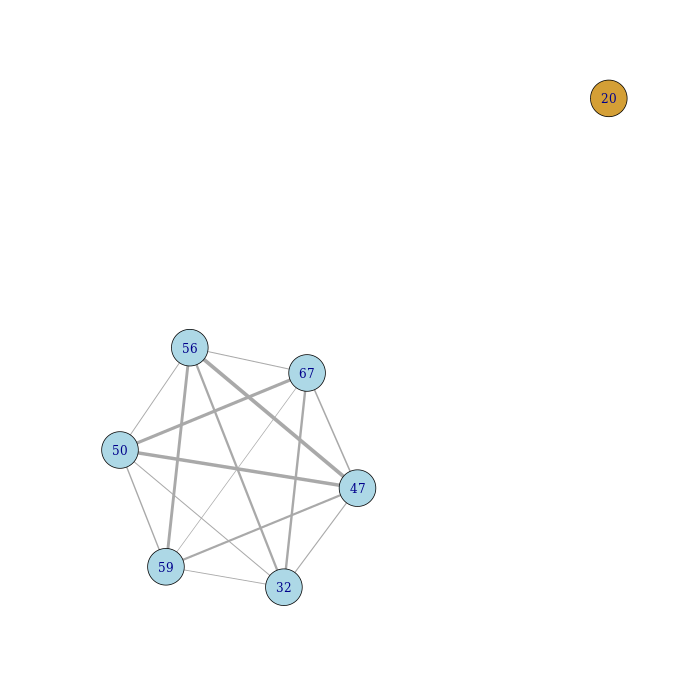
A visual representation of the plasmidome network generated by gplasCC. The network is created using an undirected graph with edges between plasmid unitigs co-existing in the random walks created by gplasCC.
Intermediary results files
If the -k flag is selected, gplasCC will also keep all intermediary files needed to construct the plasmid predictions. For example:
walks/normal_mode/*solutions.tab
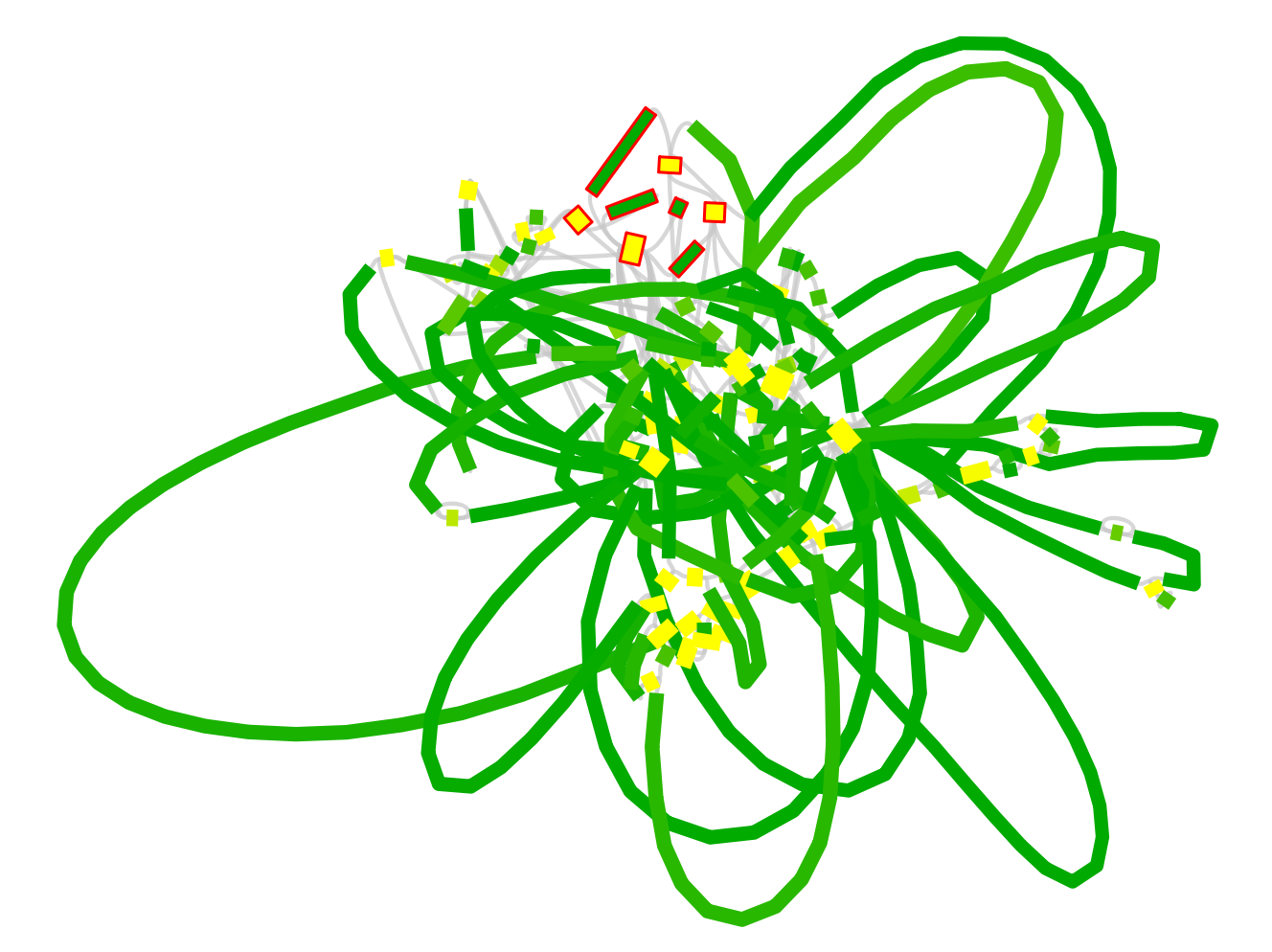
gplasCC generates plasmid-like walks for each plasmid starting node. These paths are later used to generate the edges of the plasmidome network, but they can also be useful to observe all the different walks starting from a single node (plasmid unitig). These walks can be directly given to Bandage to visualize and manually inspect a walk.
In the example below, we find different possible plasmid walks starting from the node 67-. These paths may contain inversions and rearrangements since repeats units, such as transposases, can be present several times within the same plasmid sequence. In these cases, gplasCC can traverse the sequence in different ways generating different plasmid-like paths.
tail -n 10 walks/normal_mode/my_isolate_solutions.tab
67-,70-,50-,143-
67-,70-,50-,143-
67-,70-,50-,143-
67-,70-,47+,117-,84-,59+,70-,50-,143-
67-,70-,50-,143-
67-,70-,50-,143-
67-,70-,47+,117-,84-,59+,70-,50-,143-
67-,70-,47+,117-,84-,59+,70-,50-,143-
67-,70-,50-,143-
67-,70-,50-,143-
We can use Bandage to inspect the following path on the assembly graph: 67-,70-,47+,117-,84-,59+,70-,50-,143-
Complete usage
gplas --help
usage: gplas -i INPUT [-n NAME]
             (-s SPECIES | -p CUSTOM_DB_PATH | -P PREDICTION | --extract)
             [-t THRESHOLD_PREDICTION] [-b BOLD_COVERAGE_SD]
             [-x NUMBER_ITERATIONS] [-f FILT_GPLAS] [-e EDGE_THRESHOLD]
             [-q MODULARITY_THRESHOLD] [-l LENGTH_FILTER] [-k]
             [--speciesopts] [-v] [-h]

gplasCC: A tool for binning plasmid-predicted contigs into individual
predictions

General:
  -i INPUT              Path to the graph file in GFA (.gfa) format, used
                        to extract nodes and links
  -n NAME               Name prefix for output files (default: input file
                        name)
  -s SPECIES            Choose a species database for plasmidCC
                        classification. Use --speciesopts for a list of
                        all supported species
  -p CUSTOM_DB_PATH     Path to a custom Centrifuge database (name without
                        file extensions)
  -P PREDICTION         If not using plasmidCC. Provide a path to an
                        independent binary classification file
  --extract             extract FASTA sequences from the assembly graph to
                        use with an external classifier

Parameters:
  -t THRESHOLD_PREDICTION
                        Prediction threshold for plasmid-derived sequences
                        (default: 0.5)
  -b BOLD_COVERAGE_SD   Coverage variance allowed for bold walks to
                        recover unbinned plasmid-predicted nodes (default:
                        5)
  -x NUMBER_ITERATIONS  Number of walk iterations per starting node
                        (default: 20)
  -f FILT_GPLAS         filtering threshold to reject outgoing edges
                        (default: 0.1)
  -e EDGE_THRESHOLD     Edge threshold (default: 0.1)
  -q MODULARITY_THRESHOLD
                        Modularity threshold to split components in the
                        plasmidome network (default: 0.2)
  -l LENGTH_FILTER      Filtering threshold for sequence length (default:
                        1000)

Other:
  -k, --keep            Keep intermediary files

Info:
  --speciesopts         Prints a list of all supported species for the -s
                        flag
  -v, --version         Prints gplas version
  -h, --help            Prints this message
Issues and Bugs
You can report any issues or bugs that you find while installing/running gplasCC using the issue tracker.
Contributions
GplasCC has been developed with contributions from Oscar Jordan, Julian Paganini, Jesse Kerkvliet, Malbet Rogers, Sergio Arredondo and Anita Schürch.
Citation
A publication is in preparation. If you used an earlier version of gplas in your study, please cite: https://doi.org/10.1093/bioinformatics/btaa233 https://doi.org/10.1099/mgen.0.001193
Release history Release notifications | RSS feed


Download files
Download the file for your platform. If you're not sure which to choose, learn more about installing packages.
Source Distribution
Built Distribution
Filter files by name, interpreter, ABI, and platform.
If you're not sure about the file name format, learn more about wheel file names.
Copy a direct link to the current filters
File details
Details for the file gplas-1.0.1.tar.gz.
File metadata
- Download URL: gplas-1.0.1.tar.gz
- Upload date:
- Size: 3.2 MB
- Tags: Source
- Uploaded using Trusted Publishing? No
- Uploaded via: twine/6.1.0 CPython/3.13.5
File hashes
| Algorithm | Hash digest | |
|---|---|---|
| SHA256 |
bb83324c8928f3a838b3daa198d5652d9efedf077c7ffc053ae541fe93ec03ad
|
|
| MD5 |
81cc40eab730617221c344f42d5e1252
|
|
| BLAKE2b-256 |
7287abf33c7597245edbe2e78a93f793a19e4df8e81d540e612fbc13f41335ac
|
File details
Details for the file gplas-1.0.1-py3-none-any.whl.
File metadata
- Download URL: gplas-1.0.1-py3-none-any.whl
- Upload date:
- Size: 48.4 kB
- Tags: Python 3
- Uploaded using Trusted Publishing? No
- Uploaded via: twine/6.1.0 CPython/3.13.5
File hashes
| Algorithm | Hash digest | |
|---|---|---|
| SHA256 |
243c8a5eea37ccf9481c8a10126b69f265d2252b0426854aca20242375f2a51a
|
|
| MD5 |
386cd334f8b790a7ae1ea3489a635e24
|
|
| BLAKE2b-256 |
00668edcf506ef4edf1b3dfa2050fb70bfec6c537d84632c42f79aa8587f4e2d
|






