
gpp-cpass-decrypt




Python 3 script that decrypts credentials (cPassword) stored in Group Policy Preferences (GPP) files (Groups.xml) located in the SYSVOL folder.
A very handy and useful tool for Ethical Hackers during Penetration Testing Projects, Red Team Exercises or CTFs involving attacks to Active Directory infrastructures.
If you find gpp-cpass-decrypt useful, please 
Clone Repo
git clone https://github.com/galoget/gpp-cpass-decrypt
Install Dependencies
This tool has 2 dependencies:
In order to avoid conflicts with any other installed modules in your system, it is recommended (not mandatory) to use a virtual environment (virtualenv).
Both dependencies are included in requirements.txt and can be installed in any of the following ways (just use one method):
Method 1
By doing the automated installation from PyPi with pip3, this command will install all dependencies (pip3 MUST be installed in your system):
pip3 install gpp-cpass-decrypt
With this method you can use the tool as any other command without calling it with Python (don't forget to add your pip binary path to your PATH variable).
In Kali Linux this is the default path you need to add to your PATH environment variable.
/home/kali/.local/bin
Then, simply run:
gpp_cpass_decrypt -c <base64_encoded_cpassword>
Method 2
By using pip3 and installing the dependencies manually (pip3 MUST be installed in your system):
pip3 install pycryptodome colorama
Method 3
By using pip3 and requirements.txt. Again pip3 MUST be installed in your system:
pip3 install -r requirements.txt
Method 4
By using setuptools:
python3 setup.py install
From Method 2 to Method 4. In case you don't want to install the tool in your system. You can use it as a Python script that is not managed by pip:
python3 gpp_cpass_decrypt.py -c <base64_encoded_cpassword>
Running the tool
You can run the tool with any of the following commands. They are equivalent:
python3 gpp_cpass_decrypt.py -c <base64_encoded_cpassword>
python3 gpp_cpass_decrypt.py --cpassword <base64_encoded_cpassword>
Execution Example
Command:
Installed using Method 1:
gpp_cpass_decrypt -c "gtTqxKHj4RWsxHWcZcWtM8j7XbxiL7w+SwIyQbAetjEUfqBg2HmTklEXlDHuQPgE3NyuCKZ9Nu3oeXaeSt+9JQ=="
Expected Output:
Decrypted Password: Hackem Cybersecurity Research Group
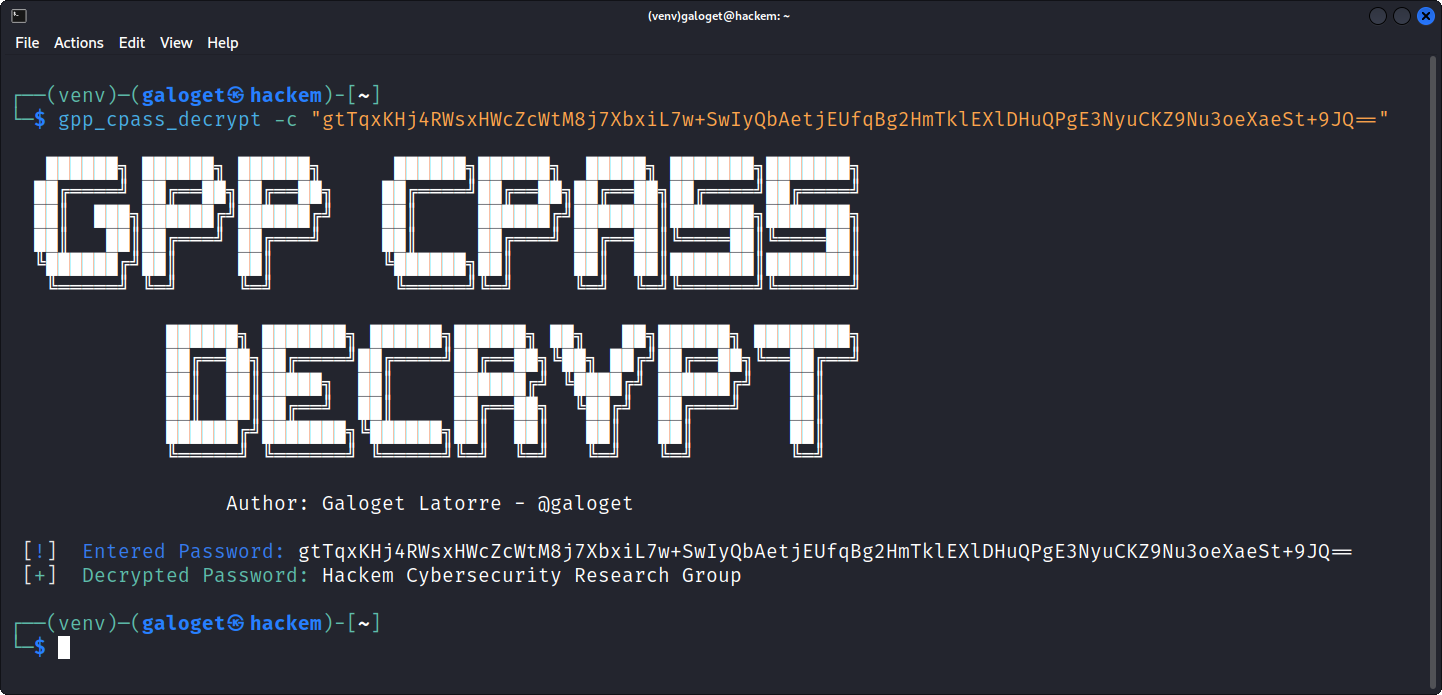
More Examples:
You can continue testing the tool with the following encrypted strings:
Ciphertext 1: YTGHyibeELFS0elGK9Z40dryAJbGpDAMwgW3DakPXyE=
Plaintext 1: Hello World
Ciphertext 2: FhkrztByQuGCkRwrk18AUp/qLNAG33QC/96rUFoSQm+2O8jPqTtAeoOig3mhfsFGr6NsKrZBiI4d6iy8Jro/Bw==
Plaintext 2: HackemCTF{R3d_T34m_0p3r4t0r_3xp3rt_8724376348734}
Ciphertext 3: c+jaRBWag4oGSHYnF73o1snzocCYsF2EP1DO7CFbe70=
Plaintext 3: Cryptography is Fun
Disclaimer
This tool can only be used where strict consent has been given. Do not use it for illegal purposes! It is the end user’s responsibility to obey all applicable local, state and federal laws. Developers assume no liability and are not responsible for any misuse or damage caused by any of the tools included in this repository.
License
This Project is licensed under GNU GPLv2.0 License. For any further detailes, please see the LICENSE file included in this repository.
Contact
In case you:
- Want to report a bug or any unexpected behavior
- Want to collaborate with the project or have an interesting ideas on how to improve it (new features)
- Have any questions about the tool that are not documented in the repository
You can contact the author directly in this link via a private message.
1 maintainer

Metadata
1 maintainer
Release files for gpp-cpass-decrypt 0.0.1
For a detailed explanation of source distributions (sdists) and built distributions (wheels), please see the package formats documentation.
Source distribution (sdist)
| File | Size | Uploaded | |
|---|---|---|---|
| gpp-cpass-decrypt-0.0.1.tar.gz | 21.1 kB | Details |
Built distribution (wheel)
| File | Interpreter | ABI | Platform | Reset |
|---|---|---|---|---|
| gpp_cpass_decrypt-0.0.1-py3-none-any.whl | Python 3 | none | any | Details |
Total release size: 40.5 kB
Release files / gpp-cpass-decrypt-0.0.1.tar.gz
| Download URL | gpp-cpass-decrypt-0.0.1.tar.gz |
|---|---|
| Size | 21.1 kB |
| Tags | Source |
|
SHA-256 checksum How to use checksums |
7e951a1c2b58a288ab987a7db827196e78876ece6a53d11886c451184ef8fb12
|
|
BLAKE2b-256 checksum How to use checksums |
610142d7092ed139bec1ab41d6f34c0269a57ce92464aebdac87b171c8a9de0b
|
| Upload date | |
|
Uploaded using Trusted Publishing? What is trusted publishing? |
No |
| Uploaded via |
twine/4.0.1 CPython/3.10.4
|
Release files / gpp_cpass_decrypt-0.0.1-py3-none-any.whl
| Download URL | gpp_cpass_decrypt-0.0.1-py3-none-any.whl |
|---|---|
| Size | 19.3 kB |
| Tags | Python 3 |
|
SHA-256 checksum How to use checksums |
21c872d17df350524be0758ae2564744f67941c12d620c294cdc030c791ea60d
|
|
BLAKE2b-256 checksum How to use checksums |
f8bbac975fe115030d06b70463f9e2755c225c46bffa8a5bf414487032db66b1
|
| Upload date | |
|
Uploaded using Trusted Publishing? What is trusted publishing? |
No |
| Uploaded via |
twine/4.0.1 CPython/3.10.4
|













