
GPP-Decrypt




A tool to decrypt Group Policy Preferences (GPP) passwords
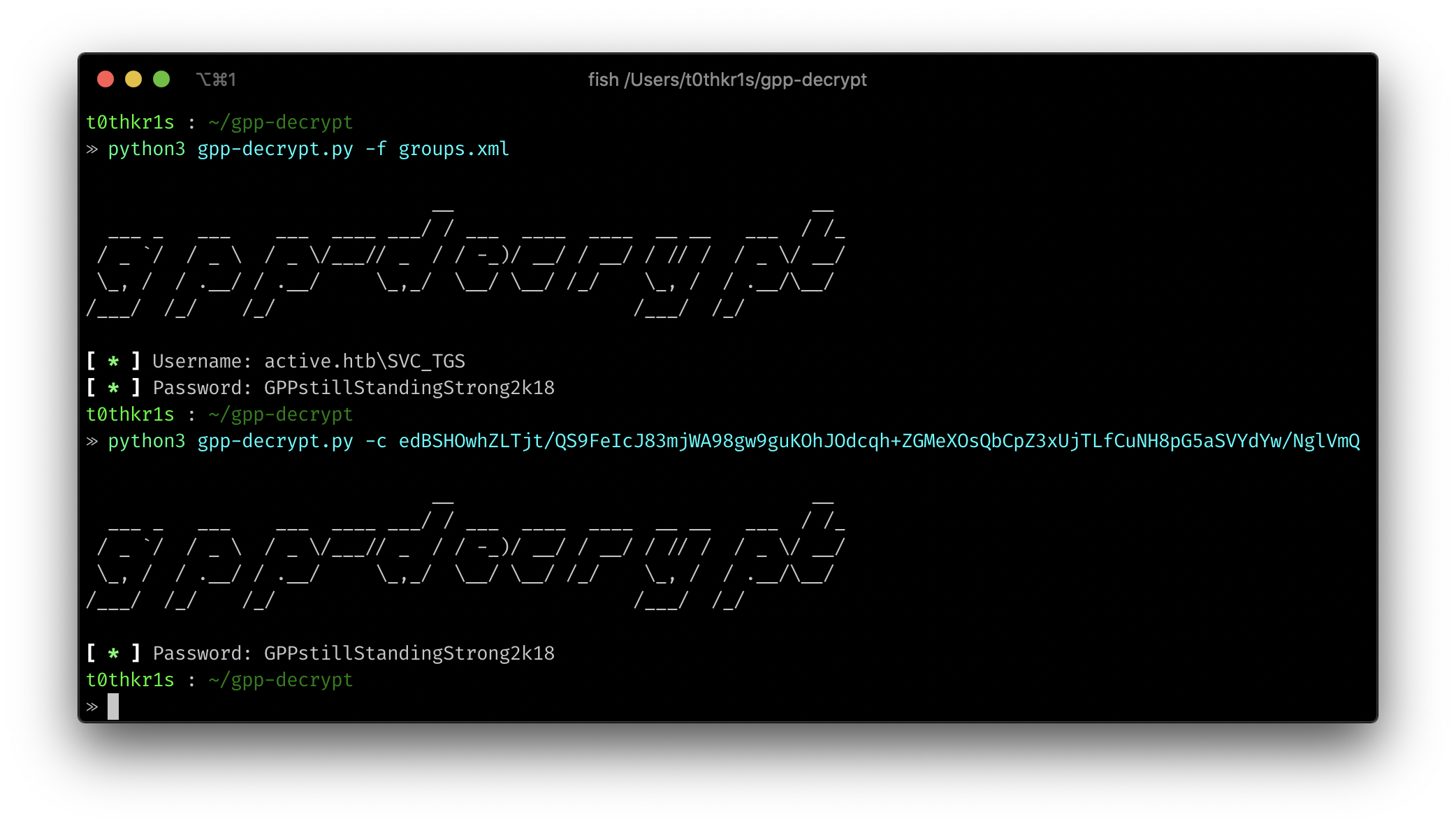
About
Group Policy Preferences (GPP) was introduced in Windows Server 2008 and allows administrators to set domain passwords via Group Policy. However, the passwords are encrypted with a publicly known AES-256 key, making them trivial to decrypt.
This tool decrypts these passwords from GPP XML files commonly found in SYSVOL shares.
Note: Microsoft released MS14-025 which prevents new credentials from being stored in GPP. However, existing GPP XML files with encrypted passwords may still exist in many environments.
Installation
From PyPI (Recommended)
pip install gpp-decrypt
From Source
git clone https://github.com/t0thkr1s/gpp-decrypt.git
cd gpp-decrypt
pip install .
Using Docker
docker build -t gpp-decrypt .
docker run -v $(pwd):/data gpp-decrypt -f /data/groups.xml
Usage
Command Line Interface
# Decrypt passwords from a GPP XML file
gpp-decrypt -f groups.xml

# Decrypt a single cpassword
gpp-decrypt -c "j1Uyj3Vx8TY9LtLZil2uAuZkFQA/4latT76ZwgdHdhw"

# Show verbose output
gpp-decrypt -f groups.xml --verbose

# Suppress banner
gpp-decrypt -f groups.xml --no-banner
As a Python Library
from gpp_decrypt import decrypt_password, parse_xml_file

# Decrypt a single password
password = decrypt_password("j1Uyj3Vx8TY9LtLZil2uAuZkFQA/4latT76ZwgdHdhw")
print(f"Decrypted: {password}")

# Parse and decrypt from XML file
results = parse_xml_file("groups.xml")
for cred in results:
    print(f"Username: {cred['username']}, Password: {cred['password']}")
Example
GPP XML files are typically found in the SYSVOL share of a domain controller:
\\<DOMAIN>\SYSVOL\<DOMAIN>\Policies\{<POLICY_GUID>}\Machine\Preferences\Groups\Groups.xml
\\<DOMAIN>\SYSVOL\<DOMAIN>\Policies\{<POLICY_GUID>}\User\Preferences\Groups\Groups.xml
Example Groups.xml structure:
<?xml version="1.0" encoding="utf-8"?>
<Groups clsid="{3125E937-EB16-4b4c-9934-544FC6D24D26}">
  <User clsid="{DF5F1855-51E5-4d24-8B1A-D9BDE98BA1D1}"
        name="Administrator"
        image="2"
        changed="2023-01-01 00:00:00"
        uid="{EF57DA28-5F69-4530-A59E-AAB58578219D}">
    <Properties action="U"
                newName=""
                fullName=""
                description=""
                cpassword="j1Uyj3Vx8TY9LtLZil2uAuZkFQA/4latT76ZwgdHdhw"
                changeLogon="0"
                noChange="1"
                neverExpires="1"
                acctDisabled="0"
                userName="Administrator"/>
  </User>
</Groups>
References
- Microsoft's MS14-025 Security Bulletin
- Original GPP Decrypt Research
- Group Policy Preferences and Getting Your Domain 0wned
License
This project is licensed under the GNU General Public License v3.0 - see the LICENSE file for details.
Disclaimer
This tool is designed for authorized security testing and system administration only. Users are responsible for complying with all applicable laws and regulations. The authors assume no liability for misuse or damage caused by this program.
1 maintainer

Metadata
1 maintainer
Release files for gpp-decrypt 2.0.0
For a detailed explanation of source distributions (sdists) and built distributions (wheels), please see the package formats documentation.
Source distribution (sdist)
| File | Size | Uploaded | |
|---|---|---|---|
| gpp_decrypt-2.0.0.tar.gz | 20.3 kB | Details |
Built distribution (wheel)
| File | Interpreter | ABI | Platform | Reset |
|---|---|---|---|---|
| gpp_decrypt-2.0.0-py3-none-any.whl | Python 3 | none | any | Details |
Total release size: 39.7 kB
Release files / gpp_decrypt-2.0.0.tar.gz
| Download URL | gpp_decrypt-2.0.0.tar.gz |
|---|---|
| Size | 20.3 kB |
| Tags | Source |
|
SHA-256 checksum How to use checksums |
347748f0f58e1cc7542065da3aa77d8d593ca253743b64a3824cf0c6f7d86892
|
|
BLAKE2b-256 checksum How to use checksums |
ab8b61fb00382679d889f0f8d2542561eee007a62629c1ea15fb28960d22fce1
|
| Upload date | |
|
Uploaded using Trusted Publishing? What is trusted publishing? |
Yes |
| Uploaded via |
twine/6.1.0 CPython/3.12.9
|
Provenance
Provenance describes where a file came from. On PyPI, provenance is shared via attestations, which provide a verifiable record of the build or publishing details. View details, limitations and caveats.


PyPI Publish Attestation
PyPI verified that this artifact, at this checksum, originated from the publisher listed below.
Signed by GitHub Actions, verified by PyPI on Aug 6, 2025.
Transparency logRelease files / gpp_decrypt-2.0.0-py3-none-any.whl
| Download URL | gpp_decrypt-2.0.0-py3-none-any.whl |
|---|---|
| Size | 19.4 kB |
| Tags | Python 3 |
|
SHA-256 checksum How to use checksums |
88b57b134cbdc5300baa0356a38da2da1a5ce726b77e0e7124e91ae207f7af07
|
|
BLAKE2b-256 checksum How to use checksums |
4d9bba014a9a972674d2beb6f1ab69ee5751c9b881647a4009c5928001c540b9
|
| Upload date | |
|
Uploaded using Trusted Publishing? What is trusted publishing? |
Yes |
| Uploaded via |
twine/6.1.0 CPython/3.12.9
|
Provenance
Provenance describes where a file came from. On PyPI, provenance is shared via attestations, which provide a verifiable record of the build or publishing details. View details, limitations and caveats.
PyPI Publish Attestation
PyPI verified that this artifact, at this checksum, originated from the publisher listed below.
Signed by GitHub Actions, verified by PyPI on Aug 6, 2025.
Transparency log












