
GPPC (Gold Piece Price Checker)
Check OSRS Grand Exchange prices from the command line. Includes module functionality to check full price history of an item. Features caching capability to save item price histories for future use.
Usage
Installation
$ pip install gppc
or
$ git clone https://github.com/moxxos/gppc.git
$ cd gppc
$ pip install .
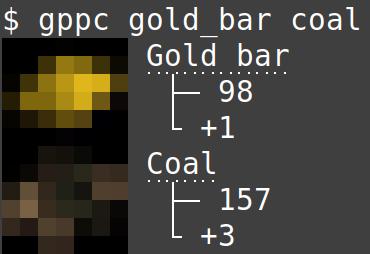
Get the price and recent 24h change of many different items on the OSRS Grand Exchange straight from the command line.
$ gppc 'gold bar' coal
$ gppc gold_bar coal
Import as a module.
>>> import gppc
>>> gppc.search('coal')
Create item instances to check item price and volume history. 4 different intervals available.
>>> from gppc import Item
>>> coal = Item('coal')
Past 1 day history at 5-minute intervals.
>>> coal.history_1day
              timestamp  avgHighPrice  avgLowPrice  highPriceVolume  lowPriceVolume
0   2023-09-20 04:15:00         276.0          264            18195           31276
1   2023-09-20 04:20:00         289.0          265             7124           82582
2   2023-09-20 04:25:00         278.0          262            18889           80672
..                  ...           ...          ...              ...             ...
362 2023-09-21 11:20:00         256.0          244            26604           89559
363 2023-09-21 11:25:00         256.0          243            42930          194245
364 2023-09-21 11:30:00         256.0          244            22929           66926

[365 rows x 5 columns]
Past 1 year history at 1-day intervals.
>>> coal.history_1year
              timestamp  avgHighPrice  avgLowPrice  highPriceVolume  lowPriceVolume
0   2022-09-20 20:00:00           144          142          7290293         8857481
1   2022-09-21 20:00:00           144          143          5821183         8728784
2   2022-09-22 20:00:00           147          145          5148730         9724897
..                  ...           ...          ...              ...             ...
362 2023-09-17 20:00:00           221          217          8200818        14460078
363 2023-09-18 20:00:00           243          236          8815340        20995587
364 2023-09-19 20:00:00           236          235          8746294        17259336

[365 rows x 5 columns]
Two other intervals available for 2 week and 3 month histories.
>>> hist_2week = coal.history_2week
>>> hist_3month = coal.history_3month
Save multiple item histories for future use depending on which histories you have accessed.
>>> coal_hist_1d = coal.history_1day
>>> coal_hist_2w = coal.history_2week
>>> coal_hist_3m = coal.history_3month
>>> coal_hist_1y = coal.history_1year
>>> coal.save_history()
1281 new records added for item: Coal

>>> bond_hist_1y = bond.history_1year
>>> bond.save_history()
365 new records added for item: Old school bond
Check item full history if past history is saved.
>>> coal.full_history
               timestamp  avgHighPrice  avgLowPrice  highPriceVolume  lowPriceVolume
0    2022-09-20 20:00:00         144.0          142          7290293         8857481
1    2022-09-21 20:00:00         144.0          143          5821183         8728784
2    2022-09-22 20:00:00         147.0          145          5148730         9724897
...                  ...           ...          ...              ...             ...
1278 2023-09-21 18:20:00         253.0          245             2090           47719
1279 2023-09-21 18:25:00         252.0          245            11647           70886
1280 2023-09-21 18:30:00         246.0          244            20901           49703

[1281 rows x 5 columns]
Create catalogs to easily manipulate lists of items.
>>> from gppc import Catalog
>>> ores = Catalog('copper ore', 'tin ore', 'iron ore', 'gold ore', 'silver ore', 'mithril ore', 'adamantite ore', 'runite ore')
>>> ores.sort()
>>> ores
['Adamantite ore', 'Copper ore', 'Gold ore', 'Iron ore', 'Mithril ore', 'Runite ore', 'Silver ore', 'Tin ore']
>>> ores.remove('Gold ore')
>>> ores
['Adamantite ore', 'Copper ore', 'Iron ore', 'Mithril ore', 'Runite ore', 'Silver ore', 'Tin ore']
Save the history of all items in your catalog.
>>> ores.save_history('1day')
365 new records added for item: Adamantite ore
365 new records added for item: Copper ore
365 new records added for item: Iron ore
365 new records added for item: Mithril ore
365 new records added for item: Runite ore
365 new records added for item: Silver ore
365 new records added for item: Tin ore
A catalog with no arguments creates a full list of all items in the Grand Exchange.
>>> all_items = Catalog()
>>> len(all_items)
4005
Updates
CHANGELOG
TODO
- Finish command line display
- Add tests and documentation
[0.1.8] - 2023-9-23
API rewrite for faster save time
Added Catalog
[0.1.6] - 2022-12-04
New Item module
[0.1.5] - 2022-10-18
Display output now works on Windows.
Added image caching.
[0.1.4] - 2022-10-07
Removed pycache from repo.
Added MANIFEST.in to process CHANGELOG.md during build process.
[0.1.3] - 2022-10-07
Fixed README and description for build and setup.
PYPI description now renders correctly.
[0.1.1] - 2022-10-06
Now works. Also displays item images.
[0.1.0] - 2022-09-12
Configured pyproject.toml
1 maintainer

Metadata
1 maintainer
Release files for gppc 0.1.12
For a detailed explanation of source distributions (sdists) and built distributions (wheels), please see the package formats documentation.
Source distribution (sdist)
| File | Size | Uploaded | |
|---|---|---|---|
| gppc-0.1.12.tar.gz | 28.0 kB | Details |
Built distribution (wheel)
| File | Interpreter | ABI | Platform | Reset |
|---|---|---|---|---|
| gppc-0.1.12-py3-none-any.whl | Python 3 | none | any | Details |
Total release size: 55.9 kB
Release files / gppc-0.1.12.tar.gz
| Download URL | gppc-0.1.12.tar.gz |
|---|---|
| Size | 28.0 kB |
| Tags | Source |
|
SHA-256 checksum How to use checksums |
5235ea442bc861d60e58e628f467c7f6e8f90daccad6f6d6c86e142363e45b4e
|
|
BLAKE2b-256 checksum How to use checksums |
d1a34f9be9f14e0d721b5ed080375a215b88fedaff108b31e7136f6ce1d6e281
|
| Upload date | |
|
Uploaded using Trusted Publishing? What is trusted publishing? |
No |
| Uploaded via |
twine/6.0.1 CPython/3.13.2
|
Release files / gppc-0.1.12-py3-none-any.whl
| Download URL | gppc-0.1.12-py3-none-any.whl |
|---|---|
| Size | 27.8 kB |
| Tags | Python 3 |
|
SHA-256 checksum How to use checksums |
f33527105a77276732f0a3a35fccba5634c556bd18818aa9d372b430af507125
|
|
BLAKE2b-256 checksum How to use checksums |
923014df01c1b6392da8c0aa81d2994f20dc7c1ea167a4d416995fadd1d96ab9
|
| Upload date | |
|
Uploaded using Trusted Publishing? What is trusted publishing? |
No |
| Uploaded via |
twine/6.0.1 CPython/3.13.2
|














