
Web UI for telemetry video overlay configuration and preview
Verified details
These details have been verified by PyPIProject links
GitHub Statistics
Maintainers

Project description
GPStitch





A visual web interface for creating video overlays with GPS telemetry data. Wraps the powerful gopro-overlay library with an intuitive UI.
Features
- Quick Mode — Select from predefined layouts, customize units and map styles
- Advanced Mode — Visual drag-and-drop editor for creating custom overlay layouts
- Live Preview — See your overlay in real-time as you configure it
- DJI Drone Support — Automatic SRT telemetry parsing with timezone and time alignment auto-detection
- DJI Osmo Action Support — Automatic detection of embedded GPS from DJI GPS Bluetooth Remote Controller (Action 4/5/6) — no secondary file needed
- Non-GoPro Video Support — Use any video with external GPX/FIT/SRT files for GPS data
- Vertical Video Support — Automatic rotation detection and correct overlay rendering
- GPS Quality Analysis — Automatic signal quality check with warnings before rendering
- Template Management — Save and load custom templates
- Batch Rendering — Process multiple files with the same settings
- Shared GPX Batch Render — Apply a single GPX track to multiple videos with automatic odometer offset per video
- Background Jobs — Render videos in the background with progress tracking
- Overlay-Only Mode — Render transparent telemetry overlays (no video) for compositing in Final Cut Pro, DaVinci Resolve, etc.
Screenshots
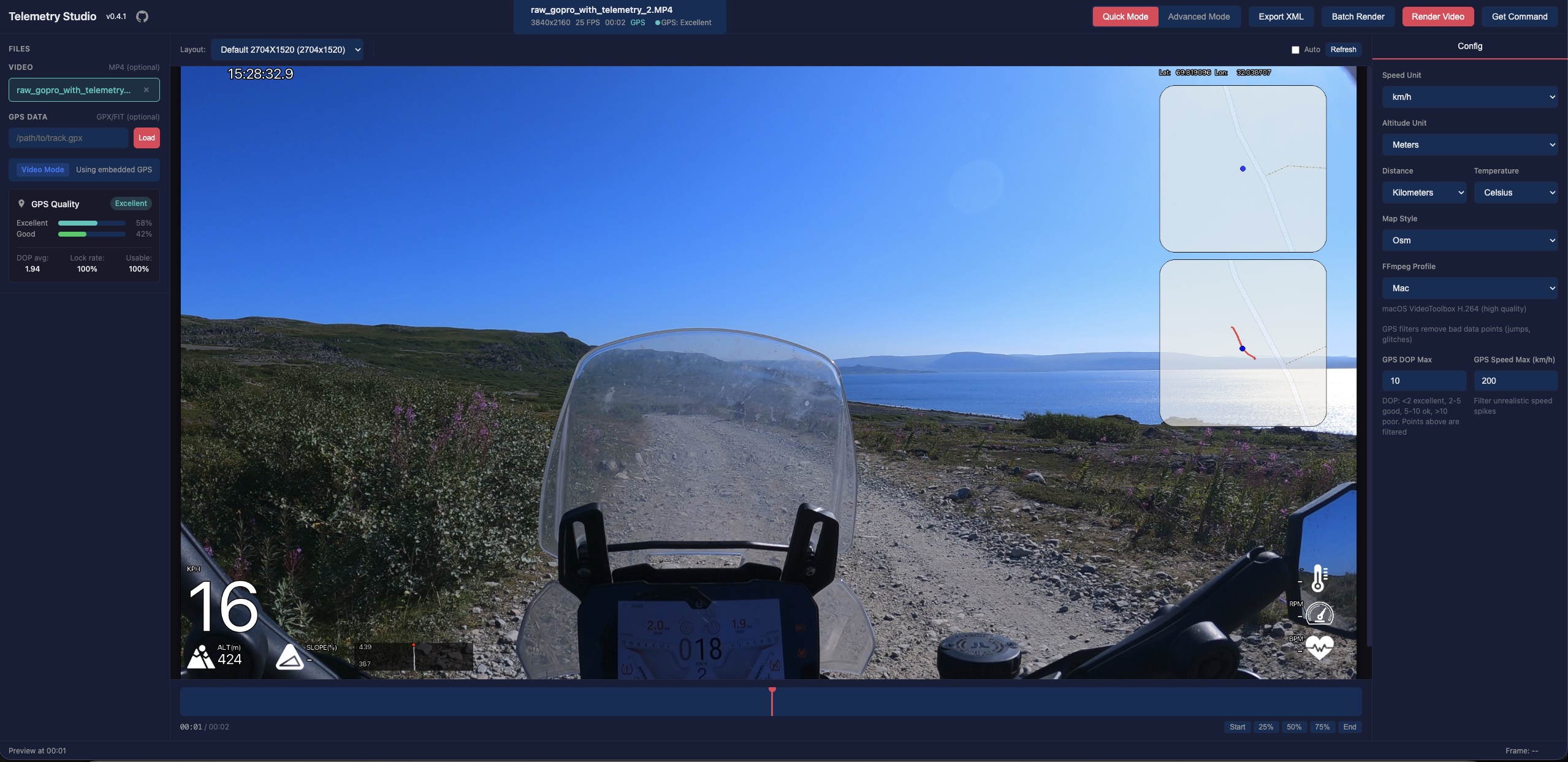
Quick Mode
Simple configuration with predefined layouts. Perfect for quick renders.
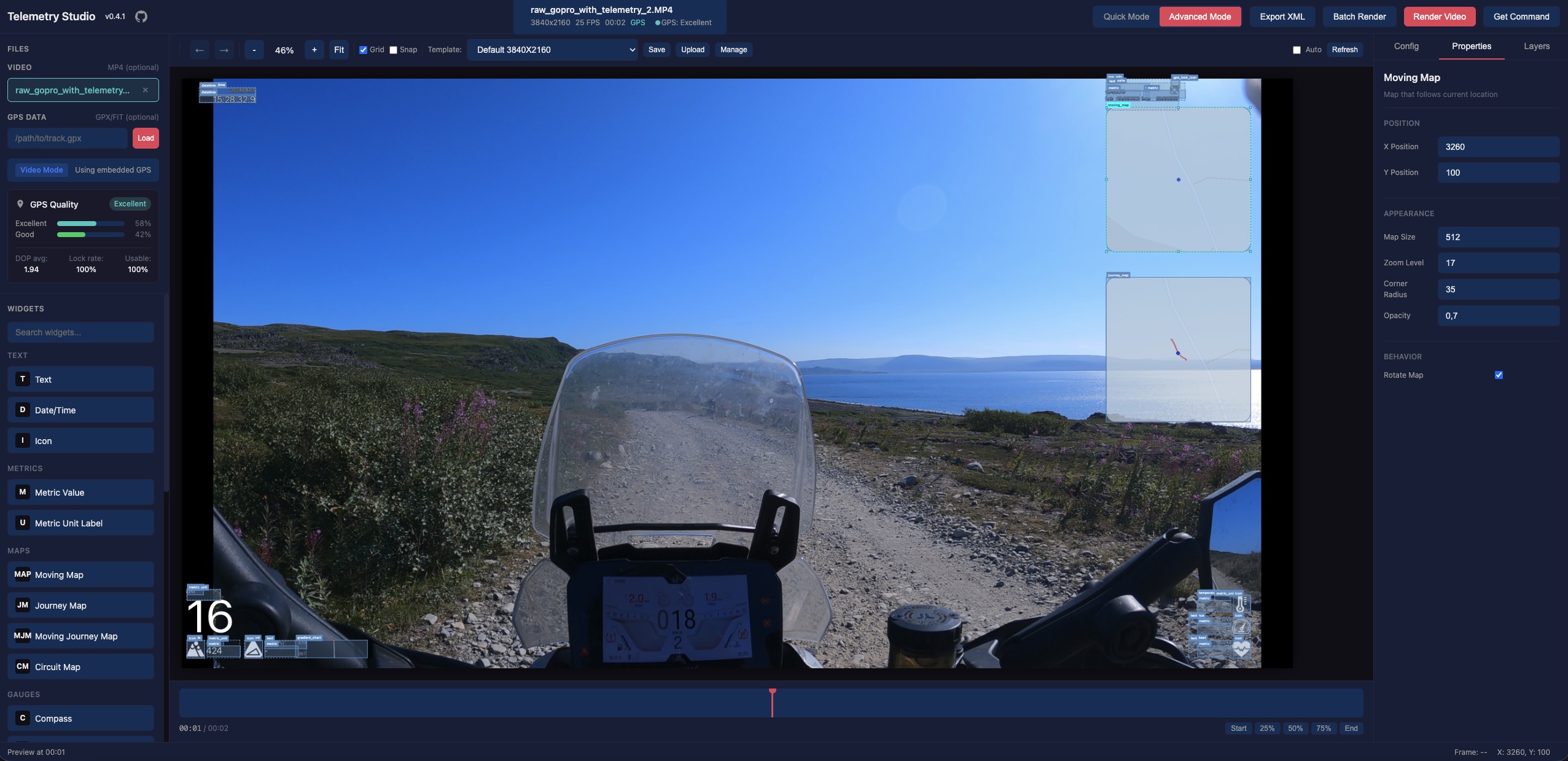
Advanced Mode
Full visual editor with drag-and-drop widgets. Create custom layouts with complete control.
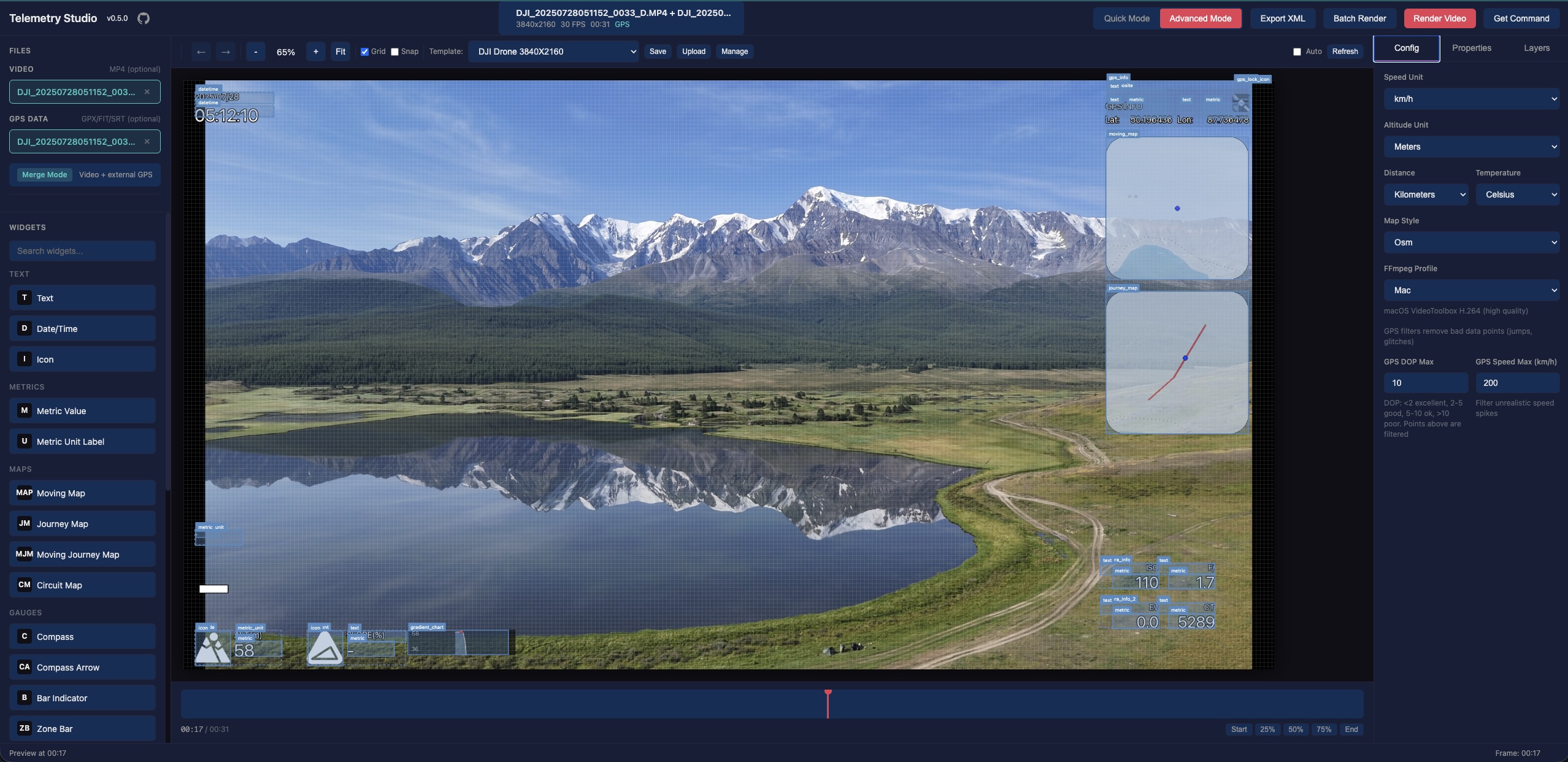
DJI Drone Support
Use DJI drone videos with SRT telemetry files. Timezone offset and time alignment are automatically detected from video metadata, supporting different DJI models and firmware versions.
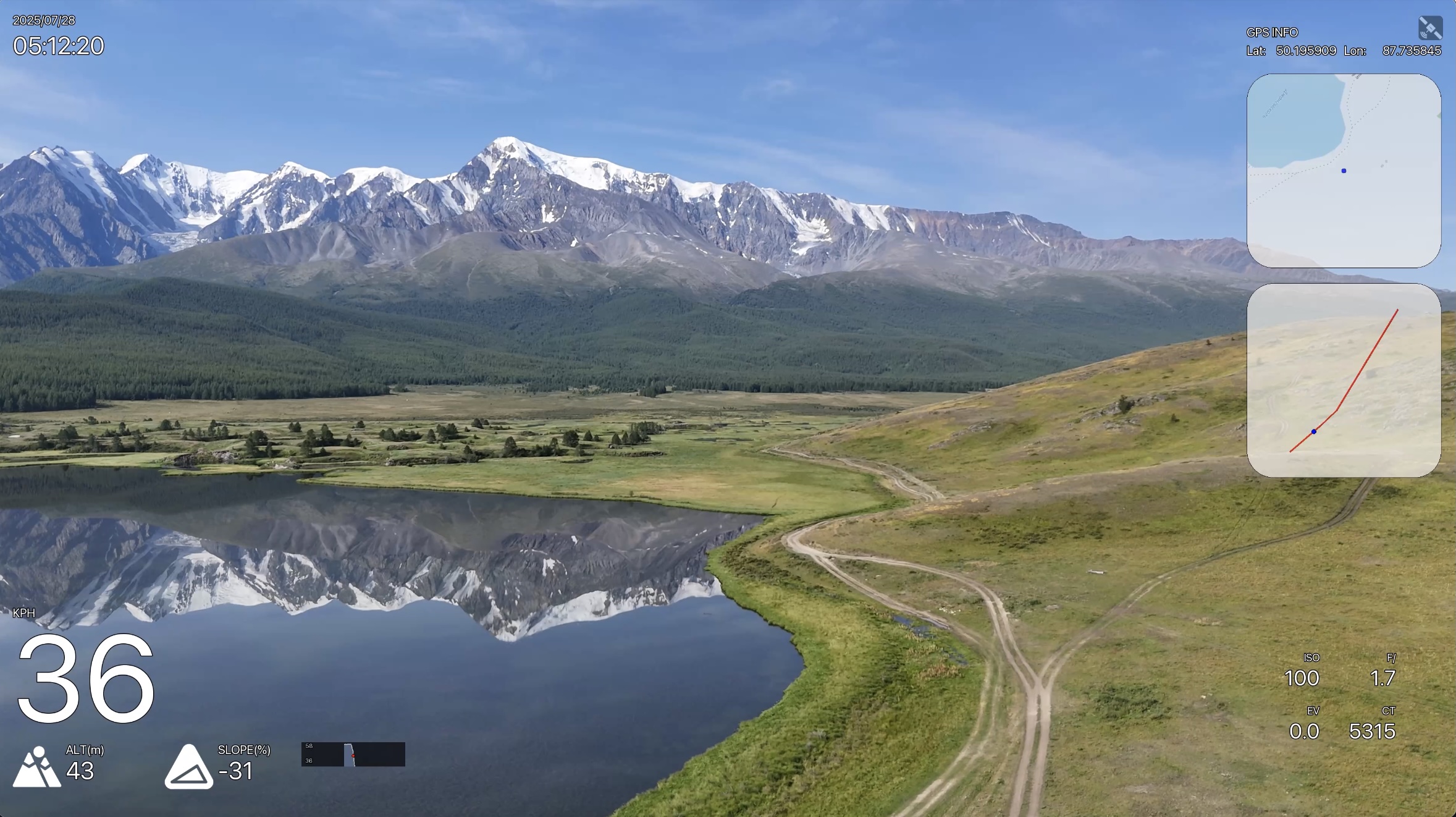
Camera metrics (ISO, shutter, f-number, EV, color temperature) from SRT files are displayed directly on the video overlay.
External GPX & Vertical Video
Use any video with external GPX/FIT files. Vertical videos are automatically detected and rendered correctly.
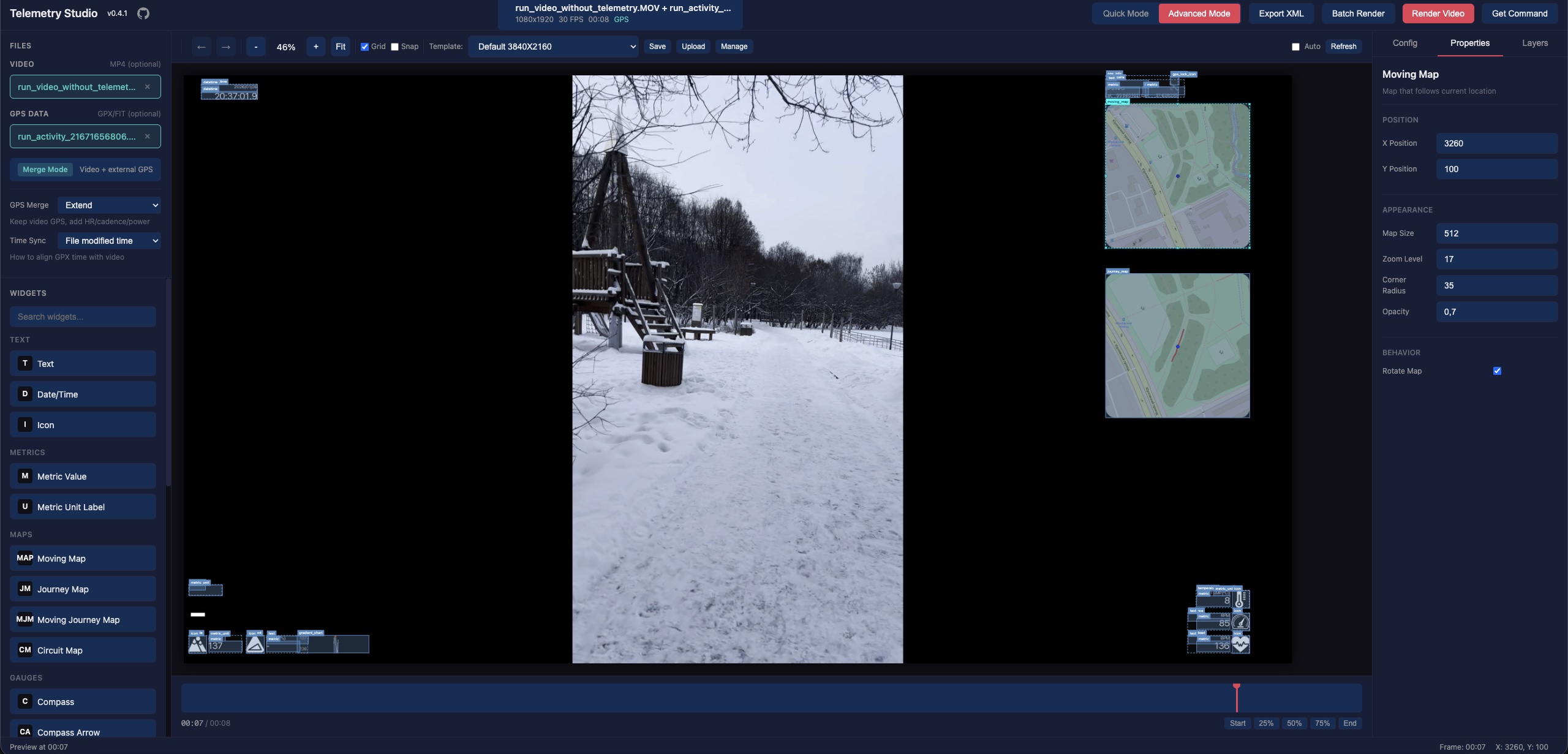
Batch Rendering
Process multiple videos at once with the same overlay settings.
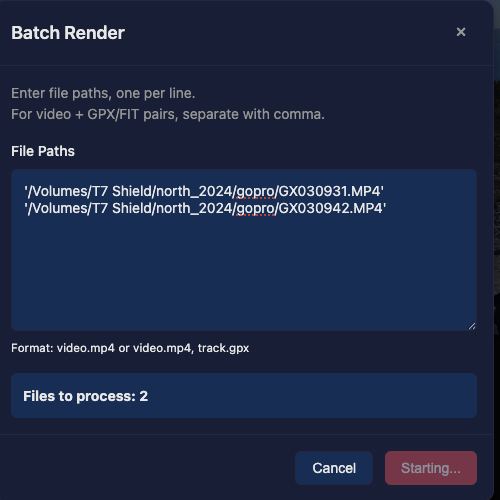
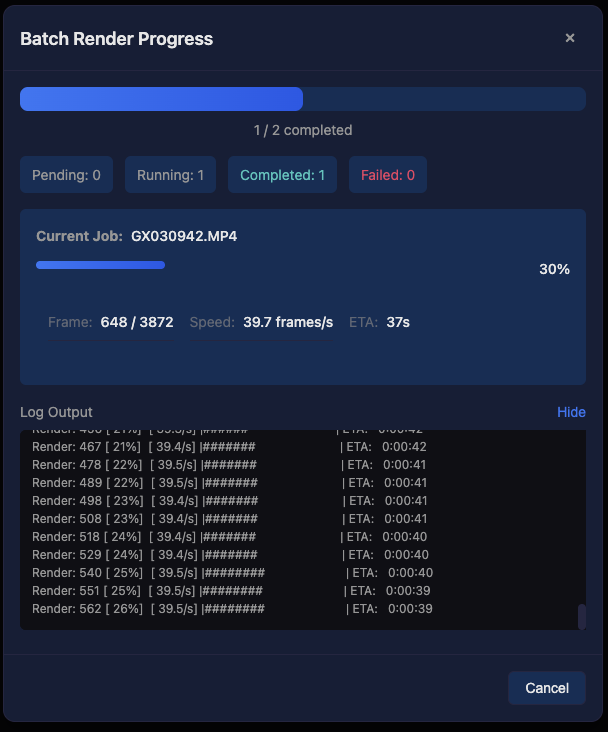
Shared GPX Batch Render
Apply a single GPX track to multiple videos recorded during the same activity. Each video automatically gets an odometer offset calculated from its creation time relative to the GPX track start, so the overlay shows the correct absolute distance from the beginning of the track.
Overlay-Only Mode
Render telemetry overlays with a transparent background — without any source video. Use a GPX, FIT, or SRT file as the primary input, and GPStitch will generate a video with an alpha channel that you can layer on top of your footage in any video editor (Final Cut Pro, DaVinci Resolve, Premiere Pro, etc.).
How to use:
- Upload a GPX, FIT, or SRT file as the primary file (no video needed)
- Configure your overlay layout and widgets as usual
- Select an encoding profile with transparency support:
- MOV (PNG) — Lossless quality, best compatibility with Final Cut Pro and DaVinci Resolve (large files)
- VP9 — Good quality with alpha channel, smaller files
- VP8 — Alpha channel support, widest browser compatibility
- Render — the output is a video with a transparent background ready for compositing
Requirements
- Python 3.14+
- FFmpeg (must be installed and available in PATH)
- gopro-overlay (installed automatically)
Installation
pipx (recommended)
# Install FFmpeg first
# macOS:    brew install ffmpeg
# Ubuntu:   sudo apt install ffmpeg
# Windows:  choco install ffmpeg

# Install GPStitch
pipx install gpstitch

# Run (opens browser automatically)
gpstitch

# Or with custom host/port
gpstitch --host 127.0.0.1 --port 8080
Optional: Cairo widgets support
Some layouts (e.g. example, example-2) use cairo-based widgets (gauges, circuit maps). These require pycairo, which needs the cairo system library:
# 1. Install system library
# macOS:    brew install cairo pkg-config
# Ubuntu:   sudo apt install libcairo2-dev pkg-config python3-dev

# 2. Install with cairo support (new install)
pipx install 'gpstitch[cairo]'

# Or add to existing installation
pipx inject gpstitch pycairo
Without pycairo, GPStitch works normally — cairo layouts will be marked as unavailable in the UI.
From source
# Install uv if not already installed
curl -LsSf https://astral.sh/uv/install.sh | sh

# Clone the repository
git clone https://github.com/Romancha/GPStitch.git
cd gpstitch

# Install dependencies
uv sync

# Run the application
uv run gpstitch
Then open http://localhost:8000 in your browser.
Supported Input Files
| Type | Formats | Description |
|---|---|---|
| Video | .mp4, .mov, .avi |
Video files (GoPro and DJI Action files may contain embedded GPS) |
| GPS Data | .gpx, .fit, .srt |
External GPS tracks — GPX, FIT, or DJI SRT telemetry (optional) |
Configuration
Environment variables (prefix: GPSTITCH_):
| Variable | Default | Description |
|---|---|---|
HOST |
0.0.0.0 |
Server host |
PORT |
8000 |
Server port |
LOCAL_MODE |
true |
Use local file paths instead of uploads |
TEMPLATES_DIR |
~/.gpstitch/templates |
Custom templates directory |
ENABLE_GOPRO_PATCHES |
true |
Enable runtime patches for gopro-overlay |
USE_WRAPPER_SCRIPT |
true |
Use wrapper script for rendering |
You can also use a .env file in the project root.
Runtime Patches
GPStitch includes runtime patches for gopro-overlay that add:
- Timecode preservation — Maintains original video timecode for Final Cut Pro compatibility
- Audio stream copy — Preserves audio without re-encoding
- Metadata preservation — Keeps original video metadata in output
- DJI camera metrics — Extends overlay engine with ISO, shutter, f-number, EV, color temperature, and focal length from DJI SRT files
- DJI Osmo Action GPS — Loads embedded protobuf GPS telemetry from DJI Action cameras with GPS Bluetooth Remote Controller
- Odometer offset — Allows odometer to start from a custom offset value for shared GPX batch rendering
Patches are applied automatically at startup. To disable:
export GPSTITCH_ENABLE_GOPRO_PATCHES=false
export GPSTITCH_USE_WRAPPER_SCRIPT=false
Development
# Install with dev dependencies
uv sync --all-extras

# Linting and formatting
uv run ruff check src tests
uv run ruff format src tests

# Run tests
uv run pytest

# Run all checks (lint + format + tests)
uv run ruff check src tests && uv run ruff format src tests && uv run pytest

# Run E2E tests (requires: uv run playwright install chromium)
uv run pytest tests/e2e/ -v
Project Structure
src/gpstitch/
├── main.py          # CLI entry point
├── app.py           # FastAPI application
├── config.py        # Settings
├── api/             # API routers
├── models/          # Pydantic data models
├── services/        # Business logic
└── static/          # Frontend assets
Contributing
Contributions are welcome! Please feel free to submit a Pull Request.
- Fork the repository
- Create your feature branch (
git checkout -b feature/amazing-feature) - Commit your changes (
git commit -m 'Add some amazing feature') - Push to the branch (
git push origin feature/amazing-feature) - Open a Pull Request
License
This project is licensed under the GPL-3.0 License - see the LICENSE file for details.
Acknowledgments
- gopro-dashboard-overlay — The underlying overlay rendering engine
Project details
Verified details
These details have been verified by PyPIProject links
GitHub Statistics
Maintainers
Release history Release notifications | RSS feed


Download files
Download the file for your platform. If you're not sure which to choose, learn more about installing packages.
Source Distribution
Built Distribution
Filter files by name, interpreter, ABI, and platform.
If you're not sure about the file name format, learn more about wheel file names.
Copy a direct link to the current filters
File details
Details for the file gpstitch-0.12.0.tar.gz.
File metadata
- Download URL: gpstitch-0.12.0.tar.gz
- Upload date:
- Size: 66.4 MB
- Tags: Source
- Uploaded using Trusted Publishing? Yes
- Uploaded via: twine/6.1.0 CPython/3.13.7
File hashes
| Algorithm | Hash digest | |
|---|---|---|
| SHA256 |
f6929a6e24e77650f4992df62b412117302ad3ee9d59bb71993a2a9b18d6e4e3
|
|
| MD5 |
70b4d676f1edb010860002d38da08932
|
|
| BLAKE2b-256 |
d98a30b022d6c4a32d40f2db58057b41a630dec594f0dfdef070c60e54b2cb2b
|
Provenance
The following attestation bundles were made for gpstitch-0.12.0.tar.gz:
Publisher:
publish.yml on Romancha/GPStitch
-
Statement:
-
Statement type:
https://in-toto.io/Statement/v1 -
Predicate type:
https://docs.pypi.org/attestations/publish/v1 -
Subject name:
gpstitch-0.12.0.tar.gz -
Subject digest:
f6929a6e24e77650f4992df62b412117302ad3ee9d59bb71993a2a9b18d6e4e3 - Sigstore transparency entry: 1115761029
- Sigstore integration time:
-
Permalink:
Romancha/GPStitch@31caf684adac7832c223d0c6c1c4463f5eff45a6 -
Branch / Tag:
refs/tags/v0.12.0 - Owner: https://github.com/Romancha
-
Access:
public
-
Token Issuer:
https://token.actions.githubusercontent.com -
Runner Environment:
github-hosted -
Publication workflow:
publish.yml@31caf684adac7832c223d0c6c1c4463f5eff45a6 -
Trigger Event:
release
-
Statement type:
File details
Details for the file gpstitch-0.12.0-py3-none-any.whl.
File metadata
- Download URL: gpstitch-0.12.0-py3-none-any.whl
- Upload date:
- Size: 273.1 kB
- Tags: Python 3
- Uploaded using Trusted Publishing? Yes
- Uploaded via: twine/6.1.0 CPython/3.13.7
File hashes
| Algorithm | Hash digest | |
|---|---|---|
| SHA256 |
c57fcaddc17965cf0f4d134e202cd57b344e1b6e59c44be445b13a107ff72f6d
|
|
| MD5 |
8e63411da5a6de167bb3813417643f5c
|
|
| BLAKE2b-256 |
d2d0506742489adb506d5eabd7a49d4c8c662a6c57177976ed88196d79d6cac2
|
Provenance
The following attestation bundles were made for gpstitch-0.12.0-py3-none-any.whl:
Publisher:
publish.yml on Romancha/GPStitch
-
Statement:
-
Statement type:
https://in-toto.io/Statement/v1 -
Predicate type:
https://docs.pypi.org/attestations/publish/v1 -
Subject name:
gpstitch-0.12.0-py3-none-any.whl -
Subject digest:
c57fcaddc17965cf0f4d134e202cd57b344e1b6e59c44be445b13a107ff72f6d - Sigstore transparency entry: 1115761031
- Sigstore integration time:
-
Permalink:
Romancha/GPStitch@31caf684adac7832c223d0c6c1c4463f5eff45a6 -
Branch / Tag:
refs/tags/v0.12.0 - Owner: https://github.com/Romancha
-
Access:
public
-
Token Issuer:
https://token.actions.githubusercontent.com -
Runner Environment:
github-hosted -
Publication workflow:
publish.yml@31caf684adac7832c223d0c6c1c4463f5eff45a6 -
Trigger Event:
release
-
Statement type:






