
GPSToFile
Quick and easy way to read GPS sentences to file with no gpsd required.
pip install gpstofile
Configuration
Here are the available configuration options:
| Key | Type | Description |
|---|---|---|
| path | str | Path to serial port |
| baudrate | int | Serial port baud rate (Default: 115200) |
| readrate | int | Read interval to listen for GPS sentences on serial bus (Default: 0s) |
| debug | bool | Print verbose log statements for debugging purposes (Default: False) |
| append | bool | Append to file instead of overwriting file contents on each new message received (Default: False) |
Getting Started
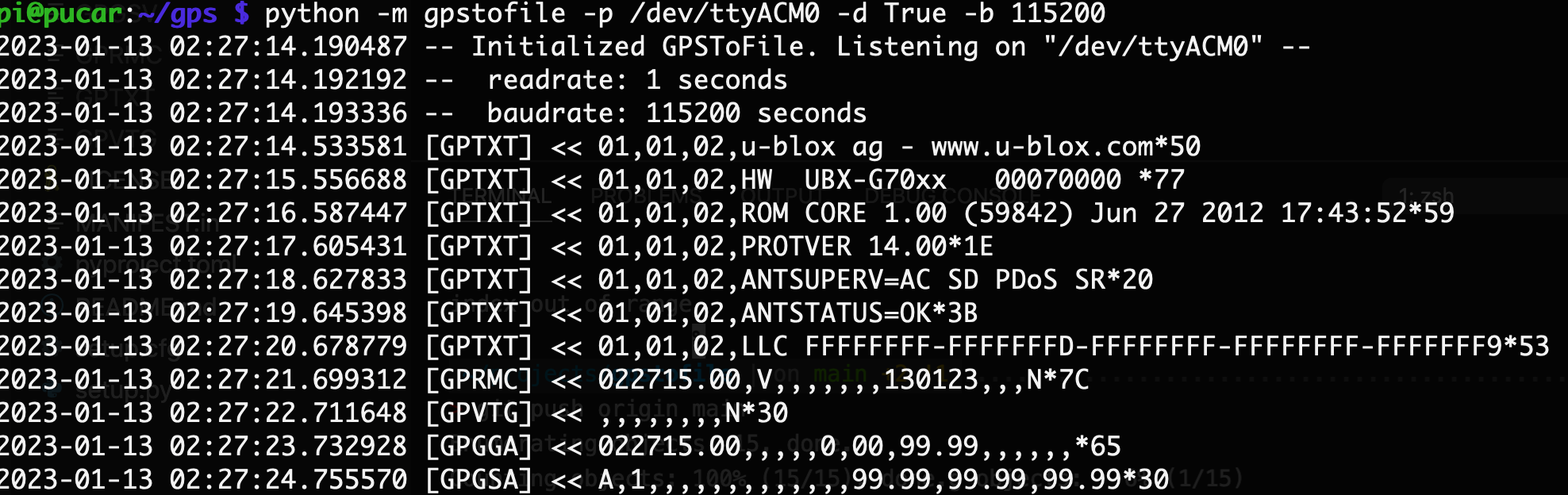
Once you get the serial path of your GPS modem, you can get started either via command line, or by importing the module:
python -m gpstofile --port /dev/tty.usbmodem14401 --debug True
or:
from gpstofile import GPSToFile

gps = GPSToFile('/dev/tty.usbmodem14401', readrate=1, debug=True)

gps.loop()
Once the loop begins running, GPS sentences will be written to files. You should see the files be created/continuously written to at readrate based on the codes in the following table:
The filename will be the NMEA sentence, for example GPGLL and the file contents will be the set of data sent after that sentence.
GPS Sentences or NMEA Sentences
| NMEA Sentence | Meaning |
|---|---|
| GPGGA | Global positioning system fix data (time, position, fix type data) |
| GPGLL | Geographic position, latitude, longitude |
| GPVTG | Course and speed information relative to the ground |
| GPRMC | Time, date, position, course and speed data |
| GPGSA | GPS receiver operating mode, satellites used in the position solution, and DOP values. |
| GPGSV | The number of GPS satellites in view satellite ID numbers, elevation, azimuth and SNR values. |
| GPMSS | Signal to noise ratio, signal strength, frequency, and bit rate from a radio beacon receiver. |
| GPTRF | Transit fix data |
| GPSTN | Multiple data ID |
| GPXTE | cross track error, measured |
| GPZDA | Date and time (PPS timing message, synchronized to PPS). |
For more info, check out this resource from RF Wireless World.
1 maintainer

Metadata
1 maintainer
Release files for gpstofile 0.0.6
For a detailed explanation of source distributions (sdists) and built distributions (wheels), please see the package formats documentation.
Source distribution (sdist)
| File | Size | Uploaded | |
|---|---|---|---|
| gpstofile-0.0.6.tar.gz | 4.6 kB | Details |
Built distribution (wheel)
| File | Interpreter | ABI | Platform | Reset |
|---|---|---|---|---|
| gpstofile-0.0.6-py3-none-any.whl | Python 3 | none | any | Details |
Total release size: 9.2 kB
Release files / gpstofile-0.0.6.tar.gz
| Download URL | gpstofile-0.0.6.tar.gz |
|---|---|
| Size | 4.6 kB |
| Tags | Source |
|
SHA-256 checksum How to use checksums |
26cb259f7030402352654e0018c73cc499cc86f2c518f69eac4a67f27031ad8c
|
|
BLAKE2b-256 checksum How to use checksums |
d23032c243e32ed4b642cfcae0333402d5237c174e9bcdc0addc7094f6980b36
|
| Upload date | |
|
Uploaded using Trusted Publishing? What is trusted publishing? |
No |
| Uploaded via |
twine/4.0.1 CPython/3.11.1
|
Release files / gpstofile-0.0.6-py3-none-any.whl
| Download URL | gpstofile-0.0.6-py3-none-any.whl |
|---|---|
| Size | 4.6 kB |
| Tags | Python 3 |
|
SHA-256 checksum How to use checksums |
8e1787618e191722899792aae06c431d8ebb8333d2a29d2aa9d223e892d3d566
|
|
BLAKE2b-256 checksum How to use checksums |
8c8a84359fe098596c026e7b9e1f6adf490eed501438e9b905b7be2e0e126b5a
|
| Upload date | |
|
Uploaded using Trusted Publishing? What is trusted publishing? |
No |
| Uploaded via |
twine/4.0.1 CPython/3.11.1
|














