
GPT Commands Python
A python module that provides an easy way to use OpenAI GPT-4 (or 3.5) function calling, which is basically GPT plugins in API world.
Just create a class with your custom logic:
class Game:
    def get_inventory(self, character: str, max_items: int) -> List[str]:
        """
        Get inventory of a character

        Args:
            character (str): The name of the character to get the inventory of. One of: 'Harry', 'Ron', 'Hermione'
            max_items (int): The maximum number of items to return
        Returns:
            List[str]: The inventory of the character
        """
        if character == "Harry":
            return ["Wand", "Broom", "Cloak"]
        elif character == "Ron":
            return ["Wand", "Rat"]
        elif character == "Hermione":
            return ["Wand", "Cat", "Book"]

        return []

    def alohomora(self):
        """
        Unlock the door
        """
        print("[COMMAND] Alohomora!")

    def expelliarmus(self, target: str):
        """
        Disarm the target

        Args:
            target (str): The target to disarm
        """
        print(f"[COMMAND] Expelliarmus {target}!")
Make sure to annotate your code with type hints and doc strings. This is what the module uses to "explain" the functions to GPT.
Then pass an instance of your class to GPTCommandsClient like so and start prompting:
manager = Game()
model = "gpt-4-0613"  # "gpt-3.5-turbo-16k-0613"
async with GPTCommandsClient(model, system_prompt) as client:
    while True:
        prompt = input("You: ")
        async for data in client.chat_stream(prompt, manager):
            print(data, end="")
        print()
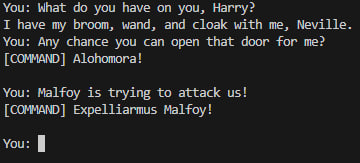
List of currently supported types for parameters:
boolintfloatstrList[T]Dict[str, T]Optional[T]@dataclassmarked classes withJsonSchemaMixin
See example for a full example.
Installation
-
Install the package
pip install gpt-commands-python
-
Set environment variables
Copy
.env.examplefile and rename it to.env. Then set your OpenAI API key (and optionally your organization ID). Your.envfile should look someting like this:OPENAI_API_KEY=sk-XXXXXXXXXXXXXXXXXXXXXXXXXXXXXXXXXXXXXXXXXXXXXXXX OPENAI_ORGANIZATION=org-XXXXXXXXXXXXXXXXXXXXXXXXYou can also pass these values as arguments to
GPTCommandsClientconstructor or set them as environment variables.
Running the example
python -m examples.game
1 maintainer

Metadata
1 maintainer
Release files for gpt-commands-python 0.1.0
For a detailed explanation of source distributions (sdists) and built distributions (wheels), please see the package formats documentation.
Source distribution (sdist)
| File | Size | Uploaded | Provenance | Actions |
|---|---|---|---|---|
| gpt-commands-python-0.1.0.tar.gz | 12.2 kB | Without provenance | Details for gpt-commands-python-0.1.0.tar.gz |
Built distribution (wheel)
| File | Interpreter | ABI | Platform | Actions Reset |
|---|---|---|---|---|
| gpt_commands_python-0.1.0-py3-none-any.whl | Python 3 | none | any | Details for gpt_commands_python-0.1.0-py3-none-any.whl |
Total release size: 21.1 kB
Release files / gpt-commands-python-0.1.0.tar.gz
| Download URL | gpt-commands-python-0.1.0.tar.gz |
|---|---|
| Size | 12.2 kB |
| Tags | Source |
|
SHA-256 checksum How to use checksums |
fe839094c4bdf9713274157588d412a7ac774726635e91584ddc0bcc8e934fb0
|
|
BLAKE2b-256 checksum How to use checksums |
7d1baee28286ec8c7cde2079593d7238f947158d53d36282c6295be935ae25e4
|
| Upload date | |
|
Uploaded using Trusted Publishing? What is trusted publishing? |
No |
| Uploaded via |
twine/4.0.2 CPython/3.9.12
|
Release files / gpt_commands_python-0.1.0-py3-none-any.whl
| Download URL | gpt_commands_python-0.1.0-py3-none-any.whl |
|---|---|
| Size | 8.9 kB |
| Tags | Python 3 |
|
SHA-256 checksum How to use checksums |
cc2554e794f9c98524b922abfff1f226bf82b3deb80c1abe48bb23efa31c8012
|
|
BLAKE2b-256 checksum How to use checksums |
639a243f5a256e66653962c4953b9542da2e0d6d7e9eedfc8bcc064c9888c49d
|
| Upload date | |
|
Uploaded using Trusted Publishing? What is trusted publishing? |
No |
| Uploaded via |
twine/4.0.2 CPython/3.9.12
|
Security for gpt-commands-python 0.1.0
Provenance
Provenance describes where a file came from. On PyPI, provenance is shared via attestations, which provide a verifiable record of the build or publishing details. View details, limitations and caveats.
No provenance found
None of the files in this release were uploaded with provenance metadata.
A note on package security
PyPI is a repository for distributing packages, not a service for auditing them. While third-party security researchers and our staff do their best to detect and remove malicious packages, PyPI cannot guarantee the quality, security or suitability of any given package.
To learn more about protecting yourself from malicious actors, visit our package security documentation.













