
Combine multiple graphql-based or function-based agents with dynamic routing - based on atomic-agents.

Project description
gpt-multi-atomic-agents
A simple dynamic multi-agent framework based on atomic-agents and Instructor. Uses the power of Pydantic for data and schema validation and serialization.
-
compose Agents made of a system prompt, with a shared language of either Function Calls or else GraphQL mutations
-
convert user input into data modifications (functions or GraphQL mutations)
-
to maximise user engagement, uses a 2-phase process:
- Planning Phase:
- a router uses an LLM to process complex 'composite' user prompts, and automatically route them to the best sequence of your agents
- the router rewrites the user prompt, to best suit each agent
- an execution plan is generated
- the client can use the
routerto iterate over the execution plan, with user feedback
- a router uses an LLM to process complex 'composite' user prompts, and automatically route them to the best sequence of your agents
- Generation Phase:
- when the user is happy -> the client can use the
generatorto execute the plan, using the recommended agents - the client then receives function calls (or GraphQL mutations) to update the data
- when the user is happy -> the client can use the
- Planning Phase:
-
generate via OpenAI or AWS Bedrock or groq
-
usage:
- as a library
- OR run out-of-the-box as a REST API, accepting Agents from the client
- there is a simple TypeScript framework, for writing Agent-based TypeScript clients of the REST API
- OR as a command line chat-loop
-
note: the
!! framework is at an early stage !!- breaking changes will be indicated by increasing the minor version (major is still at zero).






Introduction
An LLM based Agents Framework using an Agent Oriented Programming approach to orchestrate agents using a shared language.
The agent language can either be Function Calling based, or else GraphQL based.
The framework is generic and allows agents to be defined in terms of a name, description, accepted input calls, and allowed output calls.
The agents communicate indirectly using a blackboard. The language is a composed of (Function or GraphQL mutation) calls: each agent specifies what it understands as input, and what calls it is able to generate. Each agent can be configured to understand a subset of the output of the other agents. In this way, the agents can understand each other's output and collaborate together.
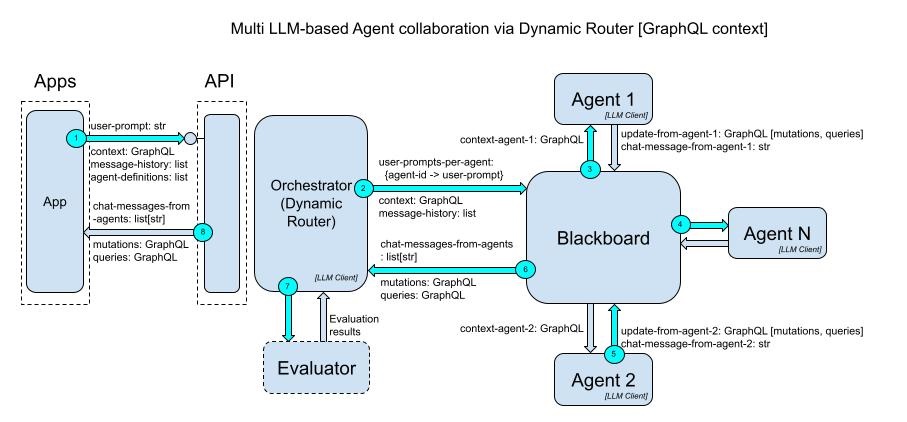
A router takes the user prompt and generates an agent execution plan.
The execution plan uses the best sequence of the most suitable agents, to handle the user prompt.
The router rewrites the user prompt to suit each agent, which improves quality and avoids unwanted output.
note: Optionally, the router can be run separately, allowing for human-in-the-loop feedback on the execution plan that the router generated. In this way, the user can collaborate more with the router, before the generative agents are actually executed.
- this allows the user to have more control over the output, and has the added benefit of reducing the perceived time taken to generate, since the user has intermediate interaction with the router.
Finally, the output is returned in the form of an ordered list of (Function or GraphQL) calls.
To read more about this approach, you can see this Medium article.
- note: the
framework is at an early stage. The Evaluator is not currently implemented.
Integration
When integrating, depending on which kind of Agent Definitions are used, the client needs to:
- Function Calling Agents: client implements the functions. The client executes the functions according to the results (function calls) generated by this framework.
- this approach is less flexible but good for simple use cases where GraphQL may be too complicated
- GraphQL based Agents: The client executes the GraphQL mutations on the GraphQL document they earler submitted to the framework.
- this approach provides the most flexibility:
- the input is a GraphQL schema with any previouly made mutation calls, the output is a set of mutation calls
- the agents can communicate generations (modifications to data) by generating GraphQL mutations that match the given schema
- this approach provides the most flexibility:
Examples [Function Calls Based Approach]
Sim Life world builder
This is a demo 'Sim Life' world builder. It uses 3 agents (Creature Creature, Vegetation Creator, Relationship Creator) to process user prompts. The agents are defined in terms of functions. The output is a series of Function Calls which can be implemented by the client, to build the Sim Life world.
Definitions [Function Calls Based Approach]
The AddCreature function:
function_add_creature = FunctionSpecSchema(
    function_name="AddCreature",
    description="Adds a new creature to the world (not vegetation)",
    parameters=[
        ParameterSpec(name="creature_name", type=ParameterType.string),
        ParameterSpec(name="allowed_terrain", type=ParameterType.string, allowed_values=terrain_types),
        ParameterSpec(name="age", type=ParameterType.int),
        ParameterSpec(name="icon_name", type=ParameterType.string, allowed_values=creature_icons),
    ]
)
The AddCreatureRelationship function:
function_add_relationship = FunctionSpecSchema(
    function_name="AddCreatureRelationship",
    description="Adds a new relationship between two creatures",
    parameters=[
        ParameterSpec(
            name="from_name", type=ParameterType.string
        ),
        ParameterSpec(
            name="to_name", type=ParameterType.string
        ),
        ParameterSpec(
            name="relationship_name",
            type=ParameterType.string,
            allowed_values=["eats", "buys", "feeds", "sells"],
        ),
    ],
)
Agent Definitions [Function Calls Based Approach]
The Creature Creator agent is defined declaratively in terms of:
- its description (a very short prompt)
- its input schema (a list of accepted function definitions)
- its output schema (a list of output function definitions)
Agents can collaborate and exchange information indirectly, by reusing the same function defintions via a blackboard.
def build_creature_agent():
    agent_definition = build_function_agent_definition(
        agent_name="Creature Creator",
        description="Creates new creatures given the user prompt. Ensures that ALL creatures mentioned by the user are created.",
        accepted_functions=[function_add_creature, function_add_relationship],
        functions_allowed_to_generate=[function_add_creature],
        topics=["creature", "summary"]
    )

    return agent_definition
Notes about the Creature Creator agent:
- this agent can only generate "AddCreature" function calls.
- the agent also accepts (understands) previous "AddCreature" calls, so that it knows what has already been created.
- additionally, this agent understands a subset of function calls from agents: here, it understands the "AddRelationship" function defined by
function_add_relationship. This allows the agents to collaborate. See the example source code for more details.
Examples [GraphQL Based Approach]
Sim Life world builder
This is a demo 'Sim Life' world builder. It uses 3 agents (Creature Creature, Vegetation Creator, Relationship Creator) to process user prompts. The agents are defined declaratively in terms of GraphQL input schema, and allowed generated mutations. The output is a series of GraphQL mutations which can be executed by the client, to build the Sim Life world.
Definitions [GraphQL Based Approach]
The GraphQL schema:
type Creature {
  id: ID!
  creature_name: String!
  allowed_terrain: TerrainType!
  age: Int!
  icon_name: IconType!
}

type Vegetation {
  id: ID!
  vegetation_name: String!
  icon_name: IconType!
  allowed_terrain: TerrainType!
}

type Relationship {
  id: ID!
  from_name: String!
  to_name: String!
  relationship_kind: RelationshipType!
}
...
The GraphQL mutations that we want the Agents to generate, are distinct for each agent:
Creature Creator agent:
type Mutation {
  addCreature(input: CreatureInput!): Creature!
}

input CreatureInput {
  creature_name: String!
  allowed_terrain: TerrainType!
  age: Int!
  icon_name: IconType!
}
Vegetation Creator agent:
type Mutation {
  addVegetation(input: VegetationInput!): Vegetation!
}

input VegetationInput {
  vegetation_name: String!
  icon_name: IconType!
  allowed_terrain: TerrainType!
}
Agent Definitions [GraphQL Based Approach]
The Creature Creator agent is defined declaratively in terms of:
- its description (a very short prompt)
- its input schema (a list of accepted GraphQL schemas)
- its output schema (a list of output GraphQL mutation calls)
An agent is basically a composition of input and output schemas, together with a prompt.
Agents collaborate and exchange information indirectly via a blackboard, by reusing the same GraphQL schemas and mutation calls.
creatures_graphql = _read_schema("creature.graphql")
creature_mutations_graphql = _read_schema("creature.mutations.graphql")

def build_creature_agent():
    agent_definition = build_graphql_agent_definition(
        agent_name="Creature Creator",
        description="Creates new creatures given the user prompt. Ensures that ALL creatures mentioned by the user are created.",
        accepted_graphql_schemas=[creatures_graphql, creature_mutations_graphql],
        mutations_allowed_to_generate=[creature_mutations_graphql],
        topics=["creature", "summary"]
    )

    return agent_definition
Notes about this agent:
- this agent can only generate mutations that are defined by
creature_mutations_graphqlfrom the file "creature.mutations.graphql". - the agent also accepts (understands) previous mutations calls, so that it knows what has already been created (
creature_mutations_graphql). - additionally, this agent understands the shared GraphQL schema defined by
creatures_graphqlfrom the file "creature.graphql".- This array of GraphQL files can also be used to allow an Agent to understand a subset of the mutations output by other agents. This allows the agents to collaborate.
- See the example source code for more details.
Using the Agents in a chat loop
The agents can be used together to form a chat bot:
from gpt_multi_atomic_agents import functions_expert_service, config
from . import agents

def run_chat_loop(given_user_prompt: str|None = None) -> list:
    CHAT_AGENT_DESCRIPTION = "Handles users questions about an ecosystem game like Sim Life"

    agent_definitions = [
        build_creature_agent(), build_relationship_agent(), build_vegatation_agent()  # for more capabilities, add more agents here
    ]

    _config = config.Config(
        ai_platform = config.AI_PLATFORM_Enum.bedrock_anthropic,
        model = config.ANTHROPIC_MODEL,
        max_tokens = config.ANTHROPIC_MAX_TOKENS,
        is_debug = False
        )

    return functions_expert_service.run_chat_loop(agent_definitions=agent_definitions, chat_agent_description=CHAT_AGENT_DESCRIPTION, _config=_config, given_user_prompt=given_user_prompt)
note: if
given_user_promptis not set, thenrun_chat_loop()will wait for user input from the keyboard
See the example source code for more details.
Example Execution [Function Calls Based Approach]
USER INPUT:
Add a sheep that eats grass
OUTPUT:
Generated 3 function calls
[Agent: Creature Creator] AddCreature( creature_name=sheep, icon_name=sheep-icon, land_type=prairie, age=1 )
[Agent: Plant Creator] AddPlant( plant_name=grass, icon_name=grass-icon, land_type=prairie )
[Agent: Relationship Creator] AddCreatureRelationship( from_name=sheep, to_name=grass, relationship_name=eats )
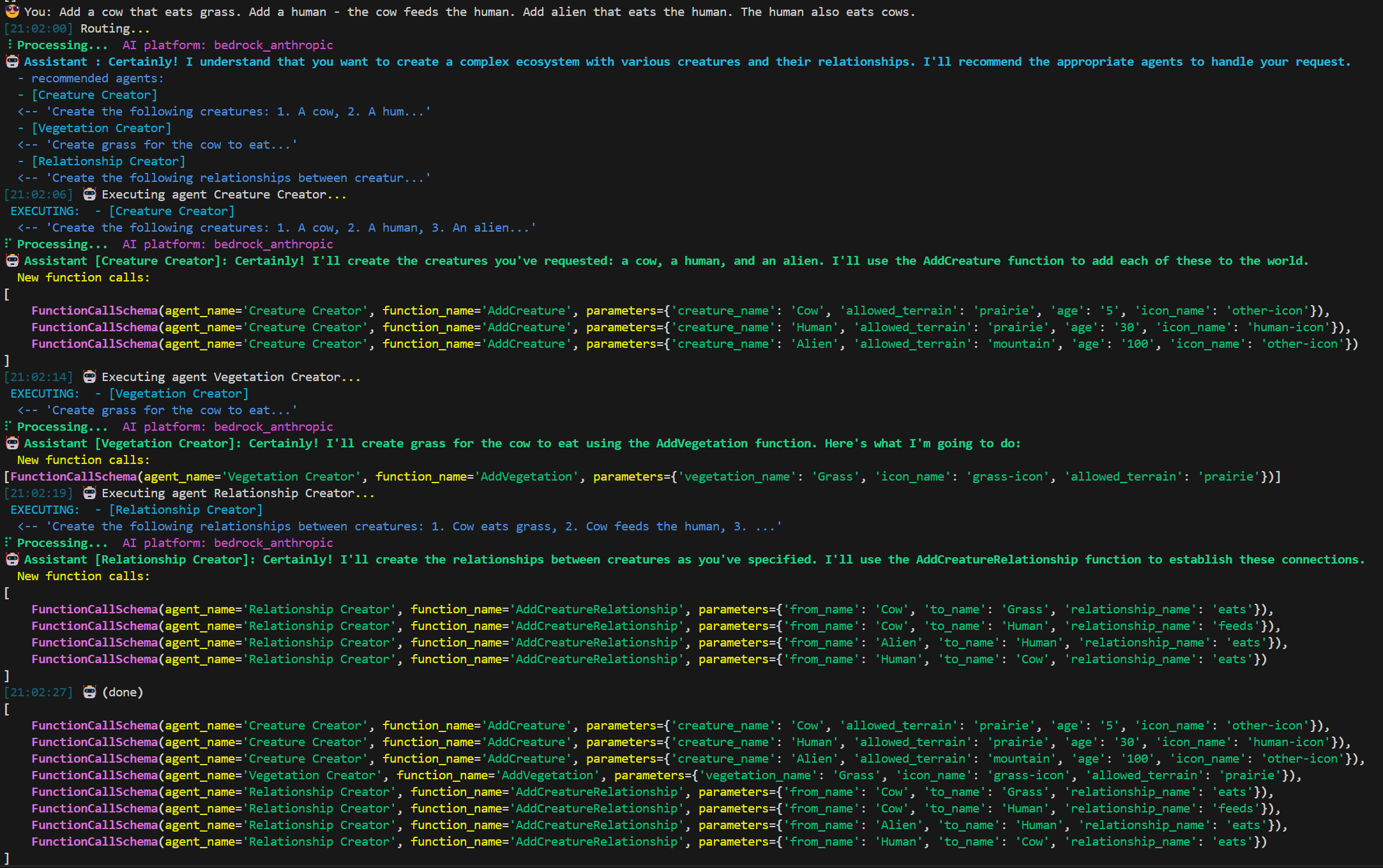
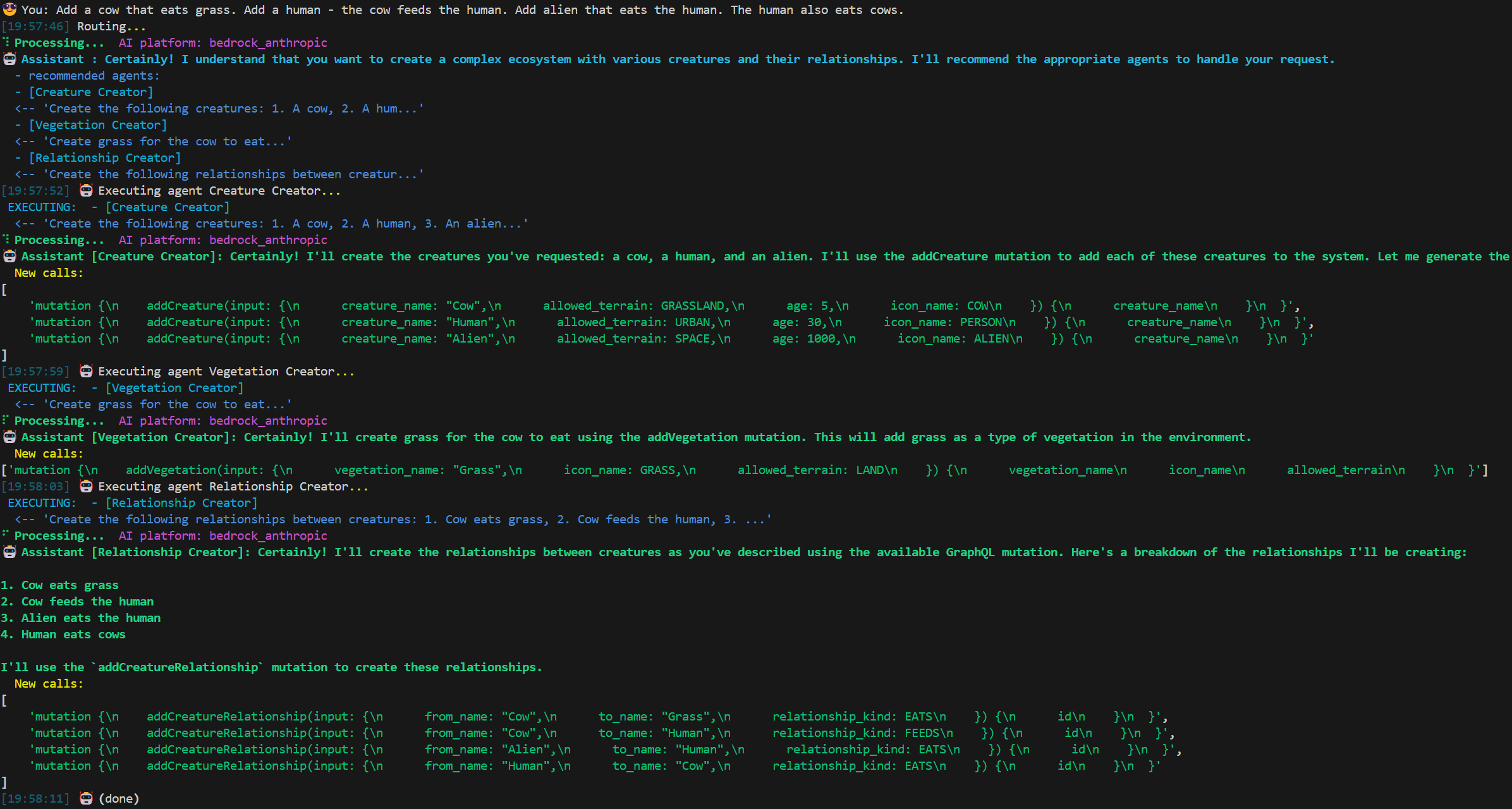
Because the framework has a dynamic router, it can handle more complex 'composite' prompts, such as:
Add a cow that eats grass. Add a human - the cow feeds the human. Add and alien that eats the human. The human also eats cows.
The router figures out which agents to use, what order to run them in, and what prompt to send to each agent.
Optionally, the router can be re-executed with user feedback on its genereated plan, before actually executing the agents.
The recommended agents are then executed in order, building up their results in the shared blackboard.
Finally, the framework combines the resulting calls together and returns them to the client.
Example run via Function Call based agents:
Example Execution [GraphQL Based Approach]
USER INPUT:
Add a sheep that eats grass
OUTPUT:
['mutation {\n    addCreature(input: {\n      creature_name: "sheep",\n      allowed_terrain: GRASSLAND,\n      age: 2,\n      icon_name: SHEEP\n    }) {\n      creature_name\n      allowed_terrain\n      age\n      icon_name\n    }\n  }']
['mutation {', '  addVegetation(input: {', '    vegetation_name: "Grass",', '    icon_name: GRASS,', '    allowed_terrain: LAND', '  }) {', '    vegetation_name', '    icon_name', '    allowed_terrain', '  }', '}']
['mutation {', '  addCreatureRelationship(input: {', '    from_name: "Sheep",', '    to_name: "Grass",', '    relationship_kind: EATS', '  }) {', '    id', '  }', '}']
Example run via GraphQL based agents:
Setup
-
Install Python 3.11 and poetry
-
Install dependencies.
poetry install
- Setup your credentials for your preferred AI platform.
For OpenAI:
- You need to get an Open AI key.
- Set environment variable for your with your Open AI key:
export OPENAI_API_KEY="xxx"
Add that to your shell initializing script (~/.zprofile or similar)
Load in current terminal:
source ~/.zprofile
Usage
gpt-multi-atomic-agents can be used in three ways:
1 - as a framework for your application or service 2 - as a REST API, where a client provides the agents and user prompts 3 - as a command line tool to chat and generate functions to modify your data
1. Usage as a framework (library)
See the example source code for more details.
2. Usage as REST API (with Swagger examples):
./run-rest-api.sh
The REST API URL and Swagger URLs are printed to the console
The available REST methods:
-
generate_plan: Optionally call this before generate_function_calls, in order to generate an Execution Plan separately, and get user feedback. This can help reduce perceived latency for the user.
-
generate_function_calls: Generates Function Calls to fulfill the user's prompt, given the available Agents in the user's request. If an Execution Plan is included in the request, then that is used to decide which Agents to execute. Otherwise an Execution Plan will be internally generated.
-
[Not yet implemented] generate_graphql
TypeScript REST API Client
There is a simple TypeScript framework, for writing Agent-based TypeScript clients of the REST API.
For an example with simple Agents, see TypeScript Example Agents.
3. Usage as a command line chat tool
Chat to generate mutations (Function Calls or GraphQL) with the configured Agents. The Blackboard can be saved out for later chatting, or it can be consumed by other tools, for example to execute against application data.
The example command line chats are setup with the same Sim Life style example agents.
Via function calling:
./run-example.sh
Via GraphQL:
./run-example.graphql.sh
🤖 Assistant : Welcome to multi-agent chat
Type in a question for the AI. If you are not sure what to type, then ask it a question like 'What can you do?'
To exit, use the quit command
Available commands:
  clear - Clear the blackboard, starting over. (alias: reset)
  dump - Dump the current blackboard state to the console (alias: show)
  help - Display help text
  list - List the local data files from previous blackboards
  load - Load a blackboard from the local data store
  save - Save the blackboard to the local data store
  quit - Exit the chat loop (alias: bye, exit, stop)
Tests
./test.sh
Release history Release notifications | RSS feed


Download files
Download the file for your platform. If you're not sure which to choose, learn more about installing packages.
Source Distribution
Built Distribution
Filter files by name, interpreter, ABI, and platform.
If you're not sure about the file name format, learn more about wheel file names.
Copy a direct link to the current filters
File details
Details for the file gpt_multi_atomic_agents-0.6.1.tar.gz.
File metadata
- Download URL: gpt_multi_atomic_agents-0.6.1.tar.gz
- Upload date:
- Size: 24.7 kB
- Tags: Source
- Uploaded using Trusted Publishing? No
- Uploaded via: poetry/1.8.3 CPython/3.11.7 Windows/10
File hashes
| Algorithm | Hash digest | |
|---|---|---|
| SHA256 |
9e02eb4fc6b9848693f9eedf53145f542d8d236806de106ab2c2c4037e641422
|
|
| MD5 |
330c625840f74f502eebbbb85e8a41dc
|
|
| BLAKE2b-256 |
2b4bf6261ccb95a1c878274e6d68fbce306b75bfe97491bc173155707568ca15
|
File details
Details for the file gpt_multi_atomic_agents-0.6.1-py3-none-any.whl.
File metadata
- Download URL: gpt_multi_atomic_agents-0.6.1-py3-none-any.whl
- Upload date:
- Size: 33.4 kB
- Tags: Python 3
- Uploaded using Trusted Publishing? No
- Uploaded via: poetry/1.8.3 CPython/3.11.7 Windows/10
File hashes
| Algorithm | Hash digest | |
|---|---|---|
| SHA256 |
fe11deb117d76a62e58ff315f7cfa823fc279d50b8f21436dc6445e93bb81cd0
|
|
| MD5 |
a21169bda44db6f57e3f00bde47d464b
|
|
| BLAKE2b-256 |
c9e53585e653b69f526c974e7903a1869f39c62e813c33d628f454d50925986e
|






