









GPT Researcher is an autonomous agent designed for comprehensive online research on a variety of tasks.
The agent can produce detailed, factual and unbiased research reports, with customization options for focusing on relevant resources, outlines, and lessons. Inspired by the recent Plan-and-Solve and RAG papers, GPT Researcher addresses issues of speed, determinism and reliability, offering a more stable performance and increased speed through parallelized agent work, as opposed to synchronous operations.
Our mission is to empower individuals and organizations with accurate, unbiased, and factual information by leveraging the power of AI.
Why GPT Researcher?
- To form objective conclusions for manual research tasks can take time, sometimes weeks to find the right resources and information.
- Current LLMs are trained on past and outdated information, with heavy risks of hallucinations, making them almost irrelevant for research tasks.
- Current LLMs are limited to short token outputs which are not sufficient for long detailed research reports (2k+ words).
- Services that enable web search (such as ChatGPT + Web Plugin), only consider limited sources and content that in some cases result in superficial and biased answers.
- Using only a selection of web sources can create bias in determining the right conclusions for research tasks.
Demo
https://github.com/assafelovic/gpt-researcher/assets/13554167/dd6cf08f-b31e-40c6-9907-1915f52a7110
Architecture
The main idea is to run "planner" and "execution" agents, whereas the planner generates questions to research, and the execution agents seek the most related information based on each generated research question. Finally, the planner filters and aggregates all related information and creates a research report.
The agents leverage both gpt3.5-turbo and gpt-4o (128K context) to complete a research task. We optimize for costs using each only when necessary. The average research task takes around 3 minutes to complete, and costs ~$0.1.
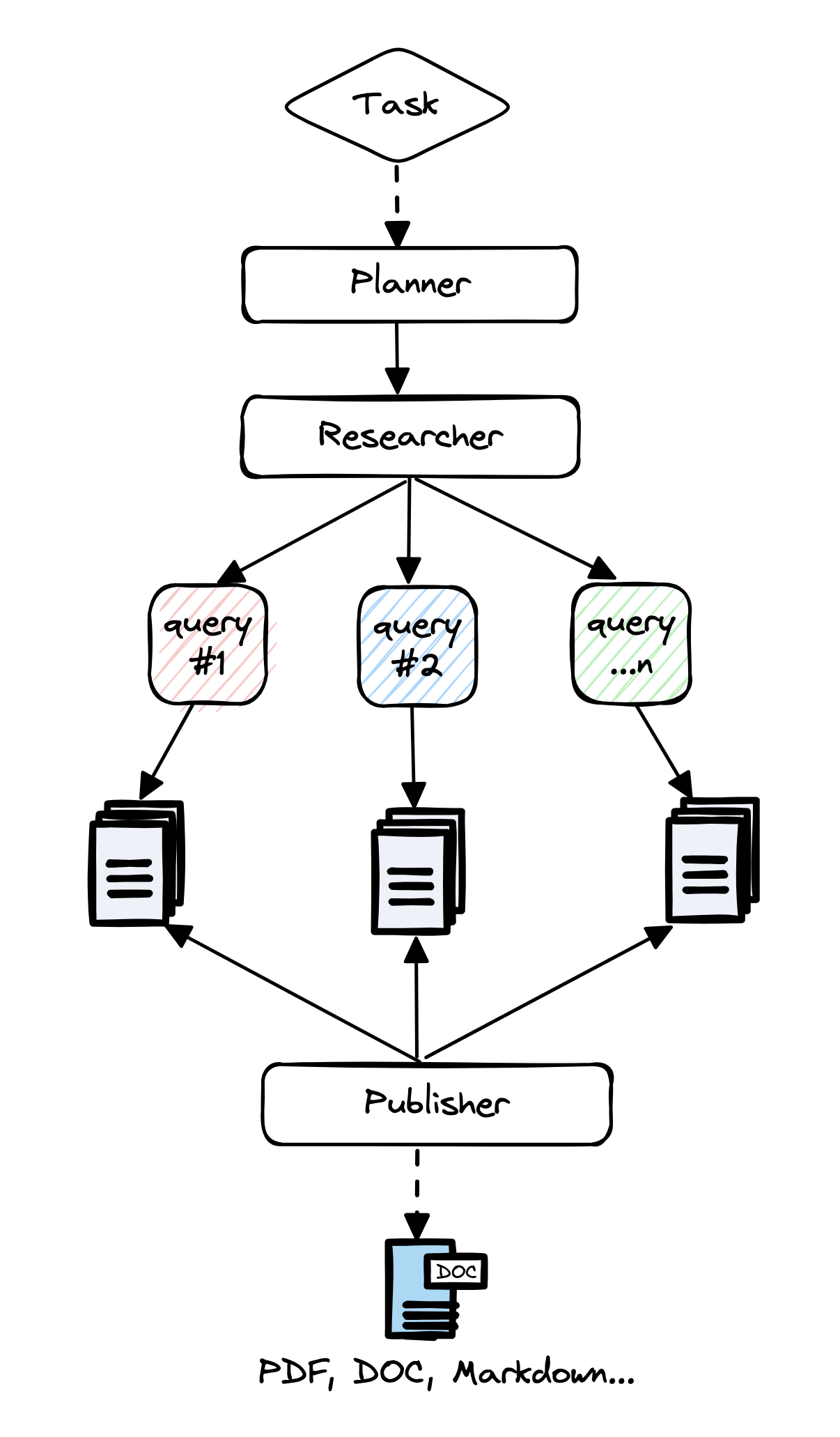
More specifically:
- Create a domain specific agent based on research query or task.
- Generate a set of research questions that together form an objective opinion on any given task.
- For each research question, trigger a crawler agent that scrapes online resources for information relevant to the given task.
- For each scraped resources, summarize based on relevant information and keep track of its sources.
- Finally, filter and aggregate all summarized sources and generate a final research report.
Tutorials
Features
- 📝 Generate research, outlines, resources and lessons reports with local documents and web sources
- 📜 Can generate long and detailed research reports (over 2K words)
- 🌐 Aggregates over 20 web sources per research to form objective and factual conclusions
- 🖥️ Includes an easy-to-use web interface (HTML/CSS/JS)
- 🔍 Scrapes web sources with javascript support
- 📂 Keeps track and context of visited and used web sources
- 📄 Export research reports to PDF, Word and more...
📖 Documentation
Please see here for full documentation on:
- Getting started (installation, setting up the environment, simple examples)
- Customization and configuration
- How-To examples (demos, integrations, docker support)
- Reference (full API docs)
⚙️ Getting Started
Installation
Step 0 - Install Python 3.11 or later. See here for a step-by-step guide.
Step 1 - Download the project and navigate to its directory
git clone https://github.com/assafelovic/gpt-researcher.git
cd gpt-researcher
Step 3 - Set up API keys using two methods: exporting them directly or storing them in a
.envfile.
For Linux/Windows temporary setup, use the export method:
export OPENAI_API_KEY={Your OpenAI API Key here}
export TAVILY_API_KEY={Your Tavily API Key here}
For a more permanent setup, create a .env file in the current gpt-researcher directory and input the env vars (without export).
- For LLM provider, we recommend OpenAI GPT, but you can use any other LLM model (including open sources). To learn how to change the LLM model, please refer to the documentation page.
- For web search API, we recommend Tavily Search API, but you can also refer to other search APIs of your choice by changing the search provider in config/config.py to
duckduckgo,google,bing,serper,searxand more. Then add the corresponding env API key.
Quickstart
Step 1 - Install dependencies
pip install -r requirements.txt
Step 2 - Run the agent with FastAPI
python -m uvicorn main:app --reload
Step 3 - Go to http://localhost:8000 on any browser and enjoy researching!
To learn how to get started with Docker, Poetry or a virtual environment check out the documentation page.
Run as PIP package
pip install gpt-researcher
...
from gpt_researcher import GPTResearcher

query = "why is Nvidia stock going up?"
researcher = GPTResearcher(query=query, report_type="research_report")
# Conduct research on the given query
research_result = await researcher.conduct_research()
# Write the report
report = await researcher.write_report()
...
For more examples and configurations, please refer to the PIP documentation page.
📄 Research on Local Documents
You can instruct the GPT Researcher to run research tasks based on your local documents. Currently supported file formats are: PDF, plain text, CSV, Excel, Markdown, PowerPoint, and Word documents.
Step 1: Add the env variable DOC_PATH pointing to the folder where your documents are located.
export DOC_PATH="./my-docs"
Step 2:
- If you're running the frontend app on localhost:8000, simply select "My Documents" from the the "Report Source" Dropdown Options.
- If you're running GPT Researcher with the PIP package, pass the
report_sourceargument as "documents" when you instantiate theGPTResearcherclass code sample here.
One-Click Deployment

👪 Multi-Agent Assistant
As AI evolves from prompt engineering and RAG to multi-agent systems, we're excited to introduce our new multi-agent assistant built with LangGraph.
By using LangGraph, the research process can be significantly improved in depth and quality by leveraging multiple agents with specialized skills. Inspired by the recent STORM paper, this project showcases how a team of AI agents can work together to conduct research on a given topic, from planning to publication.
An average run generates a 5-6 page research report in multiple formats such as PDF, Docx and Markdown.
Check it out here or head over to our documentation for more information.
🚀 Contributing
We highly welcome contributions! Please check out contributing if you're interested.
Please check out our roadmap page and reach out to us via our Discord community if you're interested in joining our mission.
✉️ Support / Contact us
- Community Discord
- Author Email: assaf.elovic@gmail.com
🛡 Disclaimer
This project, GPT Researcher, is an experimental application and is provided "as-is" without any warranty, express or implied. We are sharing codes for academic purposes under the MIT license. Nothing herein is academic advice, and NOT a recommendation to use in academic or research papers.
Our view on unbiased research claims:
- The main goal of GPT Researcher is to reduce incorrect and biased facts. How? We assume that the more sites we scrape the less chances of incorrect data. By scraping over 20 sites per research, and choosing the most frequent information, the chances that they are all wrong is extremely low.
- We do not aim to eliminate biases; we aim to reduce it as much as possible. We are here as a community to figure out the most effective human/llm interactions.
- In research, people also tend towards biases as most have already opinions on the topics they research about. This tool scrapes many opinions and will evenly explain diverse views that a biased person would never have read.
Please note that the use of the GPT-4 language model can be expensive due to its token usage. By utilizing this project, you acknowledge that you are responsible for monitoring and managing your own token usage and the associated costs. It is highly recommended to check your OpenAI API usage regularly and set up any necessary limits or alerts to prevent unexpected charges.
1 maintainer

Release files for gpt-researcher-ian 0.6.11
For a detailed explanation of source distributions (sdists) and built distributions (wheels), please see the package formats documentation.
Source distribution (sdist)
| File | Size | Uploaded | |
|---|---|---|---|
| gpt-researcher-ian-0.6.11.tar.gz | 45.0 kB | Details |
Built distribution (wheel)
| File | Interpreter | ABI | Platform | Reset |
|---|---|---|---|---|
| gpt_researcher_ian-0.6.11-py3-none-any.whl | Python 3 | none | any | Details |
Total release size:106.5 kB
Release files / gpt-researcher-ian-0.6.11.tar.gz
| Download URL | gpt-researcher-ian-0.6.11.tar.gz |
|---|---|
| Size | 45.0 kB |
| Tags | Source |
|
SHA-256 checksum How to use checksums |
3e40b8d24f3fa7582d1eb961cdb509031e8d371a5371fb977959d10473ffe92b
|
|
BLAKE2b-256 checksum How to use checksums |
e2f9c88621385054e92b10d322b2c1b5140c1342160899c5215486852a824f06
|
| Upload date | |
|
Uploaded using Trusted Publishing? What is trusted publishing? |
No |
| Uploaded via |
twine/5.1.0 CPython/3.11.8
|
Release files / gpt_researcher_ian-0.6.11-py3-none-any.whl
| Download URL | gpt_researcher_ian-0.6.11-py3-none-any.whl |
|---|---|
| Size | 61.5 kB |
| Tags | Python 3 |
|
SHA-256 checksum How to use checksums |
44466a5f58df90156f1f47c19e1d1c0777820ef0373c7d4cd7d50ca6d274885f
|
|
BLAKE2b-256 checksum How to use checksums |
689d726ded9af4a84c289d169ce9609fc9bbafbf02d628b9d5cab11feaa32f17
|
| Upload date | |
|
Uploaded using Trusted Publishing? What is trusted publishing? |
No |
| Uploaded via |
twine/5.1.0 CPython/3.11.8
|














