
GPT4 OpenAI unofficial API
Unofficial GPT-4 API access via chat.openai.com using Selenium
Have you applied to GPT-4 API access but OpenAI is too busy to reply? Me too, that's why I created this package. It uses selenium webdriver to emulate user interaction on chat.openai.com. If the account has ChatGPT Plus, the driver will use GPT-4, otherwise it will use the default GPT-3.5.
It supports both GPT4 browser, DALL-E 3, and plugins by selecting model via GPT4OpenAI(token=token, model='gpt-4'), or model='gpt-4-plugins'.
Note: This unofficial API library is not endorsed by OpenAI and violates their Terms of Service. Use it at your own risk; the creator assumes no liability for any consequences. Please adhere to platform's ToS and exercise caution with unofficial resources.
The core logic was taken from the IntelligenzaArtificiale/Free-Auto-GPT.
Demo
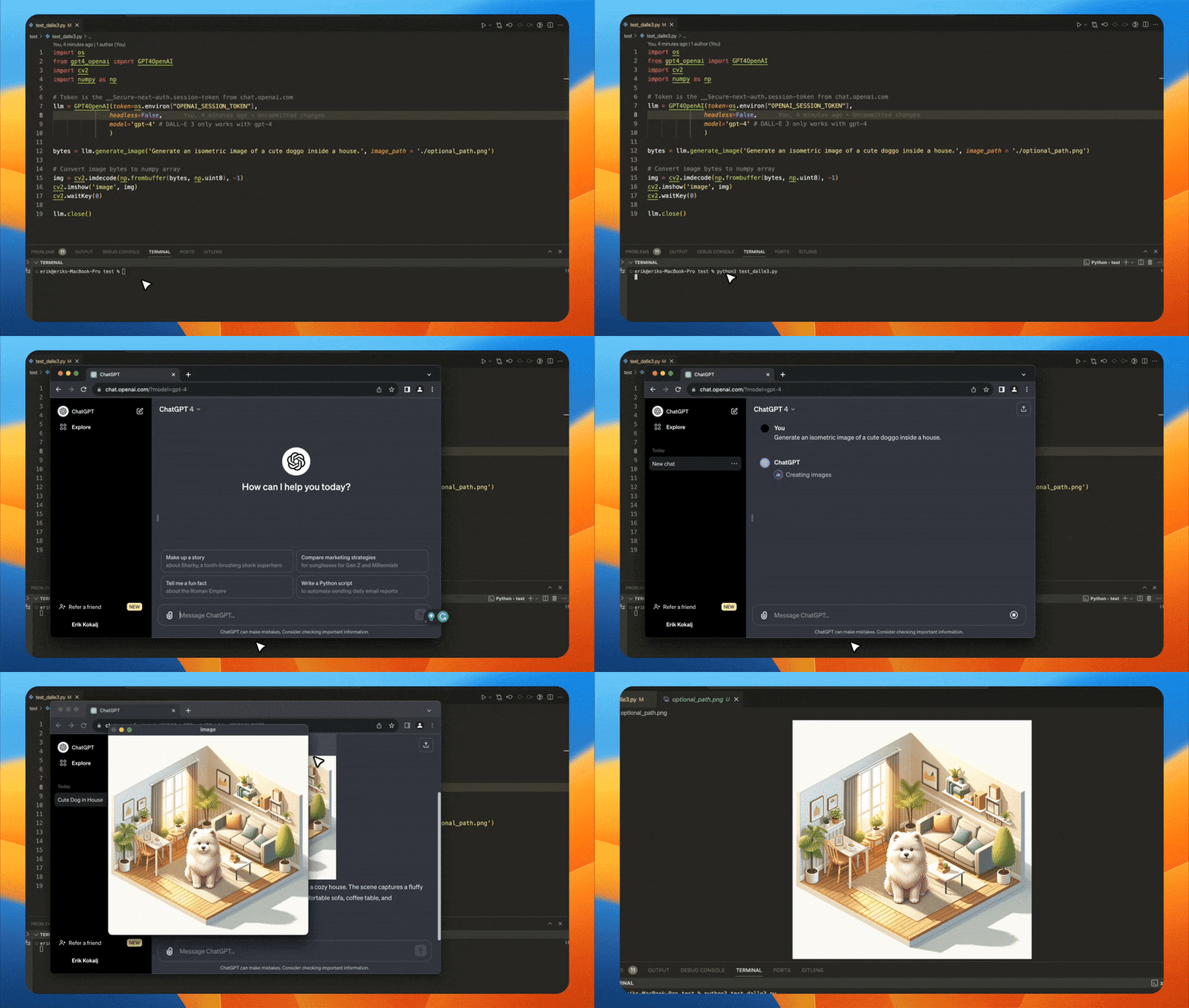
Demo script
from gpt4_openai import GPT4OpenAI

# Token is the __Secure-next-auth.session-token from chat.openai.com
llm = GPT4OpenAI(token=my_session_token, headless=False, model='gpt-4')
# GPT3.5 will answer 8, while GPT4 should be smart enough to answer 10
response = llm('If there are 10 books in a room and I read 2, how many books are still in the room?')
print(response)
DALL-E 3 support
This code was used for the demo gif above.
from gpt4_openai import GPT4OpenAI

llm = GPT4OpenAI(token=my_session_token, headless=False,
                model='gpt-4' # DALL-E 3 only works with gpt-4
                )

img_bytes = llm.generate_image('Generate an isometric image of a cute doggo inside a house.', image_path = './img_save_path.png')
Browsing support
from gpt4_openai import GPT4OpenAI

# Token is the __Secure-next-auth.session-token from chat.openai.com
llm = GPT4OpenAI(token=my_session_token, headless=False, model='gpt-4-browsing')
# ChatGPT will first browse the web for the name/age of her boyfriend, then return the answer
response = llm('What is the age difference between Dua Lipa and her boyfriend?')
print(response)
Langchain support
GPT4OpenAI actually extends LLM class from langchain.llms.base. So you can easily use this library inside langchain ecosystem. Example:
from gpt4_openai import GPT4OpenAI
from langchain import LLMChain
from langchain.prompts.chat import (ChatPromptTemplate, SystemMessagePromptTemplate, AIMessagePromptTemplate, HumanMessagePromptTemplate)

template="You are a helpful assistant that translates english to pirate."
system_message_prompt = SystemMessagePromptTemplate.from_template(template)
example_human = HumanMessagePromptTemplate.from_template("Hi")
example_ai = AIMessagePromptTemplate.from_template("Argh me mateys")
human_message_prompt = HumanMessagePromptTemplate.from_template("{text}")

chat_prompt = ChatPromptTemplate.from_messages([system_message_prompt, example_human, example_ai, human_message_prompt])

# Token is the __Secure-next-auth.session-token from chat.openai.com
llm = GPT4OpenAI(token=my_session_token)

chain = LLMChain(llm=llm, prompt=chat_prompt)
print(chain.run("My name is John and I like to eat pizza."))
Output will be:
AI: Ahoy, me name be John an' I be likin' ta feast on some pizza, arr!
How to get the session token
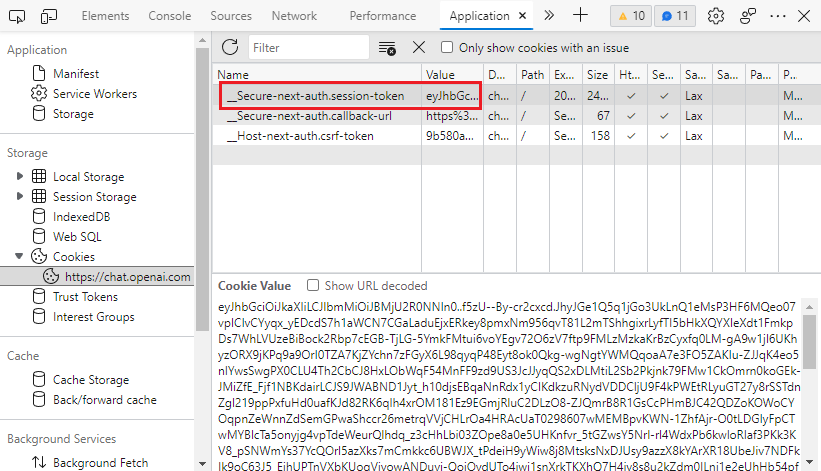
- Go to https://chat.openai.com and open the developer tools by
F12. - Find the
__Secure-next-auth.session-tokencookie inApplication>Storage>Cookies>https://chat.openai.com. - Copy the value in the
Cookie Valuefield.
OpenAI's GPT4 vs other providers
Initially, I tried poe.com (private API implemented at gpt4free), but noticed that input context window is smaller than one of OpenAI ChatGPT. And the same goes for Bing's GPT4.
Installation
To install this Python package, run the following command:
pip install gpt4-openai-api
Dependencies
These dependencies get downloaded directly:
undetected-chromedriver(selenium browser)markdownifylangchain
1 maintainer

Metadata
1 maintainer
Release files for gpt4-openai-api 0.9.0
For a detailed explanation of source distributions (sdists) and built distributions (wheels), please see the package formats documentation.
Source distribution (sdist)
| File | Size | Uploaded | |
|---|---|---|---|
| gpt4-openai-api-0.9.0.tar.gz | 13.4 kB | Details |
Built distribution (wheel)
| File | Interpreter | ABI | Platform | Reset |
|---|---|---|---|---|
| gpt4_openai_api-0.9.0-py3-none-any.whl | Python 3 | none | any | Details |
Total release size: 24.2 kB
Release files / gpt4-openai-api-0.9.0.tar.gz
| Download URL | gpt4-openai-api-0.9.0.tar.gz |
|---|---|
| Size | 13.4 kB |
| Tags | Source |
|
SHA-256 checksum How to use checksums |
30931acf1a86b01739f5385aad3cb2542151fe116aa2c9d1f060fe47fdff5770
|
|
BLAKE2b-256 checksum How to use checksums |
4f039f275f25a14d13ccd37107d51c5a5e5a44b4c8b920737713d7d40045428c
|
| Upload date | |
|
Uploaded using Trusted Publishing? What is trusted publishing? |
No |
| Uploaded via |
twine/4.0.2 CPython/3.11.4
|
Release files / gpt4_openai_api-0.9.0-py3-none-any.whl
| Download URL | gpt4_openai_api-0.9.0-py3-none-any.whl |
|---|---|
| Size | 10.8 kB |
| Tags | Python 3 |
|
SHA-256 checksum How to use checksums |
df11ef3bd6aeb8ca9653e24049a5a56596446085d3bdb327c3c37f3c0a7b6a08
|
|
BLAKE2b-256 checksum How to use checksums |
7f8fef46b0c56ba85087538c9b7aa7fa23796e82ea93383088a1ab1355b7e9a5
|
| Upload date | |
|
Uploaded using Trusted Publishing? What is trusted publishing? |
No |
| Uploaded via |
twine/4.0.2 CPython/3.11.4
|














