
A simple GNU Readline-based application for interaction with chat-oriented AI models using GPT4All Python bindings.
Contents
Install
The following installation options are available:
Pip
$ pip install git+https://github.com/sergei-mironov/gpt4all-cli.git
Note: pip install gpt4all-cli might also work, but the git+https method would bring the most
recent version.
Nix
$ git clone --depth=1 https://github.com/sergei-mironov/gpt4all-cli && cd gpt4all-cli
# Optionally, change the 'nixpkgs' input of the flake.nix to a more suitable
$ nix profile install ".#python-gpt4all-cli"
Usage
usage: gpt4all-cli [-h] [--model-dir MODEL_DIR] [--model [STR1:]STR2]
                   [--num-threads NUM_THREADS] [--model-apikey STR]
                   [--model-temperature MODEL_TEMPERATURE] [--device DEVICE]
                   [--readline-key-send READLINE_KEY_SEND]
                   [--readline-prompt READLINE_PROMPT]
                   [--readline-history FILE] [--verbose NUM] [--revision]

Command-line arguments

options:
  -h, --help            show this help message and exit
  --model-dir MODEL_DIR
                        Model directory to prepend to model file names
  --model [STR1:]STR2, -m [STR1:]STR2
                        Model to use. STR1 is 'gpt4all' (the default) or
                        'openai'. STR2 is the model name
  --num-threads NUM_THREADS, -t NUM_THREADS
                        Number of threads to use
  --model-apikey STR    Model provider-specific API key
  --model-temperature MODEL_TEMPERATURE
                        Temperature parameter of the model
  --device DEVICE, -d DEVICE
                        Device to use for chatbot, e.g. gpu, amd, nvidia,
                        intel. Defaults to CPU
  --readline-key-send READLINE_KEY_SEND
                        Terminal code to treat as Ctrl+Enter (default: \C-k)
  --readline-prompt READLINE_PROMPT
                        Input prompt (default: >>>)
  --readline-history FILE
                        History file name (default is '_gpt4all_cli_history';
                        set empty to disable)
  --verbose NUM         Set the verbosity level 0-no,1-full
  --revision            Print the revision
The console accepts language defined by the following grammar:
start: (command | escape | text)? (command | escape | text)*
escape.3: /\\./
command.2: /\/ask|\/exit|\/help|\/reset/ | \
           /\/model/ / +/ string | \
           /\/apikey/ / +/ string | \
           /\/nthreads/ / +/ (number | def) | \
           /\/verbose/ / +/ (number | def) | \
           /\/temp/ / +/ (float | def ) | \
           /\/echo/ | /\/echo/ / /
string: /"[^\"]+"/ | /""/
number: /[0-9]+/
float: /[0-9]+\.[0-9]*/
def: "default"
text: /(.(?!\/|\\))*./s
Example session
$ gpt4all-cli
Type /help or a question followed by the /ask command (or by pressing `C-k` key).
>>> /model "~/.local/share/nomic.ai/GPT4All/Meta-Llama-3-8B-Instruct.Q4_0.gguf"
>>> Hi!
>>> /ask
Hello! I'm happy to help you. What's on your mind?^C
>>> What's your name?
>>> /ask
I don't really have a personal name, but you can call me "Assistant"
Vim integration
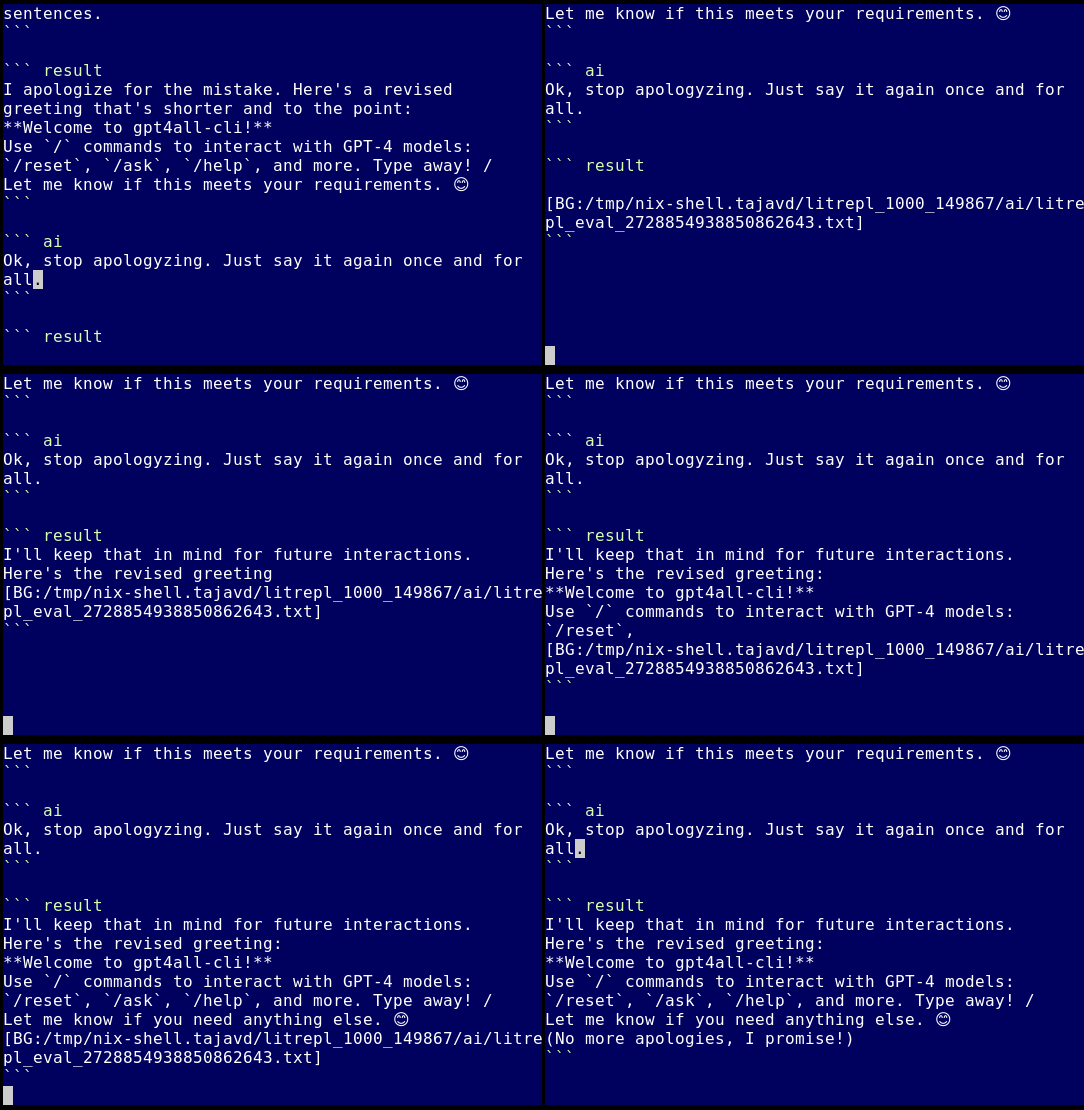
Gpt4all-cli is supported by the Litrepl text processor.
1 maintainer

Download files
Download the file for your platform. If you're not sure which to choose, learn more about installing packages.
Source Distribution
Built Distribution
Filter files by name, interpreter, ABI, and platform.
If you're not sure about the file name format, learn more about wheel file names.
Copy a direct link to the current filters
File details
Details for the file gpt4all_cli-1.3.0.tar.gz.
File metadata
- Download URL: gpt4all_cli-1.3.0.tar.gz
- Upload date:
- Size: 10.6 kB
- Tags: Source
- Uploaded using Trusted Publishing? No
- Uploaded via:
twine/5.0.0 CPython/3.11.9
File hashes
| Algorithm | Hash digest | |
|---|---|---|
| SHA256 |
b57c6e42cd2eefa48faeca5f3ce232deff2a32e8468307a3a322d6934fe44319
|
|
| MD5 |
86ae93635f874ef50d28c019ae501547
|
|
| BLAKE2b-256 |
58be7ddc8b5d79ce0ad0088a5254fb0781d4d824617fa725a37437b96223f80a
|
File details
Details for the file gpt4all_cli-1.3.0-py3-none-any.whl.
File metadata
- Download URL: gpt4all_cli-1.3.0-py3-none-any.whl
- Upload date:
- Size: 10.0 kB
- Tags: Python 3
- Uploaded using Trusted Publishing? No
- Uploaded via:
twine/5.0.0 CPython/3.11.9
File hashes
| Algorithm | Hash digest | |
|---|---|---|
| SHA256 |
dc68348a61b920ba45438ebedc3a5889803809568dc91cb990d496642cfde646
|
|
| MD5 |
8168501771aa316eea5916e63d8374bf
|
|
| BLAKE2b-256 |
2e59c43fd435c425a40109cdbefba17d55a758b713baaec17a0403d3c483b3c8
|














