
GPU-CLAHE
GPU-accelerated CLAHE (Contrast Limited Adaptive Histogram Equalization) for TensorFlow.


The whole algorithm is expressed as dense TensorFlow ops and compiled with XLA, so a batch of images is equalized in a handful of GPU kernels with no per-image Python loop.
~15× faster than single-threaded OpenCV, agreeing with it to a mean of 2.5 grey levels out of 255 at matched parameters, and producing bit-identical output across CPU/GPU, Python versions and TensorFlow versions.
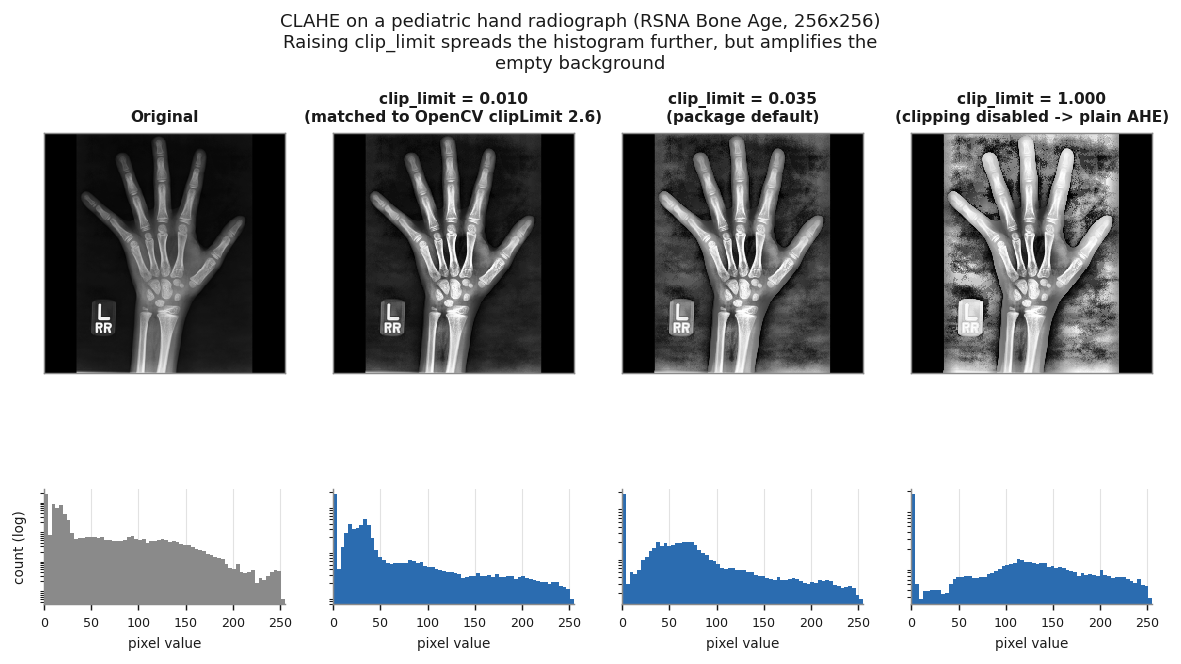
Pediatric hand radiograph from the RSNA Pediatric Bone Age Machine Learning Challenge dataset (Halabi et al., Radiology 2019 — see Data and attribution). Histograms are log-scaled: 43% of each image is near-black background.
Contents
- What it does · Installation · Quick start
- Parameter conventions — read this if you know OpenCV
- Choosing
clip_limit· Agreement with OpenCV - Performance · Determinism · API — full reference
- Limitations · Reproducing these results
- Data and attribution
What it does
CLAHE makes low-contrast images readable. It works in four steps:
- Tile. The image is split into
tile_size × tile_sizeregions (32×32 by default). - Equalize locally. Each tile gets its own intensity mapping, derived from that tile's histogram — so a dark corner and a bright one are each treated on their own terms.
- Interpolate. Every pixel is mapped through the lookup tables of its four neighbouring tiles and blended bilinearly, so no tile seams appear.
- Limit contrast. Histogram bins are capped before the mapping is built, which is what stops near-empty regions being amplified into noise.
This package performs all four on the GPU for a whole batch at once.
Installation
pip install gpu-clahe            # CPU, or with a CUDA-enabled TF already present
pip install "gpu-clahe[gpu]"     # also pulls the CUDA 12 runtime wheels (~3.5 GB)
Requires Python 3.9+ and TensorFlow 2.12+.
GPU support requires Linux or WSL2
TensorFlow dropped native-Windows GPU support at 2.11, and this package needs 2.12+, so on Windows there is no configuration that reaches the GPU — CUDA installed or not. TensorFlow says so itself on import:
TensorFlow GPU support is not available on native Windows for TensorFlow >= 2.11.
Even if CUDA/cuDNN are installed, GPU will not be used. Please use WSL2 [...]
Everything still runs correctly on Windows, just on the CPU. For GPU throughput, use Linux or run inside WSL2. The published benchmarks were measured on Linux.
If the GPU is not detected after [gpu] (Linux)
TensorFlow can fail to load the pip-installed CUDA libraries, because they live under
site-packages/nvidia/*/lib/ — a path the dynamic loader does not search by default.
The symptom is silent: everything works, just on the CPU, at roughly 1/18th the speed.
Check first:
import tensorflow as tf
print(tf.config.list_physical_devices("GPU"))   # [] means CPU fallback
If it prints [], point the loader at the wheels:
export LD_LIBRARY_PATH="$(python -c '
import os, nvidia
base = os.path.dirname(nvidia.__file__)
print(":".join(os.path.join(base, d, "lib") for d in os.listdir(base)
               if os.path.isdir(os.path.join(base, d, "lib"))))')"
Conda users normally do not hit this, because a conda-installed CUDA already sits on the loader path.
Quick start
import numpy as np
import gpu_clahe

images = np.random.randint(0, 256, (1000, 512, 512), dtype=np.uint8)
enhanced = gpu_clahe.convert_clahe(images)
Staying on the GPU
The host↔device round trip costs more than the CLAHE itself. If throughput matters, keep the data on the device:
import tensorflow as tf
import gpu_clahe

batch = tf.cast(tf.random.uniform((64, 512, 512), 0, 256, dtype=tf.int32), tf.uint8)

# Call the kernel directly inside a tf.function / tf.data pipeline.
enhanced = gpu_clahe.clahe_gpu(batch, tile_size=32, clip_limit=0.035)
Configuration object
from gpu_clahe import CLAHEConfig, convert_clahe

config = CLAHEConfig(tile_size=16, clip_limit=0.02)
enhanced = convert_clahe(images, config=config)

batch_size = config.auto_batch_size(images.shape)   # sized from VRAM and tile_size
Explicit arguments always beat config, including when they equal the default.
Batch sizing accounts for tile_size, because the per-tile histograms are the dominant
buffer once tiles get small: 3 B/pixel at tile_size=32, but 48 at 8 and 192 at 4.
Parameter conventions
Two parameters differ from OpenCV and cause nearly all the confusion.
clip_limit is a fraction of the pixels in a tile
Not OpenCV's clipLimit. The two are related by an exact conversion:
this package:  cap = clip_limit × tile_pixels
OpenCV:        cap = clipLimit  × tile_pixels / 256
which gives, independent of tile size:
clipLimit_opencv = clip_limit × 256
clip_limit (here) |
equivalent OpenCV clipLimit |
|
|---|---|---|
| 0.004 | 1.0 | gentle |
| 0.008 | 2.0 | OpenCV's most common setting |
| 0.012 | 3.0 | |
| 0.016 | 4.0 | |
| 0.035 | 9.0 | this package's default — aggressive |
| ≥ 1.0 | ≥ 256 | clipping never fires (see below) |
This mapping is verified empirically in Agreement with OpenCV.
Note the package default of 0.035 corresponds to OpenCV clipLimit ≈ 9, well above the
2–4 that OpenCV users typically pick. It is not wrong, but it is strong.
Values ≥ 1.0 silently disable clipping. A tile of 32×32 holds 1024 pixels, so a single
histogram bin can never exceed 1024. Once clip_limit × tile_pixels ≥ tile_pixels the cap
can never be crossed, and you get plain Adaptive Histogram Equalization with no contrast
limiting at all — the rightmost panel in the figure at the top. Passing an OpenCV-style
clipLimit=3.0 straight through lands you here.
tile_size is the tile's side in pixels
OpenCV's tileGridSize is the number of tiles. For a 512×512 image, tile_size=32
corresponds to tileGridSize=(16, 16):
grid = (-(-width // tile_size), -(-height // tile_size)) # (cols, rows)
Other constraints
- Single channel only. A 4-D input must have a trailing dimension of 1. For colour, convert to LAB and apply this to the L channel.
- Values are read on a
[0, 255]scale, whatever the dtype — see Limitations. - Height and width must be static at trace time. Batch size may vary, though a static batch selects the faster histogram path.
Choosing clip_limit
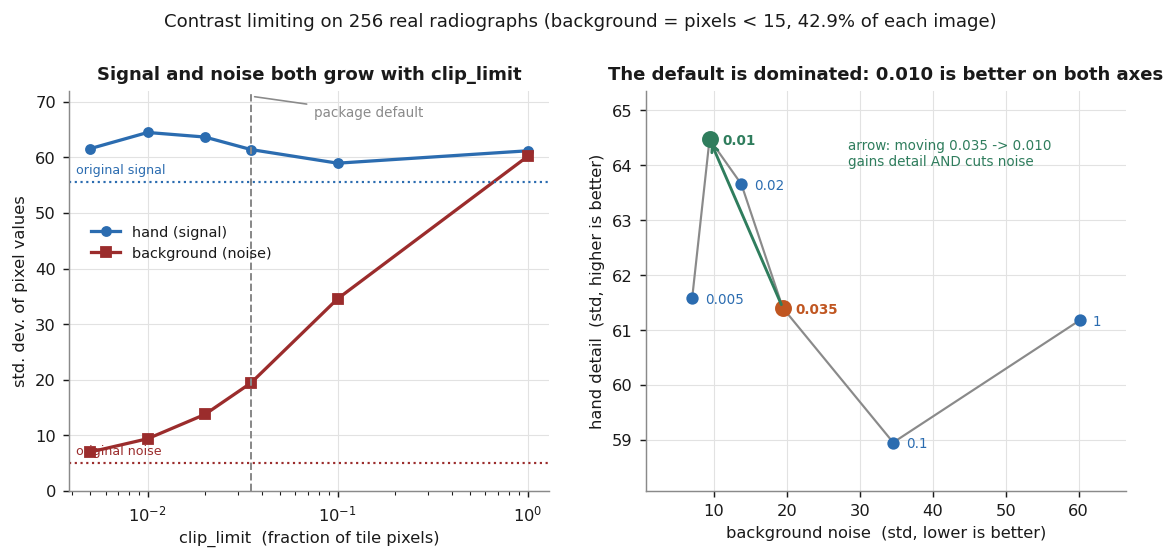
CLAHE amplifies noise in regions that carry no signal. This is inherent to the algorithm, not to this implementation — OpenCV does the same thing.
Measured on 256 radiographs, splitting each image into hand (pixels ≥ 15) and background (pixels < 15, which is 42.9% of every image):
clip_limit |
hand detail (σ) ↑ | background noise (σ) ↓ |
|---|---|---|
| original | 55.6 | 5.0 |
| 0.005 | 61.6 | 7.0 |
| 0.010 | 64.5 | 9.4 |
| 0.020 | 63.7 | 13.8 |
| 0.035 (default) | 61.4 | 19.4 |
| 0.100 | 59.0 | 34.6 |
| 1.000 | 61.2 | 60.2 |
On this dataset 0.010 dominates the default: more detail and half the noise. Past
roughly 0.02 the extra amplification lands almost entirely on the background.
This optimum is dataset-dependent. It reflects a large low-signal background, which is typical of radiographs and atypical of natural photographs. Sweep it on your own data.
Note also that σ is a proxy for detail — it measures spread, and cannot distinguish real structure from amplified noise. Treat the table as a starting point, and validate against whatever your downstream task actually optimises.
Agreement with OpenCV
tests/reference.py is a naive NumPy implementation that mirrors the kernel step for step,
and the suite asserts the two are bit-identical. That pins regressions, but it cannot
catch a conceptual error, since both share an algorithm. OpenCV is the independent check.
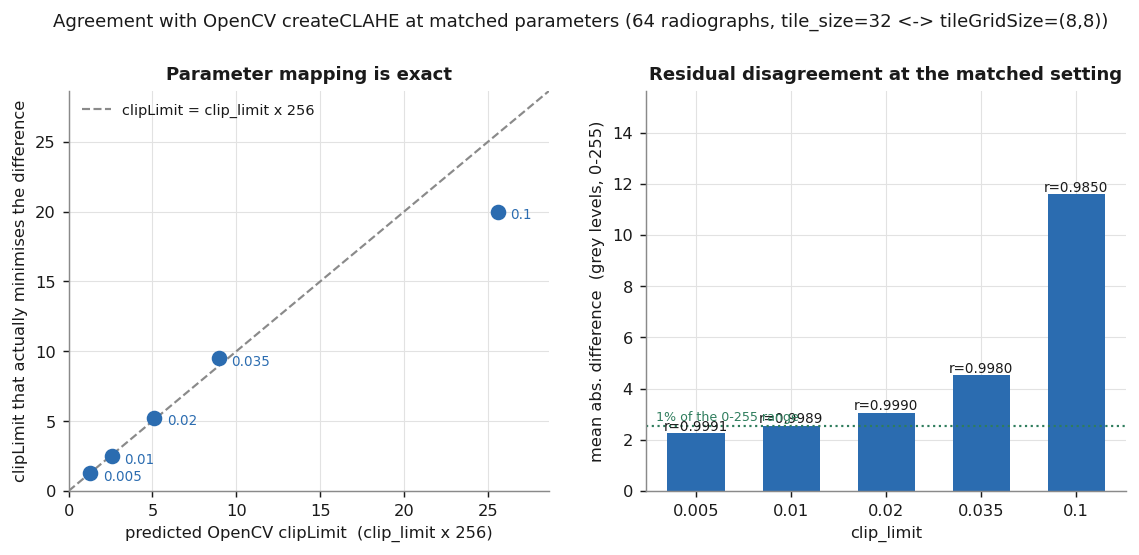
Measured on 64 radiographs at tile_size=32 ↔ tileGridSize=(8,8), sweeping OpenCV's
clipLimit from 0.5 to 20 in steps of 0.25 to find the true best match:
clip_limit |
predicted clipLimit |
best-fitting clipLimit |
mean abs. diff | correlation |
|---|---|---|---|---|
| 0.005 | 1.28 | 1.25 | 2.26 | 0.9991 |
| 0.010 | 2.56 | 2.50 | 2.54 | 0.9989 |
| 0.020 | 5.12 | 5.25 | 3.06 | 0.9990 |
| 0.035 | 8.96 | 9.50 | 4.52 | 0.9980 |
| 0.050 | 12.80 | 13.50 | 6.08 | 0.9964 |
The predicted mapping lands within one search step of the measured optimum throughout, and correlation stays above 0.996. Mean absolute difference is 2.3–2.5 grey levels — under 1% of the range — at the settings you would actually use.
Why the outputs are not identical
Two deliberate differences remain:
- LUT normalization. This package computes
(cdf − cdf_min) · 255 / (cdf_max − cdf_min); OpenCV usescdf · 255 / tile_pixelswithout subtracting the floor. Subtracting the floor matters most where the darkest bin is large, i.e. in near-empty tiles — measured at 4.2% of the CDF range in background tiles versus 1.0% in hand tiles. - Redistribution. Clipped mass is spread once and the integer remainder dropped; OpenCV
distributes the remainder with a spacing step. This grows with
clip_limit, which is why the residual difference rises from 2.3 to 6.1 levels across the table.
Consequently disagreement concentrates in low-signal regions. At clip_limit=0.035 the mean
absolute difference is 3.06 levels over the hand but 7.30 over the background; at 0.010
the two are comparable (2.78 and 2.25).
Convention 1 is inherited from v1.0.0 and kept deliberately — changing it would alter output for existing users.
If you need bit-identical OpenCV output, this package is not a drop-in replacement. It is a fast, independently-validated CLAHE, not a port.
Performance
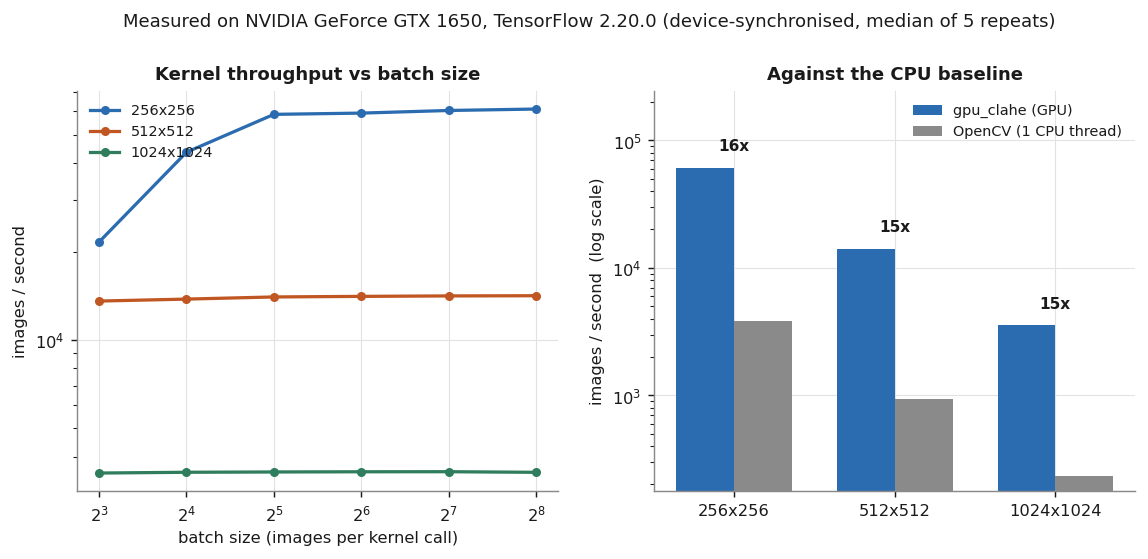
Measured on an NVIDIA GTX 1650 (4 GB, 896 CUDA cores, compute capability 7.5), driver 535.309.01, TensorFlow 2.20.0, Python 3.9.23. This is a low-end laptop GPU; a datacentre card will be substantially faster.
Every figure comes from benchmarks/run_benchmark.py, which forces a device
synchronization before stopping the clock and reports the median of repeated passes
over 1024 images per timed repeat:
python benchmarks/run_benchmark.py --sizes 256 512 1024 --num-images 1024 \
    --json docs/benchmark_results.json
The raw data is committed at docs/benchmark_results.json.
That file predates the harness recording its own parameters, so it pins the image count
and the environment but not the repeat count — see provenance_note inside it. Runs from
the current harness embed a parameters block and the exact command.
Kernel throughput — images already resident in GPU memory
| Image size | Throughput | Pixel rate | Best batch | OpenCV (1 thread) | Speedup |
|---|---|---|---|---|---|
| 256 × 256 | 61,110 img/s | 4,005 MPix/s | 256 | 3,796 img/s | 16.1× |
| 512 × 512 | 14,147 img/s | 3,708 MPix/s | 256 | 929 img/s | 15.2× |
| 1024 × 1024 | 3,562 img/s | 3,735 MPix/s | 128 | 234 img/s | 15.2× |
The pixel rate is near-constant across image sizes, which is what you want to see: the GPU is saturated rather than latency-bound.
End-to-end throughput
convert_clahe with a NumPy array in and out, including the host↔device round trip, on
2,048 real radiographs:
| Throughput | |
|---|---|
| Kernel only (256×256, batch 128) | 53,126 img/s |
convert_clahe (NumPy in/out) |
11,911 img/s |
A separate run on real radiographs rather than the synthetic sweep above, which is why the kernel-only figure differs from that table's 60,424 img/s at the same configuration. Not covered by the committed JSON.
The PCIe transfer dominates. If throughput matters, keep your data on the device — pass
a tf.Tensor with return_tensor=True, or call clahe_gpu directly.
Reproducibility of the measurement
Short runs on a laptop GPU are dominated by clock-boost behaviour: the same 256×256 configuration measured between 48k and 62k img/s depending on how warm the card was. Published figures use workloads long enough for clocks to settle, with batch sizes interleaved across repeats so thermal drift cannot favour whichever ran last. Expect your own numbers to move by a few percent, and be suspicious of any single short run.
Determinism
The same input produces bit-identical output across devices, Python versions, TensorFlow versions and NumPy versions. Verified by hashing the output of 64 radiographs:
| Environment | GPU | SHA-256 (first 32) |
|---|---|---|
| Python 3.9.23, TF 2.20.0, NumPy 2.0.2 | yes | 489cd96070a822218ec4a98fe1023c69 |
| Python 3.13.5, TF 2.21.0, NumPy 2.5.1 | yes | 489cd96070a822218ec4a98fe1023c69 |
| Python 3.13.5, TF 2.21.0, NumPy 2.5.1 | no | 489cd96070a822218ec4a98fe1023c69 |
This is not automatic. Two properties make it hold, and both are load-bearing:
- The LUT normalization is integer arithmetic. In floating point, XLA:GPU lowers
division to an approximate reciprocal, so a quotient landing exactly on
x.5on the CPU falls just below it on the GPU and rounds the other way. That produced off-by-one pixels between devices. The kernel computes(2·255·n + s) // (2·s)instead — round-half-up with no floating point anywhere. - Histogram accumulation adds int32 ones through a scatter. Integer addition is associative, so the ordering of GPU atomics cannot change the result. The same scatter in floating point would not be reproducible.
tests/test_correctness.py::test_gpu_matches_cpu_bit_exactly guards this.
API
📘 Full API reference → — every parameter, error message and recipe, with runnable examples.
| Function | Purpose |
|---|---|
convert_clahe(images, ...) |
Whole-dataset entry point; batches automatically. Validates input unless validate=False. |
clahe_gpu(images, tile_size, clip_limit, dtype) |
The XLA kernel. (B,H,W) or (B,H,W,1) tensor. |
clahe_gpu_nojit(...) |
Non-XLA twin, for dynamic shapes or diagnosing a miscompile. |
CLAHEConfig(...) |
Parameter bundle with auto_batch_size(shape, tile_size=None). |
setup_gpu(memory_growth, enable_xla) |
Configure the device; returns whether a GPU exists. |
validate_input(images) |
(is_valid, message). Never raises. |
require_valid_input(images) |
Raises ValueError instead. |
get_gpu_info() |
TF version, CUDA flag, per-device name and compute capability. |
environment() |
The above plus Python, platform and driver — what a benchmark artefact records. |
total_gpu_memory_mb() |
Device total via nvidia-smi; 0 if unavailable. |
gpu_driver_version() |
NVIDIA driver version via nvidia-smi; None if unavailable. |
benchmark_performance(...) |
Synchronized throughput sweep → BenchmarkReport. |
benchmark_opencv(...) |
Single-threaded CPU baseline → BenchmarkResult. |
Accepted input dtypes: uint8, uint16, int16, int32, float16, float32, float64.
Limitations
-
Values are interpreted on a
[0, 255]scale regardless of dtype, and out-of-range values are clipped rather than rescaled. A 12-bit DICOM radiograph (0–4095) has ~94% of it collapse onto a single value. Rescale first:scaled = image.astype(np.float32) / image.max() * 255
convert_clahenow rejects both this and its mirror image — a float image normalized to[0, 1], which otherwise comes back as a solid black frame. Passvalidate=Falseto opt out.clahe_gpuis the raw kernel and does not check: it clips and continues. -
convert_claherequires the whole dataset in host RAM. It allocates the full output array and indexes the input directly. A million 512×512 images is 262 GB. Batching within a run is correct and tested; true streaming would need a generator or file-backed API.use_pipeline=Truecosts a further full copy, sincetf.data.from_tensor_slicesmaterializes the array it is given. -
Single channel only. Colour requires converting to LAB and applying to the L channel manually. Rejected explicitly rather than silently mishandled.
-
Height and width must be static. Required by XLA. The batch size may be dynamic, but a dynamic batch selects a histogram path roughly 12× slower — and one that depends on XLA fusing away its
(B, tiles, pixels, 256)intermediate. Underclahe_gpu(JIT) that fusion happens. Underclahe_gpu_nojitit does not, so the intermediate is real: about 8.6 GB for a 32×512×512 batch. Prefer a static batch, or stay on the JIT path. -
Redistribution is single-pass. Excess clipped mass is spread once and the integer remainder dropped; it is not re-clipped, and the remainder is not distributed with OpenCV's spacing. See Agreement with OpenCV.
-
Benchmarks come from one low-end GPU. Figures on a datacentre card will differ substantially, and the automatic batch-size ceiling was tuned against 4 GB of VRAM.
Reproducing these results
pip install -e ".[dev]"

pytest                                                    # 185 tests
python benchmarks/run_benchmark.py --sizes 256 512 1024   # throughput table
The benchmark writes JSON with --json results.json, recording the full environment
(TF version, GPU model, compute capability, driver, Python, platform), the parameters it
was invoked with, and the command needed to repeat it. A throughput figure without its
hardware is not a result, and one without its parameters cannot be checked.
Figures 1–3 are regenerated from a directory of equally-sized single-channel PNGs:
python benchmarks/make_figures.py --data /path/to/images
Data and attribution
The radiographs in Figures 1–3 come from the RSNA Pediatric Bone Age Machine Learning Challenge (2017) dataset — de-identified pediatric hand radiographs released for research use. The dataset is not redistributed with this package; only derived figures illustrating the effect of CLAHE are shown. Obtain it from the RSNA challenge page, subject to its terms of use.
If you use the dataset, cite the challenge paper:
Halabi SS, Prevedello LM, Kalpathy-Cramer J, et al. The RSNA Pediatric Bone Age Machine Learning Challenge. Radiology. 2019;290(2):498–503. doi:10.1148/radiol.2018180736
@article{halabi2019rsna,
  title   = {The {RSNA} Pediatric Bone Age Machine Learning Challenge},
  author  = {Halabi, Safwan S. and Prevedello, Luciano M. and
             Kalpathy-Cramer, Jayashree and Mamonov, Artem B. and
             Bilbily, Alexander and Cicero, Mark and Pan, Ian and
             Pereira, Lucas Ara{\'u}jo and Sousa, Rafael Teixeira and
             Abdala, Nitamar and Kitamura, Felipe Campos and
             Thodberg, Hans H. and Chen, Leon and Shih, George and
             Andriole, Katherine and Kohli, Marc D. and
             Erickson, Bradley J. and Flanders, Adam E.},
  journal = {Radiology},
  volume  = {290},
  number  = {2},
  pages   = {498--503},
  year    = {2019},
  doi     = {10.1148/radiol.2018180736}
}
The benchmark comparison uses OpenCV's createCLAHE as an
independent reference implementation. The algorithm itself is due to Zuiderveld,
Contrast Limited Adaptive Histogram Equalization, Graphics Gems IV, 1994.
Development
git clone https://github.com/ateferos77/tf_clahe_gpu
cd tf_clahe_gpu
pip install -e ".[dev]"
pre-commit install

pytest                  # GPU-marked tests skip automatically without a GPU
ruff check . && ruff format --check .
mypy gpu_clahe
CI runs lint, type-check, the suite on Python 3.9–3.13 across Linux/macOS/Windows, and a build job that installs the wheel from a temporary directory and smoke-tests it.
See CONTRIBUTING.md.
Upgrading from 1.x
2.0 is a breaking release — the import name changed from clahe to gpu_clahe,
output pixel values shift by up to one grey level, and mis-scaled input is now rejected
rather than silently mangled. See Parameter conventions and
Limitations for what to check in existing code.
License
MIT — see LICENSE.
Citation
@software{gpu_clahe,
  author = {Mirzazadeh, Bahador and Rostami, Atefe},
  title  = {GPU-CLAHE: GPU-accelerated CLAHE for TensorFlow},
  url    = {https://github.com/ateferos77/tf_clahe_gpu},
  year   = {2025}
}
1 maintainer

Download files
Download the file for your platform. If you're not sure which to choose, learn more about installing packages.
Source Distribution
Built Distribution
Filter files by name, interpreter, ABI, and platform.
If you're not sure about the file name format, learn more about wheel file names.
Copy a direct link to the current filters
File details
Details for the file gpu_clahe-2.0.2.tar.gz.
File metadata
- Download URL: gpu_clahe-2.0.2.tar.gz
- Upload date:
- Size: 51.1 kB
- Tags: Source
- Uploaded using Trusted Publishing? Yes
- Uploaded via:
twine/7.0.0 CPython/3.13.14
File hashes
| Algorithm | Hash digest | |
|---|---|---|
| SHA256 |
bf95edd1282cb2e63ab8fa5c0bc2f3e80ba70c647f70bd2ae8de0dd43dd478c7
|
|
| MD5 |
baedbf0dff8d5b2e9a2cf8aaf1a8000b
|
|
| BLAKE2b-256 |
e4a9f1623e10081c1350e7fc9657696cbd20136eb293b463839461a5844d303d
|
Provenance
The following attestation bundles were made for gpu_clahe-2.0.2.tar.gz:
Publisher:
release.yml on ateferos77/tf_clahe_gpu
-
Statement:
-
Statement type:
https://in-toto.io/Statement/v1 -
Predicate type:
https://docs.pypi.org/attestations/publish/v1 -
Subject name:
gpu_clahe-2.0.2.tar.gz -
Subject digest:
bf95edd1282cb2e63ab8fa5c0bc2f3e80ba70c647f70bd2ae8de0dd43dd478c7 - Sigstore transparency entry: 2360698742
- Sigstore integration time:
-
Permalink:
ateferos77/tf_clahe_gpu@4c27e6a8bd12868d9a916cd59b8de1af1823292e -
Branch / Tag:
refs/tags/v2.0.2 - Owner: https://github.com/ateferos77
-
Access:
public
-
Token Issuer:
https://token.actions.githubusercontent.com -
Runner Environment:
github-hosted -
Publication workflow:
release.yml@4c27e6a8bd12868d9a916cd59b8de1af1823292e -
Trigger Event:
push
-
Statement type:
File details
Details for the file gpu_clahe-2.0.2-py3-none-any.whl.
File metadata
- Download URL: gpu_clahe-2.0.2-py3-none-any.whl
- Upload date:
- Size: 32.5 kB
- Tags: Python 3
- Uploaded using Trusted Publishing? Yes
- Uploaded via:
twine/7.0.0 CPython/3.13.14
File hashes
| Algorithm | Hash digest | |
|---|---|---|
| SHA256 |
a07de2050410cca035055a04ed05c68b1064872ce83923f179128cb12b3a48ca
|
|
| MD5 |
9d53d84de2cc6a215179510338cb86e1
|
|
| BLAKE2b-256 |
a8b091544f34f1d80323e829318155baf3e1120dfb18327e713c230dc5c0ad25
|
Provenance
The following attestation bundles were made for gpu_clahe-2.0.2-py3-none-any.whl:
Publisher:
release.yml on ateferos77/tf_clahe_gpu
-
Statement:
-
Statement type:
https://in-toto.io/Statement/v1 -
Predicate type:
https://docs.pypi.org/attestations/publish/v1 -
Subject name:
gpu_clahe-2.0.2-py3-none-any.whl -
Subject digest:
a07de2050410cca035055a04ed05c68b1064872ce83923f179128cb12b3a48ca - Sigstore transparency entry: 2360698768
- Sigstore integration time:
-
Permalink:
ateferos77/tf_clahe_gpu@4c27e6a8bd12868d9a916cd59b8de1af1823292e -
Branch / Tag:
refs/tags/v2.0.2 - Owner: https://github.com/ateferos77
-
Access:
public
-
Token Issuer:
https://token.actions.githubusercontent.com -
Runner Environment:
github-hosted -
Publication workflow:
release.yml@4c27e6a8bd12868d9a916cd59b8de1af1823292e -
Trigger Event:
push
-
Statement type:














