
GTLS: GPU Transit Least Squares


GTLS is a CUDA implementation of the Transit Least Squares (TLS) algorithm for detecting periodic exoplanet transits in light curves. It keeps the TLS interface and transit model, and evaluates all trial periods, durations and epochs in parallel on an NVIDIA GPU, which makes it several times faster than CPU TLS.
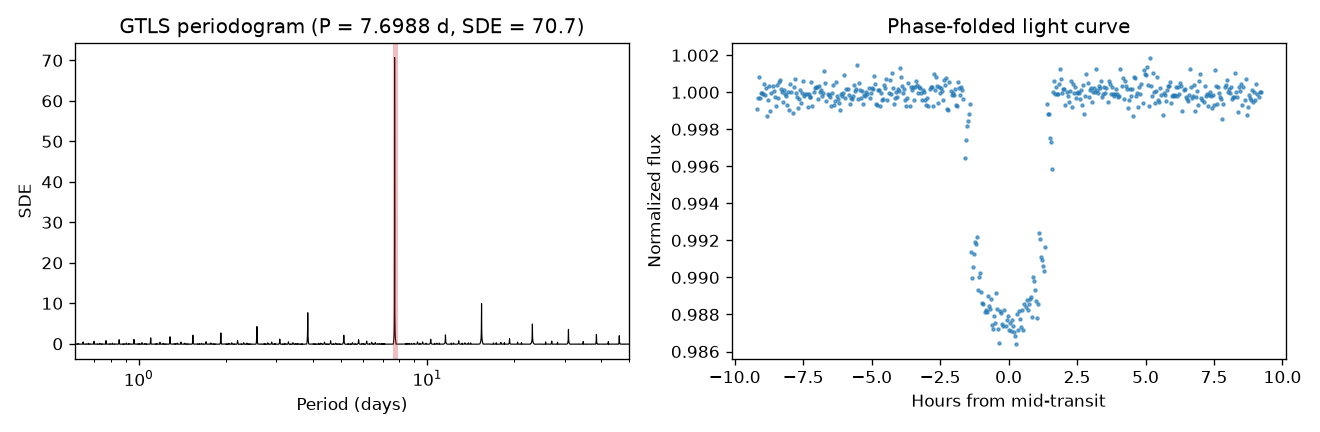
Features
- Drop-in replacement for the
transitleastsquaressearch API - Limb-darkened transit templates (default, grazing and box-shaped)
- Batches trial periods automatically to fit the free GPU memory
- Refines the strongest peaks and their period aliases (P/2, 2P, 2P/3, 3P/2) with a full search at every cadence
- Supports multi-GPU machines: pick a device with
GPUDeviceIDor split one search across several withGPUDeviceIDs
Requirements
- An NVIDIA GPU with CUDA
- Python >= 3.8
- CuPy matching your CUDA version
Installation
CuPy wheels depend on the local CUDA version, so CuPy is not a hard dependency. Install CuPy following the official guide, then install GTLS:
pip install gputls
Or let pip pick a CuPy build for you:
pip install "gputls[cuda12]"   # CUDA 12.x
pip install "gputls[cuda11]"   # CUDA 11.x
To install from source:
git clone https://github.com/Farthing-0/GTLS.git
cd GTLS
pip install .
Quick start
from gputls import gtls

# time in days, flux normalized to 1, optional flux uncertainties dy
model = gtls(time, flux, dy)
result = model.power()

print(result.period, result.T0, result.duration, result.depth, result.SDE)
power() accepts the same keyword arguments as TLS. Commonly used ones:
| Argument | Default | Description |
|---|---|---|
period_min, period_max |
0, inf |
Limits of the automatic period grid (days) |
periods |
[] |
Custom array of trial periods; overrides the automatic grid |
R_star, M_star |
1.0, 1.0 |
Stellar radius and mass (solar units) used for the period grid |
oversampling_factor |
3 |
Period grid oversampling |
duration_grid_step |
1.1 |
Multiplicative step of the duration grid |
transit_depth_min |
1e-5 |
Minimum depth of a trial transit |
transit_template |
"default" |
"default", "grazing" or "box" |
T0_fit_margin |
0.125 |
Epoch step of the coarse search as a fraction of the duration (0 to 0.125; 0 tests every cadence) |
GPUDeviceID |
0 |
CUDA device to run on |
GPUDeviceIDs |
None |
List of CUDA devices to split the search across (e.g. [0, 1]); overrides GPUDeviceID. Results are identical to a single-GPU run |
bar_location |
0 |
Position of the progress bar, useful when running several searches in parallel |
fast |
False |
Return only (periods, power), skipping the refinement and transit statistics |
Results
power() returns a gtlsResult object with the following attributes:
| Attribute | Description |
|---|---|
period |
Best period (days) |
T0 |
Mid-transit time of the first transit (days) |
duration |
Transit duration (days) |
depth |
Fractional transit depth (1 - in-transit flux). Note: TLS reports the in-transit flux level instead |
SDE |
Signal Detection Efficiency of the best period |
snr, snrPink |
Signal-to-noise ratio with white and pink (correlated) noise |
snrFit, snrFitPink |
Signal-to-noise ratio from the fitted transit depth |
transitTimes |
Mid-transit times within the light curve |
periods, power |
Periodogram: trial periods and SDE power |
chi2 |
Minimum chi² of each period after refinement |
raw_chi2, raw_power |
Minimum chi² and power of the coarse search, before refinement |
possiblePeriods, possiblePeriodsIndices |
Periods that were refined, and their indices in periods |
rawDuration, rawDurations, durationPoints |
Best duration as a fraction of the period, the duration grid, and the best duration in data points |
Examples
The examples/ folder contains Jupyter notebooks comparing GTLS with TLS:
tess_tutorial.ipynb: a TESS targetkepler_tutorial.ipynb: a Kepler target downloaded withlightkurve
The notebooks also need matplotlib, astropy, transitleastsquares, lightkurve and wotan.
Testing
The test suite runs end-to-end searches on the GPU: injection-recovery on a synthetic
light curve, the fast mode, a real Kepler light curve stored in
tests/data/, release of GPU memory after a search, and (on machines with
at least two GPUs) bitwise agreement between single- and multi-GPU searches. It needs astropy in addition to the runtime dependencies.
One-click build, install and test (inside an environment where CuPy is installed):
./run_tests.sh            # GPU 0
./run_tests.sh 1          # GPU 1
PYTHON=/path/to/python ./run_tests.sh
The script reinstalls only gputls itself (--no-deps) and then runs
tests/test_gtls.py. The tests can also be run with pytest tests; select the GPU with
the GTLS_GPU_DEVICE environment variable.
Project structure
GTLS/
├── src/gputls/          # Python package
│   ├── main.py          # gtls class (public API)
│   ├── core.py          # GPU search driver
│   ├── kernels.cu       # CUDA kernels, compiled at runtime by CuPy
│   ├── grid.py          # period and duration grids
│   ├── transit.py       # transit templates (batman)
│   ├── stats.py         # periodogram and SNR statistics
│   ├── validate.py      # input and argument validation
│   ├── constants.py     # default parameters
│   └── ...
├── tests/               # GPU test suite and test data
├── examples/            # Jupyter notebooks
├── docs/images/         # Figures used in the documentation
├── run_tests.sh         # One-click build and test
└── pyproject.toml
Acknowledgements and license
GTLS is adapted from TLS by Michael Hippke and René Heller. If you use GTLS, please also cite the TLS paper: Hippke, M. & Heller, R. (2019), Optimized transit detection algorithm to search for periodic transits of small planets, A&A 623, A39.
Both TLS and GTLS are released under the MIT License.
1 maintainer

Metadata
1 maintainer
Release files for gputls 0.6.0
For a detailed explanation of source distributions (sdists) and built distributions (wheels), please see the package formats documentation.
Source distribution (sdist)
| File | Size | Uploaded | Provenance | Actions |
|---|---|---|---|---|
| gputls-0.6.0.tar.gz | 32.5 kB | Without provenance | Details for gputls-0.6.0.tar.gz |
Built distribution (wheel)
| File | Interpreter | ABI | Platform | Actions Reset |
|---|---|---|---|---|
| gputls-0.6.0-py3-none-any.whl | Python 3 | none | any | Details for gputls-0.6.0-py3-none-any.whl |
Total release size: 62.9 kB
Release files / gputls-0.6.0.tar.gz
| Download URL | gputls-0.6.0.tar.gz |
|---|---|
| Size | 32.5 kB |
| Tags | Source |
|
SHA-256 checksum How to use checksums |
709a5cb776463b544a8bc12b15a653615d7eed0ffa8a07bcc300b3824e163913
|
|
BLAKE2b-256 checksum How to use checksums |
bd353cb958d78d3bf8937b5ffc393d6ab657c586b44f8752ca15d5be57a85b4d
|
| Upload date | |
|
Uploaded using Trusted Publishing? What is trusted publishing? |
No |
| Uploaded via |
twine/7.0.0 CPython/3.12.3
|
Release files / gputls-0.6.0-py3-none-any.whl
| Download URL | gputls-0.6.0-py3-none-any.whl |
|---|---|
| Size | 30.4 kB |
| Tags | Python 3 |
|
SHA-256 checksum How to use checksums |
8136924e84c7d05e1f337fdce586e6c49ed6e3c88bfa4d6cdfb6bea732e3335e
|
|
BLAKE2b-256 checksum How to use checksums |
66b4e6a66914994ee725dda26bb7adb19f5b8190b20c43f9fad94e9c8dd6c4ec
|
| Upload date | |
|
Uploaded using Trusted Publishing? What is trusted publishing? |
No |
| Uploaded via |
twine/7.0.0 CPython/3.12.3
|
Security for gputls 0.6.0
Provenance
Provenance describes where a file came from. On PyPI, provenance is shared via attestations, which provide a verifiable record of the build or publishing details. View details, limitations and caveats.
No provenance found
None of the files in this release were uploaded with provenance metadata.
A note on package security
PyPI is a repository for distributing packages, not a service for auditing them. While third-party security researchers and our staff do their best to detect and remove malicious packages, PyPI cannot guarantee the quality, security or suitability of any given package.
To learn more about protecting yourself from malicious actors, visit our package security documentation.














