
ArWen
Explore weather, create regional forecasts, and run them on your own hardware.
ArWen combines a native desktop application, a terminal workspace, and a CUDA-based atmospheric modeling engine. Use the desktop to inspect weather maps, choose a forecast area or cyclone, review the setup, and follow your results. Run the model on a local NVIDIA GPU or a Linux computer connected over SSH.
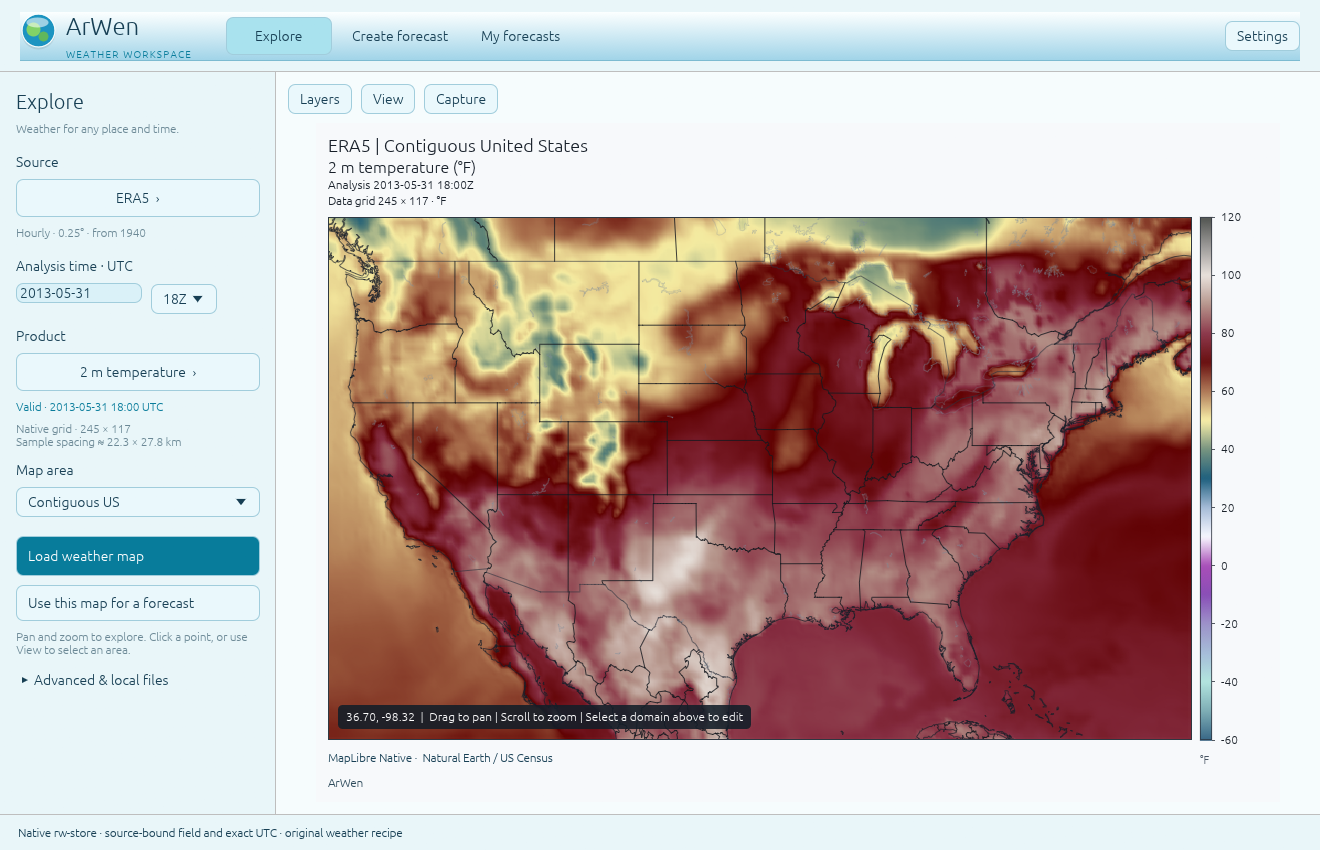
The Linux desktop displaying a real ERA5 field. Windows uses the same interface.
Get ArWen
| Download | Requirements |
|---|---|
| Windows desktop: GUI and TUI | x86-64 Windows; compatible NVIDIA GPU and driver; internet for first setup |
| Linux desktop: GUI and TUI | x86-64 Linux, glibc 2.39 or newer, such as Ubuntu 24.04; Python 3.11 or newer; X11 or Wayland with working OpenGL |
| Integration kit | Developer guide, CLI/plan examples, catalogs, and client design notes |
The desktop archives contain the applications, native map library and map assets. Windows includes a graphical setup launcher that downloads a private Python and CUDA runtime on first use. Linux uses the manual setup below. No Rust or C++ compiler is needed for these binary packages.
The Python package is named gpuwm. Its Windows and Linux platform wheels
include the engine, native processing tools, and TUI. The desktop GUI is the
separate download above. Check release notes and checksums
for the exact artifacts and qualification records.
Install the desktop for forecasts on your PC
Windows
- Download the Windows desktop ZIP and extract it into its own folder.
- Open ArWen.exe. The setup window installs the matching engine and GPU dependencies, shows progress, and checks the local GPU.
- When the workspace opens, choose Create forecast, draw an area, review the configuration, and run it on Local computer.
Python and the user-space CUDA components are managed by the application.
A compatible NVIDIA driver must already be installed. Keep the resources
folder beside ArWen.exe. Setup errors remain visible with retry and repair
controls; setup does not require terminal commands.
First setup also prepares the physics tables and global geography needed for regional forecasts. Allow several gigabytes of downloads and at least 25 GB of free disk space, plus space for weather inputs and forecast output.
Linux
python3 -m venv ~/.local/share/arwen/venvs/2.7.3
~/.local/share/arwen/venvs/2.7.3/bin/python -m pip install 'gpuwm[all-cu12]==2.7.3'
~/.local/share/arwen/venvs/2.7.3/bin/python -m gpuwm.cli fetch-tables
~/.local/share/arwen/venvs/2.7.3/bin/python -m gpuwm.cli doctor
Extract the complete Linux tarball. From its application folder:
./Start\ ArWen.sh --python ~/.local/share/arwen/venvs/2.7.3/bin/python
If your distribution does not include Python's venv module, install its venv
package first; Ubuntu provides python3-venv.
The Linux launchers open the connected GUI and TUI. Use
Start ArWen Terminal.sh for the terminal alone. After activating a Python
environment, gpuwm tui also opens the terminal.
Settings and run caches live outside the application folder. Keep the application files and notices together when moving or updating the desktop.
GPU requirements and forecast data
The normal desktop installation above already includes the GPU dependencies. Local forecasting requires a compatible NVIDIA GPU and driver. A card's VRAM capacity alone does not establish driver or CUDA compatibility.
For a manual Python installation on a supported CUDA 13 GPU and driver, replace
all-cu12 with all-cu13 in the installation command. Install only one CuPy/CUDA major in each environment.
A driver reporting CUDA 13 support can also run CUDA 12 applications; that
display does not require switching a working CUDA 12 installation. See
NVIDIA's compatibility guidance.
gpuwm doctor reports each remedy as a command or a # comment explaining
the manual step.
The GPU extra installs CuPy and the required user-space NVIDIA CUDA components through their dependency packages. It does not install Python or the NVIDIA device driver. Install one CuPy/CUDA major per environment. See the CuPy installation guide and ArWen hardware guidance.
Most scientific lookup data arrives with the automatically installed
gpuwm-data package. gpuwm fetch-tables obtains and hash-checks two additional
Thompson tables, about 314 MiB combined. Geography and forecast inputs are
separate: configure an existing geography installation or use gpuwm fetch-geog.
ERA5 requires the user's CDS configuration and dataset access. Remote operation
requires an SSH client and a configured, reachable forecast computer.
Local forecast integration runs on CUDA; it has no CPU fallback. The desktop, terminal, native weather processing, and remote-control workflows can run on a computer without a local CUDA installation.
Only an intentionally viewer-only or remote-control installation should use
gpuwm[render]==2.7.3 without a GPU extra. It cannot execute local forecasts.
Work with weather
- Explore: choose a supported source, field, area, and valid time; load a weather map and play available UTC frames.
- Create forecast: start from an area, an Explore map, a saved configuration, or a cyclone setup. Choose the forecast computer and inputs, review the resolved physics and memory requirements, then launch.
- My forecasts: return to active or saved runs, inspect domains and output times, view native fields and plots, and play the forecast history.
- Terminal and CLI: use
gpuwm tuifor an interactive workspace or the command interfaces for scripts and automation.
GFS, HRRR, and ERA5 workflows are included, with ERA5 member selection and
cyclone-follow setup among the 2.7 features. The installed source catalog is
available through gpuwm sources --json. Forecast-input support and Explore
preview support are separate; some registered forcing sources do not yet have
an Explore preview route.
For a configuration already prepared for your computer and inputs:
gpuwm go forecast.toml --dry-run
gpuwm go forecast.toml
The first command reviews the route; the second executes it. See the CLI manual and TUI manual for the complete workflows.
Integrate ArWen into another application
The integration guide and downloadable kit describe the CLI, run-plan documents, catalogs, and companion bridge boundaries. The kit contains an example subprocess client and tests. It is a documented integration surface, not a separate simulation engine or a replacement for runtime validation.
Use the installed catalogs and validated plans when building another interface. Preserve request identity, selected source/time/domain, cancellation, and the distinction between a preview and an executing forecast.
Science, compatibility, and current limits
ArWen independently implements a WRF-ARW-class regional atmospheric model and WRF-derived physics on the GPU. Its numerical comparisons and qualification apply to documented configurations and test cases. They do not establish universal equivalence with WRF or validate every combination of physics, input dataset, and hardware. Read the verification record, physics documentation, and 2.7 changes.
- Checkpoints: 2.7 writes format 6. Format-5 checkpoints from older releases and previews are not compatible. Finish those runs with the version that created them, or start again from the original configuration and inputs.
- Noah-MP memory basis:
sf_surface_physics = 4is priced from the per-thread frames its kernels compile to, which are readings of a compile platform (target architecture and NVRTC build). The NVRTC build is set by the cuda-toolkit release the package's[ctk]extra resolves to when pip runs, not by the machine. The desktop runtime is a CUDA-12 install. This release carries readings on both CUDA majors: sm_120 and sm_86 on NVRTC 12.9.86, the build a CUDA-12 install resolves (gpu-cu12,gpu,all, and the desktop runtime), and sm_120 on the two builds thegpu-cu13extra has resolved to, 13.4.59 (whatpip install gpuwm[gpu-cu13]installs today) and 13.3.33. On a recorded platform the estimate prices Noah-MP from that platform's own reading. On any other card the Noah-MP frames are priced the way every other kernel is priced on an unrecorded platform, from the ceiling over the recorded platforms, andgpuwm checkstates that basis beside the verdict ("Noah-MP local frames priced from the ceiling over the recorded platforms ...; not measured on this card"). Either waygpuwm checkandgpuwm runadmit Noah-MP with no flag;tools/measure_noahmp_frames.py measure, run on a card in its own environment, produces the row that makes its price a reading. - Playback: the first pass may wait while remote frames enter the local cache. Startup compilation and input preparation also affect reported overall simulation speed.
- Known interface issues: some preview sources remain unavailable, exported dateline-crossing outlines can show a seam, and a background compact-store worker can report an error during the forecast-completion transition. The release qualification documents the retained limits.
ArWen is research and educational software. Use official meteorological services for forecasts and safety warnings. The project is not affiliated with or endorsed by NCAR or UCAR.
Report an issue
Include the version, platform, what you attempted, and the relevant error.
gpuwm report RUN_DIRECTORY --output diagnostics.zip collects a diagnostic
report with recognized sensitive patterns redacted. Review it before sharing:
raw copied logs can contain local paths, usernames, hosts, and configuration
details, and no redaction tool guarantees anonymity. Never post credential files
or private keys. See
reporting a problem.
Development and licensing
Development combines human direction, AI-assisted implementation, and numerical and runtime verification. The source, scientific provenance, tests, and release qualification records are available for inspection.
For a developer installation from a source checkout, use bash install.sh on
Linux or powershell -File install.ps1 on Windows. Source installations build
the native components and need the corresponding build tools. The explicit
bash install.sh invocation also works when an extracted source archive has
lost executable permission bits; use it if ./install.sh reports
Permission denied.
The engine is licensed under the Apache License 2.0. The desktop application and its dependencies carry their own licenses and notices in the desktop archives. Third-party code, tables, and datasets retain their respective terms; see NOTICE and scientific provenance.
1 maintainer

Release files for gpuwm 2.7.3
For a detailed explanation of source distributions (sdists) and built distributions (wheels), please see the package formats documentation.
Source distribution (sdist)
| File | Size | Uploaded | |
|---|---|---|---|
| gpuwm-2.7.3.tar.gz | 38.7 MB | Details |
Built distributions (wheels)
| File | Interpreter | ABI | Platform | Reset |
|---|---|---|---|---|
| gpuwm-2.7.3-py3-none-win_amd64.whl | Python 3 | none | Windows x86-64 | Details |
| gpuwm-2.7.3-py3-none-manylinux_2_28_x86_64.whl | Python 3 | none | Linux glibc 2.28+ x86-64 | Details |
| gpuwm-2.7.3-py3-none-any.whl | Python 3 | none | any | Details |
Total release size: 207.8 MB
Release files / gpuwm-2.7.3.tar.gz
| Download URL | gpuwm-2.7.3.tar.gz |
|---|---|
| Size | 38.7 MB |
| Tags | Source |
|
SHA-256 checksum How to use checksums |
dc7b022ff0273e063bbe1e4be34e3d377e67ead305df83efa2e4b8f0fa721fcc
|
|
BLAKE2b-256 checksum How to use checksums |
8e9c95a789ff37fc2280170d37e33ffaef73cccfa279291f67cf5f2b9461fc30
|
| Upload date | |
|
Uploaded using Trusted Publishing? What is trusted publishing? |
Yes |
| Uploaded via |
twine/7.0.0 CPython/3.13.14
|
Provenance
Provenance describes where a file came from. On PyPI, provenance is shared via attestations, which provide a verifiable record of the build or publishing details. View details, limitations and caveats.


PyPI Publish Attestation
PyPI verified that this artifact, at this checksum, originated from the publisher listed below.
Signed by GitHub Actions, verified by PyPI on Sep 12, 2026.
Transparency logRelease files / gpuwm-2.7.3-py3-none-win_amd64.whl
| Download URL | gpuwm-2.7.3-py3-none-win_amd64.whl |
|---|---|
| Size | 64.2 MB |
| Tags | Python 3 Windows x86-64 |
|
SHA-256 checksum How to use checksums |
1e72f26c8be004aeb1a28a18b04770824c84b2eb867e05ef7b7b043d085b0b60
|
|
BLAKE2b-256 checksum How to use checksums |
55b971f45d20ccf6499c83aab7a6b474dd1a5c3846e8398c1f45cf25199c89ab
|
| Upload date | |
|
Uploaded using Trusted Publishing? What is trusted publishing? |
Yes |
| Uploaded via |
twine/7.0.0 CPython/3.13.14
|
Provenance
Provenance describes where a file came from. On PyPI, provenance is shared via attestations, which provide a verifiable record of the build or publishing details. View details, limitations and caveats.
PyPI Publish Attestation
PyPI verified that this artifact, at this checksum, originated from the publisher listed below.
Signed by GitHub Actions, verified by PyPI on Sep 12, 2026.
Transparency logRelease files / gpuwm-2.7.3-py3-none-manylinux_2_28_x86_64.whl
| Download URL | gpuwm-2.7.3-py3-none-manylinux_2_28_x86_64.whl |
|---|---|
| Size | 71.1 MB |
| Tags | Linux glibc 2.28+ x86-64 Python 3 |
|
SHA-256 checksum How to use checksums |
72cc744e540079bd024c0db8ee2263195cb0cd6572f2f7874920dbb2e14439cb
|
|
BLAKE2b-256 checksum How to use checksums |
66200a9d7edb70ad2dd7f606953c8888281d777195ccc4f8c1aa888cb6f191ed
|
| Upload date | |
|
Uploaded using Trusted Publishing? What is trusted publishing? |
Yes |
| Uploaded via |
twine/7.0.0 CPython/3.13.14
|
Provenance
Provenance describes where a file came from. On PyPI, provenance is shared via attestations, which provide a verifiable record of the build or publishing details. View details, limitations and caveats.
PyPI Publish Attestation
PyPI verified that this artifact, at this checksum, originated from the publisher listed below.
Signed by GitHub Actions, verified by PyPI on Sep 12, 2026.
Transparency logRelease files / gpuwm-2.7.3-py3-none-any.whl
| Download URL | gpuwm-2.7.3-py3-none-any.whl |
|---|---|
| Size | 33.7 MB |
| Tags | Python 3 |
|
SHA-256 checksum How to use checksums |
4140a8e272b3b0e3219c43da2d9f194038b40d4ebe47010e49f324008312046d
|
|
BLAKE2b-256 checksum How to use checksums |
4fd6078f964949cd720afecf7ed50810af7c74c14a5fc26c31b30864c1749a09
|
| Upload date | |
|
Uploaded using Trusted Publishing? What is trusted publishing? |
Yes |
| Uploaded via |
twine/7.0.0 CPython/3.13.14
|
Provenance
Provenance describes where a file came from. On PyPI, provenance is shared via attestations, which provide a verifiable record of the build or publishing details. View details, limitations and caveats.
PyPI Publish Attestation
PyPI verified that this artifact, at this checksum, originated from the publisher listed below.
Signed by GitHub Actions, verified by PyPI on Sep 12, 2026.
Transparency log













