
gpxiltools
Python tools for gpxil genome pixel images: one pixel per base, one image per chromosome and plane, stored as an ordinary multi-page TIFF.
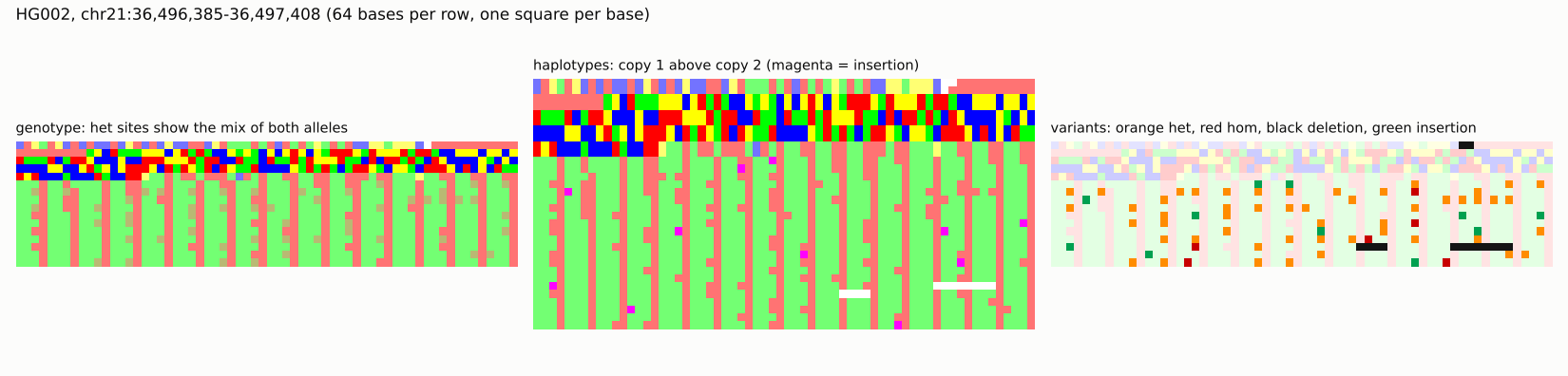
gpxiltools converts a reference FASTA, and optionally one person's VCF, into a
.gpxil.tif file; reads any genomic interval of any plane as a NumPy array;
exports reference, haplotype or IUPAC sequences and VCF; checks files against
the specification; and renders pictures for the screen (PNG), for print (CMYK
TIFF) and as a whole "genome book" PDF with one printed dot per base.
Install
pip install gpxiltools
Requires Python 3.10 or later, NumPy, tifffile, imagecodecs, Pillow and jsonschema. For
the tests: pip install "gpxiltools[test]" (adds pytest, pysam and pikepdf). The
latest code, before it is released: pip install git+https://github.com/comparativechrono/Gpxil-tools.
Command line
# a reference genome as pictures
gpxil encode Homo_sapiens.GRCh38.dna_sm.primary_assembly.fa.gz --ucsc-names -o GRCh38.gpxil.tif

# a person: reference plus their calls; outside the callable regions the
# genotype is UNKNOWN; --sex XY makes chrX/chrY haploid outside the PARs
gpxil encode GRCh38.fa.gz -v HG002.vcf.gz --callable HG002_benchmark.bed \
    --sex XY --ucsc-names -o HG002.gpxil.tif

gpxil info HG002.gpxil.tif
gpxil validate HG002.gpxil.tif

# pictures (coordinates are 1-based, inclusive)
gpxil render HG002.gpxil.tif chr21:30,000,001-30,250,000 -o region.png --width 500
gpxil render HG002.gpxil.tif chr21:36,496,385-36,497,408 -o haps.png --width 64 --mode haplotypes --scale 8
gpxil render HG002.gpxil.tif chr21:30,000,001-30,250,000 -o region.tif --width 500 --cmyk --dpi 300
gpxil render HG002.gpxil.tif chr21 -o chr21-hilbert.png --layout hilbert --mode reference

# a print-ready book: one dot per base, A4, 300 dpi, DeviceCMYK
gpxil book HG002.gpxil.tif -o HG002-genome.pdf --contigs chr21 --palette process
gpxil book HG002.gpxil.tif -o proof.pdf --max-pages 10 --rgb

# back to sequences and VCF
gpxil fasta HG002.gpxil.tif --which 1 --region chr21:5,000,001-6,000,000 -o hap1.fa
gpxil vcf HG002.gpxil.tif -o HG002.from-gpxil.vcf
gpxil vcf HG002.gpxil.tif --region chr17:7,661,779-7,687,538 -o TP53.vcf

# a file written with --no-ref holds only the sample; give the reference back,
# as a FASTA or as a gpxil file (which is then read a region at a time)
gpxil vcf HG002.noref.gpxil.tif --reference GRCh38.fa.gz -o HG002.from-gpxil.vcf
gpxil fasta HG002.noref.gpxil.tif --reference GRCh38.gpxil.tif --region chr21:5,000,001-5,001,000

# files on the web are read with range requests, a strip at a time: here the
# Gpxil browser's GRCh38, used without downloading it
G=https://comparativechrono.github.io/Gpxil-browser/data/grch38/gpxil
gpxil info $G/chr17.gpxil.tif
gpxil fasta $G/chr17.gpxil.tif --region chr17:7,668,402-7,668,461
gpxil encode $G/chr21.gpxil.tif -v HG002_chr21.vcf.gz -o HG002_chr21.gpxil.tif   # a gpxil file as the reference

gpxil palettes
Render modes: reference, genotype (heterozygous sites in the mix of both
alleles' colours), haplotypes (two pixel rows per row of bases) and
variants (faded reference, variants coloured by zygosity). Palettes:
classic (A red, C blue, G green, T yellow), gpxi (Albrecht-Buehler's
grey levels), okabe-ito (colour-blind safe) and process (one printing ink
per base). Each palette is defined in both sRGB and CMYK, so print output is
never converted from screen colours.
Python
import numpy as np
from gpxiltools import GpxilFile, codes
from gpxiltools.export import haplotype_sequence
from gpxiltools.render import render

with GpxilFile("HG002.gpxil.tif") as g:
    chr21 = g["chr21"]                                 # "21" works too (aliases)
    ref = chr21.read("ref", 30_000_000, 30_010_000)    # uint8, one value per base
    gt = chr21.read("gt", 30_000_000, 30_010_000)      # high nibble hap 1, low nibble hap 2
    h1, h2 = codes.hap1(gt), codes.hap2(gt)
    sub1, sub2 = np.isin(h1, codes.HAP_SUB_CODES), np.isin(h2, codes.HAP_SUB_CODES)
    het_snv = (sub1 & (h2 == 0)) | (sub2 & (h1 == 0)) | (sub1 & sub2 & (h1 != h2))
    dose = codes.dosage(ref, gt)                       # (10000, 4) copies of A, C, G, T
    seq1 = haplotype_sequence(chr21, 1, 30_000_000, 30_010_000)
    picture = render(chr21, start=30_000_000, end=30_250_000, bases_per_row=500)
    picture.save_png("region.png")
    whole = chr21.image("ref")                         # the stored 2-D raster, 8,192 bases per row
Planes are ordinary arrays, so image tools apply directly. A GC-content map of a chromosome, for instance:
from skimage.measure import block_reduce

base = whole & 0x0F
gc = np.isin(base, (codes.BASE_C, codes.BASE_G))
acgt = np.isin(base, codes.HAP_SUB_CODES)
gc_map = block_reduce(gc, (8, 64), np.sum) / np.maximum(block_reduce(acgt, (8, 64), np.sum), 1)
A URL or an open binary file works wherever a path does:
GpxilFile("https://…/chr17.gpxil.tif") downloads only what is read
(gpxiltools.remote.RangeFile does the range requests, a block at a time,
and keeps the recent blocks), and GpxilFile(io.BytesIO(data)) reads from
memory.
gpxiltools also runs in the browser, in Pyodide (Python compiled to
WebAssembly), as it does in GpxilStudio:
micropip.install("gpxiltools") leaves out imagecodecs, which Pyodide does
not have and which only Zstandard, LZW and PackBits need. Deflate, the
default compression, needs nothing but Python.
Writing a file directly, including your own planes:
from gpxiltools import GpxilWriter
from gpxiltools.fasta import read_fasta

rec = read_fasta("toy.fa")[0]
coverage = np.zeros(rec.length, dtype=np.uint16)   # e.g. read depth from a BAM
with GpxilWriter("toy.gpxil.tif", reference={"name": "toy"}) as w:
    w.add_contig(rec.name, {"ref": rec.codes, "x-coverage": coverage})
What a file contains
| Plane | Per base | |
|---|---|---|
ref |
IUPAC code as a 4-bit set (A=1, C=2, G=4, T=8, N=15) plus a soft-mask bit | always, unless the reference is given by digest |
gt |
state of haplotype 1 (high nibble) and 2 (low nibble): REF, A/C/G/T, DEL, UNKNOWN, ABSENT, COMPLEX | with a sample |
flags |
phased, insertion follows (per haplotype), filtered, called | with a sample |
gq, dp, ps |
genotype quality, depth, phase set | when the VCF has them |
x-… |
anything else | optional |
Inserted sequences and symbolic structural variants live in a small per-contig side table. The full rules are in the specification.
Performance and size
Measured on 2 cores with GRCh38 (Ensembl 116) and the GIAB HG002 v5.0q calls:
| chr21 reference, Deflate | 11.3 MB (1.93 bits per base; the FASTA.gz is 12.6 MB) |
| chr21 genotype, flags and side table | 0.68 MB (the VCF.gz is 0.94 MB) |
| read a random 1 kb interval | 0.6 ms |
| whole genome, HG002 | 888 MB, encoded in 12.6 minutes (at most 2 GB of memory), validated in 1.5 minutes |
benchmarks/bench_representations.py
reproduces the comparison with PNG, WebP, JPEG XL, tiles, Hilbert layout,
4-bit packing and CMYK dosage images; the rationale
discusses the results.
Correctness
The tests compare reconstructed haplotypes against simulated genomes with
known haplotypes and against bcftools consensus, check that exporting to
VCF and re-encoding gives back the same haplotypes, and pin down each rule of
the conversion with small hand-made cases. On HG002 chr21 the haplotypes
agree with bcftools on every non-overlapping record; where records overlap
(* alleles), gpxiltools applies both records and bcftools skips one.
Limits of version 0.1
- One sample per file, ploidy at most 2.
- VCF export is equivalent in haplotype content, not a copy of the input records: INFO, IDs and record boundaries are not kept.
- Symbolic structural variants other than deletions are recorded but not applied to haplotype sequences.
- Book PDFs use device CMYK ink values and the standard Helvetica font (not embedded); proof them with the printer's ICC profile.
A gpxil file of a person, and every faithful rendering or book of it, is that person's genome: handle it like the VCF it came from.
Development
git clone https://github.com/comparativechrono/Gpxil-tools && cd Gpxil-tools
pip install -e ".[test]"
pytest
To release a version: set it in src/gpxiltools/__init__.py, add it to
CHANGES.md, merge, and publish a GitHub release tagged with the version
(v0.2.0). The workflow release.yml then tests the package, builds it and
publishes it to PyPI by trusted
publishing, so no token is stored anywhere.
Licence
Copyright © 2026 Chronomic Medicine Group, Department of Genomic Medicine, University of Cambridge. Released under the MIT licence.
1 maintainer

Metadata
1 maintainer
Release files for gpxiltools 0.3.1
For a detailed explanation of source distributions (sdists) and built distributions (wheels), please see the package formats documentation.
Source distribution (sdist)
| File | Size | Uploaded | Provenance | Actions |
|---|---|---|---|---|
| gpxiltools-0.3.1.tar.gz | 757.5 kB | With provenance | Details for gpxiltools-0.3.1.tar.gz |
Built distribution (wheel)
| File | Interpreter | ABI | Platform | Actions Reset |
|---|---|---|---|---|
| gpxiltools-0.3.1-py3-none-any.whl | Python 3 | none | any | Details for gpxiltools-0.3.1-py3-none-any.whl |
Total release size: 830.7 kB
Release files / gpxiltools-0.3.1.tar.gz
| Download URL | gpxiltools-0.3.1.tar.gz |
|---|---|
| Size | 757.5 kB |
| Tags | Source |
|
SHA-256 checksum How to use checksums |
e4d987ef480db953d94014000b0d56cdb96410501e32a2a6bf5b80481b3badfe
|
|
BLAKE2b-256 checksum How to use checksums |
e13f3fd046080d35ef0c3669b346a661b5e864377598b2a132c06dfb296b6147
|
| Upload date | |
|
Uploaded using Trusted Publishing? What is trusted publishing? |
Yes |
| Uploaded via |
twine/7.0.0 CPython/3.13.16
|
Provenance
Provenance describes where a file came from. On PyPI, provenance is shared via attestations, which provide a verifiable record of the build or publishing details. View details, limitations and caveats.


PyPI Publish Attestation
PyPI verified that this artifact, at this checksum, originated from the publisher listed below.
Signed by GitHub Actions, verified by PyPI on Oct 28, 2026.
Transparency logRelease files / gpxiltools-0.3.1-py3-none-any.whl
| Download URL | gpxiltools-0.3.1-py3-none-any.whl |
|---|---|
| Size | 73.3 kB |
| Tags | Python 3 |
|
SHA-256 checksum How to use checksums |
0164e6065bcc8c9b60adfebe5613e376ab50d3152059fc157f75028fe9067ad2
|
|
BLAKE2b-256 checksum How to use checksums |
2cbd7eaea47389cdf9802cc42475113235ad564f76fda2028f3634abf9b450be
|
| Upload date | |
|
Uploaded using Trusted Publishing? What is trusted publishing? |
Yes |
| Uploaded via |
twine/7.0.0 CPython/3.13.16
|
Provenance
Provenance describes where a file came from. On PyPI, provenance is shared via attestations, which provide a verifiable record of the build or publishing details. View details, limitations and caveats.
PyPI Publish Attestation
PyPI verified that this artifact, at this checksum, originated from the publisher listed below.
Signed by GitHub Actions, verified by PyPI on Oct 28, 2026.
Transparency logSecurity for gpxiltools 0.3.1
Provenance
Provenance describes where a file came from. On PyPI, provenance is shared via attestations, which provide a verifiable record of the build or publishing details. View details, limitations and caveats.
Full provenance
Both files in this release have been uploaded with provenance metadata.
Attestation for gpxiltools-0.3.1.tar.gz
PyPI Publish Attestation
PyPI verified that this artifact, at this checksum, originated from the publisher listed below.
Signed by GitHub Actions, verified by PyPI on Oct 28, 2026.
Transparency logA note on package security
PyPI is a repository for distributing packages, not a service for auditing them. While third-party security researchers and our staff do their best to detect and remove malicious packages, PyPI cannot guarantee the quality, security or suitability of any given package.
To learn more about protecting yourself from malicious actors, visit our package security documentation.














