
GPXSheet
Motorcycle sport-touring route awareness generator.





GPXSheet is a Python command-line application and reusable library that converts GPX routes into highly glanceable, map-centric motorcycle navigation aids optimized for tank-bag use.
It is not a rally roadbook and not a GPS replacement. The goal is route awareness: a rider should be able to glance at the printed sheet for less than one second and immediately understand what road they're on, what the next navigation decision is, how far away it is, what comes after, and where they are within the overall route.
Documentation: gpxsheet.readthedocs.io — library API, web API guide + interactive reference, and deployment notes.
Features
- Route analysis — GPX (track/route/waypoints) → decision points, fuel,
reassurance markers, and road segments. Route structure comes from
OpenStreetMap road topology rather than raw geometry, so twisty roads don't
flood with false turns.
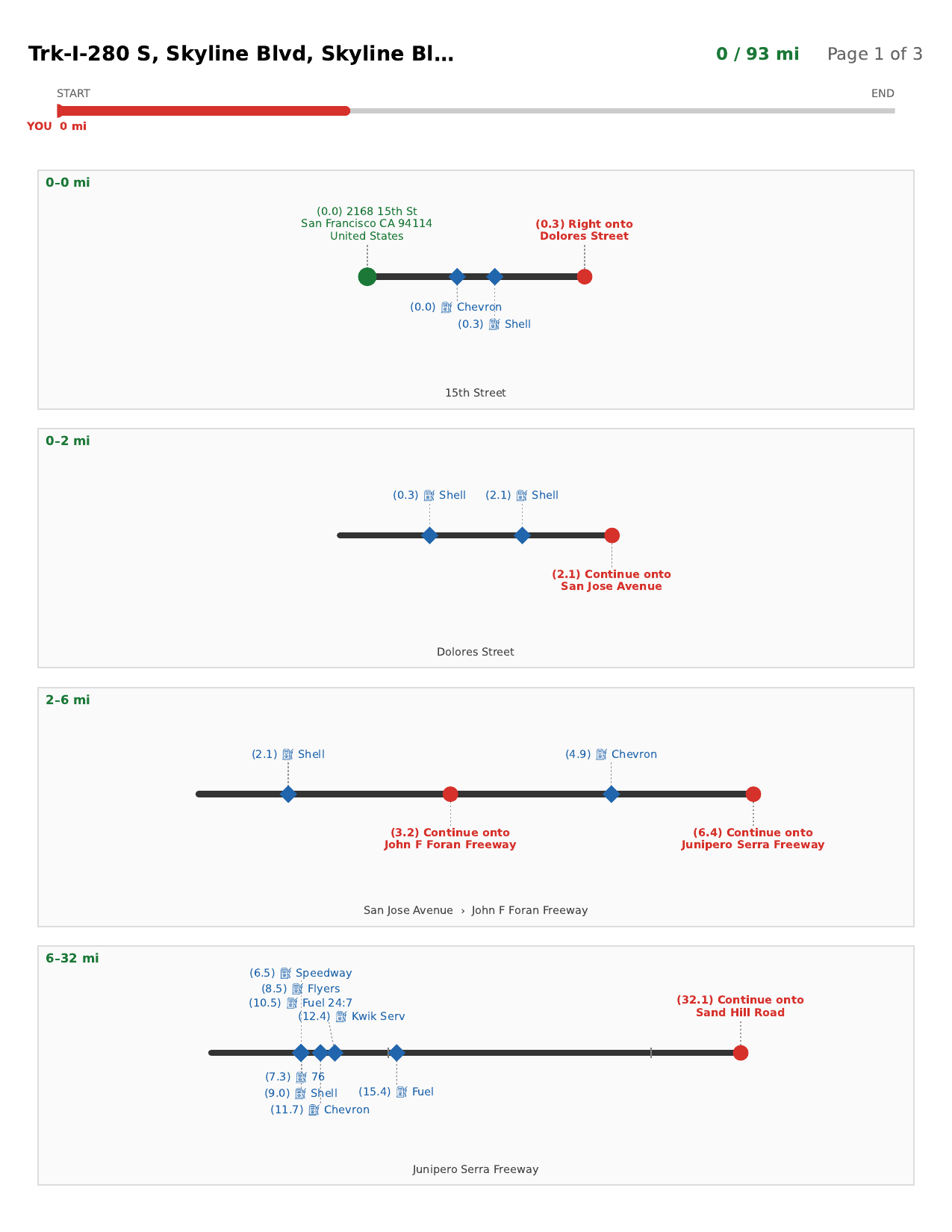
analyzetext output. - Schematic map strip — a stylized (or faithful) map ribbon showing the road-name segments, decisions, fuel, and waypoints.
- Tank-bag PDF — route-aware pagination; a portrait roadbook (stacked strip lanes, the default) or landscape (one strip per page).
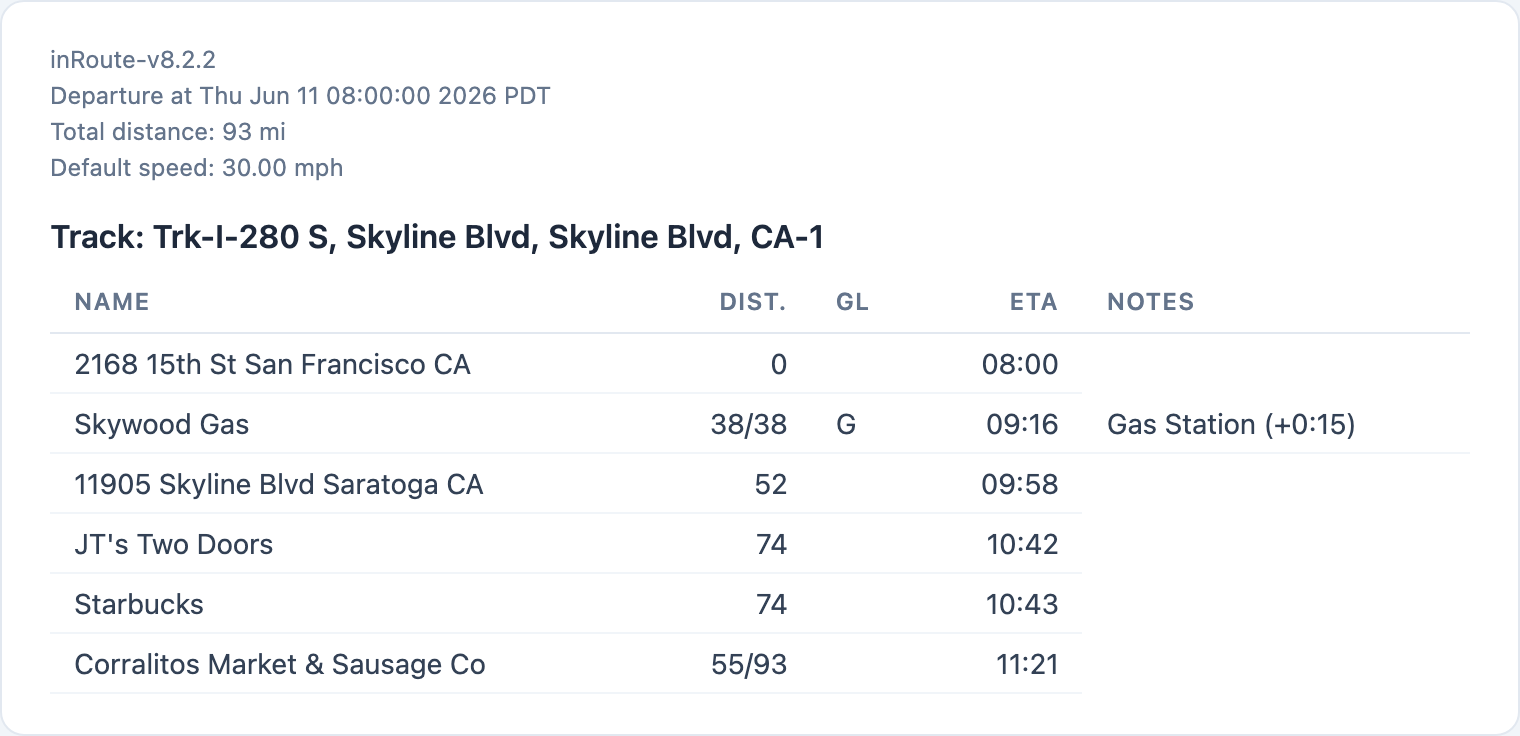
- Route table — a markdown/HTML trip plan (waypoints, distances, fuel/lunch
markers, ETAs, sunrise/sunset; per-day sections for multi-day GPX);
tableCLI. - Packaged for
pip install gpxsheet; PEP 561 typed. - Web service — a FastAPI app exposing the engine over REST (async jobs); see Web service below.
How it works internally — the two-tier decision detection, schematic layout engine, pagination, and OSM enrichment — is documented in docs/product.md.
Installation
pip install gpxsheet
Development
git clone <repo-url> gpxsheet && cd gpxsheet
git submodule update --init          # populate gpxsamples/
python3 -m venv .venv && source .venv/bin/activate
pip install -e ".[dev,service]"      # service required for mypy (pydantic plugin)
python -m build && twine check dist/*    # build + check the distribution
# publish (maintainer only): twine upload dist/*
Dev server modes — see docs/dev-workflow.md for the full breakdown. Short version:
# Simple (no Docker needed — EagerRunner, synchronous):
make dev-api && make dev-ui

# Full stack (real async queue, requires Docker):
make infra && make dev-api-full && make dev-worker && make dev-ui
Usage
CLI
gpxsheet generate route.gpx -o route.pdf            # portrait roadbook (default)
gpxsheet generate route.gpx --landscape -o route.pdf
#   layout knobs: --lane-decisions M (decisions per page; default auto-fit); --lanes N (portrait lanes/page)

gpxsheet table   route.gpx --departure 9am -o route.md   # route table (html|md)
gpxsheet table   route.gpx --no-osm -o route.md          # fast, fully offline
gpxsheet analyze route.gpx                           # text analysis
gpxsheet strip   route.gpx -o route_strip.png        # single schematic strip PNG
Library
render, analyze, and validate run synchronously, mirroring the web API; the
route table lives in gpxsheet.routetable. Full reference and examples: the
Library API.
Web service
A FastAPI service exposes the engine over REST and ships a built-in browser UI.
Web UI — drop a GPX onto the page, see a live strip preview and route stats,
adjust options, and download the PDF/PNG or route table. Build it once
(make frontend), then run uvicorn gpxsheet.service.asgi:app (UI at /,
Swagger at /docs); the hot-reload dev modes are covered under
Development above.
REST API — every operation is an async job (submit → poll → fetch) over
/v1/render, /v1/table, /v1/analyze, and /v1/validate. The full reference —
every endpoint, parameter, auth, and browser fetch/curl examples — is the
Web API guide (live OpenAPI at /docs). Config is
env-driven (GPXSHEET_REDIS_URL switches the prod path; see
gpxsheet/service/settings.py).
Self-hosting & hardening — run the single Docker image or the full Redis/MinIO stack; see docs/deploy.md before exposing the service to the public internet.
License
GNU Affero General Public License v3.0 or later (AGPL-3.0-or-later) — see LICENSE. Copyright © 2026 Paul Traina. Because the AGPL covers use over a network, anyone who runs a modified version of the web service must offer its users the corresponding source.
1 maintainer

Release files for gpxsheet 1.1.1
For a detailed explanation of source distributions (sdists) and built distributions (wheels), please see the package formats documentation.
Source distribution (sdist)
| File | Size | Uploaded | |
|---|---|---|---|
| gpxsheet-1.1.1.tar.gz | 428.7 kB | Details |
Built distribution (wheel)
| File | Interpreter | ABI | Platform | Reset |
|---|---|---|---|---|
| gpxsheet-1.1.1-py3-none-any.whl | Python 3 | none | any | Details |
Total release size: 828.2 kB
Release files / gpxsheet-1.1.1.tar.gz
| Download URL | gpxsheet-1.1.1.tar.gz |
|---|---|
| Size | 428.7 kB |
| Tags | Source |
|
SHA-256 checksum How to use checksums |
7a22611aec17b962ac536cc1ef6155292619752111f8cf886b2bda2afd2cc98f
|
|
BLAKE2b-256 checksum How to use checksums |
e07b1761d832bb9f72b5670bc749d15648190a60183135476311eb60286d16ff
|
| Upload date | |
|
Uploaded using Trusted Publishing? What is trusted publishing? |
Yes |
| Uploaded via |
twine/6.1.0 CPython/3.13.12
|
Provenance
Provenance describes where a file came from. On PyPI, provenance is shared via attestations, which provide a verifiable record of the build or publishing details. View details, limitations and caveats.


PyPI Publish Attestation
PyPI verified that this artifact, at this checksum, originated from the publisher listed below.
Signed by GitHub Actions, verified by PyPI on Jun 12, 2026.
Transparency logRelease files / gpxsheet-1.1.1-py3-none-any.whl
| Download URL | gpxsheet-1.1.1-py3-none-any.whl |
|---|---|
| Size | 399.4 kB |
| Tags | Python 3 |
|
SHA-256 checksum How to use checksums |
62e22dc13c563585a1118238c70e7544d321c5ffe2f1811b4225bb32811952bd
|
|
BLAKE2b-256 checksum How to use checksums |
83e59508f174807952bde6f2bbe03c4b0a48d06cbc1303cd55c1caf29eaa3c67
|
| Upload date | |
|
Uploaded using Trusted Publishing? What is trusted publishing? |
Yes |
| Uploaded via |
twine/6.1.0 CPython/3.13.12
|
Provenance
Provenance describes where a file came from. On PyPI, provenance is shared via attestations, which provide a verifiable record of the build or publishing details. View details, limitations and caveats.
PyPI Publish Attestation
PyPI verified that this artifact, at this checksum, originated from the publisher listed below.
Signed by GitHub Actions, verified by PyPI on Jun 12, 2026.
Transparency log













