
Build and execute GraphQL queries in the terminal.
This project is inspired by https://graphiql-online.com.
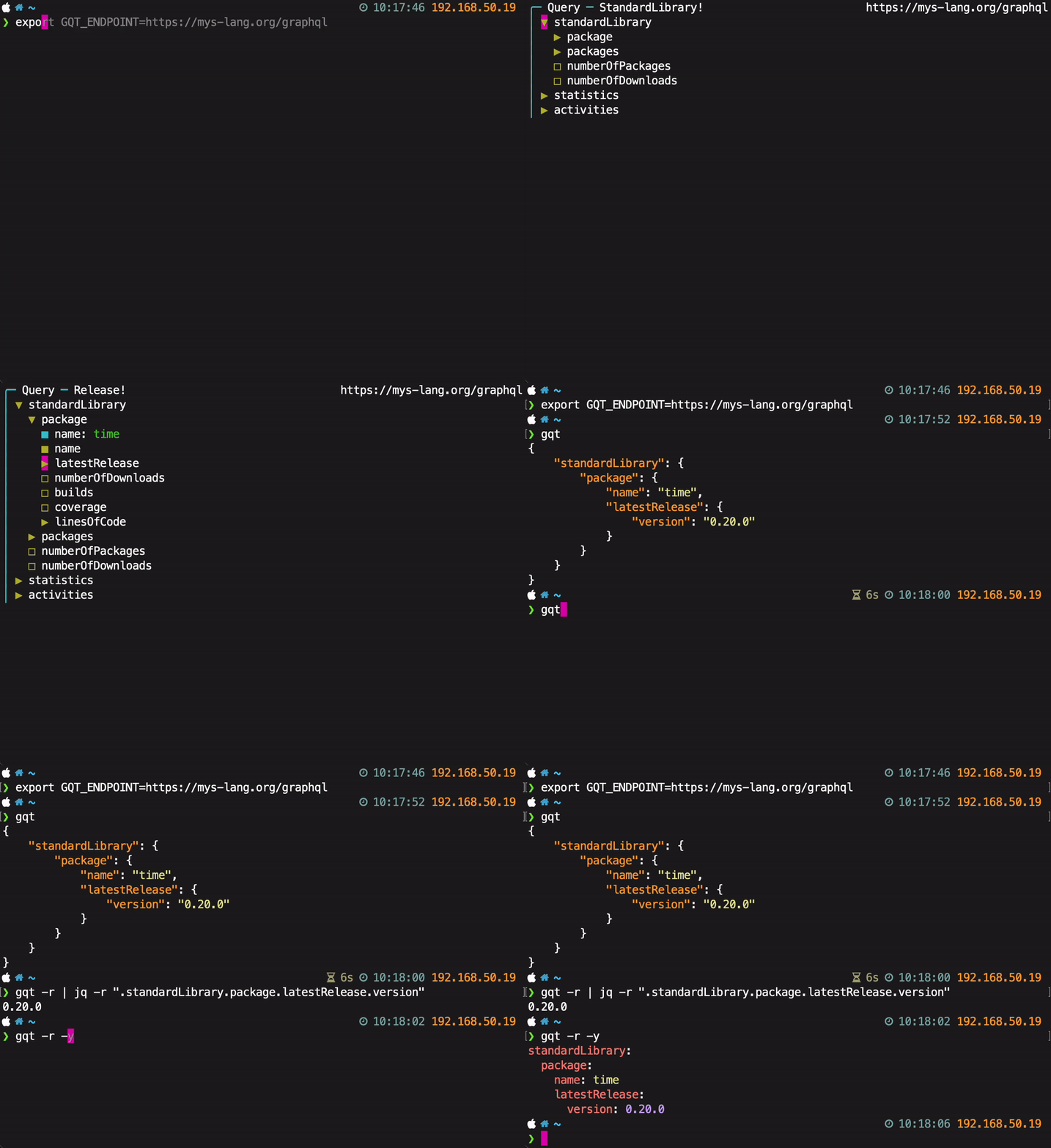
Installation
pip3 install gqtIt’s recommended to install bat for pretty output.
Controls
Press h or ? for help.
Examples
Set default GraphQL endpoint:
export GQT_ENDPOINT=https://mys-lang.org/graphqlInteractively create a query and execute it:
gqt{
"statistics": {
"numberOfGraphqlRequests": 3
}
}Repeat last query:
gqt -r{
"statistics": {
"numberOfGraphqlRequests": 4
}
}Print the query (and variables) instead of executing it:
gqt -qQuery:
query Query {
statistics {
numberOfGraphqlRequests
}
}
Variables:
{}YAML output:
gqt -ystatistics:
numberOfGraphqlRequests: 8Name queries:
gqt -n stats -ystatistics:
numberOfGraphqlRequests: 8gqt -n time -ystandardLibrary:
package:
latestRelease:
version: 0.20.0gqt -n stats -y -rstatistics:
numberOfGraphqlRequests: 9gqt -n time -y -rstandardLibrary:
package:
latestRelease:
version: 0.20.0List queries:
gqt -lEndpoint Query name
---------------------------- ------------
https://mys-lang.org/graphql <default>
https://mys-lang.org/graphql time
https://mys-lang.org/graphql statsMake arguments variables by pressing v and give them as -v <name>=<value> on the command line:
gqt -v name=time -ystandardLibrary:
package:
latestRelease:
version: 0.20.0gqt -r -qquery Query($name: String!) {
standardLibrary {
package(name: $name) {
latestRelease {
version
}
}
}
}Print the schema:
gqt --print-schematype Query {
standardLibrary: StandardLibrary!
statistics: Statistics!
activities: [Activity!]!
}
type StandardLibrary {
package(name: String!): Package!
packages: [Package!]
numberOfPackages: Int
numberOfDownloads: Int
}
...Enpoint option and bearer token in HTTP auth header:
gqt -e https://api.github.com/graphql -H "Authorization: bearer ghp_<value>"Ideas
Press c for compact view, hiding fields that are not selected.
Search:
Press / to search for visible fields. Press <Up> and <Down> to move to the previous and next search hit. Highlight all hits. Press <Enter> to end the search and move the cursor to the current hit. Press <Esc> to abort the search and restore the cursor to its pre-search position. Show number of hits.
╭─ Query
│ ▼ search
│   ▶ Book
│     ■ title
│   ▶ Author
│     ■ name
│ ▶ film
│ ▶ films

/fil                                                1 of 2 matches
Alias?
Press a to create an alias.
Press d to delete an alias.
smallPicture and mediumPicture are aliases of picture.
╭─ Query
│ ▶ Book
│   ▶ picture
│   ▼ smallPicture: picture
│     ■ width: 320
│     ■ height: 240
│   ▼ mediumPicture: picture
│     ■ width: 800
│     ■ height: 600
Optionally give schema path on command line. For endpoints that does not support schema introspection.
1 maintainer

Metadata
1 maintainer
Release files for gqt 0.125.6
For a detailed explanation of source distributions (sdists) and built distributions (wheels), please see the package formats documentation.
Source distribution (sdist)
| File | Size | Uploaded | Provenance | Actions |
|---|---|---|---|---|
| gqt-0.125.6.tar.gz | 22.6 kB | Without provenance | Details for gqt-0.125.6.tar.gz |
Built distribution (wheel)
| File | Interpreter | ABI | Platform | Actions Reset |
|---|---|---|---|---|
| gqt-0.125.6-py3-none-any.whl | Python 3 | none | any | Details for gqt-0.125.6-py3-none-any.whl |
Total release size: 40.5 kB
Release files / gqt-0.125.6.tar.gz
| Download URL | gqt-0.125.6.tar.gz |
|---|---|
| Size | 22.6 kB |
| Tags | Source |
|
SHA-256 checksum How to use checksums |
386eebfd3a4012878ae4cf9fad82a0e4177717b7a05395e92d8ea319f0b5cd02
|
|
BLAKE2b-256 checksum How to use checksums |
cb7ebdc437366eda8b2140d9e50016e396e0b45cde61e1bcbca8aea0ee29d7f9
|
| Upload date | |
|
Uploaded using Trusted Publishing? What is trusted publishing? |
No |
| Uploaded via |
twine/6.1.0 CPython/3.9.23
|
Release files / gqt-0.125.6-py3-none-any.whl
| Download URL | gqt-0.125.6-py3-none-any.whl |
|---|---|
| Size | 18.0 kB |
| Tags | Python 3 |
|
SHA-256 checksum How to use checksums |
a08205f5d5edc9a9f0c97d06ec80a3c8b02532e7abeca61639da5a9b6e6b6b6b
|
|
BLAKE2b-256 checksum How to use checksums |
a0f6dcc67544fcaf528ee5dedd502f823c13ba68a013478407dab390d6cf9c6d
|
| Upload date | |
|
Uploaded using Trusted Publishing? What is trusted publishing? |
No |
| Uploaded via |
twine/6.1.0 CPython/3.9.23
|
Security for gqt 0.125.6
Provenance
Provenance describes where a file came from. On PyPI, provenance is shared via attestations, which provide a verifiable record of the build or publishing details. View details, limitations and caveats.
No provenance found
None of the files in this release were uploaded with provenance metadata.
A note on package security
PyPI is a repository for distributing packages, not a service for auditing them. While third-party security researchers and our staff do their best to detect and remove malicious packages, PyPI cannot guarantee the quality, security or suitability of any given package.
To learn more about protecting yourself from malicious actors, visit our package security documentation.














