
An AI-powered Grade School Math Solver with RAG
Verified details
These details have been verified by PyPIProject links
GitHub Statistics
Maintainers

Project description
GradeSchoolMathSolver




📦 Docker Hub:


An AI-powered Grade School Math Solver with RAG (Retrieval-Augmented Generation). Automatically generates arithmetic problems, tracks correct and incorrect answers, and provides personalized practice and exams. Ideal for learning, testing, and building adaptive math tutoring agents.
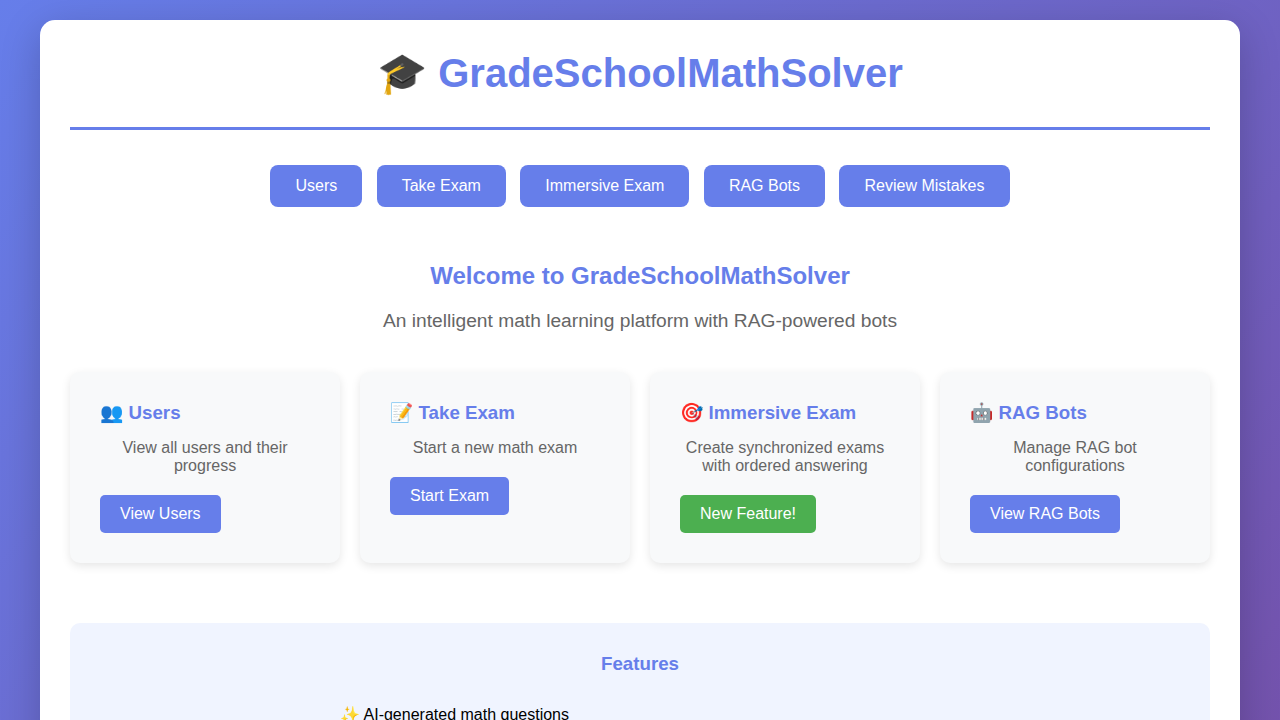
🎯 Features
- AI-Generated Questions: Automatically generate math problems at easy, medium, and hard difficulty levels
- Question Classification: Categorize questions by type (addition, subtraction, multiplication, etc.)
- User Management: Track user progress, answer history, and performance statistics
- Quiz History with RAG: Store and retrieve similar questions using vector search for personalized learning
- Embedding Service: Generate semantic embeddings for questions to enable advanced RAG capabilities
- Database Flexibility: Choose between MariaDB (default) or Elasticsearch based on your needs
- Intelligent RAG bots: Configurable RAG bots that can use classification and RAG for better problem-solving
- Web Interface: User-friendly Flask-based web UI for taking exams and viewing statistics
- RAG Bot Management: Create and test different RAG bot configurations
- Performance Tracking: Monitor correctness rates, recent performance, and trends
- 🆕 Immersive Exams: Synchronized exams where all participants answer the same questions with optional answer reveal strategies
- 🆕 Teacher Service: Optional educational feedback for wrong answers to help users learn from mistakes
- 🆕 Mistake Review Service: Review and re-attempt past incorrect answers in FIFO order to learn from mistakes
🏗️ Architecture
The system consists of 13 main components:
0. AI Model Service
- Uses Docker Desktop models via localhost endpoint (port 12434)
- Provides natural language generation for questions and reasoning
- OpenAI-compatible chat/completions API format
- See AI Model Service Documentation
0.5. Embedding Service
- Generates vector embeddings using EmbeddingGemma model (ai/embeddinggemma:300M-Q8_0)
- Foundation for RAG (Retrieval-Augmented Generation) capabilities
- Enables semantic similarity search for questions
- Docker Model Runner integration via OpenAI-compatible API
- See Embedding Service Documentation
1. QA Generation Service
- Generates mathematical equations based on difficulty level
- Converts equations to natural language questions using AI
- Supports easy (single operation), medium (multiple operations), and hard (parentheses/division)
2. Question Classification Service
- Classifies questions into predefined categories
- Rule-based classification with optional AI enhancement
- Categories: addition, subtraction, multiplication, division, mixed_operations, parentheses, fractions
3. Account Service
- Unified database storage for user management (MariaDB by default)
- Tracks answer correctness history with timestamps
- Calculates overall correctness and recent 100 questions score
- Tracks reviewed status for mistake review feature
- See Database Service Documentation
- See MariaDB Integration
4. Quiz History Service
- Database storage for RAG capabilities (works with both MariaDB and Elasticsearch)
- Stores question, answer, and context for retrieval
- Enables similarity search for personalized learning (best with Elasticsearch)
- See Database Service Documentation
5. Exam Service
- Coordinates question generation and answer evaluation
- Supports both human and RAG bot exams
- Updates user statistics and quiz history
- Integrates teacher service for human feedback
6. Immersive Exam Service
- Synchronized exam management for multiple participants
- Pre-generates shared questions for all participants
- Ordered participant registration (humans and RAG bots)
- Configurable reveal strategies for cheating experiments
- Server-controlled question progression
- Real-time status updates and results
7. Teacher Service
- Provides educational feedback for incorrect answers
- AI-based explanations with template fallback
- Step-by-step guidance for correct solutions
- Toggle-able via configuration
- Only active for human users (not RAG bots)
8. Mistake Review Service
- Allows users to review past incorrect answers
- FIFO (First-In, First-Out) ordering of mistakes
- Mark mistakes as reviewed to avoid repetition
- Interactive retry with instant feedback
- Real-time tracking of unreviewed mistake count
9. Web UI Service
- Flask-based web interface
- User dashboard with statistics and trends
- Interactive exam interface
- Immersive exam creation and participation
- RAG bot testing and management
- Teacher feedback display
- Mistake review interface
10. RAG Bot Service
- Configurable problem-solving RAG bots
- Optional question classification
- Optional RAG from quiz history
- Provides reasoning for answers
11. RAG Bot Management Service
- Create, update, and delete RAG bot configurations
- Pre-configured default RAG bots
- Test RAG bots with different settings
🚀 Quick Start
Prerequisites
- Python 3.11+
- Docker Desktop with Docker Model Runner enabled (for AI models)
- Docker Model Runner is Docker Desktop's built-in AI model hosting service that runs LLMs locally
- Provides an OpenAI-compatible API at localhost:12434
- See setup instructions below
- MariaDB or Elasticsearch for database (MariaDB recommended, included in Docker setup)
- 8GB+ RAM recommended (16GB+ recommended for larger models)
Required Models for Full Functionality:
- LLM Model:
ai/llama3.2:1B-Q4_0(for question generation and reasoning) - Embedding Model:
ai/embeddinggemma:300M-Q8_0(for RAG and semantic search)
Installation
Option 1: Using Pre-built Docker Image (Recommended for Production)
The default docker-compose.yml uses the published Docker Hub image for easy deployment:
# Pull the latest image (optional - docker-compose will pull automatically)
docker pull yangzq50/gradeschoolmathsolver:latest

# Or pull a specific version
docker pull yangzq50/gradeschoolmathsolver:1.0.0

# Start the application (see "Start the Application" section below)
docker-compose up -d
No need to modify docker-compose.yml - it now uses the published image by default.
Option 2: Install from PyPI (Easiest)
Install the package directly from PyPI:
pip install gradeschoolmathsolver
This will install the latest stable release with all dependencies.
Option 3: Install from Source
-
Clone the repository
git clone https://github.com/yangzq50/GradeSchoolMathSolver.git
cd GradeSchoolMathSolver
-
Install the package
The project uses
pyproject.tomlfor modern Python packaging.Install as a package (recommended)
pip install .
Install in development mode (includes dev dependencies)
pip install -e .[dev]
This will install all dependencies automatically and make the
gradeschoolmathsolvercommand available. The[dev]extra includes testing tools like pytest, flake8, and mypy. -
Set up environment variables
cp .env.example .env
# Edit .env with your configuration:
# - AI_MODEL_URL: Docker Desktop models endpoint (e.g., http://localhost:12434)
# - AI_MODEL_NAME: Model name (e.g., ai/llama3.2:1B-Q4_0)
# - LLM_ENGINE: Engine type (e.g., llama.cpp)
# - DATABASE_BACKEND: mariadb (default) or elasticsearch
-
Set up Docker Model Runner (Docker Desktop's AI model service)
Docker Model Runner is Docker Desktop's built-in feature for running AI models locally with an OpenAI-compatible API.
How to enable Docker Model Runner:
a. Install/Update Docker Desktop
- Download from https://www.docker.com/products/docker-desktop
- Ensure you have Docker Desktop version 4.32 or later
b. Enable Docker Model Runner
- Open Docker Desktop
- Navigate to Settings → Features in development
- Enable "Enable Docker AI Model Runner" (or similar option depending on your version)
- Apply & Restart Docker Desktop
c. Download AI Models
- In Docker Desktop, navigate to the AI Models section (or Models tab)
- Search for and pull
llama3.2:1B-Q4_0(or your preferred model) - Search for and pull
embeddinggemma:300M-Q8_0(for embedding/RAG features) - Wait for the models to download and become ready
d. Verify Docker Model Runner is working
# Test if models API is accessible
curl http://localhost:12434/engines/llama.cpp/v1/models

# Test a simple chat completion
curl http://localhost:12434/engines/llama.cpp/v1/chat/completions \
  -H "Content-Type: application/json" \
  -d '{
    "model": "ai/llama3.2:1B-Q4_0",
    "messages": [{"role": "user", "content": "What is 2+2?"}]
  }'

# Test embeddings generation
curl http://localhost:12434/engines/llama.cpp/v1/embeddings \
  -H "Content-Type: application/json" \
  -d '{
    "model": "ai/embeddinggemma:300M-Q8_0",
    "input": ["What is 2+2?"]
  }'
The models run at localhost:12434 and provide an OpenAI-compatible API endpoint. Example model:
ai/llama3.2:1B-Q4_0 -
Start the Application
You have three options for running the application:
Option 1: Production Deployment (Recommended)
Uses the published Docker Hub image for production deployment:
# Start with MariaDB (default, recommended)
docker-compose up -d
The web app will be available at
http://localhost:5000What this does:
- Pulls the latest image from Docker Hub (yangzq50/gradeschoolmathsolver:latest)
- Starts MariaDB container on port 3306
- Starts the web application container on port 5000
- Web app connects to Docker Model Runner via
host.docker.internal:12434 - Data is persisted in
./datadirectory
Optional: Start with Elasticsearch for RAG features
# Start all services including Elasticsearch
docker-compose --profile elasticsearch up -d
# Update .env: DATABASE_BACKEND=elasticsearch
To stop all services:
docker-compose downOption 2: Development Mode
For local development with live code changes:
# Start with local build and source mounting
docker-compose -f docker-compose.yml -f docker-compose.dev.yml up -d
This will:
- Build the web application from local source
- Mount source code for live development
- Enable Flask debug mode
- Start MariaDB (or use
--profile elasticsearchfor Elasticsearch)
Option 3: Database in Docker + Web App Locally
If you prefer to run the web app locally (useful for rapid development):
a. Start only the database:
# MariaDB (default)
docker-compose up -d mariadb

# Or Elasticsearch (for RAG)
docker-compose up -d elasticsearch
b. Run the web application locally:
# Using the installed package command
gradeschoolmathsolver

# Or using Python module (if installed in development mode)
python -m gradeschoolmathsolver.web_ui.app
The web app will be available at
http://localhost:5000 -
Open your browser
http://localhost:5000
Alternative: Local Setup (Without Docker)
If you prefer to run everything locally without Docker:
- Set up LLM service - Use any OpenAI-compatible API endpoint (see AI Model Service Documentation)
- Install and run MariaDB locally (see MariaDB Integration Documentation)
- Or install Elasticsearch for RAG features (see Elasticsearch Storage Documentation)
- Update .env with your LLM endpoint and database URLs
- Install the package with
pip install . - Run the web application with
gradeschoolmathsolver
📖 Usage
Taking an Exam (Human)
- Navigate to the "Take Exam" page
- Enter your username
- Select difficulty level (easy, medium, hard)
- Choose number of questions (1-20)
- Answer the generated questions
- Submit to see your results and statistics
- NEW: For any incorrect answers, you'll receive personalized teacher feedback explaining:
- Why your answer was wrong
- Step-by-step guidance to the correct solution
- Educational tips for that operation type
Teacher Feedback Feature
When you submit a wrong answer, the teacher service automatically provides:
- Clear explanation of why the answer is incorrect
- Step-by-step guidance on how to solve the problem correctly
- Educational tips specific to the type of math operation
- Encouraging tone to support learning
This feature can be toggled on/off via the TEACHER_SERVICE_ENABLED configuration option.
Reviewing Your Mistakes (NEW)
The mistake review feature allows you to learn from your past errors:
- Navigate to the "Review Mistakes" page
- Enter your username
- Click "Start Reviewing"
- See your unreviewed mistake count
- For each mistake, you'll see:
- The original question
- Your incorrect answer
- The correct answer
- Question category and date
- Try Again: Enter a new answer and click "Check Answer" to see if you got it right
- Click "→ Next Mistake" to mark the current mistake as reviewed and move to the next one
- Mistakes are shown in FIFO (First-In, First-Out) order - oldest mistakes first
- Once reviewed, mistakes won't appear in future review sessions
Benefits:
- Focused practice on areas where you struggled
- Immediate feedback on retry attempts
- Track your improvement over time
- Never miss reviewing an important mistake
Creating an Immersive Exam
- Navigate to the "Immersive Exam" page
- Set difficulty distribution (easy, medium, hard question counts)
- Choose a reveal strategy:
- None: No participant sees others' answers
- Reveal to Later Participants: Participants see answers from those before them (for cheating experiments)
- Reveal All After Round: Everyone sees all answers after each question completes
- Optionally set time per question
- Click "Create Exam"
- Register participants:
- Add human users by username
- Add RAG bots from the dropdown
- Click "Start Exam" when all participants are registered
- Participants join using their username or RAG bot name
- Answer questions in synchronized order
- View final results with leaderboard
Testing a RAG Bot
- Navigate to the "RAG Bots" page
- Select a RAG bot configuration
- Set test parameters (difficulty, question count)
- Run the test
- Review RAG bot performance and reasoning
Creating a Custom RAG Bot
from gradeschoolmathsolver.models import AgentConfig
from gradeschoolmathsolver.services.agent_management import AgentManagementService

# Create agent management service
agent_mgmt = AgentManagementService()

# Define custom RAG bot
custom_agent = AgentConfig(
    name="my_custom_bot",
    use_classification=True,
    use_rag=True,
    rag_top_k=3,
    include_incorrect_history=True
)

# Create RAG bot
agent_mgmt.create_agent(custom_agent)
API Usage
The system provides REST APIs for integration:
# Create a user
curl -X POST http://localhost:5000/api/users \
  -H "Content-Type: application/json" \
  -d '{"username": "john_doe"}'

# Generate exam questions
curl -X POST http://localhost:5000/api/exam/human \
  -H "Content-Type: application/json" \
  -d '{
    "username": "john_doe",
    "difficulty": "medium",
    "question_count": 5
  }'

# Run agent exam
curl -X POST http://localhost:5000/api/exam/agent \
  -H "Content-Type: application/json" \
  -d '{
    "agent_name": "rag_agent",
    "username": "john_doe",
    "difficulty": "hard",
    "question_count": 3
  }'

# Create immersive exam (NEW)
curl -X POST http://localhost:5000/api/exam/immersive/create \
  -H "Content-Type: application/json" \
  -d '{
    "difficulty_distribution": {"easy": 3, "medium": 4, "hard": 3},
    "reveal_strategy": "reveal_to_later_participants",
    "time_per_question": 60
  }'

# Register participant for immersive exam
curl -X POST http://localhost:5000/api/exam/immersive/{exam_id}/register \
  -H "Content-Type: application/json" \
  -d '{
    "participant_id": "alice",
    "participant_type": "human"
  }'

# Get immersive exam status
curl http://localhost:5000/api/exam/immersive/{exam_id}/status?participant_id=alice

# Submit answer in immersive exam
curl -X POST http://localhost:5000/api/exam/immersive/{exam_id}/answer \
  -H "Content-Type: application/json" \
  -d '{
    "participant_id": "alice",
    "question_index": 0,
    "answer": 42
  }'

# Get next mistake to review (NEW)
curl http://localhost:5000/api/mistakes/next/john_doe

# Get count of unreviewed mistakes (NEW)
curl http://localhost:5000/api/mistakes/count/john_doe

# Mark a mistake as reviewed (NEW)
curl -X POST http://localhost:5000/api/mistakes/review \
  -H "Content-Type: application/json" \
  -d '{
    "username": "john_doe",
    "mistake_id": 123
  }'

# Get all unreviewed mistakes (NEW)
curl http://localhost:5000/api/mistakes/all/john_doe?limit=50
🧪 Testing
Test individual services:
# Test QA Generation
python -m gradeschoolmathsolver.services.qa_generation.service

# Test Classification
python -m gradeschoolmathsolver.services.classification.service

# Test Account Service
python -m gradeschoolmathsolver.services.account.service

# Test Quiz History
python -m gradeschoolmathsolver.services.quiz_history.service

# Test Agent
python -m gradeschoolmathsolver.services.agent.service

# Test Agent Management
python -m gradeschoolmathsolver.services.agent_management.service

# Test Exam Service
python -m gradeschoolmathsolver.services.exam.service

# Test Immersive Exam Service
python -m gradeschoolmathsolver.services.immersive_exam.service

# Test Teacher Service
python -m gradeschoolmathsolver.services.teacher.service

# Test Mistake Review Service
python -m gradeschoolmathsolver.services.mistake_review.service

# Test Embedding Service
python -m gradeschoolmathsolver.services.embedding.service

# Run all tests with pytest
pytest tests/ -v

# Run specific test files
pytest tests/test_basic.py -v
pytest tests/test_teacher_service.py -v
pytest tests/test_immersive_exam.py -v
pytest tests/test_mistake_review.py -v
pytest tests/test_embedding_service.py -v
🔧 Configuration
Default RAG Bots
The system creates these default RAG bots:
- basic_agent: Simple AI without classification or RAG
- classifier_agent: Uses classification but no RAG
- rag_agent: Uses both classification and RAG
- rag_correct_only: RAG with only correct answers from history
Environment Variables
See .env.example for all available configuration options.
Key settings:
Model Service Configuration (Recommended):
GENERATION_SERVICE_URL: Full URL for text generation endpoint (e.g., http://localhost:12434/engines/llama.cpp/v1/chat/completions)GENERATION_MODEL_NAME: Name of the generation model (e.g., ai/llama3.2:1B-Q4_0)EMBEDDING_SERVICE_URL: Full URL for embedding endpoint (e.g., http://localhost:12434/engines/llama.cpp/v1/embeddings)EMBEDDING_MODEL_NAME: Name of the embedding model (e.g., ai/embeddinggemma:300M-Q8_0)
Legacy Model Configuration (Backward Compatible):
AI_MODEL_URL: Base URL of the AI model service (e.g., http://localhost:12434)AI_MODEL_NAME: Name of the model to use (e.g., ai/llama3.2:1B-Q4_0)LLM_ENGINE: LLM engine to use (e.g., llama.cpp)EMBEDDING_MODEL_URL: Base URL of the embedding service (e.g., http://localhost:12434)
Database Configuration:
DATABASE_BACKEND: Database backend (mariadb or elasticsearch, default: mariadb)MARIADB_HOST: MariaDB hostname (default: localhost)MARIADB_PORT: MariaDB port (default: 3306)MARIADB_USER: MariaDB username (default: math_solver)MARIADB_PASSWORD: MariaDB passwordMARIADB_DATABASE: MariaDB database name (default: math_solver)ELASTICSEARCH_HOST: Elasticsearch hostname (when using Elasticsearch)ELASTICSEARCH_PORT: Elasticsearch port (when using Elasticsearch)ELASTICSEARCH_INDEX: Index name for quiz history (default: quiz_history)
Feature Toggles:
TEACHER_SERVICE_ENABLED: Enable/disable teacher feedback (default: True)
Model Access Module:
All model interactions are now centralized in the model_access.py module. This provides:
- Configurable model endpoints (no need to hardcode service URLs)
- Consistent error handling and retry logic
- Single point of maintenance for model API calls
- Easier testing and mocking
See Model Access Documentation for detailed configuration examples and API usage.
Database Configuration
The system supports two database backends, both with full RAG (Retrieval-Augmented Generation) capabilities:
MariaDB (Default, Recommended)
- Lightweight and fast
- Proper relational structure with typed columns
- Lower resource usage
- Easy setup with Docker
- Embedding support: Supports vector embeddings for RAG via separate embedding tables
- See MariaDB Integration Documentation
DATABASE_BACKEND=mariadb
MARIADB_HOST=localhost
MARIADB_PORT=3306
MARIADB_USER=math_solver
MARIADB_PASSWORD=math_solver_password
MARIADB_DATABASE=math_solver
Elasticsearch (Optional, for Advanced RAG)
- Advanced full-text search capabilities
- Native vector similarity search (dense_vector fields)
- Semantic similarity matching out of the box
- Best for large-scale RAG deployments
- Requires more resources (8GB+ RAM recommended)
- See Elasticsearch Storage Documentation
DATABASE_BACKEND=elasticsearch
ELASTICSEARCH_HOST=localhost
ELASTICSEARCH_PORT=9200
ELASTICSEARCH_INDEX=quiz_history
Note: Both backends support the embedding service for RAG functionality. MariaDB stores embeddings in separate tables with indexed vector columns, while Elasticsearch uses native dense_vector fields for efficient similarity search.
Teacher Service Configuration
The teacher service can be enabled or disabled via environment variable:
# Enable teacher feedback (default)
TEACHER_SERVICE_ENABLED=True

# Disable teacher feedback
TEACHER_SERVICE_ENABLED=False
When enabled, the service provides:
- AI-generated explanations when AI model is available
- Template-based fallback explanations when AI is unavailable
- Feedback only for human users (not RAG bots)
- No performance impact on correct answers
📊 System Flow
User/Agent Request → Exam Service → QA Generation Service → Questions
                           ↓
                  Classification Service → Categories
                           ↓
                     Agent Service (optional) → AI Model
                           ↓           ↓
                    Quiz History ← RAG Search
                           ↓           ↑
                   Embedding Service (for semantic search)
                           ↓
                   Account Service → Statistics
                           ↓
                     Database Storage
🛠️ Development
Project Structure
GradeSchoolMathSolver/
├── pyproject.toml               # Package configuration and dependencies
├── docker-compose.yml           # Docker setup (production - uses Docker Hub image)
├── docker-compose.dev.yml       # Docker setup (development - builds from source)
├── Dockerfile                   # Multi-stage web app container
├── .env.example                 # Environment template
├── src/                         # Source code
│   └── gradeschoolmathsolver/  # Main package
│       ├── __init__.py         # Package initialization
│       ├── config.py           # Configuration settings
│       ├── models.py           # Data models (including mistake review)
│       ├── services/           # Core services
│       │   ├── qa_generation/     # Question generation
│       │   ├── classification/    # Question classification
│       │   ├── account/          # User management
│       │   ├── database/         # Database backends
│       │   ├── quiz_history/     # RAG history storage
│       │   ├── exam/            # Exam management
│       │   ├── immersive_exam/  # Immersive exam management
│       │   ├── teacher/         # Teacher feedback service
│       │   ├── mistake_review/  # Mistake review service
│       │   ├── embedding/       # Embedding service for RAG
│       │   ├── agent/           # RAG bot logic
│       │   └── agent_management/ # Agent configuration
│       └── web_ui/              # Flask web interface
│           ├── app.py          # Web application
│           └── templates/      # HTML templates
│               ├── immersive_exam_create.html
│               ├── immersive_exam_live.html
│               ├── immersive_exam_results.html
│               └── mistake_review.html
├── docs/                   # Documentation
│   ├── AI_MODEL_SERVICE.md
│   ├── EMBEDDING_SERVICE.md
│   └── ...
└── tests/                 # Test files
    ├── test_basic.py
    ├── test_teacher_service.py
    ├── test_immersive_exam.py
    ├── test_mistake_review.py
    └── test_embedding_service.py
Adding New Features
- New Question Type: Modify
src/gradeschoolmathsolver/services/qa_generation/service.py - New Category: Add to
src/gradeschoolmathsolver/config.pyQUESTION_CATEGORIES - New Agent Strategy: Extend
src/gradeschoolmathsolver/services/agent/service.py - New UI Page: Add template to
src/gradeschoolmathsolver/web_ui/templates/
🐛 Troubleshooting
Recommended Installation Methods
For the best experience, install GradeSchoolMathSolver using one of these methods:
-
Docker (Recommended for Production)
docker-compose up -d
-
PyPI (Recommended for Users)
pip install gradeschoolmathsolver
Avoid installing from source unless you are actively developing the project, as it requires additional setup and dependencies.
Module Import Errors
If you encounter import errors:
-
Verify the package is installed
pip show gradeschoolmathsolver
-
Reinstall the package
pip install --upgrade gradeschoolmathsolver
# Or if using Docker, rebuild the container
docker-compose build --no-cache
-
Run using the package command
gradeschoolmathsolver
-
Or run as a module
python -m gradeschoolmathsolver.web_ui.app
AI Model Not Responding
-
Check if Docker Model Runner is running and accessible:
# Test models endpoint
curl http://localhost:12434/engines/llama.cpp/v1/models

# Test chat completions endpoint
curl http://localhost:12434/engines/llama.cpp/v1/chat/completions \
  -H "Content-Type: application/json" \
  -d '{"model": "ai/llama3.2:1B-Q4_0", "messages": [{"role": "user", "content": "test"}]}'
-
Verify Docker Model Runner is enabled in Docker Desktop:
- Open Docker Desktop
- Go to Settings → Features in development
- Ensure "Enable Docker AI Model Runner" is checked
- Check that models are downloaded in the AI Models/Models section
-
Verify your environment variables are correct:
AI_MODEL_URL=http://localhost:12434
AI_MODEL_NAME=ai/llama3.2:1B-Q4_0
LLM_ENGINE=llama.cpp
-
Check Docker Desktop status:
- Open Docker Desktop and check if it's running
- Navigate to Settings → Resources
- Verify resource allocation (CPU/Memory) - at least 8GB RAM recommended
- Check the Models tab to ensure your model is downloaded and active
Database Connection Issues
MariaDB Issues
-
Check if MariaDB is running:
docker ps | grep mariadb
# Or for local install
sudo systemctl status mariadb
-
Test connection:
mysql -h localhost -P 3306 -u math_solver -p
-
Verify credentials in
.envmatch your setup -
Check logs:
docker logs math-solver-mariadb
For detailed troubleshooting, see MariaDB Integration Documentation
Elasticsearch Issues (if using Elasticsearch for RAG)
- Check if ES is running:
docker ps | grep elasticsearch - Test connection:
curl http://localhost:9200 - The system will work in limited mode without ES (uses MariaDB)
- See Elasticsearch Storage Documentation
Data Directory Issues
-
Check permissions on data directory:
ls -la data/
-
For MariaDB data issues:
# Remove MariaDB data (WARNING: deletes all data!)
rm -rf data/mariadb/
docker-compose up -d mariadb
-
Restart application to recreate tables
📦 Releases and Publishing
This project uses automated GitHub Actions workflows to create releases and publish to Docker Hub and PyPI.
Creating a Release
To create a new release:
- Ensure all changes are committed and pushed to the main branch
- Create and push a semantic version tag:
git tag -a v1.0.0 -m "Release version 1.0.0"
git push origin v1.0.0
This will automatically:
- Create a GitHub release with auto-generated release notes
- Build and publish multi-platform Docker images to Docker Hub
- Build and publish the Python package to PyPI
- Tag the Docker image with version numbers (e.g.,
1.0.0,1.0,1,latest)
Docker Hub Images
Pre-built Docker images are available at:
- Repository: yangzq50/gradeschoolmathsolver
- Tags: Each release creates multiple tags for flexibility
1.0.0- Specific version (recommended for production)1.0- Latest patch version1- Latest minor versionlatest- Latest release
PyPI Package
The package is also available on PyPI:
- Package: gradeschoolmathsolver
- Install:
pip install gradeschoolmathsolver
Package Configuration
The project uses pyproject.toml for package configuration (modern Python packaging standard).
Key sections in pyproject.toml:
[project]- Package metadata (name, version, description, dependencies)[build-system]- Build requirements and backend (setuptools)[tool.setuptools]- Package discovery configuration[project.scripts]- Console script entry points
To update dependencies or metadata, edit pyproject.toml directly. The package version in pyproject.toml will be automatically updated to match the git tag during the release workflow.
For Maintainers
Setting up PyPI Publishing
PyPI publishing is automated using OpenID Connect (OIDC) for secure, token-less authentication:
-
Configure PyPI Trusted Publishing:
- Log in to PyPI
- Go to your project → Settings → Publishing
- Add a new "GitHub Actions" publisher:
- Owner: yangzq50
- Repository: GradeSchoolMathSolver
- Workflow name: pypi-publish.yml
- Environment name: prod
- Click "Add"
-
Configure the "prod" environment in GitHub:
- Go to Settings → Environments
- Create or configure the "prod" environment
- Optionally add protection rules (e.g., required reviewers)
Note: OIDC authentication eliminates the need for PyPI API tokens in GitHub Secrets, providing enhanced security through short-lived tokens automatically generated during workflow execution.
Building and Testing Locally
To build the package locally:
# Install build tools
pip install build twine

# Build the package
python -m build

# Check the built package
twine check dist/*

# Test upload to TestPyPI (optional)
twine upload --repository testpypi dist/*
Updating Package Dependencies
Edit pyproject.toml to add or update dependencies:
dependencies = [
    "flask==3.1.2",
    "new-package>=1.0.0",
    "..."
]
After updating dependencies, test locally with pip install -e . to install in development mode.
Detailed instructions for setting up and customizing the release workflows:
- Release Workflow Documentation - Complete guide for GitHub releases and Docker Hub publishing
📝 License
This project is licensed under the MIT License - see the LICENSE file for details.
🤝 Contributing
Contributions are welcome! Please feel free to submit a Pull Request.
📧 Contact
For questions or support, please open an issue on GitHub.
🙏 Acknowledgments
- Docker Model Runner for local AI model hosting
- Ollama for alternative AI model deployment
- LLaMA 3.2 for language generation
- EmbeddingGemma for text embedding and semantic search
- MariaDB for reliable database storage
- Elasticsearch for advanced RAG capabilities
- Flask for web framework
Project details
Verified details
These details have been verified by PyPIProject links
GitHub Statistics
Maintainers


Download files
Download the file for your platform. If you're not sure which to choose, learn more about installing packages.
Source Distribution
Built Distribution
Filter files by name, interpreter, ABI, and platform.
If you're not sure about the file name format, learn more about wheel file names.
Copy a direct link to the current filters
File details
Details for the file gradeschoolmathsolver-0.9.1.tar.gz.
File metadata
- Download URL: gradeschoolmathsolver-0.9.1.tar.gz
- Upload date:
- Size: 119.7 kB
- Tags: Source
- Uploaded using Trusted Publishing? Yes
- Uploaded via: twine/6.1.0 CPython/3.13.7
File hashes
| Algorithm | Hash digest | |
|---|---|---|
| SHA256 |
13c221c83cf7bd118d86bc498097a09196fddefda8c3a614115fe340855ced91
|
|
| MD5 |
3f2468f8a80241f31ffe97ff7d5f059f
|
|
| BLAKE2b-256 |
d5e464a2f1d510445938f5e8a679b26c0b65b363004dbbfc3273fc6defc29b7f
|
Provenance
The following attestation bundles were made for gradeschoolmathsolver-0.9.1.tar.gz:
Publisher:
pypi-publish.yml on yangzq50/GradeSchoolMathSolver
-
Statement:
-
Statement type:
https://in-toto.io/Statement/v1 -
Predicate type:
https://docs.pypi.org/attestations/publish/v1 -
Subject name:
gradeschoolmathsolver-0.9.1.tar.gz -
Subject digest:
13c221c83cf7bd118d86bc498097a09196fddefda8c3a614115fe340855ced91 - Sigstore transparency entry: 731754610
- Sigstore integration time:
-
Permalink:
yangzq50/GradeSchoolMathSolver@f1959089f7a9f42ae5daf4c65fc2253c0a16be04 -
Branch / Tag:
refs/heads/main - Owner: https://github.com/yangzq50
-
Access:
public
-
Token Issuer:
https://token.actions.githubusercontent.com -
Runner Environment:
github-hosted -
Publication workflow:
pypi-publish.yml@f1959089f7a9f42ae5daf4c65fc2253c0a16be04 -
Trigger Event:
workflow_run
-
Statement type:
File details
Details for the file gradeschoolmathsolver-0.9.1-py3-none-any.whl.
File metadata
- Download URL: gradeschoolmathsolver-0.9.1-py3-none-any.whl
- Upload date:
- Size: 101.3 kB
- Tags: Python 3
- Uploaded using Trusted Publishing? Yes
- Uploaded via: twine/6.1.0 CPython/3.13.7
File hashes
| Algorithm | Hash digest | |
|---|---|---|
| SHA256 |
77d9e9e59fdc82ec37a4433f2c06723cb156ea7426cf98df24c47a212859e219
|
|
| MD5 |
31db946ae0de872ff9dd3dfb07484ca8
|
|
| BLAKE2b-256 |
0df22317aca749edf72a9b14a3b47765e39f7a21d85918df5ca09a9e51075e96
|
Provenance
The following attestation bundles were made for gradeschoolmathsolver-0.9.1-py3-none-any.whl:
Publisher:
pypi-publish.yml on yangzq50/GradeSchoolMathSolver
-
Statement:
-
Statement type:
https://in-toto.io/Statement/v1 -
Predicate type:
https://docs.pypi.org/attestations/publish/v1 -
Subject name:
gradeschoolmathsolver-0.9.1-py3-none-any.whl -
Subject digest:
77d9e9e59fdc82ec37a4433f2c06723cb156ea7426cf98df24c47a212859e219 - Sigstore transparency entry: 731754613
- Sigstore integration time:
-
Permalink:
yangzq50/GradeSchoolMathSolver@f1959089f7a9f42ae5daf4c65fc2253c0a16be04 -
Branch / Tag:
refs/heads/main - Owner: https://github.com/yangzq50
-
Access:
public
-
Token Issuer:
https://token.actions.githubusercontent.com -
Runner Environment:
github-hosted -
Publication workflow:
pypi-publish.yml@f1959089f7a9f42ae5daf4c65fc2253c0a16be04 -
Trigger Event:
workflow_run
-
Statement type:






