
Symbolic differentiation and Rust code generation library.

Project description


Gradgen
What it does
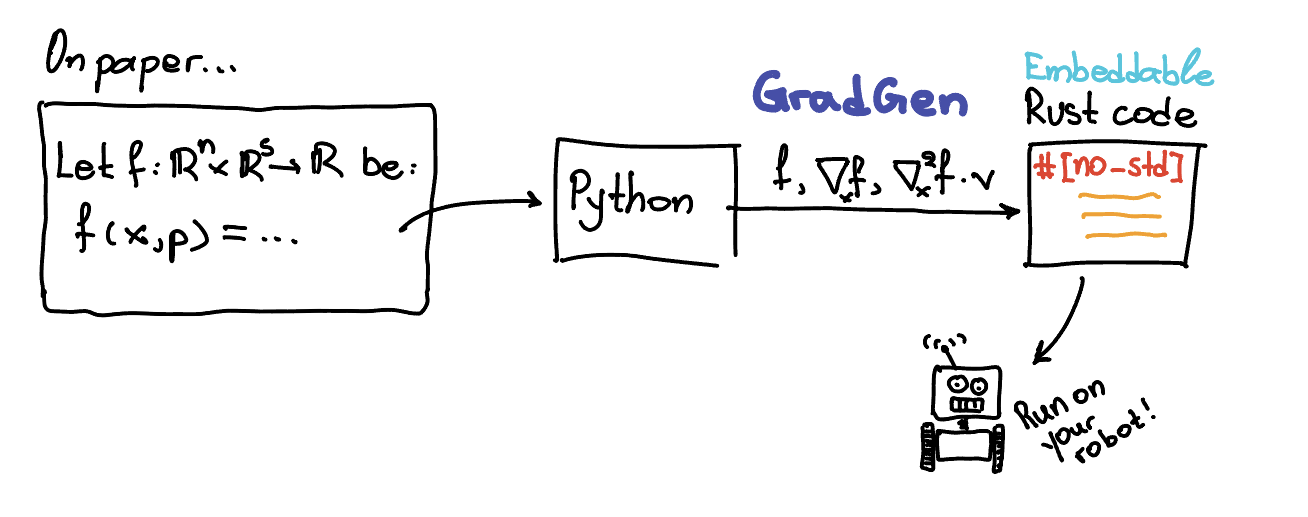
gradgen is a Python library for symbolic differentiation and Rust code generation.
The project is being built incrementally. The current implementation focuses on:
SX-style symbolic expressions- vector-first semantics
Functionas a core abstraction- symbolic automatic differentiation
- simplification and common subexpression extraction
- Rust code generation for primal and derivative kernels
Matrix operations, MX, complex-domain semantics, and solver-related features are still to come.
The library already supports:
- scalar symbolic expressions with hash-consed DAG nodes
- symbolic vectors built from scalar
SXexpressions - scalar operations such as
+,-,*,/,**,min,max, and a growing set of elementary functions - vector operations including elementwise
+,-,/, scalar-vector products, dot products, slicing, and vector norms - symbolic and numeric
Functioncalls - forward-mode AD through scalar derivatives and Jacobian-vector products
- reverse-mode AD through gradients and vector-Jacobian products
- Jacobian and Hessian construction
Function-level gradient, Jacobian-block, Hessian-block, HVP, and joint primal-Jacobian helpers- bounded symbolic simplification
- common subexpression elimination plans for later code generation
- Rust crate generation for primal functions, derivative bundles, and multi-kernel crates
Some intentional limitations at this stage:
SXsymbols are formal symbols representing real-valued scalar quantities- elementwise vector-vector multiplication with
x * yis not supported yet - simplification is still rule-based and bounded, not a full computer algebra system
- full matrix types are not implemented yet, so Jacobians and Hessians use flat row-major vector representations where needed
Currently implemented elementary functions include:
sin,cos,tanasin,acos,atan,atan2sinh,cosh,tanh,asinh,acosh,atanhexp,expm1,log,log1psqrt,cbrt,hypoterf,erfcabs,floor,ceil,round,trunc,fract,signum
Current vector norm helpers include:
norm2()norm2sq()norm1()norm_inf()norm_p(p)norm_p_to_p(p)
Example
from gradgen import Function, SX, SXVector

# Scalar input and numeric evaluation.
x = SX.sym("x")
f = Function("f", [x], [x * x + 1])
print(f(3.0))  # 10.0

# Scalar input and symbolic substitution.
z = SX.sym("z")
print(f(z))    # symbolic expression equivalent to z * z + 1

# Vector input with multiple outputs.
v = SXVector.sym("v", 2)
g = Function("g", [v], [v, v.dot(v)])
print(g([2.0, 3.0]))  # ((2.0, 3.0), 13.0)
Core Concepts
SX
SX is the scalar symbolic type. An SX value is not a concrete number. It is a symbolic expression node in a DAG whose intended meaning is a real-valued scalar computation.
from gradgen import SX

x = SX.sym("x")
y = SX.sym("y")
expr = x.sin() + x * y
Repeated identical expressions reuse the same underlying node internally, which keeps graphs compact and helps later AD and code generation.
SXVector
SXVector is a lightweight vector container built from scalar SX expressions.
from gradgen import SXVector

x = SXVector.sym("x", 3)
y = SXVector.sym("y", 3)

z = x + y
d = x.dot(y)
For now:
x + y,x - y, andx / yare elementwise2 * xandx * 2are supportedx * yis intentionally not supported yetx[i]returns anSX, whilex[a:b]returns anSXVectorview
Example with slicing:
from gradgen import Function, SXVector

z = SXVector.sym("z", 4)
x = z[0:3]
u = z[3:4]

f = Function("f", [z], [x.norm2() * u + x.norm2sq()])
print(f([1.0, 2.0, 3.0, 4.0]))
Function
Function defines a symbolic boundary around inputs and outputs.
from gradgen import Function, SX

x = SX.sym("x")
y = SX.sym("y")
f = Function("f", [x, y], [x + y, x * y])
You can call a function numerically:
print(f(2.0, 3.0)) # (5.0, 6.0)
Or symbolically:
z = SX.sym("z")
w = SX.sym("w")
print(f(z, w))  # symbolic outputs
Vector inputs accept either SXVector values or Python sequences:
from gradgen import Function, SXVector

v = SXVector.sym("v", 2)
g = Function("g", [v], [v.dot(v)])

print(g([2.0, 3.0]))  # 13.0
Automatic Differentiation
The current AD layer supports both forward-mode and reverse-mode symbolic differentiation.
Forward-mode entry points:
derivative(expr, wrt)for scalar derivativesjvp(expr, wrt, tangent)for Jacobian-vector products
Reverse-mode entry points:
gradient(expr, wrt)for scalar-output reverse gradientsvjp(expr, wrt, cotangent)for vector-Jacobian products
Higher-order helpers:
jacobian(expr, wrt)hessian(expr, wrt)for scalar-output expressions
Smooth elementary functions such as atan2, hypot, asinh, acosh,
atanh, cbrt, erf, and erfc participate in AD. Nonsmooth functions such
as min, floor, ceil, round, trunc, fract, signum, norm1, and
norm_inf currently raise if differentiation is requested. norm_p(...) and
norm_p_to_p(...) support AD when p is a constant greater than 1.
Forward mode
Scalar derivative
from gradgen import Function, SX, derivative

x = SX.sym("x")
expr = x.sin() + x * x
dexpr = derivative(expr, x)

df = Function("df", [x], [dexpr])
print(df(2.0))
Vector directional derivative
from gradgen import Function, SXVector, jvp

x = SXVector.sym("x", 2)
expr = x.dot(x)
directional = jvp(expr, x, [1.0, 0.0])

df = Function("df", [x], [directional])
print(df([3.0, 4.0]))  # 6.0
Differentiating a Function
You can also build a new function representing a forward-mode directional derivative of an existing Function:
from gradgen import Function, SX

x = SX.sym("x")
y = SX.sym("y")
f = Function("f", [x, y], [x * y + x.sin()])

df_dx = f.jvp(1.0, 0.0)
df_dy = f.jvp(0.0, 1.0)
The returned object is another Function with the same primal inputs and differentiated outputs.
Reverse mode
Reverse mode is especially useful for scalar-output expressions with many inputs.
Scalar gradient
from gradgen import Function, SX, gradient

x = SX.sym("x")
y = SX.sym("y")
expr = x * y + x.sin()

grad_x = gradient(expr, x)
grad_y = gradient(expr, y)

g = Function("g", [x, y], [grad_x, grad_y])
print(g(2.0, 5.0))
Vector-Jacobian product
from gradgen import Function, SX, SXVector, vjp

x = SX.sym("x")
outputs = SXVector((x.sin(), x * x))
sensitivity = vjp(outputs, x, [2.0, 3.0])

g = Function("g", [x], [sensitivity])
print(g(2.0))
Reverse-mode differentiation of a Function
You can also build a reverse-mode differentiated function from cotangent seeds on the outputs:
from gradgen import Function, SX

x = SX.sym("x")
y = SX.sym("y")
f = Function("f", [x, y], [x * y + x.sin()])

reverse = f.vjp(1.0)
print(reverse(2.0, 5.0))
Function.vjp(...) returns a new Function with:
- the same primal inputs as the original function
- outputs ordered like the original inputs
- values equal to the vector-Jacobian product for the supplied cotangent direction
If you want a runtime-seeded reverse-mode function instead, provide wrt_index:
from gradgen import Function, SXVector

x = SXVector.sym("x", 2)
G = Function(
    "G",
    [x],
    [SXVector((x[0] + x[1], x[0] * x[1], x[1].sin()))],
    input_names=["x"],
    output_names=["y"],
)

reverse_x = G.vjp(wrt_index=0)
print(reverse_x([3.0, 4.0], [2.0, -1.0, 5.0]))
This returns a Function with:
- the original primal inputs
- one appended cotangent input per declared output
- a single output block equal to $J_G(x)^\top v$ for the selected input block
For scalar-output functions, there is also a high-level Function.gradient(...) helper:
grad_f = some_scalar_function.gradient(0)
This returns a new Function whose outputs represent the gradient with respect to the selected input block.
Jacobians
The library also supports symbolic Jacobian construction.
from gradgen import Function, SXVector, jacobian

x = SXVector.sym("x", 2)
expr = x.dot(x)

jac = jacobian(expr, x)
f = Function("jac", [x], [jac])
print(f([3.0, 4.0]))  # (6.0, 8.0)
For vector-output by vector-input cases, Jacobians are currently represented as flat row-major vectors because full matrix types are not implemented yet.
For example:
from gradgen import Function, SXVector

x = SXVector.sym("x", 2)
G = Function(
    "G",
    [x],
    [SXVector((x[0] + x[1], x[0] * x[1], x[1].sin()))],
    input_names=["x"],
    output_names=["y"],
)

JG = G.jacobian(0)
print(JG([3.0, 4.0]))  # (1.0, 1.0, 4.0, 3.0, 0.0, cos(4.0))
This corresponds to the $3 \times 2$ matrix $$ \begin{bmatrix} 1 & 1 \ 4 & 3 \ 0 & \cos(4) \end{bmatrix} $$ stored row by row.
You can also derive a Jacobian block from a function:
jac_f = some_function.jacobian(0)
If you want multiple input blocks at once, use:
blocks = some_function.jacobian_blocks()
For Rust code generation workflows that want one kernel to compute several artifacts together, you can also build a combined symbolic function:
joint = some_function.joint(("f", "jf"), 0, simplify_joint="high")
This low-level Function.joint(...) API operates on one selected wrt block at
a time. Supported component names are:
"f"for the primal outputs"grad"for the gradient block"jf"for the Jacobian block"hessian"for the Hessian block"hvp"for the Hessian-vector product
The output order follows the requested component tuple. If "hvp" is included,
the returned function appends a tangent input block.
Hessians
Hessians are supported for scalar-output expressions.
from gradgen import Function, SXVector, hessian

x = SXVector.sym("x", 2)
expr = x[0] * x[0] + x[0] * x[1] + x[1] * x[1]

hes = hessian(expr, x)
f = Function("hes", [x], list(hes))
print(f([3.0, 4.0]))  # ((2.0, 1.0), (1.0, 2.0))
At the function level:
hes_f = some_scalar_function.hessian(0)
For multiple input blocks:
blocks = some_scalar_function.hessian_blocks()
Hessian-vector products
For scalar-output functions, you can also build Hessian-vector product kernels. The resulting function keeps the original inputs and appends one extra tangent input block:
hvp_f = some_scalar_function.hvp(0)
To build several blocks at once:
blocks = some_scalar_function.hvp_blocks()
Simplification
The library includes a bounded symbolic simplifier for expressions and functions.
from gradgen import SX, derivative, simplify

x = SX.sym("x")
expr = derivative(x * x, x)

print(expr)                         # unsimplified symbolic derivative
print(simplify(expr, "medium"))     # cleaner symbolic expression
Supported simplification controls:
- integer pass counts like
max_effort=5 - named effort presets:
"none""basic""medium""high""max"
Functions can also be simplified directly:
f_simplified = f.simplify(max_effort="high")
This works for ordinary functions and derived ones such as Jacobians and Hessians.
Common Subexpression Elimination
The library can extract reusable intermediate expressions into a computation plan, which is especially useful as a precursor to Rust code generation.
from gradgen import SX, cse

x = SX.sym("x")
z = x * x + 1
expr = z + z * z

plan = cse([expr])
for assignment in plan.assignments:
    print(assignment.name, assignment.expr, assignment.use_count)
You can also build a plan directly from a function:
plan = f.cse(prefix="w", min_uses=2)
CSEPlan currently contains:
assignments: named reusable intermediates in topological orderoutputs: flattened scalar outputsuse_counts: DAG reference counts for all visited nodes
This is intended to become the bridge between symbolic graphs and workspace-based Rust code generation.
Rust Code Generation
The library can generate Rust code for primal functions, derivative functions, and combined multi-kernel crates.
The generated Rust currently uses:
- deterministic naming
- a slice-based ABI
- explicit workspace variables stored in a mutable workspace slice
- configurable scalar types (
f64orf32) stdandno_stdbackend modes
When the generated code uses vector norms or special functions that need shared
support code, gradgen emits auxiliary Rust helpers once at module scope. This
includes helpers such as norm2, norm2sq, norm1, norm_inf, norm_p,
norm_p_to_p, erf, and erfc when they are required by the generated crate.
Generate Rust source in memory
from gradgen import Function, SX

x = SX.sym("x")
f = Function("square_plus_one", [x], [x * x + 1], input_names=["x"], output_names=["y"])

result = f.generate_rust()
print(result.source)
print(result.workspace_size)
The generated function looks like a plain Rust function with this style of signature:
pub fn square_plus_one(x: &[f64], y: &mut [f64], work: &mut [f64]) {
    // ...
}
For multiple inputs and outputs, each declared input and output becomes its own slice argument.
If a generated kernel does not need workspace, the argument is still present but
named _work to avoid an unused-variable warning in Rust.
You can also configure the backend explicitly:
from gradgen import RustBackendConfig

config = (
    RustBackendConfig()
    .with_backend_mode("no_std")
    .with_scalar_type("f32")
    .with_math_lib("libm")
    .with_function_name("eval_kernel")
)

result = f.generate_rust(config=config)
Rust-facing names follow two different rules:
- symbolic
Function(...)names and input/output names may still be ordinary user-facing strings such as"my function"or"out value". During code generation they are sanitized into simple Rust identifiers. - explicit backend overrides such as
crate_name=andRustBackendConfig.with_function_name(...)are validated strictly and must already be valid Rust-style identifiers matching[A-Za-z_][A-Za-z0-9_]*.
In addition, generated Rust now fails early if sanitization would create an ambiguous API, for example when:
- two different Python names collapse to the same Rust identifier
- a generated argument name would collide with internal ABI names such as
work - an explicit crate or function name is a Rust keyword like
fn
This keeps naming problems visible at Python/codegen time instead of surfacing later as confusing Rust compiler errors.
Create a Rust project on disk
You can also create a minimal Cargo project at a user-specified path:
from gradgen import Function, SX

x = SX.sym("x")
f = Function("square_plus_one", [x], [x * x + 1], input_names=["x"], output_names=["y"])

project = f.create_rust_project("./square_plus_one")
print(project.project_dir)
This writes:
Cargo.tomlREADME.mdsrc/lib.rs
The generated README.md contains simple generic instructions such as:
cargo build
Custom crate and function names
project = f.create_rust_project(
    "/tmp/my_kernel",
    crate_name="my_kernel",
    function_name="eval_kernel",
)
There is also a module-level helper if you prefer:
from gradgen import create_rust_project

project = create_rust_project(f, "/tmp/my_kernel")
Create a derivative Rust bundle
You can generate a directory containing Rust crates for the primal function, Jacobians, and Hessians:
bundle = f.create_rust_derivative_bundle(
    "/tmp/my_bundle",
    simplify_derivatives="high",
)
This creates a bundle directory with entries such as:
primal/f_jacobian_<input_name>/f_hessian_<input_name>/for scalar-output functions
There is also a module-level helper:
from gradgen import create_rust_derivative_bundle

bundle = create_rust_derivative_bundle(f, "/tmp/my_bundle")
Build a single crate with one or more source functions
If you want one Cargo crate containing several related kernels, use
CodeGenerationBuilder. The builder can target one source function or many:
from gradgen import CodeGenerationBuilder, FunctionBundle, RustBackendConfig

builder = (
    CodeGenerationBuilder()
    .with_backend_config(
        RustBackendConfig()
        .with_backend_mode("no_std")
        .with_scalar_type("f32")
    )
    .for_function(
        f,
        lambda b: (
            b.add_primal()
             .add_gradient()
             .add_hvp()
             .add_joint(
                 FunctionBundle()
                 .add_f()
                 .add_jf(wrt=0)
             )
             .with_simplification("medium")
        ),
    )
)

project = builder.build("/tmp/my_kernel")
Each for_function(...) block configures the kernels generated for one source
Function. Inside that block, currently supported builder requests include:
add_primal()add_gradient()add_jacobian()add_vjp()add_joint(FunctionBundle().add_f().add_jf(wrt=0))add_joint(FunctionBundle().add_f().add_hvp(wrt=0))add_joint(FunctionBundle().add_f().add_jf(wrt=0).add_hvp(wrt=0))add_hessian()add_hvp()
For backward compatibility, CodeGenerationBuilder(f) still works as a
single-function shorthand. The examples below use the more general
for_function(...) style.
More generally, add_joint(...) accepts a FunctionBundle, which can describe
primal outputs plus one or more derivative artifacts for one or more wrt
blocks. The builder expands that bundle into one or more combined symbolic
functions, simplifies them, and then generates Rust from those shared
expression graphs. This helps the generated kernels reuse intermediate work
across the requested outputs.
For example:
bundle = (
    FunctionBundle()
    .add_f()
    .add_jf(wrt=[0, 1, 2])
    .add_hessian(wrt=[0, 1])
)

builder = CodeGenerationBuilder().for_function(
    f,
    lambda b: b.add_joint(bundle),
)
Builder-generated function names are prefixed with the crate name and include
the source function name. For example, with crate name my_kernel and a single
source function named f the generated Rust API looks like:
my_kernel_f_fmy_kernel_f_gradmy_kernel_f_jfmy_kernel_f_hessianmy_kernel_f_hvpmy_kernel_f_f_jfmy_kernel_f_f_jf_hvp
If the crate contains multiple source functions, the source function name is still used to keep the Rust entrypoints distinct:
my_kernel_f_fmy_kernel_f_jfmy_kernel_g_fmy_kernel_g_hvp
If you explicitly set crate_name or function_name, those names must already
be acceptable Rust identifiers. The builder and backend will reject values that
need sanitization, values that start with digits, and Rust keywords. By
contrast, source-function names and input/output names are still sanitized
automatically when Rust is generated.
You can also request a uniform simplification pass for every generated kernel:
builder = (
    CodeGenerationBuilder()
    .for_function(
        f,
        lambda b: (
            b.add_primal()
             .add_jacobian()
             .add_hvp()
             .add_joint(
                 FunctionBundle()
                 .add_f()
                 .add_jf(wrt=0)
                 .add_hvp(wrt=0)
             )
             .with_simplification("medium")
        )
    )
)
With this setting, simplification is applied to all generated kernels for that source function, including the separate primal/Jacobian/HVP kernels and the joint kernel.
Staged Composition
For long compositions of state-transform stages, ComposedFunction keeps the
stage structure explicit instead of expanding everything into one large symbolic
expression graph. This is especially useful when you want generated Rust to use
separate stage helpers and loop-based repeated application.
Each state-transform stage must have the signature:
G(state, p) -> next_state
and the terminal function must have the signature:
h(state, pf) -> scalar
You can build compositions with:
.then(G, p=...)for one stage.chain([...])for several possibly different stages.repeat(G, params=[...])for repeated application of the same stage.finish(h, p=...)for the terminal scalar output
Numeric stage parameters are embedded as constants. Symbolic stage parameters
are packed into a single extra runtime input slice named parameters, ordered
in forward stage order with the terminal parameter block last.
from gradgen import ComposedFunction, Function, SXVector

x = SXVector.sym("x", 2)
state = SXVector.sym("state", 2)
p = SXVector.sym("p", 2)
pf = SXVector.sym("pf", 1)

G = Function(
    "g",
    [state, p],
    [SXVector((state[0] + p[0], state[1] * p[1]))],
    input_names=["state", "p"],
    output_names=["next_state"],
)
h = Function(
    "h",
    [state, pf],
    [state[0] + state[1] + pf[0]],
    input_names=["state", "pf"],
    output_names=["y"],
)

composed = (
    ComposedFunction("f_chain", x)
    .then(G, p=p)
    .repeat(G, params=[p, p])
    .finish(h, p=pf)
)

expanded = composed.to_function()
gradient = composed.gradient()
The expanded symbolic function has the inputs:
xparameters
where parameters contains the packed stage parameters for the composition.
Complete end-to-end example
The example below:
- defines two scalar functions of the same 3D input
- evaluates them in Python
- generates one Rust crate containing kernels for both
from gradgen import (
    CodeGenerationBuilder,
    Function,
    FunctionBundle,
    RustBackendConfig,
    SXVector,
)

x = SXVector.sym("x", 3)

f = Function(
    "f",
    [x],
    [x[0] * x[0] + x[0] * x[1] + x[2].sin() + x[1] * x[2]],
    input_names=["x"],
    output_names=["y"],
)

g = Function(
    "g",
    [x],
    [x.norm2() + x[0] * x[2]],
    input_names=["x"],
    output_names=["z"],
)

# Try the symbolic functions in Python first.
jf = f.jacobian(0)
hvp = f.hvp(0)

print("f([1,2,3]) =", f([1.0, 2.0, 3.0]))
print("jf([1,2,3]) =", jf([1.0, 2.0, 3.0]))
print("hvp([1,2,3], [1,0,-1]) =", hvp([1.0, 2.0, 3.0], [1.0, 0.0, -1.0]))
print("g([1,2,3]) =", g([1.0, 2.0, 3.0]))

config = (
    RustBackendConfig()
    .with_crate_name("my_kernel")
    .with_backend_mode("std")
    .with_scalar_type("f64")
)

builder = (
    CodeGenerationBuilder()
    .with_backend_config(config)
    .for_function(
        f,
        lambda b: (
            b.add_primal()
             .add_jacobian()
             .add_hvp()
             .add_joint(
                 FunctionBundle()
                 .add_f()
                 .add_jf(wrt=0)
                 .add_hvp(wrt=0)
             )
             .with_simplification("medium")
        ),
    )
    .for_function(
        g,
        lambda b: (
            b.add_primal()
             .add_gradient()
             .with_simplification("medium")
        ),
    )
)

project = builder.build("./my_kernel")

print("Generated crate:", project.project_dir)
print("Generated Rust functions:")
for codegen in project.codegens:
    print(" -", codegen.function_name)
Then build the generated crate with:
cd my_kernel
cargo build
Current ABI conventions
At the moment the generated Rust code assumes:
- scalar inputs are length-1 slices
- vector inputs are dense
&[T]slices whereTisf64orf32 - scalar outputs are length-1
&mut [T]slices - vector outputs are dense
&mut [T]slices - intermediate values live in
work: &mut [T]
The no_std backend uses a configurable math namespace and defaults to libm.
Development
Run the test suite locally with:
PYTHONPATH=src pytest
Release history Release notifications | RSS feed


Download files
Download the file for your platform. If you're not sure which to choose, learn more about installing packages.
Source Distribution
Built Distribution
Filter files by name, interpreter, ABI, and platform.
If you're not sure about the file name format, learn more about wheel file names.
Copy a direct link to the current filters
File details
Details for the file gradgen-0.3.1.tar.gz.
File metadata
- Download URL: gradgen-0.3.1.tar.gz
- Upload date:
- Size: 104.5 kB
- Tags: Source
- Uploaded using Trusted Publishing? No
- Uploaded via: twine/6.2.0 CPython/3.13.3
File hashes
| Algorithm | Hash digest | |
|---|---|---|
| SHA256 |
35eca778ddb3e6be323c144b4647b8340897886d38fcd325be9405a24e9655f1
|
|
| MD5 |
f95f7df359da041377d3f87126fad240
|
|
| BLAKE2b-256 |
5eda99a117a8bfa526611be8b13bf85a47903e03b24b681822363cbdab33e764
|
File details
Details for the file gradgen-0.3.1-py3-none-any.whl.
File metadata
- Download URL: gradgen-0.3.1-py3-none-any.whl
- Upload date:
- Size: 74.6 kB
- Tags: Python 3
- Uploaded using Trusted Publishing? No
- Uploaded via: twine/6.2.0 CPython/3.13.3
File hashes
| Algorithm | Hash digest | |
|---|---|---|
| SHA256 |
ca78b1fd1843904ea8d0af70b77bf611aa6c3c610f6cac1e396c0dbb446b57ee
|
|
| MD5 |
3cd2bfd9854e4deff344ffe8308595a5
|
|
| BLAKE2b-256 |
73d48245faed58353154bd7fa7ba79c46c5448acfd71eb048706f951b0533b20
|






