
Gradio Terminal




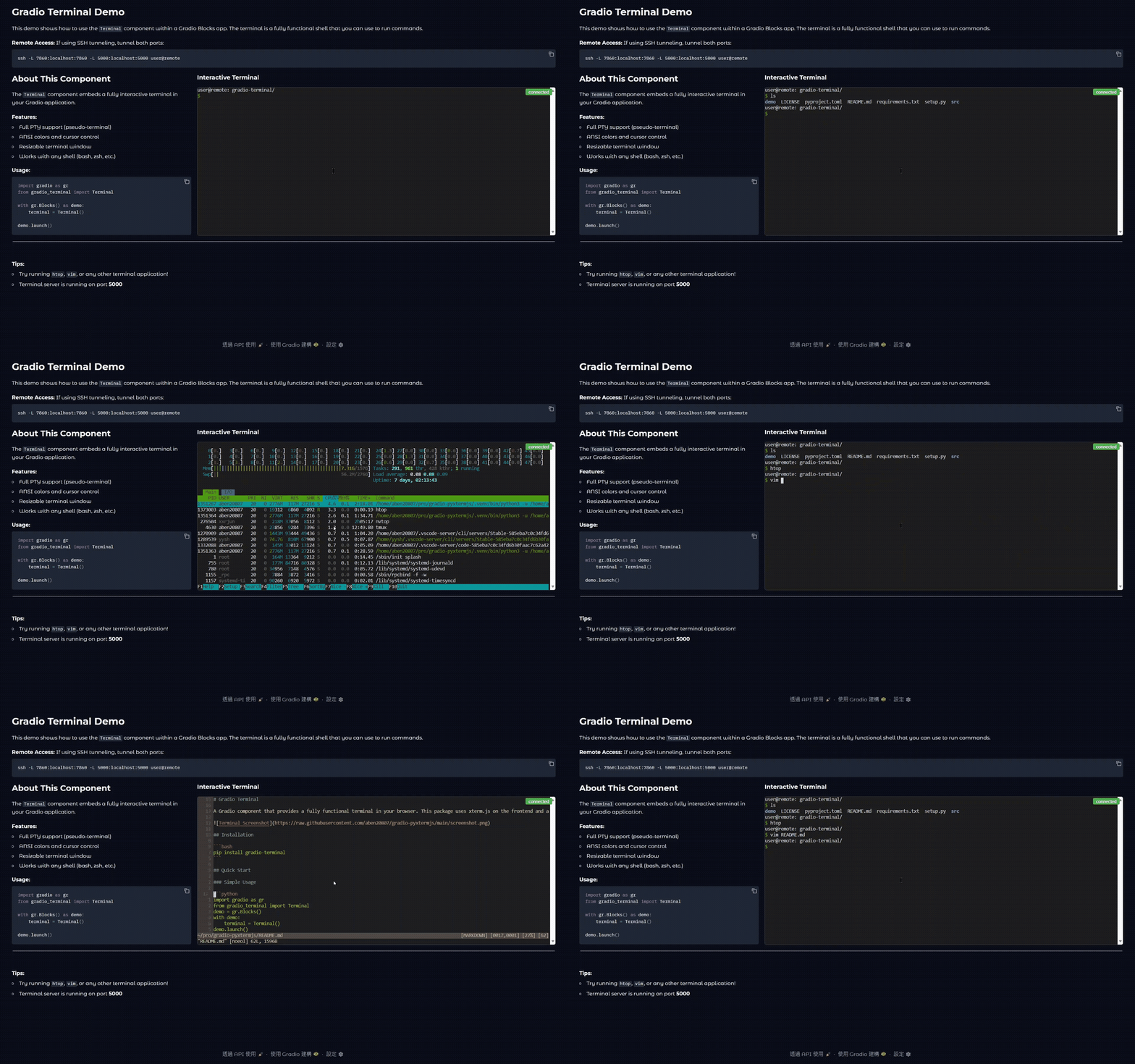
A Gradio component that provides a fully functional terminal in your browser. This package uses xterm.js on the frontend and a PTY on the backend to provide a real shell experience.
Installation
pip install gradio-terminal
Quick Start
Simple Usage
import gradio as gr
from gradio_terminal import Terminal
demo = gr.Blocks()
with demo:
    terminal = Terminal()
demo.launch()
Secure Terminal (No Sudo)
with demo:
    terminal = Terminal(allow_sudo=False)  # Block sudo commands
Terminal with Blacklist
with demo:
    terminal = Terminal(
        blacklist_commands=["rm", "shutdown", "reboot"]  # Block dangerous commands
    )
API Reference
| Function | Parameters | Description |
|---|---|---|
launch_terminal() |
port=5000, host="127.0.0.1", command="bash", share=False, allow_sudo=True, blacklist_commands=None, **launch_kwargs |
Launch a standalone Gradio app with a terminal. |
create_terminal_demo() |
port=5000, host="127.0.0.1", command="bash", height=400, allow_sudo=True, blacklist_commands=None |
Create a Gradio Blocks demo with an embedded terminal. |
Terminal() |
port=5000, host="127.0.0.1", command="bash", height=400, label=None, visible=True, elem_id=None, elem_classes=None, allow_sudo=True, blacklist_commands=None |
Create a terminal component for Gradio Blocks. |
TerminalServer() |
port=5000, host="127.0.0.1", command="bash" |
Low-level terminal server for custom integrations. |
TerminalServer Methods
| Method | Description |
|---|---|
start() |
Start the server and return the URL |
get_url() |
Get the terminal server URL |
stop() |
Stop the terminal server |
Notes
allow_sudo: Whether to allow sudo commands (default: True). When False, sudo commands are blocked with an error message.blacklist_commands: List of commands to block (default: None). Any command in this list will be blocked with an error message.
Security
This component provides shell access to your server. Use the allow_sudo=False parameter to block sudo commands and the blacklist_commands parameter to block specific dangerous commands for enhanced security:
terminal = Terminal(
    allow_sudo=False,
    blacklist_commands=["rm", "shutdown", "reboot", "passwd"]
)
Disclaimer and Security Notice
This component provides shell access to your server, which can pose significant security risks if misused. It should only be used in trusted environments. While this package provides settings such as allow_sudo=False and blacklist_commands to reduce potential threats, it does not guarantee complete security. The authors are not responsible for any misuse or damage caused by this component.
License
This project is licensed under the Apache-2.0 License.
Acknowledgments
1 maintainer

Metadata
1 maintainer
Release files for gradio-terminal 1.1.1
For a detailed explanation of source distributions (sdists) and built distributions (wheels), please see the package formats documentation.
Source distribution (sdist)
| File | Size | Uploaded | |
|---|---|---|---|
| gradio_terminal-1.1.1.tar.gz | 14.7 kB | Details |
Built distribution (wheel)
| File | Interpreter | ABI | Platform | Reset |
|---|---|---|---|---|
| gradio_terminal-1.1.1-py3-none-any.whl | Python 3 | none | any | Details |
Total release size: 28.4 kB
Release files / gradio_terminal-1.1.1.tar.gz
| Download URL | gradio_terminal-1.1.1.tar.gz |
|---|---|
| Size | 14.7 kB |
| Tags | Source |
|
SHA-256 checksum How to use checksums |
4a1c2df17b805f8f26983933bc7dc5d049c7f97823a48f82c1ef5afd2e5321a1
|
|
BLAKE2b-256 checksum How to use checksums |
6d77c65001247887c78d424d620862fab7e8bbb8c8680f181b0c38364662cbd2
|
| Upload date | |
|
Uploaded using Trusted Publishing? What is trusted publishing? |
Yes |
| Uploaded via |
twine/6.1.0 CPython/3.13.7
|
Provenance
Provenance describes where a file came from. On PyPI, provenance is shared via attestations, which provide a verifiable record of the build or publishing details. View details, limitations and caveats.


PyPI Publish Attestation
PyPI verified that this artifact, at this checksum, originated from the publisher listed below.
Signed by GitHub Actions, verified by PyPI on Feb 3, 2026.
Transparency logRelease files / gradio_terminal-1.1.1-py3-none-any.whl
| Download URL | gradio_terminal-1.1.1-py3-none-any.whl |
|---|---|
| Size | 13.7 kB |
| Tags | Python 3 |
|
SHA-256 checksum How to use checksums |
9bc88e2d59416520662d71b4db694f4fdfb4742ba78536517a7d1b778ac384b2
|
|
BLAKE2b-256 checksum How to use checksums |
74c38ef1a242890c94b834f3bc49c521119cb64973aca559617433d6f87e7f7e
|
| Upload date | |
|
Uploaded using Trusted Publishing? What is trusted publishing? |
Yes |
| Uploaded via |
twine/6.1.0 CPython/3.13.7
|
Provenance
Provenance describes where a file came from. On PyPI, provenance is shared via attestations, which provide a verifiable record of the build or publishing details. View details, limitations and caveats.
PyPI Publish Attestation
PyPI verified that this artifact, at this checksum, originated from the publisher listed below.
Signed by GitHub Actions, verified by PyPI on Feb 3, 2026.
Transparency log













