
Video Slider Component for Gradio UI

Project description
tags: [gradio-custom-component, ImageSlider] title: gradio_videoslider short_description: VideoSlider Component for Gradio colorFrom: blue colorTo: yellow sdk: gradio pinned: false app_file: space.py
gradio_videoslider


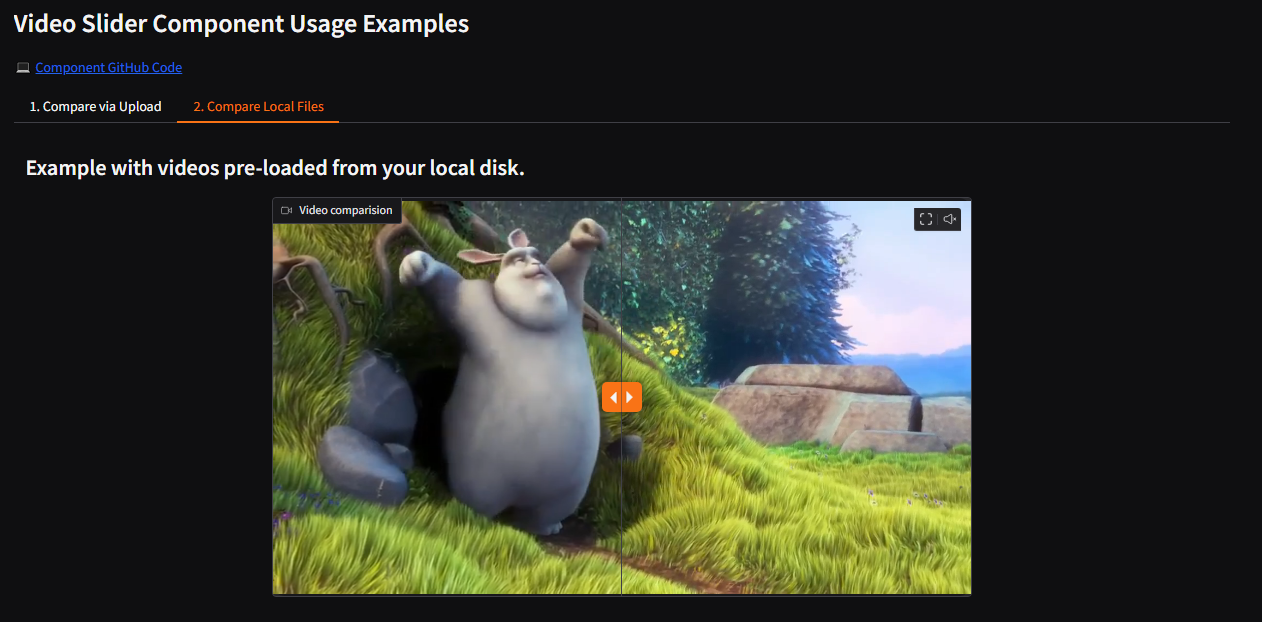
An interactive component for Gradio to compare two videos side-by-side with a draggable slider.
Features
- Side-by-Side Comparison: Display two videos in the same component, perfect for showing "before and after" results.
- Interactive Slider: A draggable vertical slider allows users to intuitively compare the two videos.
- Synchronized Playback: Clicking on the component plays or pauses both videos simultaneously, keeping them in sync.
- Input and Output: Use it as an input field for users to upload two videos, or as an output to display results from your function.
- Standard Video Controls: Includes autoplay, looping properties, mute/unmute, fullscreen toggle, and a download button.
- Flexible Loading: Load videos from local file paths or remote URLs directly into the component.
Installation
pip install gradio_videoslider
Usage
import gradio as gr
from gradio_videoslider import VideoSlider
import os

# --- 1. DEFINE THE PATHS TO YOUR LOCAL VIDEOS ---
#
# IMPORTANT: Replace the values below with the paths to YOUR video files.
#
# Option A: Relative Path (if the video is in the same folder as this app.py)
# video_path_1 = "video_before.mp4"
# video_path_2 = "video_after.mp4"
#
# Option B: Absolute Path (the full path to the file on your computer)
# Example for Windows:
# video_path_1 = "C:\\Users\\YourName\\Videos\\my_video_1.mp4"
#
# Example for Linux/macOS:
# video_path_1 = "/home/yourname/videos/my_video_1.mp4"

# Set your file paths here:
video_path_1 = "examples/SampleVideo 720x480.mp4"
video_path_2 = "examples/SampleVideo 1280x720.mp4"


# --- 2. FUNCTION FOR THE UPLOAD EXAMPLE ---
def process_uploaded_videos(video_inputs):
    """This function handles the uploaded videos."""
    print("Received videos from upload:", video_inputs)
    return video_inputs


# --- 3. GRADIO INTERFACE ---
with gr.Blocks() as demo:
    gr.Markdown("# Video Slider Component Usage Examples")
    gr.Markdown("<span>💻 <a href='https://github.com/DEVAIEXP/gradio_component_videoslider'>Component GitHub Code</a></span>")

    with gr.Tabs():
        # --- TAB 1: UPLOAD EXAMPLE ---
        with gr.TabItem("1. Compare via Upload"):
            gr.Markdown("## Upload two videos to compare them side-by-side.")
            video_slider_input = VideoSlider(label="Your Videos", height=400, width=700, video_mode="upload")
            video_slider_output = VideoSlider(
                label="Video comparision",
                interactive=False,
                autoplay=True,
                video_mode="preview",
                show_download_button=False,
                loop=True,
                height=400,
                width=700
            )
            submit_btn = gr.Button("Submit")
            submit_btn.click(
                fn=process_uploaded_videos,
                inputs=[video_slider_input],
                outputs=[video_slider_output]
            )

        # --- TAB 2: LOCAL FILE EXAMPLE ---
        with gr.TabItem("2. Compare Local Files"):
            gr.Markdown("## Example with videos pre-loaded from your local disk.")

            # This is the key part: we pass a tuple of your local file paths to the `value` parameter.
            VideoSlider(
                label="Video comparision",
                value=(video_path_1, video_path_2),
                interactive=False,
                show_download_button=False,
                autoplay=True,
                video_mode="preview",
                loop=True,
                height=400,
                width=700
            )

# A check to give a helpful error message if files are not found.
if not os.path.exists(video_path_1) or not os.path.exists(video_path_2):
    print("---")
    print(f"WARNING: Could not find one or both video files.")
    print(f"Please make sure these paths are correct in your app.py file:")
    print(f"  - '{os.path.abspath(video_path_1)}'")
    print(f"  - '{os.path.abspath(video_path_2)}'")
    print("---")

if __name__ == '__main__':
    demo.launch(debug=True)
VideoSlider
Initialization
| name | type | default | description |
|---|---|---|---|
value |
typing.Union[
    typing.Tuple[str | pathlib.Path, str | pathlib.Path],
    typing.Callable,
    NoneType,
][
    typing.Tuple[str | pathlib.Path, str | pathlib.Path][
        str | pathlib.Path, str | pathlib.Path
    ],
    Callable,
    None,
]
|
None |
A tuple of two video file paths or URLs to display initially. Can also be a callable. |
height |
int | None
|
None |
The height of the component container in pixels. |
width |
int | None
|
None |
The width of the component container in pixels. |
label |
str | None
|
None |
The label for this component that appears above it. |
every |
float | None
|
None |
If `value` is a callable, run the function 'every' seconds while the client connection is open. |
show_label |
bool | None
|
None |
If False, the label is not displayed. |
container |
bool
|
True |
If False, the component will not be wrapped in a container. |
scale |
int | None
|
None |
An integer that defines the component's relative size in a layout. |
min_width |
int
|
160 |
The minimum width of the component in pixels. |
interactive |
bool | None
|
None |
If True, the component is in input mode (upload). If False, it's in display-only mode. |
visible |
bool
|
True |
If False, the component is not rendered. |
elem_id |
str | None
|
None |
An optional string that is assigned as the id of the component in the HTML. |
elem_classes |
typing.Union[typing.List[str], str, NoneType][
    typing.List[str][str], str, None
]
|
None |
An optional list of strings that are assigned as the classes of the component in the HTML. |
position |
int
|
50 |
The initial horizontal position of the slider, from 0 (left) to 100 (right). |
show_download_button |
bool
|
True |
If True, a download button is shown for the second video. |
show_mute_button |
bool
|
True |
If True, a mute/unmute button is shown. |
show_fullscreen_button |
bool
|
True |
If True, a fullscreen button is shown. |
video_mode |
"upload" | "preview"
|
"preview" |
The mode of the component, either "upload" or "preview". |
autoplay |
bool
|
False |
If True, videos will start playing automatically on load (muted). |
loop |
bool
|
False |
If True, videos will loop when they finish playing. |
Events
| name | description |
|---|---|
change |
Triggered when the value of the VideoSlider changes either because of user input (e.g. a user types in a textbox) OR because of a function update (e.g. an image receives a value from the output of an event trigger). See .input() for a listener that is only triggered by user input. |
upload |
This listener is triggered when the user uploads a file into the VideoSlider. |
clear |
This listener is triggered when the user clears the VideoSlider using the clear button for the component. |
User function
The impact on the users predict function varies depending on whether the component is used as an input or output for an event (or both).
- When used as an Input, the component only impacts the input signature of the user function.
- When used as an output, the component only impacts the return signature of the user function.
The code snippet below is accurate in cases where the component is used as both an input and an output.
def predict(
    value: typing.Optional[
   typing.Tuple[
       str | pathlib.Path | None, str | pathlib.Path | None
   ]
][
   typing.Tuple[
       str | pathlib.Path | None, str | pathlib.Path | None
   ][str | pathlib.Path | None, str | pathlib.Path | None],
   None,
]
) -> typing.Optional[
   typing.Tuple[
       str | pathlib.Path | None, str | pathlib.Path | None
   ]
][
   typing.Tuple[
       str | pathlib.Path | None, str | pathlib.Path | None
   ][str | pathlib.Path | None, str | pathlib.Path | None],
   None,
]:
    return value
Release history Release notifications | RSS feed


Download files
Download the file for your platform. If you're not sure which to choose, learn more about installing packages.
Source Distribution
Built Distribution
Filter files by name, interpreter, ABI, and platform.
If you're not sure about the file name format, learn more about wheel file names.
Copy a direct link to the current filters
File details
Details for the file gradio_videoslider-1.0.0.tar.gz.
File metadata
- Download URL: gradio_videoslider-1.0.0.tar.gz
- Upload date:
- Size: 1.3 MB
- Tags: Source
- Uploaded using Trusted Publishing? No
- Uploaded via: twine/6.2.0 CPython/3.10.11
File hashes
| Algorithm | Hash digest | |
|---|---|---|
| SHA256 |
8d94e5a1e28ddd3c110eda6e06c8267a29bbe7a253e1fc44c7a94155c8d441e0
|
|
| MD5 |
13c85234de97abf4a2cd87385046657d
|
|
| BLAKE2b-256 |
1e7d30985adab61fc186809da531dfc82ef0c67d7f310edad93a1d957a46092e
|
File details
Details for the file gradio_videoslider-1.0.0-py3-none-any.whl.
File metadata
- Download URL: gradio_videoslider-1.0.0-py3-none-any.whl
- Upload date:
- Size: 8.3 kB
- Tags: Python 3
- Uploaded using Trusted Publishing? No
- Uploaded via: twine/6.2.0 CPython/3.10.11
File hashes
| Algorithm | Hash digest | |
|---|---|---|
| SHA256 |
442f897acedbea2d1712d31da81e41ceccebfed83dce5b6dab858f9d89060cf3
|
|
| MD5 |
2fcb1bfdda6aed148873e991aab67a7a
|
|
| BLAKE2b-256 |
86e1564db2b15c2f945e893eb900264e9dec5687b10254b83cf3c4cf08c011cd
|






