

Grafton




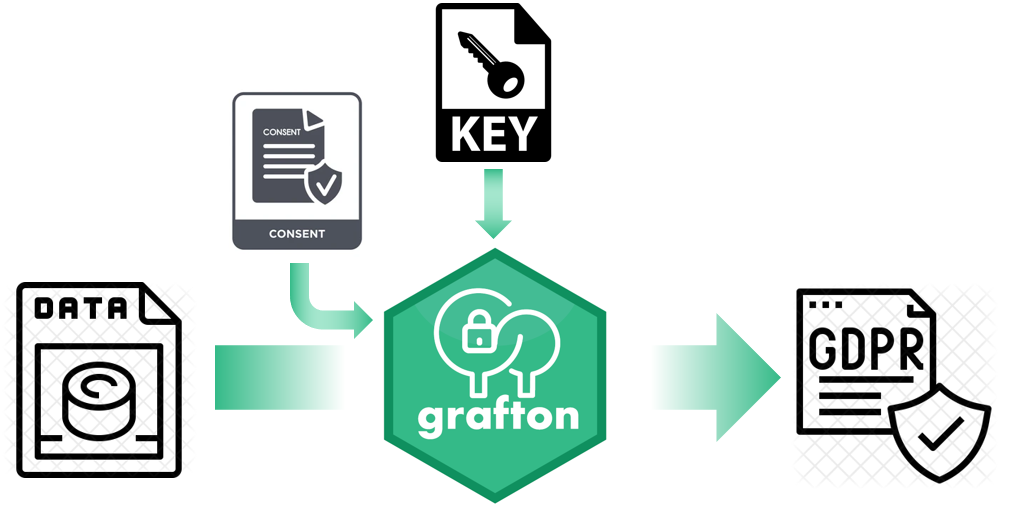
Grafton is a GDPR anonymizer for any file using informed consent, encoding key and randomising numbers
It can anonymize various input files such as CSV, json, XML or other flat files. In line with the GDPR legislation, the mandatory fields have been anonymized, so that any detection of the subjects is prevented.
The encryption key for this anonymization process is provided in a separate file (CSV) and must be stored securely afterwards. In accordance with the GDPR, data is only retained when informed consent is given. Consent can be provided in a separate CSV file. The tracked numbers can also be randomized within a similar order of magnitude.
The use of this package does not guarantee compliance with the GDPR. This package only performs the steps described above.
This package is developed by the AI team at VIVES University of Applied Sciences and is used in our research on demand forecasting.
Grafton works with any extension, but is initially designed to anonymise the file flatfile.csv:
- with a list of replacement values in the key file: pseudonyms.csv
- retaining only users with consent in a list in the consent file: consent.csv
The anonymised file export.csv (any extension possible again) is then saved to the current directory.
The script has default names for all the lists and files to anonymise, but these can be altered if needed.
Getting started
Installation
-
Install python3.7+
-
Create a virtual env where you want to install:
$> python3 -m venv grafton -
Activate the environment
$> source grafton/bin/activate -
Install the package with pip
$> pip install grafton
Randomize numeric entries
from grafton import randomise_number

int_number = 5
randomized_number = randomise_number(int_number)
Anonymize files of any format
from grafton import anonymise
import pandas as pd
# The pseudoynyms file
pseudonyms_url = 'https://raw.githubusercontent.com/yForecasting/grafton/main/grafton/pseudonyms.csv'
pseudonyms_file = pd.read_csv(pseudonyms_url, sep = ';')

# The consent file with the entries they gave their consent
consent_url = 'https://raw.githubusercontent.com/yForecasting/grafton/main/grafton/consent.csv'
consent_file = pd.read_csv(consent_url)

# The location of the flatfile to be anonymized
flat_file = 'https://raw.githubusercontent.com/yForecasting/grafton/main/grafton/flatfile.csv'

# The location of the export file
export_file = '/content/export.csv'

anonymise(pseudonyms_file = pseudonyms_url, consent_file = consent_url, flat_file = flat_file, export_file = export_file)
Original data read.
Export started.
Wait for the end of script signature!
Grafton complete.
---- end of script ----
Contributing
Contribution is welcomed!
Start by reviewing the contribution guidelines. After that, take a look at a good first issue.
Disclaimer
grafton does not save, publish or share with anyone any identifiable user information.
The use of this package does not guarantee compliance with the GDPR. This package only performs the steps described above.
Support
The AI team at VIVES University of Applied Sciences builds and maintains grafton to make it simple and accessible. We are using this software in our research on demand forecasting. A special thanks to Ruben Vanhecke and Filotas Theodosiou for their contribution.
1 maintainer

Metadata
1 maintainer
Release files for grafton 0.1.9
For a detailed explanation of source distributions (sdists) and built distributions (wheels), please see the package formats documentation.
Source distribution (sdist)
| File | Size | Uploaded | Provenance | |
|---|---|---|---|---|
| grafton-0.1.9.tar.gz | 18.1 kB | Without provenance | Details |
Built distribution (wheel)
| File | Interpreter | ABI | Platform | Reset |
|---|---|---|---|---|
| grafton-0.1.9-py3-none-any.whl | Python 3 | none | any | Details |
Total release size: 36.4 kB
Release files / grafton-0.1.9.tar.gz
| Download URL | grafton-0.1.9.tar.gz |
|---|---|
| Size | 18.1 kB |
| Tags | Source |
|
SHA-256 checksum How to use checksums |
3c37ae157965a2b75d3d3ce9baf539fccbb9b7b4b6479a2c0320b08755cee8a8
|
|
BLAKE2b-256 checksum How to use checksums |
ae3f88f9aa8206b5506210d98e02594fd92a530c22de5bb907e2ba9909aa21ea
|
| Upload date | |
|
Uploaded using Trusted Publishing? What is trusted publishing? |
No |
| Uploaded via |
twine/5.1.1 CPython/3.8.6
|
Release files / grafton-0.1.9-py3-none-any.whl
| Download URL | grafton-0.1.9-py3-none-any.whl |
|---|---|
| Size | 18.3 kB |
| Tags | Python 3 |
|
SHA-256 checksum How to use checksums |
031942437972ffd620aa6220996fd548e932b1ae97150070190c449d78db5b89
|
|
BLAKE2b-256 checksum How to use checksums |
064f141781bac6dc13d3da4f2b8fc4eac285b8745ff5d863949ac062d5d03fa5
|
| Upload date | |
|
Uploaded using Trusted Publishing? What is trusted publishing? |
No |
| Uploaded via |
twine/5.1.1 CPython/3.8.6
|
Security for grafton 0.1.9
Provenance
Provenance describes where a file came from. On PyPI, provenance is shared via attestations, which provide a verifiable record of the build or publishing details. View details, limitations and caveats.
No provenance found
None of the files in this release were uploaded with provenance metadata.
A note on package security
PyPI is a repository for distributing packages, not a service for auditing them. While third-party security researchers and our staff do their best to detect and remove malicious packages, PyPI cannot guarantee the quality, security or suitability of any given package.
To learn more about protecting yourself from malicious actors, visit our package security documentation.














