
A bot platform for automatic responses based on various triggers

Project description
gramhopper


A bot platform for automatic responses based on various triggers.
Install
Using pip
Install the latest version:
$ pip install gramhopper
Using docker
Pull the latest image:
$ docker pull orbin/gramhopper:latest
Configure
Create a bot
- Create a bot using BotFather.
- Save the received token in
~/.gramphopper/token.txt. - Enable receiving messages from groups for the bot by sending
/setprivacyto BotFather, then select the new bot and clickDisable.
Enable nicknames for user-based rules
To use user nicknames, you have to get the user IDs first.
Getting user ID in Telegram
Getting a Telegram user ID can be done using @userinfobot:
- Go to @userinfobot and press "START". The bot will then print your user ID.
- To get the user ID of another user, just forward a message from this user and the bot will print their user ID.
Mapping nicknames to user IDs
To use user nicknames, ~/.gramphopper/users.json should contain an object in which the keys
are nicknames and the values are user IDs, for example:
{
  "nickname1": 123456789,
  "nickname2": 987654321
}
Rules configuration
The configuration file is located at ~/.gramphopper/rules.yml.
Basically, the configuration file has three parts:
- Global triggers: triggers that can be used in rules without redefining.
- Global responses: responses that can be used in rules without redefining.
- Rules: Pairs of triggers and responses, which define together what triggers the bot and how it responds.
rules.yml example
The following configuration file:
triggers:
  - name: cat
    type: text.has_exact_word
    word:
      - Meow
      - meow

  - name: duck
    type: text.has_exact_word
    word: Quack

responses:
  - name: found_dog
    type: preset.reply
    preset_response:
      - Hey, here's a dog!

rules:
  # Identifies a cat (a global "cat" trigger) and sends "Hello cat!" (an inline response).
  - trigger: cat
    response:
      type: preset.message
      preset_response: Hello cat!

  # Identifies a dog (an inline trigger) and replies "Hey, here's a dog!"
  # (a global "found_dog" response).
  - trigger:
      type: text.has_substring
      substring:
        - Woof
        - woof
        - Ruff
        - ruff
    response: found_dog

  # Identifies an animal sound (an inline trigger) and replies
  # 'I hear "(the animal sound)"' (an inline response), with a 30% probability.
  - trigger:
      type: text.regexp
      pattern: ^(Quack|Meow|Woof|Moo)$
    response:
      type: match.message
      template: I hear "{0}"
    probability: 0.3

  # Identifies 5 occurrences in 60 seconds of a duck sound (an inline event_streak
  # trigger that uses a global "duck" trigger") and replies "Shut up duck!".
  - trigger:
      type: event_streak
      counting_event_trigger: duck
      streak_timeout_sec: 60
      event_count: 5
    response:
      type: preset.message
      preset_response: Shut up duck!
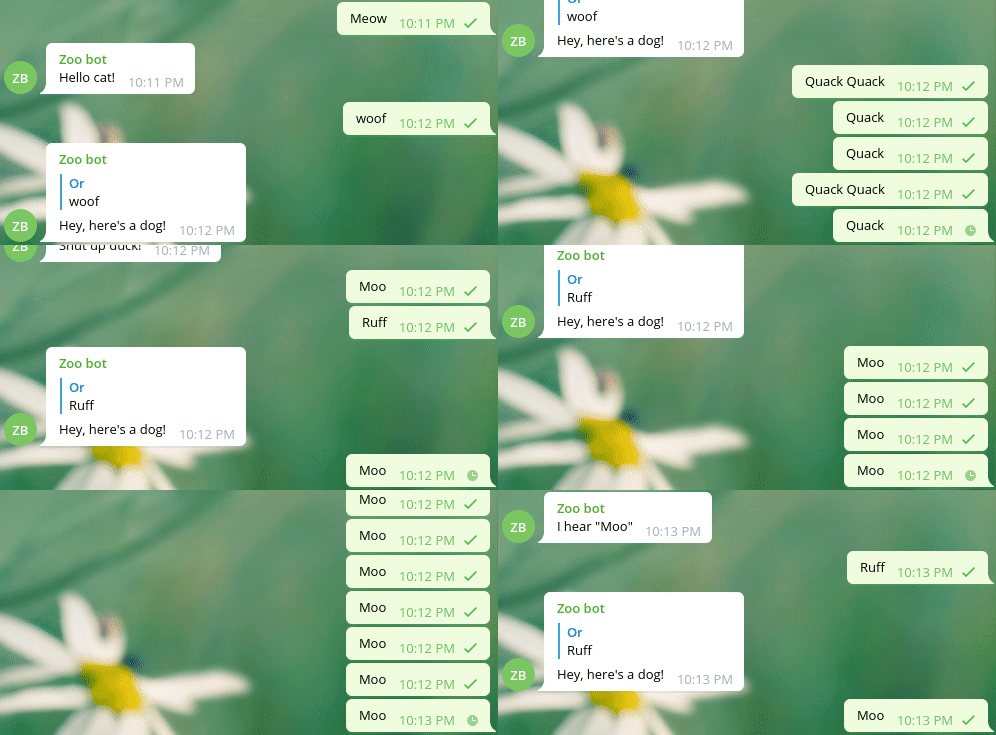
will yield the following conversation:
Run
To run gramhopper, just run:
From installed package
$ gramhopper
From docker image
$ docker run -it -v /your/configuration/dir:/root/.gramhopper orbin/gramhopper:latest
Release history Release notifications | RSS feed


Download files
Download the file for your platform. If you're not sure which to choose, learn more about installing packages.
Source Distribution
Built Distribution
Filter files by name, interpreter, ABI, and platform.
If you're not sure about the file name format, learn more about wheel file names.
Copy a direct link to the current filters
File details
Details for the file gramhopper-2.0.1.tar.gz.
File metadata
- Download URL: gramhopper-2.0.1.tar.gz
- Upload date:
- Size: 14.8 kB
- Tags: Source
- Uploaded using Trusted Publishing? No
- Uploaded via: twine/1.13.0 pkginfo/1.5.0.1 requests/2.22.0 setuptools/40.8.0 requests-toolbelt/0.9.1 tqdm/4.32.1 CPython/3.7.1
File hashes
| Algorithm | Hash digest | |
|---|---|---|
| SHA256 |
aeae5eb1c059fb6837bdc7f3f7e1b6ba198e550c48e359563f0ec0ea6c51e3af
|
|
| MD5 |
a4d058324df9fa0e1f81e62302888833
|
|
| BLAKE2b-256 |
0f1bb011bfbf56907a58dc97149bbdbd8c6b22b30d7159761a58fc14fd7ab107
|
File details
Details for the file gramhopper-2.0.1-py3-none-any.whl.
File metadata
- Download URL: gramhopper-2.0.1-py3-none-any.whl
- Upload date:
- Size: 23.1 kB
- Tags: Python 3
- Uploaded using Trusted Publishing? No
- Uploaded via: twine/1.13.0 pkginfo/1.5.0.1 requests/2.22.0 setuptools/40.8.0 requests-toolbelt/0.9.1 tqdm/4.32.1 CPython/3.7.1
File hashes
| Algorithm | Hash digest | |
|---|---|---|
| SHA256 |
6937b59bfd06599bed7b59dd2fcfcc18f62c2cec182fb203b6a7c1aa5d227023
|
|
| MD5 |
eb09a68c09a589a644dc1bac7d4ceea8
|
|
| BLAKE2b-256 |
146e161d2f1410c893126f23150666fca978e18e64be4c9611b847baefae50ca
|






