
GrantTrace




Stable: v2.5.0 · PyPI 2.5.0
源码版本为 2.5.1,发布前验收已完成,Ready for release(未发布);尚未创建 v2.5.1 tag / GitHub Release 或发布到 PyPI。
An OpenAPI authorization auditor that compares identities, verifies persisted changes, and reports restoration evidence.
安全优先、证据驱动的 OpenAPI 权限审计工具。检查 BOLA / IDOR 与 Mass Assignment,输出身份对比、持久化变更及恢复核验的 HTML / JSON 报告。默认只读;主动写测试须显式开启并配置允许清单与独立读回。
五分钟体验 · 完整示例报告 · 配置指南 · 命令行与迁移 · 验收记录 · 发布自检
为什么是 GrantTrace / Why GrantTrace
- Compare identities:比较 Owner / Visitor / Anonymous 等身份访问同一资源的结果。
- Verify real side effects:通过独立读回验证状态是否真正持久化,不只看 HTTP 状态码。
- Restore safely:主动 PATCH 测试使用显式 allowlist、原始状态快照、恢复与恢复验证。
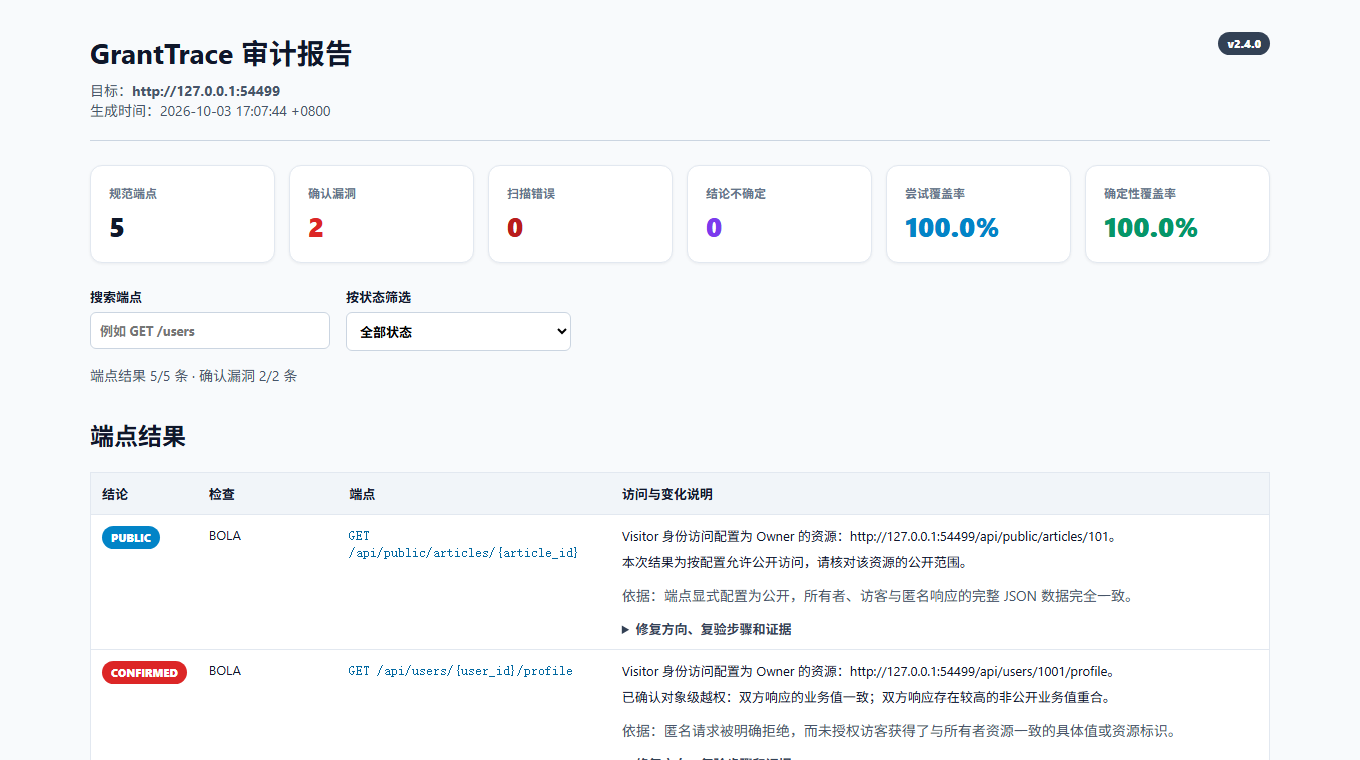
五分钟体验
需要 Python 3.9+。当前已发布稳定版 v2.5.0:PyPI。安装包包含内置 granttrace demo,首次体验只需:
python -m pip install --upgrade granttrace
granttrace --version
granttrace demo
安装后可在任意目录运行,无需 clone、准备配置、另开终端或访问外部 API。Demo 自动启动动态端口的 127.0.0.1 靶场,比较身份访问、演示 BOLA / IDOR 与 Mass Assignment,并通过独立读回与恢复核验展示 PATCH 测试证据。主动写操作仅发生在内置、可丢弃的本机靶场;demo 不接受外部 target 或用户凭据,结束时关闭靶场。
HTML / JSON 报告保留在当前目录的 granttrace-demo/ 唯一子目录,终端会输出绝对路径,不覆盖已有报告。可选用 granttrace demo --output-dir PATH 指定报告父目录,或 granttrace demo --read-only 仅体验只读身份访问,发送 0 PATCH。
完整离线示例:HTML 报告(下载后用浏览器打开)与 JSON 结果。
接入自己的 API
推荐按以下顺序首次接入;前四步只处理本地文件:
- 生成草稿和清单:
granttrace --spec your-openapi.yaml --init-config config.local.json
-
人工填写并核对:打开配置和 checklist,填写不同的 Owner / Visitor 测试账户、可丢弃资源与业务授权预期。候选 PATCH 字段和 GET 路径只是接口合同提示;确认所需读回映射,删除不用的读回草稿,替换全部
__GRANTTRACE_INPUT__:占位值,最后移除_granttrace_draft。草稿未完成时会阻止验证、计划与扫描;write_allowlist默认为空。 -
离线验证配置与规范,检查终端中的 scope、模式、警告和下一步:
granttrace --spec your-openapi.yaml --config config.local.json --validate-config
- 生成并人工检查本地计划;dry-run 发送 0 请求:
granttrace --spec your-openapi.yaml --config config.local.json --dry-run --export-json plan.local.json
- 第一次真实扫描保持只读:确认计划后,将下例地址替换为已授权的测试目标;这一步会发送读取请求,默认 0 PATCH。
granttrace --spec your-openapi.yaml --target https://authorized-test.example \
  --config config.local.json --export-json result.local.json
- 以后需要时再考虑主动 PATCH:只有在专用可丢弃资源、独立 GET readback、字段映射、一致性和恢复路径均经人工确认后,才配置明确的
write_allowlist并在真实扫描中单独添加--allow-write-tests。允许清单存在不表示写测试已开启,运行时仍须满足写入与恢复条件。
OpenAPI 和离线验证不能证明资源归属、业务授权策略、合法测试权限、生产读回一致性或实际恢复能力;检查通过只代表配置结构及支持的语义通过当前检查。账户、API Key / Cookie、合法共享和管理员访问见 配置指南,输出与自动化兼容性见 命令行说明。支持的数组、布尔值及 style / explode 编码见 参数规则。接入实测前请核对 安全边界。
SARIF 导出
--export-sarif PATH 可与 HTML / JSON 同时使用。启动下方仓库 mock 后,在明确授权、可丢弃的本机靶场执行;此命令会发送读取请求,默认 0 PATCH:
granttrace --spec openapi.json --target http://127.0.0.1:8080 --config config.example.json \
  --export-json result.local.json --export-sarif granttrace.sarif -o report.html
SARIF 2.1.0 只包含 CONFIRMED 的 BOLA / IDOR 与 Mass Assignment;SUSPICIOUS / INCONCLUSIVE 不升级为漏洞,完整状态仍见 HTML / JSON。SARIF 始终脱敏且不导出原始响应或 headers,不能与 --dry-run 同用;各输出路径须独立。当前工作目录内的真实 OpenAPI spec 会作为相对 artifact location,不伪造源码行号,API endpoint 仍放在 message / properties。在 GitHub Actions 中从 checkout 的仓库根目录运行,再用 upload-sarif 上传;workspace 外的 spec 省略 location,绝不导出本机绝对路径,其结果无法展示为 GitHub Code Scanning alert。详见 兼容说明。
cURL 复现模板
HTML 确认漏洞卡片可提供安全的 POSIX shell cURL 模板和“复制 cURL”按钮。所有认证值均为 Visitor 占位符,即使使用 --include-sensitive-evidence 也不会放入模板。请只在明确授权的测试环境中填入自己的测试凭据;脱敏值需人工补全,信息不足时不提供按钮。离线报告支持复制 fallback,也可直接选择命令文本。详见 复现说明。
从源码开发 / 运行仓库 mock
需要查看源码或手工运行仓库靶场时:
git clone https://github.com/ysc070528/granttrace.git
cd granttrace
python -m pip install -e .
python mock_server/server.py
另开终端,进入同一目录执行首次只读扫描:
granttrace --spec openapi.json --target http://127.0.0.1:8080 --config config.example.json --export-json result.local.json
用浏览器打开默认生成的 granttrace_report.html:先查看发现与修复建议,再按状态筛选端点、展开证据。预期结果为 1 个 CONFIRMED、1 个 PUBLIC、1 个 SECURE、2 个 SKIPPED,确定性覆盖率 60%。两个 PATCH 因默认只读而跳过。JSON 结果写入 result.local.json;两个本地产物均由 .gitignore 忽略。
在这个可丢弃的本地靶场体验写测试和恢复核验:
granttrace --spec openapi.json --target http://127.0.0.1:8080 --config config.example.json --allow-write-tests --export-json result.local.json
再次打开 granttrace_report.html。预期 2 个 CONFIRMED、1 个 PUBLIC、2 个 SECURE,确定性覆盖率 100%,批量赋值发现的 rollback_verified 为 true。本次扫描更新同名 HTML / JSON 文件;这些结果只属于内置五个演示端点。
验证与边界
python -m unittest discover -s tests
python scripts/verify_business_scenarios.py
python scripts/verify_install.py
测试直接使用仓库中的 config.example.json,无需创建本地凭据文件。业务场景验收 单独记录团队共享、管理员读取、跨租户拒绝和故意越权的真值、误报与漏报;验收记录 标明实际测试环境和范围。
“没有确认漏洞”不等于系统安全。检查覆盖率、错误、可疑和不确定项;显式授权预期只适用于本次身份与资源组合。仅在具备专用测试账户、独立读回和恢复方案的隔离环境启用写测试。远程 $ref、GraphQL、gRPC、自动 OAuth / mTLS 登录以及 POST / PUT 主动测试尚未实现。更多规则与迁移说明见 操作指南。
Apache License 2.0。
1 maintainer

Metadata
1 maintainer
Release files for granttrace 2.5.1
For a detailed explanation of source distributions (sdists) and built distributions (wheels), please see the package formats documentation.
Source distribution (sdist)
| File | Size | Uploaded | |
|---|---|---|---|
| granttrace-2.5.1.tar.gz | 372.8 kB | Details |
Built distribution (wheel)
| File | Interpreter | ABI | Platform | Reset |
|---|---|---|---|---|
| granttrace-2.5.1-py3-none-any.whl | Python 3 | none | any | Details |
Total release size: 487.8 kB
Release files / granttrace-2.5.1.tar.gz
| Download URL | granttrace-2.5.1.tar.gz |
|---|---|
| Size | 372.8 kB |
| Tags | Source |
|
SHA-256 checksum How to use checksums |
2a054c6100317fff20ca4191873c2238e9f877b6e2a1847b3ba74db3a657e731
|
|
BLAKE2b-256 checksum How to use checksums |
381ff8bce83435122c880f15b3df1f9d6e50ebe71450135c51ac5113c4d4f1c0
|
| Upload date | |
|
Uploaded using Trusted Publishing? What is trusted publishing? |
Yes |
| Uploaded via |
twine/7.0.0 CPython/3.13.14
|
Provenance
Provenance describes where a file came from. On PyPI, provenance is shared via attestations, which provide a verifiable record of the build or publishing details. View details, limitations and caveats.


PyPI Publish Attestation
PyPI verified that this artifact, at this checksum, originated from the publisher listed below.
Signed by GitHub Actions, verified by PyPI on Oct 5, 2026.
Transparency logRelease files / granttrace-2.5.1-py3-none-any.whl
| Download URL | granttrace-2.5.1-py3-none-any.whl |
|---|---|
| Size | 115.0 kB |
| Tags | Python 3 |
|
SHA-256 checksum How to use checksums |
67c1e19b8891d7145caa19dcdef4375ae5a19bb9291099036dd0527c70103be3
|
|
BLAKE2b-256 checksum How to use checksums |
97769879fdb347ea94761b3c9c1279cd083480544eeb8f4672d484b02f5b9935
|
| Upload date | |
|
Uploaded using Trusted Publishing? What is trusted publishing? |
Yes |
| Uploaded via |
twine/7.0.0 CPython/3.13.14
|
Provenance
Provenance describes where a file came from. On PyPI, provenance is shared via attestations, which provide a verifiable record of the build or publishing details. View details, limitations and caveats.
PyPI Publish Attestation
PyPI verified that this artifact, at this checksum, originated from the publisher listed below.
Signed by GitHub Actions, verified by PyPI on Oct 5, 2026.
Transparency log













