
Find images matching keywords using CLIP. Like grep, but for images.

Project description
grape
Find images matching keywords using CLIP (Radford et al., 2021). Like grep, but for images.
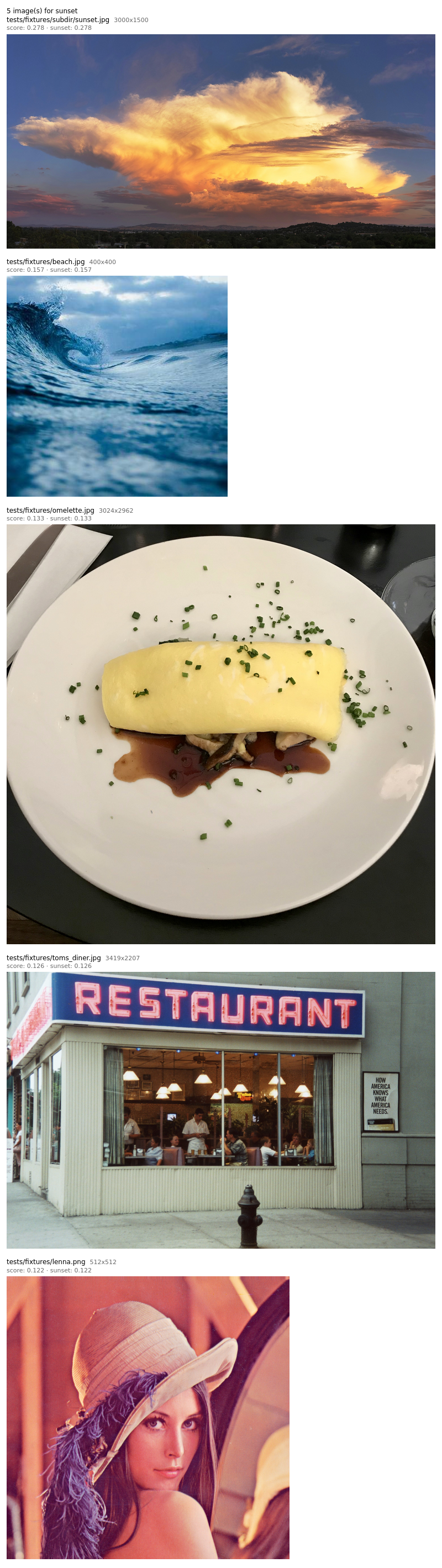
$ grape -R -s --keywords sunset ~/Pictures
0.327  ~/Pictures/vacation/beach_golden_hour.jpg
0.285  ~/Pictures/vacation/pier_evening.jpg
0.241  ~/Pictures/hiking/mountain_view.jpg
Install
pip install grape-image-search
Python 3.10+. Model weights (~900 MB for the default) download on first run.
For a headless install without the --view GUI deps:
pip install grape-image-search --no-deps
pip install open-clip-torch torch Pillow platformdirs tqdm transformers sentencepiece
Usage
Paths can be files, directories (with -R), or - to read from stdin.
At least one of -k or --like is required.
# text search
grape -R --keywords sunset ~/Pictures

# find images similar to a reference
grape -R --like ref.jpg ~/Pictures

# combine text + reference, and penalize something
grape -R --keywords dog --exclude cat --like my_dog.jpg ~/Pictures

# top 5 above a threshold, with scores
grape -R -s -n 5 -t 0.25 --keywords sunset ~/Pictures

# browse results in a GUI window
grape -R --keywords sunset --view ~/Pictures

# aesthetic ranking (skip default templating -- prompts are already full sentences)
grape -R -n 20 --ensemble-prompts '{}' --keywords 'beautiful photo' --exclude 'ugly photo' ~/Pictures

# read paths from stdin
find ~/Pictures -mtime -7 -type f | grape --keywords selfie -

# copy the top 10 cat photos to a folder
grape -R -print0 -n 10 --keywords cat ~/Pictures | xargs -0 cp -t ~/cats/

# open the best match directly
grape -R --keywords 'golden gate bridge' -n 1 ~/Pictures | xargs open

# interactive selection with fzf
grape -R --keywords dog ~/Pictures | fzf --preview 'chafa {}'
Run grape --help for the full flag list.
Worked examples
Per-keyword breakdown (-v) shows how each keyword and --like
reference contributes. The score on the header line is the mean.
$ grape -R -v -n 3 --keywords 'playful puppy,golden retriever' ~/Pictures
0.342  /home/me/Pictures/family/biscuit_park.jpg
  playful puppy: 0.301  golden retriever: 0.383
0.298  /home/me/Pictures/family/biscuit_couch.jpg
  playful puppy: 0.267  golden retriever: 0.329
0.274  /home/me/Pictures/family/old_biscuit.jpg
  playful puppy: 0.198  golden retriever: 0.350
Calibrate, then threshold. Run with -s first to see what scores real
matches land at, then set -t just below the noise floor.
$ grape -R -s --keywords sunset ~/Pictures | head -5
0.312  /home/me/Pictures/travel/santorini_evening.jpg
0.287  /home/me/Pictures/deck_sunset.jpg
0.244  /home/me/Pictures/travel/ocean_dusk.jpg
0.198  /home/me/Pictures/outdoor/golden_leaves.jpg   # weak, off-topic
$ grape -R -s -t 0.24 --keywords sunset ~/Pictures
0.312  /home/me/Pictures/travel/santorini_evening.jpg
0.287  /home/me/Pictures/deck_sunset.jpg
0.244  /home/me/Pictures/travel/ocean_dusk.jpg
Aesthetic ranking uses --exclude to subtract the mean score of a
contrast prompt. Scores are smaller here because both sides are competing.
$ grape -R -s -n 5 --ensemble-prompts '{}' \
    --keywords 'beautiful photo' --exclude 'ugly photo' ~/travel/
0.163  /home/me/travel/kyoto_arashiyama.jpg
0.139  /home/me/travel/iceland_sunset.jpg
0.127  /home/me/travel/nepal_trek.jpg
0.109  /home/me/travel/paris_evening.jpg
0.091  /home/me/travel/tokyo_skyline.jpg
Scoring
Grape ranks images by cosine similarity between CLIP embeddings. Each image's score is:
mean(similarity to --keywords and --like) - mean(similarity to --exclude)
Cosine similarities are not probabilities. Meaningful matches typically
sit in the 0.15-0.35 range; even strong matches rarely exceed 0.35. Use -s
to calibrate before choosing a -t threshold. Scores are not comparable
across models -- switch models and the numbers shift.
--like matches semantics, not pixels. Two different photos of dogs
playing fetch score high; a photo and its crop do too. For actual duplicate
detection, use a perceptual-hashing tool like
czkawka.
Caching
On by default at ~/.cache/grape/embeddings.db
($XDG_CACHE_HOME/grape/embeddings.db). Cached:
- Image embeddings (the expensive part; ~80 ms per image on CPU)
- Text embeddings, keyed by prompt
- Model identity, so repeat runs skip the torch/open_clip import entirely
- Image-vs-non-image detection results, so videos and docs are skipped on rescan
A warm query scores thousands of images in under a second via a single matrix multiply. Entries are keyed by absolute path, file stat (size, mtime, inode), and model ID, so they auto-invalidate when files change.
Use --no-cache to disable or --cache PATH to relocate.
Models
The default is
EVA-CLIP's EVA02-L-14 (Sun et al., 2023)
pretrained as merged2b_s4b_b131k -- strong zero-shot accuracy at moderate
cost. Pick any OpenCLIP
checkpoint with --model model_name/pretrained_tag:
grape --model ViT-B-32/laion2b_s34b_b79k -R --keywords sunset ~/Pictures   # fast
grape --model ViT-L-14/laion2b_s32b_b82k -R --keywords sunset ~/Pictures   # strong
Embeddings are scoped per model; switching re-encodes everything.
Keywords are matched with
prompt ensembling (Radford et al., 2021,
Section 3.1.4 and Appendix A): each keyword expands into several templates
("a photo of a {}", "a photo of the {}", ...), each is embedded, then the
embeddings are averaged and renormalized. Improves zero-shot accuracy over
a single prompt. Override with --ensemble-prompts.
Release history Release notifications | RSS feed


Download files
Download the file for your platform. If you're not sure which to choose, learn more about installing packages.
Source Distribution
Built Distribution
Filter files by name, interpreter, ABI, and platform.
If you're not sure about the file name format, learn more about wheel file names.
Copy a direct link to the current filters
File details
Details for the file grape_image_search-0.2.0.tar.gz.
File metadata
- Download URL: grape_image_search-0.2.0.tar.gz
- Upload date:
- Size: 51.3 kB
- Tags: Source
- Uploaded using Trusted Publishing? Yes
- Uploaded via: twine/6.1.0 CPython/3.13.12
File hashes
| Algorithm | Hash digest | |
|---|---|---|
| SHA256 |
89e83d78b05dcc5cf324703d3830b3793d359827dd6067f003c68888488ec8b1
|
|
| MD5 |
7ab1500f55c0fdfeb31beae1cc049af4
|
|
| BLAKE2b-256 |
9db0042d51eeb8590345bc62ad035fcd1bd28466a80984cf8e760b67442aeaa6
|
Provenance
The following attestation bundles were made for grape_image_search-0.2.0.tar.gz:
Publisher:
publish.yml on mikegraham/grape
-
Statement:
-
Statement type:
https://in-toto.io/Statement/v1 -
Predicate type:
https://docs.pypi.org/attestations/publish/v1 -
Subject name:
grape_image_search-0.2.0.tar.gz -
Subject digest:
89e83d78b05dcc5cf324703d3830b3793d359827dd6067f003c68888488ec8b1 - Sigstore transparency entry: 1514774161
- Sigstore integration time:
-
Permalink:
mikegraham/grape@07d4d02619bbc1de362e2fe7df2a741469d3aeae -
Branch / Tag:
refs/tags/v0.2.0 - Owner: https://github.com/mikegraham
-
Access:
public
-
Token Issuer:
https://token.actions.githubusercontent.com -
Runner Environment:
github-hosted -
Publication workflow:
publish.yml@07d4d02619bbc1de362e2fe7df2a741469d3aeae -
Trigger Event:
push
-
Statement type:
File details
Details for the file grape_image_search-0.2.0-py3-none-any.whl.
File metadata
- Download URL: grape_image_search-0.2.0-py3-none-any.whl
- Upload date:
- Size: 32.3 kB
- Tags: Python 3
- Uploaded using Trusted Publishing? Yes
- Uploaded via: twine/6.1.0 CPython/3.13.12
File hashes
| Algorithm | Hash digest | |
|---|---|---|
| SHA256 |
c6f4cc094532c29d280b41fd96caa21a2c1f7f5e90dac5a4b7e9fb53c8ce4e96
|
|
| MD5 |
074a9bbff8c59abca4c96881861f8a4b
|
|
| BLAKE2b-256 |
1334d6f750b3c80e161c808f825f0229ceeb4654f0e4b07c9d631d809a875714
|
Provenance
The following attestation bundles were made for grape_image_search-0.2.0-py3-none-any.whl:
Publisher:
publish.yml on mikegraham/grape
-
Statement:
-
Statement type:
https://in-toto.io/Statement/v1 -
Predicate type:
https://docs.pypi.org/attestations/publish/v1 -
Subject name:
grape_image_search-0.2.0-py3-none-any.whl -
Subject digest:
c6f4cc094532c29d280b41fd96caa21a2c1f7f5e90dac5a4b7e9fb53c8ce4e96 - Sigstore transparency entry: 1514774241
- Sigstore integration time:
-
Permalink:
mikegraham/grape@07d4d02619bbc1de362e2fe7df2a741469d3aeae -
Branch / Tag:
refs/tags/v0.2.0 - Owner: https://github.com/mikegraham
-
Access:
public
-
Token Issuer:
https://token.actions.githubusercontent.com -
Runner Environment:
github-hosted -
Publication workflow:
publish.yml@07d4d02619bbc1de362e2fe7df2a741469d3aeae -
Trigger Event:
push
-
Statement type:






