
Interactive code+docs dependency graph with doc-sync tooling and an AI-agent-friendly JSON export
Verified details
These details have been verified by PyPIProject links
GitHub Statistics
Maintainers

Project description
build-graph









Architectural memory for your refactors. See the blast radius of your changes across code, docs, and git — on one interactive map that both you and your AI agent can read.
build-graph renders a single-file interactive HTML graph connecting
three layers no other tool combines:
- code → code — Python imports (AST-based,
TYPE_CHECKING-aware) - code ↔ docs — which markdown files mention which source files
- git drift — added / modified / renamed / deleted overlay with ghost nodes for files that no longer exist
…and exports the same map as a compact, token-efficient JSON designed to drop into an LLM agent's context.
All of that with zero dependencies — pure Python stdlib, pip install
brings in nothing else. The only third-party code is D3.js in the browser,
SRI-pinned from CDN or fully embedded with --no-cdn.
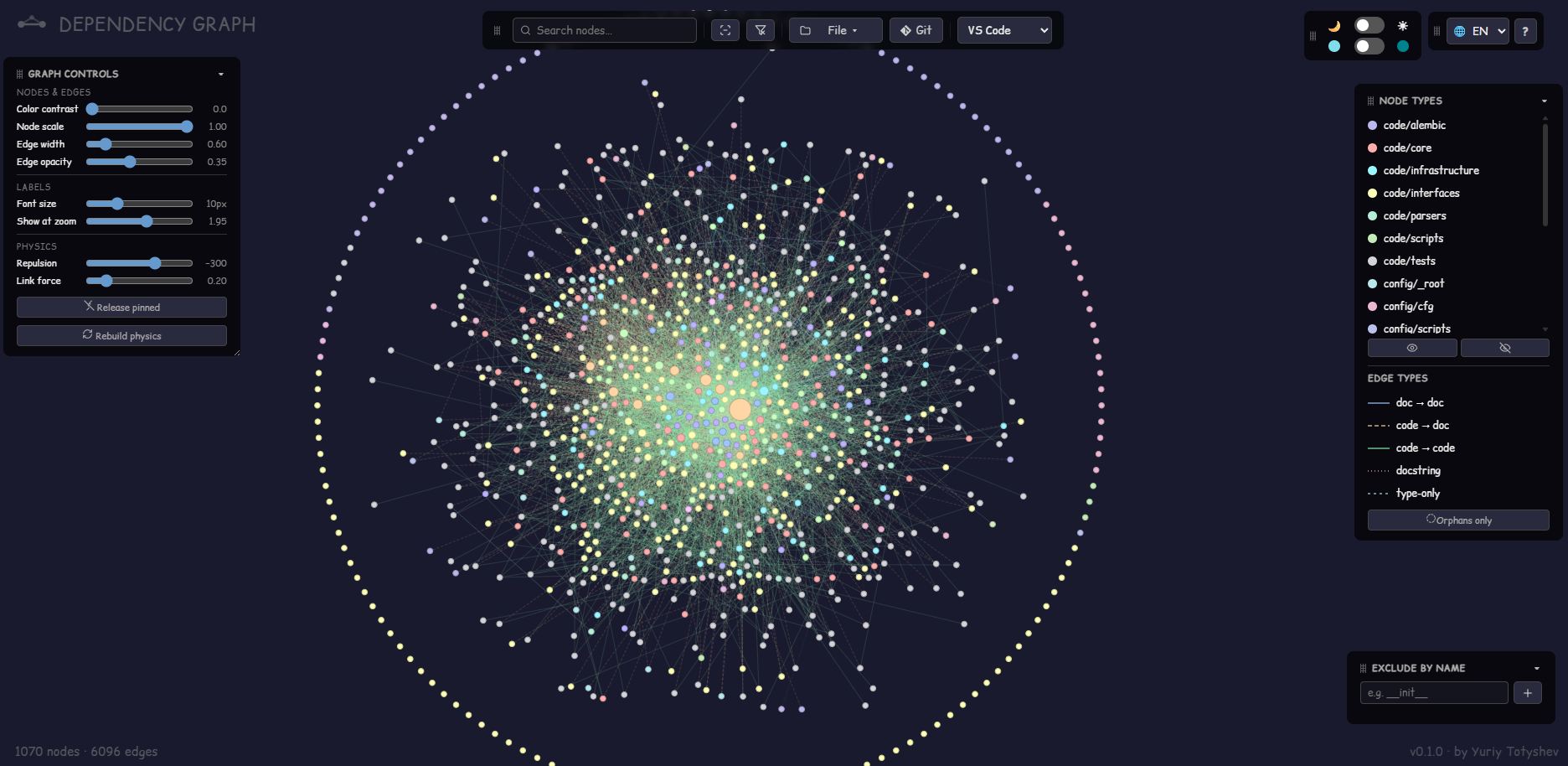
▶ Live demo — the graph of
this very repository (dogfood), with a synthetic --mock-git overlay so the
Git mode is clickable too.
📖 UI guide — every feature, one by one.
Install
pip install graph-build # or: uv tool install graph-build
No PyPI needed — install straight from GitHub:
pip install git+https://github.com/Mr-Freewan/build-graph.git

# or from a clone:
git clone https://github.com/Mr-Freewan/build-graph.git
pip install ./build-graph
Zero dependencies — stdlib only, Python 3.11+. The HTML output needs only a
browser (D3.js from CDN with SRI pinning, or fully embedded via --no-cdn).
The PyPI distribution is named
graph-build(the straight name is taken); the installed commands keep their names:build-graph,find-related-docs,verify-doc-links.
Quick start
cd your-project
build-graph                    # autodiscovery, no config needed → docs/graph.html
build-graph --compact          # + docs/graph-compact.json for AI agents
build-graph --init             # optional: pin discovered structure to graph.toml
Two companion CLIs — find-related-docs (reverse lookup: code → docs) and
verify-doc-links (broken-reference gate for CI) — ship in the same package;
see Companion tools.
Why not X?
- pydeps / Import Linter — imports only; no docs layer, no git drift.
- lychee & co. — dead-URL checkers; no map, no code layer.
- Obsidian graph view — notes only; doesn't see your code.
- Repomix / Gitingest — pack the repo text for LLMs; build-graph gives the structure: ~2 % of the tokens the raw text would cost (see the numbers).
Designed for AI agents
--compact writes a self-documenting JSON snapshot (embedded legend, indexed
nodes, 3-letter type codes) that agents use for:
- Blast radius — incoming imports of the file you're about to change, without grep.
- Docs routing — which ADR / reference doc to read before editing a file.
- Three-way doc-sync — the graph reveals (1) what's documented, (2) what should be documented but isn't, and (3) what's documented but no longer exists (ghost nodes = staleness detector).
Add build-graph --compact to a pre-commit hook or CI step to keep the map
fresh for every agent session.
The compact format
--compact writes graph-compact.json (schema v2): nodes as an indexed
array, edges as [source_idx, target_idx, type, [line_numbers]] rows,
3-letter codes for every category and edge type. The legend key embeds the
full decoding table — an agent needs no external schema, the file explains
itself:
{
  "v": "2.0",
  "legend": { "...": "what every field and code below means" },
  "stats": { "nodes": 1070, "ghosts": 0, "edges": 6279 },
  "n": [
    { "p": "smm_bot_async/core/security/access.py", "t": "cor", "d": 56 },
    { "p": "docs/explanation/adr/0009-parser-framework.md", "t": "adr",
      "d": 11, "s": "mod" }
  ],
  "e": [
    [ 1, 75, "d2d", [186] ]
  ]
}
p — path, t — category, d — degree, s — git status (omitted when
clean). Edge types: c2c imports, c2d doc mentions, d2d doc links,
dcs docstring refs, typ TYPE_CHECKING-only, ren git renames.
Deleted-but-still-referenced files ride along as ghost nodes ("G": 1).
What it costs in context
Real numbers from a production repo — 1,070 mapped files, 6,279 edges (tokens ≈ bytes / 4, the usual rough estimate):
| What you put in context | Size | ≈ Tokens |
|---|---|---|
| The mapped files themselves | 15 MB | ~3,700,000 |
--json (verbose snapshot) |
1.6 MB | ~410,000 |
--compact |
0.33 MB | ~80,000 |
The whole architecture — every import, every doc mention, every stale reference — lands in ~2 % of what the raw text would cost, and fits in a single 200 k-context session with room to work. Without the map an agent rediscovers this structure every session: dozens of speculative greps and file reads that burn comparable tokens per question, not once. On small projects the map is almost free — the compact snapshot of this very repo is 4 KB ≈ ~1,000 tokens.
Don't take these numbers on faith — measure your own repo
$ build-graph --root . --bench

Context cost on this repo (tokens ~= bytes / 4):

  What you put in context            Size      ~Tokens  vs corpus
  raw corpus (1070 files)         14.3 MB    3,757,913     100.0%
  --json export (schema v1)        1.5 MB      397,419      10.6%
  --compact export (schema v2)   311.4 KB       79,729       2.1%
--bench only measures — it writes no files.
A prompt to start from
graph-compact.json is a dependency map of this repository: nodes are
files, edges are imports and documentation mentions. Read the embedded
"legend" key first — it explains every field and code.

Using the map (before any grep):
1. Lay of the land: the 10 highest-degree hubs, grouped by category,
   with one line each on why they're central.
2. I'm about to modify <path/to/file.py>. List the blast radius:
   direct and 2-hop incoming importers, plus every doc that mentions
   the file — and tell me which of those docs to read first.
3. Anything suspicious: ghost nodes (docs pointing at deleted files),
   zero-degree modules, docs nothing links to.

Verify any surprising claim against the actual source before acting.
The interactive graph
- Canvas renderer — smooth at 1000+ nodes / 6000+ edges (pre-warmed layout, viewport culling, label LOD).
- 6 edge types — doc→doc, code→doc, code→code, type-only
(
TYPE_CHECKING), docstring mentions, git renames. - Git overlay — status colours + ghost nodes + rename edges;
--mock-gitfor a synthetic demo. - Graph diff —
--diff-base REFcompares the working tree against a git ref: file statuses feed the Git overlay, new dependency edges show green and removed ones red (dashed), with counters in the legend. Add--diff-head REFto compare two specific refs instead. - Heat overlay — node colour by git-commit frequency (blue→red
gradient), whole history by default or the last N days with
--heat-days N. A min-edits slider in the legend hides anything colder than the chosen threshold — edges follow. Mutually exclusive with the Git overlay — both recolour nodes, so only one is on at a time; unlike Git mode, it's additive: Node types stays visible and usable underneath. - Coverage overlay — node colour by test-line coverage (green→red
gradient — this one's about finding badly-covered files, so it reads
the opposite way from Heat) from a Cobertura
coverage.xml(--coverage PATH, e.g.pytest --cov=your_pkg --cov-report=xml). A max-coverage slider hides anything covered more than the chosen ceiling, isolating the worst-covered files as you lower it; turning it on also auto-hides every Node type but code in the legend (shown again with one click). Mutually exclusive with Git and Heat too. Off — and its button hidden — when no report is given. - Node tooltip — hover any node to see its name and path; in Heat or Coverage mode, also the edit count or coverage percentage behind the colour. Edge tooltips turn off while either of those modes is active.
- Analysis aids — dead-code candidates, import-cycle detector (Tarjan
SCC over runtime imports;
TYPE_CHECKINGedges don't count), orphan ring, shortest path between two nodes (Shift+click), isolate-a-type, exclude-by-name. A doc's bare mention of a same-named file (config.pywith dozens of matches, no path) is credited to oneambiguous-category node instead of fanning out to every candidate. - Sharing — URL-encoded views (Copy link), Mermaid export of the focused subgraph, full/compact JSON export.
- Comfort — 10 UI languages, dark/light themes, hue-aligned
pastel/saturated palettes, draggable glass panels, IDE deep links
(VS Code / Cursor / PyCharm), FAQ built in (
?).
Everything lands in one self-contained HTML file — attach it to a PR, send it in chat, open it offline.
Configuration (optional)
Autodiscovery classifies every tracked file by kind (code / doc / config /
locale) × location, detects your package and docs layout, and generates
deterministic colours. A graph.toml is only an override:
build-graph --init           # generate graph.toml pinning current structure
build-graph --init --diff    # report drift (new folders, stale pins), change nothing
build-graph --init --merge   # append coverage for new folders, keep your edits
See graph.example.toml for the annotated format
([docs] categories, [[code]] dirs, [[rules]], [scan] excludes,
[dead_code] exemptions, colour pins).
Two optional plain-text companions, both looked up in the project root:
known-brokens.txt— whitelist forverify-doc-linksfalse positives (one exact path per line).exclude-dirs.txt— directory-name skip list used only when git is unavailable (with git,.gitignoreis the source of truth).
CLI reference (build-graph)
| Flag | Effect |
|---|---|
--root PATH |
project root to scan (default: cwd) |
--config PATH |
graph.toml location (default: <root>/graph.toml) |
--output PATH |
HTML output (default: docs/graph.html or [output].path) |
--scope full|package |
whole repo (default) or package+tests+docs only |
--json / --compact |
verbose / agent-oriented JSON snapshots next to the HTML |
--docs-only / --no-tests |
trim the node set |
--no-cdn |
fully offline output: embed D3.js inline (SHA-256 verified) and drop the external font link |
--mock-git |
synthetic git overlay for demos/testing |
--diff-base REF |
ref-diff build: statuses + edge changes vs a git ref (head = working tree unless --diff-head is set) |
--diff-head REF |
with --diff-base: diff against this ref instead of the working tree |
--heat-days N |
restrict the Heat overlay to the last N days (default: whole history) |
--coverage PATH |
enable the Coverage overlay from a Cobertura coverage.xml |
--init [--diff|--merge|--force] |
config lifecycle (see above) |
Companion tools
find-related-docs and verify-doc-links run the same reference scanner the
graph is built from — what the map draws as a code↔docs edge is exactly what
they look up and verify. graph-query answers questions over an
already-built snapshot.
find-related-docs
Reverse lookup: which docs mention a given code file. Run it before editing a
file to know which pages need updating afterwards, or wire --git-added into
a pre-commit hook so undocumented changes get flagged before they land.
Flags & examples
find-related-docs src/mypkg/core/access.py   # single file (bare filename works too)
find-related-docs --git-added -v             # pre-commit: staged files, with doc line numbers
find-related-docs --git-modified             # working tree: staged + unstaged modifications
| Flag | Effect |
|---|---|
path |
file or directory to look up (a bare filename is searched project-wide) |
--docs-dir PATH |
documentation directory (default: docs) |
--exclude DIRNAME |
skip a folder name anywhere under the docs dir (repeatable) |
--git-added |
check all staged files; also warns about deleted files still mentioned in docs |
--git-modified |
check all modified files (staged + unstaged) |
-v / --verbose |
print docs/<file>.md:<line> for every mention |
verify-doc-links
Check that every file reference in your .md files points to a real file.
Exit codes make it a drop-in CI gate:
Flags & examples
| Exit | Meaning |
|---|---|
0 |
all references valid |
1 |
broken references found |
2 |
target path invalid (not found, or not a .md file) |
verify-doc-links                     # whole docs/ against the project root
verify-doc-links docs/reference -v   # one subtree, with the offending lines
# CI step (GitHub Actions)
- run: pip install graph-build
- run: verify-doc-links --root .
| Flag | Effect |
|---|---|
path |
.md file or directory to check (default: docs) |
--root PATH |
project root the references resolve against (default: cwd) |
--known-brokens PATH |
whitelist file (default: <root>/known-brokens.txt) |
-v / --verbose |
show the offending lines |
Besides known-brokens.txt, false positives can be silenced inline with HTML
comments (invisible in rendered Markdown): <!-- broken-link-ok --> on the
same line, <!-- broken-links-ok-start --> / <!-- broken-links-ok-end -->
around a block, or <!-- ignore-ref: path/to/file.py --> anywhere in the file.
graph-query
Ask the graph questions without opening a browser. Works on the JSON written
by --json or --compact (auto-detected; defaults to
docs/graph-compact.json):
Flags & examples
graph-query blast-radius app/core.py   # transitive importers + every doc mentioning them
graph-query hubs --top 15              # most-connected files, in/out breakdown
graph-query stale-docs --check         # docs older than the code they describe (CI gate: exit 1)
graph-query orphans --type code        # files with no edges at all
| Command | Answers |
|---|---|
blast-radius <path> |
"what breaks if I touch this file" — transitive incoming imports (--depth, --edges to tune), plus affected docs |
hubs |
"where is the center of gravity" — top nodes by in+out edges (--top N) |
stale-docs |
"which docs lag behind the code" — compares last-commit times (one git log pass; mtime fallback), --check for CI |
orphans |
"what is connected to nothing" — degree-0 nodes, filterable by category |
Every command takes --json for machine-readable output — pipe it to jq
or feed it to an agent.
Known limitations
Static analysis has natural borders — the graph is a referential map, not a semantic one:
- Dynamic imports resolve only literal / top-level-constant module names (f-strings, dict lookups, conditional rebinding are skipped).
eval/execand DI-by-string are invisible.[project.scripts]/[project.gui-scripts]entry points inpyproject.tomlare read, but only to exempt those modules from dead-code flagging — they don't create edges.- Markdown templating (
{{ ref }}, Jekyll/Hugo shortcodes) isn't parsed. - Links resolve to whole files — section anchors (
file.md#part) map to the file node. - code→code edges are Python-only for now (the markdown/doc layers are language-agnostic).
- One repo per graph; symlinks are treated as physical paths.
License
MIT © Yuriy Totyshev
Project details
Verified details
These details have been verified by PyPIProject links
GitHub Statistics
Maintainers
Release history Release notifications | RSS feed


Download files
Download the file for your platform. If you're not sure which to choose, learn more about installing packages.
Source Distribution
Built Distribution
Filter files by name, interpreter, ABI, and platform.
If you're not sure about the file name format, learn more about wheel file names.
Copy a direct link to the current filters
File details
Details for the file graph_build-0.3.0.tar.gz.
File metadata
- Download URL: graph_build-0.3.0.tar.gz
- Upload date:
- Size: 199.7 kB
- Tags: Source
- Uploaded using Trusted Publishing? Yes
- Uploaded via: twine/6.1.0 CPython/3.13.14
File hashes
| Algorithm | Hash digest | |
|---|---|---|
| SHA256 |
1cae696a4e2991a31cfb19903687dfaac2b73afb5f06cd2bc914b26499acef7d
|
|
| MD5 |
44a06324c36aa05626228d4038997faa
|
|
| BLAKE2b-256 |
1e296949505ff32e5998646f356e6b709b3d55fb74365bad32a6af1f4371f3b9
|
Provenance
The following attestation bundles were made for graph_build-0.3.0.tar.gz:
Publisher:
publish.yml on Mr-Freewan/build-graph
-
Statement:
-
Statement type:
https://in-toto.io/Statement/v1 -
Predicate type:
https://docs.pypi.org/attestations/publish/v1 -
Subject name:
graph_build-0.3.0.tar.gz -
Subject digest:
1cae696a4e2991a31cfb19903687dfaac2b73afb5f06cd2bc914b26499acef7d - Sigstore transparency entry: 2203230539
- Sigstore integration time:
-
Permalink:
Mr-Freewan/build-graph@f88af2a0f5f5736d2ce80345881daf00e874a9cd -
Branch / Tag:
refs/tags/v0.3.0 - Owner: https://github.com/Mr-Freewan
-
Access:
public
-
Token Issuer:
https://token.actions.githubusercontent.com -
Runner Environment:
github-hosted -
Publication workflow:
publish.yml@f88af2a0f5f5736d2ce80345881daf00e874a9cd -
Trigger Event:
push
-
Statement type:
File details
Details for the file graph_build-0.3.0-py3-none-any.whl.
File metadata
- Download URL: graph_build-0.3.0-py3-none-any.whl
- Upload date:
- Size: 172.2 kB
- Tags: Python 3
- Uploaded using Trusted Publishing? Yes
- Uploaded via: twine/6.1.0 CPython/3.13.14
File hashes
| Algorithm | Hash digest | |
|---|---|---|
| SHA256 |
2ff1370daa91706ba1b564d125e19a59a28d4abda10e44ccbd4b0c89c4395980
|
|
| MD5 |
1914b15d4f554bd98178e4cc7058caff
|
|
| BLAKE2b-256 |
45d34b21941c6d369af4d28b201b33ec3cc1b1484d3fc188df276a47486f5800
|
Provenance
The following attestation bundles were made for graph_build-0.3.0-py3-none-any.whl:
Publisher:
publish.yml on Mr-Freewan/build-graph
-
Statement:
-
Statement type:
https://in-toto.io/Statement/v1 -
Predicate type:
https://docs.pypi.org/attestations/publish/v1 -
Subject name:
graph_build-0.3.0-py3-none-any.whl -
Subject digest:
2ff1370daa91706ba1b564d125e19a59a28d4abda10e44ccbd4b0c89c4395980 - Sigstore transparency entry: 2203230575
- Sigstore integration time:
-
Permalink:
Mr-Freewan/build-graph@f88af2a0f5f5736d2ce80345881daf00e874a9cd -
Branch / Tag:
refs/tags/v0.3.0 - Owner: https://github.com/Mr-Freewan
-
Access:
public
-
Token Issuer:
https://token.actions.githubusercontent.com -
Runner Environment:
github-hosted -
Publication workflow:
publish.yml@f88af2a0f5f5736d2ce80345881daf00e874a9cd -
Trigger Event:
push
-
Statement type:






