
Graph of Mark (GoM)


Graph of Mark (GoM) is a visual prompting framework that transforms images into structured semantic graphs for enhanced visual scene understanding. The system integrates state-of-the-art object detection, instance segmentation, depth estimation, and relationship extraction models to construct comprehensive scene graphs that can be used as visual prompts for Multimodal Language Models (MLMs).
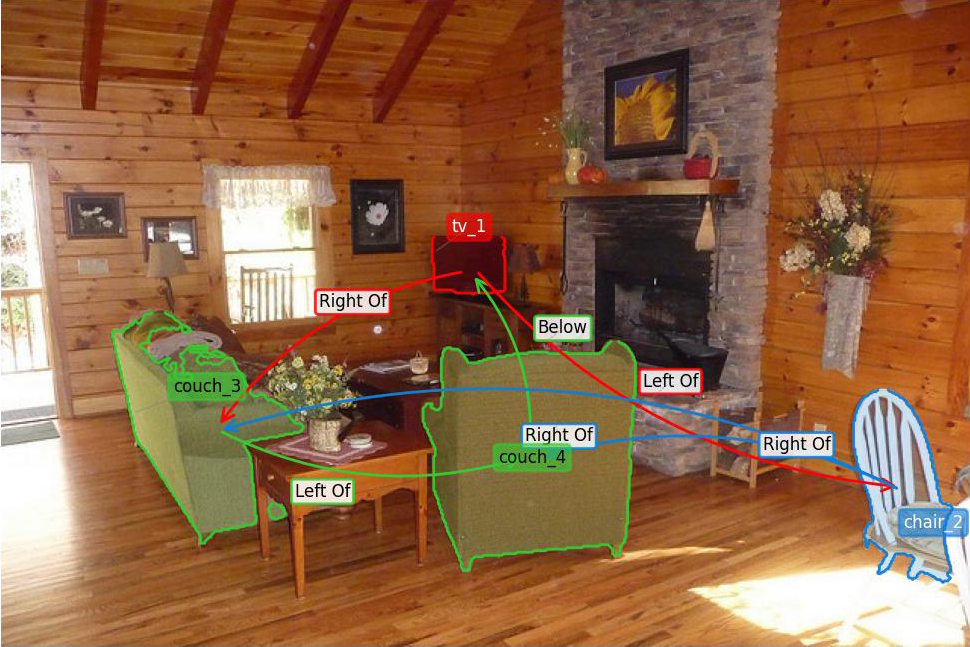
Example output showing detected objects with segmentation masks and spatial relationships.
Publication
This work has been accepted at the 40th Annual AAAI Conference on Artificial Intelligence (AAAI 2026). The paper and supplementary materials are available in the paper/ directory.
If you use Graph of Mark in your research, please cite:
@inproceedings{gom2026aaai,
  title={Graph-of-Mark: Promote Spatial Reasoning in Multimodal Language Models with Graph-Based Visual Prompting},
  author={Giacomo Frisoni, Lorenzo Molfetta, Mattia Buzzoni, Gianluca Moro},
  booktitle    = {AAAI-26, Sponsored by the Association for the Advancement of Artificial Intelligence},
  year={2026},
  publisher    = {{AAAI} Press},
  year         = {2026},
}
Visit our research group website at: https://disi-unibo-nlp.github.io
Installation
From PyPI
pip install graph-of-mark
With optional dependencies:
# Install with all features
pip install "graph-of-mark[all]"
From Source
git clone https://github.com/disi-unibo-nlp/graph-of-marks.git
cd graph-of-marks
pip install -e ".[all]"
Quick Start
Check out examples/demo_gom.ipynb for detailed examples on how to use GoM.
Python API
from gom import GoM, ProcessingConfig

# Initialize the pipeline
pipeline = GoM(device="cuda")  # or "mps" for Apple Silicon, "cpu" for CPU

# Process an image with a question
config = ProcessingConfig(
    question="What objects are in the room?",
    style="gom_text_labeled",
)
result = pipeline.process("scene.jpg", config=config, save=False)

# Access results
print(f"Detected {len(result['boxes'])} objects")
print(f"Found {len(result['relationships'])} relationships")

# Display the output image
result["output_image"].show()  # PIL Image
Visual Prompting Styles
The library implements all visual prompting configurations presented in the paper:
from gom import GoM, ProcessingConfig, GOM_STYLE_PRESETS

pipeline = GoM(device="cuda")

# Use predefined style presets via ProcessingConfig
config = ProcessingConfig(
    question="Where is the bowl?",
    style="gom_text_labeled",      # Recommended for VQA tasks
    apply_question_filter=True,    # Filter objects by question relevance
)
result = pipeline.process("scene.jpg", config=config, save=False)

# Available styles:
# - "som_text": Set-of-Mark with textual IDs (baseline, no relations)
# - "som_numeric": Set-of-Mark with numeric IDs (baseline, no relations)
# - "gom_text": GoM with textual IDs and relation arrows
# - "gom_numeric": GoM with numeric IDs and relation arrows
# - "gom_text_labeled": GoM with textual IDs and labeled relations
# - "gom_numeric_labeled": GoM with numeric IDs and labeled relations

# Access scene graph representations for VLM prompting
print(result["scene_graph_text"])    # Triple format for LLM prompts
print(result["scene_graph_prompt"])  # Compact inline format
Manual configuration is also supported:
config = ProcessingConfig(
    question="What is near the table?",
    label_mode="numeric",           # "original", "numeric", or "alphabetic"
    display_relationships=True,
    display_relation_labels=True,
    aggressive_pruning=True,        # Keep only question-relevant objects
)
result = pipeline.process("scene.jpg", config=config, save=False)
Command-Line Interface
# Image preprocessing — a JSON list of {"image_path", "question"?} pairs
gom-preprocess --json_file data.json --output_folder output/

# ...or a single image
gom-preprocess --input_path scene.jpg --output_folder output/

# Visual Question Answering
gom-vqa --input_file vqa_data.json --model_name llava-hf/llava-1.5-7b-hf
VQA prompt default. The default prompt profile is
gom_v2_concise. It tells the model that the drawn object-ID tags (person_1, bare numbers) and relation-arrow words are location pointers, not answers — so the VLM never copies a label tag as its reply. Override with--prompt-profile(scripts/run_vqa_inference.py), e.g.paper_declaredfor verbatim paper reproduction.
Pipeline Overview
The GoM pipeline processes images through the following stages:
| Stage | Description | Models |
|---|---|---|
| Detection | Object localization | OWL-ViT + YOLOv8 + Detectron2 by default; GroundingDINO opt-in via --detectors |
| Fusion | Prediction aggregation | Weighted Box Fusion (WBF), NMS |
| Segmentation | Instance mask generation | SAM, SAM2, SAM-HQ (default), FastSAM |
| Depth Estimation | 3D scene understanding | Depth Anything V2 (default); MiDaS DPT (fallback / paper profile) |
| Relationship Extraction | Spatial/semantic relations | Geometric + depth (default); CLIP/physics opt-in |
| Graph Construction | Scene graph generation | NetworkX |
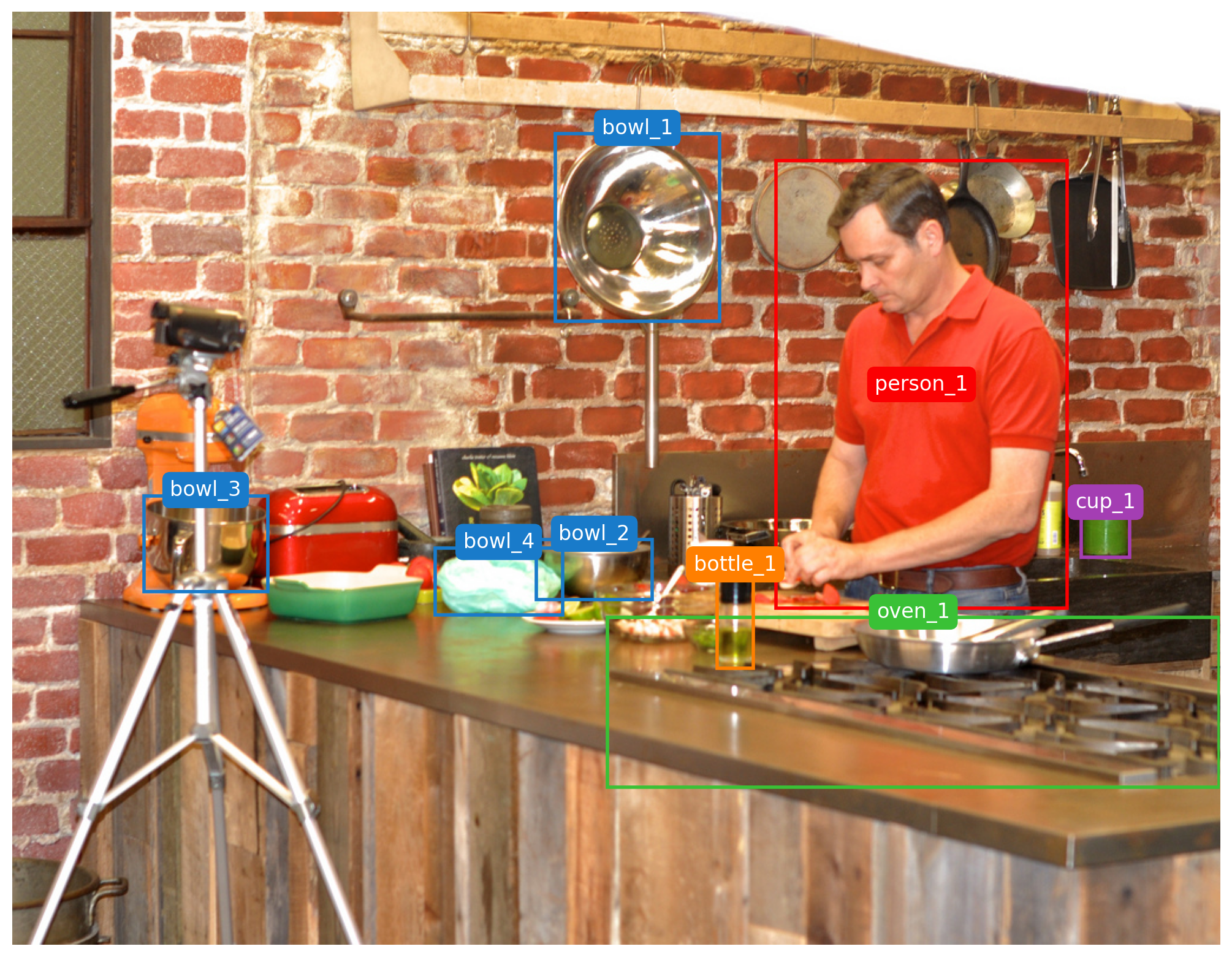
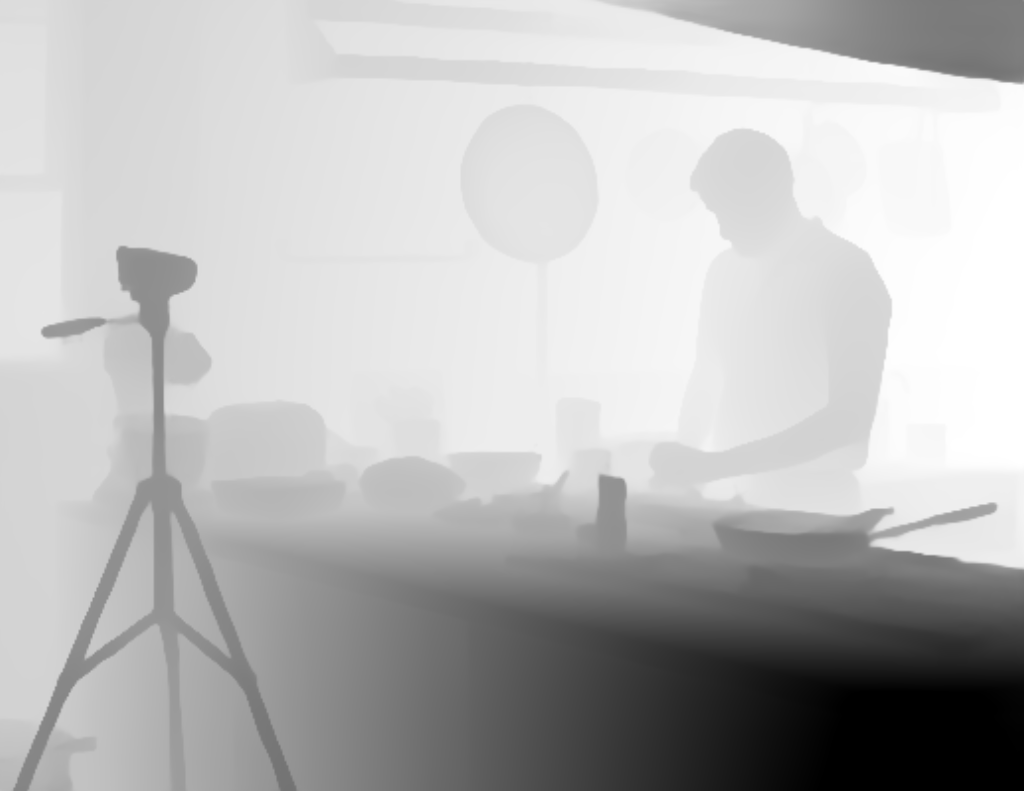
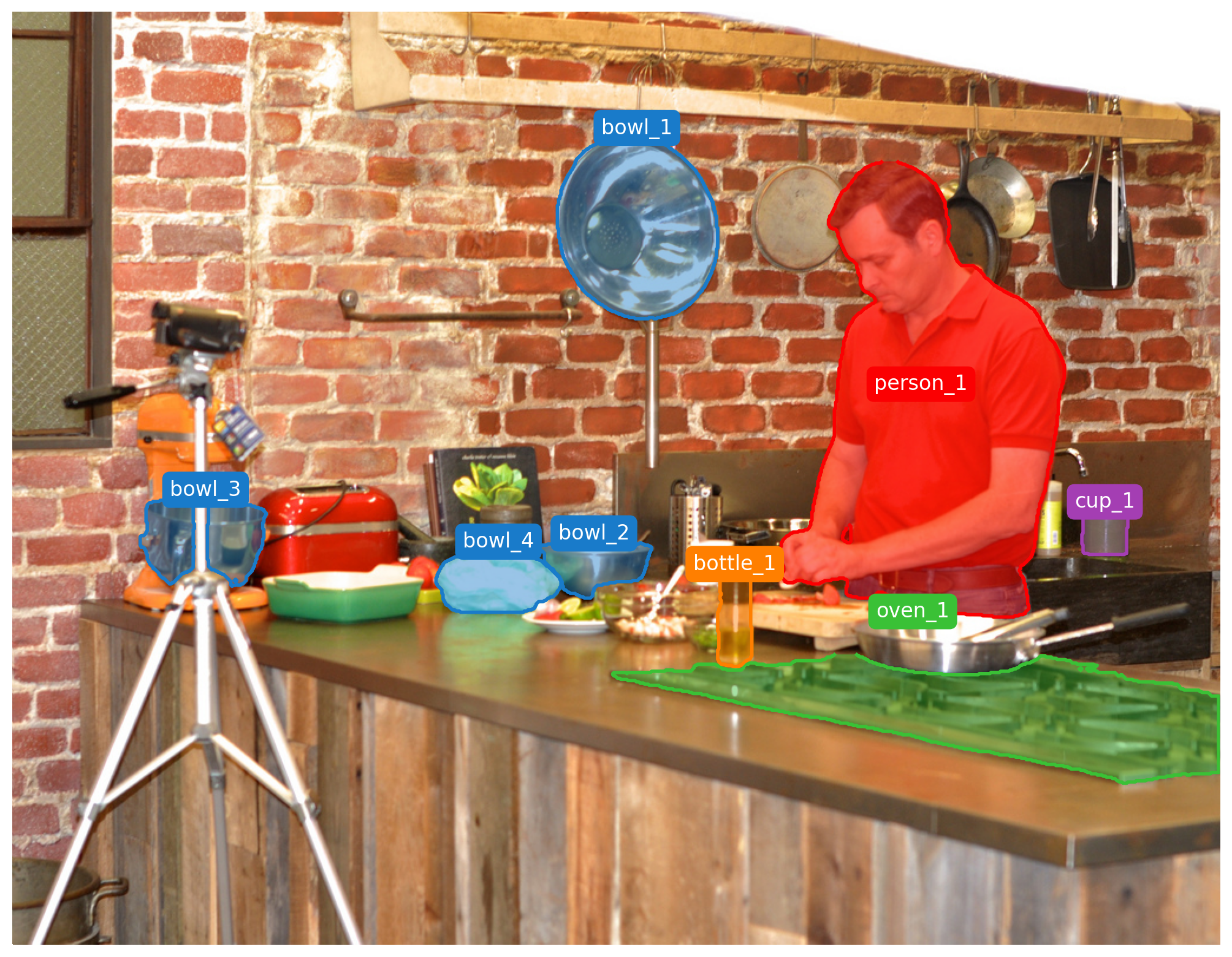
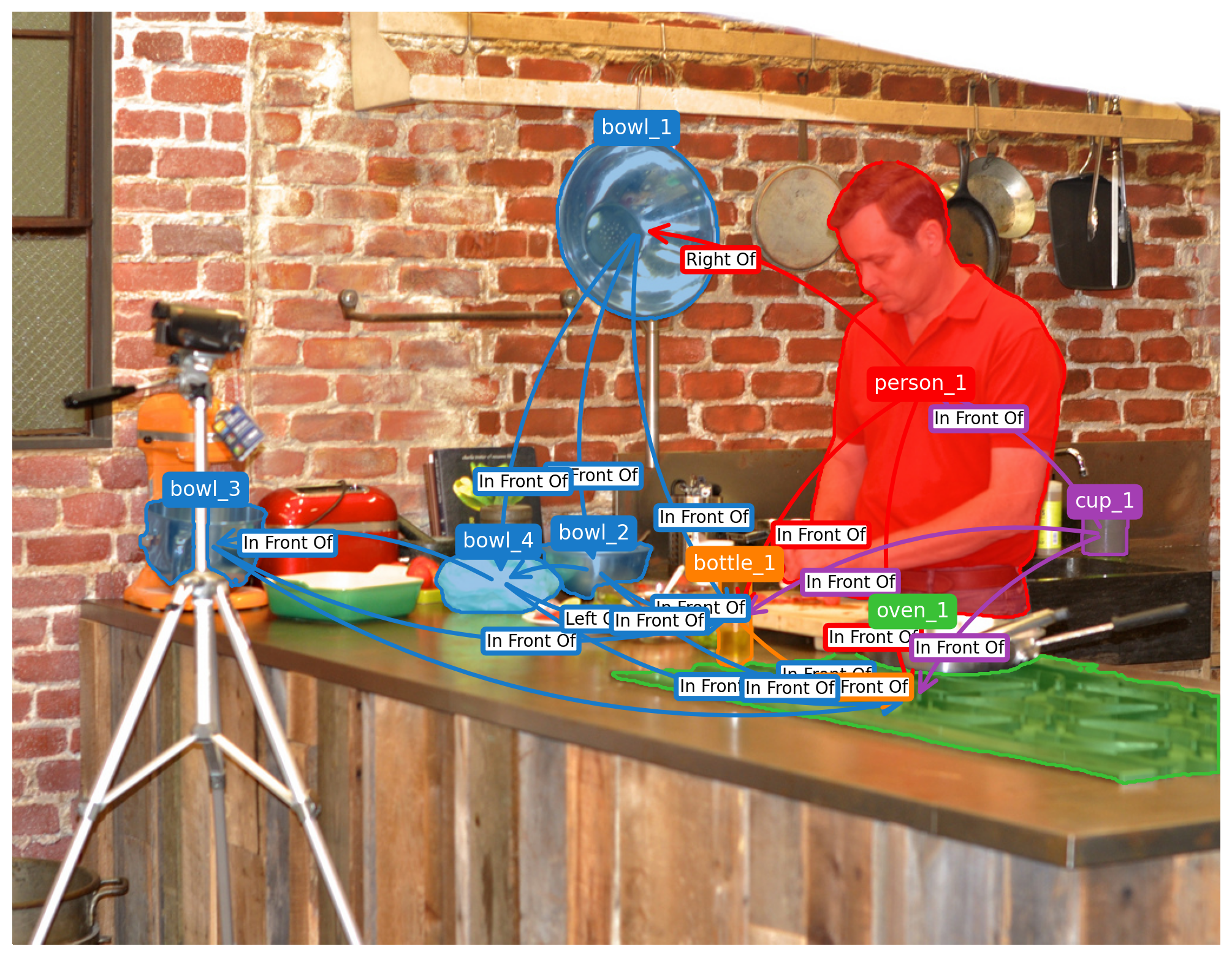
Pipeline stages: object detection, instance segmentation, depth estimation.
Return Dictionary
The process() method returns:
result = {
    "boxes": [[x1, y1, x2, y2], ...],     # Bounding boxes
    "labels": ["person", "chair", ...],    # Object labels
    "scores": [0.95, 0.87, ...],           # Confidence scores
    "masks": [np.ndarray, ...],            # Segmentation masks
    "depth": np.ndarray,                   # Depth map
    "relationships": [...],                 # Extracted relations
    "scene_graph": nx.DiGraph,             # NetworkX graph
    "scene_graph_text": "...",             # Triple format for prompts
    "scene_graph_prompt": "...",           # Compact format
    "output_image": PIL.Image.Image,       # Rendered visualization as PIL Image
    "processing_time": 12.5,               # Processing time (seconds)
}
Configuration
Visual Prompting Styles (Paper Table 2)
| Style Preset | Label Mode | Relations | Relation Labels | Recommended Use |
|---|---|---|---|---|
som_text |
Textual | No | No | Set-of-Mark baseline |
som_numeric |
Numeric | No | No | Set-of-Mark baseline |
gom_text |
Textual | Yes | No | GoM with arrows |
gom_numeric |
Numeric | Yes | No | GoM with arrows |
gom_text_labeled |
Textual | Yes | Yes | VQA tasks |
gom_numeric_labeled |
Numeric | Yes | Yes | RefCOCO tasks |
Alphabetic variants (som_alphabetic, gom_alphabetic, gom_alphabetic_labeled)
exist too. Style presets are selected through the Python API only —
ProcessingConfig(style="gom_text_labeled"), keys in GOM_STYLE_PRESETS. The
CLI has no --style flag; reproduce a style there with --label_mode +
--display_relationships / --display_relation_labels, or select a --profile.
Pipeline Parameters
| Parameter | Description | Default |
|---|---|---|
detectors_to_use |
Detection models to employ | ("owlvit", "yolov8", "detectron2") |
sam_version |
Segmentation model version | "hq" |
wbf_iou_threshold |
IoU threshold for WBF fusion | 0.90 |
label_mode |
Label format ("original", "numeric", or "alphabetic") |
"original" |
display_labels |
Render object labels | True |
display_relationships |
Render relationship arrows | True |
display_relation_labels |
Render labels on arrows | True |
show_segmentation |
Render segmentation masks | True |
output_format |
Output image format ("jpg", "png", "svg") |
"jpg" |
The GoM API applies these defaults through its quality_vqa profile, which
overrides a few of them (e.g. detectors_to_use=("owlvit", "yolov8"),
wbf_iou_threshold=0.55). The full field set with per-field comments lives on
PreprocessorConfig in src/gom/pipeline/preprocessor.py.
Appearance of the annotated image
The look of the rendered marks — arrow thickness, mask fill and colour, outline
width, fonts, and label style — is controlled by the fields below. They are
settable both as ProcessingConfig fields (Python API) and as CLI flags on
gom-preprocess (same names, prefixed with --).
| What it controls | Field / CLI flag | Default | Notes |
|---|---|---|---|
| Relation-arrow line thickness | rel_arrow_linewidth |
2.0 |
|
| Relation-arrow head size | rel_arrow_mutation_scale |
26.0 |
|
| Fill masks vs. outline-only | fill_segmentation |
False |
outline-only keeps image evidence for VQA |
| Mask fill opacity | seg_fill_alpha |
0.0 |
0 = no fill; ~0.25–0.4 for a visible tint |
| Mask/label colour saturation | color_sat_boost |
1.1 |
multiplier on the per-object colour |
| Mask/label colour brightness | color_val_boost |
1.1 |
multiplier on the per-object colour |
| Draw bounding boxes | show_bboxes |
False |
contours alone are less visually destructive |
| Bounding-box outline width | bbox_linewidth |
2.0 |
|
| Object-ID font size | obj_fontsize_inside / obj_fontsize_outside |
14 / 14 |
|
| Relation-label font size | rel_fontsize |
12 |
|
| ID-label / relation-label box border | label_bbox_linewidth / relation_label_bbox_linewidth |
3.0 |
API only — no CLI flag |
| Label text style | label_mode |
"original" |
"original" (oven_1), "numeric" (1), "alphabetic" (A) |
| Auto-rescale fonts/arrows by image size | auto_scale_styles |
True |
set False to use the raw sizes above verbatim |
CLI (default quality_vqa profile):
gom-preprocess --input_path scene.jpg --output_folder out/ \
  --rel_arrow_linewidth 3.0 --rel_arrow_mutation_scale 30 \
  --color_sat_boost 1.4 --color_val_boost 1.2 \
  --fill_segmentation --seg_fill_alpha 0.35 \
  --show_bboxes --bbox_linewidth 2.5 \
  --obj_fontsize_inside 16 --obj_fontsize_outside 16 --rel_fontsize 14 \
  --label_mode numeric --no-auto_scale_styles
Python API:
from gom import GoM, ProcessingConfig

gom = GoM(device="cuda")                       # quality_vqa profile
config = ProcessingConfig(
    rel_arrow_linewidth=3.0,                    # arrow thickness
    rel_arrow_mutation_scale=30.0,             # arrow head size
    color_sat_boost=1.4, color_val_boost=1.2,  # colour intensity
    fill_segmentation=True, seg_fill_alpha=0.35,  # mask fill vs outline-only
    show_bboxes=True, bbox_linewidth=2.5,      # box outline width
    obj_fontsize_inside=16, obj_fontsize_outside=16, rel_fontsize=14,
    label_bbox_linewidth=2.0,                  # API only (no CLI flag)
    label_mode="numeric",
    auto_scale_styles=False,                   # keep the sizes above verbatim
)
result = gom.process("scene.jpg", config=config, save=False)
By default (quality_vqa) masks render outline-only (seg_fill_alpha=0.0)
with no bounding boxes; set fill_segmentation=True, seg_fill_alpha≈0.3 for the
filled look shown above. Under profile="paper_aaai26" these appearance fields
are fixed by the paper spec (ProcessingConfig resets them in __post_init__),
so tune appearance under the default quality_vqa profile.
Custom Model Integration
GoM supports integration of custom detection, segmentation, and depth models:
from gom import GoM, ProcessingConfig
import numpy as np

def custom_detector(image):
    # Custom detection logic
    # Returns: boxes, labels, scores
    boxes = [[100, 100, 200, 200]]
    labels = ["person"]
    scores = [0.95]
    return boxes, labels, scores

def custom_segmenter(image, boxes):
    # Custom segmentation logic
    # Returns: list of boolean masks (H, W)
    h, w = image.size[1], image.size[0]
    masks = [np.ones((h, w), dtype=bool) for _ in boxes]
    return masks

def custom_depth(image):
    # Custom depth estimation
    # Returns: depth map (H, W) normalized to [0, 1]
    h, w = image.size[1], image.size[0]
    return np.zeros((h, w), dtype=np.float32)

# Create GoM with custom functions
pipeline = GoM(
    detect_fn=custom_detector,
    segment_fn=custom_segmenter,
    depth_fn=custom_depth,
    device="cuda"
)

config = ProcessingConfig(
    question="What objects are visible?",
    style="gom_text_labeled",
)
result = pipeline.process("scene.jpg", config=config, save=False)
Examples
The examples/ directory contains:
quickstart.py: Basic usage and installation verificationdemo.ipynb: Comprehensive Jupyter notebook demonstrating all features
Docker
# Build the preprocessing image (fully pinned; see reproduction/docker/)
docker build -f reproduction/docker/preprocess.Dockerfile -t gom-paper-preprocess:1 .

# Run with GPU support.  The repo is mounted at its host path, not /workdir.
docker run --rm --gpus all -v "$PWD:$PWD" -w "$PWD" \
    -e PYTHONPATH="$PWD/src" gom-paper-preprocess:1 \
    python3 src/image_preprocessor.py --json_file data.json --output_folder out/
A second image, reproduction/docker/inference.Dockerfile, provides the vLLM
inference stack. To set both up on a new machine, see
reproduction/README.md — reproduction/run_afk.sh
builds the images, downloads every model, and runs the full pipeline unattended.
Repository Structure
graph-of-marks/
├── src/gom/                    # Main package
│   ├── api.py                  # High-level API (GoM class)
│   ├── config.py               # Configuration management
│   ├── cli/                    # Command-line interface
│   ├── detectors/              # Object detection models
│   ├── segmentation/           # Segmentation models
│   ├── fusion/                 # Detection fusion strategies
│   ├── relations/              # Relationship extraction
│   ├── graph/                  # Scene graph construction
│   ├── viz/                    # Visualization utilities
│   ├── vqa/                    # VQA inference
│   └── utils/                  # Utility functions
├── examples/                   # Usage examples
├── scripts/                    # Inference scripts
├── external_libs/              # External dependencies (SAM2)
├── paper/                      # AAAI 2026 paper
├── pyproject.toml              # Package configuration
└── Makefile                    # Build commands
License
This project is licensed under the MIT License. See LICENSE for details.
Links
1 maintainer

Metadata
1 maintainer
Release files for graph-of-mark 1.2.1
For a detailed explanation of source distributions (sdists) and built distributions (wheels), please see the package formats documentation.
Source distribution (sdist)
| File | Size | Uploaded | Provenance | Actions |
|---|---|---|---|---|
| graph_of_mark-1.2.1.tar.gz | 392.1 kB | Without provenance | Details for graph_of_mark-1.2.1.tar.gz |
Built distribution (wheel)
| File | Interpreter | ABI | Platform | Actions Reset |
|---|---|---|---|---|
| graph_of_mark-1.2.1-py3-none-any.whl | Python 3 | none | any | Details for graph_of_mark-1.2.1-py3-none-any.whl |
Total release size: 820.2 kB
Release files / graph_of_mark-1.2.1.tar.gz
| Download URL | graph_of_mark-1.2.1.tar.gz |
|---|---|
| Size | 392.1 kB |
| Tags | Source |
|
SHA-256 checksum How to use checksums |
781e7154f6d936ed8d959f5d4f9770eeb04146accb4077c2942888139748201b
|
|
BLAKE2b-256 checksum How to use checksums |
547c389396a39bfc8697a54f65ca53b06d32df0148f4da7f5d4fcbd417b1d7ed
|
| Upload date | |
|
Uploaded using Trusted Publishing? What is trusted publishing? |
No |
| Uploaded via |
twine/7.0.0 CPython/3.10.12
|
Release files / graph_of_mark-1.2.1-py3-none-any.whl
| Download URL | graph_of_mark-1.2.1-py3-none-any.whl |
|---|---|
| Size | 428.1 kB |
| Tags | Python 3 |
|
SHA-256 checksum How to use checksums |
efa87ce137975116ad88f39cb34d7d4a43ba51e737d8837f5f466ad720c18066
|
|
BLAKE2b-256 checksum How to use checksums |
9f97120791a19bd17195ca1bffd3f9312b3aee138870f0157ae425639534f813
|
| Upload date | |
|
Uploaded using Trusted Publishing? What is trusted publishing? |
No |
| Uploaded via |
twine/7.0.0 CPython/3.10.12
|
Security for graph-of-mark 1.2.1
Provenance
Provenance describes where a file came from. On PyPI, provenance is shared via attestations, which provide a verifiable record of the build or publishing details. View details, limitations and caveats.
No provenance found
None of the files in this release were uploaded with provenance metadata.
A note on package security
PyPI is a repository for distributing packages, not a service for auditing them. While third-party security researchers and our staff do their best to detect and remove malicious packages, PyPI cannot guarantee the quality, security or suitability of any given package.
To learn more about protecting yourself from malicious actors, visit our package security documentation.














