
Visual scene understanding pipeline with multi-model detection, segmentation, and scene graph generation

Project description
Graph of Mark (GoM)


Graph of Mark (GoM) is a visual prompting framework that transforms images into structured semantic graphs for enhanced visual scene understanding. The system integrates state-of-the-art object detection, instance segmentation, depth estimation, and relationship extraction models to construct comprehensive scene graphs that can be used as visual prompts for Multimodal Language Models (MLMs).
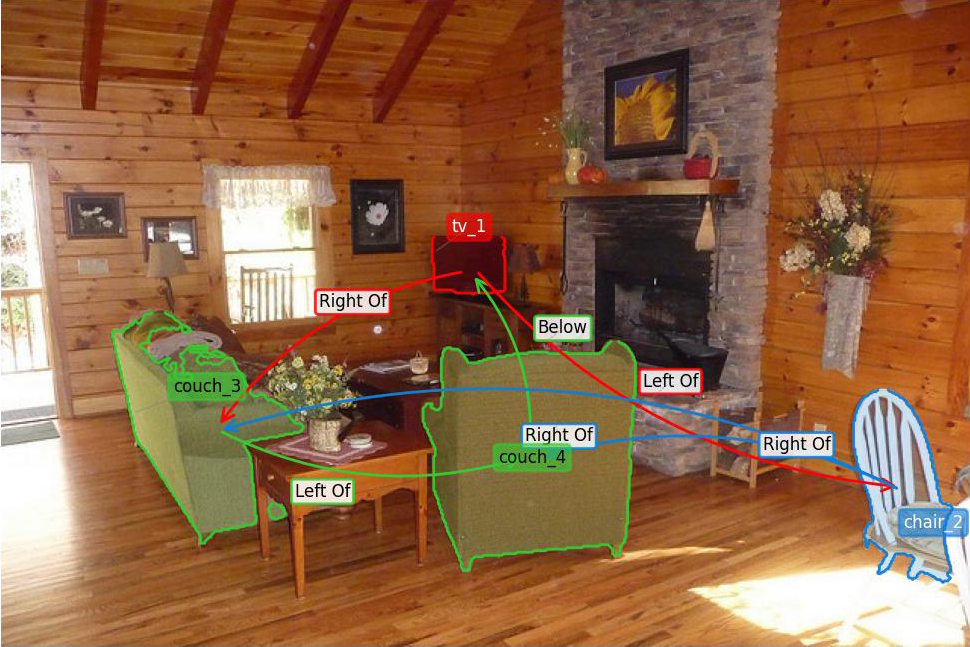
Example output showing detected objects with segmentation masks and spatial relationships.
Publication
This work has been accepted at the 40th Annual AAAI Conference on Artificial Intelligence (AAAI 2026). The paper and supplementary materials are available in the paper/ directory.
If you use Graph of Mark in your research, please cite:
@inproceedings{gom2026aaai,
  title={Graph-of-Mark: Promote Spatial Reasoning in Multimodal Language Models with Graph-Based Visual Prompting},
  author={Giacomo Frisoni, Lorenzo Molfetta, Mattia Buzzoni, Gianluca Moro},
  booktitle    = {AAAI-26, Sponsored by the Association for the Advancement of Artificial Intelligence},
  year={2026},
  publisher    = {{AAAI} Press},
  year         = {2026},
}
Visit our research group website at: https://disi-unibo-nlp.github.io
Installation
From PyPI
pip install graph-of-mark
With optional dependencies:
# Install with all features
pip install "graph-of-mark[all]"
From Source
git clone https://github.com/disi-unibo-nlp/graph-of-marks.git
cd graph-of-marks
pip install -e ".[all]"
Quick Start
Check out examples/demo_gom.ipynb for detailed examples on how to use GoM.
Python API
from gom import GoM, ProcessingConfig

# Initialize the pipeline
pipeline = GoM(device="cuda")  # or "mps" for Apple Silicon, "cpu" for CPU

# Process an image with a question
config = ProcessingConfig(
    question="What objects are in the room?",
    style="gom_text_labeled",
)
result = pipeline.process("scene.jpg", config=config, save=False)

# Access results
print(f"Detected {len(result['boxes'])} objects")
print(f"Found {len(result['relationships'])} relationships")

# Display the output image
result["output_image"].show()  # PIL Image
Visual Prompting Styles
The library implements all visual prompting configurations presented in the paper:
from gom import GoM, ProcessingConfig, GOM_STYLE_PRESETS

pipeline = GoM(device="cuda")

# Use predefined style presets via ProcessingConfig
config = ProcessingConfig(
    question="Where is the bowl?",
    style="gom_text_labeled",      # Recommended for VQA tasks
    apply_question_filter=True,    # Filter objects by question relevance
)
result = pipeline.process("scene.jpg", config=config, save=False)

# Available styles:
# - "som_text": Set-of-Mark with textual IDs (baseline, no relations)
# - "som_numeric": Set-of-Mark with numeric IDs (baseline, no relations)
# - "gom_text": GoM with textual IDs and relation arrows
# - "gom_numeric": GoM with numeric IDs and relation arrows
# - "gom_text_labeled": GoM with textual IDs and labeled relations
# - "gom_numeric_labeled": GoM with numeric IDs and labeled relations

# Access scene graph representations for VLM prompting
print(result["scene_graph_text"])    # Triple format for LLM prompts
print(result["scene_graph_prompt"])  # Compact inline format
Manual configuration is also supported:
config = ProcessingConfig(
    question="What is near the table?",
    label_mode="numeric",           # "original", "numeric", or "alphabetic"
    display_relationships=True,
    display_relation_labels=True,
    aggressive_pruning=True,        # Keep only question-relevant objects
)
result = pipeline.process("scene.jpg", config=config, save=False)
Command-Line Interface
# Image preprocessing
gom-preprocess --input_file data.json --image_dir images/ --output_folder output/

# Visual Question Answering
gom-vqa --input_file vqa_data.json --model_name llava-hf/llava-1.5-7b-hf
Pipeline Overview
The GoM pipeline processes images through the following stages:
| Stage | Description | Models |
|---|---|---|
| Detection | Object localization | YOLOv8, OWL-ViT, GroundingDINO, Detectron2 |
| Fusion | Prediction aggregation | Weighted Box Fusion (WBF), NMS |
| Segmentation | Instance mask generation | SAM, SAM2, SAM-HQ, FastSAM |
| Depth Estimation | 3D scene understanding | Depth Anything V2 |
| Relationship Extraction | Spatial/semantic relations | CLIP-based, physics-based |
| Graph Construction | Scene graph generation | NetworkX |
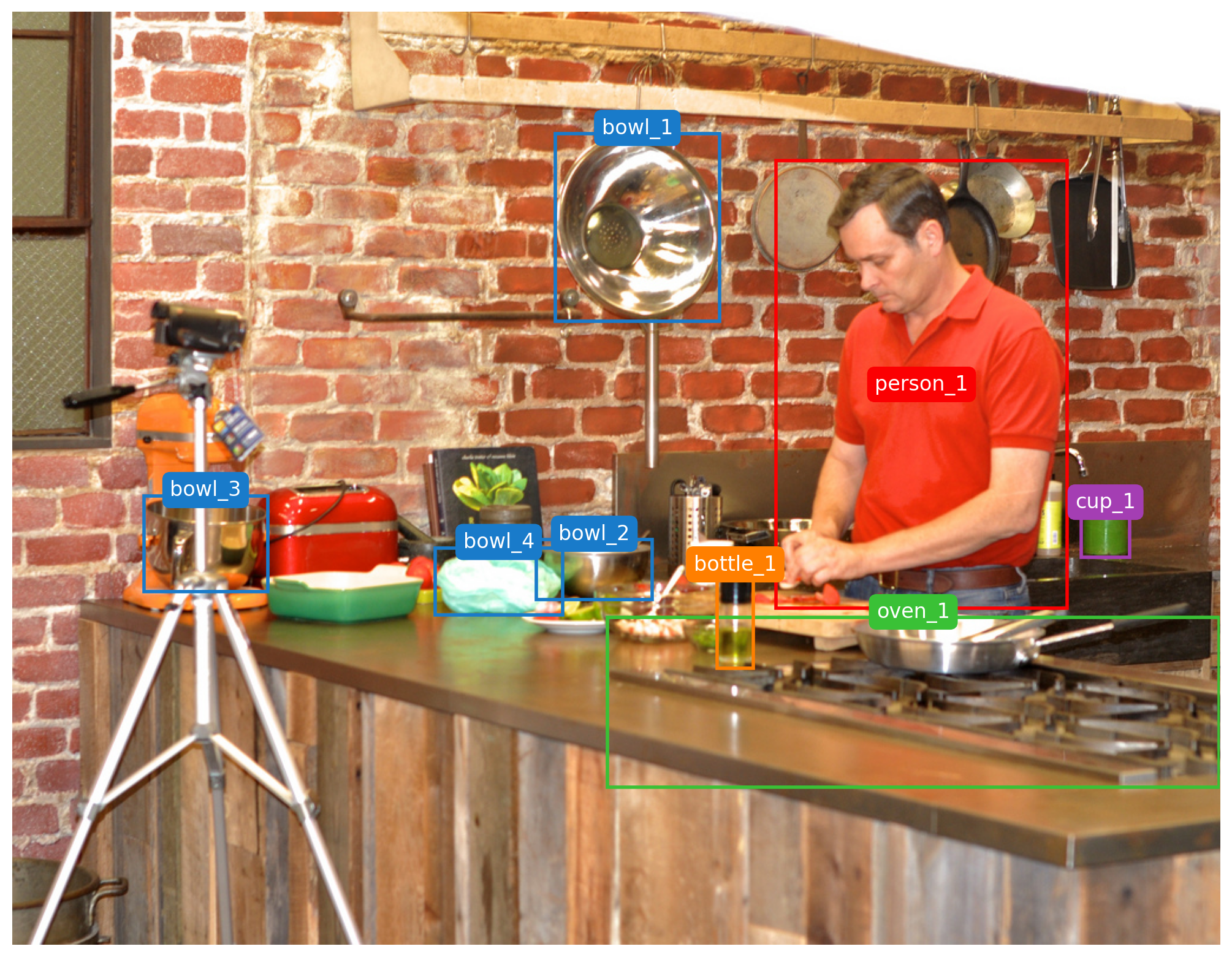
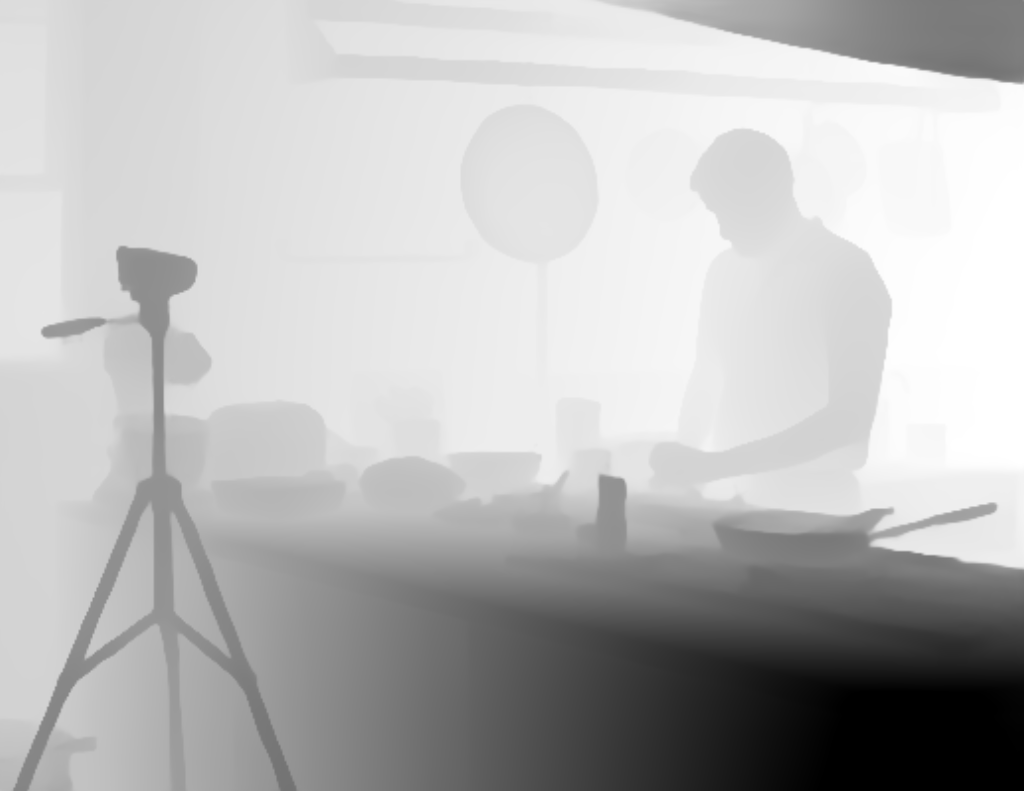
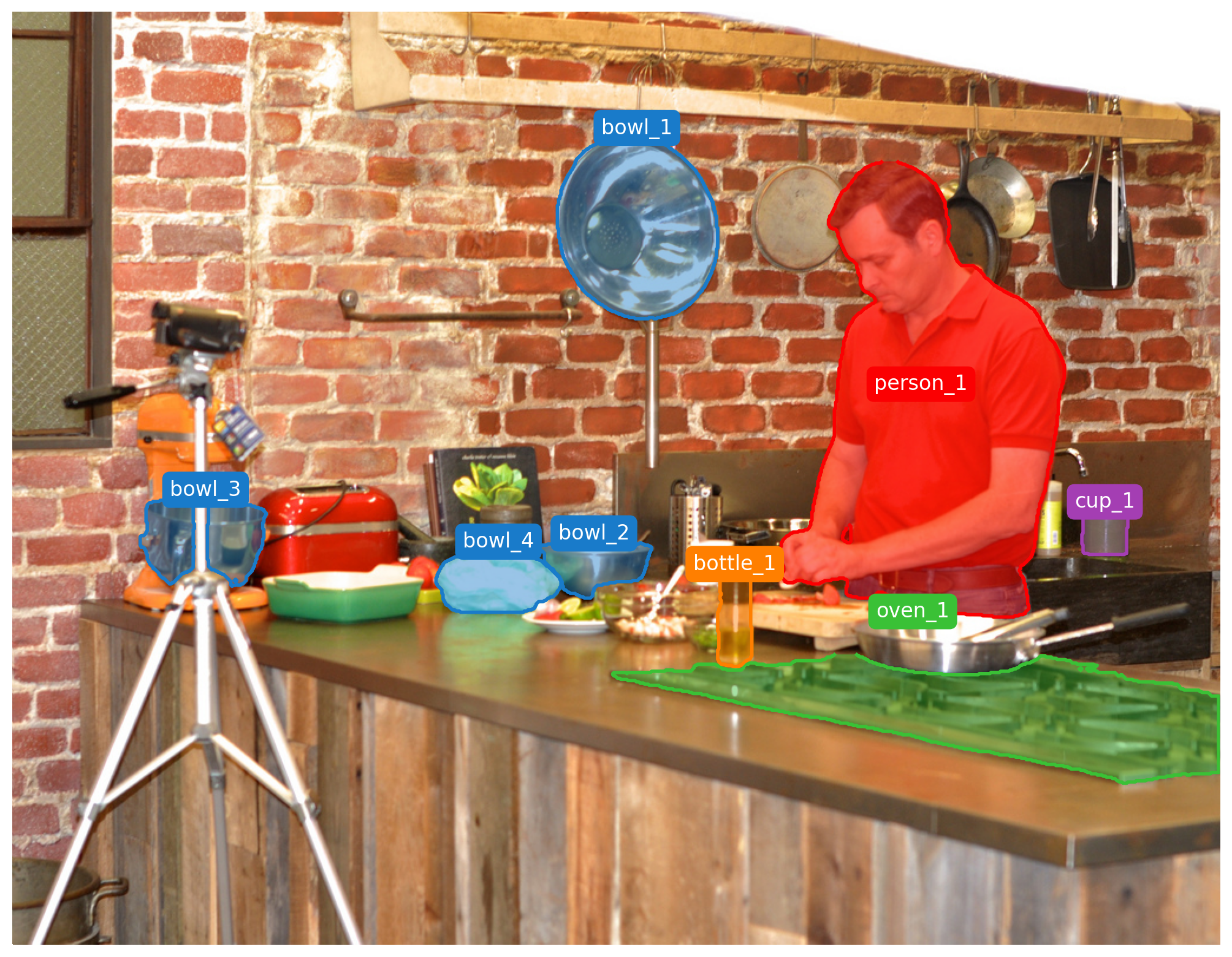
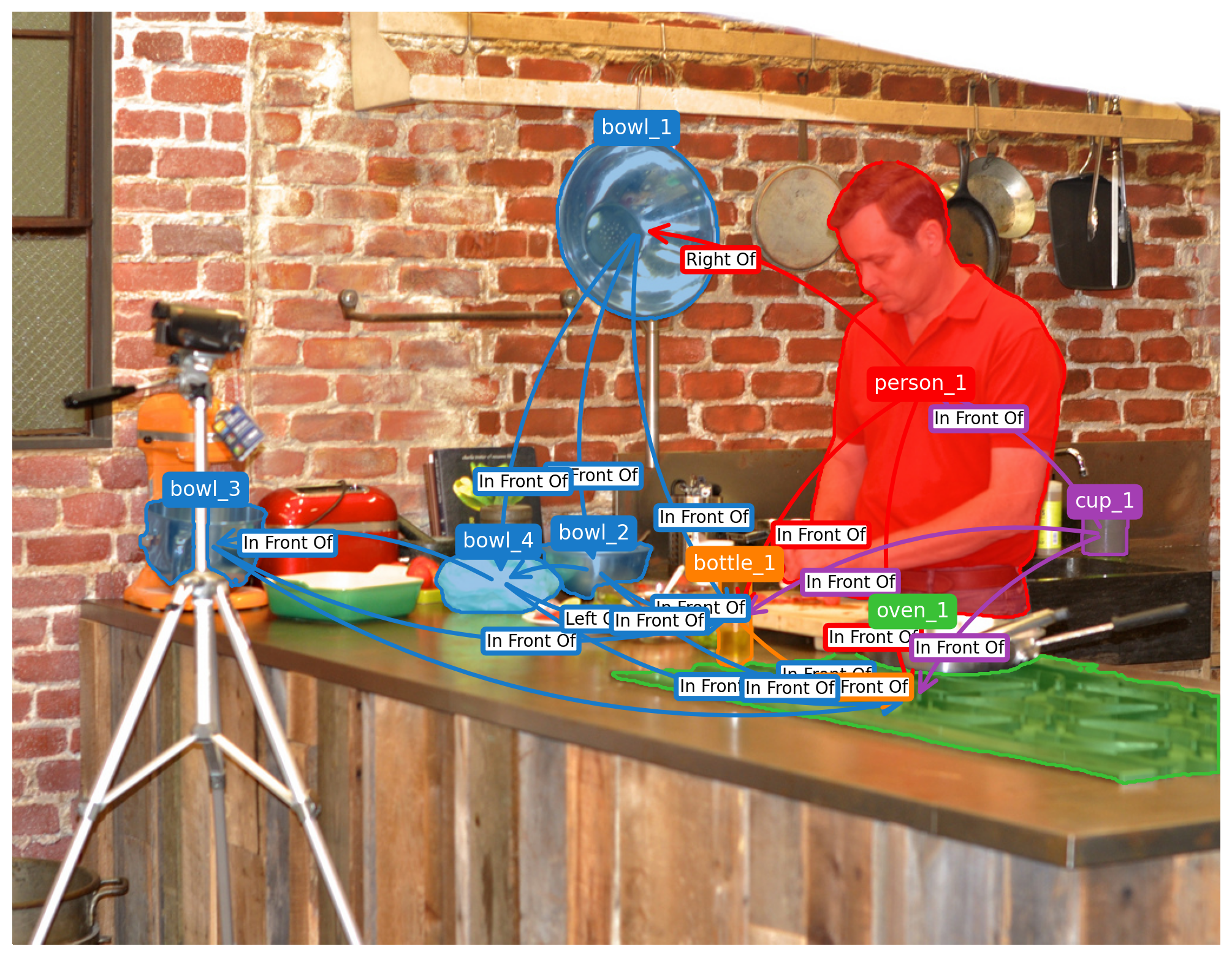
Pipeline stages: object detection, instance segmentation, depth estimation.
Return Dictionary
The process() method returns:
result = {
    "boxes": [[x1, y1, x2, y2], ...],     # Bounding boxes
    "labels": ["person", "chair", ...],    # Object labels
    "scores": [0.95, 0.87, ...],           # Confidence scores
    "masks": [np.ndarray, ...],            # Segmentation masks
    "depth": np.ndarray,                   # Depth map
    "relationships": [...],                 # Extracted relations
    "scene_graph": nx.DiGraph,             # NetworkX graph
    "scene_graph_text": "...",             # Triple format for prompts
    "scene_graph_prompt": "...",           # Compact format
    "output_image": PIL.Image.Image,       # Rendered visualization as PIL Image
    "processing_time": 12.5,               # Processing time (seconds)
}
Configuration
Visual Prompting Styles (Paper Table 2)
| Style Preset | Label Mode | Relations | Relation Labels | Recommended Use |
|---|---|---|---|---|
som_text |
Textual | No | No | Set-of-Mark baseline |
som_numeric |
Numeric | No | No | Set-of-Mark baseline |
gom_text |
Textual | Yes | No | GoM with arrows |
gom_numeric |
Numeric | Yes | No | GoM with arrows |
gom_text_labeled |
Textual | Yes | Yes | VQA tasks |
gom_numeric_labeled |
Numeric | Yes | Yes | RefCOCO tasks |
Pipeline Parameters
| Parameter | Description | Default |
|---|---|---|
detectors_to_use |
Detection models to employ | ("yolov8",) |
sam_version |
Segmentation model version | "hq" |
wbf_iou_threshold |
IoU threshold for WBF fusion | 0.55 |
label_mode |
Label format ("original" or "numeric") |
"original" |
display_labels |
Render object labels | True |
display_relationships |
Render relationship arrows | True |
display_relation_labels |
Render labels on arrows | True |
show_segmentation |
Render segmentation masks | True |
output_format |
Output image format | "png" |
Complete configuration options are documented in src/gom/config.py.
Custom Model Integration
GoM supports integration of custom detection, segmentation, and depth models:
from gom import GoM, ProcessingConfig
import numpy as np

def custom_detector(image):
    # Custom detection logic
    # Returns: boxes, labels, scores
    boxes = [[100, 100, 200, 200]]
    labels = ["person"]
    scores = [0.95]
    return boxes, labels, scores

def custom_segmenter(image, boxes):
    # Custom segmentation logic
    # Returns: list of boolean masks (H, W)
    h, w = image.size[1], image.size[0]
    masks = [np.ones((h, w), dtype=bool) for _ in boxes]
    return masks

def custom_depth(image):
    # Custom depth estimation
    # Returns: depth map (H, W) normalized to [0, 1]
    h, w = image.size[1], image.size[0]
    return np.zeros((h, w), dtype=np.float32)

# Create GoM with custom functions
pipeline = GoM(
    detect_fn=custom_detector,
    segment_fn=custom_segmenter,
    depth_fn=custom_depth,
    device="cuda"
)

config = ProcessingConfig(
    question="What objects are visible?",
    style="gom_text_labeled",
)
result = pipeline.process("scene.jpg", config=config, save=False)
Examples
The examples/ directory contains:
quickstart.py: Basic usage and installation verificationdemo.ipynb: Comprehensive Jupyter notebook demonstrating all features
Docker
# Build the container
docker build -f build/Dockerfile -t gom:latest .

# Run with GPU support
docker run --rm --gpus all -v $(pwd):/workdir gom:latest \
    gom-preprocess --input_file data.json
Repository Structure
graph-of-marks/
├── src/gom/                    # Main package
│   ├── api.py                  # High-level API (GoM class)
│   ├── config.py               # Configuration management
│   ├── cli/                    # Command-line interface
│   ├── detectors/              # Object detection models
│   ├── segmentation/           # Segmentation models
│   ├── fusion/                 # Detection fusion strategies
│   ├── relations/              # Relationship extraction
│   ├── graph/                  # Scene graph construction
│   ├── viz/                    # Visualization utilities
│   ├── vqa/                    # VQA inference
│   └── utils/                  # Utility functions
├── examples/                   # Usage examples
├── scripts/                    # Inference scripts
├── external_libs/              # External dependencies (SAM2)
├── paper/                      # AAAI 2026 paper
├── pyproject.toml              # Package configuration
└── Makefile                    # Build commands
License
This project is licensed under the MIT License. See LICENSE for details.
Links
Release history Release notifications | RSS feed


Download files
Download the file for your platform. If you're not sure which to choose, learn more about installing packages.
Source Distribution
Built Distribution
Filter files by name, interpreter, ABI, and platform.
If you're not sure about the file name format, learn more about wheel file names.
Copy a direct link to the current filters
File details
Details for the file graph_of_mark-1.1.0.tar.gz.
File metadata
- Download URL: graph_of_mark-1.1.0.tar.gz
- Upload date:
- Size: 331.7 kB
- Tags: Source
- Uploaded using Trusted Publishing? No
- Uploaded via: twine/6.2.0 CPython/3.12.9
File hashes
| Algorithm | Hash digest | |
|---|---|---|
| SHA256 |
f9c510dae69fe2fbdd7383321e3aa4a0a568864fe214bfce46efcb83c6050714
|
|
| MD5 |
7214d5f3776d0363eb65c019bda9a2b5
|
|
| BLAKE2b-256 |
a2f89ad06ee723741706a391513194abf48e2d4b5ad03f17cb16ba11aa22a6a5
|
File details
Details for the file graph_of_mark-1.1.0-py3-none-any.whl.
File metadata
- Download URL: graph_of_mark-1.1.0-py3-none-any.whl
- Upload date:
- Size: 369.2 kB
- Tags: Python 3
- Uploaded using Trusted Publishing? No
- Uploaded via: twine/6.2.0 CPython/3.12.9
File hashes
| Algorithm | Hash digest | |
|---|---|---|
| SHA256 |
5b6d6c44111149ee8f0e22151bd6b3cb0a667ddf615895044805ed82cf10a35f
|
|
| MD5 |
d3428b34cf9a55886a322ab480eebc28
|
|
| BLAKE2b-256 |
6c6334b25efa6dc6e962f630d6913f7dc0bdf42825360003b0a5723b37350fb1
|






