
Graph2Tac
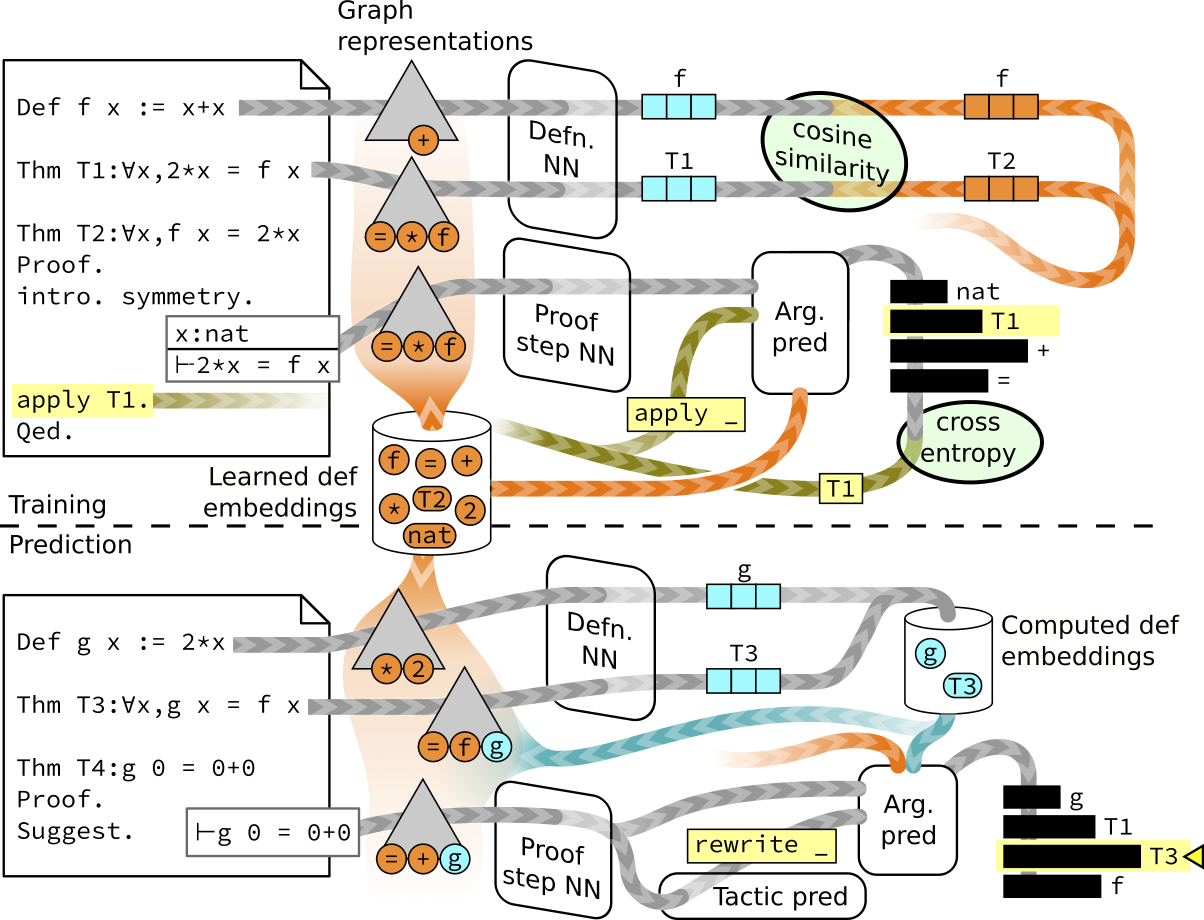
Graph2Tac is a novel neural network architecture for predicting tactics in the Coq theorem prover, and for assigning embeddings to new definitions (including theorems). More details can be found in the paper. This python project makes it possible to train and run Graph2Tac models to be used inside Tactician, an automated theorem proving system for Coq.
Using Graph2Tac within Coq
The simplest way to use the Graph2Tac model trained for the paper is via Tactician. See the instructions for the Tactician API.
Using the graph2tac library
Installation
Graph2Tac has been tested with Linux and x86 MacOS, but may work on other systems as well. It requires Python 3.9, 3.10, or 3.11, and can be installed with
pip install graph2tac
It is highly recommended that you use a virtual environment or conda environment.
Training
To get started on training a model, the following code (where paths are relative to the repository root) trains on a small portion of the Coq standard library use for testing this project.
g2t-train-tfgnn \
  --data-dir tests/data/mini_stdlib/dataset/ \
  --dataset-config graph2tac/tfgnn/default_dataset_config.yml \
  --prediction-task-config graph2tac/tfgnn/default_global_argument_prediction.yml \
  --trainer-config graph2tac/tfgnn/default_trainer_config.yml \
  --run-config graph2tac/tfgnn/default_run_config.yml \
  --definition-task-config graph2tac/tfgnn/default_definition_task.yml \
  --log model/
See g2t-train-tfgnn --help for more command line options,
and the various YAML files to change the hyperparameters and training epochs.
The trained model is stored in the log directory, model/ in the above example.
(Note, if model/ already exists and contains a model, it will continue training that model.)
See here for the full Coq dataset.
Running
The above trained model (or another existing trained model) can be run via a prediction server for interacting with Coq as follows:
g2t-server \
  --arch tfgnn \
  --tcp --port 33333 --host 0.0.0.0 \
  --model model/ \
  --log_level=info \
  --tf_log_level=critical \
  --tactic_expand_bound=256 \
  --search_expand_bound=256 \
  --update_new_definitions
The server is available locally via localhost:33333
or remotely via URL:33333 where URL is the URL (or IP address) of the machine it is running on.
Use CTRL-C to exit the server.
See https://github.com/coq-tactician/coq-tactician-api for instructions on how to call the server from Coq.
One can also run the server via stdin/stdout by replacing --tcp --port 33333 --host 0.0.0.0 with --stdin
This is intended for starting the server directly from within Coq.
See g2t-server --help for more command line options.
Using a GPU
Graph2Tac uses Tensorflow for training and inference, and will support Nvidia GPUs. To test that Tensorflow can access your system GPU, run the following python script.
import tensorflow as tf
print("How many GPUs available: ", len(tf.config.list_physical_devices('GPU')))
and follow the Tensorflow GPU instructions if needed. Note, for using GPUs with conda environments it may be necessary to set
export LD_LIBRARY_PATH=$LD_LIBRARY_PATH:$CONDA_PREFIX/lib
For g2t-train-tfgnn, to train on the available GPUs, add --gpu all to the options for g2t-train-tfgnn.
Training on multiple GPUs is supported (but only tested up to two A100s).
For g2t-server it will use any available GPUs. (You can also control the number of CPUs via --cpu-thread-count.)
Development
If you wish to develop Graph2Tac or run a previous commit, you may install it from within the repository via
pip install -e .
You can run tests as follows
pytest tests
See the testing README for more information.
1 maintainer

Metadata
1 maintainer
Release files for graph2tac 1.0.4
For a detailed explanation of source distributions (sdists) and built distributions (wheels), please see the package formats documentation.
Source distribution (sdist)
| File | Size | Uploaded | |
|---|---|---|---|
| graph2tac-1.0.4.tar.gz | 71.6 kB | Details |
Built distribution (wheel)
| File | Interpreter | ABI | Platform | Reset |
|---|---|---|---|---|
| graph2tac-1.0.4-py3-none-any.whl | Python 3 | none | any | Details |
Total release size: 147.5 kB
Release files / graph2tac-1.0.4.tar.gz
| Download URL | graph2tac-1.0.4.tar.gz |
|---|---|
| Size | 71.6 kB |
| Tags | Source |
|
SHA-256 checksum How to use checksums |
e10e4eb64610eb24aaf0bf12b05450308aede21370f5186c9d7bd40dfb3882af
|
|
BLAKE2b-256 checksum How to use checksums |
e2068b589c09dcfc5bc45b981db4d0cbd74a9453278cd0eac6a652e5192bb7c0
|
| Upload date | |
|
Uploaded using Trusted Publishing? What is trusted publishing? |
No |
| Uploaded via |
twine/4.0.2 CPython/3.10.6
|
Release files / graph2tac-1.0.4-py3-none-any.whl
| Download URL | graph2tac-1.0.4-py3-none-any.whl |
|---|---|
| Size | 76.0 kB |
| Tags | Python 3 |
|
SHA-256 checksum How to use checksums |
9591ce606fd540bf704924d42a174cebf95a1a699b0f3074c578f2d883820939
|
|
BLAKE2b-256 checksum How to use checksums |
99b010e01225819d589daac364e7e96531ade253ece803407d02026fc3d0d428
|
| Upload date | |
|
Uploaded using Trusted Publishing? What is trusted publishing? |
No |
| Uploaded via |
twine/4.0.2 CPython/3.10.6
|













