









Read this in other languages: 🇨🇳 简体中文 | 🇨🇳 繁體中文 | 🇪🇸 Español | 🇫🇷 Français | 🇩🇪 Deutsch | 🇯🇵 日本語 | 🇰🇷 한국어 | 🇮🇳 हिन्दी | 🇸🇦 العربية | 🇮🇹 Italiano | 🇧🇷 Português | 🇷🇺 Русский | 🇧🇩 বাংলা
What is GraphBit?
GraphBit is a source-available agentic AI framework for developers who need deterministic, concurrent, and low-overhead execution.
Built with a Rust core and a minimal Python layer, GraphBit delivers up to 68× lower CPU usage and 140× lower memory footprint than other frameworks, while maintaining equal or greater throughput.
It powers multi-agent workflows that run in parallel, persist memory across steps, self-recover from failures, and ensure 100% task reliability. GraphBit is built for production workloads, from enterprise AI systems to low-resource edge deployments.
Why GraphBit?
Efficiency decides who scales. GraphBit is built for developers who need deterministic, concurrent, and ultra-efficient AI execution without the overhead.
- Rust-Powered Performance - Maximum speed and memory safety at the core
- Production-Ready - Circuit breakers, retry policies, and fault recovery built-in
- Resource Efficient - Run on enterprise servers or low-resource edge devices
- Multi-Agent Ready - Parallel execution with shared memory across workflow steps
- Observable - Built-in tracing, structured logs, and performance metrics
Benchmark
GraphBit was built for efficiency at scale—not theoretical claims, but measured results.
Our internal benchmark suite compared GraphBit to leading Python-based agent frameworks across identical workloads.
| Metric | GraphBit | Other Frameworks | Gain |
|---|---|---|---|
| CPU Usage | 1.0× baseline | 68.3× higher | ~68× CPU |
| Memory Footprint | 1.0× baseline | 140× higher | ~140× Memory |
| Execution Speed | ≈ equal / faster | — | Consistent throughput |
| Determinism | 100% success | Variable | Guaranteed reliability |
GraphBit consistently delivers production-grade efficiency across LLM calls, tool invocations, and multi-agent chains.
View Full Benchmark Report for detailed methodology, test scenarios, and complete results.
Watch Benchmark Demo Video to see GraphBit's performance in action.
When to Use GraphBit
Choose GraphBit if you need:
- Production-grade multi-agent systems that won't collapse under load
- Type-safe execution and reproducible outputs
- Real-time orchestration for hybrid or streaming AI applications
- Rust-level efficiency with Python-level ergonomics
If you're scaling beyond prototypes or care about runtime determinism, GraphBit is for you.
Key Features
- Tool Selection - LLMs intelligently choose tools based on descriptions
- Type Safety - Strong typing through every execution layer
- Reliability - Circuit breakers, retry policies, error handling and fault recovery
- Multi-LLM Support - OpenAI, Azure OpenAI, Anthropic, OpenRouter, DeepSeek, Replicate, Ollama, TogetherAI and more
- Resource Management - Concurrency controls and memory optimization
- Observability - Built-in tracing, structured logs, and performance metrics
Quick Start
Installation
Recommended to use virtual environment.
pip install graphbit
Environment Setup
Set up API keys you want to use in your project:
# OpenAI (optional – required if using OpenAI models)
export OPENAI_API_KEY=your_openai_api_key_here

# Anthropic (optional – required if using Anthropic models)
export ANTHROPIC_API_KEY=your_anthropic_api_key_here
Security Note: Never commit API keys to version control. Always use environment variables or secure secret management.
Basic Usage
import os

from graphbit import LlmConfig, Executor, Workflow, Node, tool

# Initialize and configure
config = LlmConfig.openai(os.getenv("OPENAI_API_KEY"), "gpt-4o-mini")

# Create executor
executor = Executor(config)

# Create tools with clear descriptions for LLM selection
@tool(_description="Get current weather information for any city")
def get_weather(location: str) -> dict:
    return {"location": location, "temperature": 22, "condition": "sunny"}

@tool(_description="Perform mathematical calculations and return results")
def calculate(expression: str) -> str:
    return f"Result: {eval(expression)}"

# Build workflow
workflow = Workflow("Analysis Pipeline")

# Create agent nodes
smart_agent = Node.agent(
    name="Smart Agent",
    prompt="What's the weather in Paris and calculate 15 + 27?",
    system_prompt="You are an assistant skilled in weather lookup and math calculations. Use tools to answer queries accurately.",
    tools=[get_weather, calculate]
)

processor = Node.agent(
    name="Data Processor",
    prompt="Process the results obtained from Smart Agent.",
    system_prompt="""You process and organize results from other agents.

    - Summarize and clarify key points
    - Structure your output for easy reading
    - Focus on actionable insights
    """
)

# Connect and execute
id1 = workflow.add_node(smart_agent)
id2 = workflow.add_node(processor)
workflow.connect(id1, id2)

result = executor.execute(workflow)
print(f"Workflow completed: {result.is_success()}")
print("\nSmart Agent Output: \n", result.get_node_output("Smart Agent"))
print("\nData Processor Output: \n", result.get_node_output("Data Processor"))
Watch Quick Start Video Tutorial - Complete walkthrough: Install GraphBit via PyPI, setup, and run your first workflow
Watch: Building Your First Agent Workflow - Advanced tutorial on creating multi-agent workflows with GraphBit
High-Level Architecture
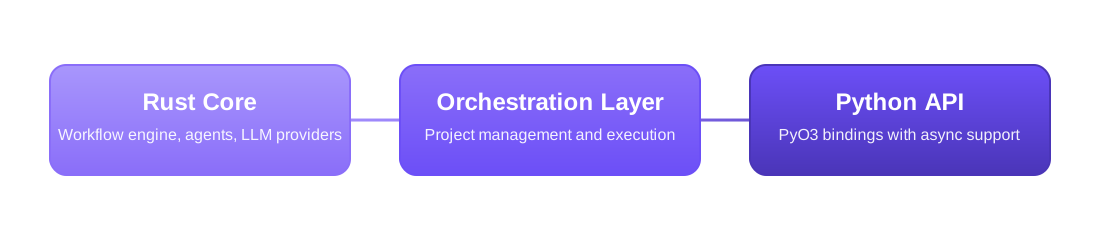
Three-tier design for reliability and performance:
- Rust Core - Workflow engine, agents, and LLM providers
- Orchestration Layer - Project management and execution
- Python API - PyO3 bindings with async support
Python API Integrations
GraphBit provides a rich Python API for building and integrating agentic workflows:
- LLM Clients - Multi-provider integrations (OpenAI, Anthropic, Azure, and more)
- Workflows - Define and manage multi-agent workflow graphs with state management
- Nodes - Agent nodes, tool nodes, and custom workflow components
- Executors - Workflow execution engine with configuration management
- Tool System - Function decorators, registry, and execution framework
- Embeddings - Vector embeddings for semantic search and retrieval
- Document Loaders - Load and parse documents (PDF, DOCX, TXT, JSON, CSV, XML, HTML)
- Text Splitters - Split documents into chunks (character, token, sentence, recursive)
For the complete list of classes, methods, and usage examples, see the Python API Reference.
Watch: GraphBit Observability & Tracing - Learn how to monitor and trace your AI workflows
Contributing to GraphBit
We welcome contributions. To get started, please see the Contributing file for development setup and guidelines.
GraphBit is built by a wonderful community of researchers and engineers.
Security
GraphBit is committed to maintaining security standards for our agentic framework. We recommend:
- Using environment variables for API keys
- Keeping GraphBit updated to the latest version
- Using proper secret management for production environments
If you discover a security vulnerability, please report it responsibly through GitHub Security or via email rather than creating a public issue.
For detailed reporting procedures and response timelines, see our Security Policy.
License
GraphBit is licensed under the Apache License, Version 2.0.
For complete terms and conditions, see the Full License.
Copyright © 2023–2026 InfinitiBit GmbH. All rights reserved.
Metadata
Release files for graphbit 0.6.8
For a detailed explanation of source distributions (sdists) and built distributions (wheels), please see the package formats documentation.
Source distribution (sdist)
| File | Size | Uploaded | |
|---|---|---|---|
| graphbit-0.6.8.tar.gz | 328.9 kB | Details |
Built distributions (wheels)
| File | Reset | |||
|---|---|---|---|---|
| graphbit-0.6.8-cp39-abi3-win_amd64.whl | CPython 3.9 | abi3 | Windows x86-64 | Details |
| graphbit-0.6.8-cp39-abi3-musllinux_1_2_x86_64.whl | CPython 3.9 | abi3 | Linux musl 1.2+ x86-64 | Details |
| graphbit-0.6.8-cp39-abi3-musllinux_1_2_aarch64.whl | CPython 3.9 | abi3 | Linux musl 1.2+ ARM64 | Details |
| graphbit-0.6.8-cp39-abi3-manylinux_2_34_x86_64.whl | CPython 3.9 | abi3 | Linux glibc 2.34+ x86-64 | Details |
| graphbit-0.6.8-cp39-abi3-manylinux_2_34_aarch64.whl | CPython 3.9 | abi3 | Linux glibc 2.34+ ARM64 | Details |
| graphbit-0.6.8-cp39-abi3-macosx_10_12_x86_64.macosx_11_0_arm64.macosx_10_12_universal2.whl | CPython 3.9 | abi3 | macOS 10.12+ x86-64, macOS 11.0+ ARM64, macOS 10.12+ universal2 (ARM64, x86-64) | Details |
Total release size: 48.7 MB
Release files / graphbit-0.6.8.tar.gz
| Download URL | graphbit-0.6.8.tar.gz |
|---|---|
| Size | 328.9 kB |
| Tags | Source |
|
SHA-256 checksum How to use checksums |
3f85cbc664ecf65e88b80b465f1c7fbce1ebaa656c0011599d9462f35c85d1ab
|
|
BLAKE2b-256 checksum How to use checksums |
965843b4b9d7a3285d644f2af943069c78e8b678c1abdaac7d08617d596ebc71
|
| Upload date | |
|
Uploaded using Trusted Publishing? What is trusted publishing? |
No |
| Uploaded via |
twine/6.1.0 CPython/3.13.12
|
Release files / graphbit-0.6.8-cp39-abi3-win_amd64.whl
| Download URL | graphbit-0.6.8-cp39-abi3-win_amd64.whl |
|---|---|
| Size | 6.0 MB |
| Tags | CPython 3.9 Windows x86-64 abi3 |
|
SHA-256 checksum How to use checksums |
7437a17b9f100f4c0c0136701c6c9a2a924773dd12843f21d7b55558226f4b71
|
|
BLAKE2b-256 checksum How to use checksums |
1ff9331eca76c2d20c390ab139df86f3ad0bedab6e712256591a753600f37b09
|
| Upload date | |
|
Uploaded using Trusted Publishing? What is trusted publishing? |
No |
| Uploaded via |
twine/6.1.0 CPython/3.13.12
|
Release files / graphbit-0.6.8-cp39-abi3-musllinux_1_2_x86_64.whl
| Download URL | graphbit-0.6.8-cp39-abi3-musllinux_1_2_x86_64.whl |
|---|---|
| Size | 7.6 MB |
| Tags | CPython 3.9 Linux musl 1.2+ x86-64 abi3 |
|
SHA-256 checksum How to use checksums |
2ba22463c7ec352f9d33805c9733f821e1ce25261f941955338cc9ed53808220
|
|
BLAKE2b-256 checksum How to use checksums |
77d7552779ba0c5e158ec7c947425acd1f7d0211557e50086d12d32f5e60969e
|
| Upload date | |
|
Uploaded using Trusted Publishing? What is trusted publishing? |
No |
| Uploaded via |
twine/6.1.0 CPython/3.13.12
|
Release files / graphbit-0.6.8-cp39-abi3-musllinux_1_2_aarch64.whl
| Download URL | graphbit-0.6.8-cp39-abi3-musllinux_1_2_aarch64.whl |
|---|---|
| Size | 7.1 MB |
| Tags | CPython 3.9 Linux musl 1.2+ ARM64 abi3 |
|
SHA-256 checksum How to use checksums |
f2f9874188d22e9bc20ce06112162328be10ad54d818fc6c5c534fb958f902ba
|
|
BLAKE2b-256 checksum How to use checksums |
76a75606553777a95bd2b016b1409e7ddfc50899a620576ee4ca4e748d3ae582
|
| Upload date | |
|
Uploaded using Trusted Publishing? What is trusted publishing? |
No |
| Uploaded via |
twine/6.1.0 CPython/3.13.12
|
Release files / graphbit-0.6.8-cp39-abi3-manylinux_2_34_x86_64.whl
| Download URL | graphbit-0.6.8-cp39-abi3-manylinux_2_34_x86_64.whl |
|---|---|
| Size | 7.6 MB |
| Tags | CPython 3.9 Linux glibc 2.34+ x86-64 abi3 |
|
SHA-256 checksum How to use checksums |
e657c97e6140f2802b30d8d520bfed8ffbea6faef3ef353dd2eb8e8fe0d27715
|
|
BLAKE2b-256 checksum How to use checksums |
fa998c02e4fd4ae2025c02b8bd4ad2b39d2482b3bc8009888a68749364fb34c2
|
| Upload date | |
|
Uploaded using Trusted Publishing? What is trusted publishing? |
No |
| Uploaded via |
twine/6.1.0 CPython/3.13.12
|
Release files / graphbit-0.6.8-cp39-abi3-manylinux_2_34_aarch64.whl
| Download URL | graphbit-0.6.8-cp39-abi3-manylinux_2_34_aarch64.whl |
|---|---|
| Size | 7.1 MB |
| Tags | CPython 3.9 Linux glibc 2.34+ ARM64 abi3 |
|
SHA-256 checksum How to use checksums |
7ed0fc4eb9be7f8c0fcc24841d99be35c112647885ac700c786b3cc860c2f722
|
|
BLAKE2b-256 checksum How to use checksums |
b492e2c2c606cb414141dced64e09cf27d67c7d981ab75c2693189548d52b89d
|
| Upload date | |
|
Uploaded using Trusted Publishing? What is trusted publishing? |
No |
| Uploaded via |
twine/6.1.0 CPython/3.13.12
|
Release files / graphbit-0.6.8-cp39-abi3-macosx_10_12_x86_64.macosx_11_0_arm64.macosx_10_12_universal2.whl
| Download URL | graphbit-0.6.8-cp39-abi3-macosx_10_12_x86_64.macosx_11_0_arm64.macosx_10_12_universal2.whl |
|---|---|
| Size | 13.0 MB |
| Tags | CPython 3.9 abi3 macOS 10.12+ universal2 (ARM64, x86-64) macOS 10.12+ x86-64 macOS 11.0+ ARM64 |
|
SHA-256 checksum How to use checksums |
8451851138dda00273e739c05fdac1242e8bfac101683b9febaa9616de20ca0f
|
|
BLAKE2b-256 checksum How to use checksums |
cbe19784f400d459883dd38e0ef1bd9fc3e8491f9da53e6cd800c54939d00135
|
| Upload date | |
|
Uploaded using Trusted Publishing? What is trusted publishing? |
No |
| Uploaded via |
twine/6.1.0 CPython/3.13.12
|














