
The AI-driven data pipeline and workflow framework for data scientists and machine learning engineers.

Project description

Graphbook







The Framework for AI-driven Data Pipelines
Report bug
·
Request feature
Overview • Status • Getting Started • Examples • Collaboration
Overview
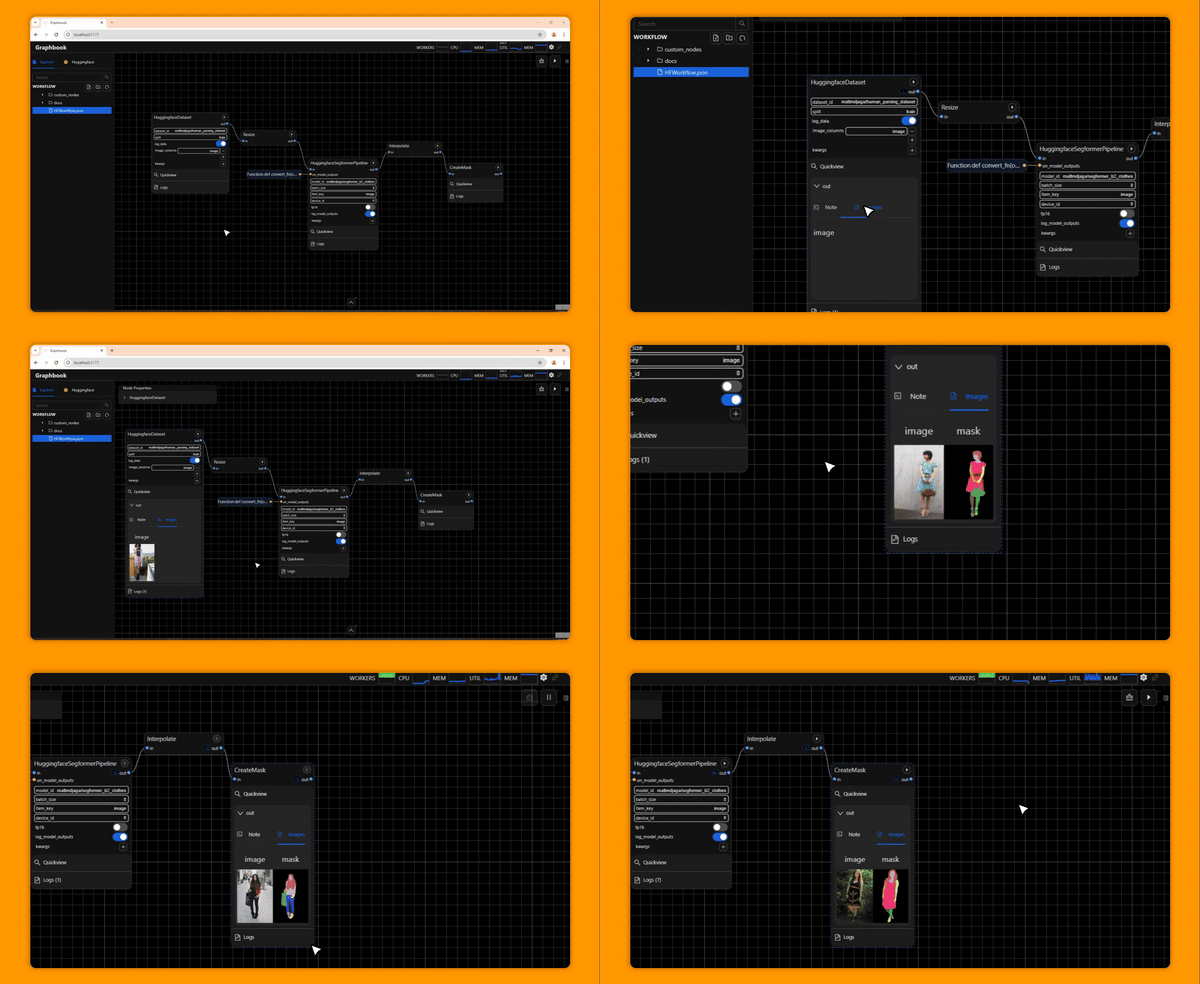
Graphbook is a framework for building efficient, interactive DAG-structured AI data pipelines or workflows composed of nodes written in Python. Graphbook provides common ML processing features such as multiprocessing IO and automatic batching for PyTorch tensors, and it features a web-based UI to assemble, monitor, and execute data processing workflows. It can be used to prepare training data for custom ML models, experiment with custom trained or off-the-shelf models, and to build ML-based ETL applications. Custom nodes can be built in Python, and Graphbook will behave like a framework and call lifecycle methods on those nodes.
Try out the demo!
Applications
- Clean and curate custom large scale datasets
- Demo ML apps on Huggingface Spaces
- Build and deliver customizable no-code or hybrid low-code ML apps and services
- Quickly experiment with different ML models and adjust hyperparameters
- Maximize GPU utilization, parallelize IO, and scale across clusters
- Wrap your Ray DAGs with a frontend for end users
Status
Graphbook is in a very early stage of development, so expect minor bugs and rapid design changes through the coming releases. If you would like to report a bug or request a feature, please feel free to do so. We aim to make Graphbook serve our users in the best way possible.
Current Features
- Graph-based visual editor to experiment and create complex ML workflows
- Workflows can be serialized as Python and JSON files
- Caches outputs and only re-executes parts of the workflow that changes between executions
- UI monitoring components for logs and outputs per node
- Custom buildable nodes with Python via OOP and functional patterns
- Multiprocessing I/O to and from disk and network
- Customizable multiprocessing functions
- Ability to execute entire graphs, or individual subgraphs/nodes
- Ability to execute singular batches of data
- Ability to pause graph execution
- Basic nodes for filtering, loading, and saving outputs
- Node grouping and subflows
- Autosaving and shareable serialized workflow files
- Registers node code changes without needing a restart
- Monitorable system CPU and GPU resource usage
- Monitorable worker queue sizes for optimal worker scaling
- Human-in-the-loop prompting for interactivity and manual control during DAG execution
- Can switch to threaded processing per client session for demoing apps to multiple simultaneous users
- Scale with Ray: Build all-code workflows and scale pipelines on Ray clusters
- (BETA) Third Party Plugins *
* We plan on adding documentation for the community to build plugins, but for now, an example can be seen at example_plugin and graphbook-huggingface
Supported OS
The following operating systems are supported in order of most to least recommended:
- Linux
- Mac
- Windows (not recommended) *
* There may be issues with running Graphbook on Windows. With limited resources, we can only focus testing and development on Linux.
Getting Started
Install from PyPI
pip install graphbookgraphbook- Visit http://localhost:8005
Install with Docker
- Pull and run the downloaded image
docker run --rm -p 8005:8005 -v $PWD/workflows:/app/workflows rsamf/graphbook:latest
- Visit http://localhost:8005
Recommended Plugins
Visit the docs to learn more on how to create custom nodes and workflows with Graphbook.
Examples
See plugin and workflow examples here in this folder.
Collaboration
Graphbook is in active development and very much welcomes contributors. If you would like to be actively involved in making Graphbook great, join our discord.
Run Graphbook in Development Mode
This is a guide on how to run Graphbook in development mode. If you are simply using Graphbook, view the Getting Started section. You can use any other virtual environment solution, but it is highly advised to use uv since our dependencies are managed with uv.
- Clone the repo and
cd graphbook uv sync --group devpython graphbook/core/cli.pycd webdeno installdeno run dev- In your browser, navigate to localhost:5173, and in the settings, change your Graph Server Host to
localhost:8005.
Release history Release notifications | RSS feed


Download files
Download the file for your platform. If you're not sure which to choose, learn more about installing packages.
Source Distribution
Built Distribution
Filter files by name, interpreter, ABI, and platform.
If you're not sure about the file name format, learn more about wheel file names.
Copy a direct link to the current filters
File details
Details for the file graphbook-0.14.0b8.tar.gz.
File metadata
- Download URL: graphbook-0.14.0b8.tar.gz
- Upload date:
- Size: 2.9 MB
- Tags: Source
- Uploaded using Trusted Publishing? No
- Uploaded via: uv/0.11.2 {"installer":{"name":"uv","version":"0.11.2","subcommand":["publish"]},"python":null,"implementation":{"name":null,"version":null},"distro":{"name":"Ubuntu","version":"24.04","id":"noble","libc":null},"system":{"name":null,"release":null},"cpu":null,"openssl_version":null,"setuptools_version":null,"rustc_version":null,"ci":true}
File hashes
| Algorithm | Hash digest | |
|---|---|---|
| SHA256 |
f33a334a840cc4bb7856661f3e2e623019630bd3aa93ca3e691b9b43a10c3feb
|
|
| MD5 |
c7270e9945e7a3372bf118a6307f98f4
|
|
| BLAKE2b-256 |
9fb62720f25528ca6f937741c5480f3afec82a1087809f82dcce6bc578f1c9de
|
File details
Details for the file graphbook-0.14.0b8-py3-none-any.whl.
File metadata
- Download URL: graphbook-0.14.0b8-py3-none-any.whl
- Upload date:
- Size: 1.6 MB
- Tags: Python 3
- Uploaded using Trusted Publishing? No
- Uploaded via: uv/0.11.2 {"installer":{"name":"uv","version":"0.11.2","subcommand":["publish"]},"python":null,"implementation":{"name":null,"version":null},"distro":{"name":"Ubuntu","version":"24.04","id":"noble","libc":null},"system":{"name":null,"release":null},"cpu":null,"openssl_version":null,"setuptools_version":null,"rustc_version":null,"ci":true}
File hashes
| Algorithm | Hash digest | |
|---|---|---|
| SHA256 |
166ab93c4e41c7093c1575d20b05f4b0f0177abe1d4e5e948617ed7cec5bd7d3
|
|
| MD5 |
92803d44981b2efb7e5beec74651399f
|
|
| BLAKE2b-256 |
bb4b597da9c1ccf20cb214f84baa57b777b0769088f666221669d571f90aeb6d
|






