

One graph engine, two write paths: a queryable knowledge base over your documents, and an agentic memory layer for Claude Code, Codex, and OpenCode.
Vectors: FAISS · LanceDB · ChromaDB | Storage: Local · S3 | LLM endpoints: OpenAI · Anthropic · DeepInfra · Together · Groq · OpenRouter · Ollama · vLLM · SGLang · LM Studio
Install · Quickstart · Modes · CLI · SDK · Backends · Benchmarks · Docs
📖 Official documentation: grail-docs.vercel.app — guided tutorials, concepts with analogies, full CLI/SDK reference, recipes (ES + EN).
🇬🇧 English · 🇪🇸 Español
Table of contents
- What is GRAIL
- Two modes, one engine
- Why GRAIL
- How it works
- Installation
- Quickstart
- Python SDK
- Agent skill
- MCP server
- CLI reference
- Search modes
- Prompt tuning — the biggest quality lever
- Storage & vector backends
- Benchmarks
- Documentation
- Contributing
- Acknowledgements
- Author
- License
What is GRAIL
GRAIL (Graph RAG with Advanced Integrations and Learning) is an open-source Python framework that turns text into a queryable knowledge graph — and serves it back through six retrieval modes, including an agentic search loop and a structural recall mode.
What makes GRAIL different from other GraphRAG systems is that the same engine powers two completely different use cases through the same artefacts (parquet + FAISS + NetworkX):
- Knowledge-base mode — point it at a folder of documents, run
grail index, query through any of six search modes. Like vanilla GraphRAG, but with cascade retrieval, agentic search, incremental updates, and honest cost tracking. - Agentic memory mode — embed GRAIL inside an agent (Claude Code, Codex, OpenCode, or any framework that supports the skill format) and let it write observations, entities, and relationships directly. The agent owns the write path; GRAIL keeps the graph coherent and searchable. A ready-to-install agent skill ships with the repo.
Both modes share one schema, one storage layer, and the same five search modes — plus a memory-only recall mode that runs without any LLM call. You can run both write paths against the same project simultaneously.
GRAIL ships with provider-agnostic endpoints: OpenAI, Anthropic, DeepInfra, Together, Groq, OpenRouter, Ollama, vLLM, SGLang, and LM Studio are first-class. Swap providers with a one-line config change.
Two modes, one engine
flowchart TB
    subgraph WP["Write paths"]
        direction TB
        KB["**Knowledge-base mode**<br/>grail index<br/>LLM extracts entities + relationships<br/>from input/ documents"]
        MM["**Agentic memory mode**<br/>MemoryProject SDK / skill tools<br/>Agent writes observations + entities<br/>under memories/"]
    end

    subgraph CORE["GRAIL Core (shared)"]
        direction TB
        ART["Parquet artefacts · FAISS index · NetworkX graph"]
        COM["Communities · Reports · Embeddings · Provenance"]
    end

    subgraph SM["Search modes (work on both)"]
        direction TB
        L[local]
        C[cascade]
        G[global]
        D[document]
        A[agent]
        R["recall<br/><i>memory only</i>"]
    end

    KB --> ART
    MM --> ART
    ART --> COM
    COM --> L & C & G & D & A & R

    style KB fill:#e6f3ff,stroke:#0066cc,color:#000
    style MM fill:#fff4e6,stroke:#cc6600,color:#000
    style CORE fill:#f5f5f5,stroke:#666,color:#000
    style SM fill:#f0f9ff,stroke:#0099cc,color:#000
When to use which
| You want to… | Use mode | Entry point |
|---|---|---|
| Build a Q&A bot over a document corpus | knowledge_base |
grail init my-kb |
| Embed long-term memory in a coding agent (Claude Code, Codex, OpenCode) | memory |
grail init my-mem --memory |
| Mix both — agent writes memories and you index reference docs | both | grail init my-mixed --memory then drop docs into input/ and run grail index |
The contract is binding: everything that works in knowledge-base mode works in memory mode — same parquets, same search code. Only the write path differs.
Why GRAIL
| Capability | What it means | Where it lives |
|---|---|---|
| Two write paths, one schema | Knowledge-base mode and agentic memory mode produce the same parquet artefacts. Every search mode works on either. | grail/core.py, grail/memory/project.py |
| Agent-driven writes | MemoryProject.add_observation(...) lets agents persist memories with explicit entities and relationships. No LLM extraction step — the caller already knows what they meant. |
grail/memory/project.py:190 |
| Folders as communities | In memory mode, the folder path under memories/ (e.g. work/clients/acme/) declares the entity's community. Multi-membership is first-class. |
grail/memory/project.py |
consolidate() as a proposal generator |
Runs Leiden + edge-density + alias-detection + folder-split analyses and emits a structured proposal file. The agent reviews; nothing mutates without consent. | grail/memory/consolidate.py, grail/memory/analyses/ |
| Cascade search | Hybrid entity-gate + BM25/cosine text rescue. Recovers facts that live in chunks where no entity was extracted. | grail/query/cascade_search.py |
| Agent search | LLM-driven tool-calling loop that picks between local / cascade / global / document per question, with forced-synthesis fallback. | grail/query/agent.py |
| Recall mode | Pure pandas filter over observed_at / category / tag / entity / confidence — zero LLM, zero embedding. Built for memory replay. |
grail/query/recall_search.py, grail/query/recall_filter.py |
| Incremental updates | append / edit / delete re-extract only affected text units. A change-ratio scheduler (threshold 0.3) updates communities without a full rebuild. |
grail/indexing/incremental_community.py |
| Single-pass extraction (KB mode) | Entities + relationships + descriptions + 2–3 anticipated retrieval queries in one LLM call per chunk — significantly fewer round-trips than systems that run separate passes. | grail/indexing/entities_relationships.py |
| Retrieval queries on entities | Each entity stores 2–3 anticipated user questions in its embedding text. Improves cross-lingual and intent-based matching. | grail/indexing/entities_relationships.py |
| Typed relationships | Optional LLM classification of edges (REGULATES, FUNDS, …). Three modes: disabled, free, constrained vocabulary. |
grail/config.py:IndexingConfig |
| Customisable prompts | All 10 prompts (entity_relation, community_report, local_search, …) are overridable Python modules. Tune them to your domain for sharper extraction, pinned voice, or multilingual packs. → Tuning guide |
grail/prompts/builtin/ |
| File-level provenance | Every text unit retains back-pointers to source files. Citations reference real documents. | grail/indexing/loader.py |
| Honest cost tracking | Distinguishes complete / partial / undefined pricing. Never reports a fake $0.00 when pricing is unknown. |
grail/llm/cost.py |
Unified Reply envelope |
Every MemoryProject method returns Reply(ok, data, warnings, next_steps, error) — same contract for the SDK and the agent-skill scripts. |
grail/memory/types.py |
| Multi-backend storage & vectors | Local or S3 storage; FAISS (default cosine), LanceDB, or ChromaDB vectors. | grail/storage/, grail/vectorstores/ |
| Two reference UIs | Textual terminal chat and FastAPI + React web chat — both embed GRAIL as a library. | grail/apps/cli_chat/, grail/apps/chat/ |
How it works
Knowledge-base indexing pipeline
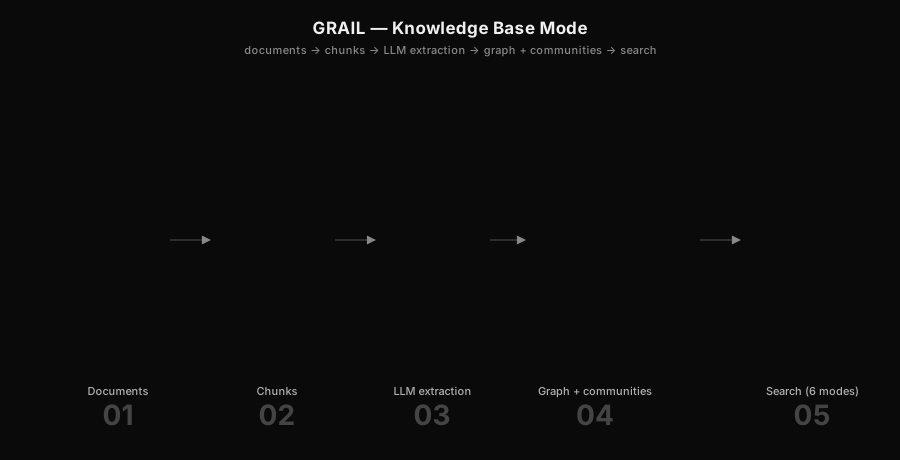
flowchart LR
    A["input/<br/>.txt .md .pdf .docx code"] --> B[preprocess<br/><i>PDF/DOCX → markdown</i>]
    B --> C[FileLoader<br/><i>chunk + provenance</i>]
    C --> D[EntityRelationshipExtractor<br/><i>single-pass LLM</i>]
    D --> E[(entities.parquet<br/>relationships.parquet)]
    E --> F[Leiden<br/><i>hierarchical + DBSCAN merge</i>]
    F --> G[(communities.parquet)]
    G --> H[CommunityReportGenerator<br/><i>LLM narratives + JSON correction</i>]
    H --> I[(community_reports.parquet)]
    E --> J[Embedder<br/><i>FAISS cosine</i>]
    J --> K[(vector index)]

    style A fill:#e6f3ff,color:#000
    style E fill:#fffce6,color:#000
    style G fill:#fffce6,color:#000
    style I fill:#fffce6,color:#000
    style K fill:#fffce6,color:#000
Memory-mode write path
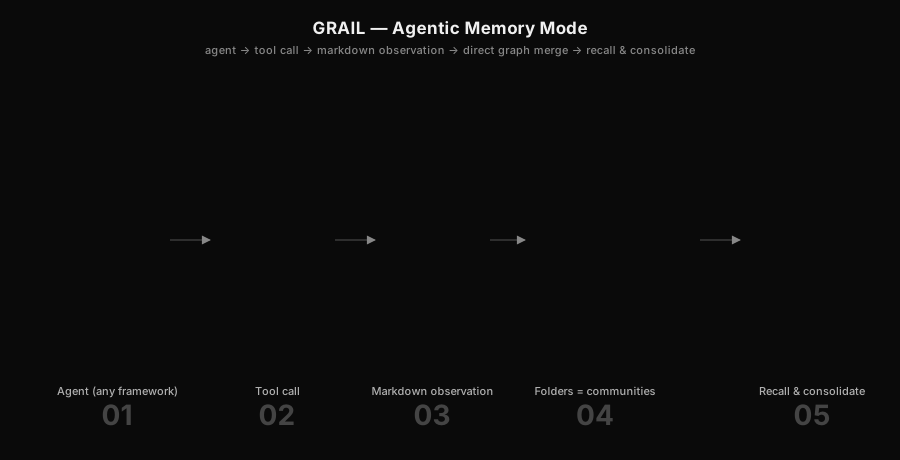
flowchart LR
A["Agent<br/>(Claude Code, Codex, OpenCode)"] -->|tool call| B[MemoryProject<br/>.add_observation]
B --> C[Write markdown<br/>memories/<category>/slug.md]
B --> D[FileLoader chunks<br/>this file only]
B --> E[Merge agent-supplied<br/>entities + relationships]
D --> F[(text_units.parquet)]
E --> G[(entities.parquet<br/>relationships.parquet)]
F --> H[Vector index]
G --> H
I["Agent calls<br/>.consolidate()"] --> J[Proposal generator<br/><i>Leiden + alias + density + split</i>]
J --> K[(proposal_set.json)]
K --> L["Agent reviews<br/>accept / reject"]
L --> G
style A fill:#fff4e6,color:#000
style I fill:#fff4e6,color:#000
style L fill:#fff4e6,color:#000
style F fill:#fffce6,color:#000
style G fill:#fffce6,color:#000
style H fill:#fffce6,color:#000
style K fill:#fffce6,color:#000
Query flow (works on both modes)
flowchart TB
    Q[Query] --> M{mode?}
    M -->|local| L[Embed → top-k entities<br/>→ assemble context → LLM]
    M -->|cascade| C[Entity gate<br/>+ BM25/cosine text rescue<br/>→ combined rank → LLM]
    M -->|global| G[Map-reduce over<br/>community reports]
    M -->|document| D[Scope to one file<br/>→ context → LLM]
    M -->|agent| A[LLM tool loop:<br/>local / cascade / global / document<br/>up to N iterations]
    M -->|recall| R[Pandas filter<br/><i>no LLM, no embedding</i>]

    L & C & G & D & A & R --> O[SearchResult]

    style Q fill:#f0f9ff,color:#000
    style O fill:#e6ffe6,color:#000
Installation
git clone git@github.com:CAMARA-CHILENA-INTELIGENCIA-ARTIFICIAL/GRAIL.git
cd GRAIL

# Recommended: uv (https://github.com/astral-sh/uv)
uv venv --python 3.12
uv pip install -e ".[dev]"          # add ",s3" for S3, ",ui" for the web chat

# Or plain pip
python3.12 -m venv .venv && source .venv/bin/activate
pip install -e ".[dev]"
Set the API keys for whichever endpoint(s) you use:
cp .env.example .env
# edit .env — OPENAI_API_KEY, DEEPINFRA_API_KEY, ANTHROPIC_API_KEY, …
Built-in endpoints cover openai, anthropic, deepinfra, together, groq, openrouter, ollama, vllm, sglang, lmstudio, local. Add your own:
# endpoints.yaml
endpoints:
  my-vllm:
    base_url: http://my-vllm.local:8000/v1
    api_key_env: MY_VLLM_KEY
    requires_key: false
Quickstart
Knowledge-base mode
# 1. Scaffold a project (low_cost_setup pre-tunes DeepInfra-friendly defaults)
uv run grail init ./my-kb --name my-kb --template low_cost_setup

# 2. Drop .txt / .md / .pdf / .docx / code files into ./my-kb/input/

# 3. Index
uv run grail index ./my-kb
👉 Full walkthrough with screenshots and troubleshooting: KB quickstart on the docs site.
# 4. Query — six modes
uv run grail query ./my-kb "What are the main themes?"           --mode global
uv run grail query ./my-kb "Who is Alice?"                       --mode local
uv run grail query ./my-kb "What dosage does protocol X cite?"   --mode cascade
uv run grail query ./my-kb "Summarise law-21250.pdf"             --mode document -d law-21250.pdf
uv run grail query ./my-kb "Compare early vs advanced treatment." --mode agent

# 5. Chat with it
uv run grail chat ./my-kb              # Textual TUI
uv run grail ui   ./my-kb              # FastAPI + React, http://127.0.0.1:8765
👉 See the web chat guide and the terminal chat guide for screenshots, slash commands, keyboard shortcuts and per-feature walkthroughs.
Agentic memory mode
# 1. Scaffold a memory project
uv run grail init ./my-mem --memory

# 2. Drive it from your agent (Python SDK example below). The agent writes
#    markdown observations under ./my-mem/memories/<category>/ and entities
#    are merged into the parquet on every write.

# 3. Recall — pure pandas filter, no LLM
uv run grail query ./my-mem --mode recall --since 7d --tag "decision"
uv run grail query ./my-mem --mode recall --category "work/clients/acme/**"

# 4. Cascade with a memory filter — combine semantic search and structural scope
uv run grail query ./my-mem "What did we decide about the migration?" \
  --mode cascade --since 30d --tag "decision"

# 5. Consolidate — generate proposals (merge aliases, discover communities, …)
uv run grail consolidate ./my-mem
uv run grail proposals list  ./my-mem
uv run grail proposals apply ./my-mem --accept <proposal_id>
👉 Full memory workflow — observations, recall, consolidate, propose / accept — with examples: Memory quickstart on the docs site.
Python SDK
GRAIL is library-first. The CLI is just a wrapper around the same Python API.
Knowledge-base mode
import asyncio
from grail import GRAIL, load_config

async def main():
    grail = GRAIL.from_config(load_config("./my-kb"))

    # Full pipeline.
    await grail.index()

    # Six search modes return the same SearchResult shape.
    answer = await grail.search("What are the main themes?", mode="global")
    print(answer.response)

    answer = await grail.agent_search("Compare early vs advanced treatment.")
    print(answer.response)

    # Incremental updates touch only affected text units.
    await grail.append(["new_doc.pdf"])
    await grail.edit({"existing.md": "/path/to/updated.md"})
    await grail.delete(["obsolete.txt"])

    # Honest cost ledger.
    print(grail.cost_tracker.render_total_cost())

asyncio.run(main())
Agentic memory mode
import asyncio
from grail import MemoryProject

async def main():
    mp = MemoryProject("./my-mem")

    # The agent writes an observation with explicit entities + relationships.
    # No LLM extraction — the caller already knows what they meant.
    reply = await mp.add_observation(
        title="Acme picked Postgres over DynamoDB",
        content="In the architecture review on Tuesday, Acme committed to "
                "Postgres for the order-history service because of "
                "transactional needs across the inventory + payments tables.",
        category="work/clients/acme",
        tags=["decision", "architecture"],
        entities=[
            {"name": "Acme",     "type": "ORGANIZATION", "description": "Client"},
            {"name": "Postgres", "type": "TECHNOLOGY",   "description": "Chosen DB"},
            {"name": "DynamoDB", "type": "TECHNOLOGY",   "description": "Rejected alternative"},
        ],
        relationships=[
            {"source": "Acme", "target": "Postgres", "relationship_type": "CHOSE",
             "description": "for transactional order-history"},
            {"source": "Acme", "target": "DynamoDB", "relationship_type": "REJECTED",
             "description": "lacked cross-table transactions"},
        ],
        confidence=0.95,
    )
    print(reply.ok, reply.data["observation_id"])

    # Recall — no LLM, structural filter only.
    recall = await mp.recall(
        mode="recall",
        category="work/clients/acme/**",
        tags=["decision"],
        since="30d",
    )
    for obs in recall.data["observations"]:
        print(obs["observed_at"], obs["title"])

    # Cascade with the same filter, so semantic search is scoped to recent
    # Acme decisions.
    answer = await mp.recall(
        "Why did Acme rule out DynamoDB?",
        mode="cascade",
        category="work/clients/acme/**",
        since="30d",
    )
    print(answer.data["response"])

    # Consolidate — runs proposal analyses; the agent reviews each item.
    proposals = mp.consolidate()
    for p in proposals.data.get("proposals", []):
        print(p["kind"], p["confidence"], p["rationale"])

asyncio.run(main())
Every MemoryProject method returns a Reply(ok, data, warnings, next_steps, error) envelope — the same shape the agent-skill scripts emit, so SDK callers and tool-calling agents read the same keys.
The memory SDK is designed to be wrapped by agent skills (SKILL.md folder format) that run inside Claude Code, OpenAI Codex, OpenCode, or any other framework that supports the standard skill convention. Discovery paths differ per framework; the skill body itself is portable.
See the Python SDK reference, the runnable examples/quickstart/quickstart.py, and the canonical embedding reference at grail/apps/chat/server.py.
Agent skill
GRAIL ships as a portable agent skill under skills/grail/ that lets a coding agent drive a knowledge base or maintain its own memory directly through tool calls — no Python harness on the agent side.
The skill follows the standard SKILL.md folder convention shared across Claude Code, OpenAI Codex, and other frameworks that adopt the same skill format, so the same folder works everywhere with framework-specific install paths.
What's inside
skills/grail/
├── SKILL.md              ← skill description + agent-facing trigger language
├── INSTALL.md            ← per-framework install paths
├── requirements.txt
├── scripts/              ← one CLI script per primitive operation
│   ├── setup.sh          ← idempotent: installs grail on first call
│   ├── init_project.py
│   ├── list_grail_projects.py
│   ├── status.py
│   ├── index.py · append.py · edit.py · delete.py · explore.py · query.py · env_check.py
│   └── memory/                   ← memory-mode tools
│       ├── add_observation.py
│       ├── add_entity.py · add_relationship.py · add_community.py
│       ├── find_similar_entity.py
│       ├── recall.py
│       ├── consolidate.py · list_proposals.py · apply_proposal.py
├── agents/openai.yaml    ← Codex sidecar (additive metadata)
├── references/           ← long-form context the agent reads on demand
│   ├── kb_mode.md · memory_mode.md · memory_tools.md
│   ├── proposals.md · search_modes.md · query_optimization.md
│   └── config_reference.md · troubleshooting.md
└── assets/
Install
The skill is published in the cchia-skills catalog. Install it with one command using the skills CLI:
npx skills add CAMARA-CHILENA-INTELIGENCIA-ARTIFICIAL/cchia-skills --skill grail
This drops the skill into ~/.claude/skills/grail/ and makes it available to Claude Code automatically. For other agent frameworks, point the installer (or the symlink below) at the framework's skills directory.
Manual install (symlink from a GRAIL checkout — best for skill development)
# Claude Code — user scope (symlink so `git pull` updates the skill)
mkdir -p ~/.claude/skills
ln -s "$(pwd)/skills/grail" ~/.claude/skills/grail

# OpenAI Codex — user scope
mkdir -p ~/.agents/skills
ln -s "$(pwd)/skills/grail" ~/.agents/skills/grail

# Project scope — bundle the skill inside a repo where you want it auto-discovered
mkdir -p .claude/skills
ln -s "$(realpath skills/grail)" .claude/skills/grail
| Framework | User-scope install | Project-scope install |
|---|---|---|
| Claude Code (CLI + claude.ai) | ~/.claude/skills/grail/ |
<repo>/.claude/skills/grail/ |
| OpenAI Codex | ~/.agents/skills/grail/ |
<repo>/.agents/skills/grail/ |
Other frameworks supporting SKILL.md |
framework-specific skills directory | same |
The skill auto-installs GRAIL via scripts/setup.sh on first call. It is idempotent — safe to invoke every session. See skills/grail/INSTALL.md for full details, including how to verify the install (scripts/env_check.py).
How an agent uses it
Every primitive is a single CLI script that returns a JSON Reply envelope ({ok, data, warnings, next_steps, error}) — the same shape the Python SDK uses, so the agent reads identical keys regardless of how it invokes GRAIL.
A typical memory-mode session inside the agent:
python scripts/list_grail_projects.py
# → which projects exist, their mode (knowledge_base or memory)

python scripts/status.py --project my-mem
# → mode, artefact counts, last_indexed_at; the agent routes on `mode`

python scripts/memory/add_observation.py \
  --project my-mem \
  --title "Acme picked Postgres over DynamoDB" \
  --content "..." \
  --category "work/clients/acme" \
  --tag decision --tag architecture \
  --entities '[{"name":"Acme","type":"ORGANIZATION"},{"name":"Postgres","type":"TECHNOLOGY"}]' \
  --relationships '[{"source":"Acme","target":"Postgres","relationship_type":"CHOSE"}]'

python scripts/memory/recall.py --project my-mem --since 7d --tag decision

python scripts/memory/consolidate.py     --project my-mem
python scripts/memory/list_proposals.py  --project my-mem
python scripts/memory/apply_proposal.py  --project my-mem --accept <proposal_id>
The skill body (the SKILL.md description, references, and scripts) is fully portable across frameworks; only the discovery path differs per framework. See skills/grail/SKILL.md for the agent-facing trigger language and routing logic.
MCP server
For MCP clients that can't run the skill — Claude Desktop, Cursor, Cline, hosted/remote setups, and other frameworks — GRAIL also ships as a Model Context Protocol server under grail/mcp/. The skill stays the primary surface for shell-capable coding agents (it carries GRAIL's routing guidance as on-demand instructions); the MCP server is the reach layer. Both wrap the same core and return the same Reply envelope.
It's one package with a profile flag, so the per-session tool surface stays lean:
pip install "graphgrail[mcp]"   # adds the MCP SDK + the `grail-mcp` binary

grail-mcp --profile memory      # agentic-memory tools
grail-mcp --profile kb           # knowledge-base tools
grail-mcp --profile all          # everything (default)
Install
Zero-install via uvx — the same one-line story as the skill, for any MCP client:
# Claude Code
claude mcp add grail-memory -- uvx --from "graphgrail[mcp]" grail-mcp --profile memory
claude mcp add grail-kb     -- uvx --from "graphgrail[mcp]" grail-mcp --profile kb
// Generic mcpServers config — Claude Desktop, Cursor, Cline, Windsurf, …
{
  "mcpServers": {
    "grail-memory": {
      "command": "uvx",
      "args": ["--from", "graphgrail[mcp]", "grail-mcp", "--profile", "memory"]
    }
  }
}
Add --project <name> to bind the server to one project (tools default to it, and the profile auto-selects from its mode). Full reference: grail/mcp/README.md. The server is distributed through the cchia-mcp catalog alongside the skill.
CLI reference
All commands take a project directory as the first positional argument.
grail init — scaffold a project
grail init <project_dir> [--name NAME] [--memory]
                         [--template TEMPLATE] [--templates-dir DIR]
                         [--overwrite] [--git/--no-git] [--list-templates]
| Flag | Description |
|---|---|
--memory |
Scaffold a memory-mode project (memories/ folder, agent-driven write path). Default is knowledge_base mode (input/ folder, grail index workflow). |
--name |
Project name (defaults to directory name). |
--template, -t |
Template pack (e.g. low_cost_setup) or your own under --templates-dir. Mutually exclusive with --memory. |
--templates-dir |
Extra directory to search for templates. |
--overwrite |
Overwrite an existing scaffold. |
--git/--no-git |
Initialise a git repo. Default: on for memory mode, off for KB mode. |
--list-templates |
List available templates and exit. |
grail index — full pipeline (KB mode)
grail index <project_dir> [--discover-entities/--no-discover-entities]
                          [--vectorstore lancedb|faiss|chromadb]
grail query — answer a question
grail query <project_dir> "<question>" [--mode MODE] [--document NAME]
                                       [--rerank/--no-rerank] [--trace DIR]
                                       [--output text|json]
                                       [--vectorstore lancedb|faiss|chromadb]
                                       # memory recall filters:
                                       [--since DELTA] [--before DELTA]
                                       [--category GLOB] [--tag TAG ...]
                                       [--entity-name NAME ...] [--type TYPE ...]
                                       [--min-confidence FLOAT]
| Flag | Description |
|---|---|
--mode, -m |
local (default) · cascade · global · document · agent · recall. |
--document, -d |
Required for --mode document. |
--rerank/--no-rerank |
Override the reranker config for this query. |
--trace, -t |
Dump full prompts, responses, and context to JSON. |
--since / --before |
Restrict to observations newer/older than ISO-8601 timestamp or relative (1h, 7d). |
--category |
Folder-glob filter (e.g. work/clients/**). |
--tag |
Tag filter; repeat for any-match. |
--entity-name, --type |
Restrict candidate pool to specific entities or types. |
--min-confidence |
Drop entities / text units below this confidence. |
grail append / edit / delete — incremental KB updates
grail append <project_dir> file1 [file2 ...]
grail edit   <project_dir> --name FILENAME --src /path/to/new
grail delete <project_dir> filename1 [filename2 ...]
grail consolidate — generate memory proposals
Runs Leiden + edge-density + alias-detection + folder-split analyses and writes a proposal set. Pure read pass — nothing mutates until the agent reviews.
grail consolidate <project_dir> [--output text|json]
grail proposals list / grail proposals apply
grail proposals list  <project_dir> [--status pending|accepted|rejected]
grail proposals apply <project_dir> [--accept ID] [--reject ID]
grail create-entities — LLM entity-type discovery (KB mode)
grail create-entities <project_dir> [--write]
grail chat / grail ui — interactive interfaces
grail chat <project_dir> [--mode agent|local|cascade|global|document]
                         [--session ID] [--db PATH]

grail ui   <project_dir> [--host HOST] [--port PORT] [--dev] [--debug]
grail viz / grail explore / grail export-neo4j
grail viz          <project_dir> [--output FILE.html] [--open-browser]
                                 [--layout-seed N] [--layout-iterations N]
grail explore      <project_dir> [--output text|json]
grail export-neo4j <project_dir> [--uri URI] [--username USER] [--password PW]
                                 [--database DB] [--clear] [--no-apoc]
                                 [--batch-size N]
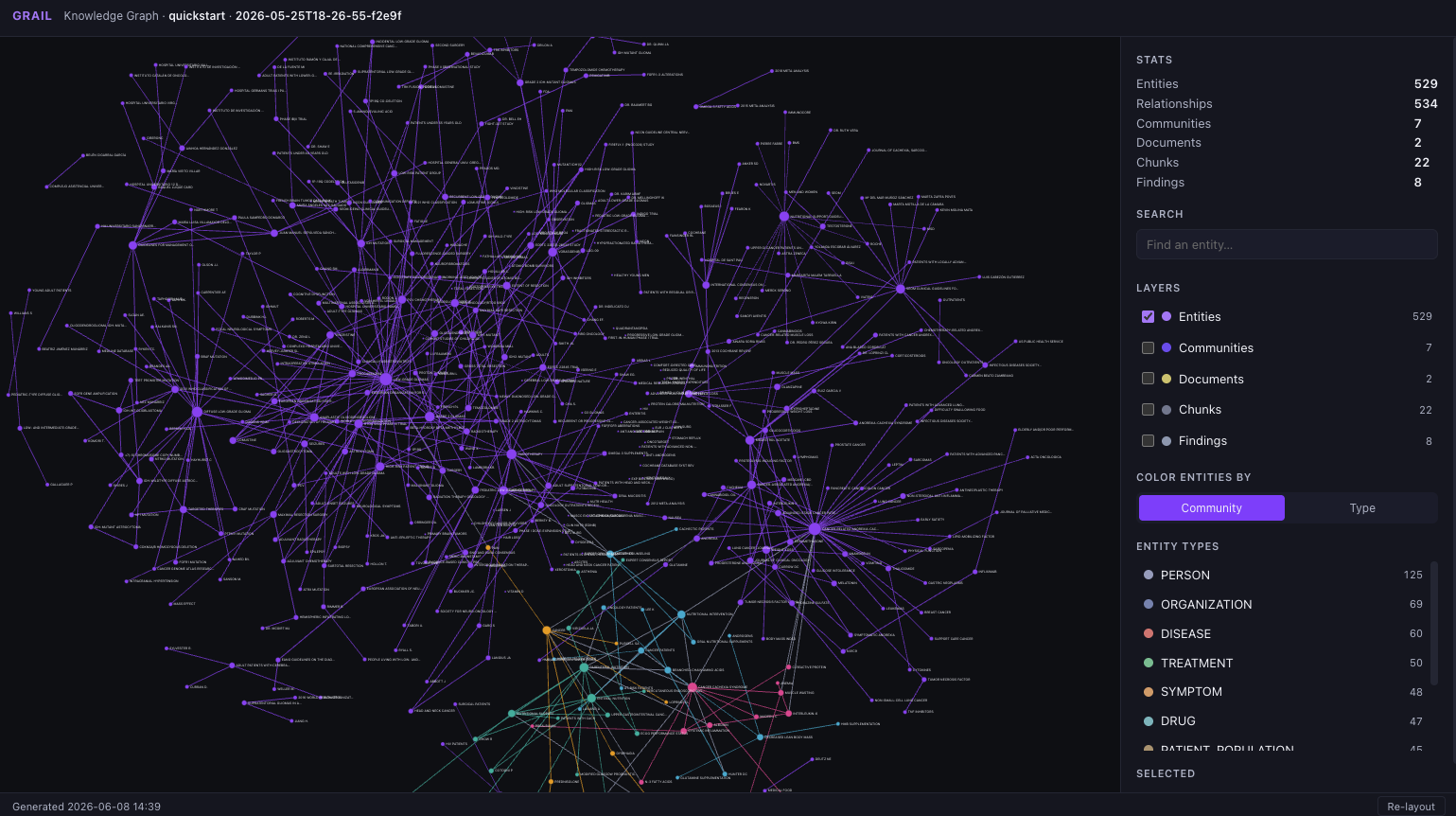
grail viz writes a single self-contained graph.html — a D3-powered interactive viewer with entity search, layer toggles, and colouring by community or entity type. Opens offline, no server required.
grail status / grail config show / grail prompt list / grail prompt show
Introspection commands for artefacts, resolved config, and the prompt registry.
Search modes
| Mode | Best for | How it works | LLM? |
|---|---|---|---|
local |
Named concepts, entities, "who/what is X" | Embed query → top-k similar entities → assemble linked text units, relationships, reports → answer. | Yes |
cascade |
Factual questions, specific details | Entity-gate + BM25/cosine text rescue → combined ranking → answer. Solves the classic GraphRAG fact-retrieval gap. | Yes |
global |
Broad / thematic questions | Map-reduce over community reports; hierarchical reduce above 100K tokens. | Yes |
document |
Single-file questions | Scope retrieval to one source document. | Yes |
agent |
Multi-step / comparative questions | LLM picks 1–3 of the above per question, with forced synthesis if iterations run out. | Yes |
recall |
Memory replay, "what did we say last week about X" | Pure pandas filter over observed_at / category / tag / entity / confidence. Zero LLM cost. Combine with any other mode as a filter modifier. |
No |
Query-shape tip for local / cascade: structure as [WHO does it] + [WHAT is the process] + [SPECIFIC TERMS from entity descriptions]. This matches entity embeddings ~3× better than keyword-only queries.
Full details: Search modes.
Prompt tuning — the biggest quality lever
GRAIL ships with 10 prompts (entity extraction, community reports, search synthesis, …) that are general-purpose by design. They work across legal text, scientific papers, code, and fiction. But the gap between reasonable and excellent output lives in the prompts.
If you spend an afternoon tuning the two or three critical prompts for your domain, you'll see compounding improvements because the gains stack across four cascading layers:
extraction prompts  →  better graph
                       ↓
report prompts      →  better community reports
                       ↓
search prompts      →  better context to the LLM
                       ↓
synthesis prompts   →  better final answers
A 20% improvement in extraction yields closer to a 60% improvement in final answer quality, because each layer amplifies the previous.
All 10 prompts are overrideable Python modules. Drop a custom directory into grail.yaml:
prompts:
  custom_paths:
    - ./my_prompts
  strict: false   # true = your pack must provide all 10 prompts
Files in ./my_prompts/<name>.py win over the built-in <name>. Mix and match: override only the ones you tune; everything else falls back to the built-in.
High-leverage targets: entity_relation (sharper extraction, domain-specific examples), local_search (pin the voice — legal, medical, technical), community_report (better global-mode summaries). For multilingual deployments (full Spanish, Portuguese, French) you can ship an entire localised pack.
➡️ Full prompt-tuning guide on grail-docs.vercel.app — domain examples (medical, legal, multilingual), iterative workflow with the LLM cache, common pitfalls, and pointers to the parser contract for entity_relation.
Storage & vector backends
Both layers are pluggable. Pick the defaults to ship today and swap when the deployment changes.
Vector stores
| Backend | Default? | Distance | Best for | Config |
|---|---|---|---|---|
| FAISS | ✓ | cosine (IndexFlatIP on L2-normalised vectors) |
In-memory speed; ships in the wheel; no separate service; ideal for projects up to ~1M vectors | vectorstore.backend: faiss |
| LanceDB | cosine / L2 | On-disk columnar; lazy-loaded; good for >1M vectors and multi-process readers | vectorstore.backend: lancedb |
|
| ChromaDB | cosine / L2 | Long-running services; built-in metadata filtering; existing Chroma deployments | vectorstore.backend: chromadb |
Override per-run from the CLI without editing config: grail index --vectorstore faiss|lancedb|chromadb and the same flag on grail query. Custom backends plug in by subclassing BaseVectorStore in grail/vectorstores/base.py.
Details: see the official docs site.
Storage backends
| Backend | Best for | Config |
|---|---|---|
| Local filesystem | Default · single machine · tests · embedded CLI | storage.backend: local, storage.root: ... |
| S3 (and S3-compatible) | Production · multi-machine · MinIO · Cloudflare R2 · any S3 API | storage.backend: s3 + s3_bucket, s3_prefix, s3_region, s3_endpoint_url |
S3 reads/writes the same parquet + GraphML artefacts — the search code is backend-agnostic. Install with the s3 extra: uv pip install -e ".[s3]". Custom backends implement the seven required methods on StorageBackend in grail/storage/base.py.
Details: see the official docs site.
LLM endpoints
Built-in: openai, anthropic, deepinfra, together, groq, openrouter, ollama, vllm, sglang, lmstudio, local. Endpoint (base URL + key env var) and model are separate fields, so changing providers is a one-line config edit. Add your own by appending to endpoints.yaml:
endpoints:
  my-vllm:
    base_url: http://my-vllm.local:8000/v1
    api_key_env: MY_VLLM_KEY
    requires_key: false
Details: Honest cost tracking.
Benchmarks
Internal: Chilean Oncology Laws (benchmark_laws)
30 patient-language questions across 7 categories against three Chilean oncology laws (~58 pages, 35 chunks). Designed as a worst-case scenario for graph-enhanced retrieval — a corpus small enough that vanilla RAG has no retrieval failures.
| Metric | GRAIL Agent | RAG Agent |
|---|---|---|
| Average score (5-dim rubric) | 4.80 / 5.00 | 4.14 / 5.00 |
| Win – Loss – Tie | 27 – 0 – 3 | 0 – 27 – 3 |
| Avg response time | ~25 s | ~35 s |
| Avg LLM calls per question | 2.6 | 3.1 |
| Empty responses | 0 | 0 |
Where the advantage comes from:
| Category | Δ score | Why |
|---|---|---|
| Cross-Source (answer spans documents) | +0.80 | Graph links across documents. |
| Comparative | +0.80 | Agent runs two local_search calls in parallel. |
| Global Synthesis | +0.90 | Community reports give bird's-eye context. |
| Multi-Chunk | +0.72 | Entity graph connects chunks. |
| Procedural | +0.64 | Relationship chains preserve step order. |
| Single Fact | +0.52 | Entity descriptions answer directly. |
| Negation / Boundary | +0.08 | Near tie. |
Methodology: Qwen3.6-35B-A3B (DeepInfra) for inference, Qwen3-Embedding-8B for retrieval, FAISS cosine, 3-iteration agent budget, Claude Opus 4.6 judge with a 5-dimension rubric (Correctness 35%, Completeness 25%, Source Grounding 15%, Coherence 10%, No Hallucination 15%).
uv run python benchmarks/run_benchmark.py
👉 Methodology, per-question breakdown and reproduction notes:
benchmarks/results/. A bar-chart visualisation of these numbers will land on the docs site once generated.
Full report and per-question detail: benchmarks/results/.
External (roadmap)
- GraphRAG-Bench — 4,072 questions, Medical + Novel domains, 4 difficulty levels.
- LongMemEval — 500 questions on chat-session memory; tracked under memory mode.
See the Benchmarks roadmap.
Documentation
📖 The official documentation lives at grail-docs.vercel.app — bilingual (ES + EN), with guided tutorials, concept pages with analogies, full CLI/SDK reference, and copy-paste recipes.
Learn
| Topic | Link |
|---|---|
| What is GRAIL | grail-docs.vercel.app/learn/what-is-grail |
| The two modes | /learn/two-modes |
| Knowledge graphs in 5 minutes | /learn/knowledge-graphs-in-5-min |
| The six search modes | /learn/search-modes |
| Cascade in depth | /learn/cascade |
| Communities and Leiden | /learn/communities-leiden |
| Memory model | /learn/memory-model |
| Honest cost tracking | /learn/cost-tracking |
Get started
| Topic | Link |
|---|---|
| Install GRAIL | /start/install |
| KB quickstart | /start/kb-quickstart |
| Memory quickstart | /start/memory-quickstart |
| Skill quickstart | /start/skill-quickstart |
| MCP quickstart | /start/mcp-quickstart |
Guides
| Topic | Link |
|---|---|
| Web chat | /guides/web-chat |
| Terminal chat (CLI) | /guides/cli-chat |
| Tune prompts to your domain ⭐ | /guides/prompt-tuning |
| Optimise indexing costs | /guides/cost-optimization |
| Trace queries for debug | /guides/query-tracing |
| Visualise the graph | /guides/visualization |
Reference
| Topic | Link |
|---|---|
| CLI reference | /reference/cli |
| Python SDK | /reference/python-sdk |
Cookbook
| Topic | Link |
|---|---|
| PDF Q&A bot | /cookbook/pdf-corpus-qa-bot |
Contributor / internal notes (deprecated for end users)
The in-repo docs/ folder is kept for contributors as technical notes on architecture, design decisions, and module internals. These are not user-facing documentation and may drift from the public site — always prefer grail-docs.vercel.app for usage docs.
Contributing
GRAIL accepts contributions across 9 well-defined categories under a two-step flow:
- Open an issue in the matching category template (the template asks the right questions up front).
- Wait for
status:approvedfrom the team. - Open a PR that references the approved issue.
| # | Category | What kind of change |
|---|---|---|
| 01 | Inference providers | New LLM endpoint (Fireworks, Hugging Face, custom OpenAI-compat) |
| 02 | Multimodal capabilities | Vision, audio, video — new functionality |
| 03 | Agentic logic | New agent tool, system-prompt update, tool-selection heuristics |
| 04 | Search methods | New search mode beyond the existing 6 |
| 05 | Indexing methods | New chunker, extractor, community algorithm, report generator |
| 06 | Vector stores | New BaseVectorStore backend |
| 07 | Cloud integrations | New StorageBackend, deploy target, secrets vault |
| 08 | Library additions | New Python dependency — runtime, optional extra, dev-only |
| 09 | Visual apps | Chat web UI, terminal TUI, dashboards, graph viz |
For open-ended design questions or ideas that don't fit a category, use GitHub Discussions.
No PR without an approved issue. This rule saves you time — we want to give design feedback before you write code, not after.
📖 Full contribution guide: CONTRIBUTING.md — covers local setup, code conventions, testing, commit style, dev-prompt convention, and label taxonomy.
Acknowledgements
- The single-pass LLM extraction of entities and relationships from text chunks in GRAIL's knowledge-base mode draws inspiration from Microsoft GraphRAG.
- Nirvai, partner of CCHIA for the code base and testing results on agentic memory.
GRAIL is developed under the open-source commission of the Cámara Chilena de Inteligencia Artificial (Chilean Chamber of Artificial Intelligence).
Author
Benjamín González Guerrero — Founder at Nirvai (Nirvana). Contact: ben@nirvana-ai.com
GRAIL is shipped under the Nirvai (Nirvana) umbrella.
License
MIT © 2025 Cámara Chilena de Inteligencia Artificial.
1 maintainer

Metadata
1 maintainer
Release files for graphgrail 0.1.7
For a detailed explanation of source distributions (sdists) and built distributions (wheels), please see the package formats documentation.
Source distribution (sdist)
| File | Size | Uploaded | |
|---|---|---|---|
| graphgrail-0.1.7.tar.gz | 3.7 MB | Details |
Built distribution (wheel)
| File | Interpreter | ABI | Platform | Reset |
|---|---|---|---|---|
| graphgrail-0.1.7-py3-none-any.whl | Python 3 | none | any | Details |
Total release size: 7.2 MB
Release files / graphgrail-0.1.7.tar.gz
| Download URL | graphgrail-0.1.7.tar.gz |
|---|---|
| Size | 3.7 MB |
| Tags | Source |
|
SHA-256 checksum How to use checksums |
c100d0cde1e1844a5a181f3cff176a3631192f6c90a7a0d05bd3fb1296e8caa7
|
|
BLAKE2b-256 checksum How to use checksums |
abc1bdd5ec5594a26bcfb53acd4858b5501d304085e4eebd2311084fa07689c2
|
| Upload date | |
|
Uploaded using Trusted Publishing? What is trusted publishing? |
No |
| Uploaded via |
uv/0.11.30 {"installer":{"name":"uv","version":"0.11.30","subcommand":["publish"]},"python":null,"implementation":{"name":null,"version":null},"distro":{"name":"Ubuntu","version":"24.04","id":"noble","libc":null},"system":{"name":null,"release":null},"cpu":null,"openssl_version":null,"setuptools_version":null,"rustc_version":null,"ci":true}
|
Release files / graphgrail-0.1.7-py3-none-any.whl
| Download URL | graphgrail-0.1.7-py3-none-any.whl |
|---|---|
| Size | 3.5 MB |
| Tags | Python 3 |
|
SHA-256 checksum How to use checksums |
66db9db9dacc3f33c3eaaa2bbd91d6532260bc4f5db763c3b0e5a8bf292504c6
|
|
BLAKE2b-256 checksum How to use checksums |
fdedfcad7ae99517c1894afb4837d67b5dbfa3dbd2f2e330bb8b1532f8006de5
|
| Upload date | |
|
Uploaded using Trusted Publishing? What is trusted publishing? |
No |
| Uploaded via |
uv/0.11.30 {"installer":{"name":"uv","version":"0.11.30","subcommand":["publish"]},"python":null,"implementation":{"name":null,"version":null},"distro":{"name":"Ubuntu","version":"24.04","id":"noble","libc":null},"system":{"name":null,"release":null},"cpu":null,"openssl_version":null,"setuptools_version":null,"rustc_version":null,"ci":true}
|














