
The graphid Module





Read the docs |
|
Github |
|
Pypi |
Graph Identification
A graph algorithm to manage the identification of individuals in a population using automatic pairwise decision algorithms with a humans in the loop. It is agnostic to the specific ranking and verification algorithms. In fact, it can work without a ranking or verification algorithm, but in that case all reviews will have to be manual, and it will be difficult to prioritize which pairs of annotations (typically images) to look at first.
This is the graph identification described in Chapter 5 of my thesis. Viewing this PDF online can be slow, so I’ve linked there raw text here.
General Information
While this repo is functional, I don’t maintain it as often as I do for other libraries that I regularly use. Its use case is fairly niche.
Helpful commands I’m currently using in development and debugging. Perhaps they will be somewhat illustrative of what this package is trying to do.
python -m graphid.demo.dummy_infr demodata_infr --show
python -m graphid.demo.dummy_infr demodata_infr --num_pccs=25 --show
python -m graphid.demo.dummy_infr demodata_infr --num_pccs=100 --show
The first of these commands will generate an image that looks like this:
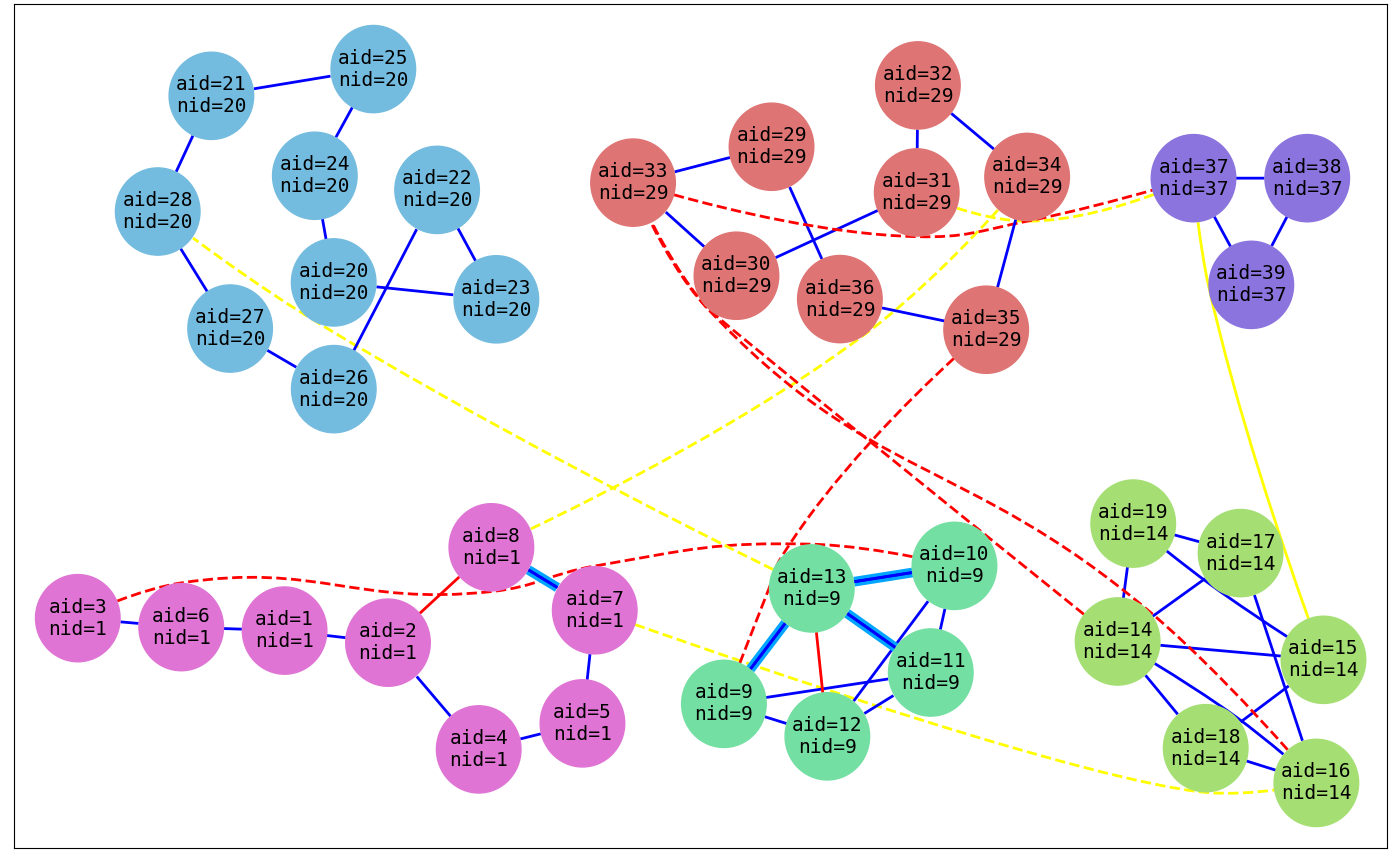
The “aid” is an annotation id, the “nid” is a name id. Blue edges mean two annotation match. Red edges mean two annotations don’t match. Yellow edges means that two annotations are not comparable (i.e. not enough info to determine if they match or not). Edges that are highlighted are ones flagged by the program for the user to re-check because it inferred that there is an inconsistency in the graph. Edges that are dotted, are flagged by the program as actually between two distinct individuals.
This README is a mess. Why not look at this Jupyter notebook in the meantime. (Note as of 2019-June-09 the GitHub viewer seems broken, but this link is working)
Installation
You should be able to simply pip install graphid. However, you might have an issue with pygraphviz. There also may be issues on Python 3.7 due to use of StopIteration.
Dependencies
sudo apt-get install -y graphviz libgraphviz-dev
pip install pygraphviz
See pygraphviz install details for more information and instructions for non-debian systems.
This project is Python 3.6+, Python 2 is not supported.
If you want to be able to draw the graphs, you must install graphviz, which is needed by pygraphviz.
I’m currently having trouble getting this to work on windows due to pygraphviz.
Conda can be used to install pygraphviz on Windows? conda install -c marufr pygraphviz. Not sure if this works. I recommend avoiding conda if possible, but Windows is one place where I think it has a good use-case.
1 maintainer

Download files
Download the file for your platform. If you're not sure which to choose, learn more about installing packages.
Source Distribution
Built Distribution
Filter files by name, interpreter, ABI, and platform.
If you're not sure about the file name format, learn more about wheel file names.
Copy a direct link to the current filters
File details
Details for the file graphid-0.1.2.tar.gz.
File metadata
- Download URL: graphid-0.1.2.tar.gz
- Upload date:
- Size: 222.3 kB
- Tags: Source
- Uploaded using Trusted Publishing? No
- Uploaded via:
twine/6.1.0 CPython/3.12.3
File hashes
| Algorithm | Hash digest | |
|---|---|---|
| SHA256 |
d83e33bae536bb4fb69e11c5ba2dbcf28d91c7e34c1a3292517848146fefbd00
|
|
| MD5 |
9e114291a514f973dff1412b38fdad93
|
|
| BLAKE2b-256 |
dcdc6803d206d9e481c83d1f4237b11ef5c013f58df6db3ab5bc5b331680127d
|
File details
Details for the file graphid-0.1.2-py3-none-any.whl.
File metadata
- Download URL: graphid-0.1.2-py3-none-any.whl
- Upload date:
- Size: 240.0 kB
- Tags: Python 3
- Uploaded using Trusted Publishing? No
- Uploaded via:
twine/6.1.0 CPython/3.12.3
File hashes
| Algorithm | Hash digest | |
|---|---|---|
| SHA256 |
c07a25aa56d17c01decd3cb5d93d4cc2fc3a9ab4ebef4ad863b34fd12965984e
|
|
| MD5 |
6204cdde6c4b20d0ffb6383448fd132c
|
|
| BLAKE2b-256 |
615f6eb5c7989095d37795287d3d4e7cb32f5d52ebfec74f474fc2a5c61c1523
|














