








GraphMuse
GraphMuse is a Python Library for Graph Deep Learning on Symbolic Music. This library intents to address Graph Deep Learning techniques and models applied specifically to Music Scores.
It contains a core set of graph-based music representations, based on Pytorch Geometric Data and HeteroData classes. It includes functionalities for these graphs such as Sampling and several Graph Convolutional Networks.
The main core of the library includes sampling strategies for Music Score Graphs, Dataloaders, Graph Creation classes, and Graph Convolutional Networks. The graph creation is implemented partly in C and works in unison with the Partitura library for parsing symbolic music.
It implements a variety of graph neural networks for music, including MusGConv, NoteGNN, MeasureGNn, BeatGNN, MetricalGNN, and HybridGNN.
Read the GraphMuse paper here.
Why GraphMuse?
GraphMuse is a library for symbolic music graph processing. It provides a set of tools for creating, manipulating, and learning from symbolic music graphs. It is built on top of PyTorch Geometric and provides a set of graph convolutional networks tailored to music data. GraphMuse is designed to be easy to use and flexible, allowing users to experiment with different graph representations and models for their music data.
GraphMuse aims to provide a set of tools for symbolic music graph processing that are easy to use and flexible.
Installation
GraphMuse is built on top of PyTorch and Pytorch Geometric. Therefore you need to install Pytorch and Pytorch Geometric first. We recommend to use conda or any other virtual environment to install and experiment with GraphMuse. GraphMuse is compatible with python 3.8 or later. To install a conda environment ensure that conda is installed in your system (info here) and then use:
conda install -n graphmuse python=3.11 pip
Pytorch and Pytorch Geometric Installation
First you need to install the Pytorch version suitable for your system. You can find the instructions here.
You also need to install Pytorch Geometric. You can find the instructions here. We recommend to use conda:
conda install pyg -c pyg
GraphMuse Installation
Using pip
You can install graphmuse along with the dependencies using pip:
pip install graphmuse
Troubleshooting
If you encounter problems during the installation due to missing the pyg-lib package you can install it using:
pip install pyg-lib -f https://data.pyg.org/whl/torch-${TORCH}+${CUDA}.html
by replacing your version of Torch and CUDA. To use CPU just type cpu. More info here.
Sometimes the optional dependencies of Pytorch Geometric that Graphmuse needs to work properly might cause problems due to C compilation or system compatibility. If you have problems with some of the torch scatter, sparse, cluster, or pyg-lib packages please follow the instructions here.
When encountering problems with some of these dependency packages usually the best solution is to start fresh with the installation.
Installing from Source
You can also install GraphMuse from source. First, clone the repository:
git clone https://github.com/manoskary/graphmuse.git
cd graphmuse
Then use pip for the rest of the dependencies:
pip install --verbose git+https://github.com/pyg-team/pyg-lib.git
pip install --verbose torch_scatter
pip install --verbose torch_sparse
pip install --verbose torch_cluster
pip install partitura
and install using the setup file:
python setup.py install
Usage
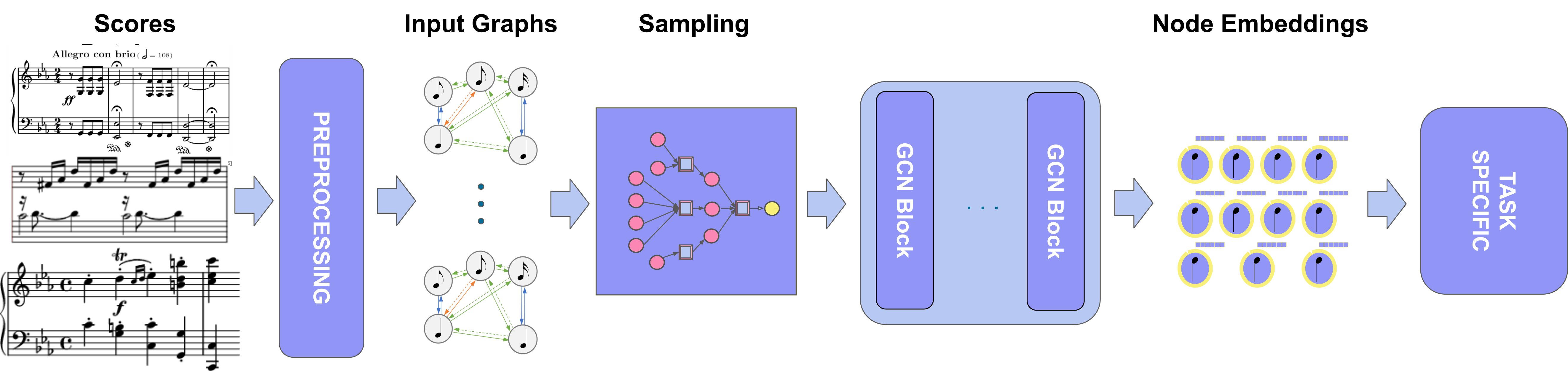
The GraphMuse processing pipeline:
Graph Convolution
GraphMuse includes a variety of graph convolutional layers for music graphs.
Using the MetricalGNN model a simple example of a forward pass is shown below.
import graphmuse.nn as gmnn
import torch

# Define the number of input features, output features, and edge features
num_input_features = 10
num_hidden_features = 10
num_output_features = 10
num_layers = 1
# metadata needs to be provided for the metrical graph similarly to Pytorch Geometric heterogeneous graph modules.
metadata = (
    ['note'],
    [('note', 'onset', 'note')]
)

# Create an instance of the MetricalGNN class
metrical_gnn = gmnn.MetricalGNN(num_input_features, num_hidden_features, num_output_features, num_layers, metadata=metadata)

# Create some dummy data for the forward pass
num_nodes = 5
x_dict = {'note': torch.rand((num_nodes, num_input_features))}
edge_index_dict = {('note', 'onset', 'note'): torch.tensor([[0, 1, 2, 3, 4], [1, 2, 3, 4, 0]])}

# Perform a forward pass
out = metrical_gnn(x_dict, edge_index_dict)

print(out)
Score Graphs
GraphMuse includes accelerated implementations of graph creation for music scores.
You can create a score graph from a musicxml file using the Partitura Python Library and the create_score_graph function from GraphMuse.
import graphmuse as gm
import partitura
import torch

score = partitura.load_musicxml('path_to_musicxml')
note_array = score.note_array()
feature_array = torch.rand((len(note_array), 10))
score_graph = gm.create_score_graph(feature_array, note_array)
print(score_graph)
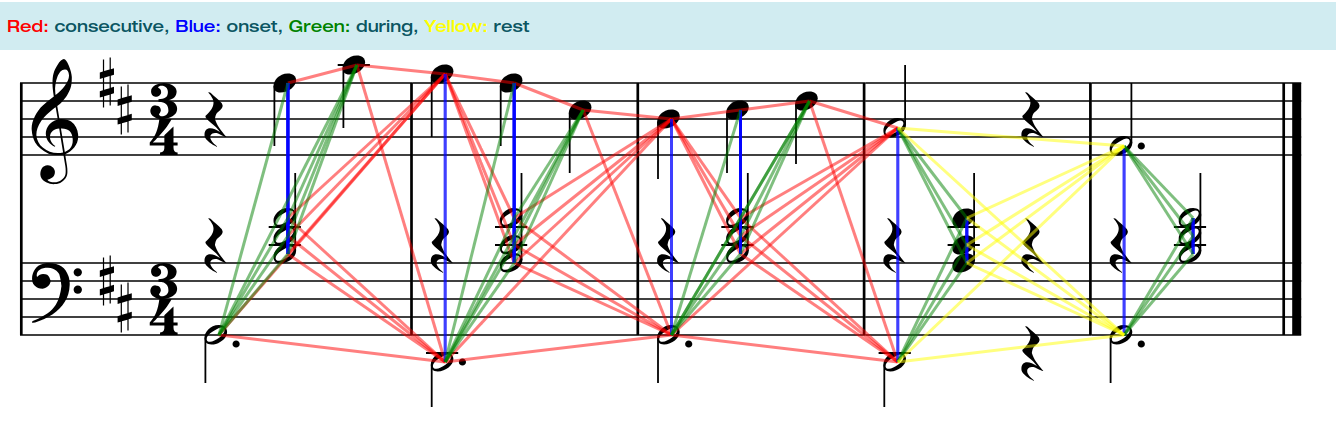
A score graph is a PyTorch Geometric HeteroData object that follows the following conceptual structure:
Sampling and Batching
GraphMuse includes a dataloader for sampling and batching music graphs together.
It uses the node-wise sampling strategy for each graph and batching them together.
You can specify the number of graphs to sample (batch_size) and the size of the subgraph to sample (subgraph_size).
Then, you can create an instance of the MuseNeighborLoader class by passing the list of graphs, the subgraph size, the batch size, and the number of neighbors as arguments.
Finally, you can iterate over the dataloader to get batches of subgraphs.
from graphmuse.loader import MuseNeighborLoader
from graphmuse.utils import create_random_music_graph
import numpy as np
import torch

# Create a random graph
num_graphs = 10
max_nodes = 200
min_nodes = 100
max_dur = 20
min_dur = 1
subgraph_size = 50
batch_size = 4
feature_size = 10
labels = 4

graphs = list()
for i in range(num_graphs):
    l = np.random.randint(min_nodes, max_nodes)
    graph = create_random_music_graph(
        graph_size=l, min_duration=min_dur, max_duration=max_dur, feature_size=feature_size, add_beat_nodes=True)
    label = np.random.randint(0, labels, graph["note"].x.shape[0])
    graph["note"].y = torch.tensor(label, dtype=torch.long)
    graphs.append(graph)

# Create dataloader
dataloader = MuseNeighborLoader(graphs, subgraph_size=subgraph_size, batch_size=batch_size,
                                num_neighbors=[3, 3, 3])

# Iterate over the dataloader
for batch in dataloader:
    print(batch)
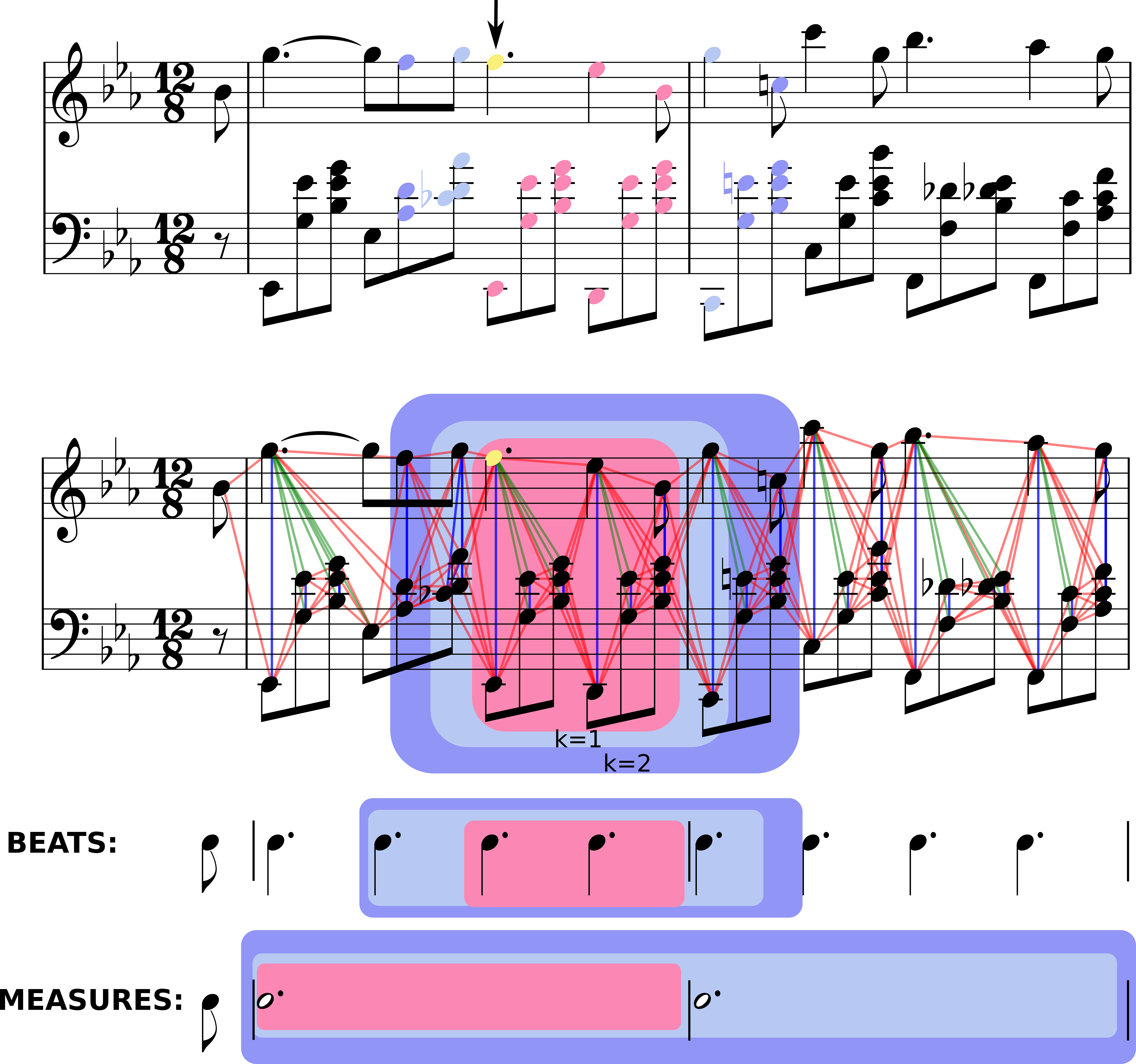
The conceptual structure of sampling from each score graph is shown below:
Citing GraphMuse
GraphMuse was published at ISMIR 2024. To cite our work:
@inproceedings{karystinaios2024graphmuse,
  title={GraphMuse: A Library for Symbolic Music Graph Processing},
  author={Karystinaios, Emmanouil and Widmer, Gerhard},
  booktitle={Proceedings of the International Society for Music Information Retrieval Conference (ISMIR)},
  year={2024}
}
1 maintainer

Metadata
1 maintainer
Release files for graphmuse 0.0.5
For a detailed explanation of source distributions (sdists) and built distributions (wheels), please see the package formats documentation.
Built distributions (wheels)
Total release size: 396.2 kB
Release files / graphmuse-0.0.5-cp312-cp312-manylinux_2_5_x86_64.manylinux1_x86_64.manylinux_2_17_x86_64.manylinux2014_x86_64.whl
| Download URL | graphmuse-0.0.5-cp312-cp312-manylinux_2_5_x86_64.manylinux1_x86_64.manylinux_2_17_x86_64.manylinux2014_x86_64.whl |
|---|---|
| Size | 79.1 kB |
| Tags | CPython 3.12 Linux glibc 2.17+ x86-64 Linux glibc 2.5+ x86-64 |
|
SHA-256 checksum How to use checksums |
8e9c5ee415ee2f74d669b8e2422b5181f6d5f0b9de8567dd363f96db81692941
|
|
BLAKE2b-256 checksum How to use checksums |
c30e4d3786cd440923a1b3301729b24bb02489e83691d12703dd362a37fc7033
|
| Upload date | |
|
Uploaded using Trusted Publishing? What is trusted publishing? |
No |
| Uploaded via |
twine/5.1.1 CPython/3.10.12
|
Release files / graphmuse-0.0.5-cp311-cp311-manylinux_2_5_x86_64.manylinux1_x86_64.manylinux_2_17_x86_64.manylinux2014_x86_64.whl
| Download URL | graphmuse-0.0.5-cp311-cp311-manylinux_2_5_x86_64.manylinux1_x86_64.manylinux_2_17_x86_64.manylinux2014_x86_64.whl |
|---|---|
| Size | 79.0 kB |
| Tags | CPython 3.11 Linux glibc 2.17+ x86-64 Linux glibc 2.5+ x86-64 |
|
SHA-256 checksum How to use checksums |
c6a3b7a2596b7686cd9d43e2f664f24003f50a0fe0d47be641ed0dd1497aa28a
|
|
BLAKE2b-256 checksum How to use checksums |
a8fe36b85eb9ab3907f24e7e65535db89a2708bc036683ed325a3e9a39a48471
|
| Upload date | |
|
Uploaded using Trusted Publishing? What is trusted publishing? |
No |
| Uploaded via |
twine/5.1.1 CPython/3.10.12
|
Release files / graphmuse-0.0.5-cp310-cp310-manylinux_2_5_x86_64.manylinux1_x86_64.manylinux_2_17_x86_64.manylinux2014_x86_64.whl
| Download URL | graphmuse-0.0.5-cp310-cp310-manylinux_2_5_x86_64.manylinux1_x86_64.manylinux_2_17_x86_64.manylinux2014_x86_64.whl |
|---|---|
| Size | 78.9 kB |
| Tags | CPython 3.10 Linux glibc 2.17+ x86-64 Linux glibc 2.5+ x86-64 |
|
SHA-256 checksum How to use checksums |
0859acf26454b0c17631812d949ffd9f72675e2d2ccd3e489fbd4bf23d5967aa
|
|
BLAKE2b-256 checksum How to use checksums |
39750c6bafe276432e6e23c0b401074d54a6ab1f35b2d5ab461f32a26541ea15
|
| Upload date | |
|
Uploaded using Trusted Publishing? What is trusted publishing? |
No |
| Uploaded via |
twine/5.1.1 CPython/3.10.12
|
Release files / graphmuse-0.0.5-cp39-cp39-manylinux_2_5_x86_64.manylinux1_x86_64.manylinux_2_17_x86_64.manylinux2014_x86_64.whl
| Download URL | graphmuse-0.0.5-cp39-cp39-manylinux_2_5_x86_64.manylinux1_x86_64.manylinux_2_17_x86_64.manylinux2014_x86_64.whl |
|---|---|
| Size | 78.8 kB |
| Tags | CPython 3.9 Linux glibc 2.17+ x86-64 Linux glibc 2.5+ x86-64 |
|
SHA-256 checksum How to use checksums |
de23723509c34e9c4c0784f9ea4037de32b98486f07f9aee6f927d91ea654152
|
|
BLAKE2b-256 checksum How to use checksums |
bfabd10ba39d12b4e0f9e2352e017a1f15e232b57724704690f0281c6c5dd1f1
|
| Upload date | |
|
Uploaded using Trusted Publishing? What is trusted publishing? |
No |
| Uploaded via |
twine/5.1.1 CPython/3.10.12
|
Release files / graphmuse-0.0.5-cp38-cp38-manylinux_2_5_x86_64.manylinux1_x86_64.manylinux_2_17_x86_64.manylinux2014_x86_64.whl
| Download URL | graphmuse-0.0.5-cp38-cp38-manylinux_2_5_x86_64.manylinux1_x86_64.manylinux_2_17_x86_64.manylinux2014_x86_64.whl |
|---|---|
| Size | 80.5 kB |
| Tags | CPython 3.8 Linux glibc 2.17+ x86-64 Linux glibc 2.5+ x86-64 |
|
SHA-256 checksum How to use checksums |
cb9eedd3bb229fd702040e3b5e670a5f7d55ee463a8468df3da9195ed62d6ca0
|
|
BLAKE2b-256 checksum How to use checksums |
c36f48f0819d078fe89afacadc017e6343012558b96269b592139eb6115f967c
|
| Upload date | |
|
Uploaded using Trusted Publishing? What is trusted publishing? |
No |
| Uploaded via |
twine/5.1.1 CPython/3.10.12
|
Security for graphmuse 0.0.5
Provenance
Provenance describes where a file came from. On PyPI, provenance is shared via attestations, which provide a verifiable record of the build or publishing details. View details, limitations and caveats.
No provenance found
None of the files in this release were uploaded with provenance metadata.
A note on package security
PyPI is a repository for distributing packages, not a service for auditing them. While third-party security researchers and our staff do their best to detect and remove malicious packages, PyPI cannot guarantee the quality, security or suitability of any given package.
To learn more about protecting yourself from malicious actors, visit our package security documentation.














