
A tool to capture, measure and plot printed data

Project description
GraphOut: A tool to capture, measure and plot printed data
Good for measuring performance or benchmarking, especially if all you can get your hands on is print.
Install
pip install graphout
Example
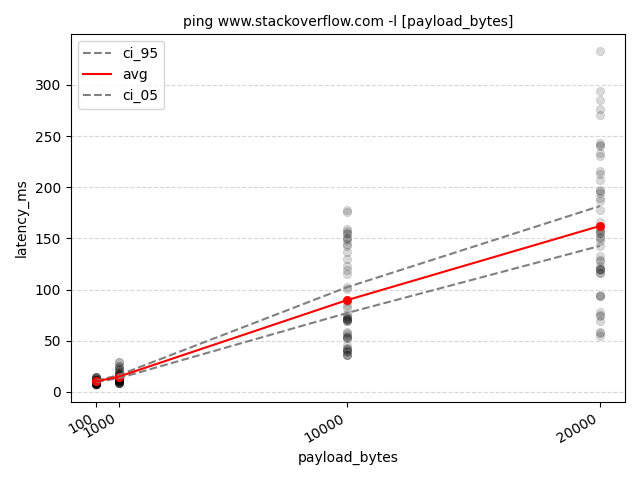
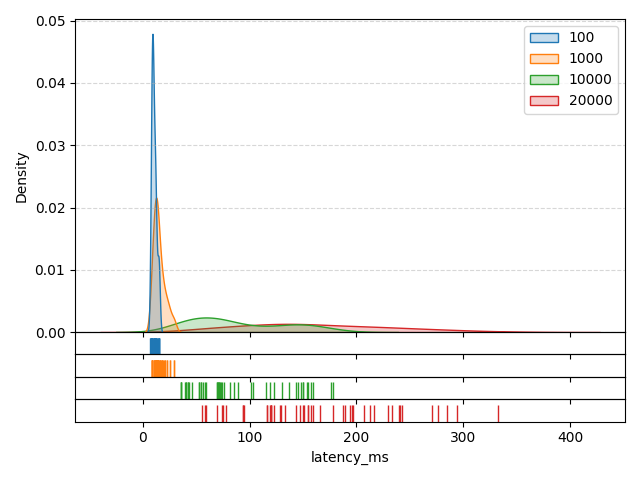
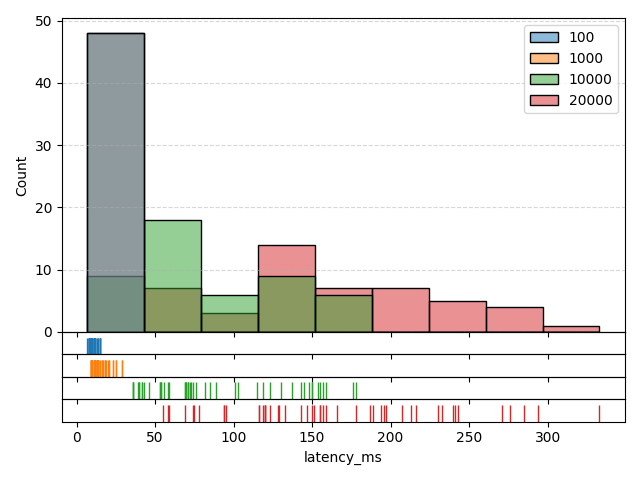
Execute ping 12 times using 6 parallel processes, parse the millisecond latency and make a graph.
graphout -n 12 --proc 6 --out ping_so -p 'latency_ms:time=([0-9]*)ms' --stack --rot-x -- ping www.stackoverflow.com -l [payload_bytes] -- 100 1000 10000 20000
         |--------------------------------- options --------------------------------|    |------------- command template ------------|    |----- values -----|
After running this, three things are going to happen:
- The ping command is going to be run 12 times for each
[100, 1000, 10000, 20000]value placed at[payload_bytes]in the command template. - The output is going to be parsed line-by-line and a
time=([0-9]*)msregex applied to extract the latency. - The numeric results and some charts are going to be put into a folder named
ping_so.
Each command configuration is going to contain up to 48 datapoints since each ping produces 4 measures, so 4 * 12 = 48.
However, ping can sometimes time out so less than 48 datapoints is also possible.
Result: Graph
Result: Kernel Density Estimate (KDE)
Result: Histogram
Result: Histogram + KDE (Stacked)
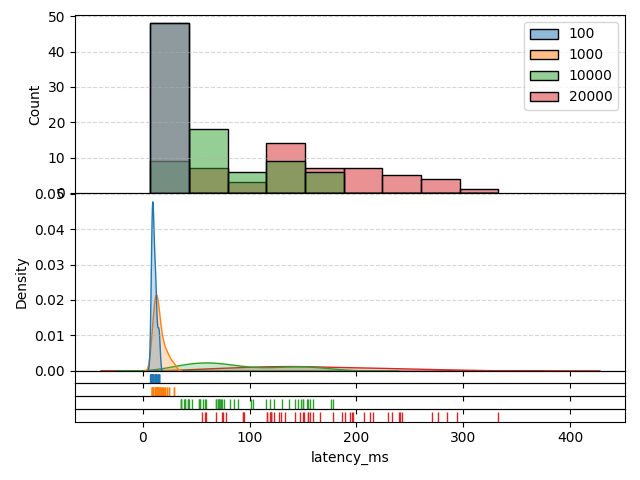
Separate per-parameter-value KDEs and histograms are also generated.
Result: result.json
{
"base": "ping www.stackoverflow.com -l [payload_bytes]",
"runs": [
{
"command": "ping www.stackoverflow.com -l 100",
"x_name": "payload_bytes",
"x": "100",
"measures": {
"latency_ms": {
"stats": {
"cnt": 48,
"avg": 10.3125,
"std": 2.1846295756898293,
"min": 7.0,
"max": 15.0
},
"data": [
8.0,
8.0,
10.0,
10.0,
8.0,
9.0,
10.0,
14.0,
10.0,
11.0,
10.0,
14.0,
8.0,
11.0,
9.0,
13.0,
11.0,
9.0,
9.0,
8.0,
7.0,
9.0,
9.0,
9.0,
8.0,
9.0,
8.0,
9.0,
8.0,
12.0,
15.0,
11.0,
10.0,
9.0,
12.0,
12.0,
9.0,
12.0,
15.0,
11.0,
9.0,
12.0,
15.0,
9.0,
8.0,
12.0,
15.0,
11.0
]
}
}
},
{
"command": "ping www.stackoverflow.com -l 1000",
"x_name": "payload_bytes",
"x": "1000",
"measures": {
"latency_ms": {
"stats": {
"cnt": 48,
"avg": 15.0,
"std": 5.238970176536444,
"min": 9.0,
"max": 29.0
},
"data": [
9.0,
14.0,
21.0,
18.0,
12.0,
13.0,
12.0,
9.0,
9.0,
10.0,
18.0,
18.0,
11.0,
14.0,
16.0,
9.0,
9.0,
14.0,
13.0,
14.0,
9.0,
13.0,
14.0,
12.0,
13.0,
20.0,
29.0,
19.0,
11.0,
17.0,
25.0,
12.0,
13.0,
14.0,
29.0,
15.0,
13.0,
16.0,
21.0,
23.0,
11.0,
12.0,
25.0,
23.0,
10.0,
10.0,
16.0,
12.0
]
}
}
},
{
"command": "ping www.stackoverflow.com -l 10000",
"x_name": "payload_bytes",
"x": "10000",
"measures": {
"latency_ms": {
"stats": {
"cnt": 48,
"avg": 89.60416666666667,
"std": 44.4559258588957,
"min": 36.0,
"max": 178.0
},
"data": [
40.0,
70.0,
71.0,
69.0,
54.0,
36.0,
42.0,
43.0,
76.0,
130.0,
176.0,
85.0,
103.0,
74.0,
145.0,
115.0,
123.0,
101.0,
119.0,
143.0,
148.0,
155.0,
89.0,
178.0,
154.0,
39.0,
36.0,
40.0,
137.0,
72.0,
53.0,
58.0,
159.0,
53.0,
36.0,
42.0,
157.0,
82.0,
69.0,
70.0,
150.0,
59.0,
46.0,
56.0,
150.0,
73.0,
54.0,
71.0
]
}
}
},
{
"command": "ping www.stackoverflow.com -l 20000",
"x_name": "payload_bytes",
"x": "20000",
"measures": {
"latency_ms": {
"stats": {
"cnt": 48,
"avg": 162.10416666666666,
"std": 68.78682443834762,
"min": 55.0,
"max": 333.0
},
"data": [
78.0,
94.0,
94.0,
95.0,
133.0,
59.0,
55.0,
58.0,
187.0,
155.0,
120.0,
207.0,
240.0,
116.0,
196.0,
166.0,
285.0,
197.0,
159.0,
129.0,
333.0,
230.0,
216.0,
233.0,
213.0,
69.0,
74.0,
75.0,
241.0,
120.0,
119.0,
120.0,
243.0,
128.0,
123.0,
116.0,
271.0,
151.0,
147.0,
143.0,
276.0,
155.0,
157.0,
150.0,
294.0,
194.0,
189.0,
178.0
]
}
}
}
],
"args": "-n 12 --proc 6 --out ping_so -p latency_ms:time=([0-9]*)ms --stack --rot-x -- ping www.stackoverflow.com -l [payload_bytes] -- 100 1000 10000 20000"
}
Release history Release notifications | RSS feed


Download files
Download the file for your platform. If you're not sure which to choose, learn more about installing packages.
Source Distribution
Built Distribution
Filter files by name, interpreter, ABI, and platform.
If you're not sure about the file name format, learn more about wheel file names.
Copy a direct link to the current filters
File details
Details for the file graphout-1.0.2.5.tar.gz.
File metadata
- Download URL: graphout-1.0.2.5.tar.gz
- Upload date:
- Size: 11.3 kB
- Tags: Source
- Uploaded using Trusted Publishing? No
- Uploaded via: uv/0.11.3 {"installer":{"name":"uv","version":"0.11.3","subcommand":["publish"]},"python":null,"implementation":{"name":null,"version":null},"distro":null,"system":{"name":null,"release":null},"cpu":null,"openssl_version":null,"setuptools_version":null,"rustc_version":null,"ci":null}
File hashes
| Algorithm | Hash digest | |
|---|---|---|
| SHA256 |
698f175c1254cc7ede9dbcfc0d1174cbe7ce748aa2c5f246e9061aa7c1483688
|
|
| MD5 |
65ee28cd84fff975ee0447758130fff0
|
|
| BLAKE2b-256 |
911a0151e7a7ef933350ed35bea5972380afaa55c29f04a804f398a99dfb48bc
|
File details
Details for the file graphout-1.0.2.5-py3-none-any.whl.
File metadata
- Download URL: graphout-1.0.2.5-py3-none-any.whl
- Upload date:
- Size: 15.5 kB
- Tags: Python 3
- Uploaded using Trusted Publishing? No
- Uploaded via: uv/0.11.3 {"installer":{"name":"uv","version":"0.11.3","subcommand":["publish"]},"python":null,"implementation":{"name":null,"version":null},"distro":null,"system":{"name":null,"release":null},"cpu":null,"openssl_version":null,"setuptools_version":null,"rustc_version":null,"ci":null}
File hashes
| Algorithm | Hash digest | |
|---|---|---|
| SHA256 |
c391f21b64c8073b1d4ce0bbf412573eb1fd7f8fdfc72bfb3667912685819821
|
|
| MD5 |
cc23f4991e5c7379c3a55d8d90148336
|
|
| BLAKE2b-256 |
7292c5145f7e060c4e6ae66d55cf75f524c4937dbf297eaec649f3964b235378
|






