
graphsnip
Give your coding agent the exact code it needs, not whole files, and prove the savings.
A token-saving layer on top of Graphify for Claude Code, GitHub Copilot and Codex.




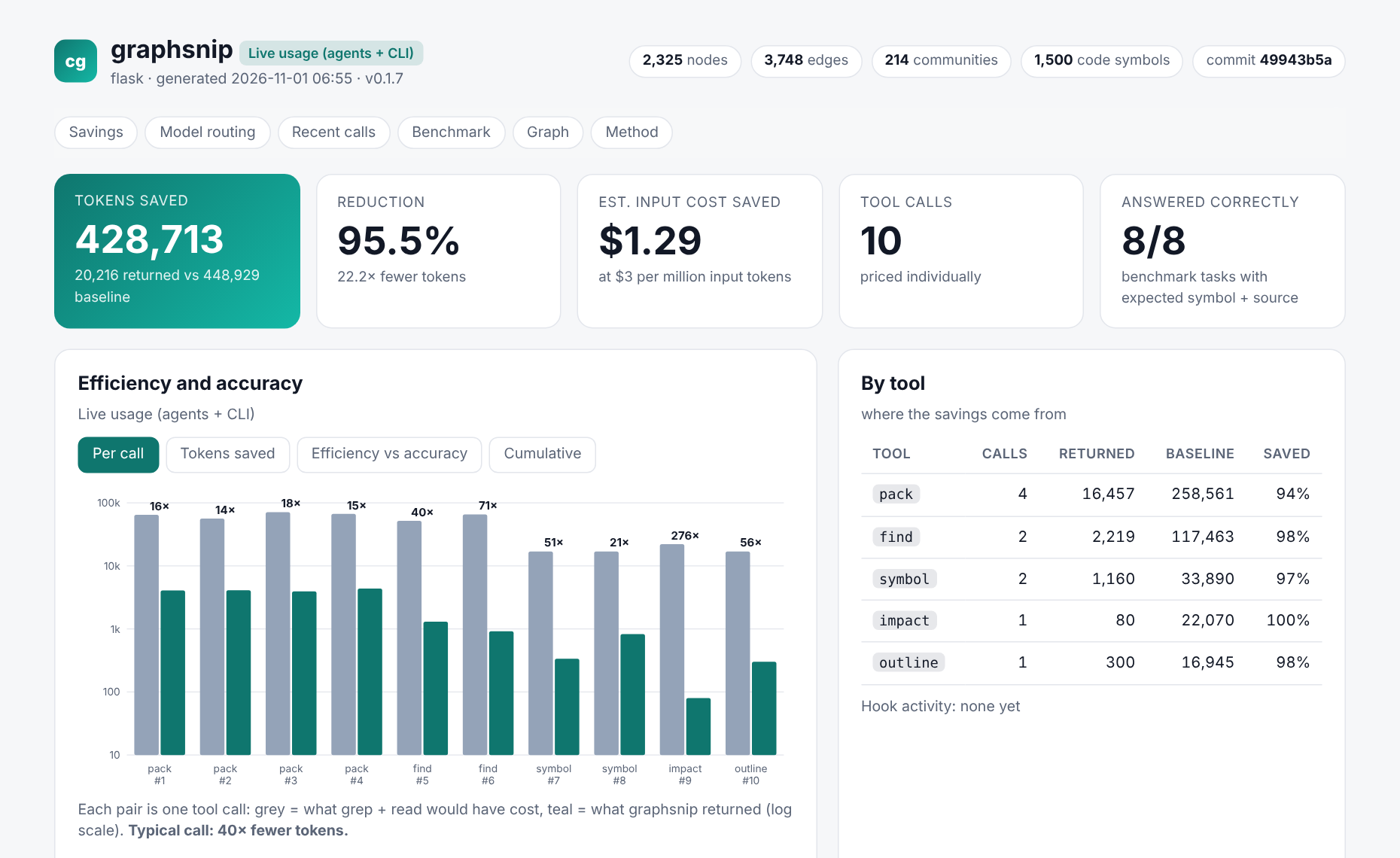
The dashboard graphsnip report writes. Real data from the Flask codebase.
At a glance
| Without a graph | Graphify alone | Graphify + graphsnip | |
|---|---|---|---|
| What the agent receives | whole files from grep | a map, no source code | the exact code, ranked and budgeted |
| Tokens for 8 Flask questions | 366,565 | 13,008 (then it must read files) | 17,869 |
| Tokens vs grep + read | baseline | −96% (map only) | −95%, with code |
| Questions answered with source | 8 / 8 | symbol named, no code | 8 / 8 |
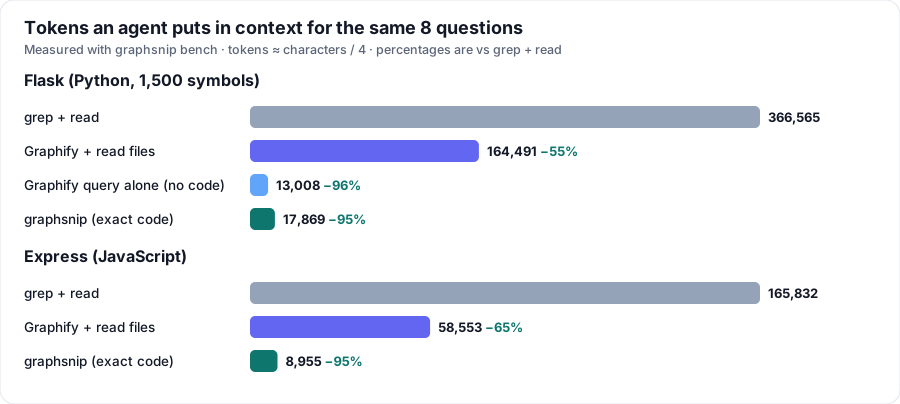
Graphify is excellent at telling an agent where things are. graphsnip adds the step after: hand over just that code, stop re-sending code the agent already has, and measure what it saved. Baseline here is deliberately realistic: grep the question's terms and read the top 8 matching files in full. It is far less than "read the whole repo".
Try it
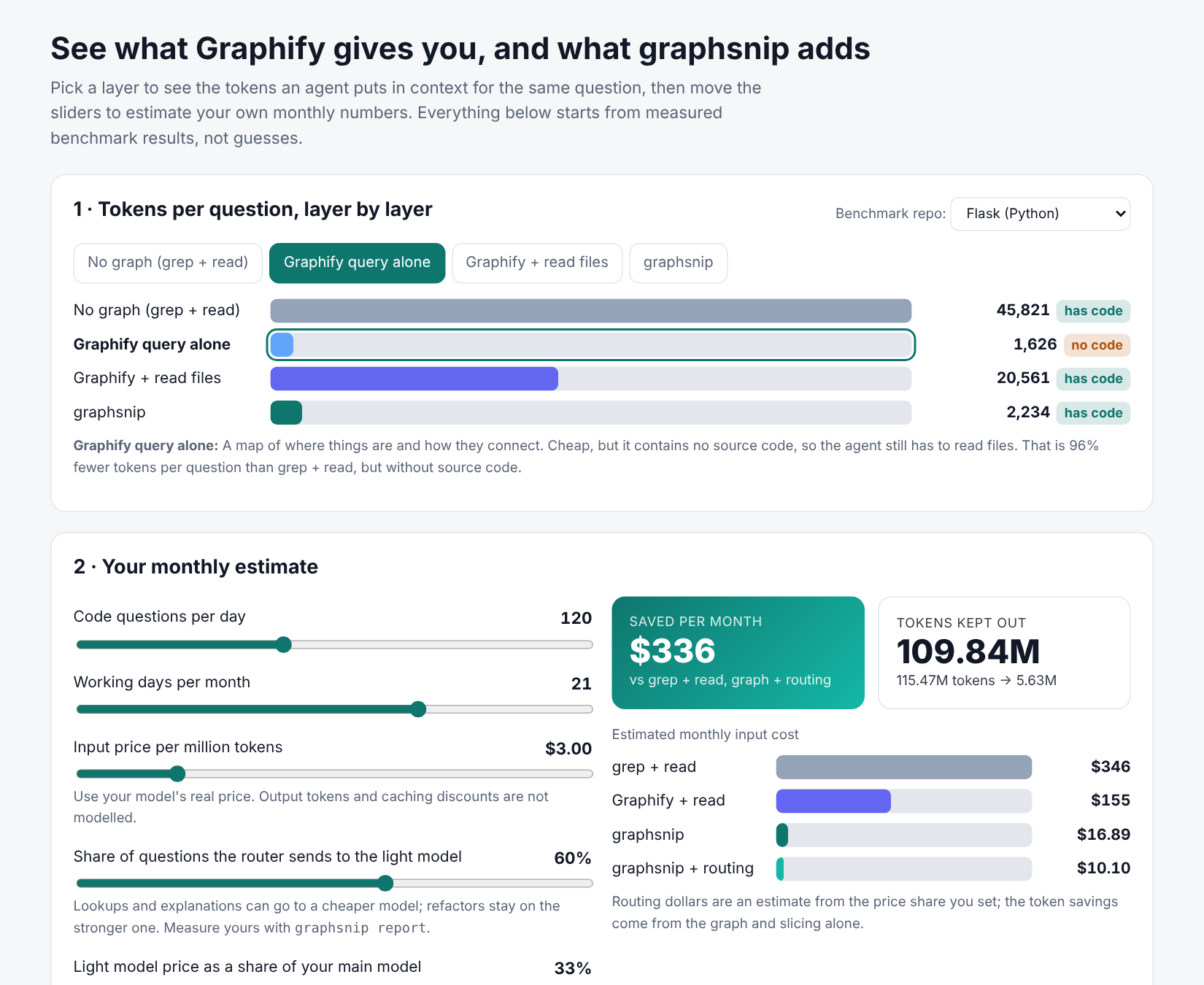
Interactive explorer. Pick a layer, move the sliders (questions per day, price per million tokens, how many questions go to a cheap model) and watch the monthly numbers change. Starts from the measured Flask and Express results.
- Open
docs/explorer.htmlin a browser (download it, it is one self-contained file), or - publish it for your team with GitHub Pages: Settings → Pages → Deploy from branch →
main/docs, then visithttps://naubadnithin7.github.io/codegraf/explorer.html.
Quick start
pipx install graphsnip            # or: pipx install git+https://github.com/naubadnithin7/codegraf
cd your-repo
graphsnip init                    # build graph, wire up Claude Code / Copilot / Codex, write the dashboard
graphsnip report --open           # savings dashboard (grows as agents use it)
No LLM key needed. Everything runs locally: Graphify parses with tree-sitter, graphsnip slices with tree-sitter.
Want a one-command demo on any repo? graphsnip demo --open builds the graph, runs a benchmark and opens the dashboard.
What you get
| Exact symbol, not the file | gs_symbol returns one function or class with its callers and callees. Docstrings trimmed, big classes shown as skeletons. |
| Context packs | gs_pack bundles the ranked code for a whole task under a token budget in one call. |
| No repeats | Code the agent already has in this session comes back as a one-line pointer. |
| Slash commands | /graphsnip <question> in Claude Code and Copilot Chat, /prompts:graphsnip in Codex. |
| Model routing | Light questions go to a cheaper model, hard ones are handed to a stronger one. Counted only when it really happened. |
| Hooks | Claude Code is nudged to use the graph instead of broad Read / grep. Fail-open, off-switch included. |
| Shell compression | graphsnip run -- pytest squeezes noisy output and keeps the failure lines. Savings are exact. |
| Dashboard | Savings per call, efficiency vs accuracy, routing log, benchmark, and Graphify's interactive graph. |
| Safe installs | Idempotent and reversible: graphsnip install / graphsnip uninstall. Your files are never overwritten. |
How it fits together
flowchart TB
    R[your repo] --> G["Graphify<br/>tree-sitter AST → graph.json<br/>graph.html · communities"]
    G --> S
    subgraph S["graphsnip"]
        direction LR
        A["symbol slicer · context packs<br/>session dedupe · budgets"]
        B["router · hooks · shell compression"]
        C["savings ledger · dashboard"]
    end
    S --> M["MCP server<br/>gs_pack · gs_find · gs_symbol<br/>gs_impact · gs_outline · gs_route"]
    M --> CC[Claude Code]
    M --> CP[Copilot]
    M --> CX[Codex]
    S --> D[".graphsnip/dashboard.html"]
See it working
|
Every call, grey vs teal. Each pair is one tool call: what grep + read would have cost against what graphsnip returned (log scale), with the multiplier on top. 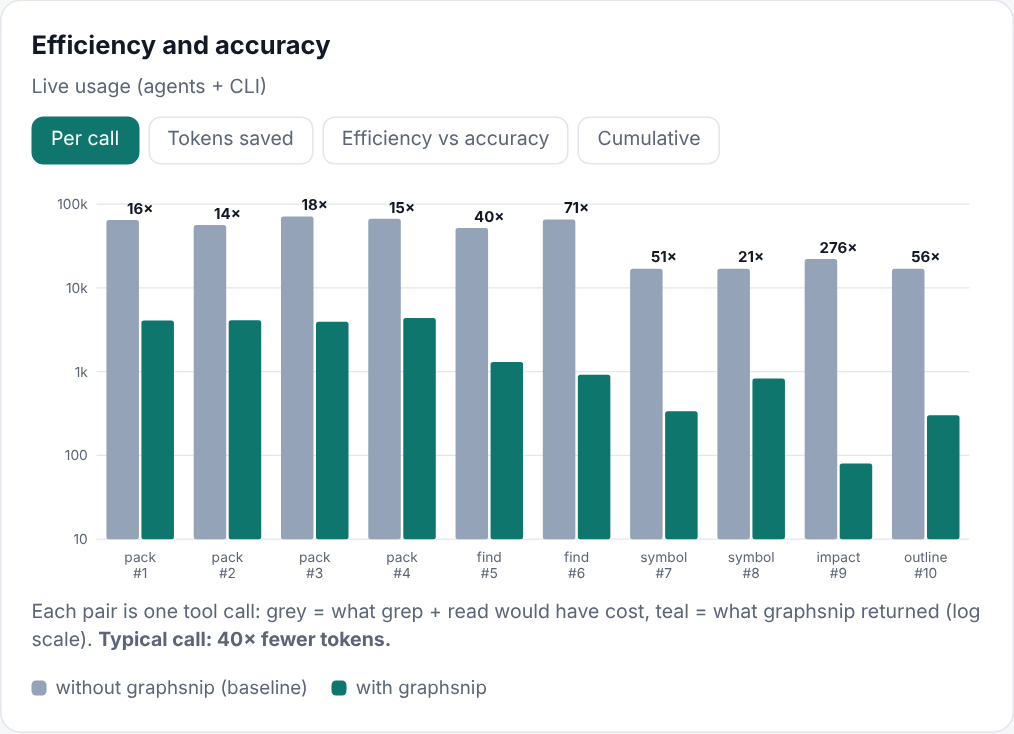
|
Same answers, a fraction of the tokens. On these questions every approach found the symbols, so the difference is what it cost to get there. 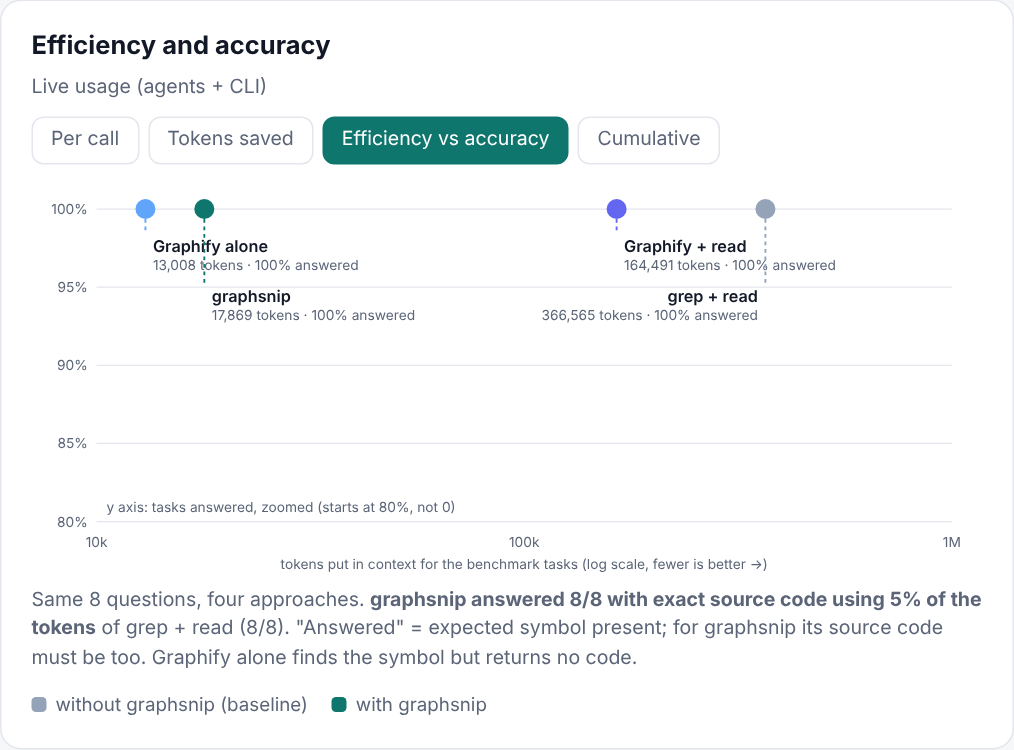
|
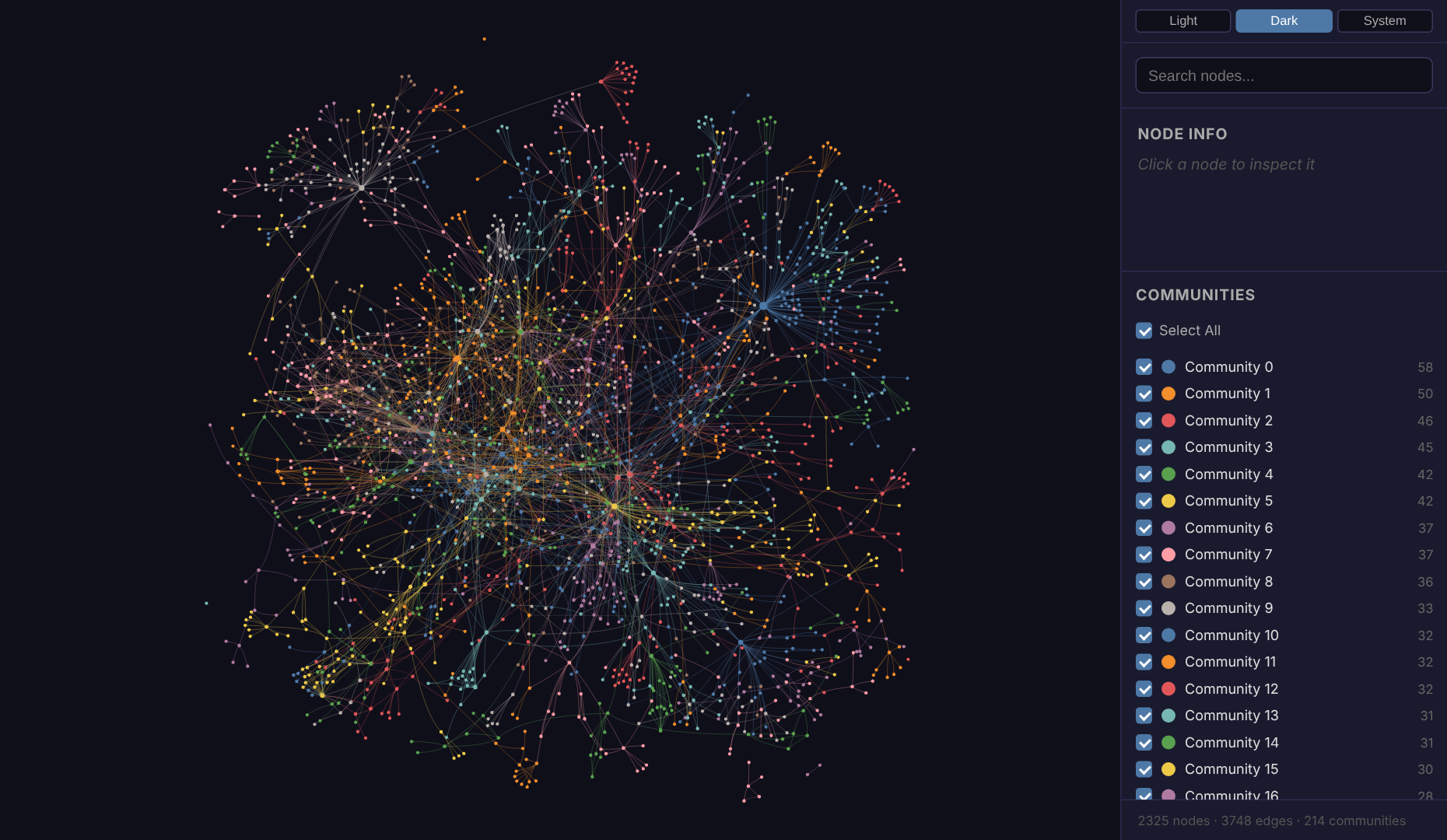
Graphify's own graph is embedded in the dashboard (and works offline). Every node is a symbol, colours are detected communities.
Slash commands
graphsnip install writes these for you:
| Client | Command | File |
|---|---|---|
| Claude Code | /graphsnip <question> and /graphsnip-deep |
.claude/commands/ |
| Copilot (VS Code, Local chat) | /graphsnip <question> and /graphsnip-deep |
.github/prompts/*.prompt.md |
| Codex | /prompts:graphsnip <question> |
~/.codex/prompts/graphsnip.md (Codex only reads prompts from your home folder; restart Codex) |
/graphsnip how does request routing work
/graphsnip impact Flask.dispatch_request
/graphsnip savings
Model routing
graphsnip cannot switch an agent's model by itself (an MCP server has no such power). What it does is decide, steer, and account for it honestly.
flowchart LR
    T["/graphsnip task"] --> R{"gs_route<br/>wording + graph size"}
    R -- light --> L["cheap model answers<br/>(Haiku)"]
    R -- "too hard" --> E["prints: Escalating to Sonnet / Opus…"]
    E --> H["stronger subagent finishes the job"]
    L --> A[answer]
    H --> A
| Client | How the model is switched | Verified by |
|---|---|---|
| Claude Code | /graphsnip is pinned to the light model; hard tasks hand off to a Sonnet / Opus subagent automatically |
session transcripts (graphsnip usage) |
| Codex | graphsnip codex "task" picks the tier and runs codex exec -m <model>: a real switch graphsnip performs |
the launcher knows the model it passed |
| Copilot | /graphsnip pinned only if you set routing.models.copilot.light; hard tasks need /graphsnip-deep |
not available |
- Statuses.
routed(running tier matched the decision),escalate,session(ran on your own model on purpose),overpowered,advisory(nobody verified which model ran). Dollars are credited only forrouted. - Routing saves dollars per token, not tokens. The token savings above come from the graph alone, and the dashboard keeps the two apart.
- Prices are editable placeholders under
routing.pricesin.graphsnip/config.json. Put your real ones in before showing a dollar figure. Codex model names go underrouting.models.codex.
Codex setup
// .graphsnip/config.json
{ "routing": { "models": { "codex": { "light": "<your light model>", "standard": "<your main model>", "heavy": "<your strongest model>" } } } }
graphsnip codex "where is the auth middleware defined"      # routes, then runs codex exec -m <model>
graphsnip codex --dry-run "refactor session handling"      # print the command only
graphsnip install also writes matching graphsnip-light|standard|heavy profiles into the Codex config.
Measured A/B: real tokens and real cost
The dashboard's savings are estimates against a hypothetical baseline. To get measured numbers, run the same questions through headless Claude Code with and without graphsnip:
graphsnip ab --dry-run              # preview: how many sessions, the exact command
graphsnip ab --yes --repeats 2      # run it (spends real usage; capped at $5 total by default)
graphsnip report --open             # "Measured A/B (real runs)" card + headline KPI
- Two throwaway copies of your repo: one with graphsnip uninstalled, one with it installed. Your repo is never modified.
- Both arms are read-only, use the same model and prompt, and start a fresh session per run, in shuffled order.
- Cost and tokens are what
claude -p --output-format jsonreports (total_cost_usd, input, cache and output tokens), so caching and every turn are included. - Results are medians over repeats; model runs are noisy, so use
--repeats 3or more for a number you will quote. - "Found" only checks that the expected symbols appear. The full answers are saved under
.graphsnip/ab/so you can judge quality yourself. - Needs the
claudeCLI on your machine. Codex A/B is not implemented yet.
Commands
All commands
| Command | What it does |
|---|---|
graphsnip init |
build graph, install integrations, benchmark, write dashboard (--dry-run previews, writes nothing) |
graphsnip demo [--open] [--bundle DIR] |
graph + benchmark + dashboard in one go; --bundle makes a shareable folder |
graphsnip build [--force] |
build or refresh the Graphify graph (code only, no LLM) |
graphsnip pack "task" |
token-budgeted bundle of the code relevant to a task |
graphsnip find "question" |
budgeted map: where things live, how they connect |
graphsnip symbol Name |
one function or class: exact lines, callers, callees |
graphsnip impact Name |
what depends on a symbol |
graphsnip outline path |
symbols in a file with line numbers |
graphsnip route "task" |
which model tier does this need? (logs the decision) |
graphsnip codex "task" |
route, then run codex exec -m <model for the tier> |
graphsnip run -- <cmd> |
run a command, compress its output, keep the exit code |
graphsnip stats / report |
savings in the terminal / the HTML dashboard |
graphsnip usage |
which models actually answered (from Claude Code transcripts) |
graphsnip bench |
offline benchmark: grep+read vs Graphify vs graphsnip |
graphsnip ab |
measured A/B in headless Claude Code: real tokens and cost, with vs without graphsnip |
graphsnip install / uninstall |
per-client config (--clients claude,copilot,codex) |
graphsnip doctor |
check Python, Graphify, tree-sitter, graph freshness, client configs |
Every query command prints ~N tokens returned vs ~M for grep+read → saved P% to stderr.
MCP tools
| Tool | Use it for |
|---|---|
gs_pack(task, budget) |
first call for "how does X work" or before a change |
gs_find(question, budget) |
locate things (map only) |
gs_symbol(name, max_lines, docs) |
read one definition instead of the file |
gs_impact(name, depth) |
blast radius before changing a signature |
gs_outline(path) |
symbols of a big file before opening it |
gs_route(task, running_tier) |
which model tier this task needs |
gs_savings() |
tokens saved so far |
A small dependency-free stdio JSON-RPC server (it does not depend on the MCP SDK's changing API). It refreshes a stale graph and records every call in .graphsnip/ledger.jsonl.
What install writes
Idempotent (run it twice, nothing changes) and reversible (graphsnip uninstall). Existing content is preserved: text files get a marked block, JSON is merged.
| Client | Files |
|---|---|
| Claude Code | .mcp.json, .claude/settings.json (PreToolUse hook), CLAUDE.md block, .claude/commands/graphsnip*.md, .claude/agents/graphsnip-{explorer,standard,heavy}.md |
| Copilot (VS Code) | .vscode/mcp.json, .github/copilot-instructions.md block, .github/prompts/graphsnip*.prompt.md |
| Codex | .codex/config.toml (or ~/.codex/config.toml with --codex-scope user), AGENTS.md block, ~/.codex/prompts/graphsnip.md |
Flags: --allow-tools pre-approves the read-only tools in Claude Code, --portable writes bare graphsnip instead of this machine's absolute path (use it before committing configs), --strict sets hook mode to strict.
Hooks (Claude Code)
Fail-open: any error means "do nothing". Configure in .graphsnip/config.json (or GRAPHSNIP_MODE).
| Mode | Behaviour |
|---|---|
nudge (default) |
adds context: the file's outline for big reads, gs_symbol("X") when a grep pattern is a known symbol. Blocks nothing |
strict |
denies those same calls with a reason that tells the agent what to call. Literal-string greps and reads with offset/limit are never blocked |
off |
nothing |
shell_filter: true additionally rewrites noisy test/build commands to run through graphsnip run. It is off by default because the rewrite returns an allow decision, which skips the permission prompt; it is limited to an allow-list and never touches pipelines or chained commands. POSIX shells only.
How the numbers are measured (and what they are not)
- Baseline per call.
find/pack: grep the question's terms, read the top 8 matching files in full.symbol: read the whole file.impact: grep the name, read matching files (cap 10). - Counted once. In a real session, tokens that stay in context are re-sent every turn, so true savings compound. The dashboard does not claim that (the explorer has an optional slider to show it).
- Quality is checked, not assumed. A task counts as answered only if the expected symbol appears with its source. That measures whether the right code was delivered, not whether a model's final answer was right.
- Shell savings are exact (raw vs compressed output). Token counts elsewhere are
chars / 4estimates; installgraphsnip[accurate]for tiktoken. - Your repo will differ. Savings are larger where files are large and lookups are broad. Replace the auto-generated tasks in
.graphsnip/tasks.jsonwith questions you really ask, thengraphsnip bench. - Dollars on the main dashboard are
tokens × price per million input tokens, ignoring output tokens and caching: a list-price estimate. For measured dollars usegraphsnip ab.
Known limits
- The hooks and the three client configs follow each tool's documented formats; the MCP server was verified against the official MCP Python client. Run
graphsnip doctorand a short session in each client before relying on them. - Symbol slicing is exact for the ~25 languages with tree-sitter grammars installed; elsewhere it falls back to indentation or brace matching.
- The graph only covers what Graphify extracts from code. Docs, PDFs and images need Graphify's semantic pass (needs an LLM key) and are not part of graphsnip's tools.
- Graphify's
graph.htmlloads vis-network from a CDN; graphsnip caches it locally so the dashboard works offline (needs internet once). - Model routing: Copilot cannot hand off to another model, Codex prompt files cannot pin one (use
graphsnip codex), and the "measured" model mix works only for Claude Code.
Development
pip install -e ".[dev]"
pytest -q
Publishing: python -m build && twine upload dist/* (PyPI), cd npm && npm publish (thin npm wrapper that needs Python 3.10+ and pipx or uv).
License
Apache-2.0. graphsnip is a separate project that calls Graphify (also Apache-2.0) as a library; see NOTICE.
1 maintainer

Metadata
1 maintainer
Release files for graphsnip 0.1.9
For a detailed explanation of source distributions (sdists) and built distributions (wheels), please see the package formats documentation.
Source distribution (sdist)
| File | Size | Uploaded | Provenance | Actions |
|---|---|---|---|---|
| graphsnip-0.1.9.tar.gz | 84.5 kB | Without provenance | Details for graphsnip-0.1.9.tar.gz |
Built distribution (wheel)
| File | Interpreter | ABI | Platform | Actions Reset |
|---|---|---|---|---|
| graphsnip-0.1.9-py3-none-any.whl | Python 3 | none | any | Details for graphsnip-0.1.9-py3-none-any.whl |
Total release size: 163.5 kB
Release files / graphsnip-0.1.9.tar.gz
| Download URL | graphsnip-0.1.9.tar.gz |
|---|---|
| Size | 84.5 kB |
| Tags | Source |
|
SHA-256 checksum How to use checksums |
80455aab374b6ea3b6034378cd886e7e6533f75ad597b91d35868314c6e52bb0
|
|
BLAKE2b-256 checksum How to use checksums |
b4dfc2205e106675f85c05df46f5ee0613f26055d931ddb809045a4010cea7db
|
| Upload date | |
|
Uploaded using Trusted Publishing? What is trusted publishing? |
No |
| Uploaded via |
twine/7.0.0 CPython/3.12.12
|
Release files / graphsnip-0.1.9-py3-none-any.whl
| Download URL | graphsnip-0.1.9-py3-none-any.whl |
|---|---|
| Size | 79.0 kB |
| Tags | Python 3 |
|
SHA-256 checksum How to use checksums |
2a5a76e24b3435b0d191bf5d676f45173fafb79b0a259b81092d183036bd6491
|
|
BLAKE2b-256 checksum How to use checksums |
b169ee703053e18dfe286b74608443a4801b5c84d03136dc814360c19125439f
|
| Upload date | |
|
Uploaded using Trusted Publishing? What is trusted publishing? |
No |
| Uploaded via |
twine/7.0.0 CPython/3.12.12
|
Security for graphsnip 0.1.9
Provenance
Provenance describes where a file came from. On PyPI, provenance is shared via attestations, which provide a verifiable record of the build or publishing details. View details, limitations and caveats.
No provenance found
None of the files in this release were uploaded with provenance metadata.
A note on package security
PyPI is a repository for distributing packages, not a service for auditing them. While third-party security researchers and our staff do their best to detect and remove malicious packages, PyPI cannot guarantee the quality, security or suitability of any given package.
To learn more about protecting yourself from malicious actors, visit our package security documentation.














