




Caffeinated object-oriented Python graph data structure library originated from an academical context.
Grapresso ☕ is like a good espresso among other graph libs:
- Quickly consumed: Easy-to-learn and setup - just try it!
- Different flavours: Suit up your backend of choice
- Beans are first class: Object-oriented approach with nodes as first class citizens
- Make your Macchiato: Extensible by design
- Concentrated: Clear and concise algorithms
- Well tested ingredients: Integration-tested using huge graphs
- Clean and lightweight: Written in pure Python 3, no other libraries needed
Grapresso works wonderfully with PyPy and is up to up to 4x faster than your regular Python. ⚡
This project is in an early state. There are many popular algorithms that are not yet implemented (at least natively, read below) Feel free to contribute! Make it feel like home for your own graph algorithms.
Goals
Grapresso vs. alternatives
There are many other good graph/network theory libraries. The most popular Python one is probably NetworkX.
From an algorithmic perspective, Grapresso will never be able to beat this extremely versatile library with a long history. Instead, it follows a different philosophy and aims to be...
- Object-oriented instead of using dicts for everything
- Abstracted and modular through separation of concerns
- Finally, a meta library to handle other libraries via backends
💡 To fully demonstrate the power of abstraction, Grapresso can be used as a middleman for NetworkX.
Usage
Install from PyPI, for instance via pip (needs Python >= 3.6):
pip install grapresso
Want to get the cheapest tour (round-trip) for TSP? Usage is easy:
from grapresso import Graph

# Build a fully connected graph using InMemoryBackend (default if no backend is given):
graph = Graph() \
    .add_edge("Aachen", "Amsterdam", cost=230) \
    .add_edge("Amsterdam", "Brussels", cost=200) \
    .add_edge("Brussels", "Aachen", cost=142)

# Now also add Luxembourg - note that every city needs to be connected to it for the graph to stay fully connected:
for city, dist in zip(("Aachen", "Brussels", "Amsterdam"), (200, 212, 420)):
    graph.add_edge(city, "Luxembourg", cost=dist)

tour = graph.cheapest_tour("Aachen")
assert tour.cost == 842
print(tour)
Now, printing to console is not really visually appealing, is it? Let's install a backend plugin as an extra that is also capable of drawing the graph:
pip install grapresso[backend-networkx]
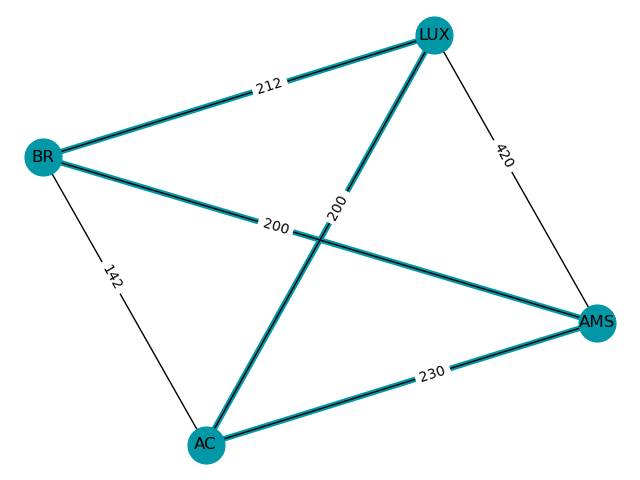
Let's quickly draw our previous graph by first converting it to one that uses NetworkX in the background and then utilizing NetworkX's natural drawing capabilities:
from grapresso.backends import NetworkXBackend

nx_graph = graph.copy_to(Graph(NetworkXBackend(directed=False)))
nx_graph.backend.quick_draw(
    # Map ISO codes to the nodes so that the text fits in the boundaries:
    labels={'Aachen': 'AC', 'Amsterdam': 'AMS', 'Brussels': 'BR', 'Luxembourg': 'LUX'},
    # Show cost as label:
    edge_label_selector='cost',
    # Mark edges that are actually in the tour
    mark_edges=tour.edges,
)
The resulting image:
See tests directory for more examples and also have a look at the integration tests!
Architecture
Grapresso provides a clean API so that you can easily extend it to store the graph's structure in your preferred storage format. Algorithms are implemented completely independent from the backend.
Backends
Algorithms are performed on a so called "backend" which wraps the graph's internal data structure.
The API is defined in backend/api.py. Therewith, backends can easily be added provided that they carefully implement the defined API.
Implementations
| Implementation | Type | Underlying data structure | Plugin installation |
|---|---|---|---|
| InMemoryBackend | In-Memory with Traits | {node_name: obj} with obj containing edges |
Built-in |
| NetworkXBackend | NetworkX compatible | nx.DiGraph with custom NetworkXNode/-Edge | pip install grapresso[backend-networkx] |
Development
This project has been originated in the subject Mathematical Methods for Computer Science (translated from the German "Mathematische Methoden der Informatik", abbreviated MMI) in the study programme Information Systems Engineering (ISE) at the FH Aachen.
Contributing
Contributions are welcome, as long as the three goals are followed.
Otherwise, you can simply support this project by hitting the 
1 maintainer

Metadata
1 maintainer
Release files for grapresso 0.1.1
For a detailed explanation of source distributions (sdists) and built distributions (wheels), please see the package formats documentation.
Source distribution (sdist)
| File | Size | Uploaded | |
|---|---|---|---|
| grapresso-0.1.1.tar.gz | 22.1 kB | Details |
Built distribution (wheel)
| File | Interpreter | ABI | Platform | Reset |
|---|---|---|---|---|
| grapresso-0.1.1-py3-none-any.whl | Python 3 | none | any | Details |
Total release size: 57.7 kB
Release files / grapresso-0.1.1.tar.gz
| Download URL | grapresso-0.1.1.tar.gz |
|---|---|
| Size | 22.1 kB |
| Tags | Source |
|
SHA-256 checksum How to use checksums |
1626242abe7adcedc40169f1c34284a0e0f1f19c76663f68636062fe76188ca8
|
|
BLAKE2b-256 checksum How to use checksums |
21caa547b72a5df49d4a00330ccaf2ad30411562788595e8743d277791d969ce
|
| Upload date | |
|
Uploaded using Trusted Publishing? What is trusted publishing? |
No |
| Uploaded via |
twine/3.2.0 pkginfo/1.5.0.1 requests/2.24.0 setuptools/49.2.0 requests-toolbelt/0.9.1 tqdm/4.48.0 CPython/3.8.4
|
Release files / grapresso-0.1.1-py3-none-any.whl
| Download URL | grapresso-0.1.1-py3-none-any.whl |
|---|---|
| Size | 35.6 kB |
| Tags | Python 3 |
|
SHA-256 checksum How to use checksums |
7c626080242308a1f913ae229b43c9c3589698d570eba8c370939a5766d89b84
|
|
BLAKE2b-256 checksum How to use checksums |
4039eb35dda42a78a8cf4a459048718d6e83ed85a31ae6e600e1e6f3d67d63ac
|
| Upload date | |
|
Uploaded using Trusted Publishing? What is trusted publishing? |
No |
| Uploaded via |
twine/3.2.0 pkginfo/1.5.0.1 requests/2.24.0 setuptools/49.2.0 requests-toolbelt/0.9.1 tqdm/4.48.0 CPython/3.8.4
|














