
Gravitype
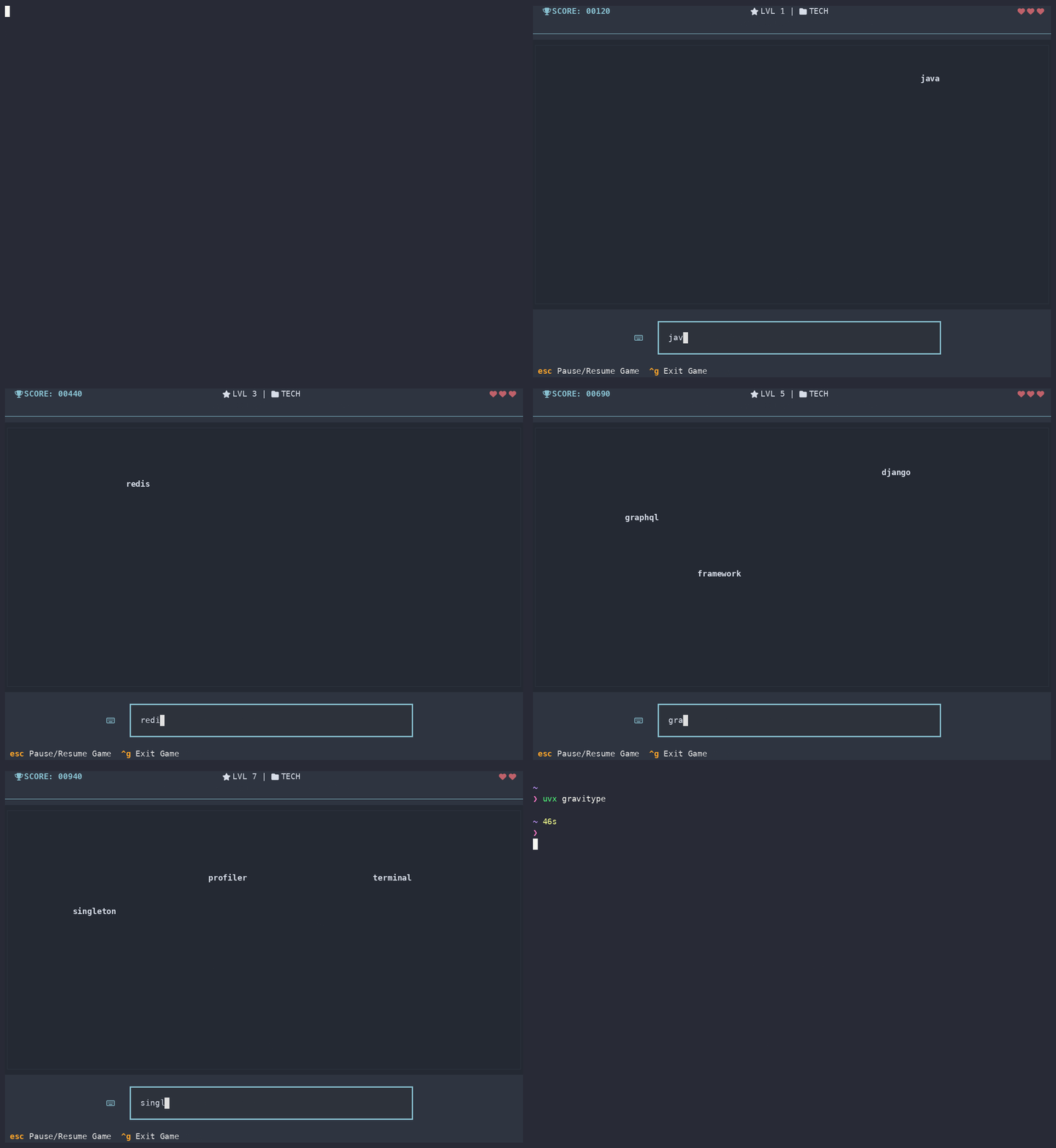
A terminal typing game where words fall from the sky. Type them before they hit the bottom — miss one and you lose a life.
Built with Textual.
 ██████╗ ██████╗  █████╗ ██╗   ██╗██╗████████╗██╗   ██╗██████╗ ███████╗
██╔════╝ ██╔══██╗██╔══██╗██║   ██║██║╚══██╔══╝╚██╗ ██╔╝██╔══██╗██╔════╝
██║  ███╗██████╔╝███████║██║   ██║██║   ██║    ╚████╔╝ ██████╔╝█████╗
██║   ██║██╔══██╗██╔══██║╚██╗ ██╔╝██║   ██║     ╚██╔╝  ██╔═══╝ ██╔══╝
╚██████╔╝██║  ██║██║  ██║ ╚████╔╝ ██║   ██║      ██║   ██║     ███████╗
 ╚═════╝ ╚═╝  ╚═╝╚═╝  ╚═╝  ╚═══╝  ╚═╝   ╚═╝      ╚═╝   ╚═╝     ╚══════╝



Requirements
Python 3.9+ (developed on 3.12). Any terminal with 256-colour support.
Install
Gravitype is on PyPI: pypi.org/project/gravitype
The quickest way, which puts gravitype on your PATH in an isolated environment:
uv tool install gravitype
Or let a script work out the details for you:
curl -LsSf https://raw.githubusercontent.com/kanakOS01/gravitype/main/install.sh | sh
That installs uv if you don't have it, then installs Gravitype with it. Piping a script into a shell runs whatever that URL serves, so if you'd rather not, every command below does the same job by hand — read the script first if you want to check.
Or with pipx, or plain pip:
pipx install gravitype
pip install gravitype
Then launch it:
gravitype
python -m gravitype works too, if you'd rather not rely on the script being on your PATH.
Running from source
git clone https://github.com/kanakOS01/gravitype.git
cd gravitype
uv sync
uv run gravitype
Features
- Falling-word gameplay with difficulty that ramps up as you score
- Two word categories: Tech and General, plus any custom sets you add
- 7 colour themes (Dracula, Nord, Tokyo Night, Gruvbox, Catppuccin, Cyberspace, 80s After Dark)
- Configurable starting lives (3 / 5 / 8) and bell-on-miss sound
- A winnable ending: reach level 27 and the run is won
- Persistent high score
- Post-game results screen: WPM, accuracy and a chart of your speed across the run
- Lifetime stats: best and average WPM, accuracy, max level (overall and per category), games started, games completed and total time played
- Pause, in-game help and keybind reference
How to play
Words spawn at the top of the board and drift down. Type a word and it disappears the moment the text matches — no Enter needed. Points are 10 × word length, and every 150 points bumps you up a level, which makes words fall faster, spawn more often and get longer.
If a word reaches the bottom you lose a life. At zero lives the run ends and your score is checked against the high score.
Reaching level 27 wins the game. That is 3,900 points, and it is where the difficulty stops climbing — get_ticks_for_level decays both the fall speed and the spawn rate toward floors that are both reached by level 27, so level 40 would play exactly like level 27. Rather than counting up forever, the run ends there with a win. Expect to need somewhere around 140 WPM sustained on three lives; it is a real target, not a formality.
When a run ends you get a results screen: your WPM, your accuracy, and a chart of how fast you typed each word, with a red × on the words you fumbled.
WPM is measured per word — the clock runs from the first keystroke of a word to the moment it matches, so the time you spend waiting for the next word to spawn isn't counted against you. A plain session average would mostly just tell you which level you reached, because the spawn rate caps how much there is to type. Accuracy is the share of keystrokes that kept what you'd typed a valid start of some word on screen; backspacing to fix a mistake doesn't count against you, but the wrong keystroke already did.
Every run is recorded on the Stats page (ctrl+t). A run counts as completed if you played it out to the end, whether that was a win or a GAME OVER — leaving with ctrl+g or quitting mid-run counts as started but not completed, though the level you reached and the time you played still count. Paused time is not counted as play time.
The input box flashes on a hit, and turns red the moment what you have typed is no longer the prefix of any word on screen.
Keybinds
Menu
| Key | Action |
|---|---|
ctrl+p / escape |
Play / back to menu |
ctrl+s |
Settings |
ctrl+h |
Help |
ctrl+a |
About |
ctrl+t |
Stats |
ctrl+q |
Quit |
In game
| Key | Action |
|---|---|
escape |
Pause / resume |
ctrl+g |
Quit to menu (run is not scored) |
ctrl+w |
Clear the word being typed |
Custom word sets
Drop a .txt file into ~/.gravitype/words/ and it becomes a category. The
filename is the name, so rust.txt adds Rust to the category dropdown
alongside Tech and General:
mkdir -p ~/.gravitype/words
cat > ~/.gravitype/words/rust.txt <<'EOF'
rust
cargo
borrow checker
trait bound
EOF
One entry per line. Leading and trailing whitespace is trimmed, blank lines are skipped and exact repeats are dropped — everything else is kept as written:
- Phrases work.
borrow checkerfalls as one item and is typed out in full, spaces and all. - Capitals work, and matter. Matching is case-sensitive, so
Borrow Checkerhas to be typed with its capitals, andRustandrustare two different entries. - Digits and punctuation are fine —
utf-8,python3,don't. - Entries must be printable ASCII. Accented and non-Latin text (
café,日本語) is skipped, since it can't be typed on a plain keyboard. That rule is also what stops a non-text file loading as a category of garbage.
Configuration
Settings are edited in-game (ctrl+s) and stored in ~/.gravitype/, so your high score follows you regardless of which directory you launch from:
~/.gravitype/
  config.json            your settings and high score
  stats.json             your lifetime play and typing stats
  words/                 your own word sets, one .txt per set
  theme_active.tcss      generated stylesheet, safe to delete
Set GRAVITYPE_HOME to relocate that directory — handy for keeping separate profiles, or for trying things out without touching your real save:
GRAVITYPE_HOME=/tmp/gravitype-test gravitype
config.json is plain JSON, so you can edit it by hand if you prefer:
{
    "high_score": 1790,
    "theme": "dracula",
    "sound_enabled": true,
    "starting_lives": 5
}
Unknown keys are ignored and a corrupt file falls back to defaults, so it is safe to delete the file to reset everything.
Versions before 0.3 kept this as a .gravitype_config.json dotfile in the working directory. If ~/.gravitype/config.json does not exist yet, Gravitype reads that dotfile once and migrates your settings forward, leaving the original where it is. An existing ~/.gravitype/config.json always takes precedence.
Project layout
gravitype/
  cli.py                     console entry point
  __main__.py                enables `python -m gravitype`
  core/
    config.py                config load/save + theme compilation
    paths.py                 per-user config and cache locations
    words.py                 word pools and level-based word picking
  tui/
    app.py                   app, screens and game loop wiring
    widgets/
      game_board.py          falling words, collision, scoring
      header.py              in-game score/level/lives bar
      main_header.py         banner and nav tabs
      screens.py             settings, help, about
      table.py               keybind table
    styles/
      base.tcss              layout and component styles
      themes/*.tcss          colour variables per theme
Themes work by concatenation: on startup generate_theme_file() writes the selected theme's variables plus base.tcss into ~/.gravitype/theme_active.tcss, and hands that path to Textual as the app's stylesheet. It is written outside the package so an installed, read-only copy still works, and it is safe to delete — it regenerates on next launch. Adding a theme means dropping a new .tcss of variables into themes/ and adding it to the Settings dropdown.
Contributing
See CONTRIBUTING.md.
Credits
Colour themes are inspired by and adapted from Smassh.
License
MIT © Kanak Tanwar
1 maintainer

Metadata
1 maintainer
Release files for gravitype 1.1.0
For a detailed explanation of source distributions (sdists) and built distributions (wheels), please see the package formats documentation.
Source distribution (sdist)
| File | Size | Uploaded | |
|---|---|---|---|
| gravitype-1.1.0.tar.gz | 57.6 kB | Details |
Built distribution (wheel)
| File | Interpreter | ABI | Platform | Reset |
|---|---|---|---|---|
| gravitype-1.1.0-py3-none-any.whl | Python 3 | none | any | Details |
Total release size: 98.4 kB
Release files / gravitype-1.1.0.tar.gz
| Download URL | gravitype-1.1.0.tar.gz |
|---|---|
| Size | 57.6 kB |
| Tags | Source |
|
SHA-256 checksum How to use checksums |
54be663e9d4eec09f770695b5b579b49af725944bc7804b03027744a57384ea1
|
|
BLAKE2b-256 checksum How to use checksums |
fee0ad772d6b1c8bc232ae500e6d4974fe6dfd59a43a4dd24a2b2f14269e19a6
|
| Upload date | |
|
Uploaded using Trusted Publishing? What is trusted publishing? |
No |
| Uploaded via |
uv/0.10.9 {"installer":{"name":"uv","version":"0.10.9","subcommand":["publish"]},"python":null,"implementation":{"name":null,"version":null},"distro":{"name":"macOS","version":null,"id":null,"libc":null},"system":{"name":null,"release":null},"cpu":null,"openssl_version":null,"setuptools_version":null,"rustc_version":null,"ci":null}
|
Release files / gravitype-1.1.0-py3-none-any.whl
| Download URL | gravitype-1.1.0-py3-none-any.whl |
|---|---|
| Size | 40.8 kB |
| Tags | Python 3 |
|
SHA-256 checksum How to use checksums |
3e460810e48271d54e64222899928a763b53074a9812385f61c9db33261d19ef
|
|
BLAKE2b-256 checksum How to use checksums |
b024430ad9b36d38264caf7e6508dfc2a089449f6bbddf8a97c38bb1993bc4fc
|
| Upload date | |
|
Uploaded using Trusted Publishing? What is trusted publishing? |
No |
| Uploaded via |
uv/0.10.9 {"installer":{"name":"uv","version":"0.10.9","subcommand":["publish"]},"python":null,"implementation":{"name":null,"version":null},"distro":{"name":"macOS","version":null,"id":null,"libc":null},"system":{"name":null,"release":null},"cpu":null,"openssl_version":null,"setuptools_version":null,"rustc_version":null,"ci":null}
|














