
gravityspawner for Jupyterhub
This package is for Gravity of DOA, SJTU
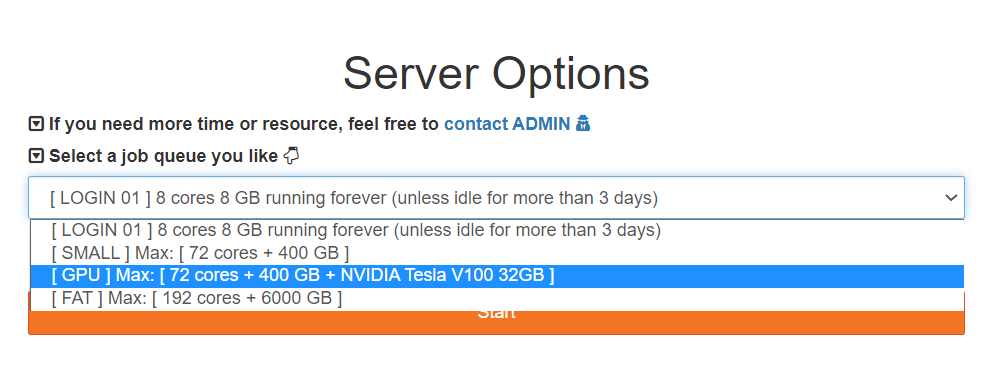
We attend to select PBS/Slurm job queue first, then input arguments like hours, memory, CPU cores to spawn a Jupyter server.
We need to combine templates and wrapspawner to achieve this goal:
├── jupyterhub
│   └── templates               # jinja template
│       ├── page.html           # change the navigation bar, add some button
│       ├── spawn.html          # user can select and input arguments such as hour, cpu, memory. use JavaScript to hide the input form.
│       └── spawn_pending.html  # waiting for spawning server, add some message
└── src
    ├── gravityspawner
        ├── gravityspawner.py   # get extra arguments from jinja template, then pass them to batchspawner [thanks wrapspawner.ProfilesSpawner]. set resource limits as well.
Installation
Install via pip:
pip install gravityspawner
Or, another better way to use pip:
python -m pip install gravityspawner
Usage
-
Add lines in
jupyterhub_config.py:c.JupyterHub.spawner_class = 'gravityspawner.GravitySpawner'
-
If we use
batchspawner.TorqueSpawner, then add these lines injupyterhub_config.py:c.GravitySpawner.profiles = [ ('[ LOGIN 01 ] 8 cores 8 GB running forever (unless idle for more than 3 days)', 'local', 'jupyterhub. spawner.LocalProcessSpawner', {'ip':'0.0.0.0'} ), ('[ SMALL ] Max: [ 72 cores + 400 GB ]', 'small', 'batchspawner.TorqueSpawner', dict(min_max_hour=(1,12),min_max_cpu=(8,72),min_max_memory=(10,360))), ('[ GPU ] Max: [ 72 cores + 400 GB + NVIDIA Tesla V100 32GB ]', 'gpu', 'batchspawner.TorqueSpawner', dict(min_max_hour=(1,12),min_max_cpu=(8,72),min_max_memory=(10,360))), ('[ FAT ] Max: [ 192 cores + 6000 GB ]', 'fat', 'batchspawner.TorqueSpawner', dict(min_max_hour=(1,12),min_max_cpu=(8,192),min_max_memory=(400,6000))), ]
profiles here represent display, key, Spawner, options. We can set limits of resource here, such as hour, memory, CPU cores. If you need more options or change options, you also need to edit the
jupyterhub/templates/spawn.html(front-end)
The final piece of configuration of jupyterhub_config.py like this:
import batchspawner
import gravityspawner

# our jinja template, change front-end style and add extra options
c.JupyterHub.template_paths = ['/opt/jupyterhub/templates']

# specify the spawner we use
c.JupyterHub.spawner_class = 'gravityspawner.GravitySpawner'

# PBS script to start Jupyter on computing nodes!
c.TorqueSpawner.batch_script = '''#!/bin/bash
#PBS -N jupyterhub
#PBS -q {queue}
#PBS -l walltime={runtime}:00:00
#PBS -l nodes=1:ppn={nprocs}
#PBS -l mem={memory}gb
####PBS -v {keepvars}
#PBS -V
#PBS -j oe
#PBS -o /home/$USER/.jupyter/jupyterhub.log
conda deactivate 1>/dev/null 2>&1
conda deactivate 1>/dev/null 2>&1
module load anaconda/conda-4.12.0 cuda/cuda-11.3
source /opt/conda/conda-4.12.0/bin/activate
conda activate /opt/jupyterhub/envs/hub02
{cmd}
'''

# Defaul options of Spawner. local + small + gpu + fat
c.GravitySpawner.profiles = [
   ('[ LOGIN 02 ] 8 cores 8 GB running forever (unless idle for more than 3 days)', 'local', 'jupyterhub.spawner.LocalProcessSpawner', {'ip':'0.0.0.0'} ),
   ('[ SMALL ] Max: [ 72 cores + 400 GB ]', 'small', 'batchspawner.TorqueSpawner',
      dict(min_max_hour=(1,12),min_max_cpu=(8,72),min_max_memory=(10,360))),
   ('[ GPU ] Max: [ 72 cores + 400 GB + NVIDIA Tesla V100 32GB ]', 'gpu', 'batchspawner.TorqueSpawner',
      dict(min_max_hour=(1,12),min_max_cpu=(8,72),min_max_memory=(10,360))),
   ('[ FAT ] Max: [ 192 cores + 6000 GB ]', 'fat', 'batchspawner.TorqueSpawner',
      dict(min_max_hour=(1,12),min_max_cpu=(8,192),min_max_memory=(400,6000))),
]
Example
This is a typical dropdown menu letting the user choose between local Login node and Torque/PBS queues
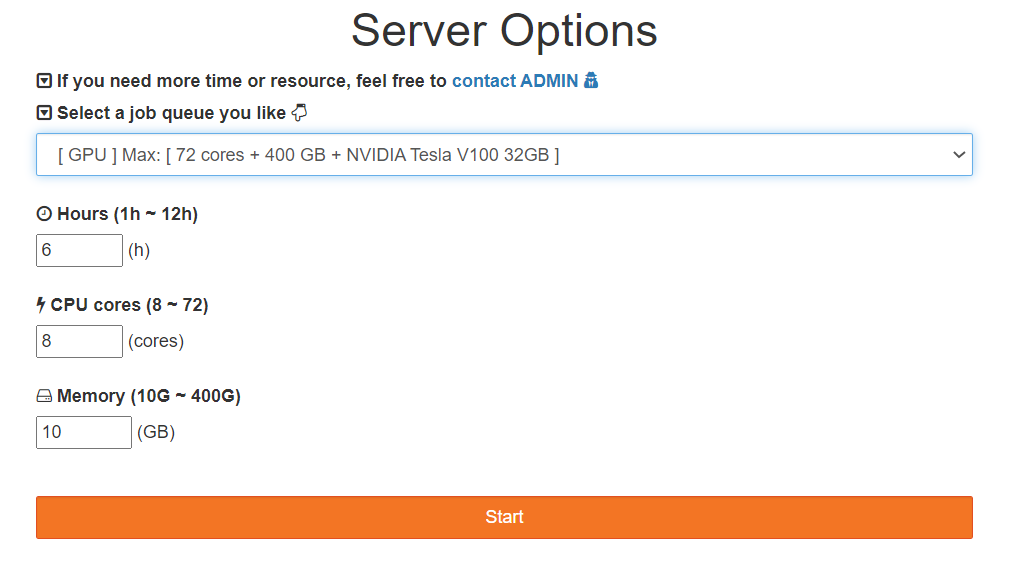
After using jupyterhub/templates, we can input args according to our selection, e.g.🌰
- select login node, which is
'local'in code: - select Torque/PBS gpu queue, which is
'gpu'in code:

1 maintainer

Metadata
1 maintainer
Release files for gravityspawner 0.0.2
For a detailed explanation of source distributions (sdists) and built distributions (wheels), please see the package formats documentation.
Source distribution (sdist)
| File | Size | Uploaded | |
|---|---|---|---|
| gravityspawner-0.0.2.tar.gz | 114.9 kB | Details |
Built distribution (wheel)
| File | Interpreter | ABI | Platform | Reset |
|---|---|---|---|---|
| gravityspawner-0.0.2-py3-none-any.whl | Python 3 | none | any | Details |
Total release size: 121.6 kB
Release files / gravityspawner-0.0.2.tar.gz
| Download URL | gravityspawner-0.0.2.tar.gz |
|---|---|
| Size | 114.9 kB |
| Tags | Source |
|
SHA-256 checksum How to use checksums |
b85c0470ac45552831ad80a9dc49cb36381ef578f1fedc1c58a575b128f97109
|
|
BLAKE2b-256 checksum How to use checksums |
4bf0ab6817bca392ee5c1cc8caa070569205e1bb33f418ba09b7eb6116a9e787
|
| Upload date | |
|
Uploaded using Trusted Publishing? What is trusted publishing? |
No |
| Uploaded via |
twine/4.0.1 CPython/3.10.5
|
Release files / gravityspawner-0.0.2-py3-none-any.whl
| Download URL | gravityspawner-0.0.2-py3-none-any.whl |
|---|---|
| Size | 6.7 kB |
| Tags | Python 3 |
|
SHA-256 checksum How to use checksums |
cf6e113e2d0b6584f8a6a5c29c3f60352a88411cfe4a4e8f3270606bd45aa800
|
|
BLAKE2b-256 checksum How to use checksums |
e1459c0cb1d83cc15083e1ae87132038f6f4edec0a241e1fc80ecb37413605c3
|
| Upload date | |
|
Uploaded using Trusted Publishing? What is trusted publishing? |
No |
| Uploaded via |
twine/4.0.1 CPython/3.10.5
|














