
Grayskull










"Skeletonr's main goal is to conquer the mysterious fortress of Castle Grayskull, from which He-Man draws his powers. If he succeeds, Skeletor would be able to conquer not only Eternia, but the whole universe."
Adapted from Wikipedia. Image credits: https://he-man.fandom.com
Introduction
Grayskull is an automatic conda recipe generator.
The main goal of this project is to generate concise recipes
for conda-forge.
The Grayskull project was created with the intention to eventually replace conda skeleton.
Presently Grayskull can generate recipes for Python packages available on PyPI and also those not published on PyPI but available as GitHub repositories.
Grayskull can also generate recipes for R packages published on CRAN.
Future versions of Grayskull will support recipe generation for packages of other repositories such as Conan and CPAN etc.
Installation
It is possible to install this project using pip:
pip install grayskull
or conda, using the conda-forge channel:
conda install -c conda-forge grayskull
It is also possible to clone this repo and install it using pip:
git clone https://github.com/conda/grayskull.git
cd grayskull
pip install -e .
Usage
It is pretty simple to use grayskull. Just call it, pass the repository
(pypi or cran) and the package name.
- Example:
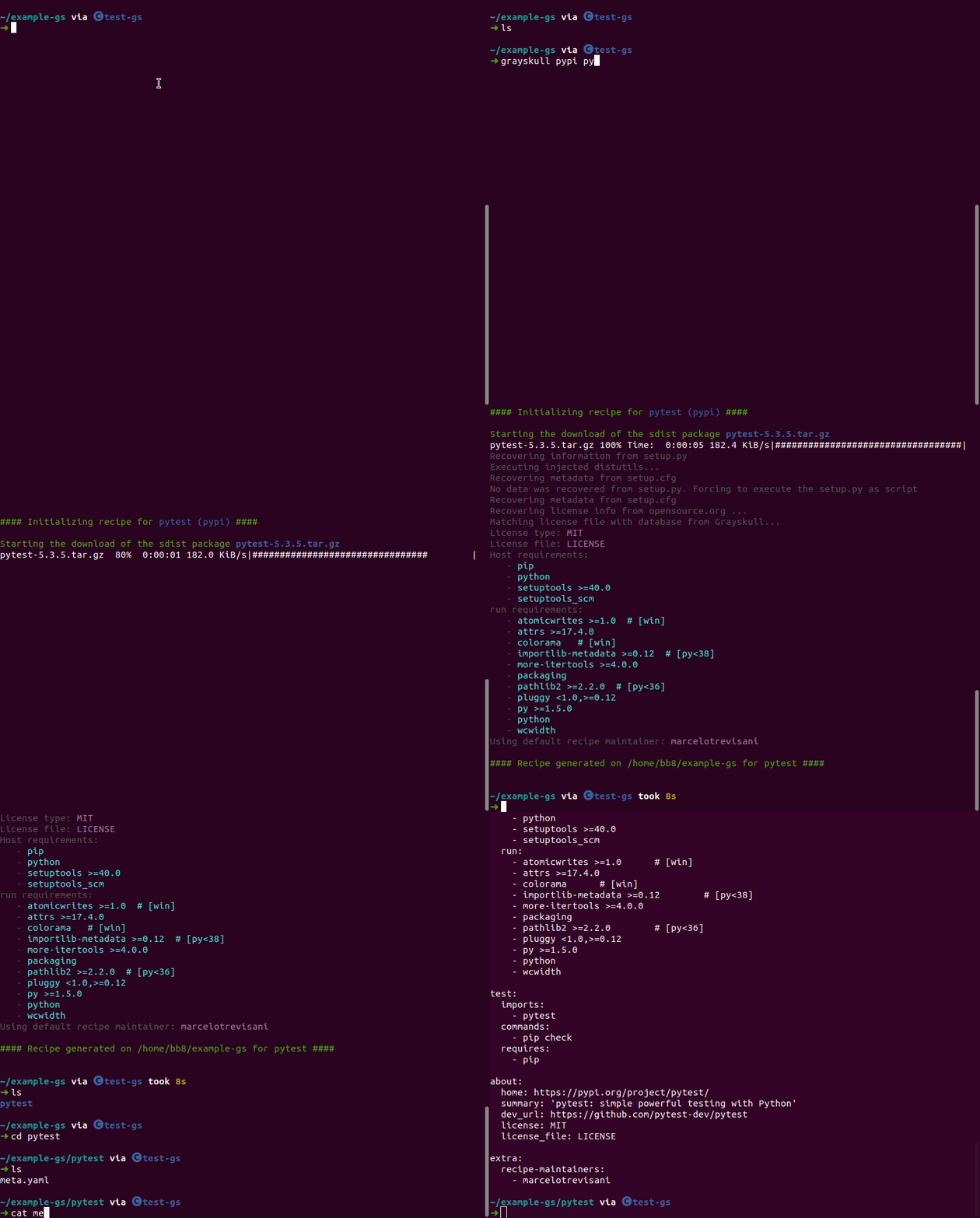
grayskull pypi pytest
After that grayskull will create a folder with the same name as the package
and inside this folder the generated recipe will be present (recipe.yaml).
Pass --no-use-v1-format to generate a legacy meta.yaml recipe instead.
- Example with
pytest(grayskull pypi pytest):
If your package is a GitHub repository just replace the package name with the GitHub repository URL.
For example:
grayskull pypi https://github.com/confluentinc/confluent-kafka-python
You can also generate a recipe from a local sdist archive:
grayskull pypi ./pytest-5.3.5.tar.gz
Note that such a recipe isn't really portable as it will depend on the local path of the sdist file. It can be useful if you want to automatically generate a conda package.
Use Grayskull with an internal package index
Grayskull can create recipes that point to any Python Package Index. Supply the --pypi-mirror-url keyword.
- Example:
grayskull pypi --pypi-mirror-url https://pypi.example.com pytest
The above will source packages from https://pypi.example.com/packages/source/...
This assumes that the mirror follows the same API as pypi including hosting metadata at the /pypi/{package_name}/json endpoint.
To specify an alternate metadata location use the --pypi-metadata-url option.
- Example:
grayskull pypi --pypi-mirror-url https://pypi.example.com --pypi-metadata-url https://pypi_meta.example.com pytest
Note:
--pypi-metadata-urlis a replacement for--pypi-url;--pypi-urlis deprecated and will be removed in a future release.
Checking package availability against custom indexes
By default, Grayskull checks if packages are available on conda-forge and highlights missing dependencies. You can specify custom package indexes to check against using the --package-indexes argument:
grayskull pypi --package-indexes my-channel company-channel conda-forge pytest
This will check if packages exist in my-channel, company-channel, or conda-forge (in that order) and mark them accordingly in the output.
You can also specify full URLs for internal package indexes that don't use anaconda.org:
grayskull pypi --package-indexes https://internal-conda.example.com http://another-conda.example.com conda-forge pytest
Both HTTP and HTTPS protocols are supported for custom package indexes. This is particularly useful for internal networks that don't have access to anaconda.org.
For internal package indexes with custom API structures, you can use the {pkg_name} placeholder in your URL:
grayskull pypi --package-indexes "https://internal-conda.example.com/api/{pkg_name}/available" conda-forge pytest
This allows you to specify exactly how your internal package index API works, rather than using the default /pkg_name/files path structure.
Online Grayskull
It is also possible to use Grayskull without any installation. You can go to this website marcelotrevisani.com/grayskull and inform the name and the version (optional) of the package and it will create the recipe for you.
License
Copyright Marcelo Duarte Trevisani and contributors, 2020-2026.
Distributed under the terms of the Apache 2.0 license, grayskull is free and open source software.
1 maintainer

Metadata
1 maintainer
Release files for grayskull 3.2.0
For a detailed explanation of source distributions (sdists) and built distributions (wheels), please see the package formats documentation.
Source distribution (sdist)
| File | Size | Uploaded | |
|---|---|---|---|
| grayskull-3.2.0.tar.gz | 2.0 MB | Details |
Built distribution (wheel)
| File | Interpreter | ABI | Platform | Reset |
|---|---|---|---|---|
| grayskull-3.2.0-py3-none-any.whl | Python 3 | none | any | Details |
Total release size: 2.1 MB
Release files / grayskull-3.2.0.tar.gz
| Download URL | grayskull-3.2.0.tar.gz |
|---|---|
| Size | 2.0 MB |
| Tags | Source |
|
SHA-256 checksum How to use checksums |
467bb43a7de610fc8719e520c9e9049f597a28d9e72c0ff047127b5340569ddb
|
|
BLAKE2b-256 checksum How to use checksums |
8945abdddfb30303923b3abb01f21d2da114d582f2df299b71124687dac9b7c7
|
| Upload date | |
|
Uploaded using Trusted Publishing? What is trusted publishing? |
No |
| Uploaded via |
twine/7.0.0 CPython/3.14.7
|
Release files / grayskull-3.2.0-py3-none-any.whl
| Download URL | grayskull-3.2.0-py3-none-any.whl |
|---|---|
| Size | 142.0 kB |
| Tags | Python 3 |
|
SHA-256 checksum How to use checksums |
c454c3fbc38a9237ab978a6672c7d24bdb5bbf137cbad7d10ab8aaa310b60b37
|
|
BLAKE2b-256 checksum How to use checksums |
216c35e9f816c3e69ba89165ceb6a7b34ec3a2765bf828624f46aeecfac32c18
|
| Upload date | |
|
Uploaded using Trusted Publishing? What is trusted publishing? |
No |
| Uploaded via |
twine/7.0.0 CPython/3.14.7
|














