
grbl2image
Generates an image (PNG, JPEG, etc.) from a GRBL file (.NC, .GC, ...), in Python using pillow (python3 PIL fork). It is to be used as a reusable standalone component, initially for the parent project GRBL WebStreamer that is a webinterface for laser cutters running on Raspi or similar SBC.
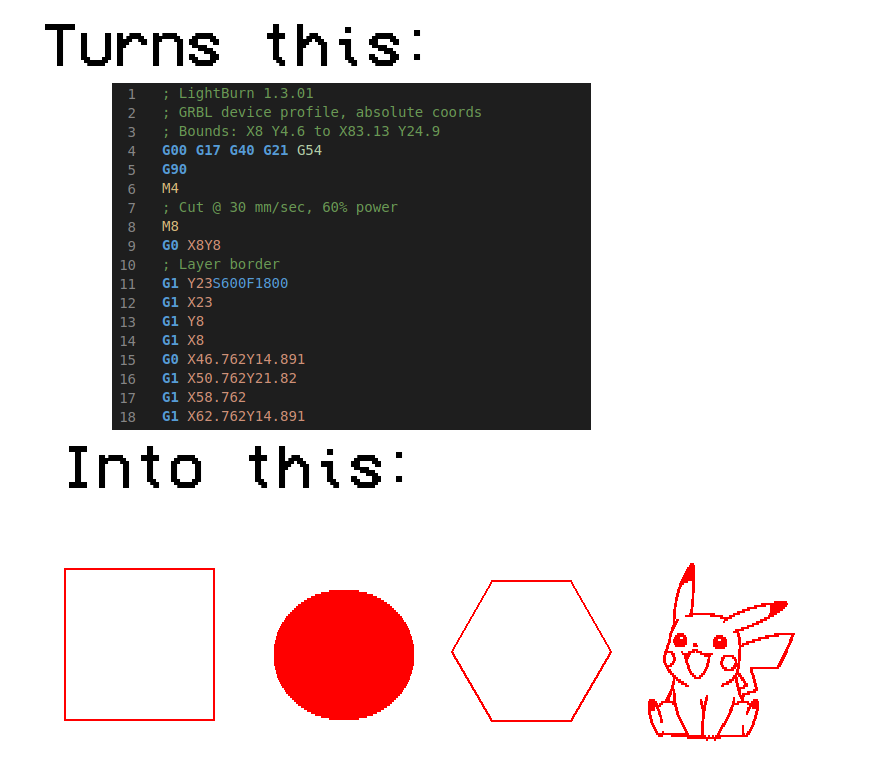
The target is to generate a simply a top view of a GRBL job for my Laser (see limitations below). As of now only a subset of the GRBL commands are recognized, and more will be added along the way when their need arise. This is not meant to be the complete solution for all GRBL files, but I'll be taking requests on GitHub so don't hesitate.
What it does
- Generates image from a GRBL file for a Laser job
- Calculates estimated bounds of the job
- Supports color blending for "greyscale" jobs
- Calculates an estimated time of completion of the job
Limitations
This is made to support a laser cutter/engraver, not CNC, and this is out of scope even of the end scope of library. There are already good solutions that handle the 3D component of your CNC. This is just a top view of a GRBL file, so if it works with yours CNC good for you!
Therefore GRBL codes that don't make sense for a laser will be ignored and not implemented, but if you have time fork this project!
Assumptions
I took some assumptions with this code, and the more mature it will get the more flexible it will be. For now, here are a few that are enforced implicitly:
- You work in Metric system (like you should)
- Default coords are ABSOLUTE
- Origin is 0,0
- Work area is 200mm x 200mm with a resolution of 10px/mm by default (but you can change that - see examples below)
Compatibility / Tested software
So far the tested software and empirically perceived support:
- LightBurn : Very good (all the jobs I made and tried rendered just fine)
Technical details
Dependencies
- Pillow the replacement of PIL the image library :
python3 -m pip install pillow
Supported GRBL codes
I will add them as I need them, but here are the ones that should work as of now:
- G0 move
- G1 burn
- G90 coords are ABSOLUTE
- G91 coords are RELATIVE
Sample usage
Generate an image from GRBL file
import grbl2image.grbl2image as G2I
from PIL import Image

#Generate the PIL Image object based on sample code
img, stats = G2I.processFile("sample.gcode/Test gcode 1.nc", color="blue")
print(stats)

#overlay another job in the same image
img, stats = G2I.processFile("sample.gcode/Test gcode 2.nc", targetImage=img, color="red", yoffset=300)
#show the stats about your job (duration, boundaries, ...)
print(stats)
#example for duration
print(f"Job duration in sec : {stats.estimatedDurationSec:0.1f}s")

#final flip because the image 0,0 is top left and for us human it's at the bottom left
img = img.transpose(Image.FLIP_TOP_BOTTOM)

#show popup
img.show()
Change the target image size
Default is 200mm x 200mm at 10px/mm resolution, but you can change that according your laser work area. Tip : better have a bigger image and then scaling down than a small image all along.
import grbl2image.grbl2image as G2I
from PIL import Image

#suppose your laser is a 40cm x 30xm for instance you could use these settings **before** calling processFile()
G2I.PIXELS_PER_MM = 5
G2I.AREA_W_MM = 300
G2I.AREA_H_MM = 400

#Generate the PIL Image object based on sample code
img, _ = G2I.processFile("sample.gcode/Test gcode 1.nc", color="blue")

#final flip because the image 0,0 is top left and for us human it's at the bottom left
img = img.transpose(Image.FLIP_TOP_BOTTOM)

#save
img.save("laser_job_001.png")
Customize the rendering
import grbl2image.grbl2image as G2I
from PIL import Image

# don't blend, just laser ON/OFF : makes you see the whole work but make greyscale images a big blotch
G2I.NO_BLENDING = True
# change default background color
G2I.BG_COLOR = "whitesmoke"

#Generate the PIL Image object based on sample code and overwrite the default values
img, _ = G2I.processFile("sample.gcode/Test gcode 1.nc", color="blue", bg_color="yellow", noblending=False)

...
Get stats about the job
import grbl2image.grbl2image as G2I

#Make the image and compute the stats (see details in the object attributes)
img, stats = G2I.processFile("sample.gcode/Test gcode 1.nc")
print(stats)
Prints:
>>>> Job 'Test gcode 1.nc' from [8.0, 4.599] ((80, 1954) px) to [83.12600000000003, 24.899000000000086] ((832, 1751) px). Estimated duration [0h 1m 9s] .
Source code
- Source is MIT licensed on GitHub : https://github.com/AlanFromJapan/grbl2image
- Parent project GRBL WebStreamer is also on GitHub under MIT license
1 maintainer

Metadata
1 maintainer
Release files for grbl2image 1.2.2
For a detailed explanation of source distributions (sdists) and built distributions (wheels), please see the package formats documentation.
Source distribution (sdist)
| File | Size | Uploaded | |
|---|---|---|---|
| grbl2image-1.2.2.tar.gz | 8.1 kB | Details |
Built distribution (wheel)
| File | Interpreter | ABI | Platform | Reset |
|---|---|---|---|---|
| grbl2image-1.2.2-py3-none-any.whl | Python 3 | none | any | Details |
Total release size: 15.8 kB
Release files / grbl2image-1.2.2.tar.gz
| Download URL | grbl2image-1.2.2.tar.gz |
|---|---|
| Size | 8.1 kB |
| Tags | Source |
|
SHA-256 checksum How to use checksums |
ae9f6d2deec42e38d2a7f63dee76c357327ac2efe355fc8ed2869c900d6a12bf
|
|
BLAKE2b-256 checksum How to use checksums |
fc53a1d46bfa38ac36fe02972bfe947a2fd6a0368cfd4b489807e4945a21a6de
|
| Upload date | |
|
Uploaded using Trusted Publishing? What is trusted publishing? |
No |
| Uploaded via |
twine/4.0.2 CPython/3.10.12
|
Release files / grbl2image-1.2.2-py3-none-any.whl
| Download URL | grbl2image-1.2.2-py3-none-any.whl |
|---|---|
| Size | 7.7 kB |
| Tags | Python 3 |
|
SHA-256 checksum How to use checksums |
fb1bc2372b8db41d2e4e35702e5b54a21790315064dbfcc4872a0d9843fdef81
|
|
BLAKE2b-256 checksum How to use checksums |
b35b772589379d1792873e883451178d461a85304711f91f23add14334ebee40
|
| Upload date | |
|
Uploaded using Trusted Publishing? What is trusted publishing? |
No |
| Uploaded via |
twine/4.0.2 CPython/3.10.12
|














