

Absolutely Delightful Table-making in Python













With Great Tables anyone can make wonderful-looking tables in Python. The philosophy here is that we can construct a wide variety of useful tables by working with a cohesive set of table components. You can mix and match things like a header and footer, attach a stub (which contains row labels), arrange spanner labels over top of the column labels, and much more. Not only that, but you can format the cell values in a variety of awesome ways.
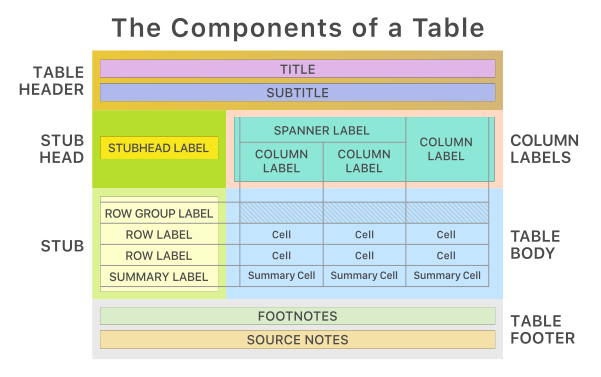
It all begins with table data in the form of a Pandas or Polars DataFrame. You then decide how to compose your output table with the elements and formatting you need for the task at hand. Finally, the table is rendered to HTML (the default option) or to an image file.
The Great Tables package is designed to be both straightforward yet powerful. The emphasis is on simple methods for the everyday display table needs (but power when you need it). Here is a brief example of how to use Great Tables to create a table from the included sp500 dataset:
from great_tables import GT
from great_tables.data import sp500

# Define the start and end dates for the data range
start_date = "2010-06-07"
end_date = "2010-06-14"

# Filter sp500 using Pandas to dates between `start_date` and `end_date`
sp500_mini = sp500[(sp500["date"] >= start_date) & (sp500["date"] <= end_date)]

# Create a display table based on the `sp500_mini` table data
(
    GT(sp500_mini)
    .tab_header(title="S&P 500", subtitle=f"{start_date} to {end_date}")
    .fmt_currency(columns=["open", "high", "low", "close"])
    .fmt_date(columns="date", date_style="wd_m_day_year")
    .fmt_number(columns="volume", compact=True)
    .cols_hide(columns="adj_close")
)
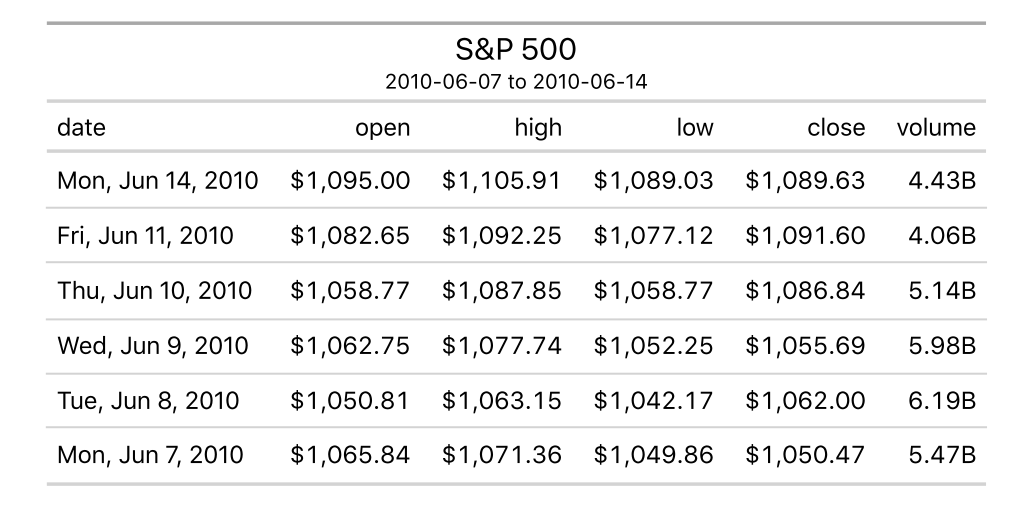
Typically we use Great Tables in an notebook environment or within a Quarto document. Tables won't print to the console, but using the show() method on a table object while in the console will open the HTML table in your default browser.
There are 16 datasets provided by Great Tables: countrypops, sza, gtcars, sp500, pizzaplace, exibble, towny, peeps, films, metro, gibraltar, constants, illness, reactions, photolysis, and nuclides.
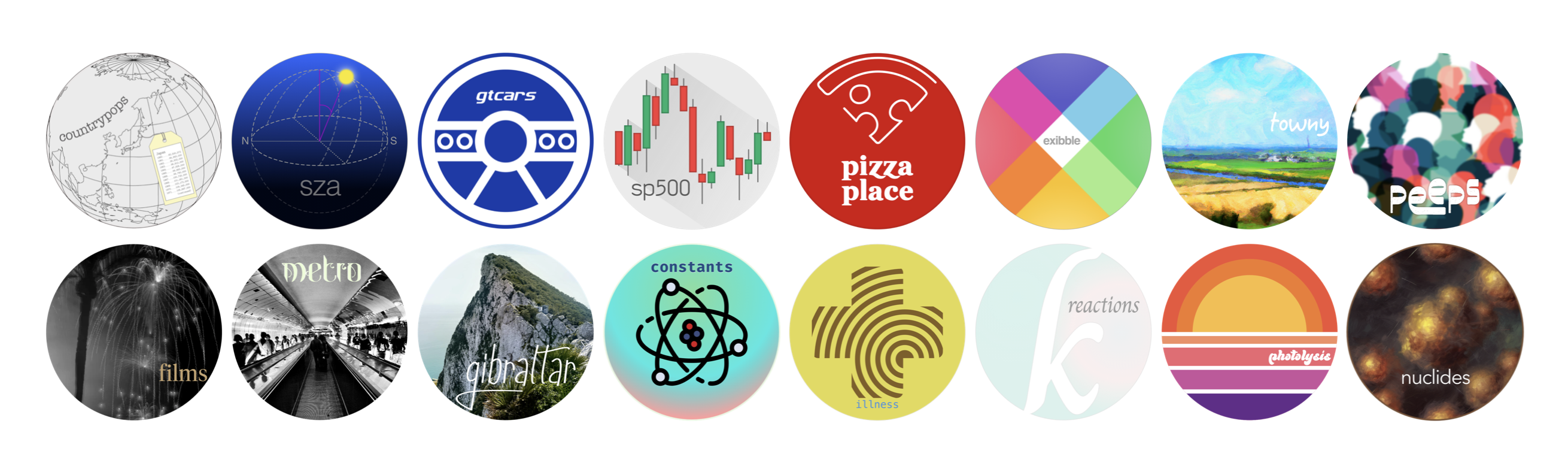
All of this tabular data is great for experimenting with the functionality available inside Great Tables and we make extensive use of these datasets in our documentation.
Beyond the methods shown in the simple sp500-based example, there are many possible ways to create super-customized tables. Check out the documentation website to get started via introductory articles for making Great Tables. There's a handy Reference section that has detailed help for every method and function in the package.

Let's talk about how to make Great Tables! There are a few locations where there is much potential for discussion.
One such place is in GitHub Discussions. This discussion board is especially great for Q&A, and many people have had their problems solved in there.

Another fine venue for discussion is in our Discord server. This is a good option for asking about the development of Great Tables, pitching ideas that may become features, and sharing your table creations!

Finally, there is the X account. There you'll find posts about Great Tables (including sneak previews about in-development features) and other table-generation packages.

These are all great places to ask questions about how to use the package, discuss some ideas, engage with others, and much more!
INSTALLATION
The Great Tables package can be installed from PyPI with:
$ pip install great_tables
You can also install Great Tables from Conda-Forge by using:
conda install conda-forge::great_tables
If you encounter a bug, have usage questions, or want to share ideas to make this package better, please feel free to file an issue.
Code of Conduct
Please note that the Great Tables project is released with a contributor code of conduct.
By participating in this project you agree to abide by its terms.
Contributing to Great Tables
There are many ways to contribute to the ongoing development of the Great Tables package. Some contributions can be simple (like fixing typos, improving documentation, filing issues for feature requests or problems, etc.) and others might take more time and care (like answering questions and submitting PRs with code changes). Just know that anything you can do to help would be very much appreciated!
Please read over the contributing guidelines for information on how to get started.
📄 License
Great Tables is licensed under the MIT license.
© Posit Software, PBC.
Citation
If you use Great Tables in your research/project/product, we would appreciate a citation to the package. You can cite the package using the following BibTeX entry:
@software{Iannone_great_tables,
author = {Iannone, Richard and Chow, Michael},
license = {MIT},
title = {{great-tables: Make awesome display tables using Python.}},
url = {https://github.com/posit-dev/great-tables},
version = {0.14.0}
}
🏛️ Governance
This project is primarily maintained by Rich Iannone and Michael Chow. Other authors may occasionally assist with some of these duties.


Release files for great-tables 1.0.0
For a detailed explanation of source distributions (sdists) and built distributions (wheels), please see the package formats documentation.
Source distribution (sdist)
| File | Size | Uploaded | |
|---|---|---|---|
| great_tables-1.0.0.tar.gz | 27.6 MB | Details |
Built distribution (wheel)
| File | Interpreter | ABI | Platform | Reset |
|---|---|---|---|---|
| great_tables-1.0.0-py3-none-any.whl | Python 3 | none | any | Details |
Total release size: 29.3 MB
Release files / great_tables-1.0.0.tar.gz
| Download URL | great_tables-1.0.0.tar.gz |
|---|---|
| Size | 27.6 MB |
| Tags | Source |
|
SHA-256 checksum How to use checksums |
d0d4a05f6cc15bd553c4654dc9e7a8b38288b1f7219444056bb68b698f0791c7
|
|
BLAKE2b-256 checksum How to use checksums |
8beb815148ae97a09bde651877260b609bf2d31bc3348bc3f9f5c518af269373
|
| Upload date | |
|
Uploaded using Trusted Publishing? What is trusted publishing? |
No |
| Uploaded via |
twine/7.0.0 CPython/3.13.14
|
Release files / great_tables-1.0.0-py3-none-any.whl
| Download URL | great_tables-1.0.0-py3-none-any.whl |
|---|---|
| Size | 1.6 MB |
| Tags | Python 3 |
|
SHA-256 checksum How to use checksums |
bbe12456b3c6f3c29da94aa6931973d03cee957d790ea4d9bcad679b5f3e9d94
|
|
BLAKE2b-256 checksum How to use checksums |
447af30cf6a8f046e97a0b7eb2c273d1ff63b0d40f118c50700e7876644d2303
|
| Upload date | |
|
Uploaded using Trusted Publishing? What is trusted publishing? |
No |
| Uploaded via |
twine/7.0.0 CPython/3.13.14
|














