
greatminds
A local workspace for a team of coding agents. Talk to a planner or developer, follow batch work, review tool permissions, and manage test stands from your browser. A separate daemon coordinates the work and keeps running when you close the UI.
Greatminds connects executors through ACP. OpenAI Codex, Claude Code and Grok have tested integration paths. Roles are independent of executors: choose a harness, model, reasoning level and permission policy for each role. Other ACP implementations can be configured; see the compatibility matrix for verified scope and limitations.
The daemon handles deterministic work: queue assignment, process lifecycle, validation commands, evidence checks and workflow transitions. Agents handle reasoning. Configuration, tasks and execution records live in your filesystem.
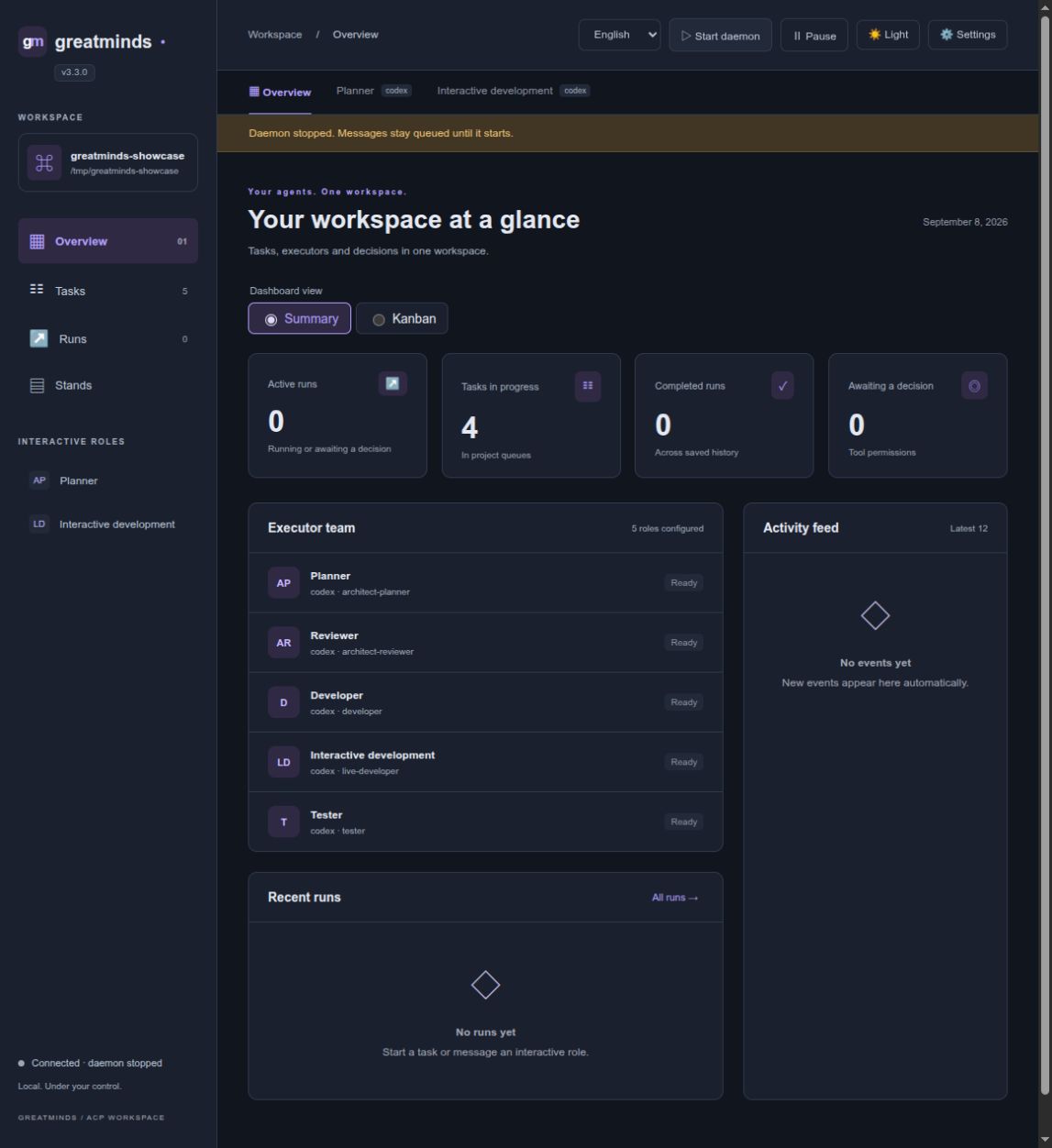
Greatminds 3.4.0, dark theme. Screenshots use a demonstration project.
Start in your existing project
Greatminds needs Linux and Python 3.11+. Your project can keep Python 3.8, another Python version, or a different language. Install Greatminds separately with uv:
uv tool install --python 3.13 greatminds
cd /path/to/your/project
greatminds setup
greatminds web --port 8765 --no-daemon
Open http://127.0.0.1:8765. In Settings, add your installed ACP executor and
an interactive ARCHITECT-PLANNER role. Save settings, click Start daemon,
and open Planner to begin a conversation.
You need an installed and authenticated harness before the first conversation.
The step-by-step setup guide
includes exact Codex installation commands, the settings values to enter, and
validation commands that use your project's own Python. Setup preserves your
project's pyproject.toml, uv.lock, .python-version and existing environment.
On subsequent visits:
cd /path/to/your/project
greatminds web --port 8765
This starts or attaches to the project daemon. Ctrl+C stops the web server;
agent work continues. Stop it explicitly with greatminds daemon stop or the
web toolbar. Each project has its own daemon and state; choose a different web
port when opening multiple projects. Systemd is optional.
In the web workspace
- Interactive role tabs with Markdown, streamed responses and activity indicators. Enter sends; Shift+Enter inserts a new line. Earlier messages load on demand.
- A dashboard with Summary / Kanban views and clickable task cards.
- Batch-run history with messages, tools, validation results and permission requests. The latest runs load first; earlier runs remain available in pages.
- Executor settings with model and reasoning selectors when supplied through ACP.
- Stands with machine access, inventories, Ansible playbooks and operation logs.
- Light and dark themes, Compact / Normal / Large interface sizes, and English, Russian and Simplified Chinese. Display preferences persist in your browser.
- The running web server's version directly below the product name.
The server binds to loopback by default and has no application authentication. For remote access, place it behind your own access controls. See the web workspace guide.
Workflows and stands
Add queue-scheduled developer, tester and reviewer roles to run a task pipeline. An agent response alone does not complete a task: the daemon checks typed results, revision, permissions and evidence before applying transitions.
In a standalone planner conversation, discuss the proposal and approve filing it. The planner can create and route several tasks through the existing task CLI; the daemon applies these requests, records progress and recovers accepted work after restart without another model turn. See planning a feature.
Ansible support is optional:
uv tool install --python 3.13 'greatminds[stands]'
Configure stand profiles and deployment policy before executing stand operations. No LLM stand-keeper is required for these deterministic operations. See the execution contract for roles, workspaces, commands, permissions and deployment gates.
CLI, tmux and VS Code workflows are also available. Start with greatminds --help
and the documentation.
Updates and development
uv tool upgrade greatminds
Restart your web server to load the new version. Restart the daemon when runtime changes need to take effect, after checking active work. See the upgrade guide and release checklist.
Report Greatminds defects in the issue tracker. Bugs in a managed project belong in that project's tracker.
Apache-2.0. See LICENSE.
1 maintainer

Metadata
1 maintainer
Release files for greatminds 3.4.0
For a detailed explanation of source distributions (sdists) and built distributions (wheels), please see the package formats documentation.
Source distribution (sdist)
| File | Size | Uploaded | Provenance | Actions |
|---|---|---|---|---|
| greatminds-3.4.0.tar.gz | 357.1 kB | With provenance | Details for greatminds-3.4.0.tar.gz |
Built distribution (wheel)
| File | Interpreter | ABI | Platform | Actions Reset |
|---|---|---|---|---|
| greatminds-3.4.0-py3-none-any.whl | Python 3 | none | any | Details for greatminds-3.4.0-py3-none-any.whl |
Total release size: 774.4 kB
Release files / greatminds-3.4.0.tar.gz
| Download URL | greatminds-3.4.0.tar.gz |
|---|---|
| Size | 357.1 kB |
| Tags | Source |
|
SHA-256 checksum How to use checksums |
e209b2cc4f2635952b06ae1c430c950ffbf12baa1d5001d60c6f6d84754f924e
|
|
BLAKE2b-256 checksum How to use checksums |
812b54b308812c279eebddf34e7ebacbccea7f522901105f4e05f73a053b7bd6
|
| Upload date | |
|
Uploaded using Trusted Publishing? What is trusted publishing? |
Yes |
| Uploaded via |
twine/7.0.0 CPython/3.13.16
|
Provenance
Provenance describes where a file came from. On PyPI, provenance is shared via attestations, which provide a verifiable record of the build or publishing details. View details, limitations and caveats.


PyPI Publish Attestation
PyPI verified that this artifact, at this checksum, originated from the publisher listed below.
Signed by GitHub Actions, verified by PyPI on Nov 3, 2026.
Transparency logRelease files / greatminds-3.4.0-py3-none-any.whl
| Download URL | greatminds-3.4.0-py3-none-any.whl |
|---|---|
| Size | 417.2 kB |
| Tags | Python 3 |
|
SHA-256 checksum How to use checksums |
9a4d3758f63ca87ea35b54e5c5e49a660e720cb0ad74a312e0e0c4984be3dcf7
|
|
BLAKE2b-256 checksum How to use checksums |
8bcd6b212046021b0336798fb05ae054e429a4d5cc6e929b883afcfd4a1acdfe
|
| Upload date | |
|
Uploaded using Trusted Publishing? What is trusted publishing? |
Yes |
| Uploaded via |
twine/7.0.0 CPython/3.13.16
|
Provenance
Provenance describes where a file came from. On PyPI, provenance is shared via attestations, which provide a verifiable record of the build or publishing details. View details, limitations and caveats.
PyPI Publish Attestation
PyPI verified that this artifact, at this checksum, originated from the publisher listed below.
Signed by GitHub Actions, verified by PyPI on Nov 3, 2026.
Transparency logSecurity for greatminds 3.4.0
Provenance
Provenance describes where a file came from. On PyPI, provenance is shared via attestations, which provide a verifiable record of the build or publishing details. View details, limitations and caveats.
Full provenance
Both files in this release have been uploaded with provenance metadata.
Attestation for greatminds-3.4.0.tar.gz
PyPI Publish Attestation
PyPI verified that this artifact, at this checksum, originated from the publisher listed below.
Signed by GitHub Actions, verified by PyPI on Nov 3, 2026.
Transparency logA note on package security
PyPI is a repository for distributing packages, not a service for auditing them. While third-party security researchers and our staff do their best to detect and remove malicious packages, PyPI cannot guarantee the quality, security or suitability of any given package.
To learn more about protecting yourself from malicious actors, visit our package security documentation.














