
Python client library for Greenbyte API

Project description
Getting started
This is the beta version of the public API for the Greenbyte Platform. It contains new features (endpoints, parameters, etc.) that we encourage you to try out before they are released as a stable version.
Note that some details might change, meaning that any SDKs downloaded for this version might have minor incompatibilities in the future.
Features that are in beta are clearly marked with the label "(BETA)" so that you can know what features are stable. If you would rather view the latest stable API documentation, please use the version selection dropdown in the top right of the page.
What's new
2022-01-24 - More plan endpoint additions
- List Device Accesses for multiple Site Accesses - a new endpoint that lists all the Device Accesses for one or more specified SiteAccessID(s).
- Get Personnel By ID - a new endpoint that gets personnel info for a specified Personnel ID.
2022-01-17 - Various improvements and addition of several new endpoints
- A taxonomy component object with ID and name has been added to the status endpoints.
- List Comments for multiple Tasks - a new endpoint that lists all the comments for one or more specified TaskId(s).
2021-08-23 - Plan Get endpoints
Plan endpoints for getting individual items by ID have been added as a compliment to the existing List endpoints. This includes:
2021-04-29 - Python SDK now on PyPi
The Python SDK is now available as a package on PyPi (https://pypi.org/project/greenbyteapi/). We will be updating this regularly in parallel with updates to the API specifications.
2021-04-27 - Improvement to endpoints
Get Data Signals: Device type (ID and title) has been added to the response for every data signal to make it easier to differentiate signals with the same name.
Get Data Per Category: Category time has been added to the response for every data per category item.
2021-04-12 - Improvement to List Status endpoint
Turbine status ID has been added to the status endpoint.
2021-03-22 - Improvement to List Site Accesses endpoint
The List Site Accesses endpoint now returns all individual personnel and the times they accessed the site.
2021-03-15 - Improvements to Plan endpoints
The List Tasks endpoint now returns related metadata fields.
2021-02-15 - More Plan endpoints (BETA)
We have added the following endpoints under the Plan section:
2021-02-08 - Add UTC support
UTC support has been added for all endpoints that return timestamps.
By setting the useUtc flag to true timestamps will be returned in UTC time zone instead of client time zone.
The flag is set to false by default.
2021-01-25 - Plan endpoints (BETA)
We have introduced a Plan section containing the following endpoints:
2021-01-18 - API key authentication changes
The preferred method of authenticating with the API is now to pass the
API key via the HTTP header X-Api-Key. The old methods, passing it as
query parameter or via the old header Breeze-ApiToken, will continue
to work but are deprecated.
Note that this change causes a breaking change in some of the SDKs, for
example, if you use the C# SDK and explicitly set the API key on the
Configuration class. This is only an issue if you download a new
version of the SDK and want to use it with existing code.
- Solution: Instead of adding the API key to the
ApiToken/BreezeApiTokenproperty, you need to use theXApiKeyproperty.
2021-01-11 - Optional .json suffix
The .json suffix is no longer necessary when calling the API. That
means that calls to for instance configuration or configuration.json
will return the same result. Endpoints that currently support the
.json suffix will continue to do so but it is considered deprecated.
2020-08-31 - Endpoint permissions
We have added more fine-grained permissions for the API. When creating or editing an API key, you can now set permissions for specific API endpoints (API key guide). Existing API keys will have permissions for all existing endpoints.
See the documentation for specific endpoints for information on which permissions are required.
2020-08-28 - Improvement for status endpoints
It is now possible to select which lost production signal will be returned when requesting status data from the API. The following endpoints are affected:
2020-08-20 - Real Time Data and Data Per Category endpoints aggregation by site level
You can now aggregate your data based on site hierarchy levels when calling the Real Time Data and Data Per Category endpoints.
The new siteLevel aggregation mode (aggregate parameter) enable this new type of aggregation.
2020-06-29 - Site endpoint
We have added a new endpoint for fetching sites and related meta data. You can find more information about this endpoint here: Get Sites.
2020-06-29 - Device endpoint improvements
The Device endpoint has been improved:
- New request parameters for filtering on sites (
siteIds) and/or parent devices (parentIds). - New response fields for device type (
deviceTypeId), parent device (parentId), and child devices (childIds)
2020-06-29 - Data endpoint aggregation by site level
You can now aggregate your data according to the site hierarchy which you can see in the device selector when calling the Data endpoint.
The new siteLevel aggregation mode (aggregate parameter) aggregates data based on the site hierarchy.
2020-06-29 - Minor API improvements
Problem description in error responses
API error responses such as 400 Bad Request now contain details about what is wrong, for example, if a request parameter is missing or has invalid value. See the error response description for each endpoint for specific examples.
Changes to HTTP rate limit headers
The format of the HTTP headers regarding rate limiting has changed:
X-Rate-Limit-Limit- This now contains the rate limit period as a string (previously the number of allowed requests for a given period).X-Rate-Limit-Remaining- The remaining number of requests for this period (like before, no change).X-Rate-Limit-Reset- This now contains the UTC timestamp string when the remaining number of requests resets (previously the number of seconds left until the end of the period).
More information is available under the 429 Too Many Requests error response description for each endpoint.
Support for time zone offsets in timestamp parameters
It is now possible to specify timestamp strings with an explicit time zone (UTC) offset, for example "2020-05-10T09:00:00+01:30".
Proper use of error response codes
Some error responses with the code 401 Unauthorized will now instead be 403 Forbidden to better match web API best practices. This is work in progress, with the goal of having all failed authorization checks return code 403 rather than 401 in the future.
2020-06-08 - Data endpoint aggregation by group
If you have divided you sites into groups of assets, you can now aggregate your data by those groups when calling the Data, Real Time Data, and Data Per Category endpoints.
The new deviceLevel aggregation mode (aggregate parameter) aggregates data based on the hierarchy level directly below site.
2020-04-27 - Data signal permissions
It is now possible to set permissions for individual data signals for API keys (Share > API Keys in the Greenbyte Platform). When adding/editing an API key, there is a new option to select authorized data signals in addition to the device selection. Leaving the signal selection blank (nothing selected) gives permission to all current and future data signals, just like previously created API keys.
API endpoints affected by data signal permissions:
datasignals.json: filters returned data signals based on permissions.data.json,realtimedata.json,datapercategory.json: gives 401 Unauthorized error for data signals without permission.status.json,activestatus.json: may omit lost production values (in thelostProductionfield) based on data signal permissions.
2020-03-30 - Data Per Category endpoint
We have added a new endpoint to the Greenbyte Platform to make it possible to extract Lost Production data per contract category from the API. You can find more information about this endpoint here: Data Per Category.
General notes regarding endpoints
- Some endpoints take
pageandpageSizeparameters in order to support fetching data in chunks. The default values are 50 forpageSizeand 1 forpage, meaning that the first 50 items will be returned. These endpoints also return aLinkheader as defined in RFC 8288. - Some endpoints return data in the time zone configured in the Greenbyte Platform. This time zone can
be fetched from the
configuration.jsonendpoint. - Some endpoints can also be reached using the POST method, with a JSON
request body instead of query parameters. As this is a legacy option,
make sure to use the legacy version of the endpoints, ending in
.json(e.g.data.json). - All endpoints implement rate limiting, which is currently 1,000 requests/minute per API key and IP address. More information is available under the 429 Too Many Requests error response description for each endpoint.
How to Build
You must have Python 2 >=2.7.9 or Python 3 >=3.4 installed on your system to install and run this SDK. This SDK package depends on other Python packages like nose, jsonpickle etc.
These dependencies are defined in the requirements.txt file that comes with the SDK.
To resolve these dependencies, you can use the PIP Dependency manager. Install it by following steps at https://pip.pypa.io/en/stable/installing/.
Python and PIP executables should be defined in your PATH. Open command prompt and type pip --version.
This should display the version of the PIP Dependency Manager installed if your installation was successful and the paths are properly defined.
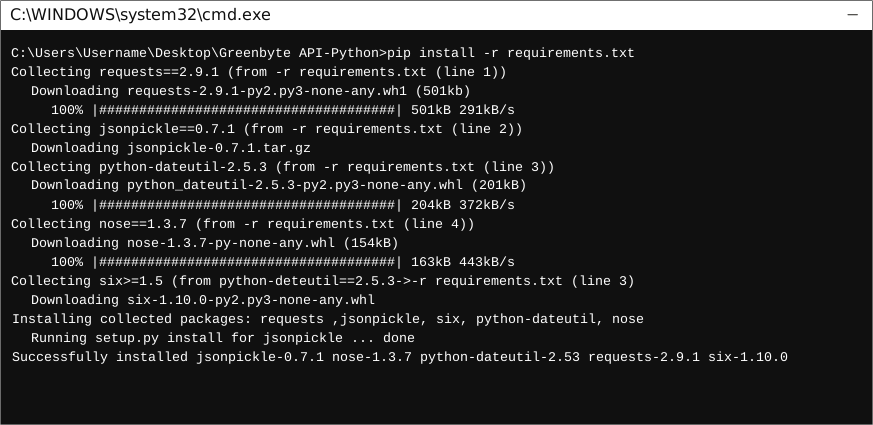
- Using command line, navigate to the directory containing the generated files (including
requirements.txt) for the SDK. - Run the command
pip install -r requirements.txt. This should install all the required dependencies.
How to Use
The following section explains how to use the Greenbyteapi SDK package in a new project.
1. Open Project in an IDE
Open up a Python IDE like PyCharm. The basic workflow presented here is also applicable if you prefer using a different editor or IDE.
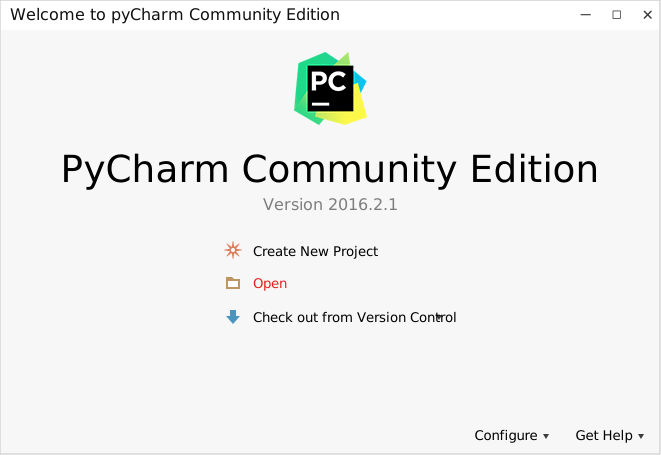
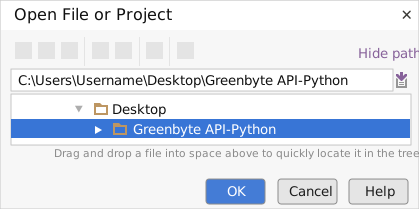
Click on Open in PyCharm to browse to your generated SDK directory and then click OK.
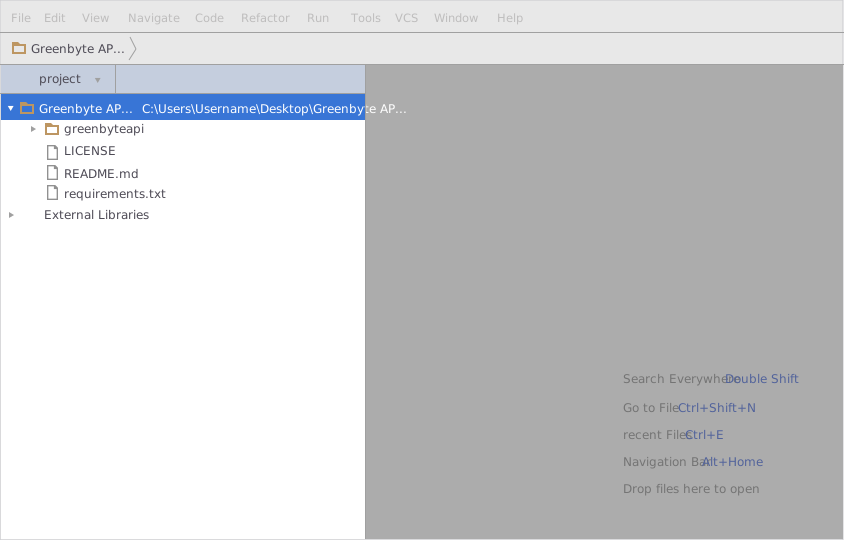
The project files will be displayed in the side bar as follows:
2. Add a new Test Project
Create a new directory by right clicking on the solution name as shown below:
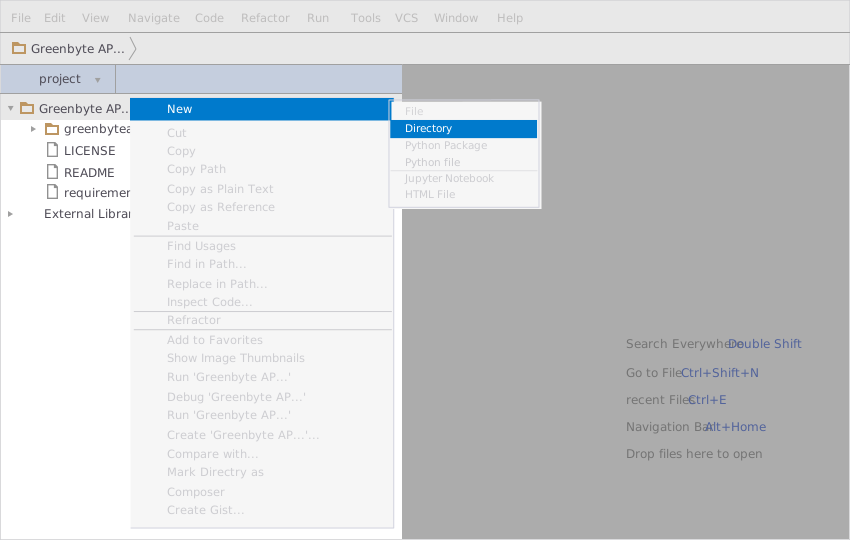
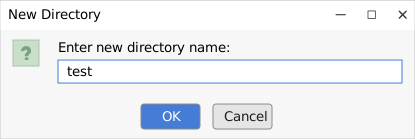
Name the directory as "test"
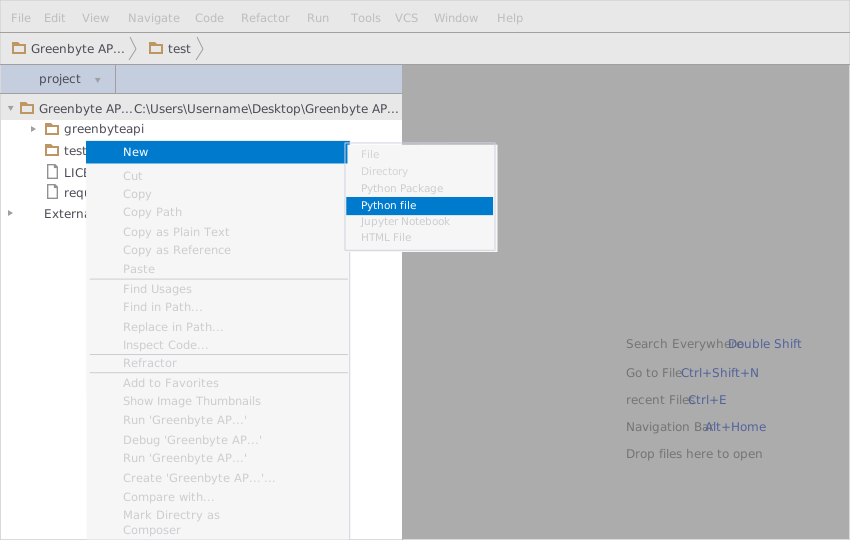
Add a python file to this project with the name "testsdk"
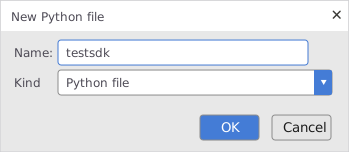
Name it "testsdk"
In your python file you will be required to import the generated python library using the following code lines
from greenbyteapi.greenbyteapi_client import GreenbyteapiClient
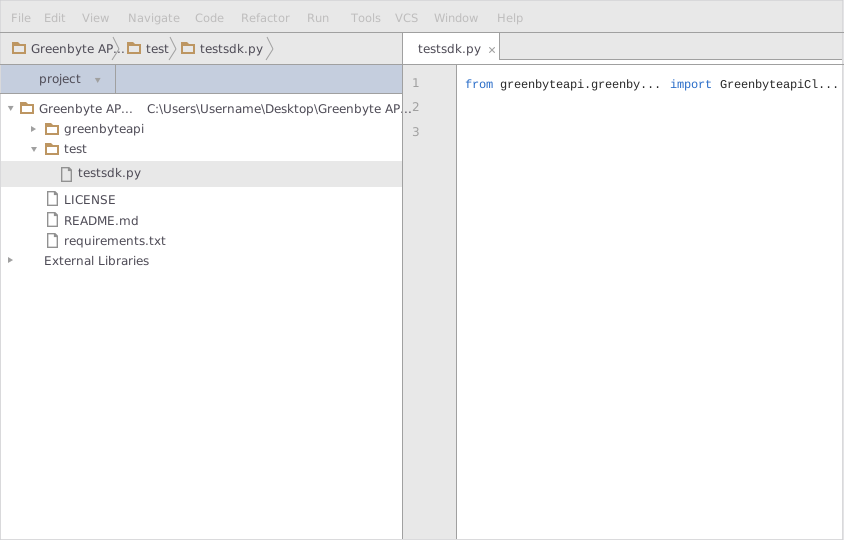
After this you can write code to instantiate an API client object, get a controller object and make API calls. Sample code is given in the subsequent sections.
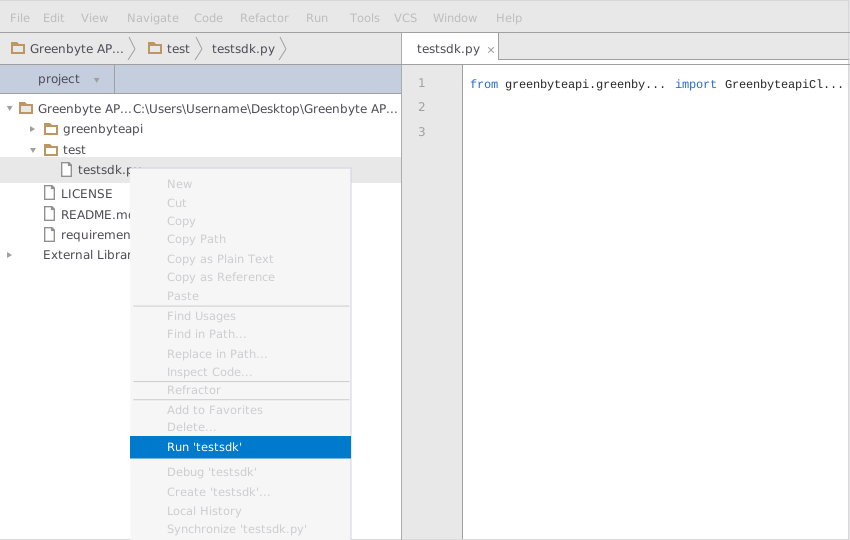
3. Run the Test Project
To run the file within your test project, right click on your Python file inside your Test project and click on Run
How to Test
You can test the generated SDK and the server with automatically generated test cases. unittest is used as the testing framework and nose is used as the test runner. You can run the tests as follows:
- From terminal/cmd navigate to the root directory of the SDK.
- Invoke
pip install -r test-requirements.txt - Invoke
nosetests
Initialization
Authentication
In order to setup authentication and initialization of the API client, you need the following information.
| Parameter | Description |
|---|---|
| x_api_key | TODO: add a description |
API client can be initialized as following.
# Configuration parameters and credentials
x_api_key = 'x_api_key'

client = GreenbyteapiClient(x_api_key)
Class Reference
List of Controllers
- DataController
- StatusesController
- ConfigurationDataController
- AssetsController
- AlertsController
- PlanController
 DataController
Get controller instance
An instance of the DataController class can be accessed from the API Client.
data_controller = client.data
 get_data_signals
Gets authorized data signals for one or more devices.
🔐 This endpoint requires the Data endpoint permission.
This request can also be made using the POST method, with a request to
datasignals.jsonand a JSON request body instead of query parameters.
def get_data_signals(self,
                         device_ids)
Parameters
| Parameter | Tags | Description |
|---|---|---|
| deviceIds | Required Collection |
What devices to get data signals for. |
Example Usage
device_ids_value = "[1,2,3]"
device_ids = json.loads(device_ids_value)

result = data_controller.get_data_signals(device_ids)
Errors
| Error Code | Error Description |
|---|---|
| 400 | The request cannot be fulfilled due to bad syntax. |
| 401 | The request is missing a valid API key. |
| 403 | One of the following: * The API key does not authorize access to the requested endpoint because of a missing endpoint permission. * The API key does not authorize access to the requested data. Devices, sites or data signals can be limited. |
| 405 | The HTTP method is not allowed for the endpoint. |
| 429 | The API key has been used in too many requests in a given amount of time. The following headers will be set in the response: * X-Rate-Limit-Limit – The rate limit period (for example"1m", "12h", or "1d"). * X-Rate-Limit-Remaining – The remaining number of requestsfor this period. * X-Rate-Limit-Reset – The UTC timestamp string (in ISO 8601format) when the remaining number of requests resets. The limit is currently 1,000 requests/minute per API key and IP address. |
get_data
Gets data for multiple devices and data signals in the given resolution. The timestamps are in the time zone configured in the Greenbyte Platform. Use the useUtc flag to get timestamps in UTC for all resolutions other than daily, weekly, monthly and yearly.
🔐 This endpoint requires the Data endpoint permission.
This request can also be made using the POST method, with a request to
data.jsonand a JSON request body instead of query parameters.
def get_data(self,
                 device_ids,
                 data_signal_ids,
                 timestamp_start,
                 timestamp_end,
                 use_utc=False,
                 resolution='10minute',
                 aggregate='device',
                 aggregate_level=0,
                 calculation=None)
Parameters
| Parameter | Tags | Description |
|---|---|---|
| deviceIds | Required Collection |
Which devices to get data for. |
| dataSignalIds | Required Collection |
Which data signals to get data for. |
| timestampStart | Required |
The beginning of the time interval to get data for (inclusive), |
| in RFC 3339, section 5.6 | ||
| date-time format: |
- Timestamps ending with 'Z' are treated as UTC. Example: "2020-01-01T00:00:00Z"
- Time zone (UTC) offset timestamps ending with '+HH:mm'/"-HH:mm" are also supported. Example: "2020-01-01T02:00:00-02:00"
- Other timestamps are treated as being in the time zone configured in the Greenbyte Platform. Example: "2020-01-01T00:00:00"
The start timestamp is included in the time interval: for
example, to select the full month of March 2020, set
timestampStart to "2020-03-01T00:00:00" and timestampEnd to
"2020-04-01T00:00:00".
Timestamps selected in the portal will by default be in UTC. |
| timestampEnd | Required | The end of the time interval to get data for (exclusive),
in RFC 3339, section 5.6
date-time format:
- Timestamps ending with 'Z' are treated as UTC. Example: "2020-01-01T00:00:00Z"
- Time zone (UTC) offset timestamps ending with '+HH:mm'/"-HH:mm" are also supported. Example: "2020-01-01T02:00:00-02:00"
- Other timestamps are treated as being in the time zone configured in the Greenbyte Platform. Example: "2020-01-01T00:00:00"
The end timestamp is not included in the time interval: for
example, to select the full month of March 2020, set
timestampStart to "2020-03-01T00:00:00" and timestampEnd to
"2020-04-01T00:00:00".
Timestamps selected in the portal will by default be in UTC. |
| useUtc | Optional DefaultValue | Set to true to get timestamps in UTC. UTC timestamps are available for all resolutions other than daily, weekly, monthly and yearly. |
| resolution | Optional DefaultValue | The desired data resolution. |
| aggregate | Optional DefaultValue | How the data should be aggregated with regards to device(s) or site(s). |
| aggregateLevel | Optional DefaultValue | When AggregateMode siteLevel is used this parameter controls down to which level in the hierarchy to aggregate. |
| calculation | Optional | The calculation used when aggregating data, both over time and across devices. The default is the data signal default. |
Example Usage
device_ids_value = "[1,2,3]"
device_ids = json.loads(device_ids_value)
data_signal_ids_value = "[1,5]"
data_signal_ids = json.loads(data_signal_ids_value)
timestamp_start = 2022-01-01T00:00:00Z
timestamp_end = 2022-01-08T00:00:00Z
use_utc = False
resolution = ResolutionEnum.ENUM_10MINUTE
aggregate = AggregateModeEnum.DEVICE
aggregate_level = 0
calculation = CalculationModeEnum.SUM

result = data_controller.get_data(device_ids, data_signal_ids, timestamp_start, timestamp_end, use_utc, resolution, aggregate, aggregate_level, calculation)
Errors
| Error Code | Error Description |
|---|---|
| 400 | The request cannot be fulfilled due to bad syntax. |
| 401 | The request is missing a valid API key. |
| 403 | One of the following: * The API key does not authorize access to the requested endpoint because of a missing endpoint permission. * The API key does not authorize access to the requested data. Devices, sites or data signals can be limited. |
| 405 | The HTTP method is not allowed for the endpoint. |
| 429 | The API key has been used in too many requests in a given amount of time. The following headers will be set in the response: * X-Rate-Limit-Limit – The rate limit period (for example"1m", "12h", or "1d"). * X-Rate-Limit-Remaining – The remaining number of requestsfor this period. * X-Rate-Limit-Reset – The UTC timestamp string (in ISO 8601format) when the remaining number of requests resets. The limit is currently 1,000 requests/minute per API key and IP address. |
get_real_time_data
Gets the most recent data point for each specified device and data signal. The timestamps are in UTC.
🔐 This endpoint requires the Data endpoint permission.
This request can also be made using the POST method, with a request to
realtimedata.jsonand a JSON request body instead of query parameters.
def get_real_time_data(self,
                           device_ids,
                           data_signal_ids,
                           aggregate='device',
                           aggregate_level=0,
                           calculation=None)
Parameters
| Parameter | Tags | Description |
|---|---|---|
| deviceIds | Required Collection |
Which devices to get data for. |
| dataSignalIds | Required Collection |
Which data signals to get data for. |
| aggregate | Optional DefaultValue |
How the data should be aggregated with regards to device(s) or site(s). |
| aggregateLevel | Optional DefaultValue |
When AggregateMode siteLevel is used this parameter controls down to which level in the hierarchy to aggregate. |
| calculation | Optional |
The calculation used when aggregating data, both over time and across devices. The default is the data signal default. |
Example Usage
device_ids_value = "[1,2,3]"
device_ids = json.loads(device_ids_value)
data_signal_ids_value = "[1,5]"
data_signal_ids = json.loads(data_signal_ids_value)
aggregate = AggregateModeEnum.DEVICE
aggregate_level = 0
calculation = CalculationModeRealTimeEnum.SUM

result = data_controller.get_real_time_data(device_ids, data_signal_ids, aggregate, aggregate_level, calculation)
Errors
| Error Code | Error Description |
|---|---|
| 400 | The request cannot be fulfilled due to bad syntax. |
| 401 | The request is missing a valid API key. |
| 403 | One of the following: * The API key does not authorize access to the requested endpoint because of a missing endpoint permission. * The API key does not authorize access to the requested data. Devices, sites or data signals can be limited. |
| 405 | The HTTP method is not allowed for the endpoint. |
| 429 | The API key has been used in too many requests in a given amount of time. The following headers will be set in the response: * X-Rate-Limit-Limit – The rate limit period (for example"1m", "12h", or "1d"). * X-Rate-Limit-Remaining – The remaining number of requestsfor this period. * X-Rate-Limit-Reset – The UTC timestamp string (in ISO 8601format) when the remaining number of requests resets. The limit is currently 1,000 requests/minute per API key and IP address. |
get_data_per_category
Gets signal data aggregated per availability contract category.
🔐 This endpoint requires the Data and Statuses endpoint permissions.
This request can also be made using the POST method, with a request to
datapercategory.jsonand a JSON request body instead of query parameters.
def get_data_per_category(self,
                              device_ids,
                              data_signal_id,
                              timestamp_start,
                              timestamp_end,
                              aggregate='device',
                              aggregate_level=0,
                              category=None,
                              contract_type='service')
Parameters
| Parameter | Tags | Description |
|---|---|---|
| deviceIds | Required Collection |
Which devices to get data for. |
| dataSignalId | Required |
Which signal to get data for; only Lost Production signals are supported at the moment. |
| timestampStart | Required |
The beginning of the time interval to get data for (inclusive), |
| in RFC 3339, section 5.6 | ||
| date-time format: |
- Timestamps ending with 'Z' are treated as UTC. Example: "2020-01-01T00:00:00Z"
- Time zone (UTC) offset timestamps ending with '+HH:mm'/"-HH:mm" are also supported. Example: "2020-01-01T02:00:00-02:00"
- Other timestamps are treated as being in the time zone configured in the Greenbyte Platform. Example: "2020-01-01T00:00:00"
The start timestamp is included in the time interval: for
example, to select the full month of March 2020, set
timestampStart to "2020-03-01T00:00:00" and timestampEnd to
"2020-04-01T00:00:00".
Timestamps selected in the portal will by default be in UTC. |
| timestampEnd | Required | The end of the time interval to get data for (exclusive),
in RFC 3339, section 5.6
date-time format:
- Timestamps ending with 'Z' are treated as UTC. Example: "2020-01-01T00:00:00Z"
- Time zone (UTC) offset timestamps ending with '+HH:mm'/"-HH:mm" are also supported. Example: "2020-01-01T02:00:00-02:00"
- Other timestamps are treated as being in the time zone configured in the Greenbyte Platform. Example: "2020-01-01T00:00:00"
The end timestamp is not included in the time interval: for
example, to select the full month of March 2020, set
timestampStart to "2020-03-01T00:00:00" and timestampEnd to
"2020-04-01T00:00:00".
Timestamps selected in the portal will by default be in UTC. |
| aggregate | Optional DefaultValue | How the data should be aggregated with regards to device(s) or site(s). |
| aggregateLevel | Optional DefaultValue | When AggregateMode siteLevel is used this parameter controls down to which level in the hierarchy to aggregate. |
| category | Optional Collection | Which status categories to include. By default all categories are included. |
| contractType | Optional DefaultValue | Which contract type to use if using multiple availability contracts. |
Example Usage
device_ids_value = "[1,2,3]"
device_ids = json.loads(device_ids_value)
data_signal_id = 248
timestamp_start = 2022-01-01T00:00:00Z
timestamp_end = 2022-01-08T00:00:00Z
aggregate = AggregateModeEnum.DEVICE
aggregate_level = 0
category = [StatusCategoryEnum.STOP]
contract_type = ContractTypeEnum.SERVICE

result = data_controller.get_data_per_category(device_ids, data_signal_id, timestamp_start, timestamp_end, aggregate, aggregate_level, category, contract_type)
Errors
| Error Code | Error Description |
|---|---|
| 400 | The request cannot be fulfilled due to bad syntax. |
| 401 | The request is missing a valid API key. |
| 403 | One of the following: * The API key does not authorize access to the requested endpoint because of a missing endpoint permission. * The API key does not authorize access to the requested data. Devices, sites or data signals can be limited. |
| 405 | The HTTP method is not allowed for the endpoint. |
| 429 | The API key has been used in too many requests in a given amount of time. The following headers will be set in the response: * X-Rate-Limit-Limit – The rate limit period (for example"1m", "12h", or "1d"). * X-Rate-Limit-Remaining – The remaining number of requestsfor this period. * X-Rate-Limit-Reset – The UTC timestamp string (in ISO 8601format) when the remaining number of requests resets. The limit is currently 1,000 requests/minute per API key and IP address. |
StatusesController
Get controller instance
An instance of the StatusesController class can be accessed from the API Client.
statuses_controller = client.statuses
get_statuses
Gets statuses for multiple devices during the given time period. The timestamps are in the time zone configured in the Greenbyte Platform. Use the useUtc flag to get timestamps in UTC.
🔐 This endpoint requires the Statuses endpoint permission.
This request can also be made using the POST method, with a request to
status.jsonand a JSON request body instead of query parameters.
def get_statuses(self,
                     device_ids,
                     timestamp_start,
                     timestamp_end,
                     category=None,
                     lost_production_signal_id=None,
                     fields=None,
                     sort_by=None,
                     sort_asc=False,
                     page_size=50,
                     page=1,
                     use_utc=False,
                     contract_type='service')
Parameters
| Parameter | Tags | Description |
|---|---|---|
| deviceIds | Required Collection |
Which devices to get statuses for. |
| timestampStart | Required |
The beginning of the time interval to get data for (inclusive), |
| in RFC 3339, section 5.6 | ||
| date-time format: |
- Timestamps ending with 'Z' are treated as UTC. Example: "2020-01-01T00:00:00Z"
- Time zone (UTC) offset timestamps ending with '+HH:mm'/"-HH:mm" are also supported. Example: "2020-01-01T02:00:00-02:00"
- Other timestamps are treated as being in the time zone configured in the Greenbyte Platform. Example: "2020-01-01T00:00:00"
The start timestamp is included in the time interval: for
example, to select the full month of March 2020, set
timestampStart to "2020-03-01T00:00:00" and timestampEnd to
"2020-04-01T00:00:00".
Timestamps selected in the portal will by default be in UTC. |
| timestampEnd | Required | The end of the time interval to get data for (exclusive),
in RFC 3339, section 5.6
date-time format:
- Timestamps ending with 'Z' are treated as UTC. Example: "2020-01-01T00:00:00Z"
- Time zone (UTC) offset timestamps ending with '+HH:mm'/"-HH:mm" are also supported. Example: "2020-01-01T02:00:00-02:00"
- Other timestamps are treated as being in the time zone configured in the Greenbyte Platform. Example: "2020-01-01T00:00:00"
The end timestamp is not included in the time interval: for
example, to select the full month of March 2020, set
timestampStart to "2020-03-01T00:00:00" and timestampEnd to
"2020-04-01T00:00:00".
Timestamps selected in the portal will by default be in UTC. |
| category | Optional Collection | Which status categories to get statuses for. |
| lostProductionSignalId | Optional | Which data signal to use for calculating lost production. Defaults to the configured default lost production signal. |
| fields | Optional Collection | Which fields to include in the response. Valid fields are those defined in the StatusItem schema (See Response Type). By default all fields are included. |
| sortBy | Optional Collection | Which fields to sort the response items by. |
| sortAsc | Optional DefaultValue | Whether to sort the items in ascending order. |
| pageSize | Optional DefaultValue | The number of items to return per page. |
| page | Optional DefaultValue | Which page to return when the number of items exceed the page size. |
| useUtc | Optional DefaultValue | Set to true to get timestamps in UTC. |
| contractType | Optional DefaultValue | Which contract type to use if using multiple availability contracts. |
Example Usage
device_ids_value = "[1,2,3]"
device_ids = json.loads(device_ids_value)
timestamp_start = 2022-01-01T00:00:00Z
timestamp_end = 2022-01-08T00:00:00Z
category = [StatusCategoryEnum.STOP]
lost_production_signal_id = 432
fields_value = '["deviceId","message","lostProduction"]'
fields = json.loads(fields_value)
sort_by = ['sortBy']
sort_asc = False
page_size = 50
page = 1
use_utc = False
contract_type = ContractTypeEnum.SERVICE

result = statuses_controller.get_statuses(device_ids, timestamp_start, timestamp_end, category, lost_production_signal_id, fields, sort_by, sort_asc, page_size, page, use_utc, contract_type)
Errors
| Error Code | Error Description |
|---|---|
| 400 | The request cannot be fulfilled due to bad syntax. |
| 401 | The request is missing a valid API key. |
| 403 | One of the following: * The API key does not authorize access to the requested endpoint because of a missing endpoint permission. * The API key does not authorize access to the requested data. Devices, sites or data signals can be limited. |
| 405 | The HTTP method is not allowed for the endpoint. |
| 429 | The API key has been used in too many requests in a given amount of time. The following headers will be set in the response: * X-Rate-Limit-Limit – The rate limit period (for example"1m", "12h", or "1d"). * X-Rate-Limit-Remaining – The remaining number of requestsfor this period. * X-Rate-Limit-Reset – The UTC timestamp string (in ISO 8601format) when the remaining number of requests resets. The limit is currently 1,000 requests/minute per API key and IP address. |
get_active_statuses
Gets active statuses for multiple devices. The timestamps are in the time zone configured in the Greenbyte Platform. Use the useUtc flag to get timestamps in UTC.
🔐 This endpoint requires the Statuses endpoint permission.
This request can also be made using the POST method, with a request to
activestatus.jsonand a JSON request body instead of query parameters.
def get_active_statuses(self,
                            device_ids,
                            category=None,
                            lost_production_signal_id=None,
                            fields=None,
                            sort_by=None,
                            sort_asc=False,
                            page_size=50,
                            page=1,
                            use_utc=False,
                            contract_type='service')
Parameters
| Parameter | Tags | Description |
|---|---|---|
| deviceIds | Required Collection |
Which devices to get statuses for. |
| category | Optional Collection |
Which status categories to get statuses for. |
| lostProductionSignalId | Optional |
Which data signal to use for calculating lost production. Defaults to the configured default lost production signal. |
| fields | Optional Collection |
Which fields to include in the response. Valid fields are those defined in the StatusItem schema (See Response Type). By default all fields are included. |
| sortBy | Optional Collection |
Which fields to sort the response items by. |
| sortAsc | Optional DefaultValue |
Whether to sort the items in ascending order. |
| pageSize | Optional DefaultValue |
The number of items to return per page. |
| page | Optional DefaultValue |
Which page to return when the number of items exceed the page size. |
| useUtc | Optional DefaultValue |
Set to true to get timestamps in UTC. |
| contractType | Optional DefaultValue |
Which contract type to use if using multiple availability contracts. |
Example Usage
device_ids_value = "[1,2,3]"
device_ids = json.loads(device_ids_value)
category = [StatusCategoryEnum.STOP]
lost_production_signal_id = 432
fields_value = '["deviceId","message","lostProduction"]'
fields = json.loads(fields_value)
sort_by = ['sortBy']
sort_asc = False
page_size = 50
page = 1
use_utc = False
contract_type = ContractTypeEnum.SERVICE

result = statuses_controller.get_active_statuses(device_ids, category, lost_production_signal_id, fields, sort_by, sort_asc, page_size, page, use_utc, contract_type)
Errors
| Error Code | Error Description |
|---|---|
| 400 | The request cannot be fulfilled due to bad syntax. |
| 401 | The request is missing a valid API key. |
| 403 | One of the following: * The API key does not authorize access to the requested endpoint because of a missing endpoint permission. * The API key does not authorize access to the requested data. Devices, sites or data signals can be limited. |
| 405 | The HTTP method is not allowed for the endpoint. |
| 429 | The API key has been used in too many requests in a given amount of time. The following headers will be set in the response: * X-Rate-Limit-Limit – The rate limit period (for example"1m", "12h", or "1d"). * X-Rate-Limit-Remaining – The remaining number of requestsfor this period. * X-Rate-Limit-Reset – The UTC timestamp string (in ISO 8601format) when the remaining number of requests resets. The limit is currently 1,000 requests/minute per API key and IP address. |
ConfigurationDataController
Get controller instance
An instance of the ConfigurationDataController class can be accessed from the API Client.
configuration_data_controller = client.configuration_data
get_configuration
Gets your system-wide configuration data.
🔐 This endpoint requires the Configuration endpoint permission.
This request can also be made using the POST method, with a request to
configuration.jsonand a JSON request body instead of query parameters.
def get_configuration(self)
Example Usage
result = configuration_data_controller.get_configuration()
Errors
| Error Code | Error Description |
|---|---|
| 400 | The request cannot be fulfilled due to bad syntax. |
| 401 | The request is missing a valid API key. |
| 403 | One of the following: * The API key does not authorize access to the requested endpoint because of a missing endpoint permission. * The API key does not authorize access to the requested data. Devices, sites or data signals can be limited. |
| 405 | The HTTP method is not allowed for the endpoint. |
| 429 | The API key has been used in too many requests in a given amount of time. The following headers will be set in the response: * X-Rate-Limit-Limit – The rate limit period (for example"1m", "12h", or "1d"). * X-Rate-Limit-Remaining – The remaining number of requestsfor this period. * X-Rate-Limit-Reset – The UTC timestamp string (in ISO 8601format) when the remaining number of requests resets. The limit is currently 1,000 requests/minute per API key and IP address. |
AssetsController
Get controller instance
An instance of the AssetsController class can be accessed from the API Client.
assets_controller = client.assets
get_devices
Gets a list of devices that the API key has permissions for.
🔐 This endpoint requires the Assets endpoint permission.
This request can also be made using the POST method, with a request to
devices.jsonand a JSON request body instead of query parameters.
def get_devices(self,
                    device_type_ids=None,
                    site_ids=None,
                    parent_ids=None,
                    fields=None,
                    page_size=50,
                    page=1,
                    use_utc=False)
Parameters
| Parameter | Tags | Description |
|---|---|---|
| deviceTypeIds | Optional Collection |
Only include devices of these types. |
| Examples: |
- 1 - Wind turbine
- 2 - Production meter
- 3 - Met mast
- 4 - Inverter
- 10 - Device group
- 11 - Grid meter
- 12 - Combiner box
- 23 - String
- 27 - Virtual Meteo Sensor |
| siteIds |
OptionalCollection| Only include devices at these sites. | | parentIds |OptionalCollection| Only include devices with these parent devices. | | fields |OptionalCollection| Which fields to include in the response. Valid fields are those defined in theDeviceschema (See Response Type). By default all fields are included. | | pageSize |OptionalDefaultValue| The number of items to return per page. | | page |OptionalDefaultValue| Which page to return when the number of items exceed the page size. | | useUtc |OptionalDefaultValue| Set to true to get timestamps in UTC. |
Example Usage
device_type_ids_value = "[1,2,3]"
device_type_ids = json.loads(device_type_ids_value)
site_ids_value = "[1,2,3]"
site_ids = json.loads(site_ids_value)
parent_ids_value = "[1,2,3]"
parent_ids = json.loads(parent_ids_value)
fields = ['fields']
page_size = 50
page = 1
use_utc = False

result = assets_controller.get_devices(device_type_ids, site_ids, parent_ids, fields, page_size, page, use_utc)
Errors
| Error Code | Error Description |
|---|---|
| 400 | The request cannot be fulfilled due to bad syntax. |
| 401 | The request is missing a valid API key. |
| 403 | One of the following: * The API key does not authorize access to the requested endpoint because of a missing endpoint permission. * The API key does not authorize access to the requested data. Devices, sites or data signals can be limited. |
| 405 | The HTTP method is not allowed for the endpoint. |
| 429 | The API key has been used in too many requests in a given amount of time. The following headers will be set in the response: * X-Rate-Limit-Limit – The rate limit period (for example"1m", "12h", or "1d"). * X-Rate-Limit-Remaining – The remaining number of requestsfor this period. * X-Rate-Limit-Reset – The UTC timestamp string (in ISO 8601format) when the remaining number of requests resets. The limit is currently 1,000 requests/minute per API key and IP address. |
get_sites
Gets a list of sites that the API key has permissions for.
🔐 This endpoint requires the Assets endpoint permission.
This request can also be made using the POST method, with a request to
sites.jsonand a JSON request body instead of query parameters.
def get_sites(self,
                  fields=None,
                  page_size=50,
                  page=1)
Parameters
| Parameter | Tags | Description |
|---|---|---|
| fields | Optional Collection |
Which fields to include in the response. Valid fields are those defined in the SiteWithData schema (See Response Type). By default all fields are included. |
| pageSize | Optional DefaultValue |
The number of items to return per page. |
| page | Optional DefaultValue |
Which page to return when the number of items exceed the page size. |
Example Usage
fields_value = '["siteId","title"]'
fields = json.loads(fields_value)
page_size = 50
page = 1

result = assets_controller.get_sites(fields, page_size, page)
Errors
| Error Code | Error Description |
|---|---|
| 400 | The request cannot be fulfilled due to bad syntax. |
| 401 | The request is missing a valid API key. |
| 403 | One of the following: * The API key does not authorize access to the requested endpoint because of a missing endpoint permission. * The API key does not authorize access to the requested data. Devices, sites or data signals can be limited. |
| 405 | The HTTP method is not allowed for the endpoint. |
| 429 | The API key has been used in too many requests in a given amount of time. The following headers will be set in the response: * X-Rate-Limit-Limit – The rate limit period (for example"1m", "12h", or "1d"). * X-Rate-Limit-Remaining – The remaining number of requestsfor this period. * X-Rate-Limit-Reset – The UTC timestamp string (in ISO 8601format) when the remaining number of requests resets. The limit is currently 1,000 requests/minute per API key and IP address. |
get_power_curves
Gets the default or learned power curves for wind turbines. Other device types are not supported.
🔐 This endpoint requires the PowerCurves endpoint permission.
This request can also be made using the POST method, with a request to
powercurves.jsonand a JSON request body instead of query parameters.
def get_power_curves(self,
                         device_ids,
                         timestamp=None,
                         learned=False)
Parameters
| Parameter | Tags | Description |
|---|---|---|
| deviceIds | Required Collection |
What devices to get power curves for. Only wind turbines are supported. |
| timestamp | Optional |
The date for which to get power curves. The default is the current date. |
| learned | Optional DefaultValue |
Whether to get learned power curves instead of default power curves. |
Example Usage
device_ids_value = "[1,2,3]"
device_ids = json.loads(device_ids_value)
timestamp = 2020-01-01
learned = False

result = assets_controller.get_power_curves(device_ids, timestamp, learned)
Errors
| Error Code | Error Description |
|---|---|
| 400 | The request cannot be fulfilled due to bad syntax. |
| 401 | The request is missing a valid API key. |
| 403 | One of the following: * The API key does not authorize access to the requested endpoint because of a missing endpoint permission. * The API key does not authorize access to the requested data. Devices, sites or data signals can be limited. |
| 405 | The HTTP method is not allowed for the endpoint. |
| 429 | The API key has been used in too many requests in a given amount of time. The following headers will be set in the response: * X-Rate-Limit-Limit – The rate limit period (for example"1m", "12h", or "1d"). * X-Rate-Limit-Remaining – The remaining number of requestsfor this period. * X-Rate-Limit-Reset – The UTC timestamp string (in ISO 8601format) when the remaining number of requests resets. The limit is currently 1,000 requests/minute per API key and IP address. |
AlertsController
Get controller instance
An instance of the AlertsController class can be accessed from the API Client.
alerts_controller = client.alerts
get_active_alerts
Gets active alerts for multiple devices. The timestamps are in the time zone configured in the Greenbyte Platform. Use the useUtc flag to get timestamps in UTC.
🔐 This endpoint requires the Alerts endpoint permission.
This request can also be made using the POST method, with a request to
activealerts.jsonand a JSON request body instead of query parameters.
def get_active_alerts(self,
                          device_ids,
                          fields=None,
                          sort_by=None,
                          sort_asc=False,
                          page_size=50,
                          page=1,
                          use_utc=False)
Parameters
| Parameter | Tags | Description |
|---|---|---|
| deviceIds | Required Collection |
What devices to get alerts for. |
| fields | Optional Collection |
Which fields to include in the response. Valid fields are those defined in the AlertItem schema (See Response Type). By default all fields are included. |
| sortBy | Optional Collection |
Which fields to sort the response items by. |
| sortAsc | Optional DefaultValue |
Whether to sort the items in ascending order. |
| pageSize | Optional DefaultValue |
The number of items to return per page. |
| page | Optional DefaultValue |
Which page to return when the number of items exceed the page size. |
| useUtc | Optional DefaultValue |
Set to true to get timestamps in UTC. |
Example Usage
device_ids_value = "[1,2,3]"
device_ids = json.loads(device_ids_value)
fields_value = '["ruleId","timestampStart"]'
fields = json.loads(fields_value)
sort_by = ['sortBy']
sort_asc = False
page_size = 50
page = 1
use_utc = False

result = alerts_controller.get_active_alerts(device_ids, fields, sort_by, sort_asc, page_size, page, use_utc)
Errors
| Error Code | Error Description |
|---|---|
| 400 | The request cannot be fulfilled due to bad syntax. |
| 401 | The request is missing a valid API key. |
| 403 | One of the following: * The API key does not authorize access to the requested endpoint because of a missing endpoint permission. * The API key does not authorize access to the requested data. Devices, sites or data signals can be limited. |
| 405 | The HTTP method is not allowed for the endpoint. |
| 429 | The API key has been used in too many requests in a given amount of time. The following headers will be set in the response: * X-Rate-Limit-Limit – The rate limit period (for example"1m", "12h", or "1d"). * X-Rate-Limit-Remaining – The remaining number of requestsfor this period. * X-Rate-Limit-Reset – The UTC timestamp string (in ISO 8601format) when the remaining number of requests resets. The limit is currently 1,000 requests/minute per API key and IP address. |
get_alerts
Gets alerts for multiple devices and the given time period. The timestamps are in the time zone configured in the Greenbyte Platform. Use the useUtc flag to get timestamps in UTC.
🔐 This endpoint requires the Alerts endpoint permission.
This request can also be made using the POST method, with a request to
alerts.jsonand a JSON request body instead of query parameters.
def get_alerts(self,
                   device_ids,
                   timestamp_start,
                   timestamp_end,
                   fields=None,
                   sort_by=None,
                   sort_asc=False,
                   page_size=50,
                   page=1,
                   use_utc=False)
Parameters
| Parameter | Tags | Description |
|---|---|---|
| deviceIds | Required Collection |
What devices to get alerts for. |
| timestampStart | Required |
The beginning of the time interval to get data for (inclusive), |
| in RFC 3339, section 5.6 | ||
| date-time format: |
- Timestamps ending with 'Z' are treated as UTC. Example: "2020-01-01T00:00:00Z"
- Time zone (UTC) offset timestamps ending with '+HH:mm'/"-HH:mm" are also supported. Example: "2020-01-01T02:00:00-02:00"
- Other timestamps are treated as being in the time zone configured in the Greenbyte Platform. Example: "2020-01-01T00:00:00"
The start timestamp is included in the time interval: for
example, to select the full month of March 2020, set
timestampStart to "2020-03-01T00:00:00" and timestampEnd to
"2020-04-01T00:00:00".
Timestamps selected in the portal will by default be in UTC. |
| timestampEnd | Required | The end of the time interval to get data for (exclusive),
in RFC 3339, section 5.6
date-time format:
- Timestamps ending with 'Z' are treated as UTC. Example: "2020-01-01T00:00:00Z"
- Time zone (UTC) offset timestamps ending with '+HH:mm'/"-HH:mm" are also supported. Example: "2020-01-01T02:00:00-02:00"
- Other timestamps are treated as being in the time zone configured in the Greenbyte Platform. Example: "2020-01-01T00:00:00"
The end timestamp is not included in the time interval: for
example, to select the full month of March 2020, set
timestampStart to "2020-03-01T00:00:00" and timestampEnd to
"2020-04-01T00:00:00".
Timestamps selected in the portal will by default be in UTC. |
| fields | Optional Collection | Which fields to include in the response. Valid fields are those defined in the AlertItem schema (See Response Type). By default all fields are included. |
| sortBy | Optional Collection | Which fields to sort the response items by. |
| sortAsc | Optional DefaultValue | Whether to sort the items in ascending order. |
| pageSize | Optional DefaultValue | The number of items to return per page. |
| page | Optional DefaultValue | Which page to return when the number of items exceed the page size. |
| useUtc | Optional DefaultValue | Set to true to get timestamps in UTC. |
Example Usage
device_ids_value = "[1,2,3]"
device_ids = json.loads(device_ids_value)
timestamp_start = 2022-01-01T00:00:00Z
timestamp_end = 2022-01-08T00:00:00Z
fields_value = '["ruleId","timestampStart"]'
fields = json.loads(fields_value)
sort_by = ['sortBy']
sort_asc = False
page_size = 50
page = 1
use_utc = False

result = alerts_controller.get_alerts(device_ids, timestamp_start, timestamp_end, fields, sort_by, sort_asc, page_size, page, use_utc)
Errors
| Error Code | Error Description |
|---|---|
| 400 | The request cannot be fulfilled due to bad syntax. |
| 401 | The request is missing a valid API key. |
| 403 | One of the following: * The API key does not authorize access to the requested endpoint because of a missing endpoint permission. * The API key does not authorize access to the requested data. Devices, sites or data signals can be limited. |
| 405 | The HTTP method is not allowed for the endpoint. |
| 429 | The API key has been used in too many requests in a given amount of time. The following headers will be set in the response: * X-Rate-Limit-Limit – The rate limit period (for example"1m", "12h", or "1d"). * X-Rate-Limit-Remaining – The remaining number of requestsfor this period. * X-Rate-Limit-Reset – The UTC timestamp string (in ISO 8601format) when the remaining number of requests resets. The limit is currently 1,000 requests/minute per API key and IP address. |
get_active_alarms
This endpoint is deprecated. Please use the new endpoint
/activealerts.jsoninstead.
def get_active_alarms(self,
                          device_ids,
                          fields=None,
                          sort_by=None,
                          sort_asc=False,
                          page_size=50,
                          page=1)
Parameters
| Parameter | Tags | Description |
|---|---|---|
| deviceIds | Required Collection |
What devices to get alerts for. |
| fields | Optional Collection |
Which fields to include in the response. Valid fields are those defined in the AlertItem schema (See Response Type). By default all fields are included. |
| sortBy | Optional Collection |
Which fields to sort the response items by. |
| sortAsc | Optional DefaultValue |
Whether to sort the items in ascending order. |
| pageSize | Optional DefaultValue |
The number of items to return per page. |
| page | Optional DefaultValue |
Which page to return when the number of items exceed the page size. |
Example Usage
device_ids_value = "[1,2,3]"
device_ids = json.loads(device_ids_value)
fields_value = '["ruleId","timestampStart"]'
fields = json.loads(fields_value)
sort_by = ['sortBy']
sort_asc = False
page_size = 50
page = 1

result = alerts_controller.get_active_alarms(device_ids, fields, sort_by, sort_asc, page_size, page)
Errors
| Error Code | Error Description |
|---|---|
| 400 | The request cannot be fulfilled due to bad syntax. |
| 401 | The request is missing a valid API key. |
| 403 | One of the following: * The API key does not authorize access to the requested endpoint because of a missing endpoint permission. * The API key does not authorize access to the requested data. Devices, sites or data signals can be limited. |
| 405 | The HTTP method is not allowed for the endpoint. |
| 429 | The API key has been used in too many requests in a given amount of time. The following headers will be set in the response: * X-Rate-Limit-Limit – The rate limit period (for example"1m", "12h", or "1d"). * X-Rate-Limit-Remaining – The remaining number of requestsfor this period. * X-Rate-Limit-Reset – The UTC timestamp string (in ISO 8601format) when the remaining number of requests resets. The limit is currently 1,000 requests/minute per API key and IP address. |
get_alarms
This endpoint is deprecated. Please use the new endpoint
/alerts.jsoninstead.
def get_alarms(self,
                   device_ids,
                   timestamp_start,
                   timestamp_end,
                   fields=None,
                   sort_by=None,
                   sort_asc=False,
                   page_size=50,
                   page=1)
Parameters
| Parameter | Tags | Description |
|---|---|---|
| deviceIds | Required Collection |
What devices to get alerts for. |
| timestampStart | Required |
The beginning of the time interval to get data for (inclusive), |
| in RFC 3339, section 5.6 | ||
| date-time format: |
- Timestamps ending with 'Z' are treated as UTC. Example: "2020-01-01T00:00:00Z"
- Time zone (UTC) offset timestamps ending with '+HH:mm'/"-HH:mm" are also supported. Example: "2020-01-01T02:00:00-02:00"
- Other timestamps are treated as being in the time zone configured in the Greenbyte Platform. Example: "2020-01-01T00:00:00"
The start timestamp is included in the time interval: for
example, to select the full month of March 2020, set
timestampStart to "2020-03-01T00:00:00" and timestampEnd to
"2020-04-01T00:00:00".
Timestamps selected in the portal will by default be in UTC. |
| timestampEnd | Required | The end of the time interval to get data for (exclusive),
in RFC 3339, section 5.6
date-time format:
- Timestamps ending with 'Z' are treated as UTC. Example: "2020-01-01T00:00:00Z"
- Time zone (UTC) offset timestamps ending with '+HH:mm'/"-HH:mm" are also supported. Example: "2020-01-01T02:00:00-02:00"
- Other timestamps are treated as being in the time zone configured in the Greenbyte Platform. Example: "2020-01-01T00:00:00"
The end timestamp is not included in the time interval: for
example, to select the full month of March 2020, set
timestampStart to "2020-03-01T00:00:00" and timestampEnd to
"2020-04-01T00:00:00".
Timestamps selected in the portal will by default be in UTC. |
| fields | Optional Collection | Which fields to include in the response. Valid fields are those defined in the AlertItem schema (See Response Type). By default all fields are included. |
| sortBy | Optional Collection | Which fields to sort the response items by. |
| sortAsc | Optional DefaultValue | Whether to sort the items in ascending order. |
| pageSize | Optional DefaultValue | The number of items to return per page. |
| page | Optional DefaultValue | Which page to return when the number of items exceed the page size. |
Example Usage
device_ids_value = "[1,2,3]"
device_ids = json.loads(device_ids_value)
timestamp_start = 2022-01-01T00:00:00Z
timestamp_end = 2022-01-08T00:00:00Z
fields_value = '["ruleId","timestampStart"]'
fields = json.loads(fields_value)
sort_by = ['sortBy']
sort_asc = False
page_size = 50
page = 1

result = alerts_controller.get_alarms(device_ids, timestamp_start, timestamp_end, fields, sort_by, sort_asc, page_size, page)
Errors
| Error Code | Error Description |
|---|---|
| 400 | The request cannot be fulfilled due to bad syntax. |
| 401 | The request is missing a valid API key. |
| 403 | One of the following: * The API key does not authorize access to the requested endpoint because of a missing endpoint permission. * The API key does not authorize access to the requested data. Devices, sites or data signals can be limited. |
| 405 | The HTTP method is not allowed for the endpoint. |
| 429 | The API key has been used in too many requests in a given amount of time. The following headers will be set in the response: * X-Rate-Limit-Limit – The rate limit period (for example"1m", "12h", or "1d"). * X-Rate-Limit-Remaining – The remaining number of requestsfor this period. * X-Rate-Limit-Reset – The UTC timestamp string (in ISO 8601format) when the remaining number of requests resets. The limit is currently 1,000 requests/minute per API key and IP address. |
PlanController
Get controller instance
An instance of the PlanController class can be accessed from the API Client.
plan_controller = client.plan
list_tasks
Gets a list of tasks.
🔐 This endpoint requires the Plan endpoint permission.
This is a beta feature. Some details might change before it is released as a stable version.
def list_tasks(self,
                   timestamp_start,
                   timestamp_end,
                   device_ids=None,
                   site_ids=None,
                   category_ids=None,
                   state=None,
                   fields=None,
                   page_size=50,
                   page=1,
                   use_utc=False)
Parameters
| Parameter | Tags | Description |
|---|---|---|
| timestampStart | Required |
The beginning of the time interval to get data for (inclusive), |
| in RFC 3339, section 5.6 | ||
| date-time format: |
- Timestamps ending with 'Z' are treated as UTC. Example: "2020-01-01T00:00:00Z"
- Time zone (UTC) offset timestamps ending with '+HH:mm'/"-HH:mm" are also supported. Example: "2020-01-01T02:00:00-02:00"
- Other timestamps are treated as being in the time zone configured in the Greenbyte Platform. Example: "2020-01-01T00:00:00"
The start timestamp is included in the time interval: for
example, to select the full month of March 2020, set
timestampStart to "2020-03-01T00:00:00" and timestampEnd to
"2020-04-01T00:00:00".
Timestamps selected in the portal will by default be in UTC. |
| timestampEnd | Required | The end of the time interval to get data for (exclusive),
in RFC 3339, section 5.6
date-time format:
- Timestamps ending with 'Z' are treated as UTC. Example: "2020-01-01T00:00:00Z"
- Time zone (UTC) offset timestamps ending with '+HH:mm'/"-HH:mm" are also supported. Example: "2020-01-01T02:00:00-02:00"
- Other timestamps are treated as being in the time zone configured in the Greenbyte Platform. Example: "2020-01-01T00:00:00"
The end timestamp is not included in the time interval: for
example, to select the full month of March 2020, set
timestampStart to "2020-03-01T00:00:00" and timestampEnd to
"2020-04-01T00:00:00".
Timestamps selected in the portal will by default be in UTC. |
| deviceIds | Optional Collection | What devices to get tasks for. |
| siteIds | Optional Collection | What sites to get tasks for. |
| categoryIds | Optional Collection | What task categories to include. |
| state | Optional | What state of tasks to get: resolved and unresolved. If not set, both resolved and unresolved tasks are included. |
| fields | Optional Collection | Which fields to include in the response. Valid fields are those defined in the Task schema (See Response Type). By default all fields are included. |
| pageSize | Optional DefaultValue | The number of items to return per page. |
| page | Optional DefaultValue | Which page to return when the number of items exceed the page size. |
| useUtc | Optional DefaultValue | Set to true to get timestamps in UTC. |
Example Usage
timestamp_start = 2022-01-01T00:00:00Z
timestamp_end = 2022-01-08T00:00:00Z
device_ids_value = "[1,2,3]"
device_ids = json.loads(device_ids_value)
site_ids_value = "[1,2,3]"
site_ids = json.loads(site_ids_value)
category_ids_value = "[1,2,3]"
category_ids = json.loads(category_ids_value)
state = TaskStateEnum.UNRESOLVED
fields_value = '["taskId","title"]'
fields = json.loads(fields_value)
page_size = 50
page = 1
use_utc = False

result = plan_controller.list_tasks(timestamp_start, timestamp_end, device_ids, site_ids, category_ids, state, fields, page_size, page, use_utc)
Errors
| Error Code | Error Description |
|---|---|
| 400 | The request cannot be fulfilled due to bad syntax. |
| 401 | The request is missing a valid API key. |
| 403 | One of the following: * The API key does not authorize access to the requested endpoint because of a missing endpoint permission. * The API key does not authorize access to the requested data. Devices, sites or data signals can be limited. |
| 405 | The HTTP method is not allowed for the endpoint. |
| 429 | The API key has been used in too many requests in a given amount of time. The following headers will be set in the response: * X-Rate-Limit-Limit – The rate limit period (for example"1m", "12h", or "1d"). * X-Rate-Limit-Remaining – The remaining number of requestsfor this period. * X-Rate-Limit-Reset – The UTC timestamp string (in ISO 8601format) when the remaining number of requests resets. The limit is currently 1,000 requests/minute per API key and IP address. |
get_task
Get a single task by ID.
🔐 This endpoint requires the Plan endpoint permission.
This is a beta feature. Some details might change before it is released as a stable version.
def get_task(self,
                 task_id,
                 use_utc=False)
Parameters
| Parameter | Tags | Description |
|---|---|---|
| taskId | Required |
The id of the task to get. |
| useUtc | Optional DefaultValue |
Set to true to get timestamps in UTC. |
Example Usage
task_id = 143
use_utc = False

result = plan_controller.get_task(task_id, use_utc)
Errors
| Error Code | Error Description |
|---|---|
| 400 | The request cannot be fulfilled due to bad syntax. |
| 401 | The request is missing a valid API key. |
| 403 | One of the following: * The API key does not authorize access to the requested endpoint because of a missing endpoint permission. * The API key does not authorize access to the requested data. Devices, sites or data signals can be limited. |
| 404 | The requested resource could not be found. |
| 405 | The HTTP method is not allowed for the endpoint. |
| 429 | The API key has been used in too many requests in a given amount of time. The following headers will be set in the response: * X-Rate-Limit-Limit – The rate limit period (for example"1m", "12h", or "1d"). * X-Rate-Limit-Remaining – The remaining number of requestsfor this period. * X-Rate-Limit-Reset – The UTC timestamp string (in ISO 8601format) when the remaining number of requests resets. The limit is currently 1,000 requests/minute per API key and IP address. |
list_task_categories
Gets a list of task categories.
🔐 This endpoint requires the Plan endpoint permission.
This is a beta feature. Some details might change before it is released as a stable version.
def list_task_categories(self)
Example Usage
result = plan_controller.list_task_categories()
Errors
| Error Code | Error Description |
|---|---|
| 400 | The request cannot be fulfilled due to bad syntax. |
| 401 | The request is missing a valid API key. |
| 403 | One of the following: * The API key does not authorize access to the requested endpoint because of a missing endpoint permission. * The API key does not authorize access to the requested data. Devices, sites or data signals can be limited. |
| 405 | The HTTP method is not allowed for the endpoint. |
| 429 | The API key has been used in too many requests in a given amount of time. The following headers will be set in the response: * X-Rate-Limit-Limit – The rate limit period (for example"1m", "12h", or "1d"). * X-Rate-Limit-Remaining – The remaining number of requestsfor this period. * X-Rate-Limit-Reset – The UTC timestamp string (in ISO 8601format) when the remaining number of requests resets. The limit is currently 1,000 requests/minute per API key and IP address. |
list_task_comments
This endpoint is deprecated. Please use the new endpoint
/task-commentsinstead.
def list_task_comments(self,
                           task_id,
                           fields=None,
                           page_size=50,
                           page=1,
                           use_utc=False)
Parameters
| Parameter | Tags | Description |
|---|---|---|
| taskId | Required |
The id of the task. |
| fields | Optional Collection |
Which fields to include in the response. Valid fields are those defined in the TaskComment schema (See Response Type). By default all fields are included. |
| pageSize | Optional DefaultValue |
The number of items to return per page. |
| page | Optional DefaultValue |
Which page to return when the number of items exceed the page size. |
| useUtc | Optional DefaultValue |
Set to true to get timestamps in UTC. |
Example Usage
task_id = 143
fields = ['fields']
page_size = 50
page = 1
use_utc = False

result = plan_controller.list_task_comments(task_id, fields, page_size, page, use_utc)
Errors
| Error Code | Error Description |
|---|---|
| 400 | The request cannot be fulfilled due to bad syntax. |
| 401 | The request is missing a valid API key. |
| 403 | One of the following: * The API key does not authorize access to the requested endpoint because of a missing endpoint permission. * The API key does not authorize access to the requested data. Devices, sites or data signals can be limited. |
| 404 | The requested resource could not be found. |
| 405 | The HTTP method is not allowed for the endpoint. |
| 429 | The API key has been used in too many requests in a given amount of time. The following headers will be set in the response: * X-Rate-Limit-Limit – The rate limit period (for example"1m", "12h", or "1d"). * X-Rate-Limit-Remaining – The remaining number of requestsfor this period. * X-Rate-Limit-Reset – The UTC timestamp string (in ISO 8601format) when the remaining number of requests resets. The limit is currently 1,000 requests/minute per API key and IP address. |
list_comments_for_multiple_tasks
Gets a list of comments belonging to one or more tasks with given taskIds.
🔐 This endpoint requires the Plan endpoint permission.
This is a beta feature. Some details might change before it is released as a stable version.
def list_comments_for_multiple_tasks(self,
                                         task_ids,
                                         fields=None,
                                         page_size=50,
                                         page=1,
                                         use_utc=False)
Parameters
| Parameter | Tags | Description |
|---|---|---|
| taskIds | Required Collection |
An array of taskIds. |
| fields | Optional Collection |
Which fields to include in the response. Valid fields are those defined in the TaskComment schema (See Response Type). By default all fields are included. |
| pageSize | Optional DefaultValue |
The number of items to return per page. |
| page | Optional DefaultValue |
Which page to return when the number of items exceed the page size. |
| useUtc | Optional DefaultValue |
Set to true to get timestamps in UTC. |
Example Usage
task_ids_value = "[1,2,3]"
task_ids = json.loads(task_ids_value)
fields_value = '["commentId","text"]'
fields = json.loads(fields_value)
page_size = 50
page = 1
use_utc = False

result = plan_controller.list_comments_for_multiple_tasks(task_ids, fields, page_size, page, use_utc)
Errors
| Error Code | Error Description |
|---|---|
| 400 | The request cannot be fulfilled due to bad syntax. |
| 401 | The request is missing a valid API key. |
| 403 | One of the following: * The API key does not authorize access to the requested endpoint because of a missing endpoint permission. * The API key does not authorize access to the requested data. Devices, sites or data signals can be limited. |
| 405 | The HTTP method is not allowed for the endpoint. |
| 429 | The API key has been used in too many requests in a given amount of time. The following headers will be set in the response: * X-Rate-Limit-Limit – The rate limit period (for example"1m", "12h", or "1d"). * X-Rate-Limit-Remaining – The remaining number of requestsfor this period. * X-Rate-Limit-Reset – The UTC timestamp string (in ISO 8601format) when the remaining number of requests resets. The limit is currently 1,000 requests/minute per API key and IP address. |
list_task_files
Gets a list of files belonging to a task.
🔐 This endpoint requires the Plan endpoint permission.
This is a beta feature. Some details might change before it is released as a stable version.
def list_task_files(self,
                        task_id,
                        fields=None,
                        page_size=50,
                        page=1,
                        use_utc=False)
Parameters
| Parameter | Tags | Description |
|---|---|---|
| taskId | Required |
The id of the task. |
| fields | Optional Collection |
Which fields to include in the response. Valid fields are those defined in the TaskFile schema (See Response Type). By default all fields are included. |
| pageSize | Optional DefaultValue |
The number of items to return per page. |
| page | Optional DefaultValue |
Which page to return when the number of items exceed the page size. |
| useUtc | Optional DefaultValue |
Set to true to get timestamps in UTC. |
Example Usage
task_id = 143
fields = ['fields']
page_size = 50
page = 1
use_utc = False

result = plan_controller.list_task_files(task_id, fields, page_size, page, use_utc)
Errors
| Error Code | Error Description |
|---|---|
| 400 | The request cannot be fulfilled due to bad syntax. |
| 401 | The request is missing a valid API key. |
| 403 | One of the following: * The API key does not authorize access to the requested endpoint because of a missing endpoint permission. * The API key does not authorize access to the requested data. Devices, sites or data signals can be limited. |
| 404 | The requested resource could not be found. |
| 405 | The HTTP method is not allowed for the endpoint. |
| 429 | The API key has been used in too many requests in a given amount of time. The following headers will be set in the response: * X-Rate-Limit-Limit – The rate limit period (for example"1m", "12h", or "1d"). * X-Rate-Limit-Remaining – The remaining number of requestsfor this period. * X-Rate-Limit-Reset – The UTC timestamp string (in ISO 8601format) when the remaining number of requests resets. The limit is currently 1,000 requests/minute per API key and IP address. |
download_task_file
Downloads a file belonging to a task.
🔐 This endpoint requires the Plan endpoint permission.
This is a beta feature. Some details might change before it is released as a stable version.
def download_task_file(self,
                           task_id,
                           file_id)
Parameters
| Parameter | Tags | Description |
|---|---|---|
| taskId | Required |
The id of the task. |
| fileId | Required |
The id of the file. |
Example Usage
task_id = 143
file_id = 143

result = plan_controller.download_task_file(task_id, file_id)
Errors
| Error Code | Error Description |
|---|---|
| 400 | The request cannot be fulfilled due to bad syntax. |
| 401 | The request is missing a valid API key. |
| 403 | One of the following: * The API key does not authorize access to the requested endpoint because of a missing endpoint permission. * The API key does not authorize access to the requested data. Devices, sites or data signals can be limited. |
| 404 | The requested resource could not be found. |
| 405 | The HTTP method is not allowed for the endpoint. |
| 429 | The API key has been used in too many requests in a given amount of time. The following headers will be set in the response: * X-Rate-Limit-Limit – The rate limit period (for example"1m", "12h", or "1d"). * X-Rate-Limit-Remaining – The remaining number of requestsfor this period. * X-Rate-Limit-Reset – The UTC timestamp string (in ISO 8601format) when the remaining number of requests resets. The limit is currently 1,000 requests/minute per API key and IP address. |
list_downtime_events
Gets a list of downtime events.
🔐 This endpoint requires the Plan endpoint permission.
This is a beta feature. Some details might change before it is released as a stable version.
def list_downtime_events(self,
                             timestamp_start,
                             timestamp_end,
                             device_ids=None,
                             site_ids=None,
                             fields=None,
                             page_size=50,
                             page=1,
                             use_utc=False)
Parameters
| Parameter | Tags | Description |
|---|---|---|
| timestampStart | Required |
The beginning of the time interval to get data for (inclusive), |
| in RFC 3339, section 5.6 | ||
| date-time format: |
- Timestamps ending with 'Z' are treated as UTC. Example: "2020-01-01T00:00:00Z"
- Time zone (UTC) offset timestamps ending with '+HH:mm'/"-HH:mm" are also supported. Example: "2020-01-01T02:00:00-02:00"
- Other timestamps are treated as being in the time zone configured in the Greenbyte Platform. Example: "2020-01-01T00:00:00"
The start timestamp is included in the time interval: for
example, to select the full month of March 2020, set
timestampStart to "2020-03-01T00:00:00" and timestampEnd to
"2020-04-01T00:00:00".
Timestamps selected in the portal will by default be in UTC. |
| timestampEnd | Required | The end of the time interval to get data for (exclusive),
in RFC 3339, section 5.6
date-time format:
- Timestamps ending with 'Z' are treated as UTC. Example: "2020-01-01T00:00:00Z"
- Time zone (UTC) offset timestamps ending with '+HH:mm'/"-HH:mm" are also supported. Example: "2020-01-01T02:00:00-02:00"
- Other timestamps are treated as being in the time zone configured in the Greenbyte Platform. Example: "2020-01-01T00:00:00"
The end timestamp is not included in the time interval: for
example, to select the full month of March 2020, set
timestampStart to "2020-03-01T00:00:00" and timestampEnd to
"2020-04-01T00:00:00".
Timestamps selected in the portal will by default be in UTC. |
| deviceIds | Optional Collection | What devices to get downtime events for. |
| siteIds | Optional Collection | What sites to get downtime events for. |
| fields | Optional Collection | Which fields to include in the response. Valid fields are those defined in the DowntimeEvent schema (See Response Type). By default all fields are included. |
| pageSize | Optional DefaultValue | The number of items to return per page. |
| page | Optional DefaultValue | Which page to return when the number of items exceed the page size. |
| useUtc | Optional DefaultValue | Set to true to get timestamps in UTC. |
Example Usage
timestamp_start = 2022-01-01T00:00:00Z
timestamp_end = 2022-01-08T00:00:00Z
device_ids_value = "[1,2,3]"
device_ids = json.loads(device_ids_value)
site_ids_value = "[1,2,3]"
site_ids = json.loads(site_ids_value)
fields_value = '["deviceIds","timestampStart"]'
fields = json.loads(fields_value)
page_size = 50
page = 1
use_utc = False

result = plan_controller.list_downtime_events(timestamp_start, timestamp_end, device_ids, site_ids, fields, page_size, page, use_utc)
Errors
| Error Code | Error Description |
|---|---|
| 400 | The request cannot be fulfilled due to bad syntax. |
| 401 | The request is missing a valid API key. |
| 403 | One of the following: * The API key does not authorize access to the requested endpoint because of a missing endpoint permission. * The API key does not authorize access to the requested data. Devices, sites or data signals can be limited. |
| 405 | The HTTP method is not allowed for the endpoint. |
| 429 | The API key has been used in too many requests in a given amount of time. The following headers will be set in the response: * X-Rate-Limit-Limit – The rate limit period (for example"1m", "12h", or "1d"). * X-Rate-Limit-Remaining – The remaining number of requestsfor this period. * X-Rate-Limit-Reset – The UTC timestamp string (in ISO 8601format) when the remaining number of requests resets. The limit is currently 1,000 requests/minute per API key and IP address. |
get_downtime_event
Gets a single downtime event by ID.
🔐 This endpoint requires the Plan endpoint permission.
This is a beta feature. Some details might change before it is released as a stable version.
def get_downtime_event(self,
                           downtime_event_id,
                           use_utc=False)
Parameters
| Parameter | Tags | Description |
|---|---|---|
| downtimeEventId | Required |
The id of the downtime event to get. |
| useUtc | Optional DefaultValue |
Set to true to get timestamps in UTC. |
Example Usage
downtime_event_id = 143
use_utc = False

result = plan_controller.get_downtime_event(downtime_event_id, use_utc)
Errors
| Error Code | Error Description |
|---|---|
| 400 | The request cannot be fulfilled due to bad syntax. |
| 401 | The request is missing a valid API key. |
| 403 | One of the following: * The API key does not authorize access to the requested endpoint because of a missing endpoint permission. * The API key does not authorize access to the requested data. Devices, sites or data signals can be limited. |
| 404 | The requested resource could not be found. |
| 405 | The HTTP method is not allowed for the endpoint. |
| 429 | The API key has been used in too many requests in a given amount of time. The following headers will be set in the response: * X-Rate-Limit-Limit – The rate limit period (for example"1m", "12h", or "1d"). * X-Rate-Limit-Remaining – The remaining number of requestsfor this period. * X-Rate-Limit-Reset – The UTC timestamp string (in ISO 8601format) when the remaining number of requests resets. The limit is currently 1,000 requests/minute per API key and IP address. |
list_site_accesses
Gets a list of site accesses.
🔐 This endpoint requires the Plan endpoint permission.
This is a beta feature. Some details might change before it is released as a stable version.
def list_site_accesses(self,
                           timestamp_start,
                           timestamp_end,
                           device_ids=None,
                           site_ids=None,
                           fields=None,
                           page_size=50,
                           page=1,
                           use_utc=False)
Parameters
| Parameter | Tags | Description |
|---|---|---|
| timestampStart | Required |
The beginning of the time interval to get data for (inclusive), |
| in RFC 3339, section 5.6 | ||
| date-time format: |
- Timestamps ending with 'Z' are treated as UTC. Example: "2020-01-01T00:00:00Z"
- Time zone (UTC) offset timestamps ending with '+HH:mm'/"-HH:mm" are also supported. Example: "2020-01-01T02:00:00-02:00"
- Other timestamps are treated as being in the time zone configured in the Greenbyte Platform. Example: "2020-01-01T00:00:00"
The start timestamp is included in the time interval: for
example, to select the full month of March 2020, set
timestampStart to "2020-03-01T00:00:00" and timestampEnd to
"2020-04-01T00:00:00".
Timestamps selected in the portal will by default be in UTC. |
| timestampEnd | Required | The end of the time interval to get data for (exclusive),
in RFC 3339, section 5.6
date-time format:
- Timestamps ending with 'Z' are treated as UTC. Example: "2020-01-01T00:00:00Z"
- Time zone (UTC) offset timestamps ending with '+HH:mm'/"-HH:mm" are also supported. Example: "2020-01-01T02:00:00-02:00"
- Other timestamps are treated as being in the time zone configured in the Greenbyte Platform. Example: "2020-01-01T00:00:00"
The end timestamp is not included in the time interval: for
example, to select the full month of March 2020, set
timestampStart to "2020-03-01T00:00:00" and timestampEnd to
"2020-04-01T00:00:00".
Timestamps selected in the portal will by default be in UTC. |
| deviceIds | Optional Collection | What devices to get site accesses for. |
| siteIds | Optional Collection | What sites to get site accesses for. |
| fields | Optional Collection | Which fields to include in the response. Valid fields are those defined in the SiteAccess schema (See Response Type). By default all fields are included. |
| pageSize | Optional DefaultValue | The number of items to return per page. |
| page | Optional DefaultValue | Which page to return when the number of items exceed the page size. |
| useUtc | Optional DefaultValue | Set to true to get timestamps in UTC. |
Example Usage
timestamp_start = 2022-01-01T00:00:00Z
timestamp_end = 2022-01-08T00:00:00Z
device_ids_value = "[1,2,3]"
device_ids = json.loads(device_ids_value)
site_ids_value = "[1,2,3]"
site_ids = json.loads(site_ids_value)
fields_value = '["siteAccessId","timestampStart"]'
fields = json.loads(fields_value)
page_size = 50
page = 1
use_utc = False

result = plan_controller.list_site_accesses(timestamp_start, timestamp_end, device_ids, site_ids, fields, page_size, page, use_utc)
Errors
| Error Code | Error Description |
|---|---|
| 400 | The request cannot be fulfilled due to bad syntax. |
| 401 | The request is missing a valid API key. |
| 403 | One of the following: * The API key does not authorize access to the requested endpoint because of a missing endpoint permission. * The API key does not authorize access to the requested data. Devices, sites or data signals can be limited. |
| 405 | The HTTP method is not allowed for the endpoint. |
| 429 | The API key has been used in too many requests in a given amount of time. The following headers will be set in the response: * X-Rate-Limit-Limit – The rate limit period (for example"1m", "12h", or "1d"). * X-Rate-Limit-Remaining – The remaining number of requestsfor this period. * X-Rate-Limit-Reset – The UTC timestamp string (in ISO 8601format) when the remaining number of requests resets. The limit is currently 1,000 requests/minute per API key and IP address. |
get_site_access
Gets a specific site access.
🔐 This endpoint requires the Plan endpoint permission.
This is a beta feature. Some details might change before it is released as a stable version.
def get_site_access(self,
                        site_access_id,
                        use_utc=False)
Parameters
| Parameter | Tags | Description |
|---|---|---|
| siteAccessId | Required |
The id of the site access. |
| useUtc | Optional DefaultValue |
Set to true to get timestamps in UTC. |
Example Usage
site_access_id = 143
use_utc = False

result = plan_controller.get_site_access(site_access_id, use_utc)
Errors
| Error Code | Error Description |
|---|---|
| 400 | The request cannot be fulfilled due to bad syntax. |
| 401 | The request is missing a valid API key. |
| 403 | One of the following: * The API key does not authorize access to the requested endpoint because of a missing endpoint permission. * The API key does not authorize access to the requested data. Devices, sites or data signals can be limited. |
| 404 | The requested resource could not be found. |
| 405 | The HTTP method is not allowed for the endpoint. |
| 429 | The API key has been used in too many requests in a given amount of time. The following headers will be set in the response: * X-Rate-Limit-Limit – The rate limit period (for example"1m", "12h", or "1d"). * X-Rate-Limit-Remaining – The remaining number of requestsfor this period. * X-Rate-Limit-Reset – The UTC timestamp string (in ISO 8601format) when the remaining number of requests resets. The limit is currently 1,000 requests/minute per API key and IP address. |
list_device_accesses
This endpoint is deprecated. Please use the new endpoint
/device-accessesinstead.
def list_device_accesses(self,
                             site_access_id,
                             fields=None,
                             page_size=50,
                             page=1,
                             use_utc=False)
Parameters
| Parameter | Tags | Description |
|---|---|---|
| siteAccessId | Required |
The id of the site access. |
| fields | Optional Collection |
Which fields to include in the response. Valid fields are those defined in the DeviceAccess schema (See Response Type). By default all fields are included. |
| pageSize | Optional DefaultValue |
The number of items to return per page. |
| page | Optional DefaultValue |
Which page to return when the number of items exceed the page size. |
| useUtc | Optional DefaultValue |
Set to true to get timestamps in UTC. |
Example Usage
site_access_id = 143
fields = ['fields']
page_size = 50
page = 1
use_utc = False

result = plan_controller.list_device_accesses(site_access_id, fields, page_size, page, use_utc)
Errors
| Error Code | Error Description |
|---|---|
| 400 | The request cannot be fulfilled due to bad syntax. |
| 401 | The request is missing a valid API key. |
| 403 | One of the following: * The API key does not authorize access to the requested endpoint because of a missing endpoint permission. * The API key does not authorize access to the requested data. Devices, sites or data signals can be limited. |
| 404 | The requested resource could not be found. |
| 405 | The HTTP method is not allowed for the endpoint. |
| 429 | The API key has been used in too many requests in a given amount of time. The following headers will be set in the response: * X-Rate-Limit-Limit – The rate limit period (for example"1m", "12h", or "1d"). * X-Rate-Limit-Remaining – The remaining number of requestsfor this period. * X-Rate-Limit-Reset – The UTC timestamp string (in ISO 8601format) when the remaining number of requests resets. The limit is currently 1,000 requests/minute per API key and IP address. |
list_device_accesses_for_multiple_site_accesses
Gets a list of device accesses belonging to site accesses with specified SiteAccessIds.
🔐 This endpoint requires the Plan endpoint permission.
This is a beta feature. Some details might change before it is released as a stable version.
def list_device_accesses_for_multiple_site_accesses(self,
                                                        site_access_ids,
                                                        fields=None,
                                                        page_size=50,
                                                        page=1,
                                                        use_utc=False)
Parameters
| Parameter | Tags | Description |
|---|---|---|
| siteAccessIds | Required Collection |
An array of siteAccessIds. |
| fields | Optional Collection |
Which fields to include in the response. Valid fields are those defined in the DeviceAccess schema (See Response Type). By default all fields are included. |
| pageSize | Optional DefaultValue |
The number of items to return per page. |
| page | Optional DefaultValue |
Which page to return when the number of items exceed the page size. |
| useUtc | Optional DefaultValue |
Set to true to get timestamps in UTC. |
Example Usage
site_access_ids_value = "[1,2]"
site_access_ids = json.loads(site_access_ids_value)
fields_value = '["deviceAccessId","siteId"]'
fields = json.loads(fields_value)
page_size = 50
page = 1
use_utc = False

result = plan_controller.list_device_accesses_for_multiple_site_accesses(site_access_ids, fields, page_size, page, use_utc)
Errors
| Error Code | Error Description |
|---|---|
| 400 | The request cannot be fulfilled due to bad syntax. |
| 401 | The request is missing a valid API key. |
| 403 | One of the following: * The API key does not authorize access to the requested endpoint because of a missing endpoint permission. * The API key does not authorize access to the requested data. Devices, sites or data signals can be limited. |
| 405 | The HTTP method is not allowed for the endpoint. |
| 429 | The API key has been used in too many requests in a given amount of time. The following headers will be set in the response: * X-Rate-Limit-Limit – The rate limit period (for example"1m", "12h", or "1d"). * X-Rate-Limit-Remaining – The remaining number of requestsfor this period. * X-Rate-Limit-Reset – The UTC timestamp string (in ISO 8601format) when the remaining number of requests resets. The limit is currently 1,000 requests/minute per API key and IP address. |
get_device_access
Get a single device access by ID.
🔐 This endpoint requires the Plan endpoint permission.
This is a beta feature. Some details might change before it is released as a stable version.
def get_device_access(self,
                          device_access_id,
                          use_utc=False)
Parameters
| Parameter | Tags | Description |
|---|---|---|
| deviceAccessId | Required |
The id of the device access to get. |
| useUtc | Optional DefaultValue |
Set to true to get timestamps in UTC. |
Example Usage
device_access_id = 143
use_utc = False

result = plan_controller.get_device_access(device_access_id, use_utc)
Errors
| Error Code | Error Description |
|---|---|
| 400 | The request cannot be fulfilled due to bad syntax. |
| 401 | The request is missing a valid API key. |
| 403 | One of the following: * The API key does not authorize access to the requested endpoint because of a missing endpoint permission. * The API key does not authorize access to the requested data. Devices, sites or data signals can be limited. |
| 404 | The requested resource could not be found. |
| 405 | The HTTP method is not allowed for the endpoint. |
| 429 | The API key has been used in too many requests in a given amount of time. The following headers will be set in the response: * X-Rate-Limit-Limit – The rate limit period (for example"1m", "12h", or "1d"). * X-Rate-Limit-Remaining – The remaining number of requestsfor this period. * X-Rate-Limit-Reset – The UTC timestamp string (in ISO 8601format) when the remaining number of requests resets. The limit is currently 1,000 requests/minute per API key and IP address. |
list_organizations
Gets a list of organizations.
🔐 This endpoint requires the Plan endpoint permission.
This is a beta feature. Some details might change before it is released as a stable version.
def list_organizations(self)
Example Usage
result = plan_controller.list_organizations()
Errors
| Error Code | Error Description |
|---|---|
| 400 | The request cannot be fulfilled due to bad syntax. |
| 401 | The request is missing a valid API key. |
| 403 | One of the following: * The API key does not authorize access to the requested endpoint because of a missing endpoint permission. * The API key does not authorize access to the requested data. Devices, sites or data signals can be limited. |
| 405 | The HTTP method is not allowed for the endpoint. |
| 429 | The API key has been used in too many requests in a given amount of time. The following headers will be set in the response: * X-Rate-Limit-Limit – The rate limit period (for example"1m", "12h", or "1d"). * X-Rate-Limit-Remaining – The remaining number of requestsfor this period. * X-Rate-Limit-Reset – The UTC timestamp string (in ISO 8601format) when the remaining number of requests resets. The limit is currently 1,000 requests/minute per API key and IP address. |
list_personnel
Gets a list of personnel.
🔐 This endpoint requires the Plan endpoint permission.
This is a beta feature. Some details might change before it is released as a stable version.
def list_personnel(self,
                       fields=None,
                       page_size=50,
                       page=1)
Parameters
| Parameter | Tags | Description |
|---|---|---|
| fields | Optional Collection |
Which fields to include in the response. Valid fields are those defined in the Personnel schema (See Response Type). By default all fields are included. |
| pageSize | Optional DefaultValue |
The number of items to return per page. |
| page | Optional DefaultValue |
Which page to return when the number of items exceed the page size. |
Example Usage
fields_value = '["lastName","phone"]'
fields = json.loads(fields_value)
page_size = 50
page = 1

result = plan_controller.list_personnel(fields, page_size, page)
Errors
| Error Code | Error Description |
|---|---|
| 400 | The request cannot be fulfilled due to bad syntax. |
| 401 | The request is missing a valid API key. |
| 403 | One of the following: * The API key does not authorize access to the requested endpoint because of a missing endpoint permission. * The API key does not authorize access to the requested data. Devices, sites or data signals can be limited. |
| 405 | The HTTP method is not allowed for the endpoint. |
| 429 | The API key has been used in too many requests in a given amount of time. The following headers will be set in the response: * X-Rate-Limit-Limit – The rate limit period (for example"1m", "12h", or "1d"). * X-Rate-Limit-Remaining – The remaining number of requestsfor this period. * X-Rate-Limit-Reset – The UTC timestamp string (in ISO 8601format) when the remaining number of requests resets. The limit is currently 1,000 requests/minute per API key and IP address. |
get_personnel
Gets a single personnel by ID.
🔐 This endpoint requires the Plan endpoint permission.
This is a beta feature. Some details might change before it is released as a stable version.
def get_personnel(self,
                      personnel_id)
Parameters
| Parameter | Tags | Description |
|---|---|---|
| personnelId | Required |
The id of the personnel to get. |
Example Usage
personnel_id = 143

result = plan_controller.get_personnel(personnel_id)
Errors
| Error Code | Error Description |
|---|---|
| 400 | The request cannot be fulfilled due to bad syntax. |
| 401 | The request is missing a valid API key. |
| 403 | One of the following: * The API key does not authorize access to the requested endpoint because of a missing endpoint permission. * The API key does not authorize access to the requested data. Devices, sites or data signals can be limited. |
| 404 | The requested resource could not be found. |
| 405 | The HTTP method is not allowed for the endpoint. |
| 429 | The API key has been used in too many requests in a given amount of time. The following headers will be set in the response: * X-Rate-Limit-Limit – The rate limit period (for example"1m", "12h", or "1d"). * X-Rate-Limit-Remaining – The remaining number of requestsfor this period. * X-Rate-Limit-Reset – The UTC timestamp string (in ISO 8601format) when the remaining number of requests resets. The limit is currently 1,000 requests/minute per API key and IP address. |


Download files
Download the file for your platform. If you're not sure which to choose, learn more about installing packages.
Source Distribution
File details
Details for the file greenbyteapi-2.2.2.tar.gz.
File metadata
- Download URL: greenbyteapi-2.2.2.tar.gz
- Upload date:
- Size: 78.1 kB
- Tags: Source
- Uploaded using Trusted Publishing? No
- Uploaded via: twine/3.4.1 importlib_metadata/4.0.1 pkginfo/1.7.0 requests/2.25.1 requests-toolbelt/0.9.1 tqdm/4.60.0 CPython/3.9.1
File hashes
| Algorithm | Hash digest | |
|---|---|---|
| SHA256 |
e29d1d604fac1d30b9d6e01edc99fb08018ca134c08afe16f6864cad1e6455a6
|
|
| MD5 |
8984ca33e79cb9b4a983e5b26c96f372
|
|
| BLAKE2b-256 |
9281921353a3f23d711d45ccc44fb00d875b34944edb04608cc775e28a289491
|






