Developer-first Climate Intelligence Framework (core rails)

Project description

Syft
A CLI tool and Go library for generating a Software Bill of Materials (SBOM) from container images and filesystems. Exceptional for vulnerability detection when used with a scanner like Grype.







Introduction
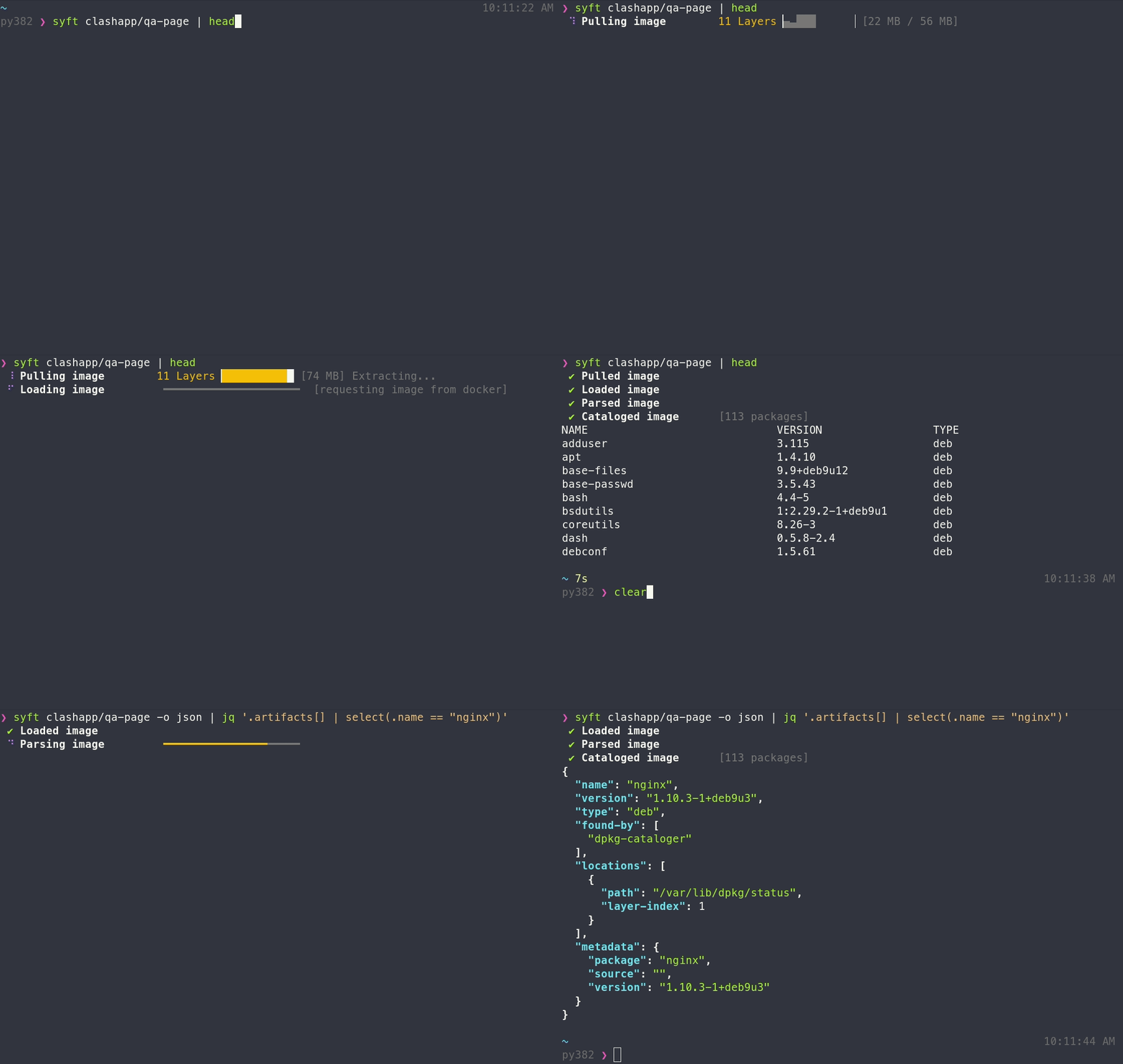
Syft is a powerful and easy-to-use open-source tool for generating Software Bill of Materials (SBOMs) for container images and filesystems. It provides detailed visibility into the packages and dependencies in your software, helping you manage vulnerabilities, license compliance, and software supply chain security.
Syft development is sponsored by Anchore, and is released under the Apache-2.0 License. For commercial support options with Syft or Grype, please contact Anchore.
Features
- Generates SBOMs for container images, filesystems, archives, and more to discover packages and libraries
- Supports OCI, Docker and Singularity image formats
- Linux distribution identification
- Works seamlessly with Grype (a fast, modern vulnerability scanner)
- Able to create signed SBOM attestations using the in-toto specification
- Convert between SBOM formats, such as CycloneDX, SPDX, and Syft's own format.
Installation
Syft binaries are provided for Linux, macOS and Windows.
Recommended
curl -sSfL https://get.anchore.io/syft | sudo sh -s -- -b /usr/local/bin
Install script options:
-b: Specify a custom installation directory (defaults to./bin)-d: More verbose logging levels (-dfor debug,-ddfor trace)-v: Verify the signature of the downloaded artifact before installation (requirescosignto be installed)
Homebrew
brew install syft
Scoop
scoop install syft
Chocolatey
The chocolatey distribution of Syft is community-maintained and not distributed by the Anchore team
choco install syft -y
Nix
Note: Nix packaging of Syft is community maintained. Syft is available in the stable channel since NixOS 22.05.
nix-env -i syft
... or, just try it out in an ephemeral nix shell:
nix-shell -p syft
Getting started
SBOM
To generate an SBOM for a container image:
syft <image>
The above output includes only software that is visible in the container (i.e., the squashed representation of the image). To include software from all image layers in the SBOM, regardless of its presence in the final image, provide --scope all-layers:
syft <image> --scope all-layers
Output formats
The output format for Syft is configurable as well using the -o (or --output) option:
syft <image> -o <format>
Where the formats available are:
syft-json: Use this to get as much information out of Syft as possible!syft-text: A row-oriented, human-and-machine-friendly output.cyclonedx-xml: A XML report conforming to the CycloneDX 1.6 specification.cyclonedx-xml@1.5: A XML report conforming to the CycloneDX 1.5 specification.cyclonedx-json: A JSON report conforming to the CycloneDX 1.6 specification.cyclonedx-json@1.5: A JSON report conforming to the CycloneDX 1.5 specification.spdx-tag-value: A tag-value formatted report conforming to the SPDX 2.3 specification.spdx-tag-value@2.2: A tag-value formatted report conforming to the SPDX 2.2 specification.spdx-json: A JSON report conforming to the SPDX 2.3 JSON Schema.spdx-json@2.2: A JSON report conforming to the SPDX 2.2 JSON Schema.github-json: A JSON report conforming to GitHub's dependency snapshot format.syft-table: A columnar summary (default).template: Lets the user specify the output format. See "Using templates" below.
Note that flags using the @ can be used for earlier versions of each specification as well.
Supported Ecosystems
- Alpine (apk)
- Bitnami packages
- C (conan)
- C++ (conan)
- Dart (pubs)
- Debian (dpkg)
- Dotnet (deps.json)
- Objective-C (cocoapods)
- Elixir (mix)
- Erlang (rebar3)
- Go (go.mod, Go binaries)
- Haskell (cabal, stack)
- Java (jar, ear, war, par, sar, nar, native-image)
- JavaScript (npm, yarn)
- Jenkins Plugins (jpi, hpi)
- Linux kernel archives (vmlinz)
- Linux kernel modules (ko)
- Nix (outputs in /nix/store)
- PHP (composer, PECL, Pear)
- Python (wheel, egg, poetry, requirements.txt, uv)
- Red Hat (rpm)
- Ruby (gem)
- Rust (cargo.lock, auditable binary)
- Swift (cocoapods, swift-package-manager)
- Wordpress plugins
- Terraform providers (.terraform.lock.hcl)
Documentation
Our wiki contains further details on the following topics:
- Supported Sources
- File Selection
- Excluding file paths
- Output formats
- Package Cataloger Selection
- Using templates
- Multiple outputs
- Private Registry Authentication
- Attestation (experimental)
- Configuration
Contributing
Check out our contributing guide and developer docs.
Syft Team Meetings
The Syft Team hold regular community meetings online. All are welcome to join to bring topics for discussion.
- Check the calendar for the next meeting date.
- Add items to the agenda (join this group for write access to the agenda)
- See you there!
Syft Logo


Download files
Download the file for your platform. If you're not sure which to choose, learn more about installing packages.
Source Distribution
Built Distribution
Filter files by name, interpreter, ABI, and platform.
If you're not sure about the file name format, learn more about wheel file names.
Copy a direct link to the current filters
File details
Details for the file greenlang_cli-0.2.1.tar.gz.
File metadata
- Download URL: greenlang_cli-0.2.1.tar.gz
- Upload date:
- Size: 575.1 kB
- Tags: Source
- Uploaded using Trusted Publishing? No
- Uploaded via: twine/6.2.0 CPython/3.13.5
File hashes
| Algorithm | Hash digest | |
|---|---|---|
| SHA256 |
863f645968561c232964679b82fff38a611289bcc771e7a910ddf5b2d4d872b7
|
|
| MD5 |
ebb7f32f11d3f116b149ff0bba6efbf3
|
|
| BLAKE2b-256 |
9fe77334378f4e1c1108ca154e5e053085b4af663bc28176b121c8677771d97e
|
File details
Details for the file greenlang_cli-0.2.1-py3-none-any.whl.
File metadata
- Download URL: greenlang_cli-0.2.1-py3-none-any.whl
- Upload date:
- Size: 547.7 kB
- Tags: Python 3
- Uploaded using Trusted Publishing? No
- Uploaded via: twine/6.2.0 CPython/3.13.5
File hashes
| Algorithm | Hash digest | |
|---|---|---|
| SHA256 |
28ff0af6a4b9c1d25a0025c2163d756895854c7678fc34a10ffccb512b25d099
|
|
| MD5 |
6a301ec1fa2eea9a76592544d3962c8f
|
|
| BLAKE2b-256 |
0a0387cf4b154929f2973e34f27bfb62ec3bb071be49595503473c32eb33592e
|